
統合パスを選択する
ニーズに最も適したパスを選択します。
| パス | 最適な用途 | 詳細 |
|---|---|---|
| Universal Commerce Protocol(UCP) | 販売者と小売業者。 | UCP ドキュメント |
| 標準のアカウントのリンク | スマートホーム、テレビ、YouTube。 | ドキュメント |
アカウントのリンクを使用すると、Google アカウント所有者は迅速、シームレス、安全にサービスに接続できます。Google アカウントのリンクを実装して、プラットフォームのユーザーデータを Google のアプリやサービスと共有することもできます。
安全な OAuth 2.0 プロトコルを使用すると、ユーザーの Google アカウントをプラットフォームのアカウントに安全にリンクできるため、Google のアプリやデバイスからサービスにアクセスできるようになります。
ユーザーは、アカウントをリンクしたり、リンクを解除したり、あるいは、必要に応じて Google アカウントのリンクを使って、プラットフォームで新しいアカウントを作成したりできます。
ユースケース
Google アカウントのリンクを実装する理由としては、次のようなものがあります。
プラットフォームのユーザーデータを Google のアプリやサービスと共有する。
Universal Commerce Protocol(UCP)を使用して、Google ショッピングと AI サーフェス(検索、Gemini)と統合する。
Google Home アプリと Google アシスタントを使用して、 Google スマートホーム の接続デバイスを管理、操作する(「OK Google, ライトをつけて」)。
会話型アクションを使用して、ユーザーがカスタマイズした Google アシスタントのエクスペリエンスと機能を作成する(「OK Google, スターバックスでいつものものを注文して」)。
Google アカウントを 特典パートナー アカウントにリンクしたユーザーが、YouTube で対象のライブ配信を視聴して特典を獲得できるようにする 。
登録時に、 Google アカウントのプロフィールから同意を得て共有されたデータを使用して、新しいアカウントに事前入力する。
機能と要件
次のマトリックスは、各リンクフローのサポートと推奨事項を定義しています。
| リンクフロー | 標準の機能 | UCP の機能 |
|---|---|---|
| アプリ切り替え | 推奨 | 推奨 |
| 効率的なリンク | 推奨 | 推奨 |
| OAuth リンク | 必須(フォールバック) | 必須(フォールバック) |
| OAuth 2.1 | 推奨 | 推奨 |
エージェント型開発(MCP と UCP)
大規模言語モデル(LLM)と AI エージェントは、ユーザーデータにアクセスするために堅牢な認証を必要とします。Google アカウントのリンクは、次のような新しいパラダイムをサポートしています。
- Model Context Protocol(MCP): GAL はセキュリティ ハンドシェイクとして機能します。 エージェントは OAuth 2.1 トークンを使用して、MCP サーバーツールに安全にクエリを実行します。
Universal Commerce Protocol(UCP): ショッピング エージェントが ユーザー プロフィールと支払いベクトルに安全にアクセスできるようにします。
必要なデータのみを共有するカスタム スコープを定義してユーザーのプライバシーを強化し、データの使用方法を明確に定義してユーザーの信頼を高めます。
アカウントのリンクを解除すると、プラットフォームでホストされているデータやサービスへのアクセス権を取り消すことができます。オプションの トークン取り消しエンドポイント を実装すると、Google が開始したイベントとの同期を維持できます。また、クロスアカウント 保護 (RISC) を使用すると、プラットフォームで発生したリンク解除イベントを Google に通知できます。
アカウントのリンクフロー
Google アカウントのリンクフローは 3 つあり、すべて OAuth ベースです。OAuth 2.0 準拠の認可エンドポイントとトークン交換エンドポイントを管理または制御する必要があります。
リンクプロセスでは、アカウント所有者がアカウントのリンクとデータの共有に同意した後、個々の Google アカウントのアクセス トークンを Google に発行します。
OAuth リンク
これは、リンクのためにユーザーをウェブサイトに誘導する OAuth リンクフロー です。ユーザーはウェブサイトにリダイレクトされ、アカウントにログインします。 ログインすると、ユーザーはサービス上のデータを Google と共有することに同意します。その時点で、ユーザーの Google アカウントとサービスがリンクされます。
OAuth リンクは、認可コードとインプリシット OAuth フローをサポートしています。サービスは、インプリシット フロー用の OAuth 2.0 準拠の認可エンドポイントをホストする必要があります。また、認可コードフローを使用する場合は、認可エンドポイントとトークン交換エンドポイントの両方を公開する必要があります。
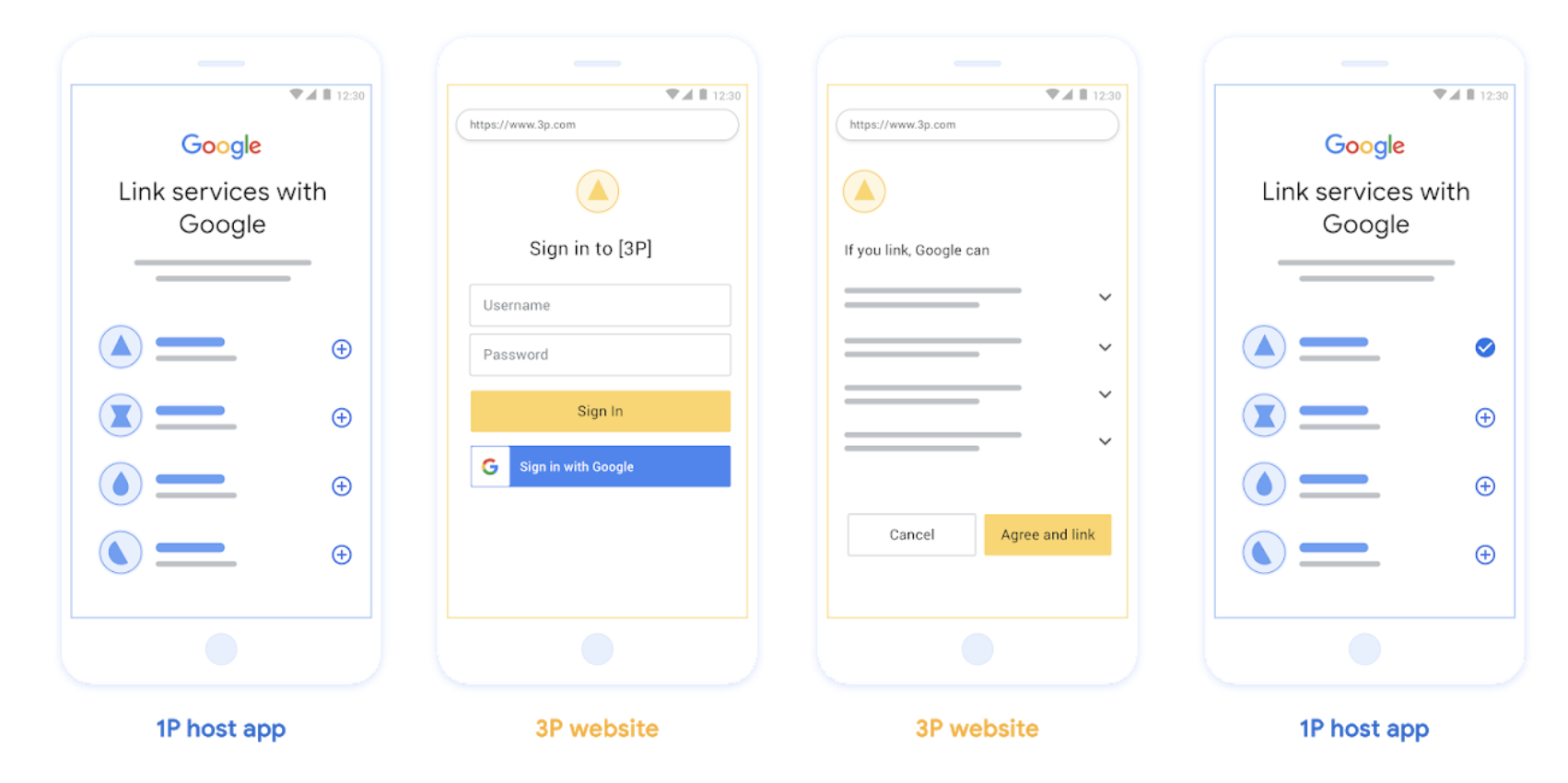
図 1 。OAuth リンクを使用したユーザーのスマートフォンでのアカウントのリンク
OAuth ベースのアプリ切り替えリンク(「アプリ切り替え」)
リンクのためにユーザーをアプリ に誘導する OAuth フロー。
OAuth ベースのアプリ切り替えリンクは、ユーザーが確認済みの Android または iOS モバイルアプリと Google のプラットフォームの間を移動して 、提案されたデータアクセス変更を確認し 、プラットフォームのアカウントを Google アカウントにリンクすることに同意する際に 、ユーザーをガイドします。アプリ切り替えを有効にするには、サービスが OAuth リンクまたは OAuth ベースの Google ログインのリンク を認可コードフローを使用してサポートしている必要があります。
アプリ切り替えは、Android と iOS の両方でサポートされています。
仕組み:
Google アプリは、ユーザーのデバイスにアプリがインストールされているかどうかを確認します。
- アプリが見つかった場合、ユーザーはアプリに「切り替え」られます。アプリは、Google とのアカウントのリンクについてユーザーから同意を得て、Google サーフェスに「切り替え」ます。
- アプリが見つからない場合、またはアプリ切り替えリンクプロセス中にエラーが発生した場合、ユーザーは効率的なリンクフローまたは OAuth リンクフローにリダイレクトされます。

図 2 。アプリ切り替えを使用したユーザーのスマートフォンでのアカウントのリンク
OAuth ベースの効率的なリンク(「効率的」)
OAuth ベースの Google ログインの効率的なリンクは、OAuth リンクの上層に Google ログインを追加し、ユーザーが Google サーフェスを離れることなくリンクプロセスを完了できるようにすることで、摩擦や離脱を減らします。 OAuth ベースの効率的なリンクは
Google ログインと OAuth リンクを組み合わせることで、シームレスなログイン、アカウント作成、アカウント
のリンクを実現し、最高のユーザー エクスペリエンスを提供します。サービスは、OAuth 2.0 準拠の認可エンドポイントとトークン交換エンドポイントをサポートする必要があります。
また、トークン交換エンドポイントは
JSON ウェブトークン(JWT)
アサーションをサポートし、必要な check インテントと get インテント、
必要に応じて create インテントを実装する必要があります。
仕組み:
Google はユーザー アカウントをアサートし、この情報をデベロッパーに渡します。
- データベースにユーザーのアカウントが存在する場合、ユーザーは Google アカウントをサービスのアカウントに正常にリンクします。
- データベースにユーザーのアカウントが存在せず、サービスでアカウントの作成がサポートされている場合、ユーザーは Google が提供するアサートされた情報(メールアドレス、名前、プロフィール写真)を使用して新しいサードパーティ アカウントを作成するか、OAuth リンクを使用してログインして別のメールアドレスとリンクすることを選択できます。

図 3 。効率的なリンクを使用したユーザーのスマートフォンでのアカウントのリンク
どのフローを使用すればよいですか?
すべてのフローを実装して、ユーザーが最適なリンク エクスペリエンスを得られるようにすることをおすすめします。効率的なフローとアプリ切り替えフローでは、ユーザーが非常に少ない手順でリンクプロセスを完了できるため、リンクの摩擦が軽減されます。OAuth リンクフローは労力が最も少なく、最初に実装するのに適しています。その後、他のリンクフローを追加できます。
トークンを操作する
Google アカウントのリンクは、標準の OAuth 2.0 トークン メカニズムに依存しています。ユーザーがアカウントのリンクに同意した後、アクセス トークンと更新トークンを Google に発行します。
- アクセス トークン: Google が API にアクセスするために使用する有効期間の短いトークン。
- 更新トークン: アクセス トークンの有効期限が切れたときに新しいアクセス トークンを取得するために Google が使用する有効期間の長いトークン。
プロトコルの詳細な契約とパラメータ要件については、トークン交換エンドポイントをご覧ください。
永続的なリンク
永続的なリンクは、安定した統合のためのコア要件です。これにより、一時的なネットワーク障害や定期的な認証情報の更新中であっても、ユーザー アカウントのリンクが維持されます。
永続的なリンクを実装するには、「スライディング ウィンドウ」アプローチを使用します。更新トークンをローテーションするのではなく、既存の更新トークンの有効期限を延長します(RFC 6749 セクション 6 を参照)。 これにより、新しい更新トークンが発行されても Google が正常に受信または保存されない場合に発生する競合状態や意図しないリンク解除を防ぐことができます。
Google に登録する
アカウントのリンクを有効にするには、OAuth 2.0 の設定の詳細と認証情報を共有する必要があります。詳しくは、登録をご覧ください。