عملية ربط مبسطة باستخدام OAuth و"تسجيل الدخول باستخدام حساب Google"

نظرة عامة

تضيف ميزة الربط المبسّط المستند إلى OAuth في "تسجيل الدخول باستخدام حساب Google" خيار "تسجيل الدخول باستخدام حساب Google" إلى الربط المستند إلى OAuth. يوفّر ذلك تجربة ربط سلسة لمستخدمي Google، كما يتيح إنشاء حساب، ما يسمح للمستخدم بإنشاء حساب جديد على خدمتك باستخدام حساب Google.

لربط الحساب باستخدام OAuth و"تسجيل الدخول باستخدام حساب Google"، اتّبِع الخطوات العامة التالية:

  1. أولاً، اطلب من المستخدم الموافقة على الوصول إلى ملفه الشخصي في حساب Google.
  2. استخدِم المعلومات الواردة في ملفه الشخصي للتحقّق مما إذا كان حساب المستخدم متوفّرًا.
  3. بالنسبة إلى المستخدمين الحاليين، اربط الحسابات.
  4. إذا لم تتمكّن من العثور على مستخدم Google مطابق في نظام المصادقة، عليك التحقّق من صحة الرمز المميّز المعرّف الذي تلقّيته من Google. يمكنك بعد ذلك إنشاء مستخدم استنادًا إلى معلومات الملف الشخصي الواردة في رمز المعرّف المميّز.
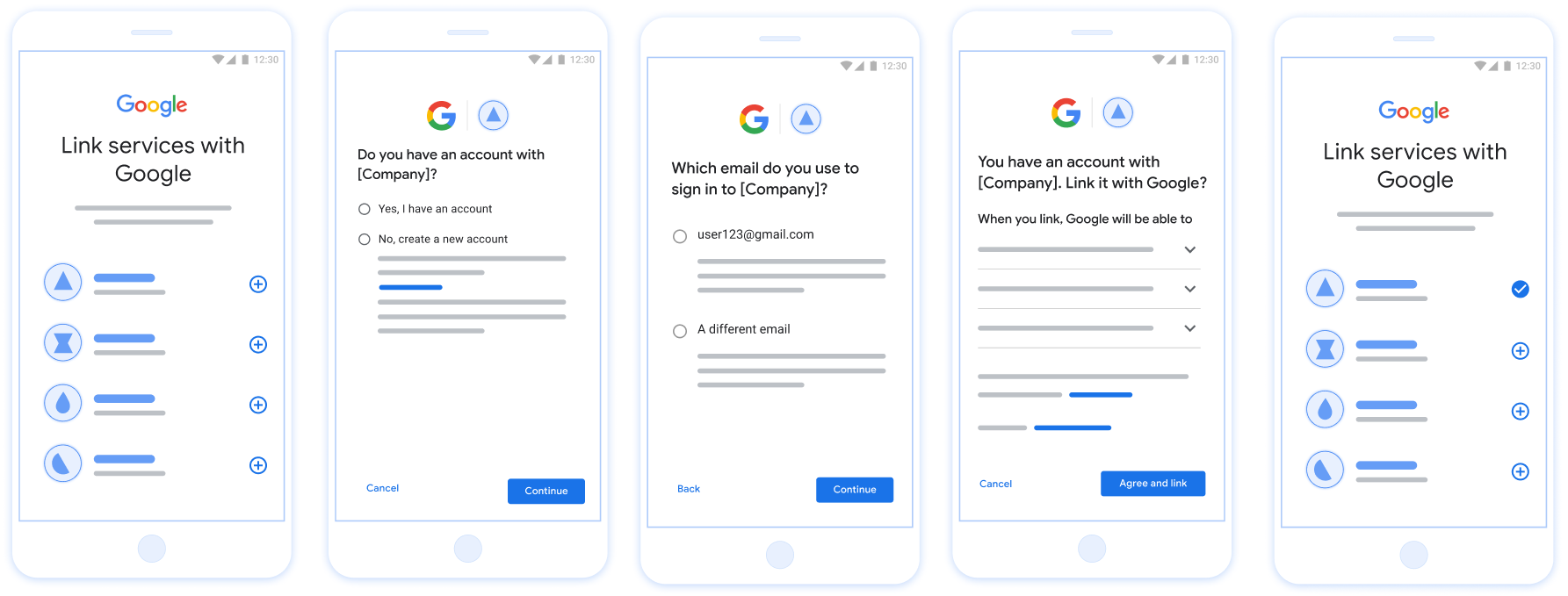
تعرض هذه الصورة الخطوات التي يتّبعها المستخدم لربط حسابه على Google باستخدام عملية الربط المبسّطة. تعرض لقطة الشاشة الأولى كيف يمكن للمستخدم اختيار تطبيقك لربطه. تتيح لقطة الشاشة الثانية للمستخدم تأكيد ما إذا كان لديه حساب حالي على خدمتك أم لا. تتيح لقطة الشاشة الثالثة للمستخدم اختيار حساب Google الذي يريد ربطه. تعرض لقطة الشاشة الرابعة تأكيدًا لربط حساب المستخدم على Google بتطبيقك. وتعرض لقطة الشاشة الخامسة حساب مستخدم تم ربطه بنجاح في تطبيق Google.

الشكل 1 ربط الحسابات على هاتف المستخدم باستخدام ميزة "الربط السلس"

متطلبات ميزة "الربط السلس"

تنفيذ خادم OAuth

يجب أن تتوافق نقطة نهاية تبادل الرموز المميزة مع الأهداف check وcreate وget. اتّبِع الخطوات التالية لإكمال عملية ربط الحساب والتعرّف على الحالات التي يتم فيها استخدام النوايا المختلفة:

  1. هل لدى المستخدم حساب في نظام المصادقة؟ (يقرّر المستخدم ذلك من خلال اختيار "نعم" أو "لا")
    1. نعم : هل يستخدم المستخدم عنوان البريد الإلكتروني المرتبط بحساب Google لتسجيل الدخول إلى منصتك؟ (يقرّر المستخدم ذلك من خلال اختيار "نعم" أو "لا")
      1. نعم : هل لدى المستخدم حساب مطابق في نظام المصادقة؟ (يتم الاتصال بالرقم check intent للتأكيد)
        1. نعم : يتم الاتصال بـ get intent ويتم ربط الحساب إذا تم عرض نتيجة get intent بنجاح.
        2. لا : إنشاء حساب جديد؟ (يقرّر المستخدم ذلك من خلال اختيار "نعم" أو "لا")
          1. نعم : يتمّ استدعاء create intent ويتمّ ربط الحساب إذا تمّ عرض نتيجة إنشاء الغرض بنجاح.
          2. لا : يتم تفعيل عملية Web OAuth، ويتم توجيه المستخدم إلى المتصفّح، ويُمنح المستخدم خيار الربط بعنوان بريد إلكتروني مختلف.
      2. لا : يتم تفعيل مسار OAuth على الويب، ويتم توجيه المستخدم إلى المتصفّح، ويُمنح المستخدم خيار الربط بعنوان بريد إلكتروني مختلف.
    2. لا : هل لدى المستخدم حساب مطابق في نظام المصادقة؟ (يتم الاتصال بالرقم check intent للتأكيد)
      1. نعم : يتم الاتصال بـ get intent ويتم ربط الحساب إذا تم عرض نتيجة get intent بنجاح.
      2. يتم استدعاء NO : create intent ويتم ربط الحساب إذا تم عرض نتيجة إنشاء الغرض بنجاح.

Check for an existing user account (check intent)

After the user gives consent to access their Google profile, Google sends a request that contains a signed assertion of the Google user's identity. The assertion contains information that includes the user's Google Account ID, name, and email address. The token exchange endpoint configured for your project handles that request.

If the corresponding Google account is already present in your authentication system, your token exchange endpoint responds with account_found=true. If the Google account doesn't match an existing user, your token exchange endpoint returns an HTTP 404 Not Found error with account_found=false.

The request has the following form:

POST /token HTTP/1.1
Host: oauth2.example.com
Content-Type: application/x-www-form-urlencoded

grant_type=urn:ietf:params:oauth:grant-type:jwt-bearer&intent=check&assertion=JWT&scope=SCOPES&client_id=GOOGLE_CLIENT_ID&client_secret=GOOGLE_CLIENT_SECRET

Your token exchange endpoint must be able to handle the following parameters:

Token endpoint parameters
intent For these requests, the value of this parameter is check.
grant_type The type of token being exchanged. For these requests, this parameter has the value urn:ietf:params:oauth:grant-type:jwt-bearer.
assertion A JSON Web Token (JWT) that provides a signed assertion of the Google user's identity. The JWT contains information that includes the user's Google Account ID, name, and email address.
client_id The client ID you assigned to Google.
client_secret The client secret you assigned to Google.

To respond to the check intent requests, your token exchange endpoint must perform the following steps:

  • Validate and decode the JWT assertion.
  • Check if the Google account is already present in your authentication system.
التحقق من صحة تأكيد JWT وفك ترميزه

يمكنك التحقق من صحة تأكيد JWT وفك ترميزه باستخدام مكتبة فك ترميز JWT بلغتك. استخدام مفاتيح Google العامة، متاحة في JWK أو PEM، للتأكّد من توقيع الرمز المميز.

عند فك ترميز النص، يظهر تأكيد JWT على النحو التالي:

{
  "sub": "1234567890",      // The unique ID of the user's Google Account
  "iss": "https://accounts.google.com",        // The assertion's issuer
  "aud": "123-abc.apps.googleusercontent.com", // Your server's client ID
  "iat": 233366400,         // Unix timestamp of the assertion's creation time
  "exp": 233370000,         // Unix timestamp of the assertion's expiration time
  "name": "Jan Jansen",
  "given_name": "Jan",
  "family_name": "Jansen",
  "email": "jan@gmail.com", // If present, the user's email address
  "email_verified": true,   // true, if Google has verified the email address
  "hd": "example.com",      // If present, the host domain of the user's GSuite email address
                            // If present, a URL to user's profile picture
  "picture": "https://lh3.googleusercontent.com/a-/AOh14GjlTnZKHAeb94A-FmEbwZv7uJD986VOF1mJGb2YYQ",
  "locale": "en_US"         // User's locale, from browser or phone settings
}

بالإضافة إلى التحقّق من توقيع الرمز المميّز، تأكَّد من أنّ التأكيد جهة الإصدار (الحقل iss) هي https://accounts.google.com، بحيث يمكن لشريحة الجمهور (الحقل aud) هو معرّف العميل الذي تم تعيينه، ولم تنتهِ صلاحية الرمز المميّز. (حقل exp).

باستخدام الحقول email وemail_verified وhd، يمكنك تحديد ما إذا كان تستضيف Google عناوين البريد الإلكتروني وموثوقًا بها. في الحالات التي تواجه فيها Google موثوقية المستخدم المعروف حاليًا بأنه صاحب الحساب الشرعي ويمكنك تخطي كلمة المرور أو طرق التحديات الأخرى. بخلاف ذلك، فإن هذه الطرق يمكن استخدامها للتحقّق من الحساب قبل ربطه

الحالات التي تكون فيها Google موثوقة:

  • السمة email هي اللاحقة @gmail.com، وهذا حساب Gmail.
  • email_verified صحيح وتم ضبط hd، هذا حساب G Suite.

يمكن للمستخدمين التسجيل للحصول على حسابات Google بدون استخدام Gmail أو G Suite. فعندما لا يحتوي email على اللاحقة @gmail.com وhd غير موجود في Google موثوقة وكلمة المرور أو طرق التحقق الأخرى للتحقق المستخدم. يمكن أن يكون email_verified صحيحًا أيضًا لأن Google تحققت في البداية من صحة المستخدم عند إنشاء حساب Google، ولكن ملكية الجهة الخارجية ربما تغير حساب بريدك الإلكتروني منذ ذلك الحين.

Check if the Google account is already present in your authentication system

Check whether either of the following conditions are true:

  • The Google Account ID, found in the assertion's sub field, is in your user database.
  • The email address in the assertion matches a user in your user database.

If either condition is true, the user has already signed up. In that case, return a response like the following:

HTTP/1.1 200 Success
Content-Type: application/json;charset=UTF-8

{
  "account_found":"true",
}

If neither the Google Account ID nor the email address specified in the assertion matches a user in your database, the user hasn't signed up yet. In this case, your token exchange endpoint needs to reply with a HTTP 404 error that specifies "account_found": "false", as in the following example:

HTTP/1.1 404 Not found
Content-Type: application/json;charset=UTF-8

{
  "account_found":"false",
}

التعامل مع الربط التلقائي (تحقيق النية)

بعد أن يمنح المستخدِم موافقته على الوصول إلى ملفه الشخصي في Google، ترسل Google طلب يتضمن تأكيدًا موقَّعًا على هوية مستخدم Google. تشير رسالة الأشكال البيانية يحتوي تأكيد البيانات على معلومات تشتمل على رقم تعريف حساب المستخدم على Google، والاسم وعنوان البريد الإلكتروني. نقطة نهاية تبادل الرموز المميّزة التي تم ضبطها المشروع أن يتعامل مع هذا الطلب.

في حال توفُّر حساب Google المناسب في المصادقة فإن نقطة نهاية تبادل الرمز المميز تقوم بإرجاع رمز مميز للمستخدم. إذا كانت لا يتطابق حساب Google مع مستخدم حالي، نقطة نهاية تبادل الرموز المميّزة تعرض الخطأ linking_error وعرض login_hint اختياري.

يكون الطلب بالشكل التالي:

POST /token HTTP/1.1
Host: oauth2.example.com
Content-Type: application/x-www-form-urlencoded

grant_type=urn:ietf:params:oauth:grant-type:jwt-bearer&intent=get&assertion=JWT&scope=SCOPES&client_id=GOOGLE_CLIENT_ID&client_secret=GOOGLE_CLIENT_SECRET

يجب أن تتمكّن نقطة نهاية تبادل الرموز المميّزة من معالجة المَعلمات التالية:

مَعلمات نقطة نهاية الرمز المميّز
intent بالنسبة إلى هذه الطلبات، تكون قيمة هذه المَعلمة هي get.
grant_type تمثّل هذه السمة نوع الرمز المميّز الذي يتم تبادله. بالنسبة لهذه الطلبات، سيتم المعلَمة urn:ietf:params:oauth:grant-type:jwt-bearer.
assertion يشير هذا المصطلح إلى رمز JSON المميّز للويب (JWT) ويقدِّم تأكيدًا موقَّعًا على بيانات وهوية المستخدم. يحتوي JWT على معلومات تتضمن عنوان URL الخاص رقم تعريف حساب Google والاسم وعنوان البريد الإلكتروني
scope اختياري: أي نطاقات تم ضبط Google فيها للطلب منها المستخدمين.
client_id معرِّف العميل الذي عيّنته لـ Google.
client_secret سر العميل الذي خصّصته لـ Google.

للردّ على طلبات intent لـ get، يجب أن تنفِّذ نقطة نهاية تبادل الرموز المميّزة الخطوات التالية:

  • التحقق من صحة تأكيد JWT وفك ترميزه
  • تحقَّق مما إذا كان حساب Google متوفّرًا من قبل في نظام المصادقة.
التحقق من صحة تأكيد JWT وفك ترميزه

يمكنك التحقق من صحة تأكيد JWT وفك ترميزه باستخدام مكتبة فك ترميز JWT بلغتك. استخدام مفاتيح Google العامة، متاحة في JWK أو PEM، للتأكّد من توقيع الرمز المميز.

عند فك ترميز النص، يظهر تأكيد JWT على النحو التالي:

{
  "sub": "1234567890",      // The unique ID of the user's Google Account
  "iss": "https://accounts.google.com",        // The assertion's issuer
  "aud": "123-abc.apps.googleusercontent.com", // Your server's client ID
  "iat": 233366400,         // Unix timestamp of the assertion's creation time
  "exp": 233370000,         // Unix timestamp of the assertion's expiration time
  "name": "Jan Jansen",
  "given_name": "Jan",
  "family_name": "Jansen",
  "email": "jan@gmail.com", // If present, the user's email address
  "email_verified": true,   // true, if Google has verified the email address
  "hd": "example.com",      // If present, the host domain of the user's GSuite email address
                            // If present, a URL to user's profile picture
  "picture": "https://lh3.googleusercontent.com/a-/AOh14GjlTnZKHAeb94A-FmEbwZv7uJD986VOF1mJGb2YYQ",
  "locale": "en_US"         // User's locale, from browser or phone settings
}

بالإضافة إلى التحقّق من توقيع الرمز المميّز، تأكَّد من أنّ التأكيد جهة الإصدار (الحقل iss) هي https://accounts.google.com، بحيث يمكن لشريحة الجمهور (الحقل aud) هو معرّف العميل الذي تم تعيينه، ولم تنتهِ صلاحية الرمز المميّز. (حقل exp).

باستخدام الحقول email وemail_verified وhd، يمكنك تحديد ما إذا كان تستضيف Google عناوين البريد الإلكتروني وموثوقًا بها. في الحالات التي تواجه فيها Google موثوقية المستخدم المعروف حاليًا بأنه صاحب الحساب الشرعي ويمكنك تخطي كلمة المرور أو طرق التحديات الأخرى. بخلاف ذلك، فإن هذه الطرق يمكن استخدامها للتحقّق من الحساب قبل ربطه

الحالات التي تكون فيها Google موثوقة:

  • السمة email هي اللاحقة @gmail.com، وهذا حساب Gmail.
  • email_verified صحيح وتم ضبط hd، هذا حساب G Suite.

يمكن للمستخدمين التسجيل للحصول على حسابات Google بدون استخدام Gmail أو G Suite. فعندما لا يحتوي email على اللاحقة @gmail.com وhd غير موجود في Google موثوقة وكلمة المرور أو طرق التحقق الأخرى للتحقق المستخدم. يمكن أن يكون email_verified صحيحًا أيضًا لأن Google تحققت في البداية من صحة المستخدم عند إنشاء حساب Google، ولكن ملكية الجهة الخارجية ربما تغير حساب بريدك الإلكتروني منذ ذلك الحين.

التأكّد من توفّر حساب Google في نظام المصادقة

تحقق مما إذا كان أي من الشروط التالية صحيحًا:

  • رقم تعريف حساب Google، الوارد في حقل sub في التأكيد، موجود في حساب المستخدم. قاعدة البيانات.
  • يتطابق عنوان البريد الإلكتروني الوارد في التأكيد مع مستخدم في قاعدة بيانات المستخدم الخاصة بك.

في حال العثور على حساب للمستخدم، عليك إصدار رمز دخول وعرض القيم في كائن JSON في نص استجابة HTTPS، كما في المثال التالي:

{
  "token_type": "Bearer",
  "access_token": "ACCESS_TOKEN",
  "refresh_token": "REFRESH_TOKEN",
  "expires_in": SECONDS_TO_EXPIRATION
}

في بعض الحالات، قد يتعذّر على المستخدم ربط الحساب استنادًا إلى الرمز المميّز للمعرّف. إذا كان لأي سبب من الأسباب، تحتاج نقطة نهاية تبادل الرمز المميز إلى الرد باستخدام HTTP 401 يحدد الخطأ error=linking_error، كما يبيِّن المثال التالي:

HTTP/1.1 401 Unauthorized
Content-Type: application/json;charset=UTF-8

{
  "error":"linking_error",
  "login_hint":"foo@bar.com"
}

عندما تتلقّى Google ردًّا بالخطأ 401 مع linking_error، ترسل Google المستخدِم إلى نقطة نهاية التفويض مع استخدام login_hint كمَعلمة. تشير رسالة الأشكال البيانية إكمال المستخدم لربط الحساب باستخدام مسار ربط OAuth في المتصفِّح

Handle account creation using Sign in with Google (create intent)

When a user needs to create an account on your service, Google makes a request to your token exchange endpoint that specifies intent=create.

The request has the following form:

POST /token HTTP/1.1
Host: oauth2.example.com
Content-Type: application/x-www-form-urlencoded

response_type=token&grant_type=urn:ietf:params:oauth:grant-type:jwt-bearer&scope=SCOPES&intent=create&assertion=JWT&client_id=GOOGLE_CLIENT_ID&client_secret=GOOGLE_CLIENT_SECRET

Your token exchange endpoint must able to handle the following parameters:

Token endpoint parameters
intent For these requests, the value of this parameter is create.
grant_type The type of token being exchanged. For these requests, this parameter has the value urn:ietf:params:oauth:grant-type:jwt-bearer.
assertion A JSON Web Token (JWT) that provides a signed assertion of the Google user's identity. The JWT contains information that includes the user's Google Account ID, name, and email address.
client_id The client ID you assigned to Google.
client_secret The client secret you assigned to Google.

The JWT within the assertion parameter contains the user's Google Account ID, name, and email address, which you can use to create a new account on your service.

To respond to the create intent requests, your token exchange endpoint must perform the following steps:

  • Validate and decode the JWT assertion.
  • Validate user information and create new account.
التحقق من صحة تأكيد JWT وفك ترميزه

يمكنك التحقق من صحة تأكيد JWT وفك ترميزه باستخدام مكتبة فك ترميز JWT بلغتك. استخدام مفاتيح Google العامة، متاحة في JWK أو PEM، للتأكّد من توقيع الرمز المميز.

عند فك ترميز النص، يظهر تأكيد JWT على النحو التالي:

{
  "sub": "1234567890",      // The unique ID of the user's Google Account
  "iss": "https://accounts.google.com",        // The assertion's issuer
  "aud": "123-abc.apps.googleusercontent.com", // Your server's client ID
  "iat": 233366400,         // Unix timestamp of the assertion's creation time
  "exp": 233370000,         // Unix timestamp of the assertion's expiration time
  "name": "Jan Jansen",
  "given_name": "Jan",
  "family_name": "Jansen",
  "email": "jan@gmail.com", // If present, the user's email address
  "email_verified": true,   // true, if Google has verified the email address
  "hd": "example.com",      // If present, the host domain of the user's GSuite email address
                            // If present, a URL to user's profile picture
  "picture": "https://lh3.googleusercontent.com/a-/AOh14GjlTnZKHAeb94A-FmEbwZv7uJD986VOF1mJGb2YYQ",
  "locale": "en_US"         // User's locale, from browser or phone settings
}

بالإضافة إلى التحقّق من توقيع الرمز المميّز، تأكَّد من أنّ التأكيد جهة الإصدار (الحقل iss) هي https://accounts.google.com، بحيث يمكن لشريحة الجمهور (الحقل aud) هو معرّف العميل الذي تم تعيينه، ولم تنتهِ صلاحية الرمز المميّز. (حقل exp).

باستخدام الحقول email وemail_verified وhd، يمكنك تحديد ما إذا كان تستضيف Google عناوين البريد الإلكتروني وموثوقًا بها. في الحالات التي تواجه فيها Google موثوقية المستخدم المعروف حاليًا بأنه صاحب الحساب الشرعي ويمكنك تخطي كلمة المرور أو طرق التحديات الأخرى. بخلاف ذلك، فإن هذه الطرق يمكن استخدامها للتحقّق من الحساب قبل ربطه

الحالات التي تكون فيها Google موثوقة:

  • السمة email هي اللاحقة @gmail.com، وهذا حساب Gmail.
  • email_verified صحيح وتم ضبط hd، هذا حساب G Suite.

يمكن للمستخدمين التسجيل للحصول على حسابات Google بدون استخدام Gmail أو G Suite. فعندما لا يحتوي email على اللاحقة @gmail.com وhd غير موجود في Google موثوقة وكلمة المرور أو طرق التحقق الأخرى للتحقق المستخدم. يمكن أن يكون email_verified صحيحًا أيضًا لأن Google تحققت في البداية من صحة المستخدم عند إنشاء حساب Google، ولكن ملكية الجهة الخارجية ربما تغير حساب بريدك الإلكتروني منذ ذلك الحين.

Validate user information and create new account

Check whether either of the following conditions are true:

  • The Google Account ID, found in the assertion's sub field, is in your user database.
  • The email address in the assertion matches a user in your user database.

If either condition is true, prompt the user to link their existing account with their Google Account. To do so, respond to the request with an HTTP 401 error that specifies error=linking_error and gives the user's email address as the login_hint. The following is a sample response:

HTTP/1.1 401 Unauthorized
Content-Type: application/json;charset=UTF-8

{
  "error":"linking_error",
  "login_hint":"foo@bar.com"
}

When Google receives a 401 error response with linking_error, Google sends the user to your authorization endpoint with login_hint as a parameter. The user completes account linking using the OAuth linking flow in their browser.

If neither condition is true, create a new user account with the information provided in the JWT. New accounts don't typically have a password set. It's recommended that you add Sign in with Google to other platforms to enable users to sign in with Google across the surfaces of your application. Alternatively, you can email the user a link that starts your password recovery flow to allow the user to set a password to sign in on other platforms.

When the creation is completed, issue an access token and refresh token and return the values in a JSON object in the body of your HTTPS response, like in the following example:

{
  "token_type": "Bearer",
  "access_token": "ACCESS_TOKEN",
  "refresh_token": "REFRESH_TOKEN",
  "expires_in": SECONDS_TO_EXPIRATION
}

الحصول على معرّف عميل Google API

سيُطلب منك تقديم معرّف عميل Google API أثناء عملية التسجيل لربط الحساب.

للحصول على معرّف عميل واجهة برمجة التطبيقات باستخدام المشروع الذي أنشأته أثناء إكمال خطوات ربط حساب OAuth لإجراء ذلك، يُرجى إكمال الخطوات التالية:

  1. انتقِل إلى صفحة العملاء.
  2. أنشئ مشروعًا على Google APIs أو اختَر مشروعًا حاليًا.

    إذا لم يكن مشروعك يتضمّن معرّف عميل من نوع تطبيق الويب، انقر على إنشاء عميل لإنشاء معرّف. احرص على تضمين نطاق موقعك الإلكتروني في مربّع مصادر JavaScript المسموح بها. عند إجراء اختبارات أو عمليات تطوير محلية، يجب إضافة كل من http://localhost وhttp://localhost:<port_number> إلى حقل مصادر JavaScript المعتمَدة.

التحقّق من صحة عملية التنفيذ

يمكنك التحقّق من صحة التنفيذ باستخدام أداة مساحة بروتوكول OAuth 2.0.

في الأداة، اتّبِع الخطوات التالية:

  1. انقر على الإعداد لفتح نافذة "إعدادات OAuth 2.0".
  2. في حقل مسار OAuth، اختَر من جهة العميل.
  3. في حقل نقاط نهاية OAuth، اختَر مخصّص.
  4. حدِّد نقطة نهاية OAuth 2.0 ومعرّف العميل الذي خصّصته لـ Google في الحقلَين المناسبَين.
  5. في قسم الخطوة 1، لا تحدّد أي نطاقات Google. بدلاً من ذلك، اترك هذا الحقل فارغًا أو اكتب نطاقًا صالحًا لخادمك (أو سلسلة عشوائية إذا كنت لا تستخدم نطاقات OAuth). عند الانتهاء، انقر على تفويض واجهات برمجة التطبيقات.
  6. في القسمَين الخطوة 2 والخطوة 3، اتّبِع مسار OAuth 2.0 وتأكَّد من أنّ كل خطوة تعمل على النحو المطلوب.

يمكنك التحقّق من صحة عملية التنفيذ باستخدام أداة عرض توضيحي لربط حساب Google.

في الأداة، اتّبِع الخطوات التالية:

  1. انقر على الزر تسجيل الدخول باستخدام حساب Google.
  2. اختَر الحساب الذي تريد ربطه.
  3. أدخِل رقم تعريف الخدمة.
  4. يمكنك اختياريًا إدخال نطاق واحد أو أكثر ستطلب الوصول إليه.
  5. انقر على بدء العرض التوضيحي.
  6. أكِّد أنّه يمكنك الموافقة على طلب ربط الحساب ورفضه عندما يُطلب منك ذلك.
  7. تأكَّد من إعادة توجيهك إلى منصتك.