
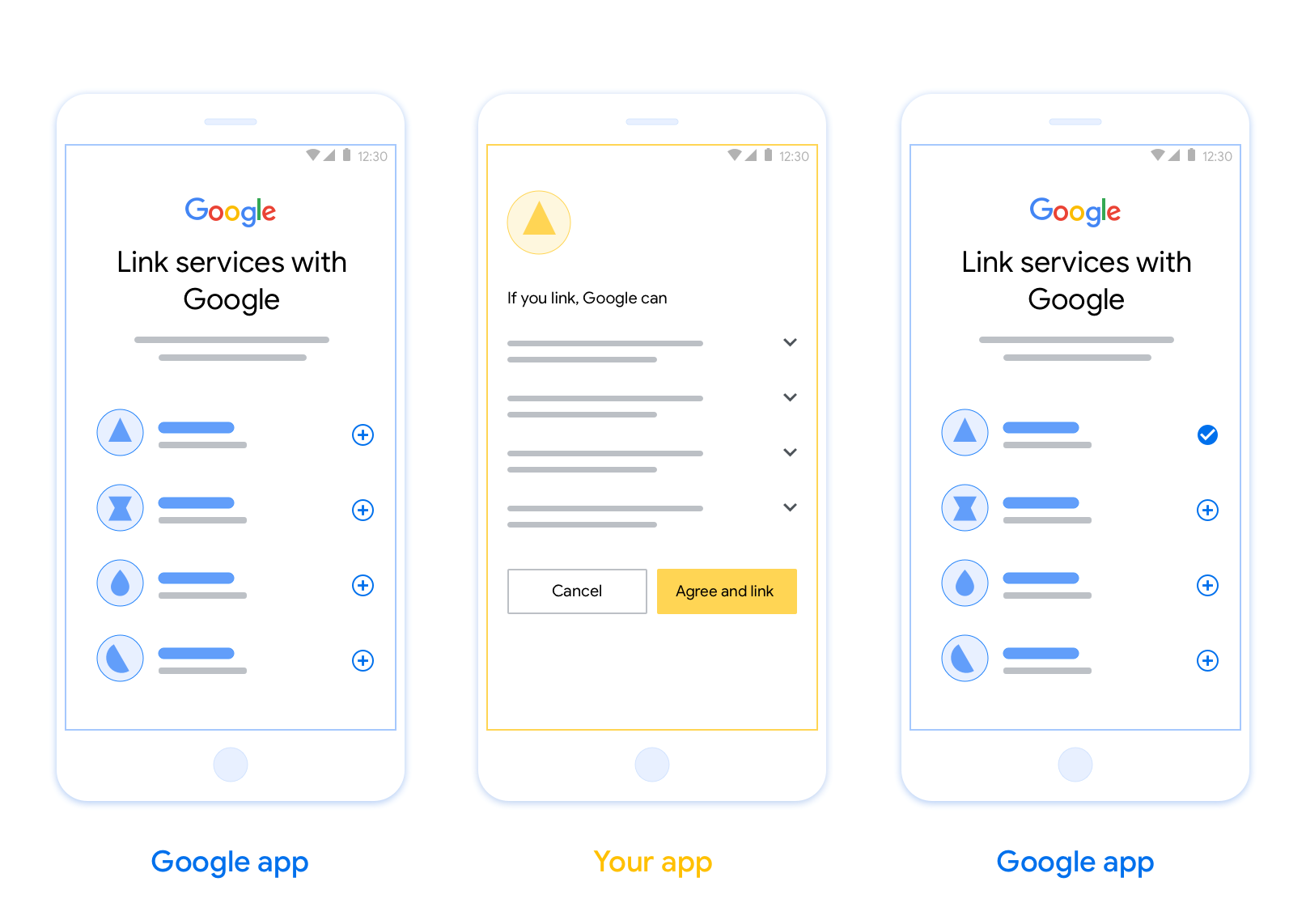
پیوند برنامه مبتنی بر OAuth (App Flip) به کاربران شما اجازه میدهد تا به سرعت حسابهای خود را در سیستم احراز هویت شما به حسابهای گوگل خود پیوند دهند. اگر برنامه شما هنگام شروع فرآیند پیوند حساب روی تلفن کاربر نصب شده باشد، آنها به طور یکپارچه برای دریافت مجوز کاربر به برنامه شما منتقل میشوند.
این رویکرد فرآیند اتصال سریعتری را فراهم میکند، زیرا کاربر مجبور نیست نام کاربری و رمز عبور خود را برای تأیید اعتبار دوباره وارد کند؛ در عوض، App Flip از اعتبارنامههای حساب کاربری در برنامه شما استفاده میکند. هنگامی که کاربر حساب گوگل خود را با برنامه شما مرتبط کرد، میتواند از هرگونه ادغامی که شما ایجاد کردهاید، بهرهمند شود.
میتوانید App Flip را هم برای برنامههای iOS و هم برای برنامههای اندروید تنظیم کنید.
الزامات
برای پیادهسازی App Flip، باید الزامات زیر را برآورده کنید:
- شما باید یک اپلیکیشن اندروید یا iOS داشته باشید.
- شما باید مالک، مدیر و نگهدارنده یک سرور OAuth 2.0 باشید که از جریان کد مجوز OAuth 2.0 پشتیبانی کند.
جریان معکوس برنامه مبتنی بر OAuth
نمودار توالی زیر، تعامل بین کاربر، برنامه گوگل، برنامه شما و سرور احراز هویت شما را برای App Flip به تفصیل نشان میدهد.
نقشها و مسئولیتها
جدول زیر نقشها و مسئولیتهای بازیگران در جریان App Flip را تعریف میکند.
| بازیگر / جزء | نقش GAL | مسئولیتها |
|---|---|---|
| برنامه/سرور گوگل | کلاینت OAuth | فرآیند پیوند را آغاز میکند، یک پیوند عمیق به برنامه تلفن همراه شما ایجاد میکند، کد مجوز را با توکنها مبادله میکند و آنها را به طور ایمن برای دسترسی به APIهای سرویس شما ذخیره میکند. |
| برنامه شما | نماینده مجوز | کاربر را احراز هویت میکند (معمولاً با استفاده از اعتبارنامههای موجود برنامه)، رضایت را دریافت میکند و یک کد مجوز را از سرور شما بازیابی میکند. |
| سرور احراز هویت شما | سرور احراز هویت | کدهای مجوز و توکنهای بهروزرسانی را اعتبارسنجی میکند و توکنهای دسترسی را به سرور گوگل صادر میکند. |
دستورالعملهای طراحی
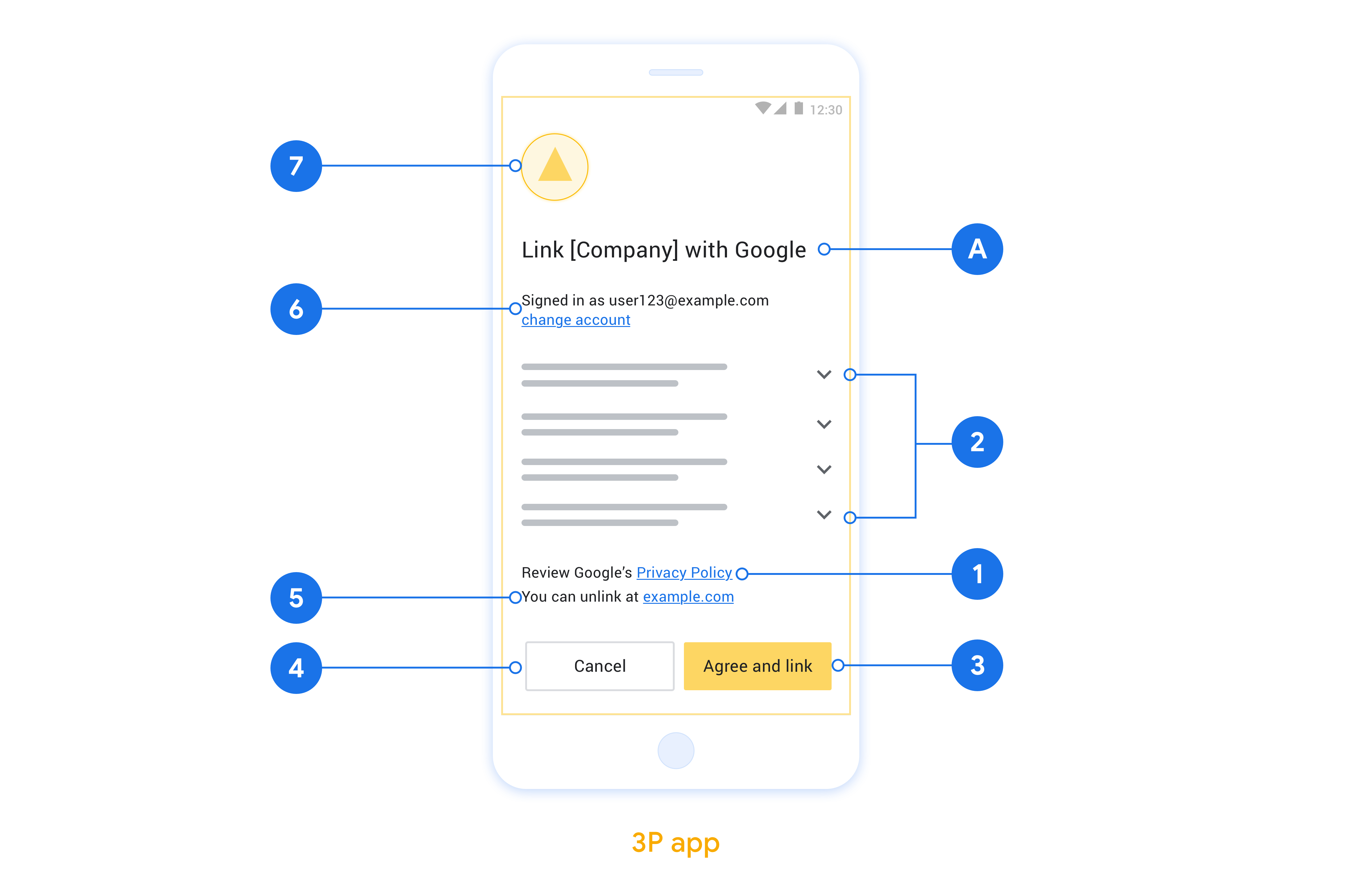
این بخش الزامات و توصیههای طراحی برای صفحه رضایت اتصال حساب App Flip را شرح میدهد. پس از اینکه گوگل برنامه شما را فراخوانی کرد، برنامه شما صفحه رضایت را به کاربر نمایش میدهد.
الزامات
- شما باید اطلاع دهید که حساب کاربر به گوگل متصل میشود، نه به یک محصول خاص گوگل، مانند گوگل هوم یا دستیار گوگل.
توصیهها
توصیه میکنیم موارد زیر را انجام دهید:
سیاست حفظ حریم خصوصی گوگل را نمایش دهید. پیوندی به سیاست حفظ حریم خصوصی گوگل را در صفحه رضایتنامه قرار دهید.
دادههایی که باید به اشتراک گذاشته شوند. با زبانی واضح و مختصر به کاربر بگویید که گوگل به چه دادههایی از او نیاز دارد و چرا.
فراخوان عمل واضح. در صفحه رضایت خود، یک فراخوان عمل واضح مانند «موافقت و پیوند» بیان کنید. دلیل این امر این است که کاربران باید بدانند برای پیوند دادن حسابهایشان، چه دادههایی را باید با گوگل به اشتراک بگذارند.
امکان رد یا لغو. در صورتی که کاربران تصمیم به عدم پذیرش لینک بگیرند، راهی برای بازگشت، رد یا لغو آن فراهم کنید.
امکان لغو پیوند. مکانیزمی برای لغو پیوند کاربران ارائه دهید، مانند URL به تنظیمات حساب کاربری آنها در پلتفرم شما. از طرف دیگر، میتوانید پیوندی به حساب گوگل قرار دهید که کاربران بتوانند حساب پیوند شده خود را مدیریت کنند.
امکان تغییر حساب کاربری. روشی را برای کاربران پیشنهاد دهید تا حساب(های) خود را تغییر دهند. این امر به ویژه در صورتی مفید است که کاربران تمایل به داشتن چندین حساب داشته باشند.
- اگر کاربری برای تغییر حساب کاربری باید صفحه رضایت را ببندد، یک خطای قابل بازیابی به گوگل ارسال کنید تا کاربر بتواند با پیوند OAuth و جریان ضمنی به حساب مورد نظر خود وارد شود.
لوگوی خود را قرار دهید. لوگوی شرکت خود را در صفحه رضایتنامه نمایش دهید. از دستورالعملهای سبک خود برای قرار دادن لوگوی خود استفاده کنید. اگر میخواهید لوگوی گوگل را نیز نمایش دهید، به بخش لوگوها و علائم تجاری مراجعه کنید.
پیادهسازی App Flip در برنامههایتان
برای پیادهسازی App Flip، باید کد مجوز کاربر را در برنامه خود تغییر دهید تا یک لینک عمیق از گوگل را بپذیرد.
برای پشتیبانی از App Flip در برنامه اندروید خود، دستورالعملهای موجود در راهنمای پیادهسازی اندروید را دنبال کنید.
برای پشتیبانی از App Flip در برنامه iOS خود، دستورالعملهای موجود در راهنمای پیادهسازی iOS را دنبال کنید.
تست برنامه تلنگر
قبل از اینکه برنامههای کاربردی تأیید شده و یک سرور OAuth 2.0 کارآمد در دسترس قرار گیرند، میتوان App Flip را با استفاده از برنامههای نمونه و آزمایشی شبیهسازی کرد.
در طول App Flip، برنامه گوگل ابتدا برنامه شما را باز میکند و سپس از سرور OAuth 2.0 شما درخواست کد مجوز میکند و در مرحله آخر پاسخ به برنامه گوگل بازگردانده میشود.
پیشنیازها
برای شبیهسازی یک برنامه گوگل و فعال کردن intent که برنامه شما را اجرا میکند، ابزار App Flip Test را برای اندروید و iOS دانلود و نصب کنید.
برای شبیهسازی برنامه خود و انتخاب نوع پاسخ OAuth 2.0، App Flip Sample را برای اندروید و iOS دانلود و نصب کنید.
توالی آزمایش
- ابزار تست چرخش برنامه را باز کنید.
- برای اجرای برنامه نمونه App Flip خود، دکمه
Try Flip!را فشار دهید. - یک پاسخ را از دکمههای رادیویی در برنامه Sample انتخاب کنید.
- برای ارسال پاسخ شبیهسازیشدهی OAuth 2.0 به ابزار تست،
Sendفشار دهید. - پیامهای لاگ ابزار تست را برای کد تایید یا جزئیات خطا بررسی کنید.
آزمایش تولید
App Flip میتواند پس از تکمیل ثبتنام و پیادهسازی سرور OAuth 2.0 شما، در محیط عملیاتی آزمایش شود.
برای تست خودکار، یک حساب گوگل و یک آدرس ایمیل مخصوص کار توصیه میشود.
وضعیت اتصال حسابها را میتوان با استفاده از حسابهای پیوند شده، هنگام ورود به سیستم به عنوان دارنده حساب گوگل، مشاهده کرد. همچنین ممکن است اتصال حسابها بین آزمایشهای مکرر از اینجا قطع شود.
به صورت اختیاری، میتوانید RISC را پیادهسازی کنید تا به صورت برنامهنویسی شده، اتصال را قطع کرده و گوگل را از این تغییر مطلع کنید.