
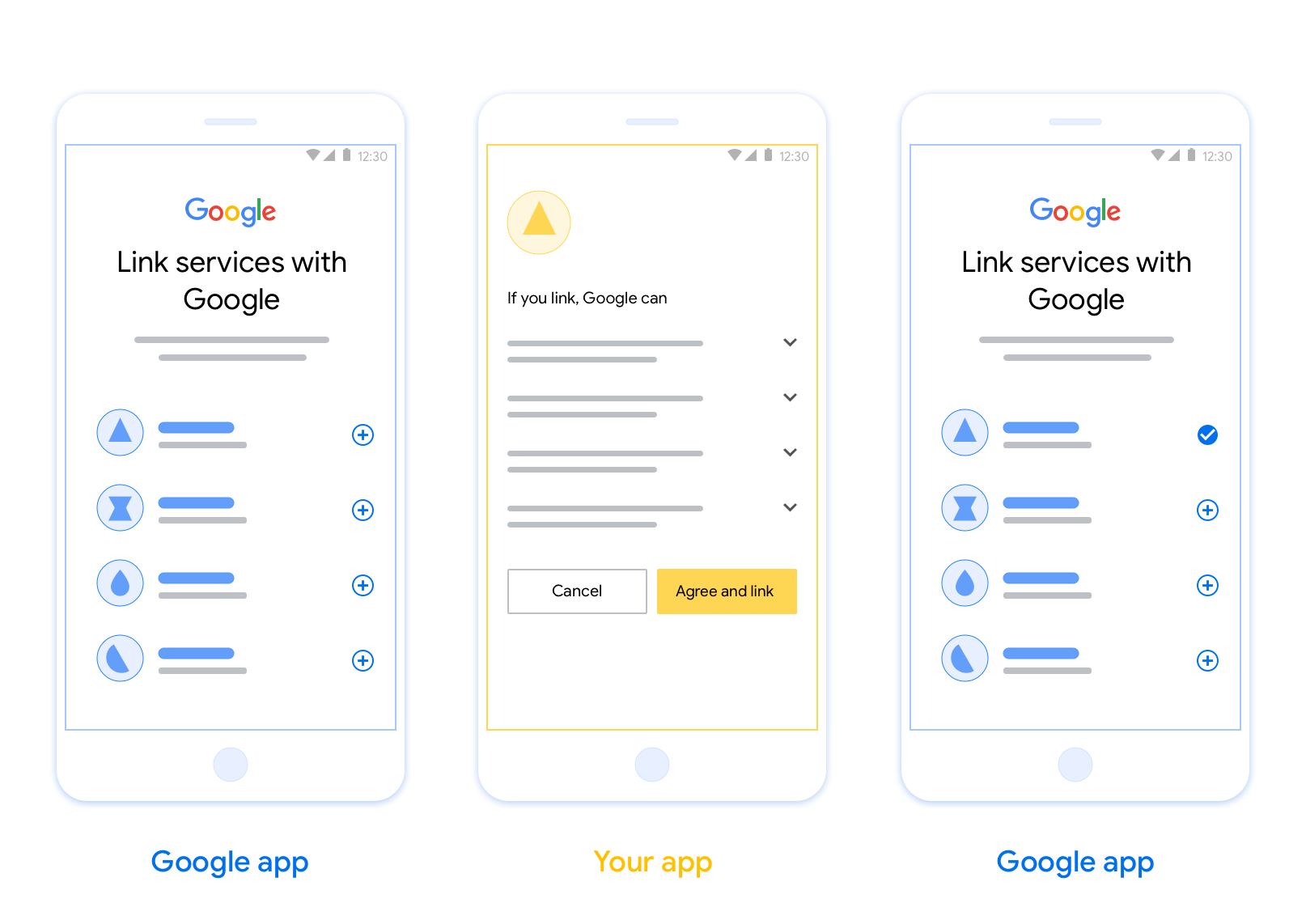
קישור מבוסס-OAuth של אפליקציות (App Flip) מאפשר למשתמשים לקשר במהירות את החשבונות שלהם במערכת האימות שלכם לחשבונות Google שלהם. אם האפליקציה שלכם מותקנת בטלפון של המשתמש כשהוא מתחיל את תהליך קישור החשבון, הוא מועבר בצורה חלקה לאפליקציה כדי לקבל הרשאה מהמשתמש.
הגישה הזו מאפשרת תהליך קישור מהיר יותר, כי המשתמש לא צריך להזין מחדש את שם המשתמש והסיסמה כדי לבצע אימות. במקום זאת, התכונה 'החלפת אפליקציות' משתמשת בפרטי הכניסה מהחשבון של המשתמש באפליקציה שלכם. אחרי שהמשתמש מקשר את חשבון Google שלו לאפליקציה שלכם, הוא יכול ליהנות מכל השילובים שפיתחתם.
אפשר להגדיר את התכונה 'החלפת אפליקציות' גם באפליקציות ל-iOS וגם באפליקציות ל-Android.
דרישות
כדי להטמיע את התכונה 'מעבר מהיר לאפליקציה', אתם צריכים לעמוד בדרישות הבאות:
- צריכה להיות לכם אפליקציה ל-Android או ל-iOS.
- אתם צריכים להיות הבעלים של שרת OAuth 2.0, לנהל אותו ולתחזק אותו, והוא צריך לתמוך בתהליך של הרשאה באמצעות קוד של OAuth 2.0.
תהליך מעבר בין אפליקציות שמבוסס על OAuth
בתרשים הרצף הבא מתוארת האינטראקציה בין המשתמש, אפליקציית Google, האפליקציה שלכם ושרת ההרשאות שלכם בקישור אפליקציות.
תפקידים ותחומי אחריות
בטבלה הבאה מוגדרים התפקידים ותחומי האחריות של הגורמים בתהליך של החלפת האפליקציה.
| המשתמש / הרכיב | תפקיד ב-GAL | תחומי אחריות |
|---|---|---|
| אפליקציית Google / שרת | לקוח OAuth | מתחיל את תהליך הקישור, מפעיל קישור עומק לאפליקציה לנייד, מחליף את קוד ההרשאה בטוקנים ומאחסן אותם בצורה מאובטחת כדי לגשת לממשקי ה-API של השירות. |
| האפליקציה | סוכן הרשאות | האימות של המשתמש (בדרך כלל באמצעות פרטי כניסה קיימים לאפליקציה), קבלת הסכמה ואחזור קוד הרשאה מהשרת. |
| שרת ההרשאות | שרת הרשאות | מאמת את קודי ההרשאה ואסימוני הרענון, ומנפיק אסימוני גישה לשרת Google. |
הנחיות עיצוב
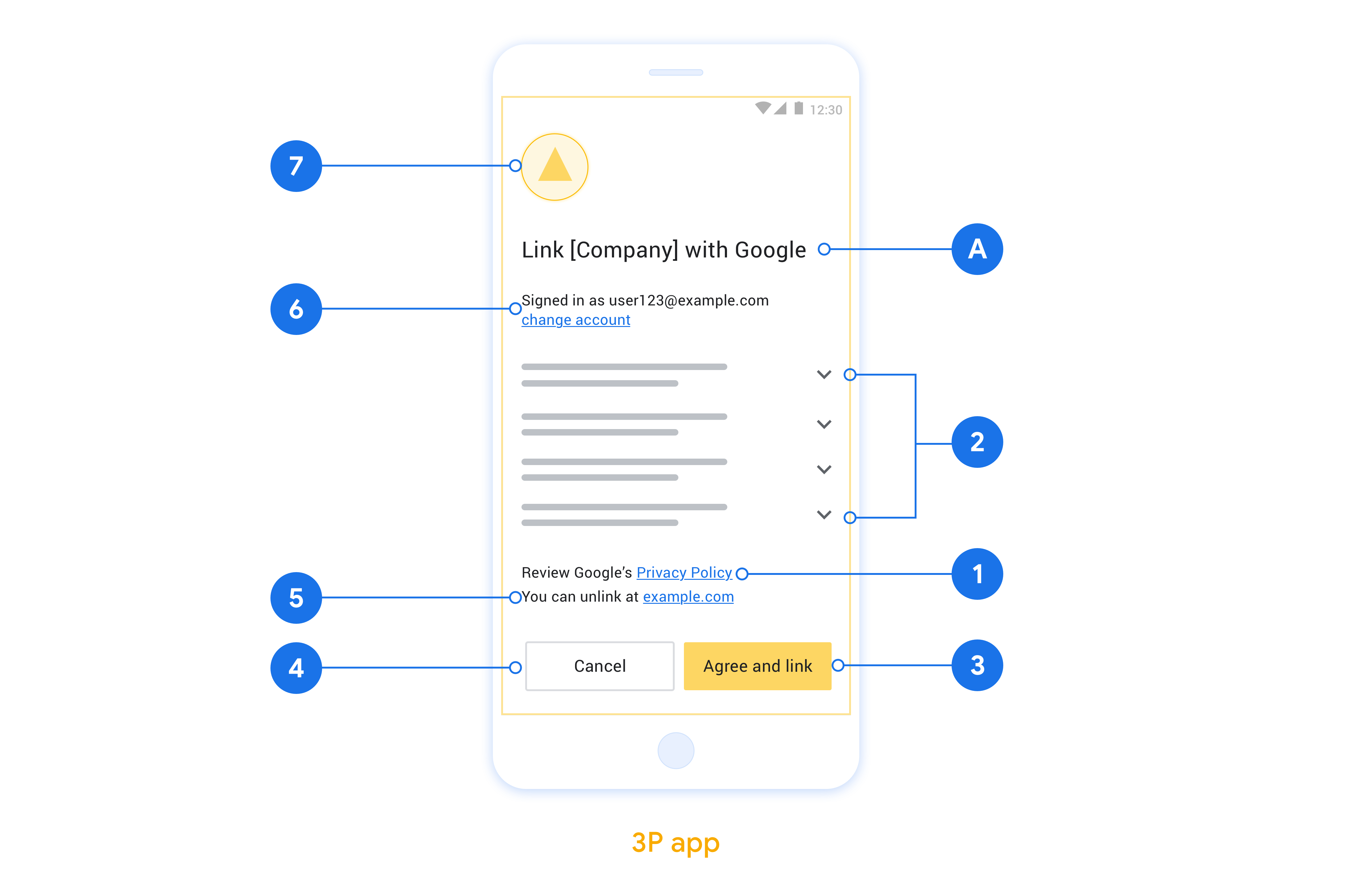
בקטע הזה מתוארות הדרישות וההמלצות לעיצוב מסך ההסכמה לקישור חשבון באפליקציה. אחרי ש-Google מפעילה את האפליקציה, האפליקציה מציגה למשתמש את מסך ההסכמה.
דרישות
- עליכם להבהיר למשתמש שהחשבון שלו מקושר ל-Google, ולא למוצר ספציפי של Google, כמו Google Home או Google Assistant.
המלצות
מה אתם יכולים לעשות?
הצגת מדיניות הפרטיות של Google במסך ההסכמה, צריך לכלול קישור למדיניות הפרטיות של Google.
הנתונים שישותפו. חשוב להשתמש בשפה ברורה ותמציתית כדי להסביר למשתמשים אילו נתונים שלהם נדרשים ל-Google ולמה.
קריאה ברורה לפעולה. צריך להציג קריאה ברורה לפעולה במסך ההסכמה, כמו 'הסכמה וקישור'. הסיבה לכך היא שהמשתמשים צריכים להבין אילו נתונים הם נדרשים לשתף עם Google כדי לקשר את החשבונות שלהם.
האפשרות לדחות או לבטל. לספק למשתמשים דרך לחזור, לדחות או לבטל את הקישור, אם הם בוחרים לא לקשר את החשבון.
אפשרות לבטל את הקישור. מציעים למשתמשים מנגנון לביטול הקישור, כמו כתובת URL להגדרות החשבון שלהם בפלטפורמה שלכם. לחלופין, אפשר לכלול קישור לחשבון Google שבו המשתמשים יכולים לנהל את החשבון המקושר שלהם.
אפשרות לשנות את חשבון המשתמש. הצעת שיטה למשתמשים להחלפת החשבונות שלהם. האפשרות הזו שימושית במיוחד אם למשתמשים יש בדרך כלל כמה חשבונות.
- אם משתמש צריך לסגור את מסך ההסכמה כדי לעבור בין חשבונות, צריך לשלוח שגיאה שניתן לתקן ל-Google כדי שהמשתמש יוכל להיכנס לחשבון הרצוי באמצעות קישור OAuth והתהליך המשתמע.
הוסיפו את הלוגו שלכם. להציג את הלוגו של החברה במסך בקשת ההסכמה. משתמשים בהנחיות הסגנון כדי למקם את הלוגו. אם רוצים להציג גם את הלוגו של Google, אפשר לעיין במאמר בנושא לוגו וסימנים מסחריים.
הטמעה של App Flip באפליקציות
כדי להטמיע את התכונה 'החלפת אפליקציות', צריך לשנות את קוד הרשאת המשתמש באפליקציה כך שיקבל קישור עומק מ-Google.
כדי לתמוך בהעברה מהירה לאפליקציה באפליקציית Android, צריך לפעול לפי ההוראות במדריך ההטמעה של Android.
כדי לתמוך בהעברה לאפליקציה באפליקציית iOS, צריך לפעול לפי ההוראות שבמדריך ההטמעה ל-iOS.
בדיקת קישור אפליקציות
אפשר לדמות את התכונה 'החלפת אפליקציות' באמצעות אפליקציות לדוגמה ואפליקציות לבדיקה לפני שזמינות אפליקציות מאומתות בייצור ושרת OAuth 2.0 תקין.
במהלך קישור אפליקציות, אפליקציית Google תפתח קודם את האפליקציה שלכם, ואז תבקש תגובה עם קוד הרשאה משרת OAuth 2.0 שלכם. בשלב האחרון, התגובה מוחזרת לאפליקציית Google.
דרישות מוקדמות
כדי לדמות אפליקציית Google ולהפעיל את ה-Intent שפותח את האפליקציה שלכם, צריך להוריד ולהתקין את כלי הבדיקה App Flip ל-Android ול-iOS.
מורידים ומתקינים את App Flip Sample ל-Android ול-iOS כדי לדמות את האפליקציה ולבחור סוג תגובה של OAuth 2.0.
רצף בדיקה
- פותחים את הכלי לבדיקת החלפת אפליקציות.
- לוחצים על
Try Flip!כדי להפעיל את אפליקציית הדוגמה App Flip. - בוחרים תשובה מלחצני הבחירה באפליקציה לדוגמה.
- לוחצים על
Sendכדי להחזיר תשובה מדומה של OAuth 2.0 לכלי הבדיקה. - בודקים את הודעות היומן של כלי הבדיקה כדי למצוא auth_code או פרטים על השגיאה.
בדיקות בסביבת הייצור
אפשר לבדוק את התכונה 'החלפת אפליקציות' בסביבת הייצור אחרי השלמת ההרשמה וההטמעה של שרת OAuth 2.0.
מומלץ להשתמש בחשבון Google אחד ובכתובת אימייל ספציפית למשימה לבדיקות אוטומטיות.
אפשר לראות את סטטוס קישור החשבונות באמצעות חשבונות מקושרים כשנכנסים לחשבון בתור בעל חשבון Google. יכול להיות שגם כאן יבוטל הקישור בין החשבונות אחרי בדיקות חוזרות.
אופציונלי, אתם יכולים להטמיע RISC כדי לבטל את הקישור באופן אוטומטי ולעדכן את Google לגבי השינוי.