
異なる ID システムを同期する

Google Cloud Search のアクセス制御は、ユーザーの Google アカウントに基づいて行われます。コンテンツのインデックス登録時には、アイテムのすべての ACL が有効な Google ユーザー ID またはグループ ID(メールアドレス)に解決される必要があります。

多くの場合、リポジトリは Google アカウントを直接把握しません。代わりに、ローカル アカウントがユーザーを表すか、ユーザーが ID プロバイダによる連携ログインを使用します。メールアドレス以外のこの識別情報は、外部 ID と呼ばれます。

管理コンソールを使用して作成された ID ソースは、以下の方法で ID システム間のこのギャップを埋めるのに役立ちます。

ID ソースは、次の場合に使用します。

  • リポジトリが、Google Workspace または Google Cloud Directory 内のユーザーのプライマリ メールアドレスを把握していない場合。
  • リポジトリで、Google Workspace のメールベースのグループに対応しないアクセス制御グループが定義されている場合。

ID ソースを使用すると、ID マッピングからインデックス登録が分離されるため、効率が向上します。これにより、ACL の作成時およびアイテムのインデックス登録時にユーザーの検索を延期できます。

デプロイの例

図 1 は、オンプレミスとクラウドの両方のリポジトリを使用している企業を示しています。それぞれ異なるタイプの外部 ID を使用します。
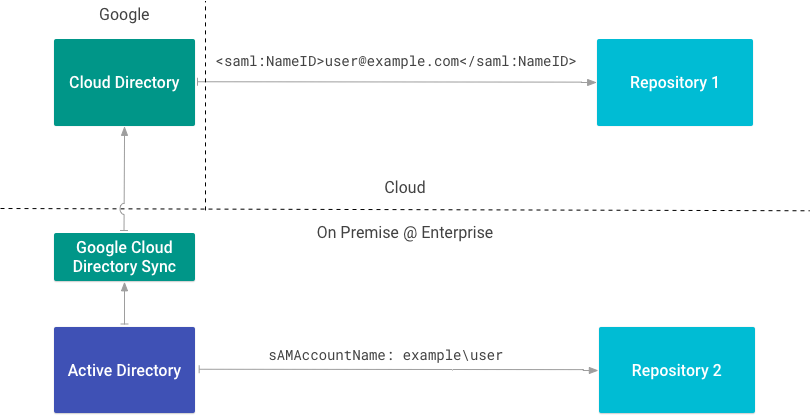
さまざまな ID タイプを使用する企業デプロイの例
図 1. さまざまな ID タイプを使用する企業デプロイの例。

リポジトリ 1 は、SAML を使用してメールアドレスでユーザーを識別します。Google Workspace または Cloud Directory のメインのメールアドレスがわかっているため、ID ソースは必要ありません。

リポジトリ 2 はオンプレミス ディレクトリと統合され、sAMAccountName でユーザーを識別します。この属性を外部 ID として使用するため、ID ソースが必要です。

ID ソースを作成する

ID ソースが必要な場合は、Cloud Search でユーザー ID をマッピングするをご覧ください。

コンテンツ コネクタを作成する前に ID ソースを作成します。ACL とインデックス データを作成するには、ID ソースの ID が必要です。ID ソースを作成すると、Cloud Directory にカスタム ユーザー プロパティも作成され、外部 ID が格納されます。プロパティ名には、IDENTITY_SOURCE_ID_identity という命名規約が使用されます。

次の表は、2 つの ID ソースを示しています。1 つは SAM アカウント名用、もう 1 つはユーザー ID(uid)用です。

ID ソース ユーザー プロパティ 外部 ID
id1 id1_identity sAMAccountName
id2 id2_identity uid

企業で使用される外部 ID のタイプごとに、ID ソースを作成します。

次の表は、Google アカウントと 2 つの外部 ID を持つユーザーが Cloud Directory にどのように表示されるかを示しています。

ユーザー メール id1_identity id2_identity
Ann ann@example.com example\ann 1001

インデックス登録用に ACL を作成するときに、これらの ID を使用して同じユーザーを参照できます。

ユーザー ACL を作成する

getUserPrincipal() または getGroupPrincipal() を使用して、外部 ID を使用してプリンシパルを作成します。

この例では、アクセス権限を持つユーザーを含むファイル権限を取得します。

FilePermissionSample.java
/**
 * Sample for mapping permissions from a source repository to Cloud Search
 * ACLs. In this example, POSIX file permissions are used a the source
 * permissions.
 *
 * @return Acl
 * @throws IOException if unable to read file permissions
 */
static Acl mapPosixFilePermissionToCloudSearchAcl(Path pathToFile) throws IOException {
  // Id of the identity source for external user/group IDs. Shown here,
  // but may be omitted in the SDK as it is automatically applied
  // based on the `api.identitySourceId` configuration parameter.
  String identitySourceId = "abcdef12345";

  // Retrieve the file system permissions for the item being indexed.
  PosixFileAttributeView attributeView = Files.getFileAttributeView(
      pathToFile,
      PosixFileAttributeView.class,
      LinkOption.NOFOLLOW_LINKS);

  if (attributeView == null) {
    // Can't read, return empty ACl
    return new Acl.Builder().build();
  }

  PosixFileAttributes attrs = attributeView.readAttributes();
  // ...
}

このスニペットは、externalUserName 属性を使用して所有者のプリンシパルを作成します。

FilePermissionSample.java
// Owner, for search quality.
// Note that for principals the name is not the primary
// email address in Cloud Directory, but the local ID defined
// by the OS. Users and groups must be referred to by their
// external ID and mapped via an identity source.
List<Principal> owners = Collections.singletonList(
    Acl.getUserPrincipal(attrs.owner().getName(), identitySourceId)
);

このスニペットは、閲覧者のプリンシパルを作成します。

FilePermissionSample.java
// List of users to grant access to
List<Principal> readers = new ArrayList<>();

// Add owner, group, others to readers list if permissions
// exist. For this example, other is mapped to everyone
// in the organization.
Set<PosixFilePermission> permissions = attrs.permissions();
if (permissions.contains(PosixFilePermission.OWNER_READ)) {
  readers.add(Acl.getUserPrincipal(attrs.owner().getName(), identitySourceId));
}
if (permissions.contains(PosixFilePermission.GROUP_READ)) {
  String externalGroupName = attrs.group().getName();
  Principal group = Acl.getGroupPrincipal(externalGroupName, identitySourceId);
  readers.add(group);
}
if (permissions.contains(PosixFilePermission.OTHERS_READ)) {
  Principal everyone = Acl.getCustomerPrincipal();
  readers.add(everyone);
}

閲覧者とオーナーを取得したら、ACL を作成します。

FilePermissionSample.java
// Build the Cloud Search ACL. Note that inheritance of permissions
// from parents is omitted. See `setInheritFrom()` and `setInheritanceType()`
// methods on the builder if required by your implementation.
Acl acl = new Acl.Builder()
    .setReaders(readers)
    .setOwners(owners)
    .build();

REST API は identitysources/IDENTITY_SOURCE_ID/users/EXTERNAL_ID パターンを使用します。Ann の id1_identityidentitysources/id1_identity/users/example/ann として解決されます。これはユーザーの中間 ID です。

リポジトリ ACL のモデル化の詳細については、ACL をご覧ください。

グループをマッピングする

ID ソースは、ACL グループの名前空間としても機能します。これを使用して、セキュリティ目的でのみ使用されるグループまたはリポジトリに対してローカルなグループを作成してマッピングします。

Cloud Identity Groups API を使用してグループを作成し、メンバーシップを管理します。ID ソースの名前を名前空間として使用して、グループを ID ソースに関連付けます。

このスニペットはグループを作成します。

CreateGroupCommand.java
String namespace = "identitysources/" + idSource;
Group group = new Group()
    .setGroupKey(new EntityKey().setNamespace(namespace).setId(groupId))
    .setDescription("Demo group")
    .setDisplayName(groupName)
    .setLabels(Collections.singletonMap("system/groups/external", ""))
    .setParent(namespace);
try {
  CloudIdentity service = Utils.buildCloudIdentityService();
  Operation createOperation = service.groups().create(group).execute();

  if (createOperation.getDone()) {
    // Note: The response contains the data for a Group object, but as
    // individual fields. To convert to a Group instance, either populate
    // the fields individually or serialize & deserialize to/from JSON.
    //
    // Example:
    // String json = service.getJsonFactory().toString(response);
    // Group createdGroup =  service.getObjectParser()
    //     .parseAndClose(new StringReader(json), Group.class);
    System.out.printf("Group: %s\n",
        createOperation.getResponse().toString());
  } else {
    // Handle case where operation not yet complete, poll for
    // completion. API is currently synchronous and all operations return
    // as completed.
    // ...
  }
} catch (Exception e) {
  System.err.printf("Unable to create group: %s", e.getMessage());
  e.printStackTrace(System.err);
}

グループ ACL を作成する

getGroupPrincipal() を使用して外部 ID を持つグループ プリンシパルを作成し、ACL をビルドします。

FilePermissionSample.java
if (permissions.contains(PosixFilePermission.GROUP_READ)) {
  String externalGroupName = attrs.group().getName();
  Principal group = Acl.getGroupPrincipal(externalGroupName, identitySourceId);
  readers.add(group);
}

ID コネクタ

ユーザーの外部 ID が Cloud Directory の Google ID に解決されるまで、ユーザーは検索結果でアイテムを表示できません。これを保証する方法は 3 つあります。

ID コネクタは、企業の ID から内部 Google ID に外部 ID をマッピングします。ID ソースを作成する場合は、ID コネクタも作成する必要があります。

Google Cloud Directory Sync(GCDS)は ID コネクタの一例です。Active Directory のユーザーとグループの情報を Cloud Directory にマッピングします。

REST API を使用して ID を同期する

update メソッドを使用して ID を同期します。

ID を再マッピングする

ID を再マッピングした後は、変更を有効にするためにアイテムのインデックスを再作成する必要があります。

  • ユーザー マッピングを削除または変更しても、元のマッピングは再インデックス登録されるまで残ります。
  • マッピングされたグループを削除して同じ groupKey で新しいグループを作成した場合、再インデックス登録するまでアクセス権は付与されません。