

사용자는 Google 클래스룸에서 수업 및 과제의 학습 목표를 설정할 수 있습니다.
동일한 학습 목표는 클래스룸 API에도 노출됩니다. Course 리소스의 학습 표준 세트와 CourseWork, CourseWorkMaterial, Rubric 리소스의 학습 목표를 설정, 검색, 수정할 수 있습니다.
이 가이드에서는 Classroom API를 사용하여 학습 목표 및 표준 세트에 액세스하고 이를 수정하는 방법을 설명합니다.
작동 방식
데이터 소스
클래스룸의 학습 목표는 Satchel Rosetta Exchange (이전 명칭: CASE Network)에서 제공하는 안정적인 전역 고유 식별자(GUID)를 사용합니다. Exchange의 표준은 노드 트리로 구성됩니다. 여기서 루트는 특정 과목에 대한 포괄적인 표준 모음이며 하위 노드는 점진적으로 더 구체적인 학습 결과를 설명합니다. 네트워크에서 표준 코드 또는 리프 노드가 있는 노드의 식별자는 CourseWork의 학습 목표로 설정할 수 있으며, 리프가 아닌 노드는 Course의 학습 표준 모음으로 설정할 수 있습니다.
Course리소스의 학습 표준 세트는 교사가 학습 목표에 태그를 지정할 때 클래스룸 UI에 표시되는 표준 그룹을 나타냅니다.CourseWork,CourseWorkMaterial또는Rubric리소스에 연결된 학습 목표는 해당 과제, 질문, 자료 또는 특정 기준표 기준과 연결된 표준 또는 기술을 나타냅니다.
Google은 Satchel Rosetta Exchange의 다음 5가지 정보를 사용합니다.
- 문서 ID: 루트 수준 노드의 GUID입니다. 이 ID는 최상위 표준 컨테이너와 일치하며 모든 하위 노드에 공통입니다.
- 문서 제목: 전체 표준 문서의 사람이 읽을 수 있는 이름입니다.
- 상품 ID: 단일 표준 (루트가 아닌 노드)의 GUID입니다.
- 표준 제목: 단일 표준의 사람이 읽을 수 있는 설명 텍스트입니다.
- 표준 코드: 특정 표준의 사람이 읽을 수 있는 약어입니다.
표준 및 목표 값 찾기
이러한 값을 찾을 위치를 이해하려면 뉴욕주의 수학 표준을 예로 들어 보세요. 루트 노드에서 시작합니다.
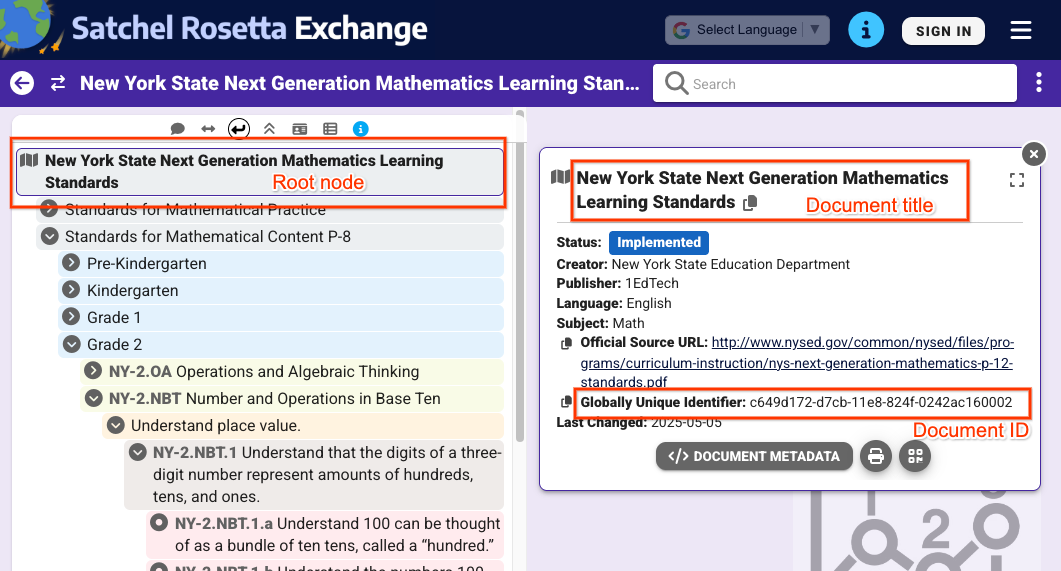 그림 1: Satchel Rosetta Exchange에서 선택한 루트 노드의 뷰 이 페이지의 모든 노드에 공통적인 문서 제목과 문서 ID가 표시됩니다.
그림 1의 뷰에서 다음 값을 추출할 수 있습니다.
- 문서 ID:
c649d172-d7cb-11e8-824f-0242ac160002 - 문서 제목:
New York State Next Generation Mathematics Learning
Standards
개별 표준의 값을 가져오려면 표준을 클릭하고 메타데이터를 펼치세요.
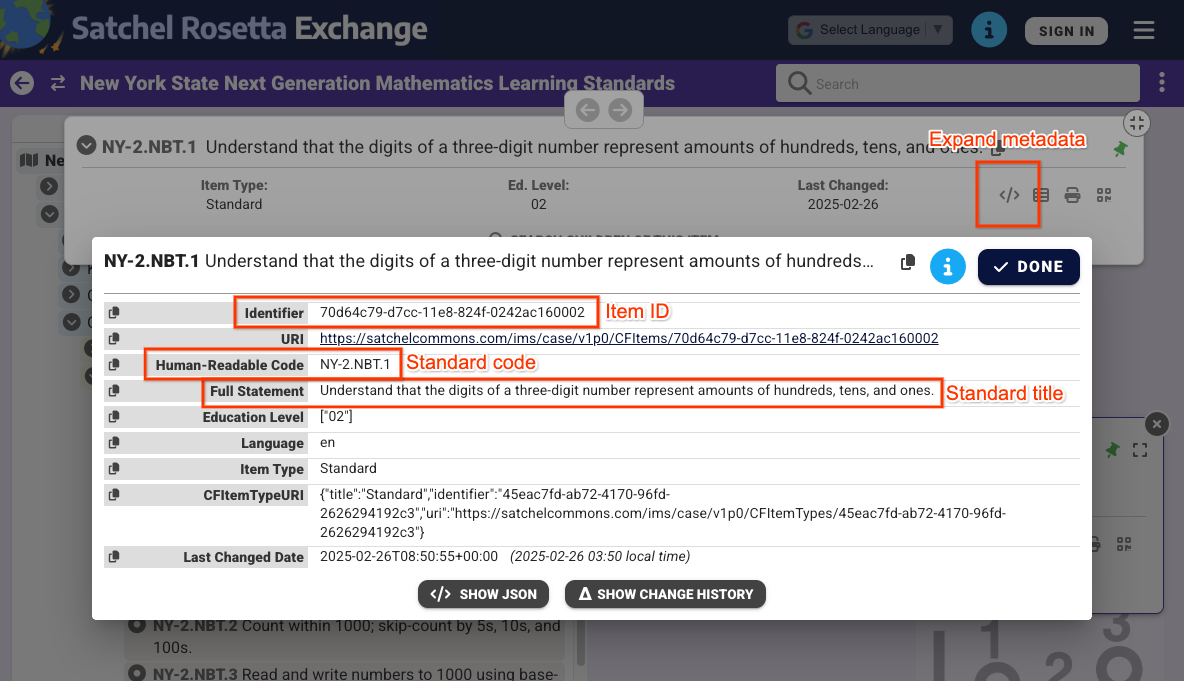 그림 2: Satchel Rosetta Exchange에서 선택한 비루트 노드의 메타데이터 보기 상품 ID, 표준 코드, 표준 제목이 표시됩니다. 이러한 값은 이 표준에만 적용됩니다.
그림 2의 뷰에서 다음 값을 확인할 수 있습니다.
- 상품 ID:
70d64c79-d7cc-11e8-824f-0242ac160002 - 표준 제목:
Understand that the digits of a three-digit number represent amounts of hundreds, tens, and ones. - 표준 코드:
NY-2.NBT.4
문서 및 항목 ID는 각 노드의 Satchel Rosetta Exchange URL에서도 추출할 수 있습니다. 이러한 URL은 https://rosetta.commongoodlt.com/{document_id}/{item_id} 패턴을 따릅니다.
최대 연결된 항목 수
- 각
Course에는 최대 20개의 학습 표준 세트가 있을 수 있습니다. - 각
CourseWork에는 학습 목표가 최대 10개까지 있을 수 있습니다. - 각 평가 기준
Criterion에는 학습 목표가 1개 있을 수 있습니다.
강의 학습 표준 모음 관리
학습 표준 모음 수정
Course 학습 표준 세트를 수정하려면 Course.learningStandardSettings 필드를 standardSets 객체로 채우세요. 각 standardSet에는 caseDocumentId 및 선택적으로 caseItemId이 포함된 caseGuid 객체가 포함되어야 합니다.
learningStandardSettings 업데이트 마스크를 사용하여 courses.create() 또는 courses.patch()와 같은 Course 변이 요청을 사용하여 학습 표준 세트를 추가할 수 있습니다.
다음 예에서는 기존 과정에 표준 세트 두 개를 설정합니다.
Python
service = build("classroom", "v1", credentials=creds)
course = {
    "learningStandardSettings": {
        # Each Course can have up to 20 learning standard sets.
        "standardSets": [
            # Construct a GUID for the NYS Next Gen Math Standards top-level node.
            # This is a top-level non-leaf node, so it only has a Document ID.
            {
                "caseGuid": {
                    "caseDocumentId": "c649d172-d7cb-11e8-824f-0242ac160002"
                }
            },
            # Construct a GUID for the AAS ELA21.AAS.K Standard node.
            # This is a mid-level non-leaf node, so it has both Document and Item IDs.
            {
                "caseGuid": {
                    "caseDocumentId": "bfc264b3-b4d1-4780-84ff-26b12e6945a6",
                    "caseItemId": "ada2cc30-7d6d-494e-8c6b-c998bae98f0b",
                }
            },
        ]
    }
}

course = (
    service.courses()
    .patch(
      id=course_id,
      updateMask="learningStandardSettings",
      body=course,
      # Specify the preview version while the feature is in Developer Preview.
      # Learning standards and goals are supported in V1_20260316_PREVIEW and
      # later.
      previewVersion="V1_20260316_PREVIEW")
    .execute()
)
print(f"Course updated: {course.get('name')}")
학습 표준 세트 가져오기
과정의 현재 학습 표준 세트를 확인하려면 Course.learningStandardSettings 필드를 검사하세요. 이 필드에는 일련의 standardSets 객체가 포함되며, 과정에 학습 표준 세트가 없는 경우 비어 있을 수 있습니다.
대답의 각 standardSet에는 표준의 설명과 루트 문서 제목이 포함됩니다. 이 텍스트는 클래스룸 UI에서 교사와 학생에게도 표시됩니다. 또한 Satchel Rosetta Exchange에서 표준을 사용할 수 있는지 여부를 나타내는 sourceDataAvailabilityStatus도 받습니다.
{
  "id": "123456789",
  "name": "LSS test class",
  "learningStandardSettings": {
    "standardSets": [
      {
        "caseGuid": {
          "caseDocumentId": "c649d172-d7cb-11e8-824f-0242ac160002"
        },
        "documentTitle": "New York State Next Generation Mathematics Learning Standards",
        "sourceDataAvailabilityStatus": "LEARNING_STANDARD_AVAILABLE"
      },
      {
        "caseGuid": {
          "caseDocumentId": "bfc264b3-b4d1-4780-84ff-26b12e6945a6",
          "caseItemId": "ada2cc30-7d6d-494e-8c6b-c998bae98f0b"
        },
        "documentTitle": "AAS English Language Arts (2021)",
        "standardTitle": "Kindergarten",
        "sourceDataAvailabilityStatus": "LEARNING_STANDARD_AVAILABLE"
      }
    ]
  }
}
CourseWork, CourseWorkMaterial, Rubric 학습 목표 관리
학습 목표 수정
학습 목표는 모든 변형 요청에서 CourseWork, CourseWorkMaterial, 루브릭 Criterion 리소스에 연결할 수 있습니다. CourseWork.learningGoals 또는 Rubric.Criterion.learningGoal 필드에 문서 및 항목 식별자를 설정합니다. 이러한 식별자는 앞서 설명한 식별자와 동일합니다.
Rubric 기준에 첨부된 학습 목표는 Rubric가 연결된 과제에 이미 첨부되어 있어야 합니다.
다음 예시에서는 학습 목표가 두 개 첨부된 CourseWork 과제를 만듭니다.
Python
# Create a CourseWork assignment with two attached learning goals.
service = build("classroom", "v1", credentials=creds)
coursework = {
    "title": "Ant colonies",
    "description": "Read the article about ant colonies and complete the quiz.",
    "materials": [
        {"link": {"url": "http://example.com/ant-colonies"}},
        {"link": {"url": "http://example.com/ant-quiz"}},
    ],
    "workType": "ASSIGNMENT",
    "state": "PUBLISHED",
    # Each CourseWork can have up to 10 learning goals.
    "learningGoals": [
        {
            "learningStandardInfo": {
                # Construct a GUID for the ELA21.AAS.11.11c Standard node.
                # This is a non-root node, so it has both Document and Item IDs.
                "caseGuid": {
                    "caseDocumentId": "bfc264b3-b4d1-4780-84ff-26b12e6945a6",
                    "caseItemId": "6d922f1f-b580-42a1-b6d2-5ee5b39c561d",
                }
            }
        },
        {
            "learningStandardInfo": {
                # Construct a GUID for the ELA21.AAS.11.22a Standard node.
                # This is a non-root node, so it has both Document and Item IDs.
                "caseGuid": {
                    "caseDocumentId": "bfc264b3-b4d1-4780-84ff-26b12e6945a6",
                    "caseItemId": "a684609a-c3ec-42da-8b7f-7a325b31ea4a",
                }
            }
        },
    ],
}

coursework = (
    service.courses()
    .courseWork()
    .create(
      courseId=course_id,
      body=coursework,
      # Specify the preview version while the feature is in Developer Preview.
      # Learning standards and goals are supported in V1_20260316_PREVIEW and
      # later.
      previewVersion="V1_20260316_PREVIEW")
    .execute()
)
print(f"Assignment created with ID {coursework.get('id')}")
다음 예시에서는 각 기준에 학습 목표가 연결된 Rubric를 만듭니다.
Python
# Create a new Rubric with a learning goal attached to each criterion.
service = build("classroom", "v1", credentials=creds)
body = {
    "criteria": [
        {
            "title": "Argument",
            "description": "How well structured your argument is.",
            "levels": [
                {
                    "title": "Convincing",
                    "description": "A compelling case is made.",
                    "points": 30,
                },
                {
                    "title": "Passable",
                    "description": "Missing some evidence.",
                    "points": 20,
                },
                {
                    "title": "Needs Work",
                    "description": "Not enough strong evidence.",
                    "points": 0,
                },
            ],
            # Each Criterion can have one learning goal.
            "learningGoal": {
                "learningStandardInfo": {
                    # Construct a GUID for the ELA21.AAS.11.11c Standard node.
                    # This is a non-root node, so it has both Document and Item IDs.
                    "caseGuid": {
                        "caseDocumentId": "bfc264b3-b4d1-4780-84ff-26b12e6945a6",
                        "caseItemId": "6d922f1f-b580-42a1-b6d2-5ee5b39c561d",
                    }
                }
            },
        },
        {
            "title": "Spelling",
            "description": "How well you spelled all the words.",
            "levels": [
                {"title": "Perfect", "description": "No mistakes.", "points": 20},
                {"title": "Great", "description": "A mistake or two.", "points": 15},
                {"title": "Needs Work", "description": "Many mistakes.", "points": 5},
            ],
            # Each Criterion can have one learning goal.
            "learningGoal": {
                "learningStandardInfo": {
                    # Construct a GUID for the ELA21.AAS.11.22a Standard node.
                    # This is a non-root node, so it has both Document and Item IDs.
                    "caseGuid": {
                        "caseDocumentId": "bfc264b3-b4d1-4780-84ff-26b12e6945a6",
                        "caseItemId": "a684609a-c3ec-42da-8b7f-7a325b31ea4a",
                    }
                }
            },
        },
    ]
}

rubric = (
    service.courses()
    .courseWork()
    .rubrics()
    .create(
      courseId=course_id,
      courseWorkId=coursework_id,
      body=body,
      # Specify the preview version while the feature is in Developer Preview.
      # Learning standards and goals are supported in V1_20260316_PREVIEW and
      # later.
      previewVersion="V1_20260316_PREVIEW")
    .execute()
)
print(f"Rubric created with ID {rubric.get('id')}")
학습 목표 가져오기
과제, 질문 또는 자료의 현재 학습 목표를 확인하려면 CourseWork.learningGoals 필드를 검사하세요. 각 학습 목표 객체에는 루트 수준 문서 제목과 학습 표준 코드가 포함됩니다.
교사는 클래스룸 UI에서 수업 과제 및 자료에 기술 태그를 추가할 수도 있습니다. 기술 태그는 API에서 액세스할 수 없습니다.
{
  "course_id": "123456789",
  "id": "987654321",
  "title": "Test ELA Assignment",
  "state": "PUBLISHED",
  "learningGoals": [
    {
      "id": "871768554412",
      "courseId": "123456789",
      "learningStandardInfo": {
        "standardCode": "ELA21.AAS.11.22a",
        "caseGuid": {
          "caseDocumentId": "bfc264b3-b4d1-4780-84ff-26b12e6945a6",
          "caseItemId": "a684609a-c3ec-42da-8b7f-7a325b31ea4a"
        }
      },
      "title": "Identify a sentence that uses correct capitalization (i.e., beginning of sentence, names, cities, states, countries, towns, titles, days, months)."
    },
    {
      "id": "871768554411",
      "courseId": "123456789",
      "learningStandardInfo": {
        "standardCode": "ELA21.AAS.11.11c",
        "caseGuid": {
          "caseDocumentId": "bfc264b3-b4d1-4780-84ff-26b12e6945a6",
          "caseItemId": "6d922f1f-b580-42a1-b6d2-5ee5b39c561d"
        }
      },
      "title": "Compose argumentative texts by stating a topic, providing reasons that support the argument, and providing an appropriate conclusion related to the topic."
    }
  ]
}
유사한 데이터가 Rubric 응답과 함께 반환되며, 기준당 하나의 learningGoal가 포함됩니다.