תצוגה מקדימה של קישורים עם צ'יפים חכמים

בדף הזה מוסבר איך ליצור תוסף ל-Google Workspace שמאפשר למשתמשים ב-Google Docs, ב-Sheets וב-Slides לצפות בתצוגה מקדימה של קישורים משירות צד שלישי.

תוסף ל-Google Workspace יכול לזהות את הקישורים לשירות שלכם ולהציע למשתמשים לראות תצוגה מקדימה שלהם. אפשר להגדיר תוסף כדי להציג תצוגה מקדימה של כמה תבניות של כתובות URL, כמו קישורים לכרטיסי תמיכה, לידים למכירות ופרופילים של עובדים.

איך משתמשים יכולים לראות תצוגה מקדימה של קישורים

כדי לראות תצוגה מקדימה של קישורים, המשתמשים צריכים ללחוץ על צ'יפים חכמים ועל כרטיסים.
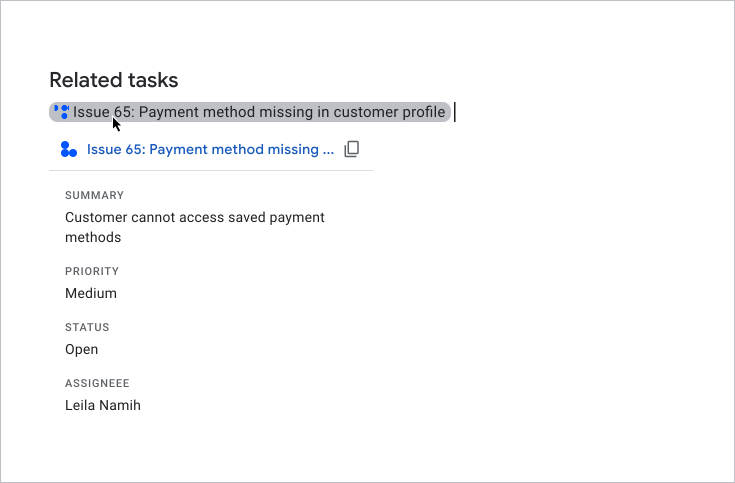
משתמש צופה בתצוגה מקדימה של כרטיס

כשמשתמשים מקלידים או מדביקים כתובת URL במסמך או בגיליון אלקטרוני, Google Docs או Google Sheets מציעים להם להחליף את הקישור בצ'יפ חכם. בצ'יפ החכם מוצג סמל ושם קצר של הפריט או תיאור של תוכן הקישור. כשמעבירים את העכבר מעל הצ'יפ, מוצג כרטיס עם תצוגה מקדימה של מידע נוסף על הקובץ או הקישור.

בסרטון הבא אפשר לראות איך משתמש ממיר קישור לצ'יפ חכם וצופה בתצוגה מקדימה של כרטיס:

איך משתמשים יכולים לראות תצוגה מקדימה של קישורים ב-Slides

אין תמיכה בצ'יפים חכמים של צד שלישי בתצוגה מקדימה של קישורים ב-Slides. כשמשתמשים מקלידים או מדביקים כתובת URL במצגת, מערכת Slides מציעה להם להחליף את הקישור בכותרת שלו כטקסט מקושר במקום בצ'יפ. כשמשתמש מעביר את העכבר מעל שם הקישור, מוצג לו כרטיס עם תצוגה מקדימה של המידע על הקישור.

בתמונה הבאה אפשר לראות איך תצוגה מקדימה של קישור מוצגת ב-Slides:

דוגמה לתצוגה מקדימה של קישור ב-Slides

דרישות מוקדמות

Apps Script

Node.js

Python

Java

אופציונלי: הגדרת אימות לשירות של צד שלישי

אם התוסף מתחבר לשירות שנדרש בו אישור, המשתמשים צריכים לבצע אימות לשירות כדי לראות תצוגה מקדימה של הקישורים. המשמעות היא שכאשר משתמשים מדביקים קישור מהשירות שלכם לקובץ ב-Docs, ב-Sheets או ב-Slides בפעם הראשונה, התוסף שלכם צריך להפעיל את תהליך ההרשאה.

כדי להגדיר שירות OAuth או בקשת הרשאה בהתאמה אישית, אפשר לעיין במאמר חיבור התוסף לשירות של צד שלישי.

בקטע הזה מוסבר איך להגדיר תצוגות מקדימות של קישורים לתוסף. התהליך כולל את השלבים הבאים:

  1. מגדירים תצוגה מקדימה של קישורים במניפסט של התוסף.
  2. איך יוצרים את הממשק של הצ'יפ החכם והכרטיס לקישורים.

הגדרת תצוגות מקדימות לקישורים

כדי להגדיר תצוגה מקדימה של קישורים, מציינים את הקטעים והשדות הבאים בקובץ המניפסט של התוסף:

  1. בקטע addOns, מוסיפים את השדה docs כדי להרחיב את Docs, את השדה sheets כדי להרחיב את Sheets ואת השדה slides כדי להרחיב את Slides.
  2. בכל שדה, מטמיעים את הטריגר linkPreviewTriggers שכולל runFunction (את הפונקציה הזו מגדירים בקטע הבא, יצירת הצ'יפ החכם והכרטיס).

    מידע על השדות שאפשר לציין בטריגר linkPreviewTriggers מופיע במאמרי העזרה בנושא מניפסטים של Apps Script או משאבי פריסה לסביבות ריצה אחרות.

  3. בשדה oauthScopes, מוסיפים את ההיקף https://www.googleapis.com/auth/workspace.linkpreview כדי שהמשתמשים יוכלו לתת הרשאה לתוסף להציג תצוגה מקדימה של קישורים בשמם.

לדוגמה, אפשר לראות את הקטע oauthScopes וaddons במניפסט הבא שמגדיר תצוגה מקדימה של קישורים לשירות של בקשת תמיכה.

{
  "oauthScopes": [
    "https://www.googleapis.com/auth/workspace.linkpreview"
  ],
  "addOns": {
    "common": {
      "name": "Preview support cases",
      "logoUrl": "https://www.example.com/images/company-logo.png",
      "layoutProperties": {
        "primaryColor": "#dd4b39"
      }
    },
    "docs": {
      "linkPreviewTriggers": [
        {
          "runFunction": "caseLinkPreview",
          "patterns": [
            {
              "hostPattern": "example.com",
              "pathPrefix": "support/cases"
            },
            {
              "hostPattern": "*.example.com",
              "pathPrefix": "cases"
            },
            {
              "hostPattern": "cases.example.com"
            }
          ],
          "labelText": "Support case",
          "logoUrl": "https://www.example.com/images/support-icon.png",
          "localizedLabelText": {
            "es": "Caso de soporte"
          }
        }
      ]
    },
    "sheets": {
      "linkPreviewTriggers": [
        {
          "runFunction": "caseLinkPreview",
          "patterns": [
            {
              "hostPattern": "example.com",
              "pathPrefix": "support/cases"
            },
            {
              "hostPattern": "*.example.com",
              "pathPrefix": "cases"
            },
            {
              "hostPattern": "cases.example.com"
            }
          ],
          "labelText": "Support case",
          "logoUrl": "https://www.example.com/images/support-icon.png",
          "localizedLabelText": {
            "es": "Caso de soporte"
          }
        }
      ]
    },
    "slides": {
      "linkPreviewTriggers": [
        {
          "runFunction": "caseLinkPreview",
          "patterns": [
            {
              "hostPattern": "example.com",
              "pathPrefix": "support/cases"
            },
            {
              "hostPattern": "*.example.com",
              "pathPrefix": "cases"
            },
            {
              "hostPattern": "cases.example.com"
            }
          ],
          "labelText": "Support case",
          "logoUrl": "https://www.example.com/images/support-icon.png",
          "localizedLabelText": {
            "es": "Caso de soporte"
          }
        }
      ]
    }
  }
}

בדוגמה, התוסף ל-Google Workspace מציג תצוגה מקדימה של קישורים לשירות של בקשות תמיכה בחברה. התוסף מציין שלושה דפוסי כתובות URL לתצוגה מקדימה של קישורים. בכל פעם שקישור תואם לאחד מדפוסי כתובות ה-URL, פונקציית הקריאה החוזרת caseLinkPreview יוצרת ומציגה כרטיס וצ'יפ חכם ב-Docs, ב-Sheets או ב-Slides, ומחליפה את כתובת ה-URL בכותרת הקישור.

איך יוצרים את הצ'יפ החכם והכרטיס

כדי להחזיר צ'יפ חכם וכרטיס לקישור, צריך להטמיע את כל הפונקציות שצוינו באובייקט linkPreviewTriggers.

כשמשתמש יוצר אינטראקציה עם קישור שתואם לתבנית כתובת URL שצוינה, מופעל הטריגר linkPreviewTriggers ופונקציית הקריאה החוזרת שלו מעבירה את אובייקט האירוע EDITOR_NAME.matchedUrl.url כארגומנט. משתמשים במטען הייעודי (payload) של אובייקט האירוע הזה כדי ליצור את הצ'יפ החכם והכרטיס של התצוגה המקדימה של הקישור.

לדוגמה, אם משתמש יציג בתצוגה מקדימה את הקישור https://www.example.com/cases/123456 ב-Docs, מטען הייעודי (payload) של האירוע הבא יוחזר:

JSON

{
  "docs": {
    "matchedUrl": {
        "url": "https://www.example.com/support/cases/123456"
    }
  }
}

כדי ליצור את ממשק הכרטיס, משתמשים בווידג'טים להצגת מידע על הקישור. אפשר גם ליצור פעולות שיאפשרו למשתמשים לפתוח את הקישור או לשנות את התוכן שלו. רשימה של הווידג'טים והפעולות הזמינים מופיעה במאמר רכיבים נתמכים בכרטיסי תצוגה מקדימה.

כדי ליצור צ'יפ חכם וכרטיס לתצוגה מקדימה של קישור:

  1. מטמיעים את הפונקציה שצוינה בקטע linkPreviewTriggers של מניפסט התוסף:
    1. הפונקציה צריכה לקבל אובייקט אירוע שמכיל את EDITOR_NAME.matchedUrl.url כארגומנט, ולהחזיר אובייקט Card יחיד.
    2. אם השירות דורש הרשאה, הפונקציה צריכה גם להפעיל את תהליך ההרשאה.
  2. בכל כרטיס תצוגה מקדימה, מטמיעים פונקציות של קריאה חוזרת שמספקות אינטראקטיביות של הווידג'ט לממשק. לדוגמה, אם כוללים לחצן עם הכיתוב 'הצגת הקישור', אפשר ליצור פעולה שמציינת פונקציית קריאה חוזרת לפתיחת הקישור בחלון חדש. מידע נוסף על אינטראקציות עם ווידג'טים זמין במאמר פעולות של תוספים.

הקוד הבא יוצר את פונקציית הקריאה החוזרת caseLinkPreview עבור Docs:

Apps Script

apps-script/3p-resources/3p-resources.gs
/**
* Entry point for a support case link preview.
*
* @param {!Object} event The event object.
* @return {!Card} The resulting preview link card.
*/
function caseLinkPreview(event) {

  // If the event object URL matches a specified pattern for support case links.
  if (event.docs.matchedUrl.url) {

    // Uses the event object to parse the URL and identify the case details.
    const caseDetails = parseQuery(event.docs.matchedUrl.url);

    // Builds a preview card with the case name, and description
    const caseHeader = CardService.newCardHeader()
      .setTitle(`Case ${caseDetails["name"][0]}`);
    const caseDescription = CardService.newTextParagraph()
      .setText(caseDetails["description"][0]);

    // Returns the card.
    // Uses the text from the card's header for the title of the smart chip.
    return CardService.newCardBuilder()
      .setHeader(caseHeader)
      .addSection(CardService.newCardSection().addWidget(caseDescription))
      .build();
  }
}

/**
* Extracts the URL parameters from the given URL.
*
* @param {!string} url The URL to parse.
* @return {!Map} A map with the extracted URL parameters.
*/
function parseQuery(url) {
  const query = url.split("?")[1];
  if (query) {
    return query.split("&")
    .reduce(function(o, e) {
      var temp = e.split("=");
      var key = temp[0].trim();
      var value = temp[1].trim();
      value = isNaN(value) ? value : Number(value);
      if (o[key]) {
        o[key].push(value);
      } else {
        o[key] = [value];
      }
      return o;
    }, {});
  }
  return null;
}

Node.js

node/3p-resources/index.js
/**
 * 
 * A support case link preview.
 *
 * @param {!URL} url The event object.
 * @return {!Card} The resulting preview link card.
 */
function caseLinkPreview(url) {
  // Builds a preview card with the case name, and description
  // Uses the text from the card's header for the title of the smart chip.
  // Parses the URL and identify the case details.
  const name = `Case ${url.searchParams.get("name")}`;
  return {
    action: {
      linkPreview: {
        title: name,
        previewCard: {
          header: {
            title: name
          },
          sections: [{
            widgets: [{
              textParagraph: {
                text: url.searchParams.get("description")
              }
            }]
          }]
        }
      }
    }
  };
}

Python

python/3p-resources/create_link_preview/main.py
def case_link_preview(url):
    """A support case link preview.
    Args:
      url: A matching URL.
    Returns:
      The resulting preview link card.
    """

    # Parses the URL and identify the case details.
    query_string = parse_qs(url.query)
    name = f'Case {query_string["name"][0]}'
    # Uses the text from the card's header for the title of the smart chip.
    return {
        "action": {
            "linkPreview": {
                "title": name,
                "previewCard": {
                    "header": {
                        "title": name
                    },
                    "sections": [{
                        "widgets": [{
                            "textParagraph": {
                                "text": query_string["description"][0]
                            }
                        }]
                    }],
                }
            }
        }
    }

Java

java/3p-resources/src/main/java/CreateLinkPreview.java
/**
 * A support case link preview.
 *
 * @param url A matching URL.
 * @return The resulting preview link card.
 */
JsonObject caseLinkPreview(URL url) throws UnsupportedEncodingException {
  // Parses the URL and identify the case details.
  Map<String, String> caseDetails = new HashMap<String, String>();
  for (String pair : url.getQuery().split("&")) {
      caseDetails.put(URLDecoder.decode(pair.split("=")[0], "UTF-8"), URLDecoder.decode(pair.split("=")[1], "UTF-8"));
  }

  // Builds a preview card with the case name, and description
  // Uses the text from the card's header for the title of the smart chip.
  JsonObject cardHeader = new JsonObject();
  String caseName = String.format("Case %s", caseDetails.get("name"));
  cardHeader.add("title", new JsonPrimitive(caseName));

  JsonObject textParagraph = new JsonObject();
  textParagraph.add("text", new JsonPrimitive(caseDetails.get("description")));

  JsonObject widget = new JsonObject();
  widget.add("textParagraph", textParagraph);

  JsonArray widgets = new JsonArray();
  widgets.add(widget);

  JsonObject section = new JsonObject();
  section.add("widgets", widgets);

  JsonArray sections = new JsonArray();
  sections.add(section);

  JsonObject previewCard = new JsonObject();
  previewCard.add("header", cardHeader);
  previewCard.add("sections", sections);

  JsonObject linkPreview = new JsonObject();
  linkPreview.add("title", new JsonPrimitive(caseName));
  linkPreview.add("previewCard", previewCard);

  JsonObject action = new JsonObject();
  action.add("linkPreview", linkPreview);

  JsonObject renderActions = new JsonObject();
  renderActions.add("action", action);

  return renderActions;
}

רכיבים נתמכים בכרטיסי תצוגה מקדימה

התוספים ל-Google Workspace תומכים בווידג'טים ובפעולות הבאים לתצוגה מקדימה של כרטיסי קישור:

Apps Script

שדה של שירות כרטיסים סוג
TextParagraph ווידג'ט
DecoratedText ווידג'ט
Image ווידג'ט
IconImage ווידג'ט
ButtonSet ווידג'ט
TextButton ווידג'ט
ImageButton ווידג'ט
Grid ווידג'ט
Divider ווידג'ט
OpenLink פעולה
Navigation הפעולה
נתמכת רק בשיטה updateCard.

JSON

שדה כרטיס (google.apps.card.v1) סוג
TextParagraph ווידג'ט
DecoratedText ווידג'ט
Image ווידג'ט
Icon ווידג'ט
ButtonList ווידג'ט
Button ווידג'ט
Grid ווידג'ט
Divider ווידג'ט
OpenLink פעולה
Navigation פעולה
נתמכת רק השיטה updateCard.

דוגמה מלאה: חבילת תוספים לבקשות תמיכה

בדוגמה הבאה מוצג תוסף ל-Google Workspace שמציג תצוגה מקדימה של קישורים לבקשות תמיכה של חברה ב-Google Docs.

בדוגמה הזו:

  • תצוגה מקדימה של קישורים לבקשות תמיכה, כמו https://www.example.com/support/cases/1234. בצ'יפ החכם מוצג סמל תמיכה, ובכרטיס התצוגה המקדימה מופיעים מספר הפנייה ותיאור.
  • אם הלוקאל של המשתמש מוגדר לספרדית, הצ'יפ החכם מתורגם לספרדית.labelText

מניפסט

Apps Script

apps-script/3p-resources/appsscript.json
{
  "timeZone": "America/New_York",
  "exceptionLogging": "STACKDRIVER",
  "runtimeVersion": "V8",
  "oauthScopes": [
    "https://www.googleapis.com/auth/workspace.linkpreview",
    "https://www.googleapis.com/auth/workspace.linkcreate"
  ],
  "addOns": {
    "common": {
      "name": "Manage support cases",
      "logoUrl": "https://developers.google.com/workspace/add-ons/images/support-icon.png",
      "layoutProperties": {
        "primaryColor": "#dd4b39"
      }
    },
    "docs": {
      "linkPreviewTriggers": [
        {
          "runFunction": "caseLinkPreview",
          "patterns": [
            {
              "hostPattern": "example.com",
              "pathPrefix": "support/cases"
            },
            {
              "hostPattern": "*.example.com",
              "pathPrefix": "cases"
            },
            {
              "hostPattern": "cases.example.com"
            }
          ],
          "labelText": "Support case",
          "localizedLabelText": {
            "es": "Caso de soporte"
          },
          "logoUrl": "https://developers.google.com/workspace/add-ons/images/support-icon.png"
        }
      ],
      "createActionTriggers": [
        {
          "id": "createCase",
          "labelText": "Create support case",
          "localizedLabelText": {
            "es": "Crear caso de soporte"
          },
          "runFunction": "createCaseInputCard",
          "logoUrl": "https://developers.google.com/workspace/add-ons/images/support-icon.png"
        }
      ]
    }
  }
}

JSON

{
  "oauthScopes": [
    "https://www.googleapis.com/auth/workspace.linkpreview"
  ],
  "addOns": {
    "common": {
      "name": "Preview support cases",
      "logoUrl": "https://developers.google.com/workspace/add-ons/images/support-icon.png",
      "layoutProperties": {
        "primaryColor": "#dd4b39"
      }
    },
    "docs": {
      "linkPreviewTriggers": [
        {
          "runFunction": "URL",
          "patterns": [
            {
              "hostPattern": "example.com",
              "pathPrefix": "support/cases"
            },
            {
              "hostPattern": "*.example.com",
              "pathPrefix": "cases"
            },
            {
              "hostPattern": "cases.example.com"
            }
          ],
          "labelText": "Support case",
          "localizedLabelText": {
            "es": "Caso de soporte"
          },
          "logoUrl": "https://developers.google.com/workspace/add-ons/images/support-icon.png"
        }
      ]
    }
  }
}

קוד

Apps Script

apps-script/3p-resources/3p-resources.gs
/**
* Entry point for a support case link preview.
*
* @param {!Object} event The event object.
* @return {!Card} The resulting preview link card.
*/
function caseLinkPreview(event) {

  // If the event object URL matches a specified pattern for support case links.
  if (event.docs.matchedUrl.url) {

    // Uses the event object to parse the URL and identify the case details.
    const caseDetails = parseQuery(event.docs.matchedUrl.url);

    // Builds a preview card with the case name, and description
    const caseHeader = CardService.newCardHeader()
      .setTitle(`Case ${caseDetails["name"][0]}`);
    const caseDescription = CardService.newTextParagraph()
      .setText(caseDetails["description"][0]);

    // Returns the card.
    // Uses the text from the card's header for the title of the smart chip.
    return CardService.newCardBuilder()
      .setHeader(caseHeader)
      .addSection(CardService.newCardSection().addWidget(caseDescription))
      .build();
  }
}

/**
* Extracts the URL parameters from the given URL.
*
* @param {!string} url The URL to parse.
* @return {!Map} A map with the extracted URL parameters.
*/
function parseQuery(url) {
  const query = url.split("?")[1];
  if (query) {
    return query.split("&")
    .reduce(function(o, e) {
      var temp = e.split("=");
      var key = temp[0].trim();
      var value = temp[1].trim();
      value = isNaN(value) ? value : Number(value);
      if (o[key]) {
        o[key].push(value);
      } else {
        o[key] = [value];
      }
      return o;
    }, {});
  }
  return null;
}

Node.js

node/3p-resources/index.js
/**
 * Responds to any HTTP request related to link previews.
 *
 * @param {Object} req An HTTP request context.
 * @param {Object} res An HTTP response context.
 */
exports.createLinkPreview = (req, res) => {
  const event = req.body;
  if (event.docs.matchedUrl.url) {
    const url = event.docs.matchedUrl.url;
    const parsedUrl = new URL(url);
    // If the event object URL matches a specified pattern for preview links.
    if (parsedUrl.hostname === 'example.com') {
      if (parsedUrl.pathname.startsWith('/support/cases/')) {
        return res.json(caseLinkPreview(parsedUrl));
      }
    }
  }
};


/**
 * 
 * A support case link preview.
 *
 * @param {!URL} url The event object.
 * @return {!Card} The resulting preview link card.
 */
function caseLinkPreview(url) {
  // Builds a preview card with the case name, and description
  // Uses the text from the card's header for the title of the smart chip.
  // Parses the URL and identify the case details.
  const name = `Case ${url.searchParams.get("name")}`;
  return {
    action: {
      linkPreview: {
        title: name,
        previewCard: {
          header: {
            title: name
          },
          sections: [{
            widgets: [{
              textParagraph: {
                text: url.searchParams.get("description")
              }
            }]
          }]
        }
      }
    }
  };
}

Python

python/3p-resources/create_link_preview/main.py
from typing import Any, Mapping
from urllib.parse import urlparse, parse_qs

import flask
import functions_framework


@functions_framework.http
def create_link_preview(req: flask.Request):
    """Responds to any HTTP request related to link previews.
    Args:
      req: An HTTP request context.
    Returns:
      An HTTP response context.
    """
    event = req.get_json(silent=True)
    if event["docs"]["matchedUrl"]["url"]:
        url = event["docs"]["matchedUrl"]["url"]
        parsed_url = urlparse(url)
        # If the event object URL matches a specified pattern for preview links.
        if parsed_url.hostname == "example.com":
            if parsed_url.path.startswith("/support/cases/"):
                return case_link_preview(parsed_url)

    return {}


def case_link_preview(url):
    """A support case link preview.
    Args:
      url: A matching URL.
    Returns:
      The resulting preview link card.
    """

    # Parses the URL and identify the case details.
    query_string = parse_qs(url.query)
    name = f'Case {query_string["name"][0]}'
    # Uses the text from the card's header for the title of the smart chip.
    return {
        "action": {
            "linkPreview": {
                "title": name,
                "previewCard": {
                    "header": {
                        "title": name
                    },
                    "sections": [{
                        "widgets": [{
                            "textParagraph": {
                                "text": query_string["description"][0]
                            }
                        }]
                    }],
                }
            }
        }
    }

Java

java/3p-resources/src/main/java/CreateLinkPreview.java
import com.google.cloud.functions.HttpFunction;
import com.google.cloud.functions.HttpRequest;
import com.google.cloud.functions.HttpResponse;
import com.google.gson.Gson;
import com.google.gson.JsonArray;
import com.google.gson.JsonObject;
import com.google.gson.JsonPrimitive;

import java.io.UnsupportedEncodingException;
import java.net.URL;
import java.net.URLDecoder;
import java.util.HashMap;
import java.util.Map;

public class CreateLinkPreview implements HttpFunction {
  private static final Gson gson = new Gson();

  /**
   * Responds to any HTTP request related to link previews.
   *
   * @param request An HTTP request context.
   * @param response An HTTP response context.
   */
  @Override
  public void service(HttpRequest request, HttpResponse response) throws Exception {
    JsonObject event = gson.fromJson(request.getReader(), JsonObject.class);
    String url = event.getAsJsonObject("docs")
        .getAsJsonObject("matchedUrl")
        .get("url")
        .getAsString();
    URL parsedURL = new URL(url);
    // If the event object URL matches a specified pattern for preview links.
    if ("example.com".equals(parsedURL.getHost())) {
      if (parsedURL.getPath().startsWith("/support/cases/")) {
        response.getWriter().write(gson.toJson(caseLinkPreview(parsedURL)));
        return;
      }
    }

    response.getWriter().write("{}");
  }


  /**
   * A support case link preview.
   *
   * @param url A matching URL.
   * @return The resulting preview link card.
   */
  JsonObject caseLinkPreview(URL url) throws UnsupportedEncodingException {
    // Parses the URL and identify the case details.
    Map<String, String> caseDetails = new HashMap<String, String>();
    for (String pair : url.getQuery().split("&")) {
        caseDetails.put(URLDecoder.decode(pair.split("=")[0], "UTF-8"), URLDecoder.decode(pair.split("=")[1], "UTF-8"));
    }

    // Builds a preview card with the case name, and description
    // Uses the text from the card's header for the title of the smart chip.
    JsonObject cardHeader = new JsonObject();
    String caseName = String.format("Case %s", caseDetails.get("name"));
    cardHeader.add("title", new JsonPrimitive(caseName));

    JsonObject textParagraph = new JsonObject();
    textParagraph.add("text", new JsonPrimitive(caseDetails.get("description")));

    JsonObject widget = new JsonObject();
    widget.add("textParagraph", textParagraph);

    JsonArray widgets = new JsonArray();
    widgets.add(widget);

    JsonObject section = new JsonObject();
    section.add("widgets", widgets);

    JsonArray sections = new JsonArray();
    sections.add(section);

    JsonObject previewCard = new JsonObject();
    previewCard.add("header", cardHeader);
    previewCard.add("sections", sections);

    JsonObject linkPreview = new JsonObject();
    linkPreview.add("title", new JsonPrimitive(caseName));
    linkPreview.add("previewCard", previewCard);

    JsonObject action = new JsonObject();
    action.add("linkPreview", linkPreview);

    JsonObject renderActions = new JsonObject();
    renderActions.add("action", action);

    return renderActions;
  }

}