
Multimedia information, such as live video, can be helpful to emergency call takers during critical situations. For example:
- Car incidents: A live video of the scene can help them understand the vehicles involved.
- Fires: To understand the extent of the blaze and damage.
- Medical emergencies: Guiding users through CPR to save lives.
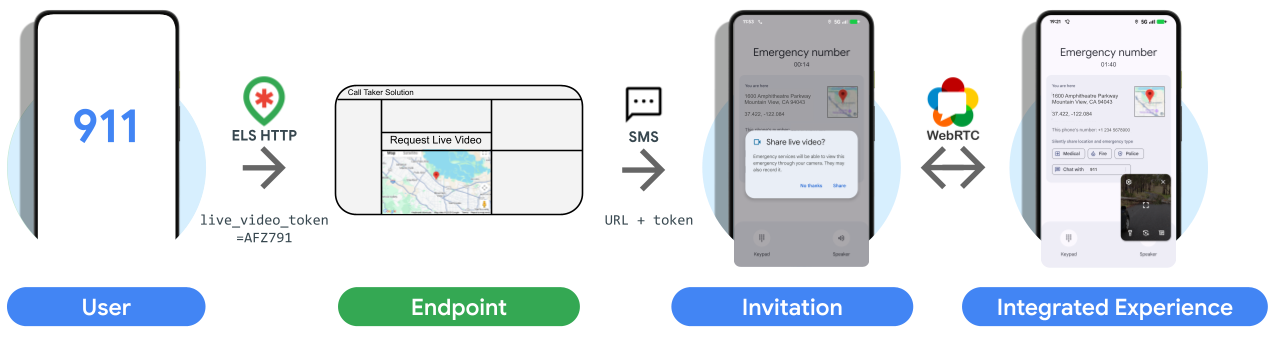
ELS can now intercept a call-taker-initiated SMS requesting live video from a user and present an integrated video experience. As this is specifically for emergency situations, it has the benefit that camera permission should be pregranted for the duration of the emergency.
Our main goals with this feature are to provide users with a:
- frictionless live video experience with no complex permissions
- consistent experience for all Android users
How it works
Integration guide
1. Receiving
After updating your ELS configuration to enable live video, you will start to
receive the live_video_token field in HTTPS ELS messages when a user's phone
supports the feature. The feature supports Android 8 Oreo devices onwards.
The token is an on-device generated ID that changes with each call or text and consists of:
- 6 random characters
- Alphanumeric
- Uppercase
2. Invitation
When you detect the token, pass it through in the URL, such as a URL parameter,
in the SMS containing the link to your video stream, for example:
https://example.com/live?token=AFZ791. ELS will detect incoming SMS messages
during emergency calls or texts and look for the matching live video token, in
this case: AFZ791.
When the device detects a valid URL and the token, the user will be presented
with a dialog asking if they would like to accept the request. If they click
Accept, the link sent in your request SMS will be opened in an integrated
webview experience.
3. Live video experience
Your live video link needs to support two experiences:
A. Web browser-based experience:
This may include your own custom UI, for example:
- Buttons
- Location requests
- Dialogs & consents
B. Integrated experience:
For this you must:
- Remove all buttons as touch events won't work
- Initiate directly into the video stream with no dialogs
Detection
You can detect the integrated mode by observing the user agent containing
Live.
Example user agent in mobile browser experience: Mozilla/5.0 (Linux; Android
10; K) AppleWebKit/537.36 (KHTML, like Gecko) Chrome/137.0.0.0 Mobile
Safari/537.36
Example user agent in integrated webview experience: Mozilla/5.0 (Linux;
Android 10; K; wv) AppleWebKit/537.36 (KHTML, like Gecko) Version/4.0
Chrome/125.000 Mobile Safari/537.36 Live/25.23.10
In JavaScript this can be achieved with the following:
if (navigator.userAgent.includes("Live")) {
    <!-- Render integrated experience -->
} else {
    <!-- Render your your own custom UI -->
}
Permissions
- Permission for camera should be pregranted for the integrated live video, you should request these as usual through JavaScript.
- Location, audio and other permissions will be rejected automatically.
Hooks
To provide the best user experience, in the integrated experience will provide the UI elements for flipping the camera and turning toggling the flashlight.
| Function Name | Return | Description | |
|---|---|---|---|
| Camera | switchCamera |
Promise<bool> |
On load, start with rear-facing camera (facing mode = environment) as most useful in emergency situations. Switch between available cameras each time the function is called. Return true on successful camera switch. |
| Flashlight | toggleFlashlight |
Promise<bool> |
Toggle the flashlight on and off each time the function is called. Return true on successful flashlight toggle. |
| Flashlight | isFlashlightAvailable |
bool |
Returns true or false depending on flashlight availability for current camera mode. After a call to switchCamera, assumes return value reflects updated availability state as soon as switchCamera's Promise resolves. |
| Flashlight | isFlashlightOn |
bool |
Returns true when flashlight is on, false otherwise. After a call to toggleFlashlight, assumes return value reflects updated flashlight on state as soon as toggleFlashlight's Promise resolves |