


This guide shows you how to use Google Mobile Ads Flutter Plugin to load and display ads from Pangle using mediation , covering both waterfall and bidding integrations. It covers how to add Pangle to an ad unit's mediation configuration and how to integrate the Pangle SDK and adapter into a Flutter app.
সমর্থিত ইন্টিগ্রেশন এবং বিজ্ঞাপন ফরম্যাট
The Ad Manager mediation adapter for Pangle has the following capabilities:
| একীকরণ | |
|---|---|
| নিলাম | |
| জলপ্রপাত | |
| ফর্ম্যাট | |
| অ্যাপ খুলুন | |
| ব্যানার | |
| ইন্টারস্টিশিয়াল | |
| পুরস্কৃত | |
| Rewarded Interstitial | |
| স্থানীয় | |
প্রয়োজনীয়তা
- সর্বশেষ Google Mobile Ads Flutter Plugin
- Flutter 3.7.0 or higher
- [For bidding]: To integrate all supported ad formats in bidding, use Google Mobile Ads mediation plugin for Pangle 2.4.0 or higher ( latest version recommended )
- To deploy on Android
- Android API level 23 or higher
- To deploy on iOS
- iOS deployment target of 13.0 or higher
- A working Flutter project configured with Google Mobile Ads Flutter Plugin . See Set up Google Mobile Ads Flutter Plugin for details.
- Set up mediation .
ধাপ ১: Pangle UI-তে কনফিগারেশন সেট আপ করুন
Sign up or Log in to your Pangle account.
Add a new application
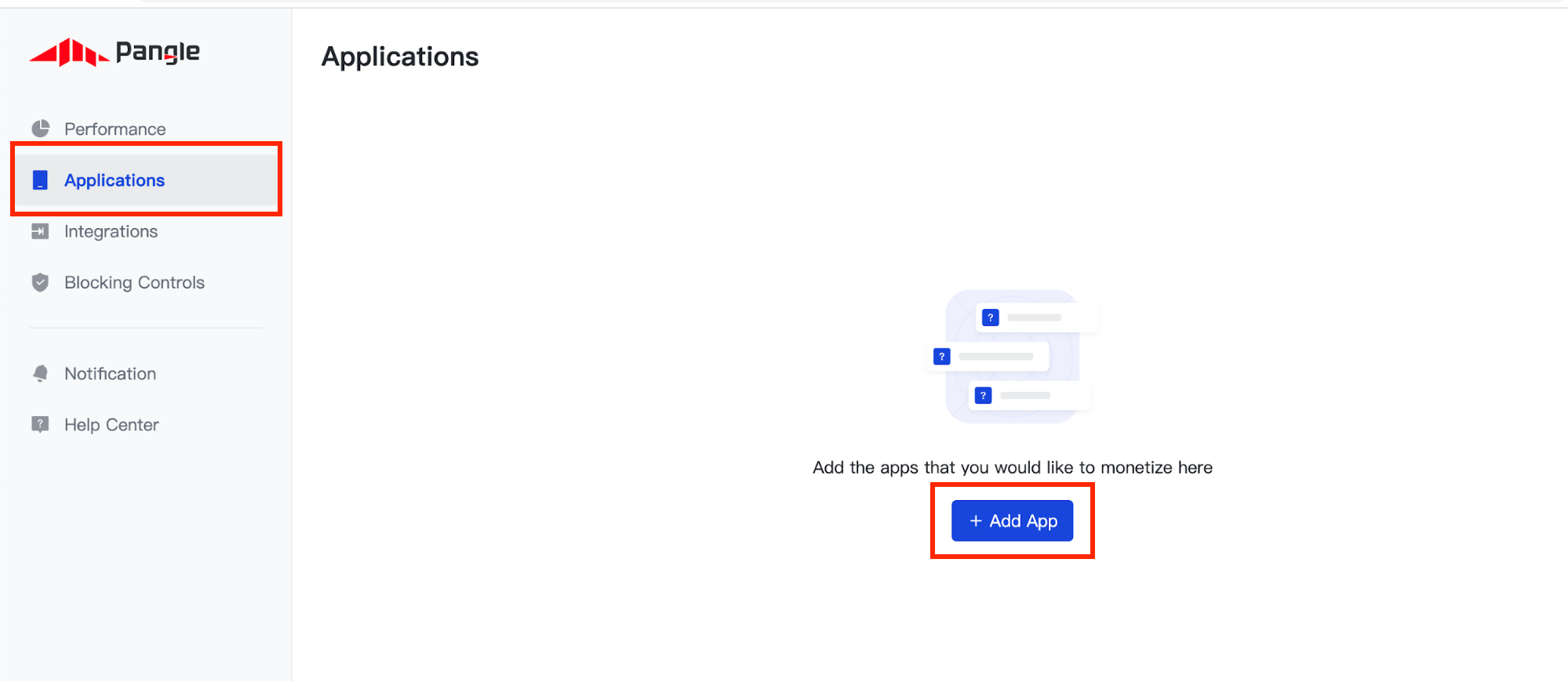
Navigate to the Applications tab and click the Add App button.
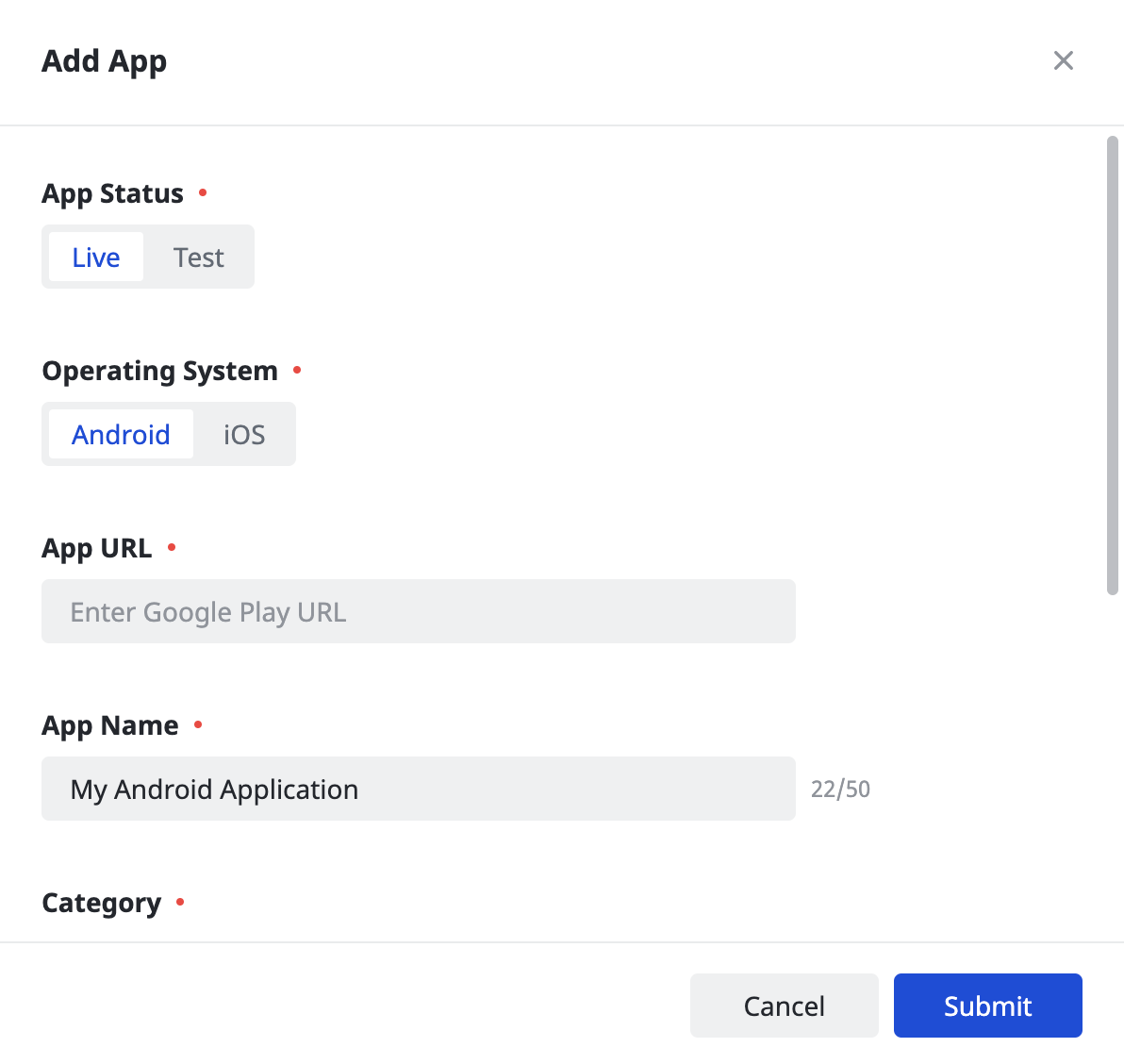
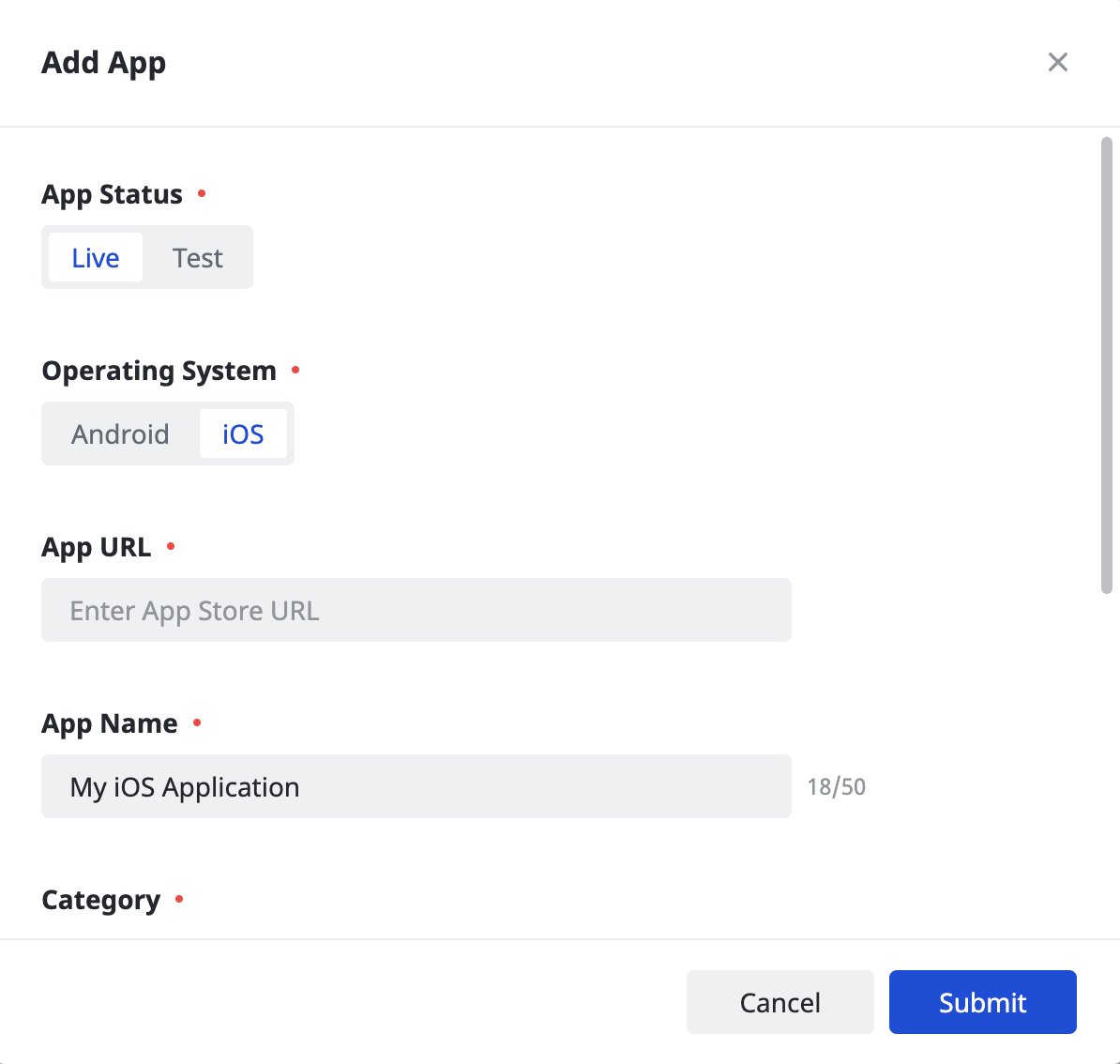
Select the Operating System you wish to create an application for and fill out the rest of the form. Then, click Submit .
অ্যান্ড্রয়েড
আইওএস
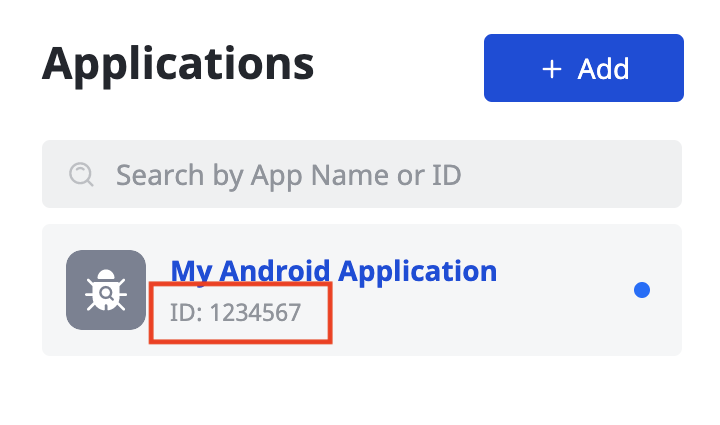
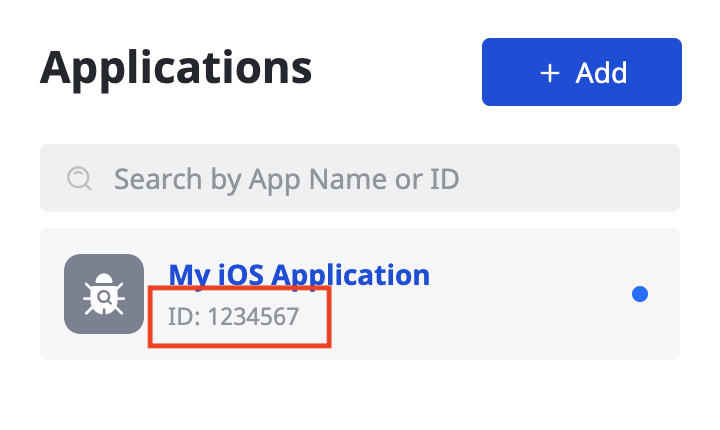
Take note of your application's App ID .
অ্যান্ড্রয়েড
আইওএস
Create an ad placement
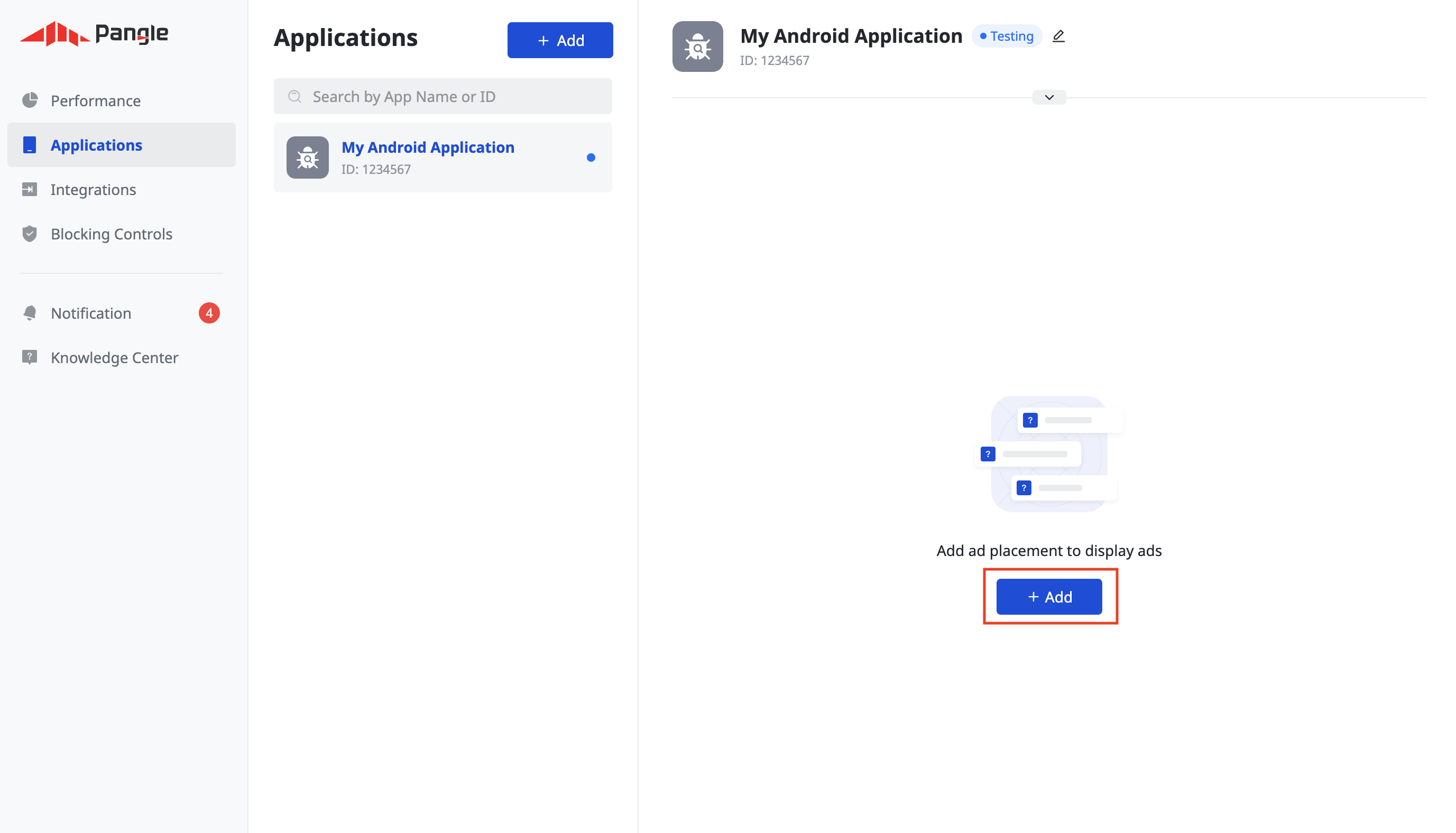
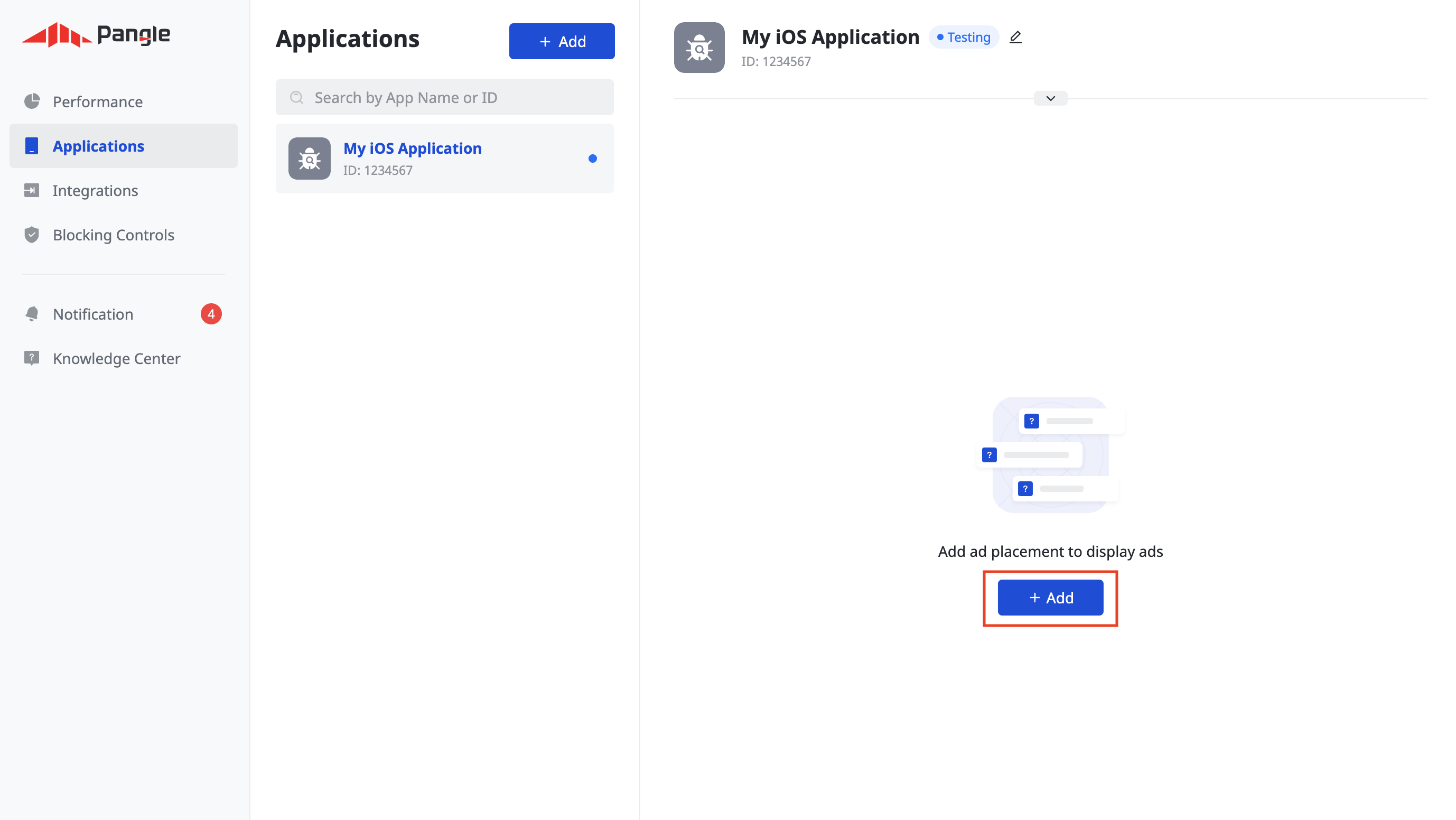
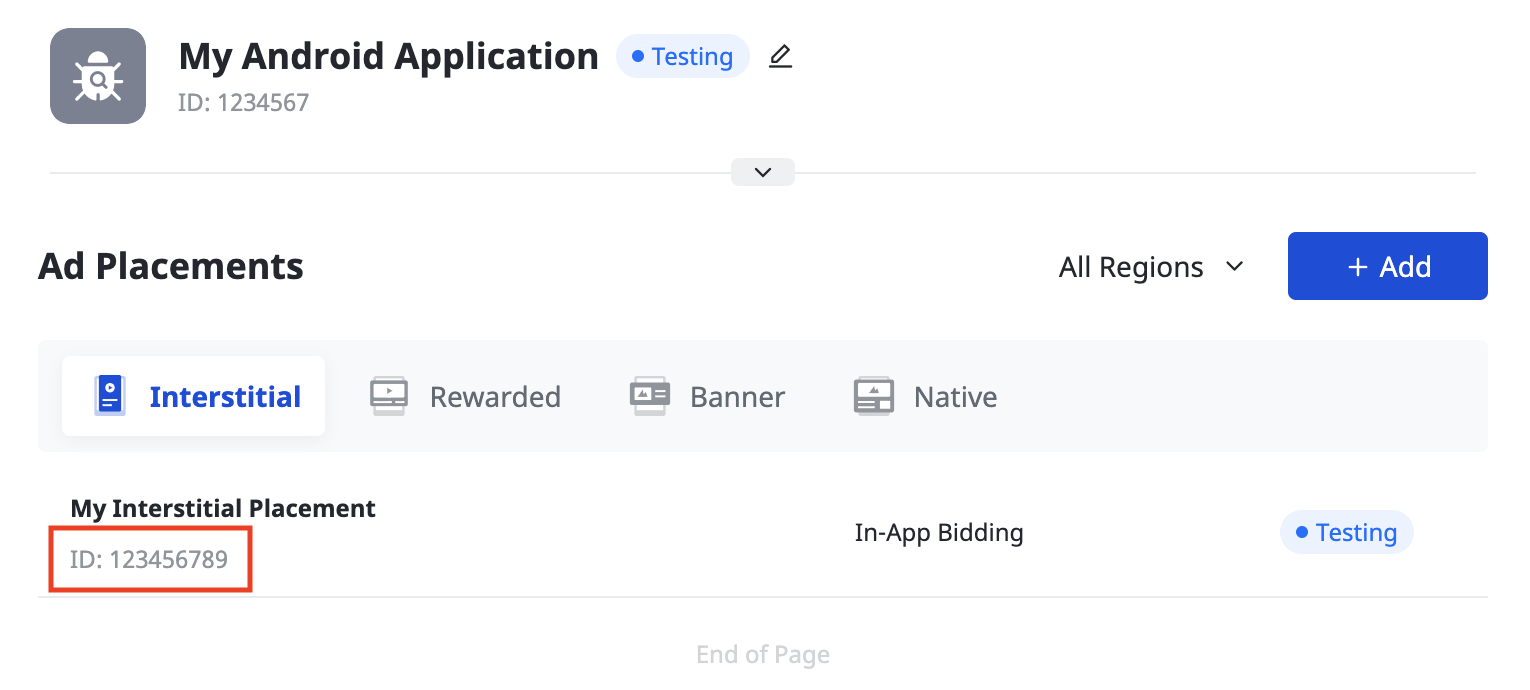
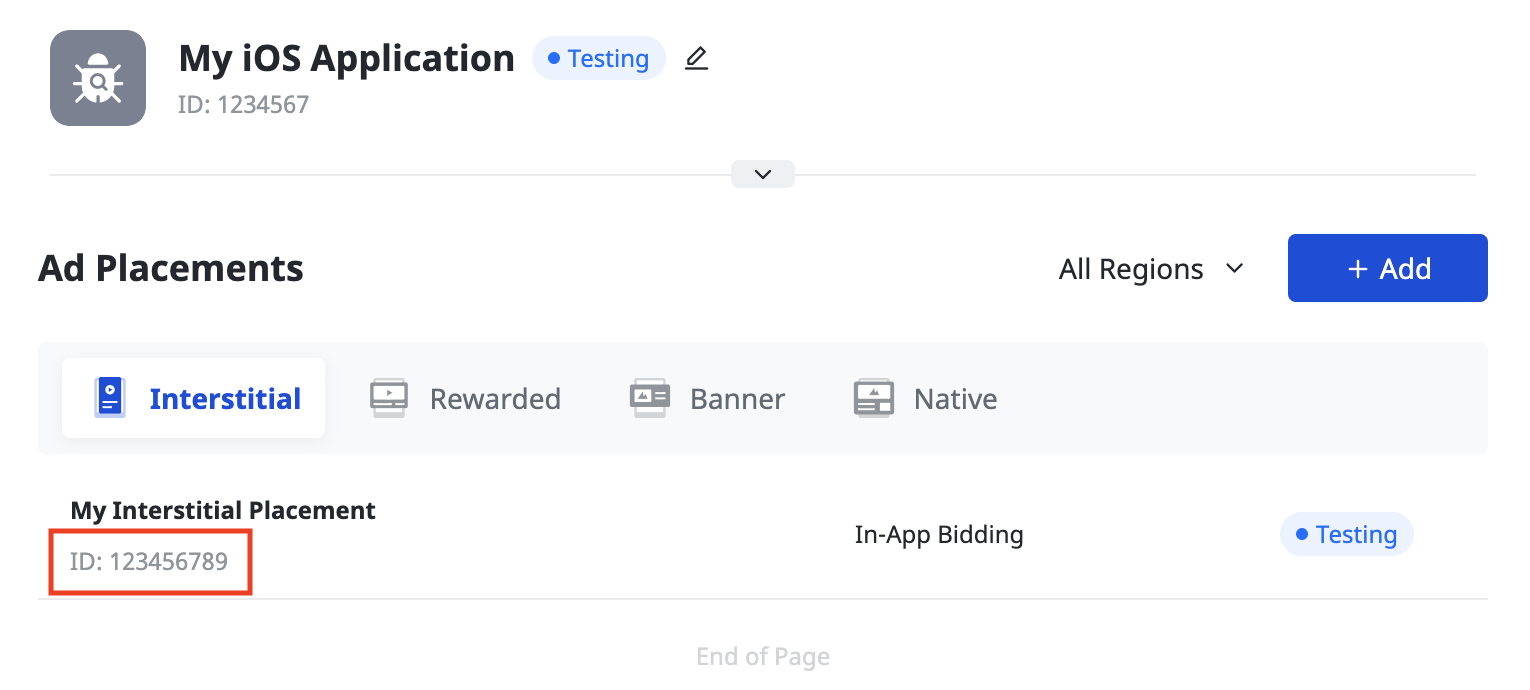
Once your application has been created, click the Add button to create your ad placement.
অ্যান্ড্রয়েড
আইওএস
নিলাম
Select your Ad Format and Ad Placement Name , and select In-App Bidding as the Pricing Type . Fill out the rest of the form and click Submit .
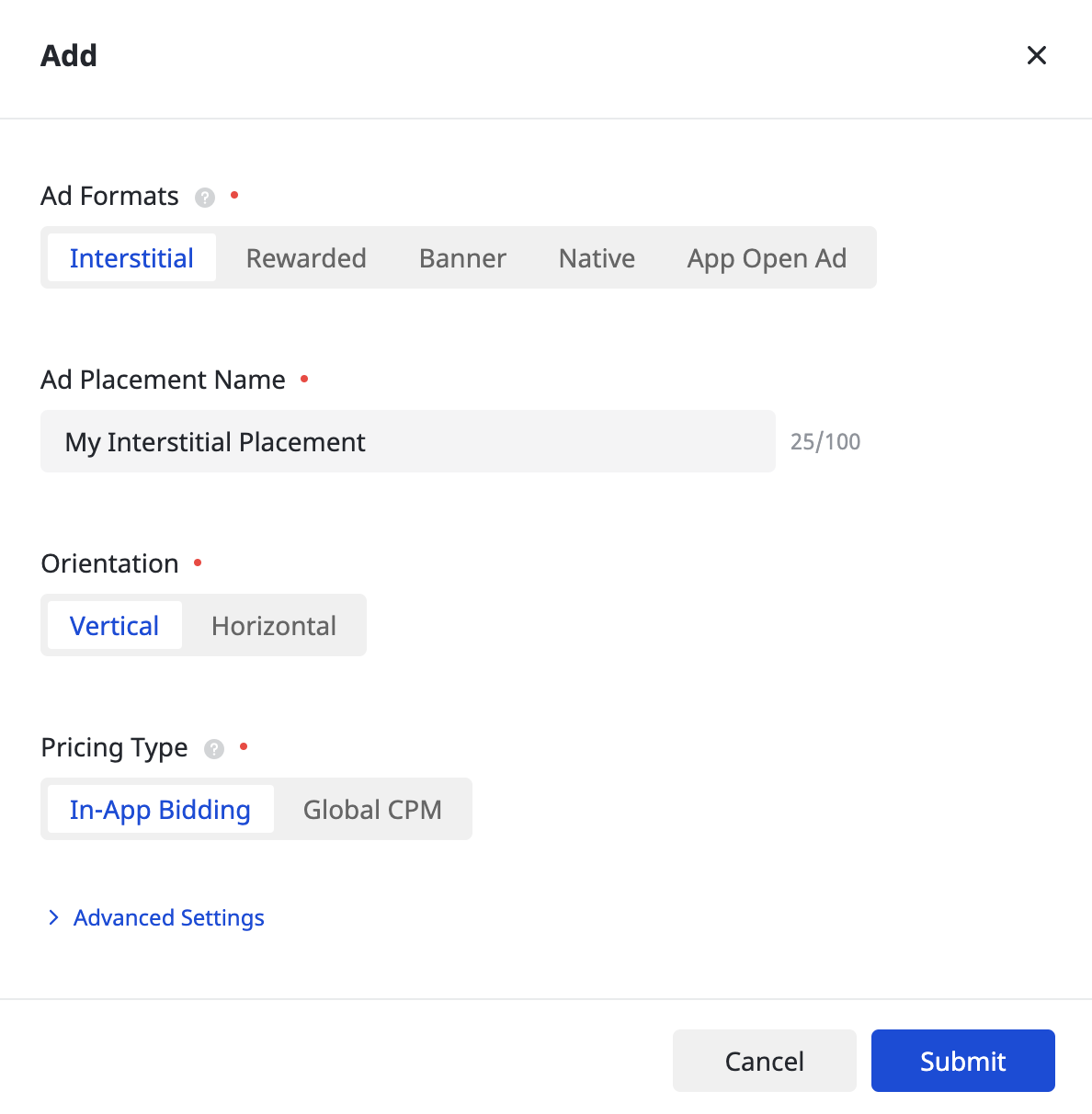
Once your ad placement is created, take note of the Ad Placement ID .
অ্যান্ড্রয়েড
আইওএস
জলপ্রপাত
Select your Ad Format and Ad Placement Name , and Global CPM as the Pricing Type . Fill out the rest of the form and click Submit .
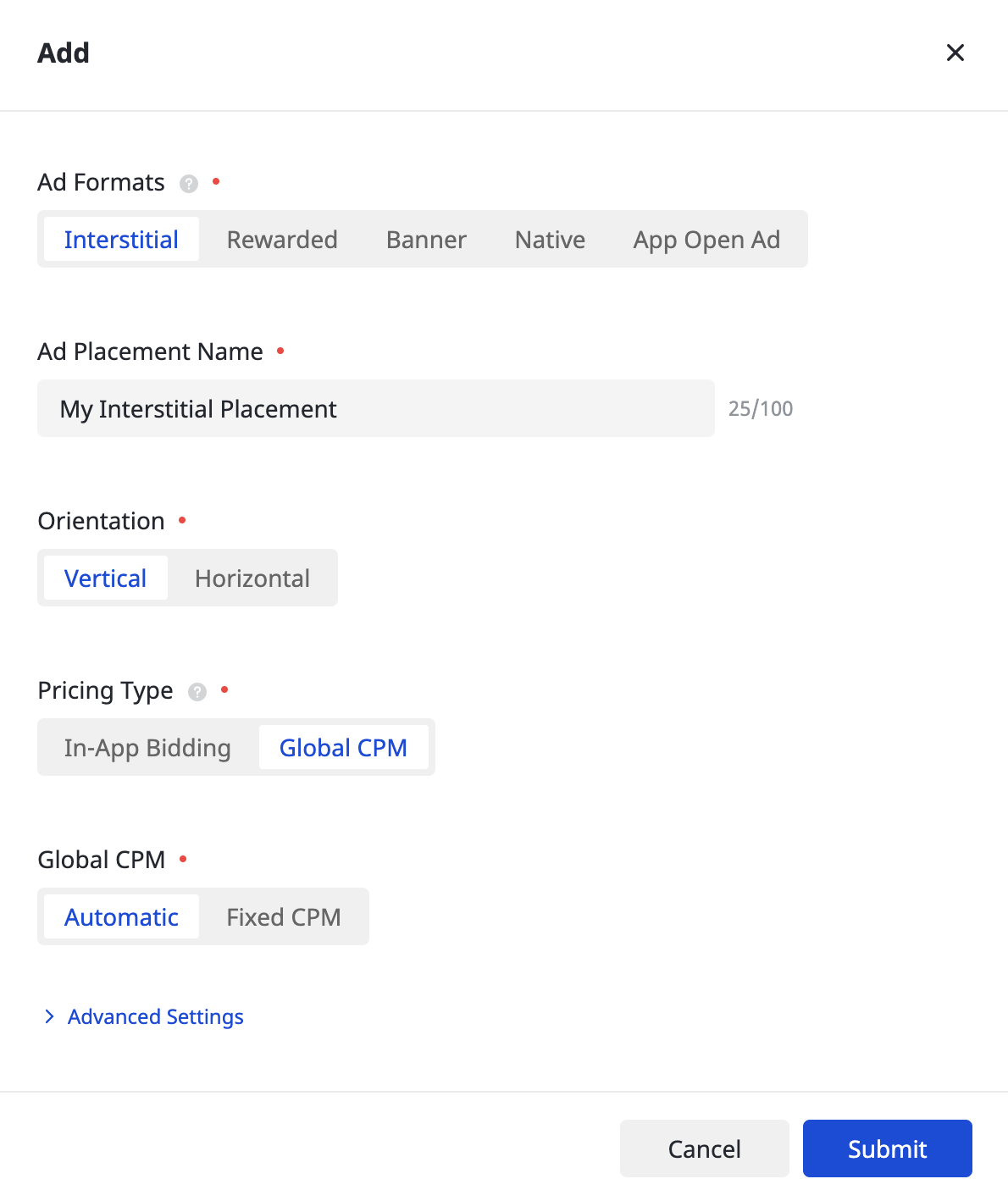
Once your ad placement is created, take note of the Ad Placement ID .
অ্যান্ড্রয়েড
আইওএস
Update your app-ads.txt
Authorized Sellers for Apps app-ads.txt is an IAB Tech Lab initiative that helps ensure your app ad inventory is only sold through channels you've identified as authorized. To prevent a significant loss in ad revenue, you'll need to implement an app-ads.txt file. If you haven't done so already, create an app-ads.txt file for Ad Manager .
To implement app-ads.txt for Pangle, see How to add Pangle to your app-ads.txt file .
টেস্ট মোড চালু করুন
Follow the instructions in Pangle's How to add a Test Ad guide on how to enable Pangle test ads.
Step 2: Set up Pangle demand in Ad Manager UI
Configure mediation settings for your ad unit
অ্যান্ড্রয়েড
For instructions, see step 2 in the guide for Android .
আইওএস
For instructions, see step 2 in the guide for iOS .
Add Pangle DSP to GDPR and US state regulations ad partners list
Follow the steps in European regulations settings and US state regulations settings to add Pangle DSP to the European and US state regulations ad partners list in the Ad Manager UI.
Step 3: Import the Pangle SDK and adapter
pub.dev এর মাধ্যমে একীকরণ
(Android only) Add the following repositories to the build.gradle file inside your project's android directory:
  repositories {
      google()
      mavenCentral()
      maven {
          url = uri("https://artifact.bytedance.com/repository/pangle/")
      }
  }
Add the following dependency with the latest versions of the Pangle SDK and adapter in your package's pubspec.yaml file:
dependencies:
  gma_mediation_pangle: ^4.0.0
Manual Integration
Download the latest version of Google Mobile Ads mediation plugin for Pangle , extract the downloaded file, and add the extracted plugin folder (and its contents) to your Flutter project. Then, reference the plugin in your pubspec.yaml file by adding the following dependency:
dependencies:
  gma_mediation_pangle:
    path: path/to/local/package
Step 4: Implement privacy settings on Pangle SDK
EU Consent and GDPR
Google EU ব্যবহারকারীর সম্মতি নীতি মেনে চলার জন্য, আপনাকে ইউরোপীয় অর্থনৈতিক অঞ্চল (EEA), যুক্তরাজ্য এবং সুইজারল্যান্ডে থাকা আপনার ব্যবহারকারীদের কাছে কিছু তথ্য প্রকাশ করতে হবে এবং যেখানে আইনত প্রয়োজন সেখানে কুকি বা অন্যান্য স্থানীয় স্টোরেজ ব্যবহারের জন্য এবং বিজ্ঞাপনের ব্যক্তিগতকরণের জন্য ব্যক্তিগত ডেটা সংগ্রহ, শেয়ার ও ব্যবহারের জন্য তাদের সম্মতি নিতে হবে। এই নীতিটি EU ePrivacy Directive এবং General Data Protection Regulation (GDPR)-এর প্রয়োজনীয়তাগুলো প্রতিফলিত করে। আপনার মিডিয়েশন চেইনের প্রতিটি বিজ্ঞাপন উৎসে সম্মতি পৌঁছেছে কিনা তা যাচাই করার দায়িত্ব আপনার। Google স্বয়ংক্রিয়ভাবে এই ধরনের নেটওয়ার্কগুলিতে ব্যবহারকারীর সম্মতির পছন্দ প্রেরণ করতে অক্ষম।
Starting in Google Mobile Ads mediation plugin for Pangle version 5.9.0, Pangle automatically reads GDPR consent set by consent management platforms that support Google's Additional Consent specification , including the UMP SDK .
US states privacy laws
মার্কিন যুক্তরাষ্ট্রের রাজ্যগুলির গোপনীয়তা আইন অনুযায়ী, ব্যবহারকারীদের তাদের "ব্যক্তিগত তথ্য" (আইনে এই পদগুলির যে সংজ্ঞা দেওয়া হয়েছে) "বিক্রয়" থেকে অপ্ট-আউট করার অধিকার দেওয়া আবশ্যক। এই অপ্ট-আউটের সুযোগটি "বিক্রেতা" পক্ষের হোমপেজে একটি সুস্পষ্ট "আমার ব্যক্তিগত তথ্য বিক্রি করবেন না" লিঙ্কের মাধ্যমে দেওয়া হয়। মার্কিন যুক্তরাষ্ট্রের রাজ্যগুলির গোপনীয়তা আইন পরিপালন নির্দেশিকা গুগল বিজ্ঞাপন পরিবেশনের জন্য সীমিত ডেটা প্রক্রিয়াকরণ সক্ষম করার সুযোগ দেয়, কিন্তু গুগল আপনার মিডিয়েশন চেইনের প্রতিটি বিজ্ঞাপন নেটওয়ার্কে এই সেটিংটি প্রয়োগ করতে পারে না। অতএব, আপনাকে আপনার মিডিয়েশন চেইনের প্রতিটি বিজ্ঞাপন নেটওয়ার্ক শনাক্ত করতে হবে যা ব্যক্তিগত তথ্য বিক্রয়ে অংশ নিতে পারে এবং পরিপালন নিশ্চিত করার জন্য সেই নেটওয়ার্কগুলির প্রত্যেকটির নির্দেশিকা অনুসরণ করতে হবে।
The Google Mobile Ads mediation plugin for Pangle includes the Pangle.SetPAConsent() method. The following sample code shows how to pass consent information to the Pangle SDK. Set consent information before you initialize Google Mobile Ads Flutter Plugin to ensure they get forwarded properly to the Pangle SDK.
using GoogleMobileAds.Api.Mediation.Pangle;
// ...

Pangle.SetPAConsent(0);
See Pangle's integration guide for more details and the values that can be provided in each method.
ধাপ ৫: প্রয়োজনীয় কোড যোগ করুন
অ্যান্ড্রয়েড
No additional code required for Pangle integration.
আইওএস
SKAdনেটওয়ার্ক ইন্টিগ্রেশন
Follow Pangle's documentation to add the SKAdNetwork identifiers to your project's Info.plist file.
Step 6: Test your implementation
Enable test ads
Make sure you register your test device for Ad Manager and enable test mode in Pangle UI.
পরীক্ষামূলক বিজ্ঞাপন যাচাই করুন
To verify that you are receiving test ads from Pangle, enable single ad source testing in ad inspector using the Pangle (Bidding) and Pangle (Waterfall) ad source(s).
ত্রুটি কোড
If the adapter fails to receive an ad from Pangle, publishers can check the underlying error from the ad response using ResponseInfo under the following classes:
অ্যান্ড্রয়েড
com.pangle.ads
com.google.ads.mediation.pangle.PangleMediationAdapter
আইওএস
GADMediationAdapterPangle
Here are the codes and accompanying messages thrown by the Pangle adapter when an ad fails to load:
অ্যান্ড্রয়েড
| ত্রুটি কোড | ডোমেইন | কারণ |
|---|---|---|
| ১০১ | com.google.ads.mediation.pangle | Invalid server parameters (eg Missing app ID or placement ID). |
| ১০২ | com.google.ads.mediation.pangle | The requested ad size does not match a Pangle supported banner size. |
| ১০৩ | com.google.ads.mediation.pangle | বিড প্রতিক্রিয়া অনুপস্থিত বা অবৈধ। |
| -1-60000 | com.pangle.ads | Pangle SDK returned an error. See Pangle's documentation for more details. |
আইওএস
| ত্রুটি কোড | ডোমেইন | কারণ |
|---|---|---|
| ১০১ | com.google.ads.mediation.pangle | Invalid server parameters (eg Missing app ID or placement ID). |
| ১০২ | com.google.ads.mediation.pangle | The requested ad size does not match a Pangle supported banner size. |
| -১-৬০০০০ | Sent by Pangle SDK | Pangle SDK returned an error. See Pangle's documentation for more details. |
প্যাঙ্গল ফ্লাটার মিডিয়েশন অ্যাডাপ্টার চেঞ্জলগ
সংস্করণ ৪.০.০
- Updated to support Google Mobile Ads Flutter Plugin version 9.0.0.
- Supports Pangle Android adapter version 8.1.0.3.1 .
- Pangle iOS অ্যাডাপ্টার সংস্করণ 8.2.0.3.0 সমর্থন করে।
- Built and tested with the Google Mobile Ads Flutter Plugin version 9.0.0.
সংস্করণ ৩.৬.০
- ফ্লাটারের সর্বনিম্ন সংস্করণ ৩.৩৮.১-এ হালনাগাদ করা হয়েছে।
- Updated to support Google Mobile Ads Flutter Plugin version 8.0.0.
- Supports Pangle Android adapter version 7.9.1.3.0 .
- Pangle iOS অ্যাডাপ্টার সংস্করণ 7.9.0.8.0 সমর্থন করে।
- Built and tested with the Google Mobile Ads Flutter Plugin version 8.0.0.
সংস্করণ ৩.৫.৩
- Supports Pangle Android adapter version 7.8.5.2.0 .
- Pangle iOS অ্যাডাপ্টার সংস্করণ 7.8.5.6.0 সমর্থন করে।
- Built and tested with the Google Mobile Ads Flutter Plugin version 7.0.0.
সংস্করণ ৩.৫.২
- ফ্লাটারের সর্বনিম্ন সংস্করণ ৩.৩৫.১-এ আপডেট করা হয়েছে।
- Updated to support Google Mobile Ads Flutter Plugin version 7.0.0
- Supports Pangle Android adapter version 7.8.0.8.0 .
- Pangle iOS অ্যাডাপ্টার সংস্করণ 7.8.0.6.0 সমর্থন করে।
- Built and tested with the Google Mobile Ads Flutter Plugin version 7.0.0.
সংস্করণ ৩.৫.১
- Supports Pangle Android adapter version 7.8.0.8.0 .
- Pangle iOS অ্যাডাপ্টার সংস্করণ 7.8.0.5.0 সমর্থন করে।
- Built and tested with the Google Mobile Ads Flutter Plugin version 6.0.0.
সংস্করণ ৩.৫.০
- Supports Pangle Android adapter version 7.8.0.7.0 .
- Pangle iOS অ্যাডাপ্টার সংস্করণ 7.8.0.3.0 সমর্থন করে।
- Built and tested with the Google Mobile Ads Flutter Plugin version 6.0.0.
সংস্করণ ৩.৪.০
- Supports Pangle Android adapter version 7.7.0.2.0 .
- Pangle iOS অ্যাডাপ্টার সংস্করণ 7.7.0.5.0 সমর্থন করে।
- Built and tested with the Google Mobile Ads Flutter Plugin version 6.0.0.
সংস্করণ ৩.৩.০
- Supports Pangle Android adapter version 7.6.0.4.0 .
- Pangle iOS অ্যাডাপ্টার সংস্করণ 7.6.0.5.0 সমর্থন করে।
- Built and tested with the Google Mobile Ads Flutter Plugin version 6.0.0.
সংস্করণ ৩.২.১
- Supports Pangle Android adapter version 7.3.0.5.0 .
- Pangle iOS অ্যাডাপ্টার সংস্করণ 7.4.1.0.0 সমর্থন করে।
- Built and tested with the Google Mobile Ads Flutter Plugin version 6.0.0.
সংস্করণ ৩.২.০
- Supports Pangle Android adapter version 7.3.0.4.0 .
- Pangle iOS অ্যাডাপ্টার সংস্করণ 7.4.0.9.0 সমর্থন করে।
- Built and tested with the Google Mobile Ads Flutter Plugin version 6.0.0.
সংস্করণ ৩.১.১
- Supports Pangle Android adapter version 7.2.0.6.0 .
- Pangle iOS অ্যাডাপ্টার সংস্করণ 7.2.0.5.0 সমর্থন করে।
- Built and tested with the Google Mobile Ads Flutter Plugin version 6.0.0.
সংস্করণ ৩.১.০
- Supports Pangle Android adapter version 7.2.0.4.0 .
- Pangle iOS অ্যাডাপ্টার সংস্করণ 7.2.0.4.0 সমর্থন করে।
- Built and tested with the Google Mobile Ads Flutter Plugin version 6.0.0.
সংস্করণ ৩.০.০
- Supports Pangle Android adapter version 7.1.0.8.0 .
- Pangle iOS অ্যাডাপ্টার সংস্করণ 7.1.1.1.0 সমর্থন করে।
- Built and tested with the Google Mobile Ads Flutter Plugin version 6.0.0.
সংস্করণ ২.২.০
- Supports Pangle Android adapter version 6.5.0.8.0 .
- Pangle iOS অ্যাডাপ্টার সংস্করণ 6.5.0.9.0 সমর্থন করে।
- Built and tested with the Google Mobile Ads Flutter Plugin version 6.0.0.
সংস্করণ ২.১.০
- Supports Pangle Android adapter version 6.5.0.4.1 .
- Pangle iOS অ্যাডাপ্টার সংস্করণ 6.5.0.8.0 সমর্থন করে।
- Built and tested with the Google Mobile Ads Flutter Plugin version 5.3.1.
সংস্করণ ২.০.০
- Supports Pangle Android adapter version 6.4.0.6.0 .
- Supports Pangle iOS adapter version 6.4.1.1.0 .
- Built and tested with the Google Mobile Ads Flutter Plugin version 5.3.0.
সংস্করণ ১.১.০
- Supports Pangle Android adapter version 5.9.0.4.0 .
- Pangle iOS অ্যাডাপ্টার সংস্করণ 5.9.0.7.0 সমর্থন করে।
- Built and tested with the Google Mobile Ads Flutter Plugin version 5.1.0.
সংস্করণ ১.০.০
- প্রাথমিক প্রকাশ।
- Supports Pangle Android adapter version 5.8.0.9.0 .
- Pangle iOS অ্যাডাপ্টার সংস্করণ 5.8.0.8.0 সমর্থন করে।
- Built and tested with the Google Mobile Ads Flutter Plugin version 5.0.1.