
کاربران ترجیح میدهند محتوایی را تماشا یا گوش دهند که از قبل میتوانند به آن دسترسی داشته باشند، مانند محتوای اشتراکی موجودشان. اگر گوگل بداند که کاربر در برنامه یا پلتفرم شما به چه محتوایی میتواند دسترسی داشته باشد، میتواند تجربه مرتبطتری را در سراسر سطوح گوگل ارائه دهد و کاربر را به آن محتوا هدایت کند.
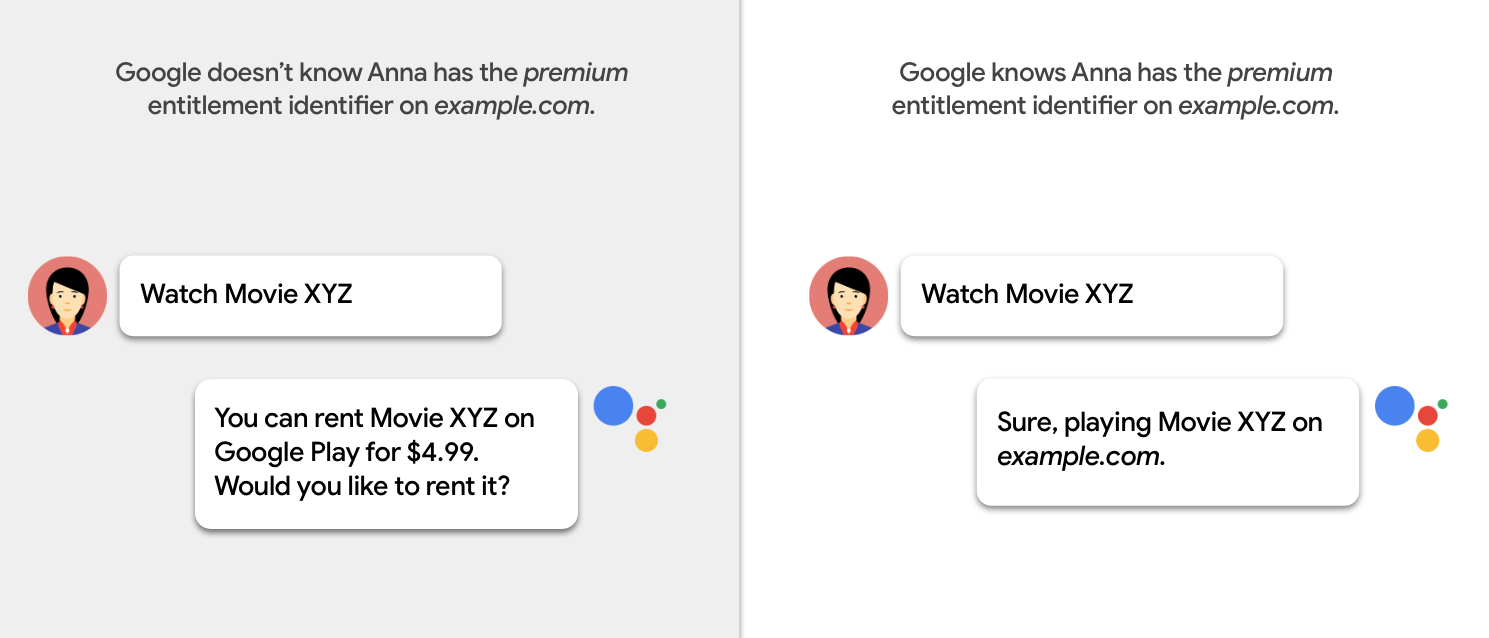
شناسایی الزامات دسترسی به محتوا
شما باید الزامات دسترسی برای هر بسته محتوایی در کاتالوگ خود را مشخص کنید. هنگام انجام این کار، سوالات زیر را در نظر بگیرید:
- آیا کاربران برای دسترسی به محتوا باید وارد برنامه یا پلتفرم شما شوند؟
آیا کاربران به اشتراک نیاز دارند؟
فقط اقدامات را تماشا کنید:
- آیا کاربران به اشتراک از یک ارائه دهنده خدمات خارجی نیاز دارند؟
- آیا اشتراک چند مرحلهای، چند بستهای یا افزونهای ارائه میدهید؟
فقط اقدامات تماشا: آیا کاربران نیاز به اجاره یا خرید محتوا دارند؟
آیا الزامات دسترسی با گذشت زمان تغییر میکند؟
آیا نیاز به دسترسی به موقعیت مکانی دستگاه بستگی دارد؟
انواع محدودیتهای دسترسی
دو نوع محدودیت دسترسی وجود دارد:
نوع پرداخت از طریق دیوار پرداخت
شما میتوانید دسترسی به محتوا را بر اساس نوع دیوار پرداخت آن محدود کنید. جدول زیر جزئیات انواع مختلف دیوار پرداخت را شرح میدهد:
| نوع پرداخت از طریق دیوار پرداخت | مثال | دسته بندی |
|---|---|---|
| نیازی به خرید یا ورود به سیستم نیست. | کراکل | nologinrequired |
| کاربر باید وارد سیستم شود، اما نیازی به اشتراک پولی ندارد. | وودو (AVOD) | free |
| کاربر باید اشتراک فعال داشته باشد. دسترسی مستقل از سطح اشتراک است. | نتفلیکس | |
| کاربر باید اشتراک فعال داشته باشد. دسترسی به سطح اشتراک بستگی دارد. | هولو (افزونهها) | |
| محتوا پس از خرید، برای مدت زمان محدودی در دسترس است. | وودو | rental |
| محتوا پس از خرید، برای مدت نامحدودی در دسترس است. | وودو | purchase |
| محتوا از طریق اشتراک کابلی در دسترس است. | اچبیاو گو | externalSubscription |
نوع Paywall برای Watch Actions
برای مشخص کردن نوع پرداخت محتوای Watch Actions، از ویژگی category در مشخصات دسترسی Action استفاده کنید:
"potentialAction": {
  "@type":"WatchAction",
  "target": { … },
  "actionAccessibilityRequirement": {
    "@type": "ActionAccessSpecification",
    "category": "subscription",
    "availabilityStarts": "2018-06-01T10:35:29Z",
    "availabilityEnds": "2019-05-31T10:35:29Z",
    "eligibleRegion": {
      "@type": "Country",
      "name": "US"
    }
  },
  ...
}
نوع Paywall برای اقدامات گوش دادن
برای مشخص کردن نوع پرداخت محتوای مربوط به Listen Actions، از ویژگی category در شیء offer استفاده کنید:
"potentialAction": {
  "@type":"ListenAction",
  "target": { … },
  "expectsAcceptanceOf":{
    "@type":"Offer",
    "category":"subscription",
    "availabilityStarts": "2018-06-01T10:35:29Z",
    "availabilityEnds": "2019-05-31T10:35:29Z",
    "eligibleRegion": {
      "@type":"Country",
      "name":"US"
    }
  },
  ...
}
منطقه جغرافیایی
شما باید مناطق جغرافیایی که محتوا در آنها در دسترس است را مشخص کنید. از یک یا هر دو ویژگی زیر استفاده کنید:
- ویژگی
eligibleRegionمربوط به یک شیء مشخصات دسترسی Action . این ویژگی الزامی است. - ویژگی
ineligibleRegionاز یک شیء مشخصات دسترسی Action .
اگر موقعیت مکانی دستگاه در هر منطقهای که در eligibleRegion مشخص شده است باشد و در هیچ منطقهای که در ineligibleRegion مشخص شده نیست، کاربر میتواند به محتوا دسترسی داشته باشد.
ویژگیهای eligibleRegion و ineligibleRegion مقادیر زیر را مجاز میدانند:
- فهرستی از
Country،CityوState. - یک شیء
GeoShape. برای جزئیات بیشتر به بخش ویژگیهایGeoShapeمراجعه کنید. - فهرستی از اشیاء
GeoShape.
اگر محتوا به صورت سراسری در دسترس است، از مقدار ویژه زیر برای eligibleRegion استفاده کنید:
"eligibleRegion": "EARTH",
موارد استفاده از qualifiedRegion
موارد زیر نمونههایی از کاربرد ویژگی eligibleRegion هستند:
- مثال ۱:
eligibleRegionبا فهرستی از کشورها. - مثال ۲:
eligibleRegionبا یک شیءGeoShapeکه شامل لیستی از کدهای پستی است. - مثال ۳:
eligibleRegionبا یک شیءGeoShapeکه شامل لیستی از کدهای ناحیه مرتبسازی رو به جلو (FSA) است. - مثال ۴:
eligibleRegionبا یک شیءGeoShapeکه حاوی یک شناسه DMA است. - مثال ۵:
eligibleRegionبا فهرستی از اشیاءGeoShape. هر کدام شامل یک شناسه DMA هستند. - مثال ۶:
ineligibleRegionبا کدهای پستی مسدود شده.
مثال ۱
eligibleRegion با فهرستی از کشورها:
"actionAccessibilityRequirement": {
  "@type": "ActionAccessSpecification",
  "category": "subscription",
  "requiresSubscription": {
    "@type": "MediaSubscription",
    "@id": "http://www.example.com/north_america_network/subscription",
    "name": "Example Subscription",
    "commonTier": true
  },
  "eligibleRegion": [
    {
      "@type": "Country",
      "name": "US"
    },
    {
      "@type": "Country",
      "name": "CA"
    }
  ]
}
مثال ۲
eligibleRegion با یک شیء GeoShape که شامل لیستی از کدهای پستی است:
"actionAccessibilityRequirement": {
  "@type": "ActionAccessSpecification",
  "category": "subscription",
  "requiresSubscription": {
    "@type": "MediaSubscription",
    "@id": "http://www.example.com/local_tv_network/subscription",
    "name": "Example Subscription",
    "commonTier": true
  },
  "eligibleRegion": {
    "@type": "GeoShape",
    "@id": "http://example.com/area1",
    "addressCountry": "US",
    "postalCode": [
      "94118",
      "94119"
    ]
  }
}
مثال ۳
eligibleRegion با یک شیء GeoShape که شامل لیستی از کدهای ناحیه مرتبسازی رو به جلو (FSA) است:
"actionAccessibilityRequirement": {
  "@type": "ActionAccessSpecification",
  "category": "subscription",
  "requiresSubscription": {
    "@type": "MediaSubscription",
    "@id": "http://www.example.com/local_tv_network/subscription",
    "name": "Example Subscription",
    "commonTier": true
  },
  "additionalProperty": {
      "@type": "PropertyValue",
      "name": "DisplaySubscriptionIdentifier",
      "value": "http://www.example.com/local_tv_network/subscription"
  },
  "eligibleRegion":{
    "@type": "GeoShape",
    "@id": "http://example.com/area2",
    "addressCountry": "CA",
    "postalCode": [
      "1A1",
      "K1A"
    ]
  }
}
مثال ۴
eligibleRegion با یک شیء GeoShape که حاوی شناسه DMA است:
"actionAccessibilityRequirement": {
  "@type": "ActionAccessSpecification",
  "category": "subscription",
  "requiresSubscription": {
    "@type": "MediaSubscription",
    "@id": "http://www.example.com/abcd/subscription",
    "name": "Example Subscription",
    "commonTier": true
  },
  "additionalProperty": {
      "@type": "PropertyValue",
      "name": "DisplaySubscriptionIdentifier",
      "value": "http://www.example.com/abcd/subscription"
  },
  "eligibleRegion":{
    "@type": "GeoShape",
    "@id": "http://example.com/area3",
    "addressCountry": "US",
    "identifier": [
      {
        "@type": "PropertyValue",
        "propertyID": "DMA_ID",
        "value": "501"
      }
    ]
  }
}
مثال ۵
eligibleRegion با فهرستی از اشیاء GeoShape . هر کدام شامل یک شناسه DMA هستند:
"actionAccessibilityRequirement" : {
   "@type" : "ActionAccessSpecification",
   "eligibleRegion" : [
      {
         "@id" : "http://example.com/dma/601",
         "@type" : "GeoShape",
         "addressCountry" : "US",
         "identifier" : {
            "@type" : "PropertyValue",
            "propertyID" : "DMA_ID",
            "value" : "601"
         }
      },
      {
         "@id" : "http://example.com/dma/602",
         "@type" : "GeoShape",
         "addressCountry" : "US",
         "identifier" : {
            "@type" : "PropertyValue",
            "propertyID" : "DMA_ID",
            "value" : "602"
         }
      }
   ]
}
مثال ۶
ineligibleRegion با کدهای پستی مسدود شده:
"actionAccessibilityRequirement": {
  "@type": "ActionAccessSpecification",
  "category": "subscription",
  "requiresSubscription": {
    "@type": "MediaSubscription",
    "@id": "http://www.example.com/local_tv_network/subscription",
    "name": "Example Subscription",
    "commonTier": true
  },
  "additionalProperty": {
      "@type": "PropertyValue",
      "name": "DisplaySubscriptionIdentifier",
      "value": "http://www.example.com/local_tv_network/subscription"
  },
 "eligibleRegion":   {
      "@type": "Country",
      "name": "US"
    },
  "ineligibleRegion": {
    "@type": "GeoShape",
    "@id": "http://example.com/area1",
    "addressCountry": "US",
    "postalCode": [
      "94118",
      "94119"
    ]
  }
}
شناسه حق امتیاز
شناسهی حق دسترسی، entitlementId ، به رشتهای اشاره دارد که نشاندهندهی دسترسی به گروهی از محتوا در کاتالوگ رسانهی شما است. برای تعیین اینکه آیا کاربری به محتوای شما دسترسی دارد یا خیر، گوگل مراحل زیر را انجام میدهد:
- ما یک فراخوانی API به نقطه پایانی Entitlements شما انجام میدهیم تا شناسههای حقوقی کاربر را دریافت کنیم.
- ما شناسههای حقوقی مورد نیاز محتوا را از فید «اقدامات رسانهای» شما جستجو میکنیم.
- ما
entitlementIdکاربر را با ویژگیidentifierشیء اشتراک رسانه در فید شما مطابقت میدهیم. اگر حداقل یکentitlementIdمطابقت داشته باشد، تعیین میکنیم که کاربر میتواند به محتوا دسترسی داشته باشد.
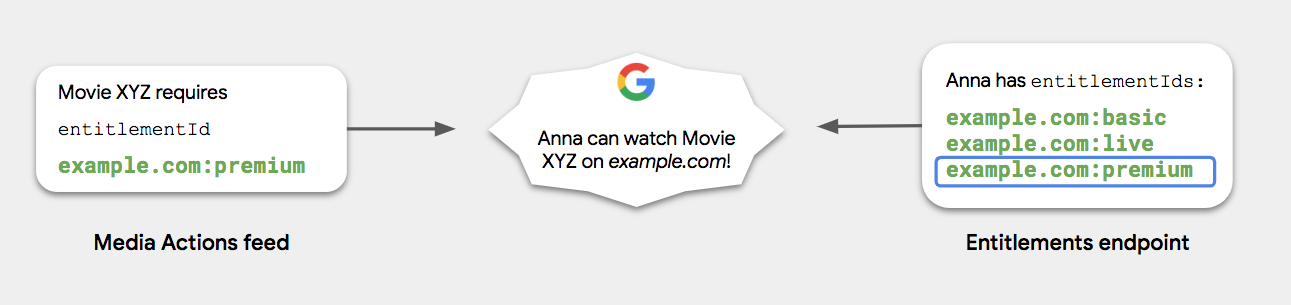
گوگل توصیه میکند که از سینتکس زیر برای entitlementId استفاده کنید:
<domain name> + colon (:) + <access level to content>
مثالهای نحوی:
-
example.com:basic -
example.com:premium -
example.com:sports
مثال شناسه حق امتیاز
فید MediaExampleCompany مشخص میکند که Movie XYZ به example.com:basic entitlementId نیاز دارد، همانطور که نشان داده شده است:
{
  "@context": ["http://schema.org", {"@language": "en"}],
  "@type": "Movie",
  "@id": "www.example.com/movie_xyz",
  "url": "www.example.com/movie_xyz",
  "name": "Movie XYZ",
  "potentialAction": {
    "@type": "WatchAction",
    "target": [ … ],
    "actionAccessibilityRequirement": {
      "@type": "ActionAccessSpecification",
      "category": "subscription",
      "requiresSubscription": {
        "@type": "MediaSubscription",
        "@id": "http://www.example.com/basic_subscription",
        "name": "Basic subscription",
        "commonTier": true
        ...
      },
      "additionalProperty": {
        "@type": "PropertyValue",
        "name": "DisplaySubscriptionIdentifier",
        "value": "http://www.example.com/basic_subscription"
      },
      ...
    }
  },
  ...
}
موارد استفاده رایج از دسترسی
موارد زیر موارد استفاده رایج از دسترسی هستند:
- رایگان (بدون نیاز به ورود): محتوا بدون نیاز به ورود، اشتراک یا خرید در دسترس است.
- رایگان (نیاز به ورود): محتوا نیاز به ورود کاربران دارد اما نیازی به اشتراک ندارد.
- اشتراک تکلایه: محتوا نیاز به اشتراک دارد. همه مشترکین میتوانند صرف نظر از بسته اشتراک خود، به محتوای یکسان، چه فیلم و چه قسمت، دسترسی داشته باشند.
- اشتراک چند سطحی: محتوا نیاز به اشتراک دارد. مشترکین میتوانند بر اساس سطح اشتراک خود به محتوای مختلف، چه فیلم و چه قسمت، دسترسی داشته باشند. به عنوان مثال، نقرهای در مقابل طلایی .
- اشتراک افزونه: محتوا نیاز به اشتراک دارد. مشترکین میتوانند محتوای ویژه را علاوه بر اشتراک معمولی خود اضافه کنند.
- خرید یکباره: محتوا قابل خریداری است و پس از آن کاربر میتواند به طور نامحدود به آن دسترسی داشته باشد.
- تلویزیون زنده: اشتراک شامل دسترسی به کانالهای محلی، ملی و پریمیوم میشود.
- اشتراک شخص ثالث: محتوا مستلزم آن است که کاربر با ارائه دهنده کابل خود وارد سیستم شود.
رایگان (نیازی به ورود نیست)
ورود لازم نیست
محتوا بدون نیاز به ورود یا عضویت در دسترس است.
{
  "actionAccessibilityRequirement": {
    "@type": "ActionAccessSpecification",
    "category": "nologinrequired",
    "availabilityStarts": "2015-01-01T00:00Z",
    "availabilityEnds": "2015-12-31T00:00Z",
    "eligibleRegion": {
      "@type": "Country",
      "name": "US"
    }
  }
}
categoryرویnologinrequiredتنظیم کنید.-
expectAcceptanceOfلحاظ نکنید.
رایگان (نیاز به ورود)
ورود لازم است
این محتوا نیاز به ورود کاربران دارد اما نیازی به اشتراک ندارد.
{
  "actionAccessibilityRequirement": {
    "@type": "ActionAccessSpecification",
    "category": "free",
    "availabilityStarts": "2015-01-01T00:00Z",
    "availabilityEnds": "2015-12-31T00:00Z",
    "eligibleRegion": {
      "@type": "Country",
      "name": "US"
    }
  }
}
categoryرا رویfreeتنظیم کنید.-
expectAcceptanceOfلحاظ نکنید.
اشتراک تک لایه
در مدل اشتراک تکلایه، ارائهدهنده خدمات یک سطح اشتراک دارد. همه مشترکین میتوانند صرف نظر از بسته اشتراک خود، به محتوای یکسانی، چه فیلم و چه قسمت، دسترسی داشته باشند.
{
  "actionAccessibilityRequirement": {
    "@type": "ActionAccessSpecification",
    "category": "subscription",
    "availabilityStarts": "2015-01-01T00:00Z",
    "availabilityEnds": "2015-12-31T00:00Z",
    "requiresSubscription": {
        "@type": "MediaSubscription",
        "name": "Example Package",
        "commonTier": true,
        "@id": "http://www.example.com/example_package"
    },
    "additionalProperty": {
      "@type": "PropertyValue",
      "name": "DisplaySubscriptionIdentifier",
      "value": "http://www.example.com/example_package"
    },
    "eligibleRegion": {
      "@type": "Country",
      "name": "US"
    }
  }
}
اشتراک چند سطحی
در مدل اشتراک پلکانی، یک ارائهدهنده خدمات چندین سطح اشتراک مانند طلایی ، نقرهای و برنزی دارد. کاربرانی که اشتراک سطح بالا را دارند میتوانند به تمام محتوای سطح پایینتر دسترسی داشته باشند. با این حال، کاربرانی که اشتراک سطح پایینتر را دارند نمیتوانند به محتوای سطح بالاتر دسترسی داشته باشند.
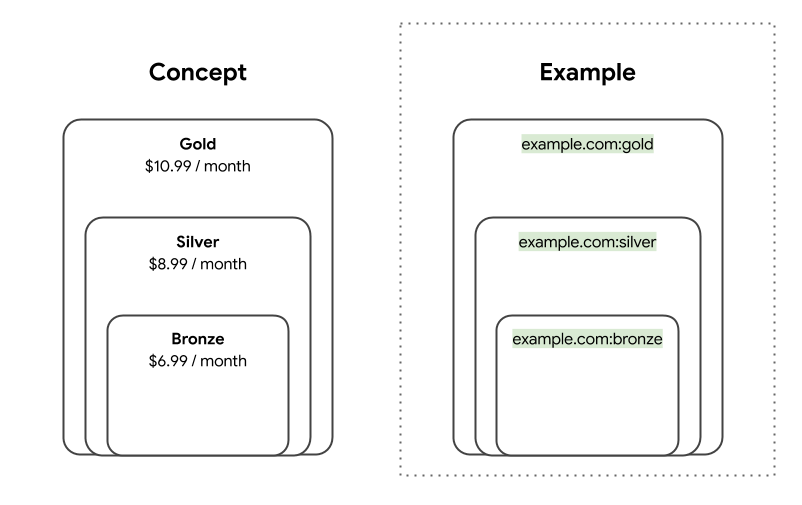
سناریوی زیر را در نظر بگیرید:
- جین در سطح طلایی مشترک میشود. نقطه پایانی مجوزهای شما شناسههای
entitlementIdزیر را برمیگرداند:-
example.com:bronze -
example.com:silver -
example.com:gold
-
- جان در سطح برنزی مشترک میشود. نقطه پایانی مجوزهای شما،
entitlementIdزیر را برمیگرداند:-
example.com:bronze
-
- فید اقدامات رسانهای شما الزامات زیر را شرح میدهد:
- فیلم A به
example.com:bronzeنیاز دارد. - فیلم B به
example.com:silverنیاز دارد.
- فیلم A به
در این سناریو، گوگل سطوح دسترسی زیر را برای جین و جان تعیین میکند:
- هم جین و هم جان به فیلم A دسترسی دارند.
- جین به فیلم B دسترسی دارد، اما جان ندارد.
{
  "actionAccessibilityRequirement": {
    "@type": "ActionAccessSpecification",
    "category": "subscription",
    "requiresSubscription": {
      "@type": "MediaSubscription",
      "@id": "http://www.example.com/basic_subscription",
      "name": "Bronze",
      "commonTier": true
      ...
    },
    "additionalProperty": {
      "@type": "PropertyValue",
      "name": "DisplaySubscriptionIdentifier",
      "value": "http://www.example.com/basic_subscription"
    },
    ...
  }
}
اشتراک افزونه
در مدل اشتراک افزونهها، ارائهدهنده خدمات به کاربران اجازه میدهد تا حق عضویت خود را افزایش داده و کانالهایی را به اشتراک پایه اضافه کنند. کاربران میتوانند هر تعداد کانال که میخواهند اضافه کنند.

سناریوی زیر را در نظر بگیرید:
- جین علاوه بر اشتراک پایه، PRO و Sportz نیز دارد. نقطه پایانی مجوزهای شما شناسههای
entitlementIdزیر را برمیگرداند:-
example.com:basic -
example.com:pro -
example.com:sportz
-
- جان فقط اشتراک پایه را دارد. نقطه پایانی مجوزهای شما،
entitlementIdزیر را برمیگرداند:-
example.com:basic
-
- فید اقدامات رسانهای شما الزامات زیر را شرح میدهد:
- فیلم A به
example.com:basicنیاز دارد. - فیلم B به
example.com:proنیاز دارد.
- فیلم A به
در این سناریو، گوگل سطوح دسترسی زیر را برای جین و جان تعیین میکند:
- هم جین و هم جان به فیلم A دسترسی دارند.
- جین به فیلم B دسترسی دارد، اما جان ندارد.
{
  "actionAccessibilityRequirement": {
    "@type": "ActionAccessSpecification",
    "category": "subscription",
    "availabilityStarts": "2015-01-01T00:00Z",
    "availabilityEnds": "2015-12-31T00:00Z",
    "eligibleRegion": {
      "@type": "Country",
      "name": "US"
    }
    "requiresSubscription": [
      {
          "@type": "MediaSubscription",
          "@id": "https://www.example.com/package/basic",
          "name": "Basic",
          "sameAs": "https://www.example.com/package/basic",
          "commonTier": true
        },
        {
          "@type": "MediaSubscription",
          "@id": "https://www.example.com/packages/basic/pro",
          "name": "PRO",
          "sameAs": "https://www.example.com/package/pro",
          "identifier": "example.com:pro",
          "commonTier": false
        },
        {
          "@type": "MediaSubscription",
          "@id": "https://www.example.com/package/sportz",
          "name": "Sportz",
          "sameAs": "https://www.example.com/package/sports",
          "identifier": "example.com:sportz",
          "commonTier": false
        }
    ],
      "additionalProperty": {
        "@type": "PropertyValue",
        "name": "DisplaySubscriptionIdentifier",
        "value": "http://www.example.com/package/basic"
      },
    }
  }
}
خرید یکجا
خرید
محتوا پس از خرید، برای مدت نامحدودی در دسترس است.
{
  "actionAccessibilityRequirement": {
    "@type": "ActionAccessSpecification",
    "category": "purchase",
    "availabilityStarts": "2015-01-01T00:00Z",
    "availabilityEnds": "2015-12-31T00:00Z",
    "eligibleRegion": {
      "@type": "Country",
      "name": "US"
    },
    "expectsAcceptanceOf": {
      "@type": "Offer",
      "price": 7.99,
      "priceCurrency": "USD",
      "seller": {
        "@type": "Organization",
        "name": "Example",
        "sameAs": "http://www.example.com/"
      }
    }
  }
}
categoryبرایpurchaseتنظیم کنید.- برای نشان دادن قیمت خرید،
expectAcceptanceOfدرactionAccessibilityRequirementقرار دهید.
اجاره
محتوا پس از خرید، برای مدت زمان محدودی در دسترس است.
{
  "actionAccessibilityRequirement": {
    "@type": "ActionAccessSpecification",
    "category": "rental",
    "availabilityStarts": "2015-01-01T00:00Z",
    "availabilityEnds": "2015-12-31T00:00Z",
    "eligibleRegion": {
      "@type": "Country",
      "name": "US"
    },
    "expectsAcceptanceOf": {
      "@type": "Offer",
      "price": 7.99,
      "priceCurrency": "USD",
      "seller": {
        "@type": "Organization",
        "name": "Example",
        "sameAs": "http://www.example.com/"
      }
    }
  }
}
categoryرا رویrentalتنظیم کنید.- برای مشخص کردن قیمت اجاره،
expectAcceptanceOfدرactionAccessibilityRequirementقرار دهید.
تلویزیون زنده
در فید اقدامات رسانهای، میتوانید دسترسی به یک کانال یا رویداد تلویزیونی زنده را بر اساس دو شرط کاربری زیر محدود کنید:
- مکان دستگاه کاربر
برای محدود کردن دسترسی به کانال تلویزیونی، منطقهای را که کاربران به آن دسترسی دارند مشخص کنید. این شرایط معمولاً برای کانالهای تلویزیونی پخش محلی اعمال میشود.
- وضعیت حساب کاربری
اگر دسترسی به یک کانال تلویزیونی به تنظیمات سطح حساب کاربری کاربر بستگی دارد، از شناسههای حق دسترسی برای نمایش محدودیت استفاده کنید.
این شرط معمولاً در موارد استفاده زیر اعمال میشود:
- بسته: کانالهای ملی اغلب در بستهها گنجانده میشوند و کاربران انتخاب میکنند که در کدام بسته مشترک شوند.
- افزونه: برخی از کانالهای پریمیوم از کاربران میخواهند که کانالهای اضافی را به صورت انتخابی به اشتراک خود اضافه کنند.
- شبکه ورزشی منطقهای (RSN): RSNها معمولاً با موقعیت مکانی «خانه» کاربر مرتبط هستند. کاربران میتوانند حتی زمانی که به خارج از موقعیت مکانی «خانه» خود سفر میکنند، محتوا را در RSN تماشا کنند.
اشتراک شخص ثالث
اشتراک شخص ثالث
محتوا از طریق سرویس دیگری برای مشترکین در دسترس است.
{
  "actionAccessibilityRequirement": {
    "@type": "ActionAccessSpecification",
    "category": "externalsubscription"
    "availabilityStarts": "2015-01-01T00:00Z",
    "availabilityEnds": "2015-12-31T00:00Z",
    "requiresSubscription":{
      "@type": "MediaSubscription",
      "@id": "https://www.example.com/faq",
      "name": "Example",
      "sameAs": "https://www.example.com/faq",
      "authenticator": {
        "@type": "Organization",
        "name": "TVE"
      }
    },
    "additionalProperty": {
      "@type": "PropertyValue",
      "name": "DisplaySubscriptionIdentifier",
      "value": "http://www.example.com/faq"
     },
    "eligibleRegion": {
      "@type": "Country",
      "name": "US"
    }
  }
}
- برای نشان دادن اینکه سرویس دیگری مشترکین را احراز هویت میکند،
authenticatorاضافه کنید. برای مثال، HBO GO نیاز به اشتراک از ارائهدهنده کابل دارد.
بستههای سطح مشترک
محتوای سطح مشترک برای همه مشترکین صرف نظر از بسته اشتراک آنها در دسترس است. سطح مشترک برای همه محتوا با category subscription اعمال میشود. برای اطلاعات بیشتر در مورد ویژگی category ، بخش نوع Paywall را بررسی کنید.
چرا یک بسته سطح مشترک مورد نیاز است؟
چندین سطح گوگل، پیشنهادهای تلویزیونی و سینمایی را به کاربران ارائه میدهند. برای تنظیم انتظارات کاربران در مورد هزینه، گوگل باید بفهمد که چه محتوایی از طریق استفاده از سطح مشترک برای همه مشترکین در دسترس است. گوگل همچنین باید بفهمد که چه محتوایی برای مشترکین با بستههای اشتراک خاص در دسترس است.
گوگل عناوین موجود در لایه مشترک را توصیه میکند، مگر اینکه از API مربوط به حق دسترسی پشتیبانی کنید. این API به گوگل اجازه میدهد تا عناوین غیر مشترکی را که هر کاربر خاص میتواند به آنها دسترسی داشته باشد، درک کند.
چه زمانی باید یک بسته سطح مشترک ایجاد کنم؟
زمانی که سرویس شما محتوایی را ارائه میدهد که برای همه مشترکین در دسترس است، به یک بسته سطح مشترک نیاز دارید. این شامل سرویسهایی میشود که فقط یک بسته ارائه میدهند و سرویسهایی که چندین بسته یا افزونه ارائه میدهند.
ارائهدهندگانی که هیچ محتوایی برای همه مشترکین در دسترس ندارند، نیازی به ایجاد یک بسته سطح مشترک ندارند. به عنوان مثال، ارائهدهندگان خدماتی هستند که محتوای منحصر به فرد متقابل را در تمام بستههای خود ارائه میدهند.
نمونههای رایج از سطوح
در ادامه نمونههایی از لایه مشترک آمده است.
اشتراک پلکانی
در مدل اشتراک پلکانی، یک ارائهدهنده خدمات دارای چندین سطح اشتراک مانند طلایی ، نقرهای و برنزی است. کاربرانی که اشتراک سطح بالاتر را دارند به تمام محتوای سطوح پایینتر دسترسی دارند. کاربرانی که اشتراک سطح پایینتری دارند به محتوای سطوح بالاتر دسترسی ندارند. تصویر زیر نمونهای از ساختار بسته است.
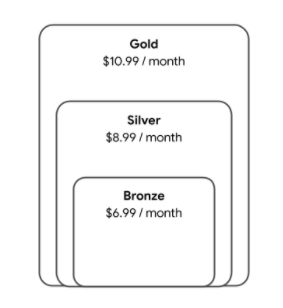
در مثال کد زیر، بسته برنزی، لایه مشترک است زیرا همه کاربران به تمام محتوای آن لایه دسترسی دارند.
"requiresSubscription": [
    {
      "@type": "MediaSubscription",
      "@id": "https://www.example.com/package/bronze",
      "name": "Bronze",
      "sameAs": "https://www.example.com/package/bronze",
      "commonTier": true
    },
    {
      "@type": "MediaSubscription",
      "@id": "https://www.example.com/package/silver",
      "name": "Silver",
      "sameAs": "https://www.example.com/package/silver",
      "identifier": "example.com:silver",
      "commonTier": false
    },
    {
      "@type": "MediaSubscription",
      "@id": "https://www.example.com/package/gold",
      "name": "Gold",
      "sameAs": "https://www.example.com/package/gold",
      "identifier": "example.com:gold",
      "commonTier": false
    }
  ],
اضافه کردنها
در مدل اشتراک افزونهها، ارائهدهنده خدمات به کاربران اجازه میدهد تا حق عضویت خود را افزایش داده و کانالهایی را به اشتراک پایه اضافه کنند. کاربران میتوانند هر تعداد کانال که میخواهند اضافه کنند. تصویر زیر نمونهای از ساختار بسته است.
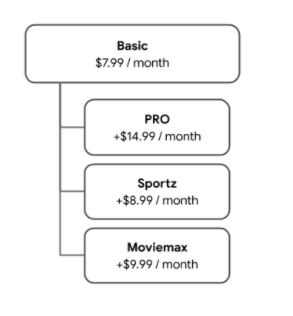
اگر کانالی در دسترس همه کاربران دارید و هیچ هزینهای برای کانال وجود ندارد، میتوانید بسته را با بسته سطح مشترک ادغام کنید.
در مثال کد زیر، پکیج پایه، لایه مشترک است زیرا همه کاربران به تمام محتوای این پکیج دسترسی دارند.
"requiresSubscription": [
    {
      "@type": "MediaSubscription",
      "@id": "https://www.example.com/package/basic",
      "name": "Basic",
      "sameAs": "https://www.example.com/package/basic",
      "commonTier": true
    },
    {
      "@type": "MediaSubscription",
      "@id": "https://www.example.com/packages/basic/pro",
      "name": "PRO",
      "sameAs": "https://www.example.com/package/pro",
      "identifier": "example.com:pro",
      "commonTier": false
    },
    {
      "@type": "MediaSubscription",
      "@id": "https://www.example.com/package/sportz",
      "name": "Sportz",
      "sameAs": "https://www.example.com/package/sports",
      "identifier": "example.com:sportz",
      "commonTier": false
    },
    {
      "@type": "MediaSubscription",
      "@id": "https://www.example.com/package/moviemax",
      "name": "Moviemax",
      "sameAs": "https://www.example.com/package/moviemax",
      "identifier": "example.com:moviemax",
      "commonTier": false
    }
  ],
بستههایی با محتوای مشترک
در یک مدل محتوا که در آن بستهها دارای محتوایی هستند که با هم تداخل دارند، یک ارائهدهنده خدمات بستههایی را میفروشد که شامل برخی از محتواهای بستههای دیگر هستند. تصویر زیر نمونهای از ساختار بسته است.
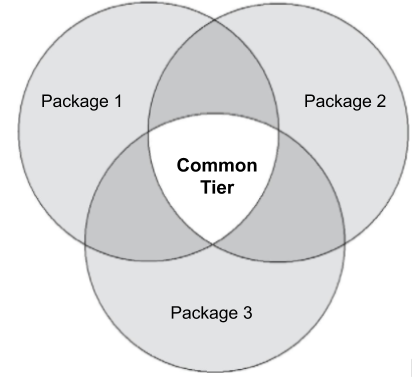
در مثال کد زیر، ارائهدهنده سه بسته ارائه میدهد که برخی از محتواها در همه بستهها مشترک هستند. در این حالت، یک بسته چهارم که نشاندهنده سطح مشترک است مورد نیاز است. این بسته باید شامل تمام محتوای موجود در هر سه بسته باشد.
"requiresSubscription": [
    {
      "@type": "MediaSubscription",
      "@id": "https://www.example.com/package/1",
      "name": "Package 1",
      "sameAs": "https://www.example.com/package/1",
      "identifier": "example.com:package1",
      "commonTier": false
    },
    {
      "@type": "MediaSubscription",
      "@id": "https://www.example.com/package/2",
      "name": "Package 2",
      "sameAs": "https://www.example.com/package/2",
      "identifier": "example.com:package2",
      "commonTier": false
    },
    {
      "@type": "MediaSubscription",
      "@id": "https://www.example.com/package/3",
      "name": "Package 3",
      "sameAs": "https://www.example.com/package/3",
      "identifier": "example.com:package3",
      "commonTier": false
    },
    {
      "@type": "MediaSubscription",
      "@id": "https://www.example.com/package/common",
      "name": "Common Tier Package",
      "sameAs": "https://www.example.com/package/common",
      "commonTier": true
    }
  ],
بستههای بدون محتوایی که با هم تداخل دارند
در یک مدل محتوا که در آن همه بستههای محتوا با هم تلاقی ندارند، ارائهدهنده خدمات بستههایی را میفروشد که هیچ محتوایی از بستههای دیگر را شامل نمیشوند. تصویر زیر نمونهای از ساختار بسته است.

در مثال زیر، ارائهدهنده سه بسته ارائه میدهد که هیچ محتوایی در همه بستهها با هم تداخل ندارد. هیچ بسته سطح مشترکی مورد نیاز نیست.
"requiresSubscription": [
    {
      "@type": "MediaSubscription",
      "@id": "https://www.example.com/package/1",
      "name": "Package 1",
      "sameAs": "https://www.example.com/package/1",
      "identifier": "example.com:package1",
      "commonTier": false
    },
    {
      "@type": "MediaSubscription",
      "@id": "https://www.example.com/package/2",
      "name": "Package 2",
      "sameAs": "https://www.example.com/package/2",
      "identifier": "example.com:package2",
      "commonTier": false
    },
    {
      "@type": "MediaSubscription",
      "@id": "https://www.example.com/package/3",
      "name": "Package 3",
      "sameAs": "https://www.example.com/package/3",
      "identifier": "example.com:package3",
      "commonTier": false
    }
  ],
نقطه پایانی استحقاقها
از اطلاعات این بخش برای میزبانی یک نقطه پایانی HTTPS که مجوزهای مرتبط با یک کاربر را برمیگرداند، استفاده کنید.
پیشنیاز
قبل از شروع، مطمئن شوید که سرویس شما از جریان OAuth 2.0 با گوگل پشتیبانی میکند.
درخواست
برای دریافت مجوزهای کاربر، گوگل درخواستی ارسال میکند که حاوی توکن OAuth کاربر است. نقطه پایانی شما باید کاربر را بر اساس آن توکن OAuth شناسایی کند. به مثال زیر توجه کنید:
GET /resource HTTP/1.1
Host: server.example.com
Authorization: Bearer <OAuthToken>
پاسخ
نقطه پایانی شما باید پاسخی با ویژگیهای زیر برگرداند:
| ملک | |
|---|---|
subscription | مورد نیاز این یک فیلد درون پاسخ ریشه است. |
subscription.type | مورد نیاز این ویژگی میتواند مقادیر زیر را داشته باشد:
|
subscription.expiration_date | اختیاری تاریخ انقضای این مجوز، در قالب ISO 8601 ، که شامل منطقه زمانی نیز میشود. برای جزئیات بیشتر، به تاریخهای انقضا مراجعه کنید. |
entitlements | اختیاری این ویژگی ریشه شامل مقادیر |
entitlements.entitlement | اگر دسترسی به کاتالوگ پخش آنلاین شما بسته به نوع اشتراک متفاوت باشد، الزامی است . این ویژگی شامل |
entitlements.expiration_date | اختیاری تاریخ انقضای این اشتراک، در قالب ISO 8601 ، که شامل منطقه زمانی نیز میشود. برای جزئیات بیشتر، به تاریخهای انقضا مراجعه کنید. |
تاریخ انقضا
دو ویژگی در یک پاسخ نقطه پایانی وجود دارد که با تاریخهای انقضا سروکار دارند: subscription.expiration_date و entitlements.expiration_date . میتوانید یکی از آنها یا هیچکدام را وارد کنید، اما نمیتوانید هر دو را با هم وارد کنید. اینکه کدام یک را استفاده کنید به مدل اشتراک شما بستگی دارد.
| مدل اشتراک | |
|---|---|
| دسترسی به کاتالوگ پخش شما برای همه مشترکین یکسان است. | از آنجا که نیازی به مشخص کردن ویژگی entitlements ندارید، subscription.expiration_date را مشخص کنید. |
دسترسی به کاتالوگ پخش شما بسته به جزئیات اشتراک کاربر متفاوت است. | اگر مدل اشتراک شما چندین سطح یا افزونه دارد که به مرور زمان منقضی میشوند، یکی از موارد زیر را انجام دهید:
|
پاسخهای نمونه
در زیر نمونههایی از پاسخها با وضعیتهای مختلف اشتراک آمده است:
- اشتراک فعال
- اشتراک فعال با تاریخ انقضا
- بدون اشتراک
- اشتراکهای فعال در چندین سطح یا افزونه
اشتراک فعال
اشتراک فعال
یک کاربر اشتراک فعالی در example.com دارد. در این حالت، همه مشترکین صرف نظر از نوع اشتراکشان، به کل کاتالوگ پخش شما دسترسی دارند.
{
  "subscription" : {
    "type": "ActiveSubscription",
  }
}
اشتراک فعال با تاریخ انقضا
اشتراک فعال با تاریخ انقضا
یک کاربر اشتراک فعالی در example.com دارد و این اشتراک تاریخ انقضا دارد. در این حالت، همه مشترکین صرف نظر از نوع اشتراک خود، به کل کاتالوگ پخش شما دسترسی دارند.
{
  "subscription" : {
    "type": "ActiveSubscription",
    "expiration_date": "2019-11-10T10:00:00Z"
  }
}
بدون اشتراک
بدون اشتراک
یک کاربر هیچ اشتراکی در example.com ندارد.
{
  "subscription" : {
    "type": "InactiveSubscription"
  }
}
اشتراکهای فعال در چندین سطح یا افزونه
اشتراکهای فعال در چندین سطح یا افزونه
یک کاربر تا تاریخ مشخصی در example.com:premium اشتراک دارد.
{
  "subscription" : {
    "type": "ActiveSubscription",
  }
  "entitlements": [
    {
      "entitlement": "example.com:premium",
      "expiration": "2019-11-10T10:00:00Z"
    }
  ]
}
محدودیت نرخ
گوگل اطلاعات مربوط به مجوزهای کاربر را تا هر شش ساعت بهروزرسانی میکند. برای هموارسازی حداکثر پرسوجوها در ثانیه (QPS)، گوگل پرسوجوها را به طور مساوی در طول زمان به نقطه پایانی شما توزیع میکند. بنابراین، میتوانید میانگین QPS مورد انتظار برای نقطه پایانی خود را با فرمول زیر تخمین بزنید:
میانگین QPS مورد انتظار = <تعداد کل کاربران> / 21600 ثانیه (6 ساعت × 60 دقیقه × 60 ثانیه)
اگر تعداد زیادی کاربر دارید، گوگل میتواند فاصله زمانی ۶ ساعته را تنظیم کند. در صورت لزوم، برای بحث در مورد پیکربندی با گوگل تماس بگیرید.
تماس با گوگل
وقتی نقطه پایانی شما آماده شد، برای اطلاعرسانی به آدرس اینترنتی نقطه پایانی با گوگل تماس بگیرید.
ویژگیهای مشخصات دسترسی به اکشن
برای اطلاعات مرجع، به بخش ویژگیهای مشخصات دسترسی به اکشن مراجعه کنید.
،کاربران ترجیح میدهند محتوایی را تماشا یا گوش دهند که از قبل میتوانند به آن دسترسی داشته باشند، مانند محتوای اشتراکی موجودشان. اگر گوگل بداند که کاربر در برنامه یا پلتفرم شما به چه محتوایی میتواند دسترسی داشته باشد، میتواند تجربه مرتبطتری را در سراسر سطوح گوگل ارائه دهد و کاربر را به آن محتوا هدایت کند.
شناسایی الزامات دسترسی به محتوا
شما باید الزامات دسترسی برای هر بسته محتوایی در کاتالوگ خود را مشخص کنید. هنگام انجام این کار، سوالات زیر را در نظر بگیرید:
- آیا کاربران برای دسترسی به محتوا باید وارد برنامه یا پلتفرم شما شوند؟
آیا کاربران به اشتراک نیاز دارند؟
فقط اقدامات را تماشا کنید:
- آیا کاربران به اشتراک از یک ارائه دهنده خدمات خارجی نیاز دارند؟
- آیا اشتراک چند مرحلهای، چند بستهای یا افزونهای ارائه میدهید؟
فقط اقدامات تماشا: آیا کاربران نیاز به اجاره یا خرید محتوا دارند؟
آیا الزامات دسترسی با گذشت زمان تغییر میکند؟
آیا نیاز به دسترسی به موقعیت مکانی دستگاه بستگی دارد؟
انواع محدودیتهای دسترسی
دو نوع محدودیت دسترسی وجود دارد:
نوع پرداخت از طریق دیوار پرداخت
شما میتوانید دسترسی به محتوا را بر اساس نوع دیوار پرداخت آن محدود کنید. جدول زیر جزئیات انواع مختلف دیوار پرداخت را شرح میدهد:
| نوع پرداخت از طریق دیوار پرداخت | مثال | دسته بندی |
|---|---|---|
| نیازی به خرید یا ورود به سیستم نیست. | کراکل | nologinrequired |
| کاربر باید وارد سیستم شود، اما نیازی به اشتراک پولی ندارد. | وودو (AVOD) | free |
| کاربر باید اشتراک فعال داشته باشد. دسترسی مستقل از سطح اشتراک است. | نتفلیکس | |
| کاربر باید اشتراک فعال داشته باشد. دسترسی به سطح اشتراک بستگی دارد. | هولو (افزونهها) | |
| محتوا پس از خرید، برای مدت زمان محدودی در دسترس است. | وودو | rental |
| محتوا پس از خرید، برای مدت نامحدودی در دسترس است. | وودو | purchase |
| محتوا از طریق اشتراک کابلی در دسترس است. | اچبیاو گو | externalSubscription |
نوع Paywall برای Watch Actions
برای مشخص کردن نوع پرداخت محتوای Watch Actions، از ویژگی category در مشخصات دسترسی Action استفاده کنید:
"potentialAction": {
  "@type":"WatchAction",
  "target": { … },
  "actionAccessibilityRequirement": {
    "@type": "ActionAccessSpecification",
    "category": "subscription",
    "availabilityStarts": "2018-06-01T10:35:29Z",
    "availabilityEnds": "2019-05-31T10:35:29Z",
    "eligibleRegion": {
      "@type": "Country",
      "name": "US"
    }
  },
  ...
}
نوع Paywall برای اقدامات گوش دادن
برای مشخص کردن نوع پرداخت محتوای مربوط به Listen Actions، از ویژگی category در شیء offer استفاده کنید:
"potentialAction": {
  "@type":"ListenAction",
  "target": { … },
  "expectsAcceptanceOf":{
    "@type":"Offer",
    "category":"subscription",
    "availabilityStarts": "2018-06-01T10:35:29Z",
    "availabilityEnds": "2019-05-31T10:35:29Z",
    "eligibleRegion": {
      "@type":"Country",
      "name":"US"
    }
  },
  ...
}
منطقه جغرافیایی
شما باید مناطق جغرافیایی که محتوا در آنها در دسترس است را مشخص کنید. از یک یا هر دو ویژگی زیر استفاده کنید:
- ویژگی
eligibleRegionمربوط به یک شیء مشخصات دسترسی Action . این ویژگی الزامی است. - ویژگی
ineligibleRegionاز یک شیء مشخصات دسترسی Action .
اگر موقعیت مکانی دستگاه در هر منطقهای که در eligibleRegion مشخص شده است باشد و در هیچ منطقهای که در ineligibleRegion مشخص شده نیست، کاربر میتواند به محتوا دسترسی داشته باشد.
ویژگیهای eligibleRegion و ineligibleRegion مقادیر زیر را مجاز میدانند:
- فهرستی از
Country،CityوState. - یک شیء
GeoShape. برای جزئیات بیشتر به بخش ویژگیهایGeoShapeمراجعه کنید. - فهرستی از اشیاء
GeoShape.
اگر محتوا به صورت سراسری در دسترس است، از مقدار ویژه زیر برای eligibleRegion استفاده کنید:
"eligibleRegion": "EARTH",
موارد استفاده از qualifiedRegion
موارد زیر نمونههایی از کاربرد ویژگی eligibleRegion هستند:
- مثال ۱:
eligibleRegionبا فهرستی از کشورها. - مثال ۲:
eligibleRegionبا یک شیءGeoShapeکه شامل لیستی از کدهای پستی است. - مثال ۳:
eligibleRegionبا یک شیءGeoShapeکه شامل لیستی از کدهای ناحیه مرتبسازی رو به جلو (FSA) است. - مثال ۴:
eligibleRegionبا یک شیءGeoShapeکه حاوی یک شناسه DMA است. - مثال ۵:
eligibleRegionبا فهرستی از اشیاءGeoShape. هر کدام شامل یک شناسه DMA هستند. - مثال ۶:
ineligibleRegionبا کدهای پستی مسدود شده.
مثال ۱
eligibleRegion با فهرستی از کشورها:
"actionAccessibilityRequirement": {
  "@type": "ActionAccessSpecification",
  "category": "subscription",
  "requiresSubscription": {
    "@type": "MediaSubscription",
    "@id": "http://www.example.com/north_america_network/subscription",
    "name": "Example Subscription",
    "commonTier": true
  },
  "eligibleRegion": [
    {
      "@type": "Country",
      "name": "US"
    },
    {
      "@type": "Country",
      "name": "CA"
    }
  ]
}
مثال ۲
eligibleRegion با یک شیء GeoShape که شامل لیستی از کدهای پستی است:
"actionAccessibilityRequirement": {
  "@type": "ActionAccessSpecification",
  "category": "subscription",
  "requiresSubscription": {
    "@type": "MediaSubscription",
    "@id": "http://www.example.com/local_tv_network/subscription",
    "name": "Example Subscription",
    "commonTier": true
  },
  "eligibleRegion": {
    "@type": "GeoShape",
    "@id": "http://example.com/area1",
    "addressCountry": "US",
    "postalCode": [
      "94118",
      "94119"
    ]
  }
}
مثال ۳
eligibleRegion با یک شیء GeoShape که شامل لیستی از کدهای ناحیه مرتبسازی رو به جلو (FSA) است:
"actionAccessibilityRequirement": {
  "@type": "ActionAccessSpecification",
  "category": "subscription",
  "requiresSubscription": {
    "@type": "MediaSubscription",
    "@id": "http://www.example.com/local_tv_network/subscription",
    "name": "Example Subscription",
    "commonTier": true
  },
  "additionalProperty": {
      "@type": "PropertyValue",
      "name": "DisplaySubscriptionIdentifier",
      "value": "http://www.example.com/local_tv_network/subscription"
  },
  "eligibleRegion":{
    "@type": "GeoShape",
    "@id": "http://example.com/area2",
    "addressCountry": "CA",
    "postalCode": [
      "1A1",
      "K1A"
    ]
  }
}
مثال ۴
eligibleRegion با یک شیء GeoShape که حاوی شناسه DMA است:
"actionAccessibilityRequirement": {
  "@type": "ActionAccessSpecification",
  "category": "subscription",
  "requiresSubscription": {
    "@type": "MediaSubscription",
    "@id": "http://www.example.com/abcd/subscription",
    "name": "Example Subscription",
    "commonTier": true
  },
  "additionalProperty": {
      "@type": "PropertyValue",
      "name": "DisplaySubscriptionIdentifier",
      "value": "http://www.example.com/abcd/subscription"
  },
  "eligibleRegion":{
    "@type": "GeoShape",
    "@id": "http://example.com/area3",
    "addressCountry": "US",
    "identifier": [
      {
        "@type": "PropertyValue",
        "propertyID": "DMA_ID",
        "value": "501"
      }
    ]
  }
}
مثال ۵
eligibleRegion با فهرستی از اشیاء GeoShape . هر کدام شامل یک شناسه DMA هستند:
"actionAccessibilityRequirement" : {
   "@type" : "ActionAccessSpecification",
   "eligibleRegion" : [
      {
         "@id" : "http://example.com/dma/601",
         "@type" : "GeoShape",
         "addressCountry" : "US",
         "identifier" : {
            "@type" : "PropertyValue",
            "propertyID" : "DMA_ID",
            "value" : "601"
         }
      },
      {
         "@id" : "http://example.com/dma/602",
         "@type" : "GeoShape",
         "addressCountry" : "US",
         "identifier" : {
            "@type" : "PropertyValue",
            "propertyID" : "DMA_ID",
            "value" : "602"
         }
      }
   ]
}
مثال ۶
ineligibleRegion با کدهای پستی مسدود شده:
"actionAccessibilityRequirement": {
  "@type": "ActionAccessSpecification",
  "category": "subscription",
  "requiresSubscription": {
    "@type": "MediaSubscription",
    "@id": "http://www.example.com/local_tv_network/subscription",
    "name": "Example Subscription",
    "commonTier": true
  },
  "additionalProperty": {
      "@type": "PropertyValue",
      "name": "DisplaySubscriptionIdentifier",
      "value": "http://www.example.com/local_tv_network/subscription"
  },
 "eligibleRegion":   {
      "@type": "Country",
      "name": "US"
    },
  "ineligibleRegion": {
    "@type": "GeoShape",
    "@id": "http://example.com/area1",
    "addressCountry": "US",
    "postalCode": [
      "94118",
      "94119"
    ]
  }
}
شناسه حق امتیاز
شناسهی حق دسترسی، entitlementId ، به رشتهای اشاره دارد که نشاندهندهی دسترسی به گروهی از محتوا در کاتالوگ رسانهی شما است. برای تعیین اینکه آیا کاربری به محتوای شما دسترسی دارد یا خیر، گوگل مراحل زیر را انجام میدهد:
- ما یک فراخوانی API به نقطه پایانی Entitlements شما انجام میدهیم تا شناسههای حقوقی کاربر را دریافت کنیم.
- ما شناسههای حقوقی مورد نیاز محتوا را از فید «اقدامات رسانهای» شما جستجو میکنیم.
- ما
entitlementIdکاربر را با ویژگیidentifierشیء اشتراک رسانه در فید شما مطابقت میدهیم. اگر حداقل یکentitlementIdمطابقت داشته باشد، تعیین میکنیم که کاربر میتواند به محتوا دسترسی داشته باشد.
گوگل توصیه میکند که از سینتکس زیر برای entitlementId استفاده کنید:
<domain name> + colon (:) + <access level to content>
مثالهای نحوی:
-
example.com:basic -
example.com:premium -
example.com:sports
مثال شناسه حق امتیاز
فید MediaExampleCompany مشخص میکند که Movie XYZ به example.com:basic entitlementId نیاز دارد، همانطور که نشان داده شده است:
{
  "@context": ["http://schema.org", {"@language": "en"}],
  "@type": "Movie",
  "@id": "www.example.com/movie_xyz",
  "url": "www.example.com/movie_xyz",
  "name": "Movie XYZ",
  "potentialAction": {
    "@type": "WatchAction",
    "target": [ … ],
    "actionAccessibilityRequirement": {
      "@type": "ActionAccessSpecification",
      "category": "subscription",
      "requiresSubscription": {
        "@type": "MediaSubscription",
        "@id": "http://www.example.com/basic_subscription",
        "name": "Basic subscription",
        "commonTier": true
        ...
      },
      "additionalProperty": {
        "@type": "PropertyValue",
        "name": "DisplaySubscriptionIdentifier",
        "value": "http://www.example.com/basic_subscription"
      },
      ...
    }
  },
  ...
}
موارد استفاده رایج از دسترسی
موارد زیر موارد استفاده رایج از دسترسی هستند:
- رایگان (بدون نیاز به ورود): محتوا بدون نیاز به ورود، اشتراک یا خرید در دسترس است.
- رایگان (نیاز به ورود): محتوا نیاز به ورود کاربران دارد اما نیازی به اشتراک ندارد.
- اشتراک تکلایه: محتوا نیاز به اشتراک دارد. همه مشترکین میتوانند صرف نظر از بسته اشتراک خود، به محتوای یکسان، چه فیلم و چه قسمت، دسترسی داشته باشند.
- اشتراک چند سطحی: محتوا نیاز به اشتراک دارد. مشترکین میتوانند بر اساس سطح اشتراک خود به محتوای مختلف، چه فیلم و چه قسمت، دسترسی داشته باشند. به عنوان مثال، نقرهای در مقابل طلایی .
- اشتراک افزونه: محتوا نیاز به اشتراک دارد. مشترکین میتوانند محتوای ویژه را علاوه بر اشتراک معمولی خود اضافه کنند.
- خرید یکباره: محتوا قابل خریداری است و پس از آن کاربر میتواند به طور نامحدود به آن دسترسی داشته باشد.
- تلویزیون زنده: اشتراک شامل دسترسی به کانالهای محلی، ملی و پریمیوم میشود.
- اشتراک شخص ثالث: محتوا مستلزم آن است که کاربر با ارائه دهنده کابل خود وارد سیستم شود.
رایگان (نیازی به ورود نیست)
ورود لازم نیست
محتوا بدون نیاز به ورود یا عضویت در دسترس است.
{
  "actionAccessibilityRequirement": {
    "@type": "ActionAccessSpecification",
    "category": "nologinrequired",
    "availabilityStarts": "2015-01-01T00:00Z",
    "availabilityEnds": "2015-12-31T00:00Z",
    "eligibleRegion": {
      "@type": "Country",
      "name": "US"
    }
  }
}
categoryرویnologinrequiredتنظیم کنید.-
expectAcceptanceOfلحاظ نکنید.
رایگان (نیاز به ورود)
ورود لازم است
این محتوا نیاز به ورود کاربران دارد اما نیازی به اشتراک ندارد.
{
  "actionAccessibilityRequirement": {
    "@type": "ActionAccessSpecification",
    "category": "free",
    "availabilityStarts": "2015-01-01T00:00Z",
    "availabilityEnds": "2015-12-31T00:00Z",
    "eligibleRegion": {
      "@type": "Country",
      "name": "US"
    }
  }
}
categoryرا رویfreeتنظیم کنید.-
expectAcceptanceOfلحاظ نکنید.
اشتراک تک لایه
در مدل اشتراک تکلایه، ارائهدهنده خدمات یک سطح اشتراک دارد. همه مشترکین میتوانند صرف نظر از بسته اشتراک خود، به محتوای یکسانی، چه فیلم و چه قسمت، دسترسی داشته باشند.
{
  "actionAccessibilityRequirement": {
    "@type": "ActionAccessSpecification",
    "category": "subscription",
    "availabilityStarts": "2015-01-01T00:00Z",
    "availabilityEnds": "2015-12-31T00:00Z",
    "requiresSubscription": {
        "@type": "MediaSubscription",
        "name": "Example Package",
        "commonTier": true,
        "@id": "http://www.example.com/example_package"
    },
    "additionalProperty": {
      "@type": "PropertyValue",
      "name": "DisplaySubscriptionIdentifier",
      "value": "http://www.example.com/example_package"
    },
    "eligibleRegion": {
      "@type": "Country",
      "name": "US"
    }
  }
}
اشتراک چند سطحی
در مدل اشتراک پلکانی، یک ارائهدهنده خدمات چندین سطح اشتراک مانند طلایی ، نقرهای و برنزی دارد. کاربرانی که اشتراک سطح بالا را دارند میتوانند به تمام محتوای سطح پایینتر دسترسی داشته باشند. با این حال، کاربرانی که اشتراک سطح پایینتر را دارند نمیتوانند به محتوای سطح بالاتر دسترسی داشته باشند.
سناریوی زیر را در نظر بگیرید:
- جین در سطح طلایی مشترک میشود. نقطه پایانی مجوزهای شما شناسههای
entitlementIdزیر را برمیگرداند:-
example.com:bronze -
example.com:silver -
example.com:gold
-
- جان در سطح برنزی مشترک میشود. نقطه پایانی مجوزهای شما،
entitlementIdزیر را برمیگرداند:-
example.com:bronze
-
- فید اقدامات رسانهای شما الزامات زیر را شرح میدهد:
- فیلم A به
example.com:bronzeنیاز دارد. - فیلم B به
example.com:silverنیاز دارد.
- فیلم A به
در این سناریو، گوگل سطوح دسترسی زیر را برای جین و جان تعیین میکند:
- هم جین و هم جان به فیلم A دسترسی دارند.
- جین به فیلم B دسترسی دارد، اما جان ندارد.
{
  "actionAccessibilityRequirement": {
    "@type": "ActionAccessSpecification",
    "category": "subscription",
    "requiresSubscription": {
      "@type": "MediaSubscription",
      "@id": "http://www.example.com/basic_subscription",
      "name": "Bronze",
      "commonTier": true
      ...
    },
    "additionalProperty": {
      "@type": "PropertyValue",
      "name": "DisplaySubscriptionIdentifier",
      "value": "http://www.example.com/basic_subscription"
    },
    ...
  }
}
اشتراک افزونه
در مدل اشتراک افزونهها، ارائهدهنده خدمات به کاربران اجازه میدهد تا حق عضویت خود را افزایش داده و کانالهایی را به اشتراک پایه اضافه کنند. کاربران میتوانند هر تعداد کانال که میخواهند اضافه کنند.
سناریوی زیر را در نظر بگیرید:
- جین علاوه بر اشتراک پایه، PRO و Sportz نیز دارد. نقطه پایانی مجوزهای شما شناسههای
entitlementIdزیر را برمیگرداند:-
example.com:basic -
example.com:pro -
example.com:sportz
-
- جان فقط اشتراک پایه را دارد. نقطه پایانی مجوزهای شما،
entitlementIdزیر را برمیگرداند:-
example.com:basic
-
- فید اقدامات رسانهای شما الزامات زیر را شرح میدهد:
- فیلم A به
example.com:basicنیاز دارد. - فیلم B به
example.com:proنیاز دارد.
- فیلم A به
در این سناریو، گوگل سطوح دسترسی زیر را برای جین و جان تعیین میکند:
- هم جین و هم جان به فیلم A دسترسی دارند.
- جین به فیلم B دسترسی دارد، اما جان ندارد.
{
  "actionAccessibilityRequirement": {
    "@type": "ActionAccessSpecification",
    "category": "subscription",
    "availabilityStarts": "2015-01-01T00:00Z",
    "availabilityEnds": "2015-12-31T00:00Z",
    "eligibleRegion": {
      "@type": "Country",
      "name": "US"
    }
    "requiresSubscription": [
      {
          "@type": "MediaSubscription",
          "@id": "https://www.example.com/package/basic",
          "name": "Basic",
          "sameAs": "https://www.example.com/package/basic",
          "commonTier": true
        },
        {
          "@type": "MediaSubscription",
          "@id": "https://www.example.com/packages/basic/pro",
          "name": "PRO",
          "sameAs": "https://www.example.com/package/pro",
          "identifier": "example.com:pro",
          "commonTier": false
        },
        {
          "@type": "MediaSubscription",
          "@id": "https://www.example.com/package/sportz",
          "name": "Sportz",
          "sameAs": "https://www.example.com/package/sports",
          "identifier": "example.com:sportz",
          "commonTier": false
        }
    ],
      "additionalProperty": {
        "@type": "PropertyValue",
        "name": "DisplaySubscriptionIdentifier",
        "value": "http://www.example.com/package/basic"
      },
    }
  }
}
خرید یکجا
خرید
محتوا پس از خرید، برای مدت نامحدودی در دسترس است.
{
  "actionAccessibilityRequirement": {
    "@type": "ActionAccessSpecification",
    "category": "purchase",
    "availabilityStarts": "2015-01-01T00:00Z",
    "availabilityEnds": "2015-12-31T00:00Z",
    "eligibleRegion": {
      "@type": "Country",
      "name": "US"
    },
    "expectsAcceptanceOf": {
      "@type": "Offer",
      "price": 7.99,
      "priceCurrency": "USD",
      "seller": {
        "@type": "Organization",
        "name": "Example",
        "sameAs": "http://www.example.com/"
      }
    }
  }
}
categoryبرایpurchaseتنظیم کنید.- برای نشان دادن قیمت خرید،
expectAcceptanceOfدرactionAccessibilityRequirementقرار دهید.
اجاره
محتوا پس از خرید، برای مدت زمان محدودی در دسترس است.
{
  "actionAccessibilityRequirement": {
    "@type": "ActionAccessSpecification",
    "category": "rental",
    "availabilityStarts": "2015-01-01T00:00Z",
    "availabilityEnds": "2015-12-31T00:00Z",
    "eligibleRegion": {
      "@type": "Country",
      "name": "US"
    },
    "expectsAcceptanceOf": {
      "@type": "Offer",
      "price": 7.99,
      "priceCurrency": "USD",
      "seller": {
        "@type": "Organization",
        "name": "Example",
        "sameAs": "http://www.example.com/"
      }
    }
  }
}
categoryرا رویrentalتنظیم کنید.- برای مشخص کردن قیمت اجاره،
expectAcceptanceOfدرactionAccessibilityRequirementقرار دهید.
تلویزیون زنده
در فید اقدامات رسانهای، میتوانید دسترسی به یک کانال یا رویداد تلویزیونی زنده را بر اساس دو شرط کاربری زیر محدود کنید:
- مکان دستگاه کاربر
برای محدود کردن دسترسی به کانال تلویزیونی، منطقهای را که کاربران به آن دسترسی دارند مشخص کنید. این شرایط معمولاً برای کانالهای تلویزیونی پخش محلی اعمال میشود.
- وضعیت حساب کاربری
اگر دسترسی به یک کانال تلویزیونی به تنظیمات سطح حساب کاربری کاربر بستگی دارد، از شناسههای حق دسترسی برای نمایش محدودیت استفاده کنید.
این شرط معمولاً در موارد استفاده زیر اعمال میشود:
- بسته: کانالهای ملی اغلب در بستهها گنجانده میشوند و کاربران انتخاب میکنند که در کدام بسته مشترک شوند.
- افزونه: برخی از کانالهای پریمیوم از کاربران میخواهند که کانالهای اضافی را به صورت انتخابی به اشتراک خود اضافه کنند.
- شبکه ورزشی منطقهای (RSN): RSNها معمولاً با موقعیت مکانی «خانه» کاربر مرتبط هستند. کاربران میتوانند حتی زمانی که به خارج از موقعیت مکانی «خانه» خود سفر میکنند، محتوا را در RSN تماشا کنند.
اشتراک شخص ثالث
اشتراک شخص ثالث
محتوا از طریق سرویس دیگری برای مشترکین در دسترس است.
{
  "actionAccessibilityRequirement": {
    "@type": "ActionAccessSpecification",
    "category": "externalsubscription"
    "availabilityStarts": "2015-01-01T00:00Z",
    "availabilityEnds": "2015-12-31T00:00Z",
    "requiresSubscription":{
      "@type": "MediaSubscription",
      "@id": "https://www.example.com/faq",
      "name": "Example",
      "sameAs": "https://www.example.com/faq",
      "authenticator": {
        "@type": "Organization",
        "name": "TVE"
      }
    },
    "additionalProperty": {
      "@type": "PropertyValue",
      "name": "DisplaySubscriptionIdentifier",
      "value": "http://www.example.com/faq"
     },
    "eligibleRegion": {
      "@type": "Country",
      "name": "US"
    }
  }
}
- برای نشان دادن اینکه سرویس دیگری مشترکین را احراز هویت میکند،
authenticatorاضافه کنید. برای مثال، HBO GO نیاز به اشتراک از ارائهدهنده کابل دارد.
بستههای سطح مشترک
محتوای سطح مشترک برای همه مشترکین صرف نظر از بسته اشتراک آنها در دسترس است. سطح مشترک برای همه محتوا با category subscription اعمال میشود. برای اطلاعات بیشتر در مورد ویژگی category ، بخش نوع Paywall را بررسی کنید.
چرا یک بسته سطح مشترک مورد نیاز است؟
چندین سطح گوگل، پیشنهادهای تلویزیونی و سینمایی را به کاربران ارائه میدهند. برای تنظیم انتظارات کاربران در مورد هزینه، گوگل باید بفهمد که چه محتوایی از طریق استفاده از سطح مشترک برای همه مشترکین در دسترس است. گوگل همچنین باید بفهمد که چه محتوایی برای مشترکین با بستههای اشتراک خاص در دسترس است.
گوگل عناوین موجود در لایه مشترک را توصیه میکند، مگر اینکه از API مربوط به حق دسترسی پشتیبانی کنید. این API به گوگل اجازه میدهد تا عناوین غیر مشترکی را که هر کاربر خاص میتواند به آنها دسترسی داشته باشد، درک کند.
چه زمانی باید یک بسته سطح مشترک ایجاد کنم؟
زمانی که سرویس شما محتوایی را ارائه میدهد که برای همه مشترکین در دسترس است، به یک بسته سطح مشترک نیاز دارید. این شامل سرویسهایی میشود که فقط یک بسته ارائه میدهند و سرویسهایی که چندین بسته یا افزونه ارائه میدهند.
ارائهدهندگانی که هیچ محتوایی برای همه مشترکین در دسترس ندارند، نیازی به ایجاد یک بسته سطح مشترک ندارند. به عنوان مثال، ارائهدهندگان خدماتی هستند که محتوای منحصر به فرد متقابل را در تمام بستههای خود ارائه میدهند.
نمونههای رایج از سطوح
در ادامه نمونههایی از لایه مشترک آمده است.
اشتراک پلکانی
در مدل اشتراک پلکانی، یک ارائهدهنده خدمات دارای چندین سطح اشتراک مانند طلایی ، نقرهای و برنزی است. کاربرانی که اشتراک سطح بالاتر را دارند به تمام محتوای سطوح پایینتر دسترسی دارند. کاربرانی که اشتراک سطح پایینتری دارند به محتوای سطوح بالاتر دسترسی ندارند. تصویر زیر نمونهای از ساختار بسته است.
در مثال کد زیر، بسته برنزی، لایه مشترک است زیرا همه کاربران به تمام محتوای آن لایه دسترسی دارند.
"requiresSubscription": [
    {
      "@type": "MediaSubscription",
      "@id": "https://www.example.com/package/bronze",
      "name": "Bronze",
      "sameAs": "https://www.example.com/package/bronze",
      "commonTier": true
    },
    {
      "@type": "MediaSubscription",
      "@id": "https://www.example.com/package/silver",
      "name": "Silver",
      "sameAs": "https://www.example.com/package/silver",
      "identifier": "example.com:silver",
      "commonTier": false
    },
    {
      "@type": "MediaSubscription",
      "@id": "https://www.example.com/package/gold",
      "name": "Gold",
      "sameAs": "https://www.example.com/package/gold",
      "identifier": "example.com:gold",
      "commonTier": false
    }
  ],
اضافه کردن
در مدل اشتراک افزونهها، ارائهدهنده خدمات به کاربران اجازه میدهد تا حق عضویت خود را افزایش داده و کانالهایی را به اشتراک پایه اضافه کنند. کاربران میتوانند هر تعداد کانال که میخواهند اضافه کنند. تصویر زیر نمونهای از ساختار بسته است.
اگر کانالی در دسترس همه کاربران دارید و هیچ هزینهای برای کانال وجود ندارد، میتوانید بسته را با بسته سطح مشترک ادغام کنید.
In the following code example, the basic package is the common tier because all users have access to all content in this package.
"requiresSubscription": [
    {
      "@type": "MediaSubscription",
      "@id": "https://www.example.com/package/basic",
      "name": "Basic",
      "sameAs": "https://www.example.com/package/basic",
      "commonTier": true
    },
    {
      "@type": "MediaSubscription",
      "@id": "https://www.example.com/packages/basic/pro",
      "name": "PRO",
      "sameAs": "https://www.example.com/package/pro",
      "identifier": "example.com:pro",
      "commonTier": false
    },
    {
      "@type": "MediaSubscription",
      "@id": "https://www.example.com/package/sportz",
      "name": "Sportz",
      "sameAs": "https://www.example.com/package/sports",
      "identifier": "example.com:sportz",
      "commonTier": false
    },
    {
      "@type": "MediaSubscription",
      "@id": "https://www.example.com/package/moviemax",
      "name": "Moviemax",
      "sameAs": "https://www.example.com/package/moviemax",
      "identifier": "example.com:moviemax",
      "commonTier": false
    }
  ],
Packages with content that intersects
In a content model where packages have content that intersects, a service provider sells packages that include some content from other packages. The following image is an example of the package structure.
In the following code example, the provider offers three packages where some content intersects across all of the packages. In this case, a fourth package that represents the common tier is required. It must include all content available across all three packages.
"requiresSubscription": [
    {
      "@type": "MediaSubscription",
      "@id": "https://www.example.com/package/1",
      "name": "Package 1",
      "sameAs": "https://www.example.com/package/1",
      "identifier": "example.com:package1",
      "commonTier": false
    },
    {
      "@type": "MediaSubscription",
      "@id": "https://www.example.com/package/2",
      "name": "Package 2",
      "sameAs": "https://www.example.com/package/2",
      "identifier": "example.com:package2",
      "commonTier": false
    },
    {
      "@type": "MediaSubscription",
      "@id": "https://www.example.com/package/3",
      "name": "Package 3",
      "sameAs": "https://www.example.com/package/3",
      "identifier": "example.com:package3",
      "commonTier": false
    },
    {
      "@type": "MediaSubscription",
      "@id": "https://www.example.com/package/common",
      "name": "Common Tier Package",
      "sameAs": "https://www.example.com/package/common",
      "commonTier": true
    }
  ],
Packages without content that intersects
In a content model where all of the content packages don't intersect, a service provider sells packages that include no content from other packages. The following image is an example of the package structure.
In the following example, the provider offers three packages with no content intersecting across all of the packages. No common tier package is required.
"requiresSubscription": [
    {
      "@type": "MediaSubscription",
      "@id": "https://www.example.com/package/1",
      "name": "Package 1",
      "sameAs": "https://www.example.com/package/1",
      "identifier": "example.com:package1",
      "commonTier": false
    },
    {
      "@type": "MediaSubscription",
      "@id": "https://www.example.com/package/2",
      "name": "Package 2",
      "sameAs": "https://www.example.com/package/2",
      "identifier": "example.com:package2",
      "commonTier": false
    },
    {
      "@type": "MediaSubscription",
      "@id": "https://www.example.com/package/3",
      "name": "Package 3",
      "sameAs": "https://www.example.com/package/3",
      "identifier": "example.com:package3",
      "commonTier": false
    }
  ],
Entitlements endpoint
Use the information from this section to host an HTTPS endpoint that returns the entitlements associated with a user.
پیشنیاز
Before you begin, verify that your service supports the OAuth 2.0 flow with Google.
درخواست
To receive a user's entitlements, Google sends a request that contains the user's OAuth token. Your endpoint needs to identify the user based on that OAuth token. See the following example:
GET /resource HTTP/1.1
Host: server.example.com
Authorization: Bearer <OAuthToken>
پاسخ
Your endpoint needs to return a response with the following properties:
| ملک | |
|---|---|
subscription | مورد نیاز This is a field inside the root response. |
subscription.type | مورد نیاز This property can have the following values:
|
subscription.expiration_date | اختیاری The expiration date of this entitlement, in ISO 8601 format , which includes the timezone. For more details, see Expiration dates . |
entitlements | اختیاری This a root property contains the |
entitlements.entitlement | Required if access to your streaming catalog varies based on the type of subscription. This property contains the |
entitlements.expiration_date | اختیاری The expiration date of this subscription, in ISO 8601 format , which includes the timezone. For more details, see Expiration dates . |
تاریخ انقضا
There are two properties in an endpoint response that deal with expiration dates: subscription.expiration_date and entitlements.expiration_date . You can include one of them or neither, but not both. Which one you use depends on your subscription model.
| Subscription model | |
|---|---|
| Access to your streaming catalog is the same for all subscribers. | Because you don't need to specify the entitlements property, specify subscription.expiration_date . |
Access to your streaming catalog varies based on the details of a user's subscription. | If your subscription model has multiple tiers or add-ons that expire over time, do one of the following:
|
پاسخهای نمونه
The following are example responses of different subscription states:
- Active subscription
- Active subscription with an expiration date
- بدون اشتراک
- Active subscriptions to multiple tiers or add-ons
Active subscription
Active subscription
A user has an active subscription to example.com . In this case, all subscribers have access to your entire streaming catalog regardless of their subscription type.
{
  "subscription" : {
    "type": "ActiveSubscription",
  }
}
Active subscription with an expiration date
Active subscription with an expiration date
A user has an active subscription to example.com , and the subscription has an expiration date. In this case, all subscribers have access to your entire streaming catalog regardless of their subscription type.
{
  "subscription" : {
    "type": "ActiveSubscription",
    "expiration_date": "2019-11-10T10:00:00Z"
  }
}
بدون اشتراک
بدون اشتراک
A user has no subscription to example.com .
{
  "subscription" : {
    "type": "InactiveSubscription"
  }
}
Active subscriptions to multiple tiers or add-ons
Active subscriptions to multiple tiers or add-ons
A user has a subscription to example.com:premium until a certain date.
{
  "subscription" : {
    "type": "ActiveSubscription",
  }
  "entitlements": [
    {
      "entitlement": "example.com:premium",
      "expiration": "2019-11-10T10:00:00Z"
    }
  ]
}
محدودیت نرخ
Google refreshes a user's entitlements information up to every six hours. To smooth out the maximum queries per second (QPS), Google distributes the queries to your endpoint evenly over time. Thus, you can estimate the expected average QPS for your endpoint with the following formula:
Expected average QPS = <total number of users> / 21,600 seconds (6 hours x 60 minutes x 60 seconds)
If you support a large number of users, Google can adjust the 6-hour interval. If necessary, contact Google to discuss the configuration.
Contact Google
When your endpoint is ready, contact Google to inform the endpoint's URL.
Action access specification properties
See the action access specification properties section for reference information.
،Users prefer to watch or listen to content that they can already access, such as their existing subscription content. If Google knows what content a user can access on your app or platform, then Google can deliver a more relevant experience across Google surfaces and direct the user to that content.
Identify content access requirements
You must identify the access requirement for each content package in your catalog. When you do so, consider the following questions:
- Do users need to log in to your app or platform to access the content?
Do users need a subscription?
Watch Actions only:
- Do users need a subscription from an external service provider?
- Do you offer a tiered, multi-package, or add-on subscription?
Watch Actions only: Do users need to rent or purchase the content?
Does the access requirement change over time?
Does the access requirement depend on the device location?
Access restriction types
There are two kinds of access restrictions:
Paywall type
You can restrict access to content by its paywall type. The following table details the different paywall types:
| Paywall type | مثال | دسته بندی |
|---|---|---|
| No purchase or login is required. | Crackle | nologinrequired |
| The user must be logged in, but doesn't need a paid subscription. | Vudu (AVOD) | free |
| The user must have an active subscription. Access is independent of the subscription tier. | نتفلیکس | |
| The user must have an active subscription. Access is dependent on the subscription tier. | Hulu (add-ons) | |
| The content is available for a finite amount of time after the purchase. | Vudu | rental |
| The content is available for an indefinite amount of time after the purchase. | Vudu | purchase |
| The content is available by cable subscription. | HBO Go | externalSubscription |
Paywall type for Watch Actions
To specify the content paywall type for Watch Actions, use the category property in the Action access specification :
"potentialAction": {
  "@type":"WatchAction",
  "target": { … },
  "actionAccessibilityRequirement": {
    "@type": "ActionAccessSpecification",
    "category": "subscription",
    "availabilityStarts": "2018-06-01T10:35:29Z",
    "availabilityEnds": "2019-05-31T10:35:29Z",
    "eligibleRegion": {
      "@type": "Country",
      "name": "US"
    }
  },
  ...
}
Paywall type for Listen Actions
To specify the content paywall type for Listen Actions, use the category property in the offer object :
"potentialAction": {
  "@type":"ListenAction",
  "target": { … },
  "expectsAcceptanceOf":{
    "@type":"Offer",
    "category":"subscription",
    "availabilityStarts": "2018-06-01T10:35:29Z",
    "availabilityEnds": "2019-05-31T10:35:29Z",
    "eligibleRegion": {
      "@type":"Country",
      "name":"US"
    }
  },
  ...
}
منطقه جغرافیایی
You must specify the geographic areas where the content is available. Use one or both of the following properties:
- The
eligibleRegionproperty of an Action access specification object. This property is required. - The
ineligibleRegionproperty of an Action access specification object.
A user can access content if the device location is within any region that's specified in eligibleRegion and isn't within any region that's specified in ineligibleRegion .
The eligibleRegion and ineligibleRegion properties allow the following values:
- A list of
Country,City, andState. - A
GeoShapeobject. See theGeoShapeproperties section for detailed requirements. - A list of
GeoShapeobjects.
If the content is available globally, use the following special value for eligibleRegion :
"eligibleRegion": "EARTH",
eligibleRegion use cases
The following are use-case examples of the eligibleRegion property:
- Example 1:
eligibleRegionwith a list of countries. - Example 2:
eligibleRegionwith aGeoShapeobject that contains a list of ZIP codes. - Example 3:
eligibleRegionwith aGeoShapeobject that contains a list of Forward Sortation Area (FSA) codes. - Example 4:
eligibleRegionwith aGeoShapeobject that contains a DMA ID. - Example 5:
eligibleRegionwith a list ofGeoShapeobjects. Each contains a DMA ID. - Example 6:
ineligibleRegionwith blocked-out ZIP codes.
Example 1
eligibleRegion with a list of countries:
"actionAccessibilityRequirement": {
  "@type": "ActionAccessSpecification",
  "category": "subscription",
  "requiresSubscription": {
    "@type": "MediaSubscription",
    "@id": "http://www.example.com/north_america_network/subscription",
    "name": "Example Subscription",
    "commonTier": true
  },
  "eligibleRegion": [
    {
      "@type": "Country",
      "name": "US"
    },
    {
      "@type": "Country",
      "name": "CA"
    }
  ]
}
Example 2
eligibleRegion with a GeoShape object that contains a list of ZIP codes:
"actionAccessibilityRequirement": {
  "@type": "ActionAccessSpecification",
  "category": "subscription",
  "requiresSubscription": {
    "@type": "MediaSubscription",
    "@id": "http://www.example.com/local_tv_network/subscription",
    "name": "Example Subscription",
    "commonTier": true
  },
  "eligibleRegion": {
    "@type": "GeoShape",
    "@id": "http://example.com/area1",
    "addressCountry": "US",
    "postalCode": [
      "94118",
      "94119"
    ]
  }
}
Example 3
eligibleRegion with a GeoShape object that contains a list of Forward Sortation Area (FSA) codes:
"actionAccessibilityRequirement": {
  "@type": "ActionAccessSpecification",
  "category": "subscription",
  "requiresSubscription": {
    "@type": "MediaSubscription",
    "@id": "http://www.example.com/local_tv_network/subscription",
    "name": "Example Subscription",
    "commonTier": true
  },
  "additionalProperty": {
      "@type": "PropertyValue",
      "name": "DisplaySubscriptionIdentifier",
      "value": "http://www.example.com/local_tv_network/subscription"
  },
  "eligibleRegion":{
    "@type": "GeoShape",
    "@id": "http://example.com/area2",
    "addressCountry": "CA",
    "postalCode": [
      "1A1",
      "K1A"
    ]
  }
}
Example 4
eligibleRegion with a GeoShape object that contains a DMA ID:
"actionAccessibilityRequirement": {
  "@type": "ActionAccessSpecification",
  "category": "subscription",
  "requiresSubscription": {
    "@type": "MediaSubscription",
    "@id": "http://www.example.com/abcd/subscription",
    "name": "Example Subscription",
    "commonTier": true
  },
  "additionalProperty": {
      "@type": "PropertyValue",
      "name": "DisplaySubscriptionIdentifier",
      "value": "http://www.example.com/abcd/subscription"
  },
  "eligibleRegion":{
    "@type": "GeoShape",
    "@id": "http://example.com/area3",
    "addressCountry": "US",
    "identifier": [
      {
        "@type": "PropertyValue",
        "propertyID": "DMA_ID",
        "value": "501"
      }
    ]
  }
}
Example 5
eligibleRegion with a list of GeoShape objects. Each contains a DMA ID:
"actionAccessibilityRequirement" : {
   "@type" : "ActionAccessSpecification",
   "eligibleRegion" : [
      {
         "@id" : "http://example.com/dma/601",
         "@type" : "GeoShape",
         "addressCountry" : "US",
         "identifier" : {
            "@type" : "PropertyValue",
            "propertyID" : "DMA_ID",
            "value" : "601"
         }
      },
      {
         "@id" : "http://example.com/dma/602",
         "@type" : "GeoShape",
         "addressCountry" : "US",
         "identifier" : {
            "@type" : "PropertyValue",
            "propertyID" : "DMA_ID",
            "value" : "602"
         }
      }
   ]
}
Example 6
ineligibleRegion with blocked-out ZIP codes:
"actionAccessibilityRequirement": {
  "@type": "ActionAccessSpecification",
  "category": "subscription",
  "requiresSubscription": {
    "@type": "MediaSubscription",
    "@id": "http://www.example.com/local_tv_network/subscription",
    "name": "Example Subscription",
    "commonTier": true
  },
  "additionalProperty": {
      "@type": "PropertyValue",
      "name": "DisplaySubscriptionIdentifier",
      "value": "http://www.example.com/local_tv_network/subscription"
  },
 "eligibleRegion":   {
      "@type": "Country",
      "name": "US"
    },
  "ineligibleRegion": {
    "@type": "GeoShape",
    "@id": "http://example.com/area1",
    "addressCountry": "US",
    "postalCode": [
      "94118",
      "94119"
    ]
  }
}
Entitlement identifier
The entitlement identifier, entitlementId , refers to a string that represents access to a group of content in your media catalog. To determine whether a user has access to your content, Google takes the following steps:
- We make an API call to your Entitlements endpoint to receive the user's entitlement identifiers.
- We look up the content's required entitlement identifiers from your Media Actions feed.
- We match a user's
entitlementIdto theidentifierproperty of the media subscription object in your feed. If at least oneentitlementIdmatches, we determine that the user can access the content.
Google recommends that you use the following syntax for entitlementId :
<domain name> + colon (:) + <access level to content>
Syntax examples:
-
example.com:basic -
example.com:premium -
example.com:sports
Entitlement identifier example
MediaExampleCompany 's feed specifies that Movie XYZ requires the example.com:basic entitlementId , as shown:
{
  "@context": ["http://schema.org", {"@language": "en"}],
  "@type": "Movie",
  "@id": "www.example.com/movie_xyz",
  "url": "www.example.com/movie_xyz",
  "name": "Movie XYZ",
  "potentialAction": {
    "@type": "WatchAction",
    "target": [ … ],
    "actionAccessibilityRequirement": {
      "@type": "ActionAccessSpecification",
      "category": "subscription",
      "requiresSubscription": {
        "@type": "MediaSubscription",
        "@id": "http://www.example.com/basic_subscription",
        "name": "Basic subscription",
        "commonTier": true
        ...
      },
      "additionalProperty": {
        "@type": "PropertyValue",
        "name": "DisplaySubscriptionIdentifier",
        "value": "http://www.example.com/basic_subscription"
      },
      ...
    }
  },
  ...
}
Common access use cases
The following are common access use cases:
- Free (no login required): The content is available without login, subscription, or purchase.
- Free (login required): The content requires users to be logged in but doesn't require a subscription.
- Single-tier subscription: The content requires a subscription. All subscribers can access the same content, whether movies or episodes, regardless of their subscription package.
- Multi-tier subscription: The content requires a subscription. Subscribers can access different content, whether movies or episodes, based on their subscription tier. For example, Silver versus Gold .
- Add-on subscription: The content requires a subscription. Subscribers can add premium content on top of their regular subscription.
- One-time purchase: The content can be purchased, after which the user can access it indefinitely.
- Live TV: A subscription includes access to local, national, and premium channels.
- Third-party subscription: The content requires the user to log in with their cable provider.
Free (no login required)
ورود لازم نیست
The content is available without login or subscription.
{
  "actionAccessibilityRequirement": {
    "@type": "ActionAccessSpecification",
    "category": "nologinrequired",
    "availabilityStarts": "2015-01-01T00:00Z",
    "availabilityEnds": "2015-12-31T00:00Z",
    "eligibleRegion": {
      "@type": "Country",
      "name": "US"
    }
  }
}
- Set
categorytonologinrequired. - Do not include
expectAcceptanceOf.
Free (login required)
Login required
The content requires users to be logged in but doesn't require a subscription.
{
  "actionAccessibilityRequirement": {
    "@type": "ActionAccessSpecification",
    "category": "free",
    "availabilityStarts": "2015-01-01T00:00Z",
    "availabilityEnds": "2015-12-31T00:00Z",
    "eligibleRegion": {
      "@type": "Country",
      "name": "US"
    }
  }
}
- Set
categorytofree. - Do not include
expectAcceptanceOf.
Single-tier subscription
In a single-tiered subscription model, a service provider has one subscription tier. All subscribers can access the same content, whether movies or episodes, regardless of their subscription package.
{
  "actionAccessibilityRequirement": {
    "@type": "ActionAccessSpecification",
    "category": "subscription",
    "availabilityStarts": "2015-01-01T00:00Z",
    "availabilityEnds": "2015-12-31T00:00Z",
    "requiresSubscription": {
        "@type": "MediaSubscription",
        "name": "Example Package",
        "commonTier": true,
        "@id": "http://www.example.com/example_package"
    },
    "additionalProperty": {
      "@type": "PropertyValue",
      "name": "DisplaySubscriptionIdentifier",
      "value": "http://www.example.com/example_package"
    },
    "eligibleRegion": {
      "@type": "Country",
      "name": "US"
    }
  }
}
Multi-tier subscription
In a tiered subscription model, a service provider has multiple subscription tiers, such as Gold , Silver , and Bronze . Users who have the upper tier subscription can access all the lower tier content. However, users who have the lower tier subscription can't access the upper tier content.
Consider the following scenario:
- Jane subscribes to the Gold tier. Your entitlements endpoint returns the following
entitlementIdidentifiers:-
example.com:bronze -
example.com:silver -
example.com:gold
-
- John subscribes to the Bronze tier. Your entitlements endpoint returns the following
entitlementId:-
example.com:bronze
-
- Your Media Actions feed describes the following requirements:
- Movie A requires
example.com:bronze. - Movie B requires
example.com:silver.
- Movie A requires
In this scenario, Google determines the following access levels for Jane and John:
- Both Jane and John have access to Movie A .
- Jane has access to Movie B , but John doesn't.
{
  "actionAccessibilityRequirement": {
    "@type": "ActionAccessSpecification",
    "category": "subscription",
    "requiresSubscription": {
      "@type": "MediaSubscription",
      "@id": "http://www.example.com/basic_subscription",
      "name": "Bronze",
      "commonTier": true
      ...
    },
    "additionalProperty": {
      "@type": "PropertyValue",
      "name": "DisplaySubscriptionIdentifier",
      "value": "http://www.example.com/basic_subscription"
    },
    ...
  }
}
Add-on subscription
In an add-ons subscription model, a service provider allows users to expand their entitlements and add channels to a base subscription. Users can add as many channels as they want to.
Consider the following scenario:
- Jane has PRO and Sportz in addition to the Basic subscription. Your entitlements endpoint returns the following
entitlementIdidentifiers:-
example.com:basic -
example.com:pro -
example.com:sportz
-
- John only has the Basic subscription. Your entitlements endpoint returns the following
entitlementId:-
example.com:basic
-
- Your Media Actions feed describes the following requirements:
- Movie A requires
example.com:basic. - Movie B requires
example.com:pro.
- Movie A requires
In this scenario, Google determines the following access levels for Jane and John:
- Both Jane and John have access to Movie A .
- Jane has access to Movie B , but John doesn't.
{
  "actionAccessibilityRequirement": {
    "@type": "ActionAccessSpecification",
    "category": "subscription",
    "availabilityStarts": "2015-01-01T00:00Z",
    "availabilityEnds": "2015-12-31T00:00Z",
    "eligibleRegion": {
      "@type": "Country",
      "name": "US"
    }
    "requiresSubscription": [
      {
          "@type": "MediaSubscription",
          "@id": "https://www.example.com/package/basic",
          "name": "Basic",
          "sameAs": "https://www.example.com/package/basic",
          "commonTier": true
        },
        {
          "@type": "MediaSubscription",
          "@id": "https://www.example.com/packages/basic/pro",
          "name": "PRO",
          "sameAs": "https://www.example.com/package/pro",
          "identifier": "example.com:pro",
          "commonTier": false
        },
        {
          "@type": "MediaSubscription",
          "@id": "https://www.example.com/package/sportz",
          "name": "Sportz",
          "sameAs": "https://www.example.com/package/sports",
          "identifier": "example.com:sportz",
          "commonTier": false
        }
    ],
      "additionalProperty": {
        "@type": "PropertyValue",
        "name": "DisplaySubscriptionIdentifier",
        "value": "http://www.example.com/package/basic"
      },
    }
  }
}
خرید یکجا
خرید
The content is available for an indefinite amount of time after the purchase.
{
  "actionAccessibilityRequirement": {
    "@type": "ActionAccessSpecification",
    "category": "purchase",
    "availabilityStarts": "2015-01-01T00:00Z",
    "availabilityEnds": "2015-12-31T00:00Z",
    "eligibleRegion": {
      "@type": "Country",
      "name": "US"
    },
    "expectsAcceptanceOf": {
      "@type": "Offer",
      "price": 7.99,
      "priceCurrency": "USD",
      "seller": {
        "@type": "Organization",
        "name": "Example",
        "sameAs": "http://www.example.com/"
      }
    }
  }
}
- Set
categorytopurchase. - Include
expectAcceptanceOfinactionAccessibilityRequirementto indicate the price of the purchase.
اجاره
The content is available for a finite amount of time after the purchase.
{
  "actionAccessibilityRequirement": {
    "@type": "ActionAccessSpecification",
    "category": "rental",
    "availabilityStarts": "2015-01-01T00:00Z",
    "availabilityEnds": "2015-12-31T00:00Z",
    "eligibleRegion": {
      "@type": "Country",
      "name": "US"
    },
    "expectsAcceptanceOf": {
      "@type": "Offer",
      "price": 7.99,
      "priceCurrency": "USD",
      "seller": {
        "@type": "Organization",
        "name": "Example",
        "sameAs": "http://www.example.com/"
      }
    }
  }
}
- Set
categorytorental. - Include
expectAcceptanceOfinactionAccessibilityRequirementto indicate the price of the rental.
تلویزیون زنده
In a Media Actions feed, you can restrict access to a Live TV channel or event based on the following two user conditions:
- The user's device location
To restrict access to the TV channel, specify the area where users have access to it. This condition usually applies to local broadcast TV channels.
- The user's account status
If access to a TV channel depends on a user's account-level setting, use entitlement identifiers to represent the restriction.
This condition usually applies to the following use-cases:
- Bundle: National channels are often included in bundles, and users choose which bundle they want to subscribe to.
- Add-on: Some premium channels require users to selectively add extra channels to their subscription.
- Regional Sports Network (RSN): RSNs are usually associated with a user's "home" location. Users can watch content on the RSN even when they travel outside of their "home" location.
Third-party subscription
Third-party subscription
The content is available to the subscribers from a different service.
{
  "actionAccessibilityRequirement": {
    "@type": "ActionAccessSpecification",
    "category": "externalsubscription"
    "availabilityStarts": "2015-01-01T00:00Z",
    "availabilityEnds": "2015-12-31T00:00Z",
    "requiresSubscription":{
      "@type": "MediaSubscription",
      "@id": "https://www.example.com/faq",
      "name": "Example",
      "sameAs": "https://www.example.com/faq",
      "authenticator": {
        "@type": "Organization",
        "name": "TVE"
      }
    },
    "additionalProperty": {
      "@type": "PropertyValue",
      "name": "DisplaySubscriptionIdentifier",
      "value": "http://www.example.com/faq"
     },
    "eligibleRegion": {
      "@type": "Country",
      "name": "US"
    }
  }
}
- Add
authenticatorto indicate that a different service authenticates the subscribers. For example, HBO GO requires a subscription from the cable provider.
Common tier packages
Common tier content is available to all subscribers regardless of their subscription package. The common tier applies to all content with the category of subscription . For more information on the category property, check the Paywall type section.
Why is a common tier package required?
Multiple Google surfaces provide TV & movie recommendations to users. To set user expectations about cost, Google must understand what content is available to all subscribers through use of the common tier. Google must also understand what content is available to subscribers with specific subscription packages.
Google recommends titles available on the common tier unless you support the entitlement API . The API lets Google understand the non-common-tier titles each specific user can access.
When should I create a common tier package?
A common tier package is required when your service offers content that's available to all subscribers. This includes services that offer only one package and services that offer multiple packages or add-ons.
Providers that have no content available to all subscribers don't need to create a common tier package. An example is service providers that provide mutually exclusive content across all of their packages.
Common tier examples
The following are examples of the common tier.
Tiered Subscription
In a tiered subscription model, a service provider has multiple subscription tiers, such as Gold , Silver , and Bronze tiers. Users with the upper-tier subscription have access to all the content in the lower tiers. Users with the lower-tier subscription don't have access to the content in the upper tier. The following image is an example of the package structure.
In the following code example, the bronze package is the common tier because all users have access to all content in that tier.
"requiresSubscription": [
    {
      "@type": "MediaSubscription",
      "@id": "https://www.example.com/package/bronze",
      "name": "Bronze",
      "sameAs": "https://www.example.com/package/bronze",
      "commonTier": true
    },
    {
      "@type": "MediaSubscription",
      "@id": "https://www.example.com/package/silver",
      "name": "Silver",
      "sameAs": "https://www.example.com/package/silver",
      "identifier": "example.com:silver",
      "commonTier": false
    },
    {
      "@type": "MediaSubscription",
      "@id": "https://www.example.com/package/gold",
      "name": "Gold",
      "sameAs": "https://www.example.com/package/gold",
      "identifier": "example.com:gold",
      "commonTier": false
    }
  ],
Add ons
In an add-ons subscription model, a service provider allows users to expand their entitlements and add channels to a basic subscription. Users can add as many channels as they want. The following image is an example of the package structure.
If you have a channel available to all users and there's no cost for the channel, you can merge the package with the common tier package.
In the following code example, the basic package is the common tier because all users have access to all content in this package.
"requiresSubscription": [
    {
      "@type": "MediaSubscription",
      "@id": "https://www.example.com/package/basic",
      "name": "Basic",
      "sameAs": "https://www.example.com/package/basic",
      "commonTier": true
    },
    {
      "@type": "MediaSubscription",
      "@id": "https://www.example.com/packages/basic/pro",
      "name": "PRO",
      "sameAs": "https://www.example.com/package/pro",
      "identifier": "example.com:pro",
      "commonTier": false
    },
    {
      "@type": "MediaSubscription",
      "@id": "https://www.example.com/package/sportz",
      "name": "Sportz",
      "sameAs": "https://www.example.com/package/sports",
      "identifier": "example.com:sportz",
      "commonTier": false
    },
    {
      "@type": "MediaSubscription",
      "@id": "https://www.example.com/package/moviemax",
      "name": "Moviemax",
      "sameAs": "https://www.example.com/package/moviemax",
      "identifier": "example.com:moviemax",
      "commonTier": false
    }
  ],
Packages with content that intersects
In a content model where packages have content that intersects, a service provider sells packages that include some content from other packages. The following image is an example of the package structure.
In the following code example, the provider offers three packages where some content intersects across all of the packages. In this case, a fourth package that represents the common tier is required. It must include all content available across all three packages.
"requiresSubscription": [
    {
      "@type": "MediaSubscription",
      "@id": "https://www.example.com/package/1",
      "name": "Package 1",
      "sameAs": "https://www.example.com/package/1",
      "identifier": "example.com:package1",
      "commonTier": false
    },
    {
      "@type": "MediaSubscription",
      "@id": "https://www.example.com/package/2",
      "name": "Package 2",
      "sameAs": "https://www.example.com/package/2",
      "identifier": "example.com:package2",
      "commonTier": false
    },
    {
      "@type": "MediaSubscription",
      "@id": "https://www.example.com/package/3",
      "name": "Package 3",
      "sameAs": "https://www.example.com/package/3",
      "identifier": "example.com:package3",
      "commonTier": false
    },
    {
      "@type": "MediaSubscription",
      "@id": "https://www.example.com/package/common",
      "name": "Common Tier Package",
      "sameAs": "https://www.example.com/package/common",
      "commonTier": true
    }
  ],
Packages without content that intersects
In a content model where all of the content packages don't intersect, a service provider sells packages that include no content from other packages. The following image is an example of the package structure.
In the following example, the provider offers three packages with no content intersecting across all of the packages. No common tier package is required.
"requiresSubscription": [
    {
      "@type": "MediaSubscription",
      "@id": "https://www.example.com/package/1",
      "name": "Package 1",
      "sameAs": "https://www.example.com/package/1",
      "identifier": "example.com:package1",
      "commonTier": false
    },
    {
      "@type": "MediaSubscription",
      "@id": "https://www.example.com/package/2",
      "name": "Package 2",
      "sameAs": "https://www.example.com/package/2",
      "identifier": "example.com:package2",
      "commonTier": false
    },
    {
      "@type": "MediaSubscription",
      "@id": "https://www.example.com/package/3",
      "name": "Package 3",
      "sameAs": "https://www.example.com/package/3",
      "identifier": "example.com:package3",
      "commonTier": false
    }
  ],
Entitlements endpoint
Use the information from this section to host an HTTPS endpoint that returns the entitlements associated with a user.
پیشنیاز
Before you begin, verify that your service supports the OAuth 2.0 flow with Google.
درخواست
To receive a user's entitlements, Google sends a request that contains the user's OAuth token. Your endpoint needs to identify the user based on that OAuth token. See the following example:
GET /resource HTTP/1.1
Host: server.example.com
Authorization: Bearer <OAuthToken>
پاسخ
Your endpoint needs to return a response with the following properties:
| ملک | |
|---|---|
subscription | مورد نیاز This is a field inside the root response. |
subscription.type | مورد نیاز This property can have the following values:
|
subscription.expiration_date | اختیاری The expiration date of this entitlement, in ISO 8601 format , which includes the timezone. For more details, see Expiration dates . |
entitlements | اختیاری This a root property contains the |
entitlements.entitlement | Required if access to your streaming catalog varies based on the type of subscription. This property contains the |
entitlements.expiration_date | اختیاری The expiration date of this subscription, in ISO 8601 format , which includes the timezone. For more details, see Expiration dates . |
تاریخ انقضا
There are two properties in an endpoint response that deal with expiration dates: subscription.expiration_date and entitlements.expiration_date . You can include one of them or neither, but not both. Which one you use depends on your subscription model.
| Subscription model | |
|---|---|
| Access to your streaming catalog is the same for all subscribers. | Because you don't need to specify the entitlements property, specify subscription.expiration_date . |
Access to your streaming catalog varies based on the details of a user's subscription. | If your subscription model has multiple tiers or add-ons that expire over time, do one of the following:
|
پاسخهای نمونه
The following are example responses of different subscription states:
- Active subscription
- Active subscription with an expiration date
- بدون اشتراک
- Active subscriptions to multiple tiers or add-ons
Active subscription
Active subscription
A user has an active subscription to example.com . In this case, all subscribers have access to your entire streaming catalog regardless of their subscription type.
{
  "subscription" : {
    "type": "ActiveSubscription",
  }
}
Active subscription with an expiration date
Active subscription with an expiration date
A user has an active subscription to example.com , and the subscription has an expiration date. In this case, all subscribers have access to your entire streaming catalog regardless of their subscription type.
{
  "subscription" : {
    "type": "ActiveSubscription",
    "expiration_date": "2019-11-10T10:00:00Z"
  }
}
بدون اشتراک
بدون اشتراک
A user has no subscription to example.com .
{
  "subscription" : {
    "type": "InactiveSubscription"
  }
}
Active subscriptions to multiple tiers or add-ons
Active subscriptions to multiple tiers or add-ons
A user has a subscription to example.com:premium until a certain date.
{
  "subscription" : {
    "type": "ActiveSubscription",
  }
  "entitlements": [
    {
      "entitlement": "example.com:premium",
      "expiration": "2019-11-10T10:00:00Z"
    }
  ]
}
محدودیت نرخ
Google refreshes a user's entitlements information up to every six hours. To smooth out the maximum queries per second (QPS), Google distributes the queries to your endpoint evenly over time. Thus, you can estimate the expected average QPS for your endpoint with the following formula:
Expected average QPS = <total number of users> / 21,600 seconds (6 hours x 60 minutes x 60 seconds)
If you support a large number of users, Google can adjust the 6-hour interval. If necessary, contact Google to discuss the configuration.
Contact Google
When your endpoint is ready, contact Google to inform the endpoint's URL.
Action access specification properties
See the action access specification properties section for reference information.
،Users prefer to watch or listen to content that they can already access, such as their existing subscription content. If Google knows what content a user can access on your app or platform, then Google can deliver a more relevant experience across Google surfaces and direct the user to that content.
Identify content access requirements
You must identify the access requirement for each content package in your catalog. When you do so, consider the following questions:
- Do users need to log in to your app or platform to access the content?
Do users need a subscription?
Watch Actions only:
- Do users need a subscription from an external service provider?
- Do you offer a tiered, multi-package, or add-on subscription?
Watch Actions only: Do users need to rent or purchase the content?
Does the access requirement change over time?
Does the access requirement depend on the device location?
Access restriction types
There are two kinds of access restrictions:
Paywall type
You can restrict access to content by its paywall type. The following table details the different paywall types:
| Paywall type | مثال | دسته بندی |
|---|---|---|
| No purchase or login is required. | Crackle | nologinrequired |
| The user must be logged in, but doesn't need a paid subscription. | Vudu (AVOD) | free |
| The user must have an active subscription. Access is independent of the subscription tier. | نتفلیکس | |
| The user must have an active subscription. Access is dependent on the subscription tier. | Hulu (add-ons) | |
| The content is available for a finite amount of time after the purchase. | Vudu | rental |
| The content is available for an indefinite amount of time after the purchase. | Vudu | purchase |
| The content is available by cable subscription. | HBO Go | externalSubscription |
Paywall type for Watch Actions
To specify the content paywall type for Watch Actions, use the category property in the Action access specification :
"potentialAction": {
  "@type":"WatchAction",
  "target": { … },
  "actionAccessibilityRequirement": {
    "@type": "ActionAccessSpecification",
    "category": "subscription",
    "availabilityStarts": "2018-06-01T10:35:29Z",
    "availabilityEnds": "2019-05-31T10:35:29Z",
    "eligibleRegion": {
      "@type": "Country",
      "name": "US"
    }
  },
  ...
}
Paywall type for Listen Actions
To specify the content paywall type for Listen Actions, use the category property in the offer object :
"potentialAction": {
  "@type":"ListenAction",
  "target": { … },
  "expectsAcceptanceOf":{
    "@type":"Offer",
    "category":"subscription",
    "availabilityStarts": "2018-06-01T10:35:29Z",
    "availabilityEnds": "2019-05-31T10:35:29Z",
    "eligibleRegion": {
      "@type":"Country",
      "name":"US"
    }
  },
  ...
}
منطقه جغرافیایی
You must specify the geographic areas where the content is available. Use one or both of the following properties:
- The
eligibleRegionproperty of an Action access specification object. This property is required. - The
ineligibleRegionproperty of an Action access specification object.
A user can access content if the device location is within any region that's specified in eligibleRegion and isn't within any region that's specified in ineligibleRegion .
The eligibleRegion and ineligibleRegion properties allow the following values:
- A list of
Country,City, andState. - A
GeoShapeobject. See theGeoShapeproperties section for detailed requirements. - A list of
GeoShapeobjects.
If the content is available globally, use the following special value for eligibleRegion :
"eligibleRegion": "EARTH",
eligibleRegion use cases
The following are use-case examples of the eligibleRegion property:
- Example 1:
eligibleRegionwith a list of countries. - Example 2:
eligibleRegionwith aGeoShapeobject that contains a list of ZIP codes. - Example 3:
eligibleRegionwith aGeoShapeobject that contains a list of Forward Sortation Area (FSA) codes. - Example 4:
eligibleRegionwith aGeoShapeobject that contains a DMA ID. - Example 5:
eligibleRegionwith a list ofGeoShapeobjects. Each contains a DMA ID. - Example 6:
ineligibleRegionwith blocked-out ZIP codes.
Example 1
eligibleRegion with a list of countries:
"actionAccessibilityRequirement": {
  "@type": "ActionAccessSpecification",
  "category": "subscription",
  "requiresSubscription": {
    "@type": "MediaSubscription",
    "@id": "http://www.example.com/north_america_network/subscription",
    "name": "Example Subscription",
    "commonTier": true
  },
  "eligibleRegion": [
    {
      "@type": "Country",
      "name": "US"
    },
    {
      "@type": "Country",
      "name": "CA"
    }
  ]
}
Example 2
eligibleRegion with a GeoShape object that contains a list of ZIP codes:
"actionAccessibilityRequirement": {
  "@type": "ActionAccessSpecification",
  "category": "subscription",
  "requiresSubscription": {
    "@type": "MediaSubscription",
    "@id": "http://www.example.com/local_tv_network/subscription",
    "name": "Example Subscription",
    "commonTier": true
  },
  "eligibleRegion": {
    "@type": "GeoShape",
    "@id": "http://example.com/area1",
    "addressCountry": "US",
    "postalCode": [
      "94118",
      "94119"
    ]
  }
}
Example 3
eligibleRegion with a GeoShape object that contains a list of Forward Sortation Area (FSA) codes:
"actionAccessibilityRequirement": {
  "@type": "ActionAccessSpecification",
  "category": "subscription",
  "requiresSubscription": {
    "@type": "MediaSubscription",
    "@id": "http://www.example.com/local_tv_network/subscription",
    "name": "Example Subscription",
    "commonTier": true
  },
  "additionalProperty": {
      "@type": "PropertyValue",
      "name": "DisplaySubscriptionIdentifier",
      "value": "http://www.example.com/local_tv_network/subscription"
  },
  "eligibleRegion":{
    "@type": "GeoShape",
    "@id": "http://example.com/area2",
    "addressCountry": "CA",
    "postalCode": [
      "1A1",
      "K1A"
    ]
  }
}
Example 4
eligibleRegion with a GeoShape object that contains a DMA ID:
"actionAccessibilityRequirement": {
  "@type": "ActionAccessSpecification",
  "category": "subscription",
  "requiresSubscription": {
    "@type": "MediaSubscription",
    "@id": "http://www.example.com/abcd/subscription",
    "name": "Example Subscription",
    "commonTier": true
  },
  "additionalProperty": {
      "@type": "PropertyValue",
      "name": "DisplaySubscriptionIdentifier",
      "value": "http://www.example.com/abcd/subscription"
  },
  "eligibleRegion":{
    "@type": "GeoShape",
    "@id": "http://example.com/area3",
    "addressCountry": "US",
    "identifier": [
      {
        "@type": "PropertyValue",
        "propertyID": "DMA_ID",
        "value": "501"
      }
    ]
  }
}
Example 5
eligibleRegion with a list of GeoShape objects. Each contains a DMA ID:
"actionAccessibilityRequirement" : {
   "@type" : "ActionAccessSpecification",
   "eligibleRegion" : [
      {
         "@id" : "http://example.com/dma/601",
         "@type" : "GeoShape",
         "addressCountry" : "US",
         "identifier" : {
            "@type" : "PropertyValue",
            "propertyID" : "DMA_ID",
            "value" : "601"
         }
      },
      {
         "@id" : "http://example.com/dma/602",
         "@type" : "GeoShape",
         "addressCountry" : "US",
         "identifier" : {
            "@type" : "PropertyValue",
            "propertyID" : "DMA_ID",
            "value" : "602"
         }
      }
   ]
}
Example 6
ineligibleRegion with blocked-out ZIP codes:
"actionAccessibilityRequirement": {
  "@type": "ActionAccessSpecification",
  "category": "subscription",
  "requiresSubscription": {
    "@type": "MediaSubscription",
    "@id": "http://www.example.com/local_tv_network/subscription",
    "name": "Example Subscription",
    "commonTier": true
  },
  "additionalProperty": {
      "@type": "PropertyValue",
      "name": "DisplaySubscriptionIdentifier",
      "value": "http://www.example.com/local_tv_network/subscription"
  },
 "eligibleRegion":   {
      "@type": "Country",
      "name": "US"
    },
  "ineligibleRegion": {
    "@type": "GeoShape",
    "@id": "http://example.com/area1",
    "addressCountry": "US",
    "postalCode": [
      "94118",
      "94119"
    ]
  }
}
Entitlement identifier
The entitlement identifier, entitlementId , refers to a string that represents access to a group of content in your media catalog. To determine whether a user has access to your content, Google takes the following steps:
- We make an API call to your Entitlements endpoint to receive the user's entitlement identifiers.
- We look up the content's required entitlement identifiers from your Media Actions feed.
- We match a user's
entitlementIdto theidentifierproperty of the media subscription object in your feed. If at least oneentitlementIdmatches, we determine that the user can access the content.
Google recommends that you use the following syntax for entitlementId :
<domain name> + colon (:) + <access level to content>
Syntax examples:
-
example.com:basic -
example.com:premium -
example.com:sports
Entitlement identifier example
MediaExampleCompany 's feed specifies that Movie XYZ requires the example.com:basic entitlementId , as shown:
{
  "@context": ["http://schema.org", {"@language": "en"}],
  "@type": "Movie",
  "@id": "www.example.com/movie_xyz",
  "url": "www.example.com/movie_xyz",
  "name": "Movie XYZ",
  "potentialAction": {
    "@type": "WatchAction",
    "target": [ … ],
    "actionAccessibilityRequirement": {
      "@type": "ActionAccessSpecification",
      "category": "subscription",
      "requiresSubscription": {
        "@type": "MediaSubscription",
        "@id": "http://www.example.com/basic_subscription",
        "name": "Basic subscription",
        "commonTier": true
        ...
      },
      "additionalProperty": {
        "@type": "PropertyValue",
        "name": "DisplaySubscriptionIdentifier",
        "value": "http://www.example.com/basic_subscription"
      },
      ...
    }
  },
  ...
}
Common access use cases
The following are common access use cases:
- Free (no login required): The content is available without login, subscription, or purchase.
- Free (login required): The content requires users to be logged in but doesn't require a subscription.
- Single-tier subscription: The content requires a subscription. All subscribers can access the same content, whether movies or episodes, regardless of their subscription package.
- Multi-tier subscription: The content requires a subscription. Subscribers can access different content, whether movies or episodes, based on their subscription tier. For example, Silver versus Gold .
- Add-on subscription: The content requires a subscription. Subscribers can add premium content on top of their regular subscription.
- One-time purchase: The content can be purchased, after which the user can access it indefinitely.
- Live TV: A subscription includes access to local, national, and premium channels.
- Third-party subscription: The content requires the user to log in with their cable provider.
Free (no login required)
ورود لازم نیست
The content is available without login or subscription.
{
  "actionAccessibilityRequirement": {
    "@type": "ActionAccessSpecification",
    "category": "nologinrequired",
    "availabilityStarts": "2015-01-01T00:00Z",
    "availabilityEnds": "2015-12-31T00:00Z",
    "eligibleRegion": {
      "@type": "Country",
      "name": "US"
    }
  }
}
- Set
categorytonologinrequired. - Do not include
expectAcceptanceOf.
Free (login required)
Login required
The content requires users to be logged in but doesn't require a subscription.
{
  "actionAccessibilityRequirement": {
    "@type": "ActionAccessSpecification",
    "category": "free",
    "availabilityStarts": "2015-01-01T00:00Z",
    "availabilityEnds": "2015-12-31T00:00Z",
    "eligibleRegion": {
      "@type": "Country",
      "name": "US"
    }
  }
}
- Set
categorytofree. - Do not include
expectAcceptanceOf.
Single-tier subscription
In a single-tiered subscription model, a service provider has one subscription tier. All subscribers can access the same content, whether movies or episodes, regardless of their subscription package.
{
  "actionAccessibilityRequirement": {
    "@type": "ActionAccessSpecification",
    "category": "subscription",
    "availabilityStarts": "2015-01-01T00:00Z",
    "availabilityEnds": "2015-12-31T00:00Z",
    "requiresSubscription": {
        "@type": "MediaSubscription",
        "name": "Example Package",
        "commonTier": true,
        "@id": "http://www.example.com/example_package"
    },
    "additionalProperty": {
      "@type": "PropertyValue",
      "name": "DisplaySubscriptionIdentifier",
      "value": "http://www.example.com/example_package"
    },
    "eligibleRegion": {
      "@type": "Country",
      "name": "US"
    }
  }
}
Multi-tier subscription
In a tiered subscription model, a service provider has multiple subscription tiers, such as Gold , Silver , and Bronze . Users who have the upper tier subscription can access all the lower tier content. However, users who have the lower tier subscription can't access the upper tier content.
Consider the following scenario:
- Jane subscribes to the Gold tier. Your entitlements endpoint returns the following
entitlementIdidentifiers:-
example.com:bronze -
example.com:silver -
example.com:gold
-
- John subscribes to the Bronze tier. Your entitlements endpoint returns the following
entitlementId:-
example.com:bronze
-
- Your Media Actions feed describes the following requirements:
- Movie A requires
example.com:bronze. - Movie B requires
example.com:silver.
- Movie A requires
In this scenario, Google determines the following access levels for Jane and John:
- Both Jane and John have access to Movie A .
- Jane has access to Movie B , but John doesn't.
{
  "actionAccessibilityRequirement": {
    "@type": "ActionAccessSpecification",
    "category": "subscription",
    "requiresSubscription": {
      "@type": "MediaSubscription",
      "@id": "http://www.example.com/basic_subscription",
      "name": "Bronze",
      "commonTier": true
      ...
    },
    "additionalProperty": {
      "@type": "PropertyValue",
      "name": "DisplaySubscriptionIdentifier",
      "value": "http://www.example.com/basic_subscription"
    },
    ...
  }
}
Add-on subscription
In an add-ons subscription model, a service provider allows users to expand their entitlements and add channels to a base subscription. Users can add as many channels as they want to.
Consider the following scenario:
- Jane has PRO and Sportz in addition to the Basic subscription. Your entitlements endpoint returns the following
entitlementIdidentifiers:-
example.com:basic -
example.com:pro -
example.com:sportz
-
- John only has the Basic subscription. Your entitlements endpoint returns the following
entitlementId:-
example.com:basic
-
- Your Media Actions feed describes the following requirements:
- Movie A requires
example.com:basic. - Movie B requires
example.com:pro.
- Movie A requires
In this scenario, Google determines the following access levels for Jane and John:
- Both Jane and John have access to Movie A .
- Jane has access to Movie B , but John doesn't.
{
  "actionAccessibilityRequirement": {
    "@type": "ActionAccessSpecification",
    "category": "subscription",
    "availabilityStarts": "2015-01-01T00:00Z",
    "availabilityEnds": "2015-12-31T00:00Z",
    "eligibleRegion": {
      "@type": "Country",
      "name": "US"
    }
    "requiresSubscription": [
      {
          "@type": "MediaSubscription",
          "@id": "https://www.example.com/package/basic",
          "name": "Basic",
          "sameAs": "https://www.example.com/package/basic",
          "commonTier": true
        },
        {
          "@type": "MediaSubscription",
          "@id": "https://www.example.com/packages/basic/pro",
          "name": "PRO",
          "sameAs": "https://www.example.com/package/pro",
          "identifier": "example.com:pro",
          "commonTier": false
        },
        {
          "@type": "MediaSubscription",
          "@id": "https://www.example.com/package/sportz",
          "name": "Sportz",
          "sameAs": "https://www.example.com/package/sports",
          "identifier": "example.com:sportz",
          "commonTier": false
        }
    ],
      "additionalProperty": {
        "@type": "PropertyValue",
        "name": "DisplaySubscriptionIdentifier",
        "value": "http://www.example.com/package/basic"
      },
    }
  }
}
خرید یکجا
خرید
The content is available for an indefinite amount of time after the purchase.
{
  "actionAccessibilityRequirement": {
    "@type": "ActionAccessSpecification",
    "category": "purchase",
    "availabilityStarts": "2015-01-01T00:00Z",
    "availabilityEnds": "2015-12-31T00:00Z",
    "eligibleRegion": {
      "@type": "Country",
      "name": "US"
    },
    "expectsAcceptanceOf": {
      "@type": "Offer",
      "price": 7.99,
      "priceCurrency": "USD",
      "seller": {
        "@type": "Organization",
        "name": "Example",
        "sameAs": "http://www.example.com/"
      }
    }
  }
}
- Set
categorytopurchase. - Include
expectAcceptanceOfinactionAccessibilityRequirementto indicate the price of the purchase.
اجاره
The content is available for a finite amount of time after the purchase.
{
  "actionAccessibilityRequirement": {
    "@type": "ActionAccessSpecification",
    "category": "rental",
    "availabilityStarts": "2015-01-01T00:00Z",
    "availabilityEnds": "2015-12-31T00:00Z",
    "eligibleRegion": {
      "@type": "Country",
      "name": "US"
    },
    "expectsAcceptanceOf": {
      "@type": "Offer",
      "price": 7.99,
      "priceCurrency": "USD",
      "seller": {
        "@type": "Organization",
        "name": "Example",
        "sameAs": "http://www.example.com/"
      }
    }
  }
}
- Set
categorytorental. - Include
expectAcceptanceOfinactionAccessibilityRequirementto indicate the price of the rental.
تلویزیون زنده
In a Media Actions feed, you can restrict access to a Live TV channel or event based on the following two user conditions:
- The user's device location
To restrict access to the TV channel, specify the area where users have access to it. This condition usually applies to local broadcast TV channels.
- The user's account status
If access to a TV channel depends on a user's account-level setting, use entitlement identifiers to represent the restriction.
This condition usually applies to the following use-cases:
- Bundle: National channels are often included in bundles, and users choose which bundle they want to subscribe to.
- Add-on: Some premium channels require users to selectively add extra channels to their subscription.
- Regional Sports Network (RSN): RSNs are usually associated with a user's "home" location. Users can watch content on the RSN even when they travel outside of their "home" location.
Third-party subscription
Third-party subscription
The content is available to the subscribers from a different service.
{
  "actionAccessibilityRequirement": {
    "@type": "ActionAccessSpecification",
    "category": "externalsubscription"
    "availabilityStarts": "2015-01-01T00:00Z",
    "availabilityEnds": "2015-12-31T00:00Z",
    "requiresSubscription":{
      "@type": "MediaSubscription",
      "@id": "https://www.example.com/faq",
      "name": "Example",
      "sameAs": "https://www.example.com/faq",
      "authenticator": {
        "@type": "Organization",
        "name": "TVE"
      }
    },
    "additionalProperty": {
      "@type": "PropertyValue",
      "name": "DisplaySubscriptionIdentifier",
      "value": "http://www.example.com/faq"
     },
    "eligibleRegion": {
      "@type": "Country",
      "name": "US"
    }
  }
}
- Add
authenticatorto indicate that a different service authenticates the subscribers. For example, HBO GO requires a subscription from the cable provider.
Common tier packages
Common tier content is available to all subscribers regardless of their subscription package. The common tier applies to all content with the category of subscription . For more information on the category property, check the Paywall type section.
Why is a common tier package required?
Multiple Google surfaces provide TV & movie recommendations to users. To set user expectations about cost, Google must understand what content is available to all subscribers through use of the common tier. Google must also understand what content is available to subscribers with specific subscription packages.
Google recommends titles available on the common tier unless you support the entitlement API . The API lets Google understand the non-common-tier titles each specific user can access.
When should I create a common tier package?
A common tier package is required when your service offers content that's available to all subscribers. This includes services that offer only one package and services that offer multiple packages or add-ons.
Providers that have no content available to all subscribers don't need to create a common tier package. An example is service providers that provide mutually exclusive content across all of their packages.
Common tier examples
The following are examples of the common tier.
Tiered Subscription
In a tiered subscription model, a service provider has multiple subscription tiers, such as Gold , Silver , and Bronze tiers. Users with the upper-tier subscription have access to all the content in the lower tiers. Users with the lower-tier subscription don't have access to the content in the upper tier. The following image is an example of the package structure.
In the following code example, the bronze package is the common tier because all users have access to all content in that tier.
"requiresSubscription": [
    {
      "@type": "MediaSubscription",
      "@id": "https://www.example.com/package/bronze",
      "name": "Bronze",
      "sameAs": "https://www.example.com/package/bronze",
      "commonTier": true
    },
    {
      "@type": "MediaSubscription",
      "@id": "https://www.example.com/package/silver",
      "name": "Silver",
      "sameAs": "https://www.example.com/package/silver",
      "identifier": "example.com:silver",
      "commonTier": false
    },
    {
      "@type": "MediaSubscription",
      "@id": "https://www.example.com/package/gold",
      "name": "Gold",
      "sameAs": "https://www.example.com/package/gold",
      "identifier": "example.com:gold",
      "commonTier": false
    }
  ],
Add ons
In an add-ons subscription model, a service provider allows users to expand their entitlements and add channels to a basic subscription. Users can add as many channels as they want. The following image is an example of the package structure.
If you have a channel available to all users and there's no cost for the channel, you can merge the package with the common tier package.
In the following code example, the basic package is the common tier because all users have access to all content in this package.
"requiresSubscription": [
    {
      "@type": "MediaSubscription",
      "@id": "https://www.example.com/package/basic",
      "name": "Basic",
      "sameAs": "https://www.example.com/package/basic",
      "commonTier": true
    },
    {
      "@type": "MediaSubscription",
      "@id": "https://www.example.com/packages/basic/pro",
      "name": "PRO",
      "sameAs": "https://www.example.com/package/pro",
      "identifier": "example.com:pro",
      "commonTier": false
    },
    {
      "@type": "MediaSubscription",
      "@id": "https://www.example.com/package/sportz",
      "name": "Sportz",
      "sameAs": "https://www.example.com/package/sports",
      "identifier": "example.com:sportz",
      "commonTier": false
    },
    {
      "@type": "MediaSubscription",
      "@id": "https://www.example.com/package/moviemax",
      "name": "Moviemax",
      "sameAs": "https://www.example.com/package/moviemax",
      "identifier": "example.com:moviemax",
      "commonTier": false
    }
  ],
Packages with content that intersects
In a content model where packages have content that intersects, a service provider sells packages that include some content from other packages. The following image is an example of the package structure.
In the following code example, the provider offers three packages where some content intersects across all of the packages. In this case, a fourth package that represents the common tier is required. It must include all content available across all three packages.
"requiresSubscription": [
    {
      "@type": "MediaSubscription",
      "@id": "https://www.example.com/package/1",
      "name": "Package 1",
      "sameAs": "https://www.example.com/package/1",
      "identifier": "example.com:package1",
      "commonTier": false
    },
    {
      "@type": "MediaSubscription",
      "@id": "https://www.example.com/package/2",
      "name": "Package 2",
      "sameAs": "https://www.example.com/package/2",
      "identifier": "example.com:package2",
      "commonTier": false
    },
    {
      "@type": "MediaSubscription",
      "@id": "https://www.example.com/package/3",
      "name": "Package 3",
      "sameAs": "https://www.example.com/package/3",
      "identifier": "example.com:package3",
      "commonTier": false
    },
    {
      "@type": "MediaSubscription",
      "@id": "https://www.example.com/package/common",
      "name": "Common Tier Package",
      "sameAs": "https://www.example.com/package/common",
      "commonTier": true
    }
  ],
Packages without content that intersects
In a content model where all of the content packages don't intersect, a service provider sells packages that include no content from other packages. The following image is an example of the package structure.
In the following example, the provider offers three packages with no content intersecting across all of the packages. No common tier package is required.
"requiresSubscription": [
    {
      "@type": "MediaSubscription",
      "@id": "https://www.example.com/package/1",
      "name": "Package 1",
      "sameAs": "https://www.example.com/package/1",
      "identifier": "example.com:package1",
      "commonTier": false
    },
    {
      "@type": "MediaSubscription",
      "@id": "https://www.example.com/package/2",
      "name": "Package 2",
      "sameAs": "https://www.example.com/package/2",
      "identifier": "example.com:package2",
      "commonTier": false
    },
    {
      "@type": "MediaSubscription",
      "@id": "https://www.example.com/package/3",
      "name": "Package 3",
      "sameAs": "https://www.example.com/package/3",
      "identifier": "example.com:package3",
      "commonTier": false
    }
  ],
Entitlements endpoint
Use the information from this section to host an HTTPS endpoint that returns the entitlements associated with a user.
پیشنیاز
Before you begin, verify that your service supports the OAuth 2.0 flow with Google.
درخواست
To receive a user's entitlements, Google sends a request that contains the user's OAuth token. Your endpoint needs to identify the user based on that OAuth token. See the following example:
GET /resource HTTP/1.1
Host: server.example.com
Authorization: Bearer <OAuthToken>
پاسخ
Your endpoint needs to return a response with the following properties:
| ملک | |
|---|---|
subscription | مورد نیاز This is a field inside the root response. |
subscription.type | مورد نیاز This property can have the following values:
|
subscription.expiration_date | اختیاری The expiration date of this entitlement, in ISO 8601 format , which includes the timezone. For more details, see Expiration dates . |
entitlements | اختیاری This a root property contains the |
entitlements.entitlement | Required if access to your streaming catalog varies based on the type of subscription. This property contains the |
entitlements.expiration_date | اختیاری The expiration date of this subscription, in ISO 8601 format , which includes the timezone. For more details, see Expiration dates . |
تاریخ انقضا
There are two properties in an endpoint response that deal with expiration dates: subscription.expiration_date and entitlements.expiration_date . You can include one of them or neither, but not both. Which one you use depends on your subscription model.
| Subscription model | |
|---|---|
| Access to your streaming catalog is the same for all subscribers. | Because you don't need to specify the entitlements property, specify subscription.expiration_date . |
Access to your streaming catalog varies based on the details of a user's subscription. | If your subscription model has multiple tiers or add-ons that expire over time, do one of the following:
|
پاسخهای نمونه
The following are example responses of different subscription states:
- Active subscription
- Active subscription with an expiration date
- بدون اشتراک
- Active subscriptions to multiple tiers or add-ons
Active subscription
Active subscription
A user has an active subscription to example.com . In this case, all subscribers have access to your entire streaming catalog regardless of their subscription type.
{
  "subscription" : {
    "type": "ActiveSubscription",
  }
}
Active subscription with an expiration date
Active subscription with an expiration date
A user has an active subscription to example.com , and the subscription has an expiration date. In this case, all subscribers have access to your entire streaming catalog regardless of their subscription type.
{
  "subscription" : {
    "type": "ActiveSubscription",
    "expiration_date": "2019-11-10T10:00:00Z"
  }
}
بدون اشتراک
بدون اشتراک
A user has no subscription to example.com .
{
  "subscription" : {
    "type": "InactiveSubscription"
  }
}
Active subscriptions to multiple tiers or add-ons
Active subscriptions to multiple tiers or add-ons
A user has a subscription to example.com:premium until a certain date.
{
  "subscription" : {
    "type": "ActiveSubscription",
  }
  "entitlements": [
    {
      "entitlement": "example.com:premium",
      "expiration": "2019-11-10T10:00:00Z"
    }
  ]
}
محدودیت نرخ
Google refreshes a user's entitlements information up to every six hours. To smooth out the maximum queries per second (QPS), Google distributes the queries to your endpoint evenly over time. Thus, you can estimate the expected average QPS for your endpoint with the following formula:
Expected average QPS = <total number of users> / 21,600 seconds (6 hours x 60 minutes x 60 seconds)
If you support a large number of users, Google can adjust the 6-hour interval. If necessary, contact Google to discuss the configuration.
Contact Google
When your endpoint is ready, contact Google to inform the endpoint's URL.
Action access specification properties
See the action access specification properties section for reference information.