
কিছু সত্তা প্রকারের জন্য আপনাকে আপনার ফিডের সামগ্রীর মধ্যে সম্পর্ক স্থাপন করতে হবে। এই তথ্য Google কে ব্যবহারকারীদের কাছে আপনার বিষয়বস্তুর সঠিক ক্রম এবং কাঠামো প্রদর্শন করতে এবং ব্যবহারকারীর প্রশ্ন অস্পষ্ট হলে সঠিক বিষয়বস্তু সনাক্ত করতে সহায়তা করে।
আপনি যে ধরনের সামগ্রী প্রদান করেন তা নির্বাচন করুন:
টিভি শো
আপনি যদি একজন টিভি শো প্রদানকারী হন, তাহলে আপনাকে আপনার মিডিয়া ক্যাটালগ ফিডে TVEpisode , TVSeason , এবং TVSeries এনটিটি টাইপগুলো যোগ করতে হবে। আপনি 'Understand the available entity types' সেকশনে এই টাইপগুলো ফিল্টার করে এগুলোর সংজ্ঞা খুঁজে নিতে পারেন।
সম্পর্কগুলি চিহ্নিত করুন
তাদের মধ্যে নিম্নলিখিত সম্পর্কগুলো স্থাপন করা নিশ্চিত করুন:
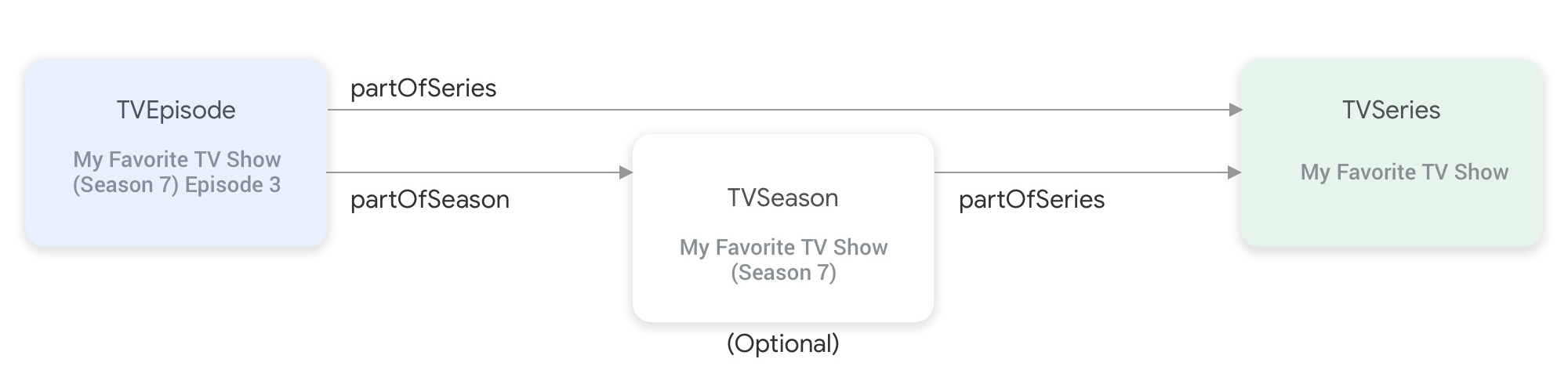
partOfSeries এবং partOfSeason প্রোপার্টিগুলো টিভি শো এনটিটি টাইপগুলোকে একসাথে সংযুক্ত করে।একটি
TVEpisodeএনটিটির জন্য আপনাকেpartOfSeriesপ্রপার্টিটি প্রদান করতে হবে, যা এপিসোডটিরTVSeriesএনটিটির@idএবংnameনির্দিষ্ট করে।"partOfSeries": { "@type": "TVSeries", "@id": "http://www.example.com/my_favorite_tv_show", "name": "My Favorite TV Show", },আপনার ফিডে যদি টিভি সিজন থাকে, তাহলে
TVSeasonএনটিটিরpartOfSeriesপ্রপার্টিতে এরTVSeriesএনটিটিও উল্লেখ করতে হবে।একটি
TVEpisodeএনটিটির জন্য আপনাকেpartOfSeasonপ্রপার্টিটি প্রদান করতে হবে, যা এপিসোডটিরTVSeasonএনটিটির@idএবংseasonNumberনির্দিষ্ট করে।"partOfSeason": { "@type": "TVSeason", "@id": "http://www.example.com/my_favorite_tv_show/s7", "seasonNumber": 7 },যদি ফিডে কোনো
TVEpisodeএনটিটির সংশ্লিষ্টTVSeasonএনটিটি না থাকে, তাহলেTVEpisodeএনটিটির জন্যpartOfSeason.@idএবংpartOfSeason.seasonNumberপ্রপার্টিগুলো প্রদান করতে নিম্নলিখিত পদক্ষেপগুলো অনুসরণ করুন:- এর
partofSeries.@idনিন এবং একটি প্লেসহোল্ডার কোয়েরি ফিল্ড (উদাহরণস্বরূপ, ?season1 ) সংযুক্ত করে একটি অনন্যpartOfSeason.@idতৈরি করুন (উদাহরণস্বরূপ, http://www.example.com/my_favorite_tv_show?season1 )। -
partOfSeason.seasonNumberএর মান 1 সেট করুন।
TVSeasonএনটিটির জন্য বিদ্যমানpartOfSeason.@idপুনরায় ব্যবহার করতে পারেন অথবা এই প্লেসহোল্ডারpartOfSeason.@idTVSeasonএনটিটির আসল@idদিয়ে প্রতিস্থাপন করতে পারেন।- এর
উদাহরণ
টিভি সিরিজ
আমার প্রিয় টিভি শো
{
"@context": ["http://schema.org", {"@language": "en"}],
"@type": "TVSeries",
"@id": "http://www.example.com/my_favorite_tv_show",
"url": "http://www.example.com/my_favorite_tv_show",
"name": "My Favorite TV Show",
"potentialAction":{ … },
...
}
টিভি সিজন
আমার প্রিয় টিভি শো (সিজন ৭)
{
"@context": ["http://schema.org", {"@language": "en"}],
"@type": "TVSeason",
"@id": "http://www.example.com/my_favorite_tv_show/s7",
"url": "http://www.example.com/my_favorite_tv_show/s7",
"name": "My Favorite TV Show, Season 7",
"seasonNumber": 7,
"partOfSeries": {
  "@type": "TVSeries",
  "@id": "http://www.example.com/my_favorite_tv_show",
  "name": "My Favorite TV Show",
},
"potentialAction":{ … },
...
}
টিভি পর্ব
আমার প্রিয় টিভি শো- এর পর্ব ৩ (সিজন ৭)
{
"@context": ["http://schema.org", {"@language": "en"}],
"@type": "TVEpisode",
"@id": "http://www.example.com/my_favorite_tv_show/s7/e3",
"url": "http://www.example.com/my_favorite_tv_show/s7/e3",
"name": "John Doe returns at night",
"episodeNumber": 3,
"partOfSeason": {
  "@type": "TVSeason",
  "@id": "http://www.example.com/my_favorite_tv_show/s7",
  "seasonNumber": 7
},
"partOfSeries": {
"@type": "TVSeries",
"@id": "http://www.example.com/my_favorite_tv_show",
"name": "My Favorite TV Show",
},
"potentialAction":{ … },
...
}
লাইভ টিভি
আপনি যদি একজন লাইভ টিভি প্রদানকারী হন, তাহলে আপনার চ্যানেল লাইনআপ উপস্থাপন করার জন্য আপনার মিডিয়া ক্যাটালগ ফিডে Organization , BroadcastService , CableOrSatelliteService , এবং TelevisionChannel এনটিটি টাইপগুলো যোগ করতে হবে। সংশ্লিষ্ট EPG (ইলেকট্রনিক প্রোগ্রামিং গাইড) উপস্থাপন করার জন্য আপনাকে BroadcastEvent , TVSeries , TVEpisode , Movie , এবং SportsEvent এনটিটিগুলোও প্রদান করতে হতে পারে। আপনি এই টাইপগুলো ফিল্টার করে 'Understand the available entity types' সেকশনে এই এনটিটিগুলোর সংজ্ঞা খুঁজে পেতে পারেন। আরও বিস্তারিত ব্যাখ্যার জন্য, আপনি ' Live TV Channels' পেজটি দেখতে পারেন।
লাইভ টিভি চ্যানেলগুলির প্রতিনিধিত্বকারী সত্তাগুলির মধ্যে সম্পর্ক
নিচের চিত্রে Organization , BroadcastService , CableOrSatelliteService এবং TelevisionChannel সত্তাগুলো কীভাবে পরস্পর সম্পর্কিত তা দেখানো হয়েছে: 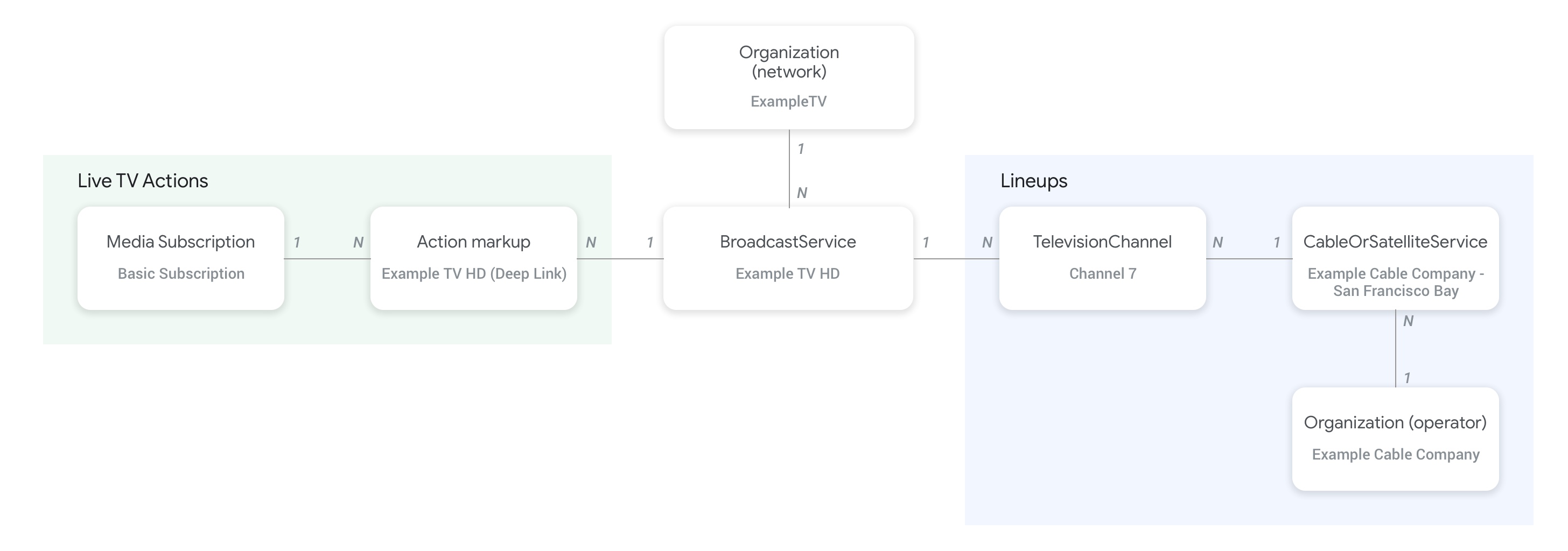
-
CableOrSatelliteServiceএনটিটিরproviderপ্রপার্টি ব্যবহার করে ফিড প্রোভাইডারের প্রতিনিধিত্বকারীOrganization(অপারেটর) এনটিটি এবংCableOrSatelliteServiceসার্ভিসের প্যারেন্ট অর্গানাইজেশনকে সংযুক্ত করা হয়। -
BroadcastServiceএনটিটিগুলোর সাথে সঙ্গতিপূর্ণOrganizationএনটিটিগুলোBroadcastServiceএনটিটিরbroadcastAffiliateOfপ্রপার্টি ব্যবহার করে সংযুক্ত করা হয়। -
TelevisionChannelএনটিটিগুলোinBroadcastLineupপ্রপার্টি ব্যবহার করেCableOrSatelliteServiceএনটিটির সাথে সংযুক্ত হয়, যা তাদের অন্তর্ভুক্ত লাইনআপের প্রতিনিধিত্ব করে। -
TelevisionChannelএনটিটিগুলোprovidesBroadcastServiceপ্রপার্টি ব্যবহার করেBroadcastServiceএনটিটির সাথে সংযুক্ত হয়, যার প্রোগ্রামিং এই চ্যানেলটি সরবরাহ করে।
ব্রডকাস্টসার্ভিস এবং অর্গানাইজেশন এনটিটিগুলোর মধ্যে সম্পর্ক কীভাবে স্থাপন করতে হবে, তার সুনির্দিষ্ট উদাহরণের জন্য লাইভ টিভি চ্যানেল কনসেপ্ট পেজটি ভালোভাবে দেখে নেওয়ার জন্য বিশেষভাবে সুপারিশ করা হচ্ছে।
চ্যানেলগুলোর মধ্যে সম্পর্ক এবং তাদের প্রোগ্রামিং নির্দেশিকা (ইপিজি)
নিচের চিত্রে দেখানো হয়েছে কিভাবে BroadcastEvent এনটিটিটি ফিডের বাকি এনটিটিগুলোর সাথে সংযুক্ত থাকে। 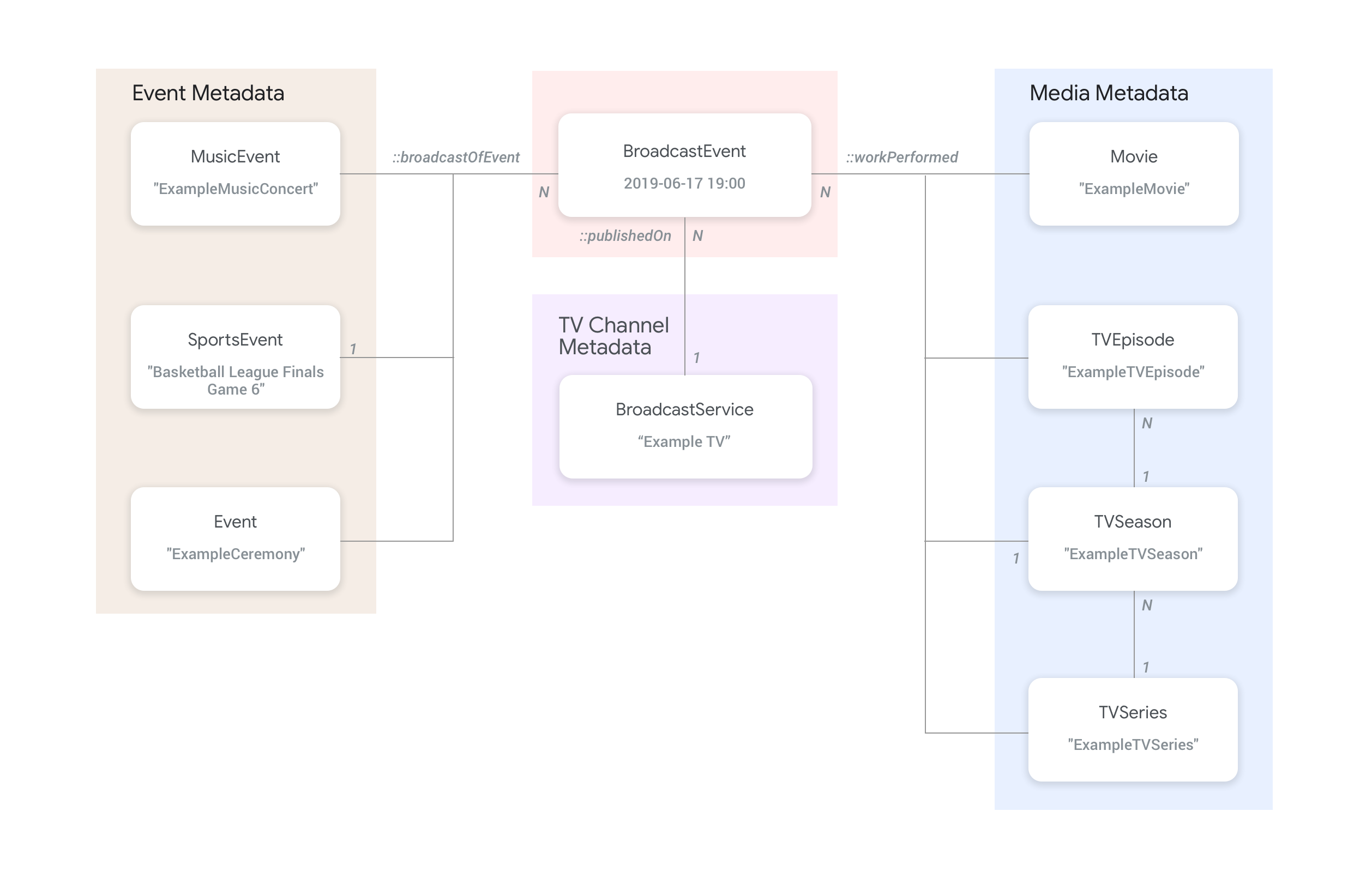
-
BroadcastEventএনটিটিগুলো, যা একটিBroadcastServiceএর প্রোগ্রামিং গাইড (EPG)-কে প্রতিনিধিত্ব করে,BroadcastEventএনটিটিরpublishedOnপ্রপার্টি ব্যবহার করেBroadcastServiceএনটিটিগুলোর সাথে সংযুক্ত থাকে। -
workPerformedপ্রপার্টি ব্যবহার করেBroadcastEventএনটিটিগুলোকে শীর্ষ স্তরেরTVEpisode,TVSeries,Movieএনটিটিগুলোর সাথেও সংযুক্ত করা যায়। -
broadcastOfEventপ্রপার্টি ব্যবহার করেBroadcastEventএনটিটিগুলোকে শীর্ষ স্তরেরSportsEventএনটিটিগুলোর সাথেও সংযুক্ত করা যায়। - অনলাইনে চ্যানেল-বিহীনভাবে স্ট্রিম করা ইভেন্টগুলোর ক্ষেত্রে, কী লাইভ স্ট্রিম করা হচ্ছে তার উপর নির্ভর করে
BroadcastEventএনটিটিগুলোworkPerformedঅথবাbroadcastOfEventপ্রপার্টি ব্যবহার করে লাইভ ইভেন্টটির প্রতিনিধিত্বকারী এনটিটির সাথে সংযোগ স্থাপন করে। এই ধরনের ক্ষেত্রে,publishedOnপ্রপার্টিটির প্রয়োজন হয় না, কারণ কোনো চ্যানেলের সাথে সংযোগের প্রয়োজন হয় না।
উদাহরণ
নিম্নলিখিত বিভাগে বিভিন্ন ওয়াচ অ্যাকশন ব্যবহারের উদাহরণ এবং কোড স্নিপেট দেওয়া হয়েছে।
ইন্টারনেটে জাতীয় টিভি পরিষেবা প্রদানকারী
সংগঠন
একটি কাল্পনিক ইন্টারনেট প্রোটোকল টেলিভিশন পরিষেবা প্রদানকারী, এক্সাম্পলটিভি ডিজিটাল সার্ভিস ( Organization ), ইন্টারনেটে লাইভ টিভি পরিষেবা প্রদান করে, যাতে নিম্নলিখিত দুটি চ্যানেল রয়েছে: এক্সাম্পলটিভি-মুভি ( Organization ) এবং এক্সাম্পলটিভি-কমেডি ( Organization ):
{
  "@context": ["http://schema.org", {"@language": "en"}],
  "@type":"Organization",
  "@id":"http://example.com/exampletv/digital",
  "name":"ExampleTV Digital Service",
  "sameAs": "https://en.wikipedia.org/wiki/exampletv_digital_service"
},
{
  "@context": ["http://schema.org", {"@language": "en"}],
  "@type":"Organization",
  "@id":"http://example.com/exampletv/movie",
  "name":"ExampleTV Movie",
  "sameAs": "https://en.wikipedia.org/wiki/exampletv_movie"
},
{
  "@context": ["http://schema.org", {"@language": "en"}],
  "@type":"Organization",
  "@id":"http://example.com/exampletv/comedy",
  "name":"ExampleTV Comedy",
  "sameAs": "https://en.wikipedia.org/wiki/exampletv_comedy"
}
সম্প্রচার পরিষেবা
এই দুটি BroadcastService সত্তা ExampleTV-Movie এবং ExampleTV-Comedy নামক কাল্পনিক চ্যানেলগুলোর জন্য ডিপ লিঙ্ক এবং অ্যাক্সেসের প্রয়োজনীয়তার বিবরণ প্রদান করে:
{
  "@context": ["http://schema.org", {"@language": "en"}],
  "@type":"BroadcastService",
  "@id":"https://www.example.com/exampletv/broadcast/movie",
  "name": "ExampleTV-Movie",
  "alternateName": [
    "Example Television Movie",
    "Example TV Movie"
  ],
  "description": "A fictional Internet Protocol TV movie channel.",
  "broadcastDisplayName":"ExampleTV-Movie",
  "broadcastAffiliateOf":{
    "@type":"Organization",
    "@id":"http://www.example.com/exampletv/movie"
  },
  "potentialAction": {
    "@type": "WatchAction",
    "target": {
      "@type": "EntryPoint",
      "urlTemplate": "http://www.example.com/exampletv/broadcast/movie?autoplay=true",
      "inLanguage": "en",
      "actionPlatform": [
        "http://schema.org/DesktopWebPlatform",
        "http://schema.org/MobileWebPlatform",
        "http://schema.org/AndroidPlatform",
        "http://schema.org/AndroidTVPlatform",
        "http://schema.org/IOSPlatform",
        "http://schema.googleapis.com/GoogleVideoCast"
      ]
    },
    "actionAccessibilityRequirement": {
      "@type": "ActionAccessSpecification",
      "category": "subscription",
      "requiresSubscription": {
        "@type": "MediaSubscription",
        "@id": "http://www.example.com/exampletv/basic_subscription",
        "name": "Basic subscription",
        "identifier": "example.com:basic",
        "commonTier": true
      },
      "eligibleRegion": [
        {
          "@type": "Country",
          "name": "US"
        }
      ]
    }
  },
  "identifier": [
    {
      "@type": "PropertyValue",
      "propertyID": "TMS_ID",
      "value": "12345"
    },
    {
      "@type": "PropertyValue",
      "propertyID": "_PARTNER_ID_",
      "value": "exampletv-movie-33345"
    }
  ]
},
{
  "@context": ["http://schema.org", {"@language": "en"}],
  "@type":"BroadcastService",
  "@id":"https://www.example.com/exampletv/broadcast/comedy",
  "name": "ExampleTV-Comedy",
  "alternateName": [
    "Example Television Comedy",
    "Example TV Comedy"
  ],
  "description": "A fictional Internet Protocol TV comedy channel.",
  "broadcastDisplayName":"ExampleTV-Comedy",
  "broadcastAffiliateOf":{
    "@type":"Organization",
    "@id":"http://www.example.com/exampletv/comedy"
  },
  "potentialAction": {
    "@type": "WatchAction",
    "target": {
      "@type": "EntryPoint",
      "urlTemplate": "http://www.example.com/exampletv/broadcast/comedy?autoplay=true",
      "inLanguage": "en",
      "actionPlatform": [
        "http://schema.org/DesktopWebPlatform",
        "http://schema.org/MobileWebPlatform",
        "http://schema.org/AndroidPlatform",
        "http://schema.org/AndroidTVPlatform",
        "http://schema.org/IOSPlatform",
        "http://schema.googleapis.com/GoogleVideoCast"
      ]
    },
    "actionAccessibilityRequirement": {
      "@type": "ActionAccessSpecification",
      "category": "subscription",
      "requiresSubscription": {
        "@type": "MediaSubscription",
        "@id": "http://www.example.com/exampletv/basic_subscription",
        "name": "Basic subscription",
        "identifier": "example.com:basic",
        "commonTier": true
      },
      "eligibleRegion": [
        {
          "@type": "Country",
          "name": "US"
        }
      ]
    }
  },
  "identifier": [
    {
      "@type": "PropertyValue",
      "propertyID": "TMS_ID",
      "value": "15555"
    },
    {
      "@type": "PropertyValue",
      "propertyID": "_PARTNER_ID_",
      "value": "exampletv-comedy-12323"
    }
  ]
}
কেবল বা স্যাটেলাইট পরিষেবা
এই CableOrSatelliteService ExampleTV Digital Service নামক পরিষেবা প্রদানকারীর বর্ণনা দেওয়া হয়েছে, যার দেশব্যাপী কভারেজ রয়েছে:
{
  "@context": ["http://schema.org", {"@language": "en"}],
  "@type":"CableOrSatelliteService",
  "@id":"http://example.com/example_iptv/us",
  "name":"Example TV Digital Service - US",
  "provider": {
    "@type": "Organization",
    "@id": "http://example.com/exampletv/digital",
  },
  "areaServed":[
    {
      "@type":"Country",
      "name": "US",
    }
  ]
}
টেলিভিশন চ্যানেল
এই TelevisionChannel সত্তাগুলো নির্দেশ করে যে এক্সাম্পলটিভি ডিজিটাল সার্ভিস আইপিটিভি-তে এক্সাম্পলটিভি মুভি প্রোগ্রামিং ExTV-Movie চ্যানেলে এবং এক্সাম্পলটিভি কমেডি প্রোগ্রামিং ExTV-Comedy চ্যানেলে রয়েছে:
{
  "@context": ["http://schema.org", {"@language": "en"}],
  "@type":"TelevisionChannel",
  "@id":"http://example.com/exampletv/extv-movie",
  "broadcastChannelId":"ExTV-Movie",
  "broadcastServiceTier":"Basic",
  "inBroadcastLineup":{
    "@type":"CableOrSatelliteService",
    "@id":"http://example.com/example_iptv/us"
  },
  "providesBroadcastService":{
    "@type":"BroadcastService",
    "@id":"https://www.example.com/exampletv/broadcast/movie"
  }
},
{
  "@context": ["http://schema.org", {"@language": "en"}],
  "@type":"TelevisionChannel",
  "@id":"http://example.com/exampletv/extv-comedy",
  "broadcastChannelId":"ExTV-Comedy",
  "broadcastServiceTier":"Basic",
  "inBroadcastLineup":{
    "@type":"CableOrSatelliteService",
    "@id":"http://example.com/example_iptv/us"
  },
  "providesBroadcastService":{
    "@type":"BroadcastService",
    "@id":"https://www.example.com/exampletv/broadcast/comedy"
  }
}
আরও উদাহরণের জন্য লাইভ টিভি উদাহরণ বিভাগটি দেখুন।
একটি টিভি চ্যানেলে সিনেমার সম্প্রচার
২০১৯ সালের ১২ই জুলাই, এক্সাম্পল টিভি ( BroadcastService ) টেলিভিশন নেটওয়ার্কে বিকাল ৫টা থেকে সন্ধ্যা ৭টার মধ্যে একটি চলচ্চিত্র সম্প্রচার করা হয়।
সম্প্রচার অনুষ্ঠান
{
  "@context": ["http://schema.org", {"@language": "en"}],
  "@type": "BroadcastEvent",
  "@id": "http://example.com/live/movie/new_release",
  "name": "My Favorite Movie",
  "description": "John Doe spent years perfecting his survival skills in a tropical jungle.",
  "startDate": "2019-07-12T17:00-08:00",
  "endDate": "2019-07-12T19:00-08:00",
  "videoFormat": "HD",
  "isLiveBroadcast": "False",
  "publishedOn": {
    "@type": "BroadcastService",
    "@id": "http://example.com/stations/example_tv"
  },
  "workPerformed": {
    "@type": "Movie",
    "@id": "http://www.example.com/my_favorite_movie"
  }
}
সম্প্রচার পরিষেবা
{
  "@context": ["http://schema.org", {"@language": "en"}],
  "@type":"BroadcastService",
  "@id":"http://example.com/stations/example_tv",
  "name":"EXAMPLE-TV",
  "broadcastDisplayName":"ABCD",
  "callSign": "EXA-TV",
  "videoFormat":"SD",
  "broadcastTimezone":"America/Los_Angeles",
  "broadcastAffiliateOf":{
    "@type":"Organization",
    "@id":"http://example.com/networks/abcd-network",
  }
  "identifier": [
   {
     "@type": "PropertyValue",
     "propertyID": "TMS_ID",
     "value": "12258"
   },
   {
     "@type": "PropertyValue",
     "propertyID": "_PARTNER_ID_",
     "value": "exampletv-123456"
   }
  ],
  "potentialAction": {
    "@type": "WatchAction",
    "target": {
      "@type": "EntryPoint",
      "urlTemplate": "http://example.com/livestream",
      "actionPlatform": [
        "http://schema.org/DesktopWebPlatform",
        "http://schema.org/MobileWebPlatform",
        "http://schema.org/AndroidPlatform",
        "http://schema.org/IOSPlatform",
        "http://schema.googleapis.com/GoogleVideoCast",
        "http://schema.org/AndroidTVPlatform"
      ]
    },
    "actionAccessibilityRequirement": {
      "@type": "ActionAccessSpecification",
      "category": "externalsubscription",
      "availabilityStarts": "2018-07-21T10:35:29Z",
      "availabilityEnds": "2019-10-21T10:35:29Z",
      "requiresSubscription": {
        "@type": "MediaSubscription",
        "@id": "http://example.com/subscription",
        "name": "ABCD",
        "sameAs": "http://example.com/subscription",
        "authenticator": {
          "@type": "Organization",
          "name": "TVE"
        }
      },
      "eligibleRegion": [
        {
          "@type": "Country",
          "name": "US"
        }
      ]
    }
  }
}
সিনেমা
{
  "@context": ["http://schema.org", {"@language": "en"}],
  "@type": "Movie",
  "@id": "http://www.example.com/my_favorite_movie",
  "url": "http://www.example.com/my_favorite_movie",
  "name": "My Favorite Movie",
  "sameAs": "https://en.wikipedia.org/wiki/my_favorite_movie",
  "releasedEvent": {
    "@type": "PublicationEvent",
    "startDate": "2008-01-20",
    "location": {
      "@type": "Country",
      "name": "US"
    }
  },
  "description": "John Doe spent years perfecting his survival skills in a tropical jungle.",
  "actor": [
    {
      "@type": "Person",
      "name": "John Doe",
      "sameAs": "https://en.wikipedia.org/wiki/John_Doe"
    },
    {
      "@type": "Person",
      "name": "Jane Doe",
      "sameAs": "https://en.wikipedia.org/wiki/Jane_Doe"
    }
  ],
  "identifier": [
    {
      "@type": "PropertyValue",
      "propertyID": "IMDB_ID",
      "value":  "tt0123456"
    }
  ]
}
আরও উদাহরণের জন্য লাইভ টিভি ইভেন্টের উদাহরণ বিভাগটি দেখুন।
অনলাইনে সরাসরি সম্প্রচারিত একটি ক্রীড়া খেলা
সম্প্রচার অনুষ্ঠান
{
  "@context": ["http://schema.org", {"@language": "en"}],
  "@type": "BroadcastEvent",
  "@id": "http://example.com/live_eevent/basketball/professional/final_game_6",
  "name": "2019 Professional Basketball Finals, Game 6: Team A at Team B",
  "description": "Game 6 of the 2019 Professional Basketball Finals. Team A leads the series 3-2 against Team B.",
  "startDate": "2018-09-16T10:00-08:00",
  "endDate": "2018-09-16T13:00-08:00",
  "videoFormat": "HD",
  "isLiveBroadcast": "False",
  "potentialAction": {
    "@type": "WatchAction",
    "target": {
      "@type": "EntryPoint",
      "urlTemplate": "http://www.example.com/pbl_semis_game?autoplay=true",
      "inLanguage": "en",
      "actionPlatform": [
        "http://schema.org/DesktopWebPlatform",
        "http://schema.org/MobileWebPlatform",
        "http://schema.org/AndroidPlatform",
        "http://schema.org/AndroidTVPlatform",
        "http://schema.org/IOSPlatform",
        "http://schema.googleapis.com/GoogleVideoCast"
      ]
    },
    "actionAccessibilityRequirement": {
      "@type": "ActionAccessSpecification",
      "category": "subscription",
      "availabilityStarts": "2018-09-16T10:00-08:00",
      "availabilityEnds": "2018-09-16T10:00-08:00",
      "requiresSubscription": {
        "@type": "MediaSubscription",
        "name": "Example Package",
        "commonTier": true,
        "@id": "http://www.example.com/example_package"
      },
      "eligibleRegion": [
        {
          "@type": "Country",
          "name": "US"
        }
      ]
    }
  },
  "broadcastOfEvent": {
    "@type": "SportsEvent",
    "@id": "http://example.com/basketball/professional/final_game_6"
  }
}
ক্রীড়া অনুষ্ঠান
{
  "@context": ["http://schema.org", {"@language": "en"}],
  "@type":"SportsEvent",
  "@id": "http://example.com/basketball/professional/final_game_6",
  "name":"2019 Professional Basketball Finals, Game 6: Team A vs Team B",
  "sport":"https://en.wikipedia.org/wiki/Basketball",
  "description": {
      "@language": "en",
      "@value": "Game 6 of the 2019 Professional Basketball Finals. Team A leads the series 3-2 against Team B."
    },
  "startDate": "2019-09-16T10:00-08:00",
  "endDate": "2019-09-16T13:00-08:00",
  "homeTeam":{
    "@type":"SportsTeam",
    "name":"Team B",
    "sport":"https://en.wikipedia.org/wiki/Basketball",
    "parentOrganization":{
      "@type":"SportsOrganization",
      "name":"Professional Basketball League",
      "sameAs":"http://www.example.com/professional_basketball_league"
    },
    "athlete":[
      {
        "@type":"Person",
        "name":"John doe"
      }
    ]
  },
  "awayTeam":{
    "@type":"SportsTeam",
    "name":"Team A",
    "sport":"https://en.wikipedia.org/wiki/Basketball",
    "athlete":[
      {
        "@type":"Person",
        "name":"Jane Doe"
      }
    ]
  },
  "location":{
    "@type":"Place",
    "name":"Example Stadium",
    "address":{
      "@type":"PostalAddress",
      "streetAddress":"1600 Amphitheatre Pkwy",
      "addressLocality":"Mountain View",
      "addressRegion":"CA",
      "postalCode":"94043",
      "addressCountry":"US"
    }
  },
  "identifier": [
    {
      "@type": "PropertyValue",
      "propertyID": "TMS_ID",
      "value":  "TMS ID of this game"
    }
  ]
}
আরও উদাহরণের জন্য ক্রীড়া উদাহরণ বিভাগটি দেখুন।