
कुछ इकाई टाइप के लिए, आपको अपने फ़ीड में मौजूद कॉन्टेंट के बीच संबंध तय करना होगा. इस जानकारी की मदद से, Google आपके कॉन्टेंट को उपयोगकर्ताओं को सही क्रम और स्ट्रक्चर में दिखा पाता है. साथ ही, जब उपयोगकर्ता की क्वेरी साफ़ तौर पर नहीं बताई गई हो, तब सही कॉन्टेंट की पहचान कर पाता है.
चुनें कि आपका कॉन्टेंट किस तरह का है:
टीवी शो
If you're a TV show provider, you need to add the TVEpisode, TVSeason, and TVSeries entity types in your media catalog feed. You can find the definitions for these entities in the Understand the available entity types section by filtering for these types.
Identify the relationships
Ensure the following relationships are established among them:
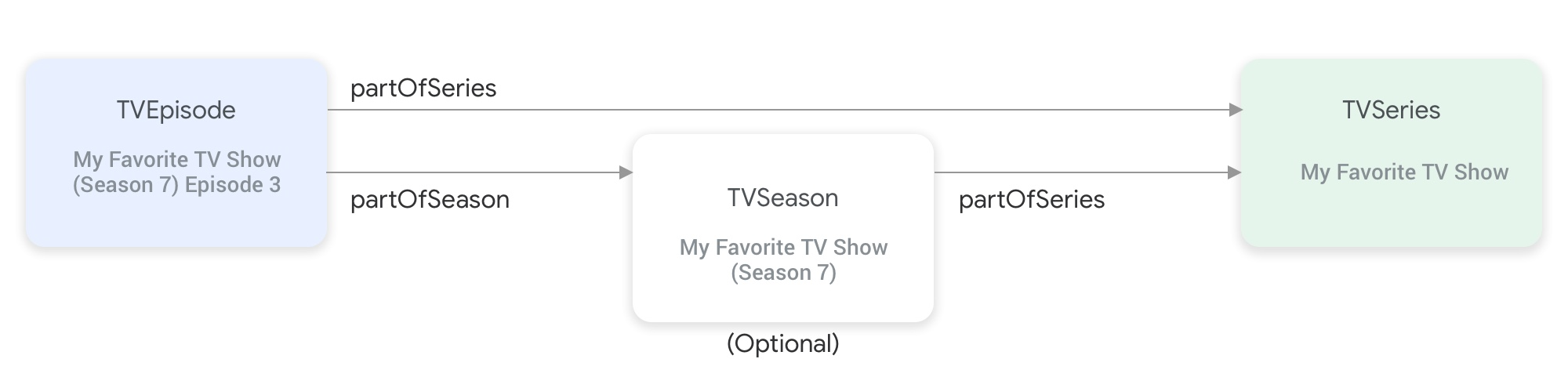
partOfSeries and partOfSeason properties connect the TV show entity types together.A
TVEpisodeentity requires you to provide thepartOfSeriesproperty, which specifies the@idandnameof the episode'sTVSeriesentity."partOfSeries": { "@type": "TVSeries", "@id": "http://www.example.com/my_favorite_tv_show", "name": "My Favorite TV Show", },If your feed contains TV seasons, a
TVSeasonentity also requires you to specify itsTVSeriesentity in thepartOfSeriesproperty.A
TVEpisodeentity requires you to provide thepartOfSeasonproperty, which specifies the@idandseasonNumberof the episode'sTVSeasonentity."partOfSeason": { "@type": "TVSeason", "@id": "http://www.example.com/my_favorite_tv_show/s7", "seasonNumber": 7 },If a
TVEpisodeentity doesn't have a correspondingTVSeasonentity in the feed, take the following steps to provide thepartOfSeason.@idandpartOfSeason.seasonNumberproperties for theTVEpisodeentity:- Take its
partofSeries.@idand attach a placeholder query field (for example, ?season1) to create a uniquepartOfSeason.@id(for example, http://www.example.com/my_favorite_tv_show?season1). - Set
partOfSeason.seasonNumberto 1.
partOfSeason.@idfor the correspondingTVSeasonentity or replace this placeholderpartOfSeason.@idwith the actual@idof theTVSeasonentity.- Take its
Example
TVSeries
My Favorite TV Show
{
"@context": ["http://schema.org", {"@language": "en"}],
"@type": "TVSeries",
"@id": "http://www.example.com/my_favorite_tv_show",
"url": "http://www.example.com/my_favorite_tv_show",
"name": "My Favorite TV Show",
"potentialAction":{ … },
...
}
TVSeason
My Favorite TV Show (season 7)
{
"@context": ["http://schema.org", {"@language": "en"}],
"@type": "TVSeason",
"@id": "http://www.example.com/my_favorite_tv_show/s7",
"url": "http://www.example.com/my_favorite_tv_show/s7",
"name": "My Favorite TV Show, Season 7",
"seasonNumber": 7,
"partOfSeries": {
  "@type": "TVSeries",
  "@id": "http://www.example.com/my_favorite_tv_show",
  "name": "My Favorite TV Show",
},
"potentialAction":{ … },
...
}
TVEpisode
Episode 3 of My Favorite TV Show (season 7)
{
"@context": ["http://schema.org", {"@language": "en"}],
"@type": "TVEpisode",
"@id": "http://www.example.com/my_favorite_tv_show/s7/e3",
"url": "http://www.example.com/my_favorite_tv_show/s7/e3",
"name": "John Doe returns at night",
"episodeNumber": 3,
"partOfSeason": {
  "@type": "TVSeason",
  "@id": "http://www.example.com/my_favorite_tv_show/s7",
  "seasonNumber": 7
},
"partOfSeries": {
"@type": "TVSeries",
"@id": "http://www.example.com/my_favorite_tv_show",
"name": "My Favorite TV Show",
},
"potentialAction":{ … },
...
}
लाइव टीवी
If you're a Live TV provider, you need to add the Organization, BroadcastService, CableOrSatelliteService, and TelevisionChannel entity types in your media catalog feed to represent your channel lineup. You may also need to provide the BroadcastEvent, TVSeries, TVEpisode, Movie, and SportsEvent entities to represent the associated EPG (electornic programming guide). You can find the definitions for these entities in the Understand the available entity types section by filtering for these types. For a more detailed explanation, you can visit the Live TV Channels page.
Relationships between entities representing Live TV channels
The figure below shows how the Organization, BroadcastService, CableOrSatelliteService, and TelevisionChannel entities are related:
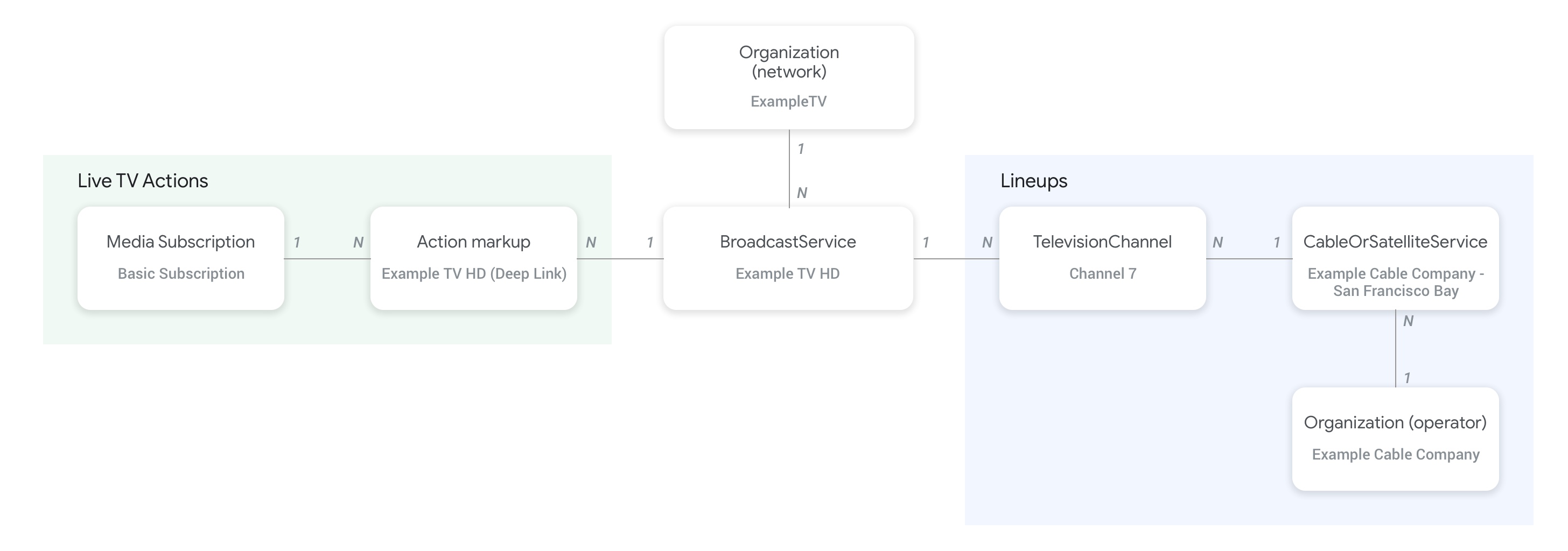
Organization(operator) entity representing the feed provider and also the parent organization ofCableOrSatelliteServiceservice are connected using theproviderproperty on theCableOrSatelliteServiceentity.Organizationentities corresponding to theBroadcastServiceentities are connected using thebroadcastAffiliateOfproperty on theBroadcastServiceentity.TelevisionChannelentities connect with theCableOrSatelliteServiceentity, that represents the lineup they belong to, using theinBroadcastLineupproperty.TelevisionChannelentities connect with theBroadcastServiceentity, whose programming this channel provides, using theprovidesBroadcastServiceproperty.
It is highly recommended to go through the Live TV channels concept page for concrete examples of how the relationship between the BroadcastService and Organization entities needs to be established.
Relationships between channels and their programming guide (EPG)
The figure below shows how the BroadcastEvent entity links to the rest of the entities in the feed.
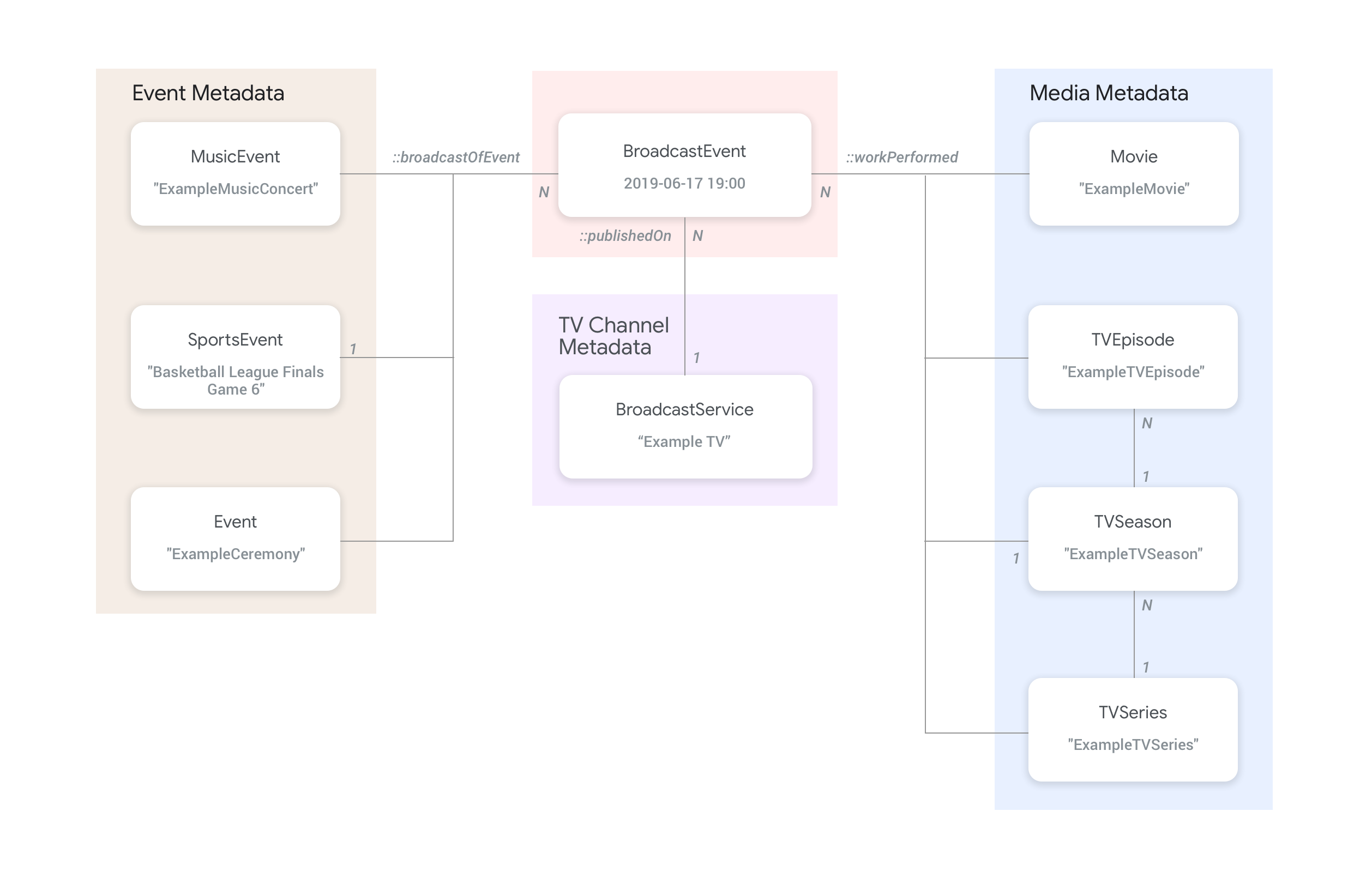
BroadcastEvententities, representing the programming guide (EPG) of aBroadcastService, are connected with theBroadcastServiceentities using thepublishedOnproperty on theBroadcastEvententity.BroadcastEvententities can also be connected to top levelTVEpisode,TVSeries,Movieentities using theworkPerformedproperty.BroadcastEvententities can also be connected to top levelSportsEvententities using thebroadcastOfEventproperty.- For channel-less events streamed online, the
BroadcastEvententities connect with the entity representing the live event using either theworkPerformedorbroadcastOfEventproperty depending on what is being live streamed. In such cases, thepublishedOnproperty is not required since the connection to a channel is not required.
Examples
The following section provides examples and snippet for various Watch Action use cases.
National TV service provider on the internet
Organization
A fictional Internet Protocol Television service provider, ExampleTV Digital Service (Organization), provides Live TV service on the Internet, which contains the following two channels: ExampleTV-Movie (Organization) and ExampleTV-Comedy (Organization):
{
  "@context": ["http://schema.org", {"@language": "en"}],
  "@type":"Organization",
  "@id":"http://example.com/exampletv/digital",
  "name":"ExampleTV Digital Service",
  "sameAs": "https://en.wikipedia.org/wiki/exampletv_digital_service"
},
{
  "@context": ["http://schema.org", {"@language": "en"}],
  "@type":"Organization",
  "@id":"http://example.com/exampletv/movie",
  "name":"ExampleTV Movie",
  "sameAs": "https://en.wikipedia.org/wiki/exampletv_movie"
},
{
  "@context": ["http://schema.org", {"@language": "en"}],
  "@type":"Organization",
  "@id":"http://example.com/exampletv/comedy",
  "name":"ExampleTV Comedy",
  "sameAs": "https://en.wikipedia.org/wiki/exampletv_comedy"
}
BroadcastService
These two BroadcastService entities provide the details of deep links and access requirement for the fictional channels ExampleTV-Movie and ExampleTV-Comedy:
{
  "@context": ["http://schema.org", {"@language": "en"}],
  "@type":"BroadcastService",
  "@id":"https://www.example.com/exampletv/broadcast/movie",
  "name": "ExampleTV-Movie",
  "alternateName": [
    "Example Television Movie",
    "Example TV Movie"
  ],
  "description": "A fictional Internet Protocol TV movie channel.",
  "broadcastDisplayName":"ExampleTV-Movie",
  "broadcastAffiliateOf":{
    "@type":"Organization",
    "@id":"http://www.example.com/exampletv/movie"
  },
  "potentialAction": {
    "@type": "WatchAction",
    "target": {
      "@type": "EntryPoint",
      "urlTemplate": "http://www.example.com/exampletv/broadcast/movie?autoplay=true",
      "inLanguage": "en",
      "actionPlatform": [
        "http://schema.org/DesktopWebPlatform",
        "http://schema.org/MobileWebPlatform",
        "http://schema.org/AndroidPlatform",
        "http://schema.org/AndroidTVPlatform",
        "http://schema.org/IOSPlatform",
        "http://schema.googleapis.com/GoogleVideoCast"
      ]
    },
    "actionAccessibilityRequirement": {
      "@type": "ActionAccessSpecification",
      "category": "subscription",
      "requiresSubscription": {
        "@type": "MediaSubscription",
        "@id": "http://www.example.com/exampletv/basic_subscription",
        "name": "Basic subscription",
        "identifier": "example.com:basic",
        "commonTier": true
      },
      "eligibleRegion": [
        {
          "@type": "Country",
          "name": "US"
        }
      ]
    }
  },
  "identifier": [
    {
      "@type": "PropertyValue",
      "propertyID": "TMS_ID",
      "value": "12345"
    },
    {
      "@type": "PropertyValue",
      "propertyID": "_PARTNER_ID_",
      "value": "exampletv-movie-33345"
    }
  ]
},
{
  "@context": ["http://schema.org", {"@language": "en"}],
  "@type":"BroadcastService",
  "@id":"https://www.example.com/exampletv/broadcast/comedy",
  "name": "ExampleTV-Comedy",
  "alternateName": [
    "Example Television Comedy",
    "Example TV Comedy"
  ],
  "description": "A fictional Internet Protocol TV comedy channel.",
  "broadcastDisplayName":"ExampleTV-Comedy",
  "broadcastAffiliateOf":{
    "@type":"Organization",
    "@id":"http://www.example.com/exampletv/comedy"
  },
  "potentialAction": {
    "@type": "WatchAction",
    "target": {
      "@type": "EntryPoint",
      "urlTemplate": "http://www.example.com/exampletv/broadcast/comedy?autoplay=true",
      "inLanguage": "en",
      "actionPlatform": [
        "http://schema.org/DesktopWebPlatform",
        "http://schema.org/MobileWebPlatform",
        "http://schema.org/AndroidPlatform",
        "http://schema.org/AndroidTVPlatform",
        "http://schema.org/IOSPlatform",
        "http://schema.googleapis.com/GoogleVideoCast"
      ]
    },
    "actionAccessibilityRequirement": {
      "@type": "ActionAccessSpecification",
      "category": "subscription",
      "requiresSubscription": {
        "@type": "MediaSubscription",
        "@id": "http://www.example.com/exampletv/basic_subscription",
        "name": "Basic subscription",
        "identifier": "example.com:basic",
        "commonTier": true
      },
      "eligibleRegion": [
        {
          "@type": "Country",
          "name": "US"
        }
      ]
    }
  },
  "identifier": [
    {
      "@type": "PropertyValue",
      "propertyID": "TMS_ID",
      "value": "15555"
    },
    {
      "@type": "PropertyValue",
      "propertyID": "_PARTNER_ID_",
      "value": "exampletv-comedy-12323"
    }
  ]
}
CableOrSatelliteService
This CableOrSatelliteService describes the service provider ExampleTV Digital Service that has national coverage:
{
  "@context": ["http://schema.org", {"@language": "en"}],
  "@type":"CableOrSatelliteService",
  "@id":"http://example.com/example_iptv/us",
  "name":"Example TV Digital Service - US",
  "provider": {
    "@type": "Organization",
    "@id": "http://example.com/exampletv/digital",
  },
  "areaServed":[
    {
      "@type":"Country",
      "name": "US",
    }
  ]
}
TelevisionChannel
These TelevisionChannel entities indicate that ExampleTV Digital Service IPTV has the ExampleTV Movie programming on channel ExTV-Movie and the ExampleTV Comedy programming on channel ExTV-Comedy:
{
  "@context": ["http://schema.org", {"@language": "en"}],
  "@type":"TelevisionChannel",
  "@id":"http://example.com/exampletv/extv-movie",
  "broadcastChannelId":"ExTV-Movie",
  "broadcastServiceTier":"Basic",
  "inBroadcastLineup":{
    "@type":"CableOrSatelliteService",
    "@id":"http://example.com/example_iptv/us"
  },
  "providesBroadcastService":{
    "@type":"BroadcastService",
    "@id":"https://www.example.com/exampletv/broadcast/movie"
  }
},
{
  "@context": ["http://schema.org", {"@language": "en"}],
  "@type":"TelevisionChannel",
  "@id":"http://example.com/exampletv/extv-comedy",
  "broadcastChannelId":"ExTV-Comedy",
  "broadcastServiceTier":"Basic",
  "inBroadcastLineup":{
    "@type":"CableOrSatelliteService",
    "@id":"http://example.com/example_iptv/us"
  },
  "providesBroadcastService":{
    "@type":"BroadcastService",
    "@id":"https://www.example.com/exampletv/broadcast/comedy"
  }
}
See the Live TV examples section for more examples.
Broadcast of a Movie on a TV channel
A movie is broadcast on the television network Example TV (BroadcastService) between 5 pm and 7 pm on July 12th, 2019.
BroadcastEvent
{
  "@context": ["http://schema.org", {"@language": "en"}],
  "@type": "BroadcastEvent",
  "@id": "http://example.com/live/movie/new_release",
  "name": "My Favorite Movie",
  "description": "John Doe spent years perfecting his survival skills in a tropical jungle.",
  "startDate": "2019-07-12T17:00-08:00",
  "endDate": "2019-07-12T19:00-08:00",
  "videoFormat": "HD",
  "isLiveBroadcast": "False",
  "publishedOn": {
    "@type": "BroadcastService",
    "@id": "http://example.com/stations/example_tv"
  },
  "workPerformed": {
    "@type": "Movie",
    "@id": "http://www.example.com/my_favorite_movie"
  }
}
BroadcastService
{
  "@context": ["http://schema.org", {"@language": "en"}],
  "@type":"BroadcastService",
  "@id":"http://example.com/stations/example_tv",
  "name":"EXAMPLE-TV",
  "broadcastDisplayName":"ABCD",
  "callSign": "EXA-TV",
  "videoFormat":"SD",
  "broadcastTimezone":"America/Los_Angeles",
  "broadcastAffiliateOf":{
    "@type":"Organization",
    "@id":"http://example.com/networks/abcd-network",
  }
  "identifier": [
   {
     "@type": "PropertyValue",
     "propertyID": "TMS_ID",
     "value": "12258"
   },
   {
     "@type": "PropertyValue",
     "propertyID": "_PARTNER_ID_",
     "value": "exampletv-123456"
   }
  ],
  "potentialAction": {
    "@type": "WatchAction",
    "target": {
      "@type": "EntryPoint",
      "urlTemplate": "http://example.com/livestream",
      "actionPlatform": [
        "http://schema.org/DesktopWebPlatform",
        "http://schema.org/MobileWebPlatform",
        "http://schema.org/AndroidPlatform",
        "http://schema.org/IOSPlatform",
        "http://schema.googleapis.com/GoogleVideoCast",
        "http://schema.org/AndroidTVPlatform"
      ]
    },
    "actionAccessibilityRequirement": {
      "@type": "ActionAccessSpecification",
      "category": "externalsubscription",
      "availabilityStarts": "2018-07-21T10:35:29Z",
      "availabilityEnds": "2019-10-21T10:35:29Z",
      "requiresSubscription": {
        "@type": "MediaSubscription",
        "@id": "http://example.com/subscription",
        "name": "ABCD",
        "sameAs": "http://example.com/subscription",
        "authenticator": {
          "@type": "Organization",
          "name": "TVE"
        }
      },
      "eligibleRegion": [
        {
          "@type": "Country",
          "name": "US"
        }
      ]
    }
  }
}
Movie
{
  "@context": ["http://schema.org", {"@language": "en"}],
  "@type": "Movie",
  "@id": "http://www.example.com/my_favorite_movie",
  "url": "http://www.example.com/my_favorite_movie",
  "name": "My Favorite Movie",
  "sameAs": "https://en.wikipedia.org/wiki/my_favorite_movie",
  "releasedEvent": {
    "@type": "PublicationEvent",
    "startDate": "2008-01-20",
    "location": {
      "@type": "Country",
      "name": "US"
    }
  },
  "description": "John Doe spent years perfecting his survival skills in a tropical jungle.",
  "actor": [
    {
      "@type": "Person",
      "name": "John Doe",
      "sameAs": "https://en.wikipedia.org/wiki/John_Doe"
    },
    {
      "@type": "Person",
      "name": "Jane Doe",
      "sameAs": "https://en.wikipedia.org/wiki/Jane_Doe"
    }
  ],
  "identifier": [
    {
      "@type": "PropertyValue",
      "propertyID": "IMDB_ID",
      "value":  "tt0123456"
    }
  ]
}
See the Live TV Event examples section for more examples.
A live sports game streamed online
Broadcast event
{
  "@context": ["http://schema.org", {"@language": "en"}],
  "@type": "BroadcastEvent",
  "@id": "http://example.com/live_eevent/basketball/professional/final_game_6",
  "name": "2019 Professional Basketball Finals, Game 6: Team A at Team B",
  "description": "Game 6 of the 2019 Professional Basketball Finals. Team A leads the series 3-2 against Team B.",
  "startDate": "2018-09-16T10:00-08:00",
  "endDate": "2018-09-16T13:00-08:00",
  "videoFormat": "HD",
  "isLiveBroadcast": "False",
  "potentialAction": {
    "@type": "WatchAction",
    "target": {
      "@type": "EntryPoint",
      "urlTemplate": "http://www.example.com/pbl_semis_game?autoplay=true",
      "inLanguage": "en",
      "actionPlatform": [
        "http://schema.org/DesktopWebPlatform",
        "http://schema.org/MobileWebPlatform",
        "http://schema.org/AndroidPlatform",
        "http://schema.org/AndroidTVPlatform",
        "http://schema.org/IOSPlatform",
        "http://schema.googleapis.com/GoogleVideoCast"
      ]
    },
    "actionAccessibilityRequirement": {
      "@type": "ActionAccessSpecification",
      "category": "subscription",
      "availabilityStarts": "2018-09-16T10:00-08:00",
      "availabilityEnds": "2018-09-16T10:00-08:00",
      "requiresSubscription": {
        "@type": "MediaSubscription",
        "name": "Example Package",
        "commonTier": true,
        "@id": "http://www.example.com/example_package"
      },
      "eligibleRegion": [
        {
          "@type": "Country",
          "name": "US"
        }
      ]
    }
  },
  "broadcastOfEvent": {
    "@type": "SportsEvent",
    "@id": "http://example.com/basketball/professional/final_game_6"
  }
}
Sports event
{
  "@context": ["http://schema.org", {"@language": "en"}],
  "@type":"SportsEvent",
  "@id": "http://example.com/basketball/professional/final_game_6",
  "name":"2019 Professional Basketball Finals, Game 6: Team A vs Team B",
  "sport":"https://en.wikipedia.org/wiki/Basketball",
  "description": {
      "@language": "en",
      "@value": "Game 6 of the 2019 Professional Basketball Finals. Team A leads the series 3-2 against Team B."
    },
  "startDate": "2019-09-16T10:00-08:00",
  "endDate": "2019-09-16T13:00-08:00",
  "homeTeam":{
    "@type":"SportsTeam",
    "name":"Team B",
    "sport":"https://en.wikipedia.org/wiki/Basketball",
    "parentOrganization":{
      "@type":"SportsOrganization",
      "name":"Professional Basketball League",
      "sameAs":"http://www.example.com/professional_basketball_league"
    },
    "athlete":[
      {
        "@type":"Person",
        "name":"John doe"
      }
    ]
  },
  "awayTeam":{
    "@type":"SportsTeam",
    "name":"Team A",
    "sport":"https://en.wikipedia.org/wiki/Basketball",
    "athlete":[
      {
        "@type":"Person",
        "name":"Jane Doe"
      }
    ]
  },
  "location":{
    "@type":"Place",
    "name":"Example Stadium",
    "address":{
      "@type":"PostalAddress",
      "streetAddress":"1600 Amphitheatre Pkwy",
      "addressLocality":"Mountain View",
      "addressRegion":"CA",
      "postalCode":"94043",
      "addressCountry":"US"
    }
  },
  "identifier": [
    {
      "@type": "PropertyValue",
      "propertyID": "TMS_ID",
      "value":  "TMS ID of this game"
    }
  ]
}
See the Sports examples section for more examples.