
Page Summary
-
Appointment availability feeds must follow a specific JSON or protobuffer format and be uploaded to the generic SFTP server every 30 minutes as full refreshes.
-
Each feed and descriptor file should have a unique filename including a timestamp, and the descriptor file's
namefield must be set toappointment.availability. -
Incremental feeds allow for uploading only changes to availability but require a full availability feed every 24 hours.
-
To use incremental updates, set
is_incremental: truein the feed, with operations including adding, updating, or deleting availability slots by adjustingspots_availableor providing newavailability_ids. -
The
AppointmentAvailabilitydefinition specifies required fields likeavailability_id,entity_id,service_id,start_time_sec,spots_total,spots_available,booking_link,base_price, andfee_price.
Create and upload appointment availability feeds
When creating and uploading appointment availability feeds, follow these instructions:
- Follow the spec described in the
appointment availability feed
for appointment availability data files. We recommend using unique appointment availability data file names for each upload.
Include a timestamp in the filename, for example,
appointment availability_1633621547.json. - In the fileset descriptor, set the
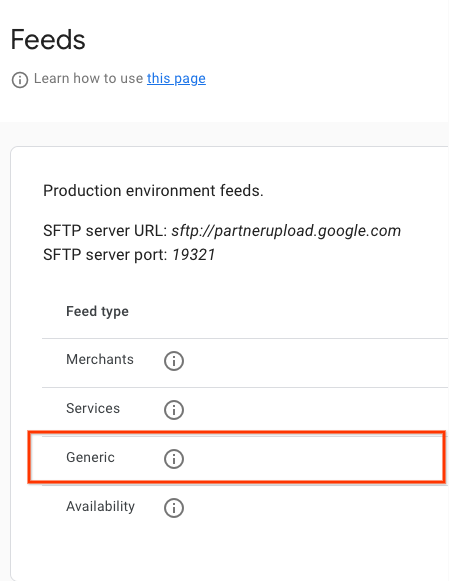
namefield toappointment.availability. For an example of the descriptor file, refer to the JSON sample. We recommend using unique descriptor file names for each upload. Include a timestamp in the filename, for example,appointment availability_1633621547.filesetdesc.json. The descriptor file must be uploaded to the generic SFTP server. - Upload feeds to the generic SFTP server every 30 mins as full refreshes.
- You can find SFTP server details in the Configuration > Feeds section of the Partner Portal.
- View feed ingestion status in the Feeds > History section of the Partner Portal.
Uploading Incremental Feeds
Appointment availability also supports incremental feeds, enabling partners to upload only the changes made to their availability using the feed upload.
To upload an incremental feed, set is_incremental: true within at least one of the availability slots in your feed. If some of the feeds have is_incremental set to true and some have it set to false, then the system treats all of them as incremental.
Incremental updates offer the following operations:
- No Change
- Do not include the availability ID for entities where there is no change.
- Update Availability
- To update a single availability, upload the specific availability entry (the same
availability_id) requiring modification, altering any of the fields selected. - Delete Availability
- If an availability entry is no longer available or should be deleted, upload that availability (the same
availability_id) withspots_availableset to 0, and the system will automatically delete it. Furthermore, to remove all data for a merchant / entity, set all of their availability slots'spots_availableto 0 - this will remove the merchant / entity themselves from Availability. - Add Availability
- For new availability slots, include the new availability entry with its unique new
availability_idin the feed upload. The system treats it the same as if it were included in a regular feed.
Definitions
AppointmentAvailabilityFeed Definition
message AppointmentAvailabilityFeed {
  repeated AppointmentAvailability data = 1;
}
AppointmentAvailability Definition
// This represents the availability data for a bookable service provided by a
// merchant.
// For example, it can be a haircut/nail manicure service for a beauty salon or
// a massage service for a spa.
// The availability feed should be a list of this message.
message AppointmentAvailability {
  // An opaque string generated by the partner that identifies a service time
  // slot. Must be unique across all entities and service time slots.
  // Strongly recommended to only include URL-safe characters.
  // Required.
  string availability_id = 1;

  // An opaque string generated by the partner that identifies an Entity.
  // Must be unique across all entities.
  // Strongly recommended to only include URL-safe characters.
  // Required.
  string entity_id = 2;

  // An opaque string of ASCII characters from an aggregator partner which
  // uniquely identifies the Service (haircut, nail manicure, massage).
  // Strongly recommended to only include URL-safe characters.
  // Required.
  string service_id = 3;

  // The name of the service provider. For example, the name of the
  // hairdresser or the spa staff member.
  // Optional.
  string provider = 12;

  // Timestamp of when this availability slot starts in UTC.
  // Given in seconds since the unix epoch.
  // For example, 1735714800 seconds for 1 Jan 2025, 07:00:00 (UTC).
  // Required.
  int64 start_time_sec = 4;

  // The minimum number of minutes in advance before the start time that this
  // availability slot can be booked.
  // For example, if the start time is 10:00 AM and the min_advance_minutes is
  // 60, then the latest time this slot can be booked is 9:00 AM on the day of
  // the appointment.
  // If not set, it is assumed to be 0, meaning the slot can be booked at any
  // time before the start time.
  // Optional.
  int32 min_advance_minutes = 13;

  // Number of total spots and available spots of this booking availability.
  // Required.
  int32 spots_total = 5;
  // Required.
  int32 spots_available = 6;

  // The minimum number of spots that should be booked for this availability.
  // For example, a user has to book at least 2 spots for a time slot sometimes.
  // If set, spots_minimum_book should be less or equal to spots_available.
  // Optional.
  int32 spots_minimum_book = 7;

  // Link of this booking availability. Users will be redirected to partner
  // website to continue booking after clicking this link.
  // Required.
  string booking_link = 8;

  // Base price per person.
  // Required.
  google.type.Money base_price = 9;
  // Fee per person.
  // Required.
  google.type.Money fee_price = 10;

  // Whether the feed is incremental or not.
  // By default it is false, meaning the Availability feed will override the
  // previous data for the same entity_id.
  // If this is set to be true, the Availability feed will be proceeded as
  // incremental updates for the same entity_id.
  //    1) If it is a new availability_id, the entry is added.
  //    2) If it is an existing availability_id and the spots_available is 0,
  //       the entry is removed.
  //    3) If it is an existing availability_id and the spots_available is not
  //    0, the entry is updated.
  bool is_incremental = 11;
}
External proto references:
Golf Availability feeds samples
Appointment Availability Feed
{
  "data": [
    {
      "availability_id": "availability_id_1",
      "entity_id": "entity_id_1",
      "service_id": "service_id_1",
      "start_time_sec": 1728257400,
      "spots_total": 4,
      "spots_available": 4,
      "spots_minimum_book": 2,
      "booking_link": "https://www.googleappointments.com/a_link_direct_to_booking_page",
      "base_price": {
        "currency_code": "USD",
        "units": 80,
        "nanos": 0
      },
      "fee_price": {
        "currency_code": "USD",
        "units": 1,
        "nanos": 750000000
      }
    },
    {
      "availability_id": "availability_id_2",
      "entity_id": "entity_id_2",
      "service_id": "service_id_2",
      "start_time_sec": 1728259200,
      "spots_total": 4,
      "spots_available": 4,
      "spots_minimum_book": 2,
      "booking_link": "https://googlegolfappointments.com/a_link_direct_to_booking_page",
      "base_price": {
        "currency_code": "USD",
        "units": 80,
        "nanos": 0
      },
      "fee_price" : {
        "currency_code": "USD",
        "units": 2,
        "nanos": 850000000
      }
    }
  ]
}
Descriptor File
{
  "generation_timestamp": 1663347730,
  "name": "appointment.availability",
  "data_file": [
    "appointment_availability_1663347730.json"
  ]
}