

本開發人員指南說明如何在行動應用程式中導入 Google 代碼管理工具。
簡介
開發人員可透過 Google 代碼管理工具介面,在行動應用程式中變更設定值,不必重建應用程式,也不必將應用程式二進位檔重新提交至應用程式市集。
這項功能有助於管理應用程式中日後可能需要變更的任何設定值或旗標,包括:
- 各種 UI 設定和顯示字串
- 應用程式中放送的廣告大小、位置或類型
- 遊戲設定
設定值也可以在執行階段使用規則進行評估,以啟用動態設定,例如:
- 根據螢幕大小判斷廣告橫幅大小
- 使用語言和位置資訊設定 UI 元素
Google 代碼管理工具也能在應用程式中動態導入追蹤代碼和像素。開發人員可以將重要事件推送至資料層,稍後再決定應觸發哪些追蹤代碼或像素。代碼管理工具支援下列代碼:
- Google 行動應用程式分析
- 自訂函式呼叫代碼
事前準備
使用本入門指南前,請先準備好下列項目:
- Google 代碼管理工具帳戶
- 新的代碼管理工具 容器和值組合巨集
- 要導入 Google 代碼管理工具的 iOS 行動應用程式
- Google Analytics Services SDK,其中包含代碼管理工具程式庫。
如果您是 Google 代碼管理工具新手,建議先 進一步瞭解容器、巨集和規則 (說明中心),再繼續閱讀本指南。
開始使用
本節將引導開發人員完成典型的代碼管理工具工作流程:
1. 在專案中加入 Google 代碼管理工具 SDK
使用 Google 代碼管理工具 SDK 之前,請先將 SDK 套件 Library 目錄中的 Google 代碼管理工具 (GTM) 標頭檔新增至專案。libGoogleAnalyticsServices.a
接著,如果應用程式目標的連結程式庫中沒有下列項目,請新增這些項目:
CoreData.frameworkSystemConfiguration.frameworklibz.dyliblibsqlite3.dyliblibGoogleAnalyticsServices.a
如要讓應用程式透過 Google 代碼管理工具 SDK 巨集,存取該架構提供的廣告主識別碼 (IDFA) 和追蹤旗標,您也需要連結下列額外程式庫:
libAdIdAccess.aAdSupport.framework
2. 在專案中新增預設容器檔案
應用程式首次執行時,Google 代碼管理工具會使用預設容器。在應用程式透過網路擷取新的容器之前,系統會使用預設容器。
如要下載預設容器二進位檔並新增至應用程式,請按照下列步驟操作:
- 登入 Google 代碼管理工具網頁介面。
- 選取要下載的容器版本。
- 點選「下載」按鈕,即可擷取容器二進位檔。
- 將二進位檔案新增至專案的根目錄,以及專案中的「Supporting Files」資料夾。
預設檔案名稱應為容器 ID (例如 GTM-1234)。下載二進位檔案後,請務必從檔案名稱中移除版本後置字串,確保遵循正確的命名慣例。
雖然建議使用二進位檔案,但如果容器不含規則或代碼,您也可以選擇使用屬性清單或 JSON 檔案。檔案應位於主要套件中,並遵循以下命名慣例:<Container_ID>.<plist|json>。
舉例來說,如果容器 ID 為 GTM-1234,您可以在名為 GTM-1234.plist 的屬性清單檔案中,指定預設容器值。
3. 開啟容器
應用程式必須先開啟容器,才能從容器中擷取值。開啟容器時,系統會從磁碟載入容器 (如有),或從網路要求容器 (如有需要)。
在 iOS 上開啟容器最簡單的方法是使用 openContainerWithId:tagManager:openType:timeout:notifier:,如下列範例所示:
// MyAppDelegate.h
// This example assumes this file is using ARC.
#import <UIKit/UIKit.h>

@class TAGManager;
@class TAGContainer;

@interface MyAppDelegate : UIResponder <UIApplicationDelegate>

@property (nonatomic, strong) TAGManager *tagManager;
@property (nonatomic, strong) TAGContainer *container;

@end


// MyAppDelegate.m
// This example assumes this file is using ARC.
#import "MyAppDelegate.h"
#import "TAGContainer.h"
#import "TAGContainerOpener.h"
#import "TAGManager.h"

@interface MyAppDelegate ()<TAGContainerOpenerNotifier>
@end

@implementation MyAppDelegate

- (BOOL)application:(UIApplication *)application didFinishLaunchingWithOptions:(NSDictionary *)launchOptions {
  self.tagManager = [TAGManager instance];

  // Optional: Change the LogLevel to Verbose to enable logging at VERBOSE and higher levels.
  [self.tagManager.logger setLogLevel:kTAGLoggerLogLevelVerbose];

  /*
   * Opens a container.
   *
   * @param containerId The ID of the container to load.
   * @param tagManager The TAGManager instance for getting the container.
   * @param openType The choice of how to open the container.
   * @param timeout The timeout period (default is 2.0 seconds).
   * @param notifier The notifier to inform on container load events.
   */
  [TAGContainerOpener openContainerWithId:@"GTM-XXXX"   // Update with your Container ID.
                               tagManager:self.tagManager
                                 openType:kTAGOpenTypePreferFresh
                                  timeout:nil
                                 notifier:self];

  // Method calls that don't need the container.

  return YES;
}

// TAGContainerOpenerNotifier callback.
- (void)containerAvailable:(TAGContainer *)container {
  // Note that containerAvailable may be called on any thread, so you may need to dispatch back to
  // your main thread.
  dispatch_async(dispatch_get_main_queue(), ^{
    self.container = container;
  });
}

// The rest of your app delegate implementation.
4. 從容器取得設定值
開啟容器後,即可使用 <type>ForKey: 方法擷取設定值:
// Retrieving a configuration value from a Tag Manager Container.

MyAppDelegate *appDelegate = (MyAppDelegate *)[[UIApplication sharedApplication] delegate];
TAGContainer *container = appDelegate.container;

// Get the configuration value by key.
NSString *title = [container stringForKey:@"title_string"];
如果要求使用的鍵不存在,系統會傳回適合所要求類型的預設值:
// Empty keys will return a default value depending on the type requested.

// Key does not exist. An empty string is returned.
NSString subtitle = [container stringForKey:@"Non-existent-key"];
[subtitle isEqualToString:@""]; // Evaluates to true.
5. 將值推送到資料層
DataLayer 是一張地圖,可讓容器中的代碼管理工具巨集和代碼,取得應用程式的執行階段資訊,例如觸控事件或畫面檢視。
舉例來說,只要將螢幕檢視畫面相關資訊推送至 DataLayer 對應,您就能在代碼管理工具網頁介面中設定代碼,以便在這些螢幕檢視畫面觸發轉換像素和追蹤呼叫,不必在應用程式中硬式編碼。
事件會使用 push: 推送至 DataLayer
//
//  ViewController.m
//  Pushing an openScreen event with a screen name into the data layer.
//

#import "MyAppDelegate.h"
#import "TAGDataLayer.h"
#import "ViewController.h"

@implementation ViewController

- (void)viewDidAppear:(BOOL)animated {
    [super viewDidAppear:animated];

    // The container should have already been opened, otherwise events pushed to
    // the data layer will not fire tags in that container.
    TAGDataLayer *dataLayer = [TAGManager instance].dataLayer;

    [dataLayer push:@{@"event": @"openScreen", @"screenName": @"Home Screen"}];
}

// Rest of the ViewController implementation

@end
在網頁介面中,您現在可以建立代碼 (例如 Google Analytics 代碼),並建立以下規則,在每次畫面瀏覽時觸發代碼: 等於「openScreen」。如要將畫面名稱傳遞至其中一個代碼,請建立參照資料層中「screenName」鍵的資料層巨集。您也可以建立代碼 (例如 Google Ads 轉換像素),只針對特定畫面檢視觸發,方法是建立規則,其中 等於「openScreen」&& 等於「ConfirmationScreen」。
6. 預覽及發布容器
巨集值一律會對應至目前發布的版本。 發布容器最新版本前,您可以先預覽容器草稿。
如要預覽容器,請在 Google 代碼管理工具網頁介面中產生預覽網址,方法是選取要預覽的容器版本,然後選取 Preview。請儲存這個預覽網址,後續步驟會用到。

如要啟用容器預覽功能,您必須在應用程式委派實作檔案中加入程式碼,並在專案的屬性清單中定義 Google 代碼管理工具預覽網址架構。
首先,請將下列以粗體顯示的程式碼片段新增至應用程式委派檔案:
@implementation MyAppDelegate

- (BOOL)application:(UIApplication *)application didFinishLaunchingWithOptions:(NSDictionary *)launchOptions {

  self.tagManager = [TAGManager instance];

  // Add the code in bold below to preview a Google Tag Manager container.
  // IMPORTANT: This code must be called before the container is opened.
  NSURL *url = [launchOptions valueForKey:UIApplicationLaunchOptionsURLKey];
  if (url != nil) {
    [self.tagManager previewWithUrl:url];
  }

  id<TAGContainerFuture> future =
      [TAGContainerOpener openContainerWithId:@"GTM-XXXX"    // Placeholder Container ID.
                                   tagManager:self.tagManager
                                     openType:kTAGOpenTypePreferNonDefault
                                      timeout:nil];

  // The rest of your method implementation.

  self.container = [future get];

  return YES;
}


// Add the code in bold below preview a Google Tag Manager container.
- (BOOL)application:(UIApplication *)application
            openURL:(NSURL *)url
  sourceApplication:(NSString *)sourceApplication
         annotation:(id)annotation {

  if ([self.tagManager previewWithUrl:url]) {
    return YES;
  }

  // Code to handle other urls.
  return NO;
}
接著,在應用程式的屬性清單檔案的 URL 類型鍵下,註冊下列網址 ID 和網址配置:
URL identifier: your.package_name
URL scheme: tagmanager.c.your.package.name

在模擬器或實體裝置上開啟連結,即可在應用程式中預覽草稿容器。
準備好讓應用程式使用草稿設定值時,請 發布容器。
進階設定
行動裝置專用的 Google 代碼管理工具提供多種進階設定選項,可讓您使用規則根據執行階段條件選取值、手動重新整理容器,以及取得開啟容器的其他選項。下列各節將說明幾種最常見的進階設定。
開啟容器的進階選項
Google 代碼管理工具 SDK 提供多種開啟容器的方法,可讓您進一步控管載入程序:
openContainerById:callback:
openContainerById:callback: 是開啟容器的最低階 API,也是最彈性的 API。如果沒有已儲存的容器,或儲存的容器不是最新版本 (超過 12 小時),這個函式會立即傳回預設容器,並從磁碟或網路非同步載入容器。
@interface ContainerCallback : NSObject<TAGContainerCallback>

@end

@implementation ContainerCallback

/**
 * Called before the refresh is about to begin.
 *
 * @param container The container being refreshed.
 * @param refreshType The type of refresh which is starting.
 */
- (void)containerRefreshBegin:(TAGContainer *)container
                  refreshType:(TAGContainerCallbackRefreshType)refreshType {
  // Notify UI that container refresh is beginning.
}

/**
 * Called when a refresh has successfully completed for the given refresh type.
 *
 * @param container The container being refreshed.
 * @param refreshType The type of refresh which completed successfully.
 */
- (void)containerRefreshSuccess:(TAGContainer *)container
                    refreshType:(TAGContainerCallbackRefreshType)refreshType {
  // Notify UI that container is available.
}

/**
 * Called when a refresh has failed to complete for the given refresh type.
 *
 * @param container The container being refreshed.
 * @param failure The reason for the refresh failure.
 * @param refreshType The type of refresh which failed.
 */
- (void)containerRefreshFailure:(TAGContainer *)container
                        failure:(TAGContainerCallbackRefreshFailure)failure
                    refreshType:(TAGContainerCallbackRefreshType)refreshType {
  // Notify UI that container request has failed.
}
@end
在載入過程中,openContainerById:callback: 會發出多個生命週期回呼,讓您的程式碼瞭解載入要求何時開始、是否失敗 (以及失敗原因),以及容器最終是從磁碟還是網路載入。
除非應用程式可接受使用預設值,否則您需要使用這些回呼,瞭解已儲存或網路容器何時載入。請注意,如果這是首次執行應用程式,且沒有網路連線,您將無法載入已儲存或網路容器。
openContainerById:callback: 會將下列 enum 值做為引數傳遞至這些回呼:
RefreshType
| 值 | 說明 |
|---|---|
kTAGContainerCallbackRefreshTypeSaved
|
重新整理要求會載入本機儲存的容器。 |
kTAGContainerCallbackRefreshTypeNetwork
|
重新整理要求會透過網路載入容器。 |
RefreshFailure
| 值 | 說明 |
|---|---|
kTAGContainerCallbackRefreshFailureNoSavedContainer
|
沒有可用的已儲存容器。 |
kTAGContainerCallbackRefreshFailureIoError
|
I/O 錯誤導致容器無法重新整理。 |
kTAGContainerCallbackRefreshFailureNoNetwork
|
沒有可用的網路連線。 |
kTAGContainerCallbackRefreshFailureNetworkError
|
發生網路錯誤。 |
kTAGContainerCallbackRefreshFailureServerError
|
伺服器發生錯誤。 |
kTAGContainerCallbackRefreshFailureUnknownError
|
發生無法分類的錯誤。 |
開啟非預設和全新容器的方法
TAGContainerOpener 會包裝 openContainerById:callback:,並提供兩種開啟容器的便利方法:openContainerWithId:tagManager:openType:timeout:notifier: 和 openContainerWithId:tagManager:openType:timeout:。
這些方法都會採用列舉,要求非預設或新的容器。
kTAGOpenTypePreferNonDefault 適用於大多數應用程式,並嘗試在指定逾時期間內,從磁碟或網路傳回第一個可用的非預設容器,即使該容器已超過 12 小時也沒問題。如果傳回過時的已儲存容器,也會發出非同步網路要求,以取得新容器。使用 kTAGOpenTypePreferNonDefault 時,如果沒有其他容器可用,或超過逾時時間,系統會傳回預設容器。
kTAGOpenTypePreferFresh 會嘗試在指定逾時期間內,從磁碟或網路傳回新的容器。如果網路連線無法使用和/或超過逾時時間,系統會傳回已儲存的容器。
不建議在要求時間較長可能會明顯影響使用者體驗的地方使用 kTAGOpenTypePreferFresh,例如 UI 標記或顯示字串。您也可以隨時使用 TAGContainer::refresh 強制發出網路容器要求。
這兩種便利方法都不會造成阻斷。
openContainerWithId:tagManager:openType:timeout: 會傳回 TAGContainerFuture 物件,該物件的 get 方法會在載入後立即傳回 TAGContainer (但會封鎖到載入完成為止)。openContainerWithId:tagManager:openType:timeout:notifier: 方法會採用單一回呼,並在容器可用時呼叫。這兩種方法的預設逾時時間都是 2.0 秒。
使用規則在執行階段評估巨集
容器可在執行階段使用規則評估值。規則可根據裝置語言、平台或任何其他巨集值等條件設定。舉例來說,規則可用於在執行階段根據裝置語言選取本地化顯示字串。您可以使用下列規則設定這項功能:
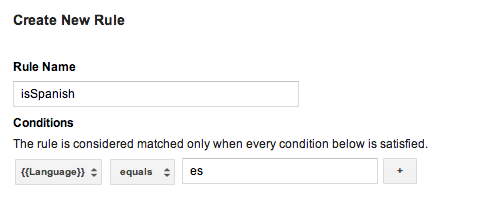
接著,您可以為每種語言建立值集合巨集,並在每個巨集中加入這項規則,插入適當的語言代碼。發布這個容器後,應用程式就能在執行階段根據使用者裝置的語言,顯示本地化顯示字串。
請注意,如果預設容器需要規則,您必須使用二進位容器檔案做為預設容器。
二進位預設容器檔案
需要規則的預設容器應使用二進位容器檔案,而非屬性清單檔案或 JSON 檔案做為預設容器。二進位容器支援使用 Google 代碼管理工具規則,在執行階段判斷巨集值,但屬性清單或 JSON 檔案則不支援。
您可以從 Google 代碼管理工具網頁介面下載二進位容器檔案,並按照以下命名慣例將檔案新增至主要應用程式套件:GTM-XXXX,其中檔案名稱代表容器 ID。
如果同時存在屬性清單檔案和/或 JSON 檔案,以及二進位容器檔案,SDK 會將二進位容器檔案做為預設容器。
使用函式呼叫巨集
函式呼叫巨集會設為應用程式中指定函式的傳回值。函式呼叫巨集可用於在 Google 代碼管理工具規則中加入執行階段值,例如根據裝置設定的語言和幣別,在執行階段決定要向使用者顯示的價格。
如要設定函式呼叫巨集,請按照下列步驟操作:
- 在 Google 代碼管理工具網頁介面中定義函式呼叫巨集。 引數可視需要設定為鍵/值組合。
- 定義實作
TAGFunctionCallMacroHandler通訊協定的處理常式:// MyFunctionCallMacroHandler.h #import "TAGContainer.h" // The function name field of the macro, as defined in the Google Tag Manager // web interface. extern NSString *const kMyMacroFunctionName; @interface MyFunctionCallMacroHandler : NSObject<TAGFunctionCallMacroHandler> @end // MyFunctionCallMacroHandler.m #import "MyFunctionCallMacroHandler.h" // Corresponds to the function name field in the Google Tag Manager interface. NSString *const kMyMacroFunctionName = @"myConfiguredFunctionName"; @implementation MacroHandler - (id)valueForMacro:(NSString *)functionName parameters:(NSDictionary *)parameters { if ([functionName isEqualToString:kMyMacroFunctionName]) { // Process and return the calculated value of this macro accordingly. return macro_value; } return nil; } @end
- 使用 TAGContainer::registerFunctionCallMacroHandler:forMacro: 註冊處理常式,以及在 Google 代碼管理工具介面中指定的函式名稱:
//
// MyAppDelegate.h
//
#import <UIKit/UIKit.h>

@interface MyAppDelegate : UIResponder <UIApplicationDelegate>

@end


//
// MyAppDelegate.m
//
#import "MyAppDelegate.h"
#import "MyFunctionCallMacroHandler.h"
#import "TAGContainer.h"
#import "TAGContainerOpener.h"
#import "TAGManager.h"

@implementation MyAppDelegate

- (BOOL)application:(UIApplication *)application didFinishLaunchingWithOptions:(NSDictionary *)launchOptions
{
  // Open the container.
  id<TAGContainerFuture> future =
      [TAGContainerOpener openContainerWithId:@"GTM-XXXX"    // Placeholder Container ID.
                                   tagManager:[TAGManager instance]
                                     openType:kTAGOpenTypePreferNonDefault
                                      timeout:nil];

  // Method calls that don't need the container.

  self.container = [future get];

  // Register a function call macro handler using the macro name defined
  // in the Google Tag Manager web interface.
  [self.container registerFunctionCallMacroHandler:[[MyFunctionCallMacroHandler alloc] init]
                                          forMacro:kMyMacroFunctionName];
}

@end
使用函式呼叫代碼
每當事件推送至資料層,且代碼規則評估結果為 true 時,函式呼叫代碼就會執行預先註冊的函式。
如要設定函式呼叫代碼,請按照下列步驟操作:
- 在 Google 代碼管理工具網頁介面中定義函式呼叫代碼。 引數可視需要設定為鍵/值組合。
- 實作
TAGFunctionCallTagHandler協定:// // MyFunctionCallTagHandler.h // #import "TAGContainer.h" extern NSString *const kMyTagFunctionName; @interface MyFunctionCallTagHandler : NSObject<TAGFunctionCallTagHandler> @end // // MyFunctionCallTagHandler.m // // Corresponds to the function name field in the Google Tag Manager interface. NSString *const kMyTagFunctionName = @"myConfiguredFunctionName"; @implementation MyFunctionCallTagHandler /** * This method will be called when any custom tag's rule(s) evaluate to true and * should check the functionName and process accordingly. * * @param functionName corresponds to the function name field, not tag * name field, defined in the Google Tag Manager web interface. * @param parameters An optional map of parameters as defined in the Google * Tag Manager web interface. */ - (void)execute:(NSString *)functionName parameters:(NSDictionary *)parameters { if ([functionName isEqualToString:kMyTagFunctionName]) { // Process accordingly. } } @end
- 使用 Google 代碼管理工具網頁介面中設定的代碼名稱,註冊函式呼叫代碼處理常式:
//
// MyAppDelegate.h
//
#import <UIKit/UIKit.h>

@interface MyAppDelegate : UIResponder <UIApplicationDelegate>

@end


//
// MyAppDelegate.m
//
#import "MyAppDelegate.h"
#import "MyFunctionCallTagHandler.h"
#import "TAGContainer.h"
#import "TAGContainerOpener.h"
#import "TAGManager.h"

@implementation MyAppDelegate

- (BOOL)application:(UIApplication *)application didFinishLaunchingWithOptions:(NSDictionary *)launchOptions {

  // Open the container.
  id<TAGContainerFuture> future =
      [TAGContainerOpener openContainerWithId:@"GTM-XXXX"    // Placeholder Container ID.
                                   tagManager:[TAGManager instance]
                                     openType:kTAGOpenTypePreferNonDefault
                                      timeout:nil];

  // Method calls that don't need the container.

  self.container = [future get];

  // Register a function call tag handler using the function name of the tag as
  // defined in the Google Tag Manager web interface.
  [self.container registerFunctionCallTagHandler:[[MyFunctionCallTagHandler alloc] init]
                                          forTag:kMyTagFunctionName];
}
@end
設定自訂重新整理週期
如果目前的容器已超過 12 小時,Google 代碼管理工具 SDK 會嘗試擷取新的容器。如要設定自訂容器重新整理週期,請使用 NSTimer,如下列範例所示:
- (void)refreshContainer:(NSTimer *)timer {
  [self.container refresh];
}

self.refreshTimer = [NSTimer scheduledTimerWithTimeInterval:<refresh_interval>
                                                     target:self
                                                   selector:@selector(refreshContainer:)
                                                   userInfo:nil
                                                    repeats:YES];
使用記錄器偵錯
根據預設,Google 代碼管理工具 SDK 會將錯誤和警告訊息列印至記錄檔。啟用更詳細的記錄功能有助於偵錯,您可以實作自己的 Logger,如以下範例所示:
// MyAppDelegate.h
// This example assumes this file is using ARC.
// This Logger class will print out not just errors and warnings (as the default
// logger does), but also info, debug, and verbose messages.
@interface MyLogger: NSObject<TAGLogger>
@end

@implementation MyLogger
- (void)error:(NSString *)message {
  NSLog(@"Error: %@", message);
}

- (void)warning:(NSString *)message {
  NSLog(@"Warning: %@", message);
}

- (void)info:(NSString *)message {
  NSLog(@"Info: %@", message);
}

- (void)debug:(NSString *)message {
  NSLog(@"Debug: %@", message);
}

- (void)verbose:(NSString *)message {
  NSLog(@"Verbose: %@", message);
}
@end

// MyAppDelegate.m
// This example assumes this file is using ARC.
@implementation MyAppDelegate

- (BOOL)application:(UIApplication *)application didFinishLaunchingWithOptions:(NSDictionary *)launchOptions {
  self.tagManager = [TAGManager instance];

  self.tagManager.logger = [[MyLogger alloc] init];

  // Rest of Tag Manager and method implementation.
  return YES;
}
// Rest of app delegate implementation.
@end
或者,您也可以使用 TagManager::logger::setLogLevel 設定現有記錄器的 LogLevel,如以下範例所示:
// Change the LogLevel to INFO to enable logging at INFO and higher levels.
self.tagManager = [TAGManager instance];
[self.tagManager.logger setLogLevel:kTAGLoggerLogLevelInfo];