
總覽
以下概略說明密碼金鑰註冊的主要步驟:
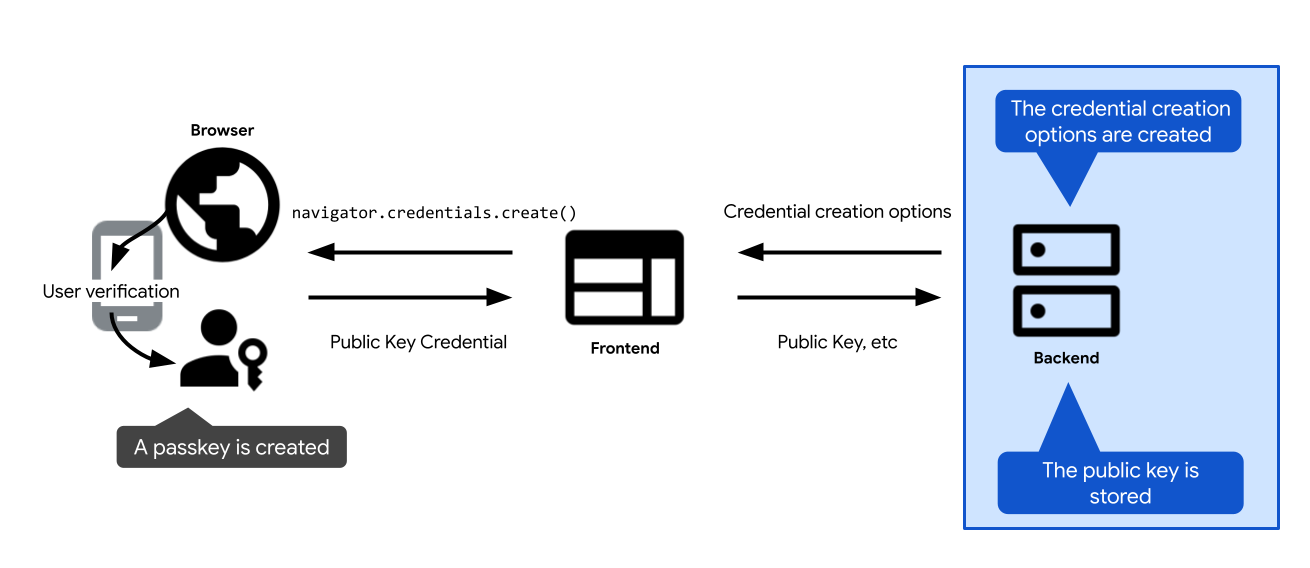
- 定義建立密碼金鑰的選項。將這些資訊傳送至用戶端,以便傳遞至密碼金鑰建立呼叫:網頁上的 WebAuthn API 呼叫
navigator.credentials.create,以及 Android 上的credentialManager.createCredential。使用者確認建立密碼金鑰後,系統會解析密碼金鑰建立呼叫,並傳回憑證PublicKeyCredential。 - 驗證憑證並儲存在伺服器上。
以下各節將深入探討每個步驟的細節。
建立憑證建立選項
在伺服器上,您需要執行的第一個步驟是建立 PublicKeyCredentialCreationOptions 物件。
如要這麼做,請使用 FIDO 伺服器端程式庫。通常會提供公用函式,為您建立這些選項。舉例來說,SimpleWebAuthn 提供 generateRegistrationOptions。
PublicKeyCredentialCreationOptions 應包含建立密碼金鑰所需的所有資訊:使用者資訊、RP 資訊,以及要建立的憑證屬性設定。定義完上述所有項目後,請視需要將這些項目傳遞至 FIDO 伺服器端程式庫中負責建立 PublicKeyCredentialCreationOptions 物件的函式。
PublicKeyCredentialCreationOptions 的部分欄位可以是常數。其他則應在伺服器上動態定義:
rpId:如要在伺服器上填入 RP ID,請使用伺服器端函式或變數,提供網頁應用程式的主機名稱,例如example.com。user.name和user.displayName:如要填入這些欄位,請使用已登入使用者的工作階段資訊 (如果使用者在註冊時建立密碼金鑰,則使用新使用者帳戶資訊)。user.name通常是電子郵件地址,且在 RP 中不得重複。user.displayName是容易使用的名稱。請注意,並非所有平台都會使用displayName。user.id:建立帳戶時產生的隨機不重複字串。與可編輯的使用者名稱不同,這個 ID 應永久不變。使用者 ID 可用來識別帳戶,但不得包含任何個人識別資訊 (PII)。您的系統可能已有使用者 ID,但如有需要,請建立專用於密碼金鑰的 ID,確保不含任何 PII。excludeCredentials:現有憑證 ID 的清單,用於防止密碼金鑰提供者重複建立密碼金鑰。如要填入這個欄位,請在資料庫中查詢這位使用者的現有憑證。詳情請參閱「避免建立重複的密碼金鑰」。challenge:註冊憑證時,除非您使用認證 (一種更進階的技術,用於驗證密碼金鑰供應商的身分和其發出的資料),否則驗證問題並不重要。不過,即使您不使用認證,驗證問題仍是必填欄位。如需建立安全驗證問題的操作說明,請參閱「伺服器端密碼金鑰驗證」。
編碼和解碼
 伺服器傳送的
 PublicKeyCredentialCreationOptions。challenge 和 user.id 等二進位欄位會在伺服器端編碼為 base64URL,以便透過 HTTPS 以 JSON 格式傳送選項。標準 WebAuthn PublicKeyCredentialCreationOptions 物件包含 ArrayBuffer 欄位,無法直接使用 JSON.stringify() 序列化。如要透過 HTTPS 傳送這些選項,二進位欄位必須編碼為 base64URL 字串:
- 在伺服器上,FIDO 伺服器端程式庫 (例如 SimpleWebAuthn) 會自動產生 JSON 可序列化選項物件 (例如
PublicKeyCredentialCreationOptionsJSON),其中包含 Base64URL 編碼欄位。 - 在用戶端,新式瀏覽器支援
PublicKeyCredential.parseCreationOptionsFromJSON(),可直接將 JSON 選項轉換為PublicKeyCredentialCreationOptions。使用@simplewebauthn/browser等用戶端程式庫時,startRegistration({ optionsJSON: options })等函式會自動處理這項轉換。
程式碼範例:建立憑證建立選項
範例中會使用 SimpleWebAuthn 程式庫。在這裡,我們將公開金鑰憑證選項的建立作業交給其 generateRegistrationOptions 函式。
import {
  generateRegistrationOptions,
  verifyRegistrationResponse,
} from '@simplewebauthn/server';
import { isoBase64URL, isoUint8Array } from '@simplewebauthn/server/helpers';

router.post('/registerRequest', csrfCheck, sessionCheck, async (req, res) => {
  const { user } = res.locals;
  // Ensure you nest verification function calls in try/catch blocks.
  // If something fails, throw an error with a descriptive error message.
  // Return that message with an appropriate error code to the client.
  try {
    // `excludeCredentials` prevents users from re-registering existing
    // credentials for a given passkey provider
    const excludeCredentials = [];
    const credentials = Credentials.findByUserId(user.id);
    if (credentials.length > 0) {
      for (const cred of credentials) {
        excludeCredentials.push({
          id: cred.id,
          type: 'public-key',
          transports: cred.transports,
        });
      }
    }

    // Generate registration options for WebAuthn create
    const options = await generateRegistrationOptions({
      rpName: process.env.RP_NAME,
      rpID: process.env.HOSTNAME,
      userID: isoUint8Array.fromUTF8String(user.id),
      userName: user.username,
      userDisplayName: user.displayName || '',
      attestationType: 'none',
      excludeCredentials,
      authenticatorSelection: {
        authenticatorAttachment: 'platform',
        residentKey: 'required',
        userVerification: 'preferred',
      },
    });

    // Keep the challenge in the session
    req.session.challenge = options.challenge;

    return res.json(options);
  } catch (e) {
    console.error(e);
    return res.status(400).send({ error: e.message });
  }
});
儲存公開金鑰
navigator.credentials.create 會傳回 PublicKeyCredential 物件。當 navigator.credentials.create 在用戶端成功解析時,表示密碼金鑰已成功建立。系統會傳回 PublicKeyCredential 物件。
PublicKeyCredential 物件包含 AuthenticatorAttestationResponse 物件,代表密碼金鑰提供者對用戶端建立密碼金鑰指令的回應。其中包含新憑證的相關資訊,您需要這些資訊才能在日後以 RP 身分驗證使用者。如要進一步瞭解AuthenticatorAttestationResponse,請參閱「附錄:AuthenticatorAttestationResponse」。
將 PublicKeyCredential 物件傳送至伺服器。收到後請進行驗證。
請將這個驗證步驟交給 FIDO 伺服器端程式庫。通常會提供公用函式。舉例來說,SimpleWebAuthn 提供 verifyRegistrationResponse。如要瞭解背後的運作原理,請參閱「附錄:驗證註冊回應」。
驗證成功後,請將憑證資訊儲存在資料庫中,方便使用者日後透過與該憑證相關聯的密碼金鑰進行驗證。
使用專用資料表,儲存與密碼金鑰相關聯的公開金鑰憑證。使用者只能有一組密碼,但可以有多個密碼金鑰,例如透過 Apple iCloud 鑰匙圈同步處理的密碼金鑰,以及透過 Google 密碼管理工具同步處理的密碼金鑰。
以下是可用來儲存憑證資訊的結構定義範例:
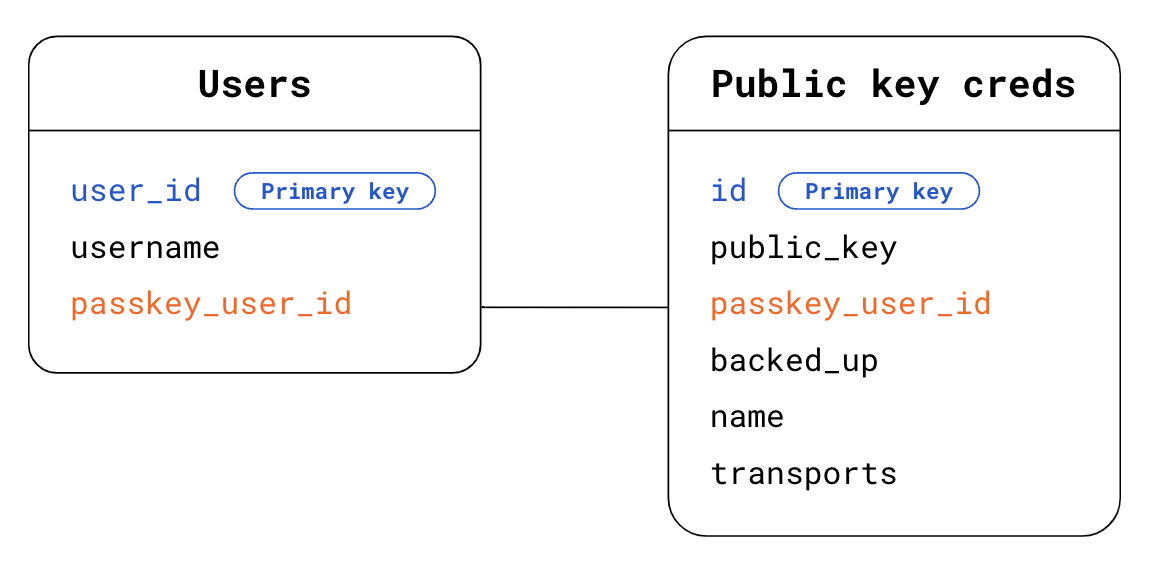
- Users 資料表:
user_id:主要使用者 ID。使用者的隨機、專屬、永久 ID。請將這個欄位做為使用者資料表的主鍵。username:使用者定義的使用者名稱,可能可以編輯。passkey_user_id:密碼金鑰專屬且不含 PII 的使用者 ID,在註冊選項中以user.id表示。使用者之後嘗試驗證時,驗證器會在userHandle的驗證回應中提供這個passkey_user_id。建議您不要將passkey_user_id設為主鍵。主鍵在系統中廣泛使用,因此往往會成為實際的 PII。
- 公開金鑰憑證資料表:
id:憑證 ID。請將這個值做為公開金鑰憑證資料表的主鍵。public_key:憑證的公開金鑰。passkey_user_id:使用這個外鍵與「Users」資料表建立連結。backed_up:如果密碼金鑰由密碼金鑰提供者同步處理,則會備份。如果您日後想考慮為持有backed_up密碼金鑰的使用者捨棄密碼,建議您儲存備份狀態。您可以檢查authenticatorData中的 BE 旗標,或使用 FIDO 伺服器端程式庫功能 (通常可讓您輕鬆存取這項資訊),確認密碼金鑰是否已備份。儲存備份資格有助於解決潛在的使用者問題。name:憑證的顯示名稱 (選用),可讓使用者自訂憑證名稱。transports:傳輸陣列。儲存傳輸方式有助於提升驗證使用者體驗。當傳輸可用時,瀏覽器可以據此運作,並顯示與密碼金鑰提供者用於與用戶端通訊的傳輸相符的使用者介面,特別是在allowCredentials不為空值的重新驗證用途中。
其他資訊 (例如密碼金鑰提供者、憑證建立時間和上次使用時間) 則可儲存起來,用於提升使用者體驗。詳情請參閱「密碼金鑰使用者介面設計」。
程式碼範例:儲存憑證
範例中會使用 SimpleWebAuthn 程式庫。在這裡,我們將註冊回應驗證交給其 verifyRegistrationResponse 函式。
import { isoBase64URL } from '@simplewebauthn/server/helpers';


router.post('/registerResponse', csrfCheck, sessionCheck, async (req, res) => {
  const expectedChallenge = req.session.challenge;
  const expectedOrigin = getOrigin(req.get('User-Agent'));
  const expectedRPID = process.env.HOSTNAME;
  const response = req.body;
  // This sample code is for registering a passkey for an existing,
  // signed-in user

  // Ensure you nest verification function calls in try/catch blocks.
  // If something fails, throw an error with a descriptive error message.
  // Return that message with an appropriate error code to the client.
  try {
    // Verify the credential
    const { verified, registrationInfo } = await verifyRegistrationResponse({
      response,
      expectedChallenge,
      expectedOrigin,
      expectedRPID,
      requireUserVerification: false,
    });

    if (!verified) {
      throw new Error('Verification failed.');
    }

    const {
      aaguid,
      credential,
      credentialBackedUp
    } = registrationInfo;

    // Name the credential based on AAGUID
    const name =
      aaguid === undefined ||
      aaguid === '00000000-0000-0000-0000-000000000000' ?
        req.useragent?.platform : aaguids[aaguid]?.name;

    const base64PublicKey = isoBase64URL.fromBuffer(credential.publicKey);

    // Existing, signed-in user
    const { user } = res.locals;

    // Save the credential
    await Credentials.update({
      id: credential.id,
      passkey_user_id: user.passkey_user_id,
      publicKey: base64PublicKey,
      name,
      aaguid,
      transports: credential.transports || response.response.transports,
      backed_up: credentialBackedUp,
      registered_at: new Date().getTime()
    });

    // Kill the challenge for this session
    delete req.session.challenge;

    return res.json(user);
  } catch (e) {
    delete req.session.challenge;

    console.error(e);
    return res.status(400).send({ error: e.message });
  }
});
附錄:AuthenticatorAttestationResponse
AuthenticatorAttestationResponse 包含兩個重要物件:
response.clientDataJSON是用戶端資料的 JSON 版本,在網路上是瀏覽器看到的資料。其中包含 RP 來源、驗證問題,以及androidPackageName(如果用戶端是 Android 應用程式)。RP 讀取clientDataJSON後,即可存取瀏覽器在create要求時看到的資訊。response.attestationObject包含兩項資訊:attestationStatement,除非您使用認證,否則這個值不具關聯性。authenticatorData是密碼金鑰提供者看到的資料。身為 RP,讀取authenticatorData可讓您存取密碼金鑰供應商看到的資料,並在create要求時傳回。
authenticatorData包含與新建立密碼金鑰相關聯的公開金鑰憑證重要資訊:
- 公開金鑰憑證本身,以及專屬憑證 ID。
- 與憑證相關聯的 RP ID。
- 描述建立密碼金鑰時使用者狀態的標記:使用者是否實際在場,以及使用者是否成功通過驗證 (請參閱「userVerification 深入探討」)。
- AAGUID 是密碼金鑰提供者 (例如 Google 密碼管理工具) 的 ID。您可以根據 AAGUID 識別密碼金鑰提供者,並在密碼金鑰管理頁面中顯示名稱。(請參閱「使用 AAGUID 判斷密碼金鑰提供者」一節)
雖然 authenticatorData 巢狀結構位於 attestationObject 內,但無論是否使用認證,密碼金鑰實作都需要其中包含的資訊。authenticatorData 經過編碼,且包含以二進位格式編碼的欄位。伺服器端程式庫通常會處理剖析和解碼作業。如果您未使用伺服器端程式庫,建議您使用 getAuthenticatorData() 用戶端,省去伺服器端的剖析和解碼工作。
附錄:驗證註冊回應
在幕後,驗證註冊回應包含下列檢查:
- 確認 RP ID 與網站相符。
- 確認要求的來源是網站的預期來源 (主要網站網址、Android 應用程式)。
- 如需使用者驗證,請確認使用者驗證旗標
authenticatorData.uv為true。 - 使用者在場標記
authenticatorData.up通常應為true,但如果憑證是有條件建立,則應為false。 - 確認用戶端是否能提供您給予的驗證問題。如果您不使用認證,則可忽略這項檢查。不過,建議您實作這項檢查,確保日後決定使用認證時,程式碼已準備就緒。
- 確認憑證 ID 尚未註冊給任何使用者。
- 確認密碼金鑰供應商用來建立憑證的演算法,是您列出的演算法 (在
publicKeyCredentialCreationOptions.pubKeyCredParams的每個alg欄位中,通常定義在伺服器端程式庫中,您無法查看)。這樣一來,使用者就只能使用您允許的演算法註冊。
如要瞭解詳情,請參閱 SimpleWebAuthn 的 verifyRegistrationResponse 原始碼,或深入瞭解規格中的完整驗證清單。