
總覽
以下概略說明密碼金鑰驗證的主要步驟:
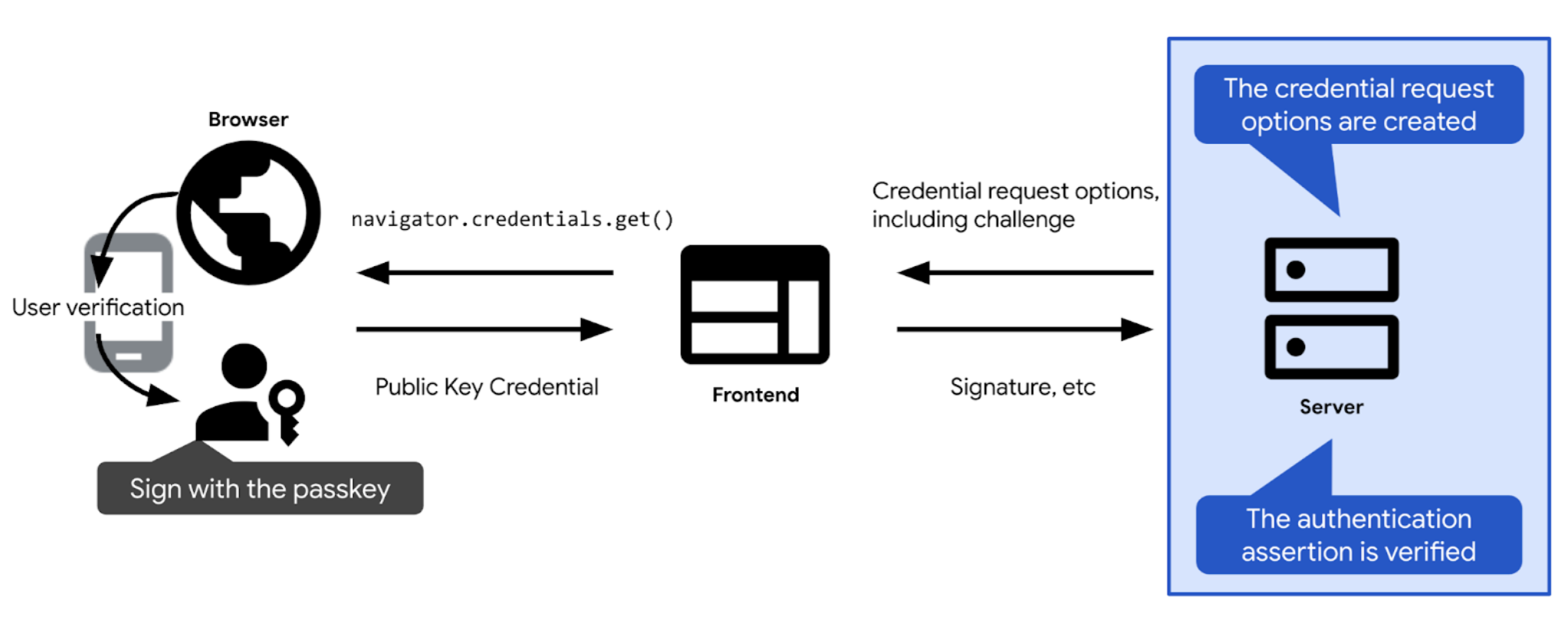
- 定義驗證問題和其他選項,以便使用密碼金鑰進行驗證。將這些值傳送至用戶端,以便傳遞至密碼金鑰驗證呼叫 (網頁上的
navigator.credentials.get)。使用者確認密碼金鑰驗證後,密碼金鑰驗證呼叫會解析並傳回憑證 (PublicKeyCredential)。憑證包含驗證宣告。
- 驗證驗證斷言。
- 如果驗證宣告有效,請驗證使用者。
以下各節將深入探討每個步驟的細節。
建立驗證
在實際操作中,驗證問題是一組隨機位元組陣列,以 ArrayBuffer 物件表示。
// Example challenge, base64URL-encoded
weMLPOSx1VfSnMV6uPwDKbjGdKRMaUDGxeDEUTT5VN8
為確保驗證問題能發揮作用,請務必:
- 確保同一個驗證問題不會重複使用。每次嘗試登入時,都會產生新的驗證問題。每次嘗試登入後,無論成功或失敗,都應捨棄驗證問題。並在一段時間後捨棄驗證。切勿在單一回應中接受相同驗證問題超過一次。
- 確保驗證問題經過加密保護。驗證問題應幾乎不可能猜中。如要在伺服器端建立加密安全驗證,建議您使用信任的 FIDO 伺服器端程式庫。如果您選擇自行建立驗證問題,請使用技術堆疊中內建的密碼編譯功能,或尋找專為密碼編譯用途設計的程式庫。例如 Node.js 中的 iso-crypto,或 Python 中的 secrets。根據規格,驗證碼長度至少須為 16 個位元組,才能視為安全。
建立驗證問題後,請將其儲存在使用者工作階段中,以便日後驗證。
建立憑證要求選項
建立憑證要求選項,做為 publicKeyCredentialRequestOptions 物件。
如要這麼做,請使用 FIDO 伺服器端程式庫。通常會提供公用函式,為您建立這些選項。舉例來說,SimpleWebAuthn 提供 generateAuthenticationOptions。
publicKeyCredentialRequestOptions 應包含密碼金鑰驗證所需的所有資訊。將這項資訊傳遞至 FIDO 伺服器端程式庫中負責建立 publicKeyCredentialRequestOptions 物件的函式。
publicKeyCredentialRequestOptions 的部分欄位可以是常數。其他則應在伺服器上動態定義:
rpId:您預期憑證會與哪個 RP ID 建立關聯,例如example.com。您在此提供的 RP ID 必須與憑證相關聯的 RP ID 相符,驗證才會成功。如要填入 RP ID,請使用與註冊憑證時在publicKeyCredentialCreationOptions中設定的 RP ID 相同的值。challenge:密碼金鑰提供者會簽署這項資料,證明使用者在提出驗證要求時持有密碼金鑰。請參閱「建立驗證問題」一節中的詳細資料。allowCredentials:這個驗證可接受的憑證陣列。傳遞空白陣列,讓使用者從瀏覽器顯示的清單中選取可用的密碼金鑰。詳情請參閱「從 RP 伺服器擷取驗證問題」和「深入瞭解可供偵測的憑證」。userVerification:指出是否「需要」、「建議」或「不建議」使用裝置螢幕鎖定功能進行使用者驗證。請參閱「從 RP 伺服器擷取驗證碼」。timeout:使用者完成驗證的時間長度 (以毫秒為單位)。這個值應合理寬鬆,且短於challenge的生命週期。建議的預設值為 5 分鐘,但您可以增加到 10 分鐘,這仍在建議範圍內。如果預期使用者會採用混合式工作流程,則適合設定較長的逾時時間,因為這類工作流程通常需要較長時間。如果作業逾時,系統會擲回NotAllowedError。
建立publicKeyCredentialRequestOptions後,請傳送給客戶。

challenge 解碼作業會在用戶端進行。程式碼範例:建立憑證要求選項
範例中會使用 SimpleWebAuthn 程式庫。在這裡,我們將憑證要求選項的建立作業交給其 generateAuthenticationOptions 函式。
import {
  generateAuthenticationOptions,
} from '@simplewebauthn/server';

router.post('/signinRequest', csrfCheck, async (req, res) => {

  // Ensure you nest calls in try/catch blocks.
  // If something fails, throw an error with a descriptive error message.
  // Return that message with an appropriate error code to the client.
  try {
    // Use the generateAuthenticationOptions function from SimpleWebAuthn
    const options = await generateAuthenticationOptions({
      rpID: process.env.HOSTNAME,
      allowCredentials: [],
    });
    // Save the challenge in the user session
    req.session.challenge = options.challenge;

    return res.json(options);
  } catch (e) {
    console.error(e);
    return res.status(400).json({ error: e.message });
  }
});
驗證並登入使用者
navigator.credentials.get 在用戶端成功解析後,會傳回 PublicKeyCredential 物件。

navigator.credentials.get 會傳回 PublicKeyCredential。response 是 AuthenticatorAssertionResponse。代表密碼金鑰提供者對用戶端指令的回應,用於建立所需內容,以便在 RP 上嘗試使用密碼金鑰進行驗證。其中包含:
response.authenticatorData和response.clientDataJSON,例如在密碼金鑰註冊步驟。response.signature,其中包含這些值的簽章。
將 PublicKeyCredential 物件傳送至伺服器。
在伺服器上執行下列操作:

- 收集驗證斷言和驗證使用者所需資訊:
- 產生驗證選項時,取得儲存在工作階段中的預期驗證問題。
- 取得預期的來源和 RP ID。
- 在資料庫中找出使用者。如果是可探索憑證,您就無法得知提出驗證要求的使用者是誰。你可以透過以下兩種方式找出答案:
- 方法 1:使用
PublicKeyCredential物件中的response.userHandle。在「Users」資料表中,找出與userHandle相符的passkey_user_id。 - 選項 2:使用
PublicKeyCredential物件中的憑證id。在 公開金鑰憑證表格中,找出與PublicKeyCredential物件中id憑證相符的id憑證。然後使用外鍵passkey_user_id尋找「Users」資料表中的對應使用者。
- 方法 1:使用
- 在資料庫中找出與收到的驗證宣告相符的公開金鑰憑證資訊。如要這麼做,請在「公開金鑰憑證」資料表中,找出與
PublicKeyCredential物件中id憑證相符的id憑證。
驗證驗證聲明。請將這個驗證步驟交給 FIDO 伺服器端程式庫,該程式庫通常會提供用於此目的的公用函式。舉例來說,SimpleWebAuthn 提供
verifyAuthenticationResponse。如要瞭解背後的運作原理,請參閱「附錄:驗證驗證回應」。無論驗證是否成功,都請刪除驗證問題,以免發生重送攻擊。
登入使用者帳戶。如果驗證成功,請更新工作階段資訊,將使用者標示為已登入。您也可以將
user物件傳回用戶端,讓前端使用與新登入使用者相關聯的資訊。
程式碼範例:驗證並登入使用者
範例中會使用 SimpleWebAuthn 程式庫。在這裡,我們將驗證回應的驗證作業交給其 verifyAuthenticationResponse 函式。
import {
  verifyAuthenticationResponse,
} from '@simplewebauthn/server';
import { isoBase64URL } from '@simplewebauthn/server/helpers';

router.post('/signinResponse', csrfCheck, async (req, res) => {
  const response = req.body;
  const expectedChallenge = req.session.challenge;
  const expectedOrigin = getOrigin(req.get('User-Agent'));
  const expectedRPID = process.env.HOSTNAME;

  // Ensure you nest verification function calls in try/catch blocks.
  // If something fails, throw an error with a descriptive error message.
  // Return that message with an appropriate error code to the client.
  try {
    // Find the credential stored to the database by the credential ID
    const cred = Credentials.findById(response.id);
    if (!cred) {
      throw new Error('Credential not found.');
    }
    // Find the user - Here alternatively we could look up the user directly
    // in the Users table via userHandle
    const user = Users.findByPasskeyUserId(cred.passkey_user_id);
    if (!user) {
      throw new Error('User not found.');
    }
    // Prepare credential information for verification
    const credential = {
      id: cred.id,
      publicKey: isoBase64URL.toBuffer(cred.publicKey),
      transports: cred.transports,
    };

    // Verify the credential
    const { verified, authenticationInfo } = await verifyAuthenticationResponse({
      response,
      expectedChallenge,
      expectedOrigin,
      expectedRPID,
      credential,
      requireUserVerification: false,
    });

    if (!verified) {
      throw new Error('User verification failed.');
    }

    // Kill the challenge for this session.
    delete req.session.challenge;

    req.session.username = user.username;
    req.session['signed-in'] = 'yes';

    return res.json(user);
  } catch (e) {
    delete req.session.challenge;

    console.error(e);
    return res.status(400).json({ error: e.message });
  }
});
附錄:驗證驗證回應
驗證驗證回應包含下列檢查:
- 確認 RP ID 與網站相符。
- 確認要求的來源與網站的登入來源相符。如果是 Android 應用程式,請參閱「驗證來源」。
- 確認裝置能夠提供您指定的驗證。
- 確認使用者在驗證期間,遵循您做為 RP 所規定的要求。如需使用者驗證,請確認
authenticatorData中的uv(使用者已驗證) 旗標為true。檢查authenticatorData中的up(使用者在場) 旗標是否為true,因為密碼金鑰一律需要使用者在場。 - 驗證簽章。如要驗證簽名,您需要:
- 簽章,也就是已簽署的驗證碼:
response.signature - 用於驗證簽章的公開金鑰。
- 原始簽署資料。這是要驗證簽章的資料。
- 用於建立簽章的加密編譯演算法。
- 簽章,也就是已簽署的驗證碼:
如要進一步瞭解這些步驟,請查看 SimpleWebAuthn 的 verifyAuthenticationResponse 原始碼,或深入瞭解規格中的完整驗證清單。