
আপনার ইন্টিগ্রেশন পথ বেছে নিন
আপনার প্রয়োজন অনুসারে সবচেয়ে উপযুক্ত পথটি বেছে নিন:
| পথ | সেরা | আরও জানুন |
|---|---|---|
| সার্বজনীন বাণিজ্য প্রোটোকল (ইউসিপি) | ব্যবসায়ী এবং খুচরা বিক্রেতারা। | ইউসিপি ডকস |
| স্ট্যান্ডার্ড অ্যাকাউন্ট লিঙ্কিং | স্মার্ট হোম, টিভি এবং ইউটিউব। | ডাক্তাররা |
Account linking enables Google Account holders to quickly, seamlessly and safely connect to your services. You may choose to implement Google Account Linking to share a user's data from your platform with Google apps and services.
নিরাপদ OAuth 2.0 প্রোটোকল আপনাকে আপনার প্ল্যাটফর্মে থাকা ব্যবহারকারীর অ্যাকাউন্টের সাথে তার গুগল অ্যাকাউন্ট নিরাপদে লিঙ্ক করার সুযোগ দেয়, যার ফলে গুগল অ্যাপ্লিকেশন এবং ডিভাইসগুলো আপনার পরিষেবাগুলো ব্যবহারের অনুমতি পায়।
ব্যবহারকারীরা তাদের অ্যাকাউন্ট লিঙ্ক বা আনলিঙ্ক করতে পারেন এবং গুগল অ্যাকাউন্ট লিঙ্কিং-এর মাধ্যমে আপনার প্ল্যাটফর্মে ঐচ্ছিকভাবে একটি নতুন অ্যাকাউন্টও তৈরি করতে পারেন।
ব্যবহারের ক্ষেত্র
গুগল অ্যাকাউন্ট লিঙ্কিং চালু করার কয়েকটি কারণ হলো:
আপনার প্ল্যাটফর্ম থেকে ব্যবহারকারীর ডেটা গুগল অ্যাপস ও পরিষেবাগুলোর সাথে শেয়ার করুন।
ইউনিভার্সাল কমার্স প্রোটোকল (UCP) ব্যবহার করে গুগল শপিং এবং এআই সারফেসের (সার্চ, জেমিনি) সাথে ইন্টিগ্রেট করুন।
গুগল টিভি ব্যবহার করে আপনার ভিডিও ও সিনেমা চালান।
Google Home অ্যাপ এবং Google Assistant ব্যবহার করে Google Smart Home-এর সাথে সংযুক্ত ডিভাইসগুলি পরিচালনা ও নিয়ন্ত্রণ করুন, যেমন: "হে গুগল, লাইটগুলো জ্বালিয়ে দাও"।
কনভারসেশনাল অ্যাকশন- এর মাধ্যমে ব্যবহারকারী-কাস্টমাইজড গুগল অ্যাসিস্ট্যান্ট অভিজ্ঞতা ও কার্যকারিতা তৈরি করুন, যেমন: "হে গুগল, স্টারবাকস থেকে আমার নিয়মিত অর্ডারটি দাও"।
ব্যবহারকারীদের তাদের গুগল অ্যাকাউন্ট একটি রিওয়ার্ডস পার্টনার অ্যাকাউন্টের সাথে লিঙ্ক করার পর ইউটিউবে যোগ্য লাইভ স্ট্রিম দেখে পুরস্কার অর্জন করার সুযোগ দিন।
সাইন-আপ করার সময় গুগল অ্যাকাউন্ট প্রোফাইল থেকে সম্মতিসূচকভাবে শেয়ার করা ডেটা দিয়ে নতুন অ্যাকাউন্টগুলো আগে থেকেই পূরণ করুন।
সক্ষমতা ও প্রয়োজনীয়তা
নিম্নলিখিত ম্যাট্রিক্সটি প্রতিটি লিঙ্কিং ফ্লো-এর জন্য সমর্থন এবং সুপারিশসমূহ সংজ্ঞায়িত করে।
| সংযোগ প্রবাহ | সাধারণ বৈশিষ্ট্য | ইউসিপি বৈশিষ্ট্য |
|---|---|---|
| অ্যাপ ফ্লিপ | সুপারিশকৃত | সুপারিশকৃত |
| সুবিন্যস্ত সংযোগ | সুপারিশকৃত | সুপারিশকৃত |
| ওয়েব ওঅথ | প্রয়োজনীয় (বিকল্প) | প্রয়োজনীয় (বিকল্প) |
| OAuth 2.1 | সুপারিশকৃত | সুপারিশকৃত |
শুধুমাত্র প্রয়োজনীয় ডেটা শেয়ার করার জন্য কাস্টম স্কোপ নির্ধারণ করে ব্যবহারকারীর গোপনীয়তা উন্নত করুন, এবং তাদের ডেটা কীভাবে ব্যবহার করা হবে তা স্পষ্টভাবে সংজ্ঞায়িত করে ব্যবহারকারীর আস্থা বৃদ্ধি করুন।
Access to data and services hosted on your platform can be revoked by unlinking accounts. Implementing an optional token revocation endpoint lets you stay in sync with Google initiated events, while Cross-Account Protection (RISC) lets you notify Google of any unlinking events that take place on your platform.
অ্যাকাউন্ট লিঙ্কিং প্রবাহ
গুগল অ্যাকাউন্ট লিঙ্ক করার ৩টি প্রক্রিয়া রয়েছে, যেগুলোর সবগুলোই OAuth ভিত্তিক এবং এগুলোর জন্য আপনাকে OAuth 2.0 অনুবর্তী অনুমোদন ও টোকেন বিনিময় এন্ডপয়েন্টগুলো পরিচালনা বা নিয়ন্ত্রণ করতে হবে।
লিঙ্ক করার প্রক্রিয়ার সময়, অ্যাকাউন্টধারীদের অ্যাকাউন্ট লিঙ্ক করতে ও ডেটা শেয়ার করার সম্মতি নেওয়ার পর, আপনি প্রতিটি গুগল অ্যাকাউন্টের জন্য গুগলকে অ্যাক্সেস টোকেন প্রদান করেন।
OAuth লিঙ্কিং ('ওয়েব OAuth')
This is the basic OAuth flow that sends users to your website for linking. The user is redirected to your website to sign in to their account. Once signed in, the user consents to sharing their data, on your service, with Google. At that point, the user's Google Account and your service, are linked.
OAuth Linking supports the authorization code and implicit OAuth flows. Your service must host an OAuth 2.0 compliant authorization endpoint for the implicit flow, and must expose both an authorization and token exchange endpoint when using the authorization code flow.
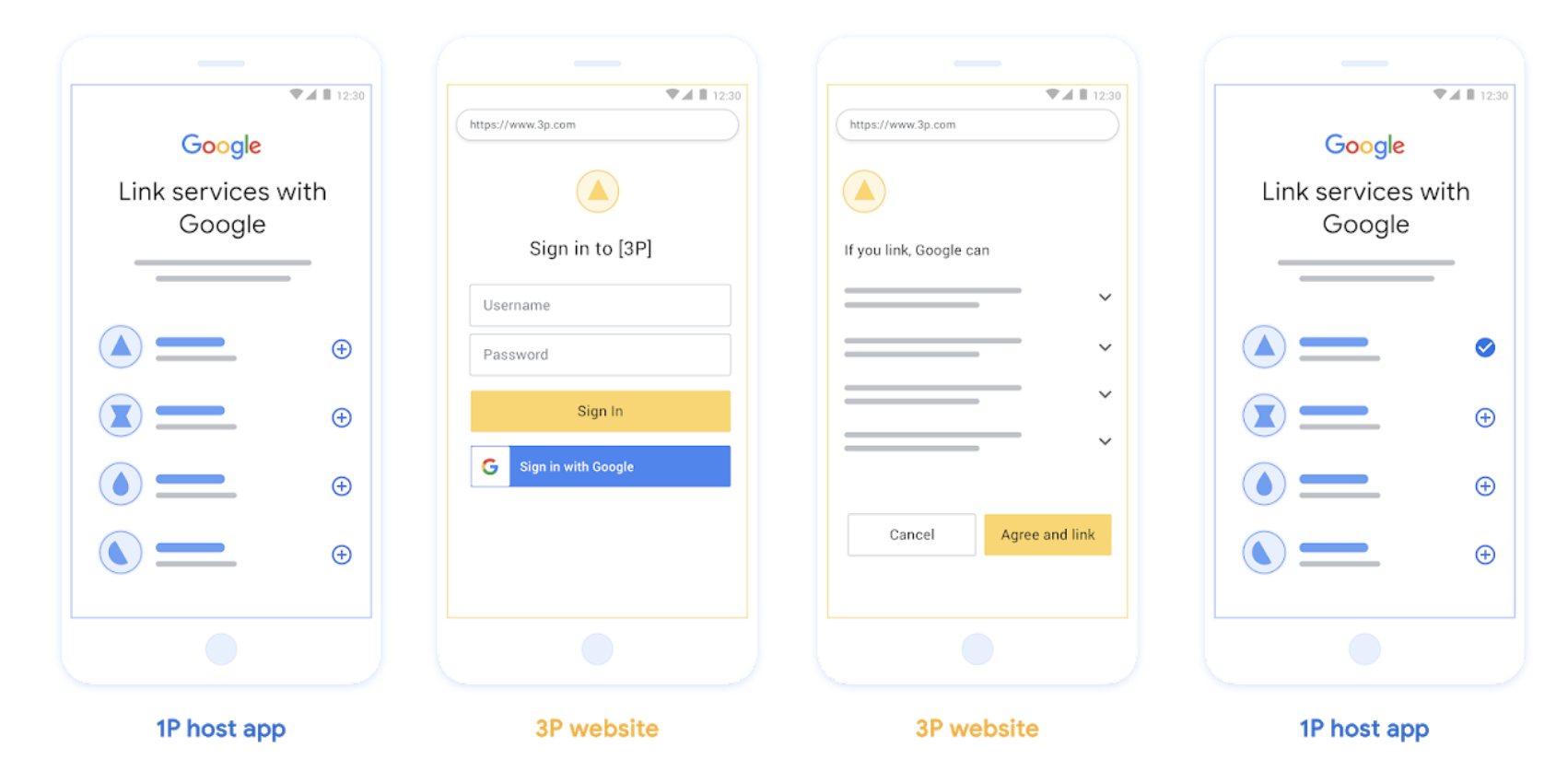
চিত্র ১। ওয়েব ওঅথ (Web OAuth) ব্যবহার করে ব্যবহারকারীর ফোনে অ্যাকাউন্ট লিঙ্ক করা।
OAuth-ভিত্তিক অ্যাপ ফ্লিপ লিঙ্কিং ('অ্যাপ ফ্লিপ')
একটি OAuth ফ্লো যা ব্যবহারকারীদের লিঙ্ক করার জন্য আপনার অ্যাপে পাঠায়।
OAuth-ভিত্তিক অ্যাপ ফ্লিপ লিঙ্কিং ব্যবহারকারীদের আপনার যাচাইকৃত অ্যান্ড্রয়েড বা আইওএস মোবাইল অ্যাপ এবং গুগলের প্ল্যাটফর্মের মধ্যে যাতায়াতের সময় প্রস্তাবিত ডেটা অ্যাক্সেস পরিবর্তনগুলো পর্যালোচনা করতে এবং আপনার প্ল্যাটফর্মে থাকা তাদের অ্যাকাউন্টটি গুগল অ্যাকাউন্টের সাথে লিঙ্ক করার জন্য সম্মতি প্রদানে সহায়তা করে। অ্যাপ ফ্লিপ সক্ষম করতে হলে, আপনার পরিষেবাটিকে অবশ্যই অথরাইজেশন কোড ফ্লো ব্যবহার করে OAuth লিঙ্কিং অথবা OAuth-ভিত্তিক 'সাইন ইন উইথ গুগল' লিঙ্কিং সমর্থন করতে হবে।
অ্যাপ ফ্লিপ অ্যান্ড্রয়েড এবং আইওএস উভয় প্ল্যাটফর্মেই সমর্থিত।
এটি যেভাবে কাজ করে:
গুগল অ্যাপ ব্যবহারকারীর ডিভাইসে আপনার অ্যাপটি ইনস্টল করা আছে কিনা তা যাচাই করে:
- অ্যাপটি খুঁজে পাওয়া গেলে, ব্যবহারকারীকে আপনার অ্যাপে পাঠিয়ে দেওয়া হয়। আপনার অ্যাপটি গুগলের সাথে অ্যাকাউন্টটি লিঙ্ক করার জন্য ব্যবহারকারীর কাছ থেকে সম্মতি সংগ্রহ করে এবং তারপর আবার গুগলের মূল পৃষ্ঠায় ফিরিয়ে দেয়।
- অ্যাপটি খুঁজে না পাওয়া গেলে অথবা অ্যাপ ফ্লিপ লিঙ্কিং প্রক্রিয়ার সময় কোনো ত্রুটি ঘটলে, ব্যবহারকারীকে স্ট্রিমলাইনড বা ওয়েব ওঅথ ফ্লো-তে পুনঃনির্দেশিত করা হয়।
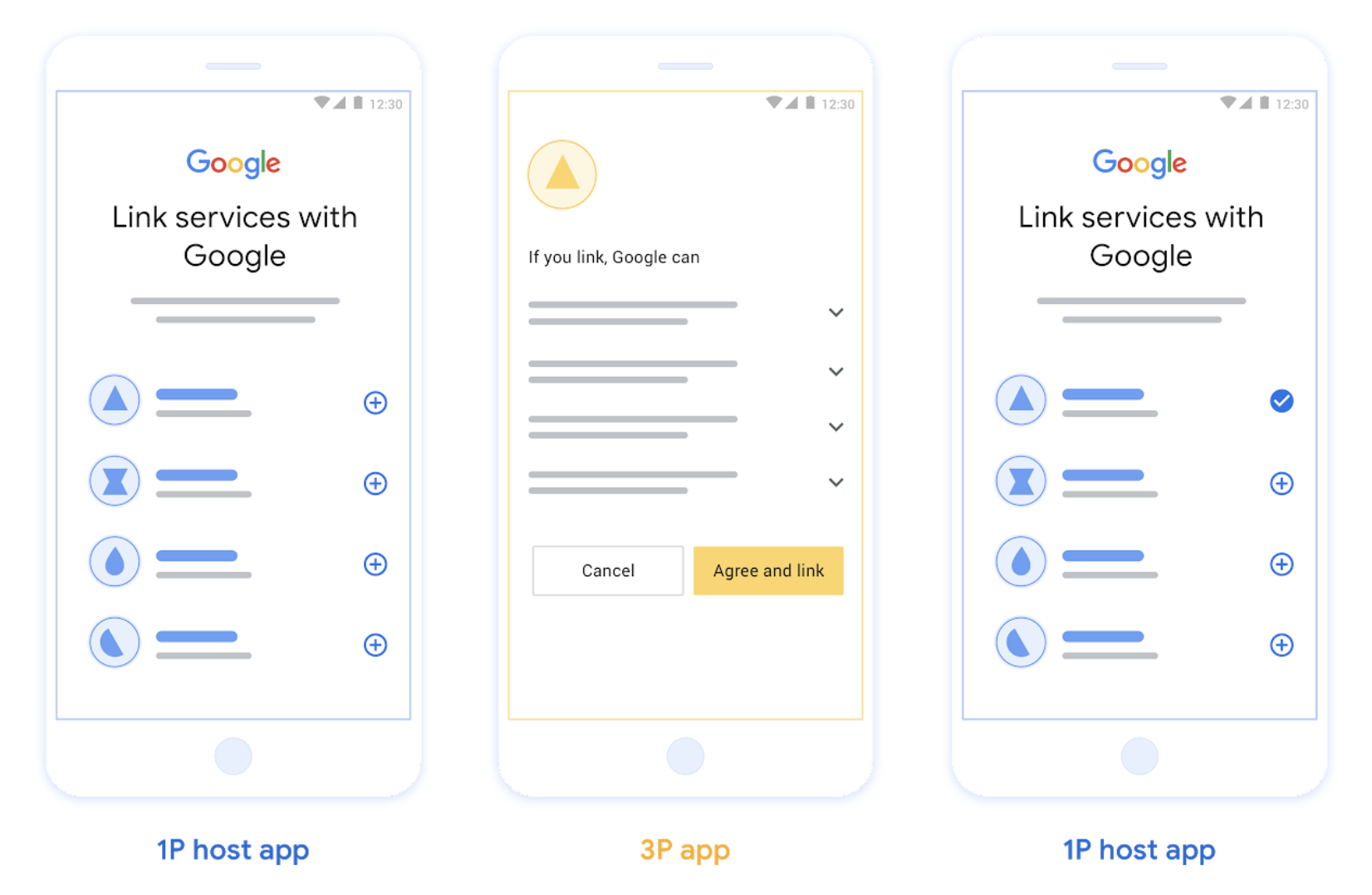
চিত্র ২। ব্যবহারকারীর ফোনে অ্যাপ ফ্লিপ দিয়ে অ্যাকাউন্ট লিঙ্ক করা।
OAuth-ভিত্তিক সরলীকৃত লিঙ্কিং ('সরলীকৃত')
OAuth-ভিত্তিক সাইন ইন উইথ গুগল স্ট্রিমলাইনড লিঙ্কিং, OAuth লিঙ্কিং-এর উপরে সাইন ইন উইথ গুগল যুক্ত করে, যা ব্যবহারকারীদের গুগল প্ল্যাটফর্ম থেকে বের না হয়েই লিঙ্কিং প্রক্রিয়াটি সম্পন্ন করতে সক্ষম করে, ফলে জটিলতা এবং ব্যবহারকারী কমে যাওয়ার হার হ্রাস পায়। OAuth-ভিত্তিক স্ট্রিমলাইনড লিঙ্কিং, সাইন ইন উইথ গুগল-কে OAuth লিঙ্কিং-এর সাথে একত্রিত করে নির্বিঘ্ন সাইন-ইন, অ্যাকাউন্ট তৈরি এবং অ্যাকাউন্ট লিঙ্কিং-এর মাধ্যমে সেরা ব্যবহারকারীর অভিজ্ঞতা প্রদান করে। আপনার পরিষেবাটিকে অবশ্যই OAuth 2.0 অনুবর্তী অনুমোদন এবং টোকেন বিনিময় এন্ডপয়েন্ট সমর্থন করতে হবে। এছাড়াও, আপনার টোকেন বিনিময় এন্ডপয়েন্টকে অবশ্যই JSON ওয়েব টোকেন (JWT) অ্যাসারশন সমর্থন করতে হবে এবং check , create , ও get ইন্টেন্টগুলো প্রয়োগ করতে হবে।
এটি যেভাবে কাজ করে:
গুগল ব্যবহারকারীর অ্যাকাউন্টটি যাচাই করে এবং এই তথ্য আপনাকে জানায়:
- আপনার ডাটাবেসে ব্যবহারকারীর একটি অ্যাকাউন্ট থাকলে, ব্যবহারকারী সফলভাবে তাদের গুগল অ্যাকাউন্টটি আপনার পরিষেবাতে থাকা অ্যাকাউন্টের সাথে লিঙ্ক করেন।
- if no account exists for the user in your database, the user can either create a new 3P account with the asserted information Google provides : email, name, and profile picture , or choose to sign in and link with another email (this will require them to sign-in to the your service using Web OAuth).
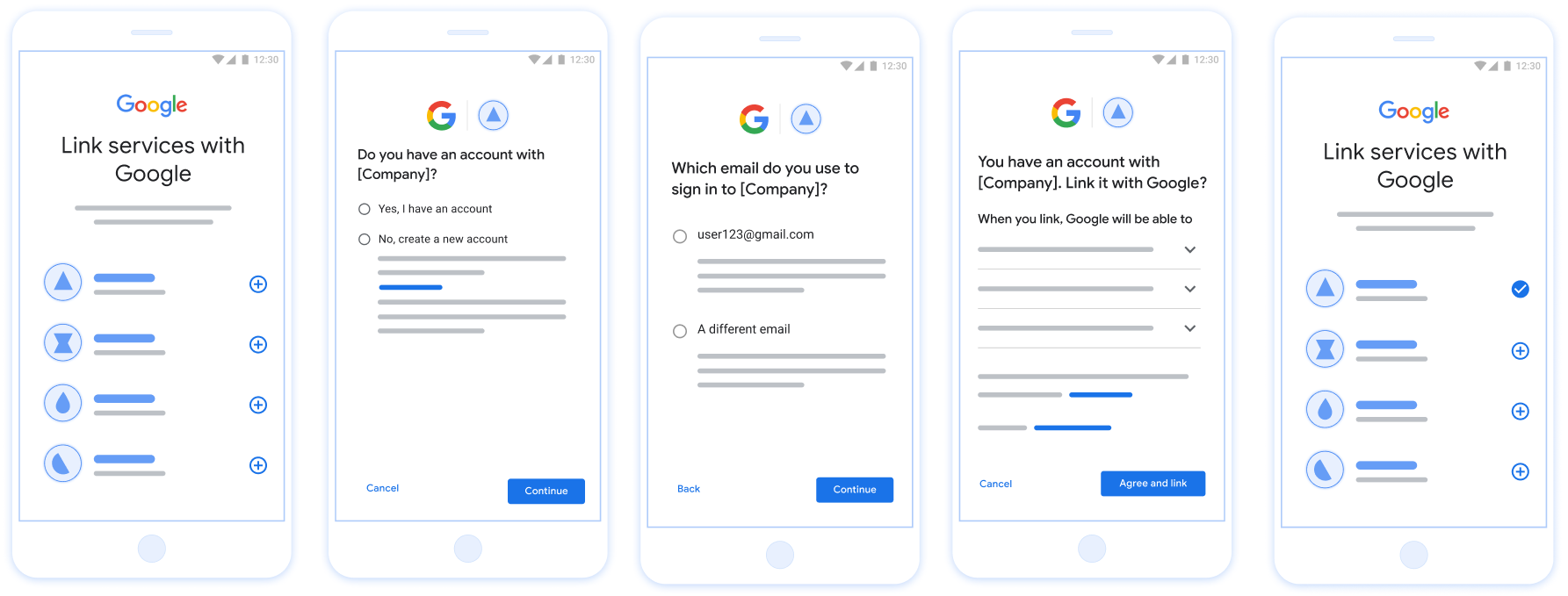
চিত্র ৩। স্ট্রিমলাইনড লিঙ্কিং-এর মাধ্যমে ব্যবহারকারীর ফোনে অ্যাকাউন্ট লিঙ্ক করা।
আপনার কোন প্রবাহ ব্যবহার করা উচিত?
We recommend implementing all flows to ensure users get the best linking experience. The Streamlined and App flip flows reduce linking friction as users are able to complete the linking process in very few steps. The Web OAuth linking has the lowest level of effort and is a good place to start after which you can add on the other linking flows.
টোকেন নিয়ে কাজ করুন
গুগল অ্যাকাউন্ট লিঙ্কিং OAuth 2.0 ইন্ডাস্ট্রি স্ট্যান্ডার্ডের উপর ভিত্তি করে তৈরি।
টোকেন নিয়ে কাজ করুন
অ্যাকাউন্টধারীদের অ্যাকাউন্ট লিঙ্ক করা এবং ডেটা শেয়ার করার সম্মতি পাওয়ার পর, আপনি প্রতিটি গুগল অ্যাকাউন্টের জন্য গুগলকে অ্যাক্সেস টোকেন প্রদান করেন।
Token types
OAuth 2.0 uses strings called tokens to communicate between the user agent, the client application, and the OAuth 2.0 server.
Three types of OAuth 2.0 tokens can be used during account linking:
Authorization code. A short-lived token that can be exchanged for an access and a refresh token. For security purposes, Google calls your authorization endpoint to obtain a single use or very short-lived code.
Access token. A token that grants the bearer access to a resource. To limit exposure that could result from the loss of this token, it has a limited lifetime, usually expiring after an hour or so.
Refresh token. A long-lived token that can be exchanged for a new access token when an access token expires. When your service integrates with Google, this token is exclusively stored and used by Google. Google calls your token exchange endpoint to exchange refresh tokens for access tokens, which are in turn used to access user data.
Token handling
Race conditions in clustered environments and client-server exchanges can result in complex timing and error handling scenarios when working with tokens. For example:
- You receive a request for a new access token, and you issue a new access token. Concurrently, you receive a request for access to your service's resource using the previous, unexpired access token.
- Your refresh token reply is yet to be received (or is never received) by Google. Meanwhile, the previously valid refresh token is used in a request from Google.
Requests and replies can arrive in any order, or not at all due to asynchronous services running in a cluster, network behavior, or other means.
Immediate and fully consistent shared state both within, and between, your and Google's token handling systems cannot be guaranteed. Multiple valid, unexpired tokens can coexist within or across systems short period of time. To minimize negative user impact we recommend you do the following:
- Accept unexpired access tokens, even after a newer token is issued.
- Use alternatives to Refresh Token Rotation.
- Support multiple, concurrently valid access and refresh tokens. For security, you should limit the number of tokens and token lifetime.
Maintenance and outage handling
During maintenance or unplanned outages Google might be unable to call your authorization or token exchange endpoints to obtain access and refresh tokens.
Your endpoints should respond with a 503 error code and empty body. In this
case, Google retries failed token exchange requests for a limited time. Provided
that Google is later able to obtain refresh and access tokens, failed requests
are not visible to users.
Failing requests for an access token result in a visible error, if initiated by a user. Users will be required to retry linking failures if the implicit OAuth 2.0 flow is used.
Recommendations
There are many solutions to minimize maintenance impact. Some options to consider:
Maintain your existing service and route a limited number of requests to your newly updated service. Migrate all requests only after confirming expected functionality.
Reduce the number of token requests during the maintenance period:
Limit maintenance periods to less than the access token lifetime.
Temporarily increase the access token lifetime:
- Increase token lifetime to greater than maintenance period.
- Wait twice the duration of your access token lifetime, enabling users to exchange short lived tokens for longer duration tokens.
- Enter maintenance.
- Respond to token requests with a
503error code and empty body. - Exit maintenance.
- Decrease token lifetime back to normal.
স্থায়ী সংযোগ
স্থিতিশীল ইন্টিগ্রেশনের জন্য পারসিস্টেন্ট লিঙ্কিং একটি অপরিহার্য শর্ত। এটি নিশ্চিত করে যে সাময়িক নেটওয়ার্ক ব্যর্থতা বা পর্যায়ক্রমিক ক্রেডেনশিয়াল রিফ্রেশের সময়েও ব্যবহারকারীর অ্যাকাউন্টগুলো সংযুক্ত থাকে।
To implement persistent linking, use a "sliding window" approach: extend the expiration of the existing Refresh Token instead of rotating it (referencing RFC 6749 Section 6). This prevents race conditions and unintended unlinking that can occur if a new Refresh Token is issued but not successfully received or stored by Google.
গুগলে নিবন্ধন করুন
অ্যাকাউন্ট লিঙ্কিং সক্ষম করার জন্য আমাদের আপনার OAuth 2.0 সেটআপের বিবরণ এবং ক্রেডেনশিয়াল প্রয়োজন হবে। বিস্তারিত জানতে রেজিস্ট্রেশন দেখুন।