Ringkasan
Penautan yang disederhanakan untuk Login dengan Google berbasis OAuth menambahkan Login dengan Google di atas penautan OAuth. Hal ini memberikan pengalaman penautan yang lancar bagi pengguna Google, dan juga memungkinkan pembuatan akun, yang memungkinkan pengguna membuat akun baru di layanan Anda menggunakan Akun Google mereka.
Untuk melakukan penautan akun dengan OAuth dan Login dengan Google, ikuti langkah-langkah umum berikut:
- Pertama, minta pengguna untuk memberikan izin akses ke profil Google mereka.
- Gunakan informasi di profilnya untuk memeriksa apakah akun pengguna ada.
- Untuk pengguna lama, tautkan akun.
- Jika Anda tidak dapat menemukan kecocokan untuk pengguna Google di sistem autentikasi Anda, validasi token ID yang diterima dari Google. Kemudian, Anda dapat membuat pengguna berdasarkan informasi profil yang ada di token ID.
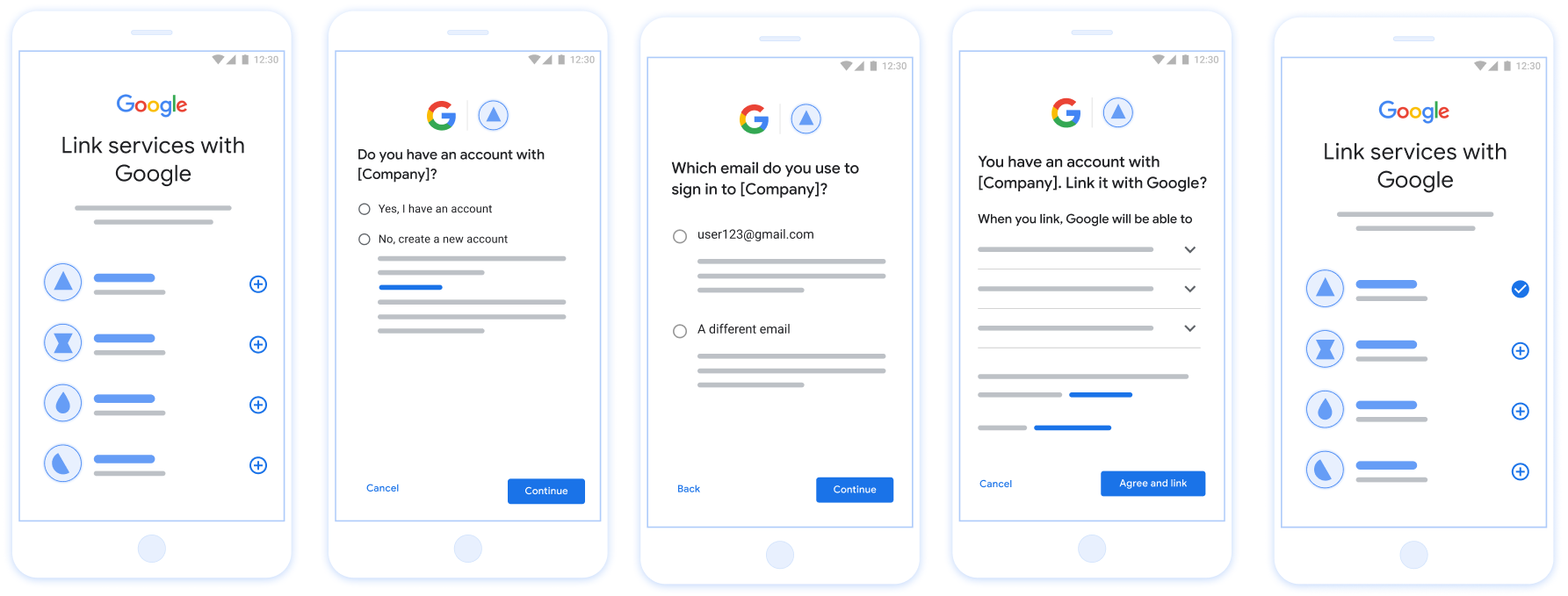
Gambar 1. Penautan Akun di ponsel pengguna dengan Penautan yang Sederhana
Persyaratan untuk Penautan yang Disederhanakan
- Terapkan alur penautan OAuth web dasar. Layanan Anda harus mendukung endpoint otorisasi dan penukaran token yang kompatibel dengan OAuth 2.0.
- Endpoint pertukaran token Anda harus mendukung pernyataan Token Web JSON (JWT) dan menerapkan maksud
check,create, danget.
Menerapkan server OAuth Anda
Endpoint pertukaran token Anda harus mendukung maksud check, create, get.
Ikuti langkah-langkah berikut untuk menyelesaikan alur penautan akun dan mempelajari kapan berbagai maksud digunakan:
- Apakah pengguna memiliki akun di sistem autentikasi Anda? (Pengguna memutuskan dengan memilih YA atau TIDAK)
- YA : Apakah pengguna menggunakan email yang terkait dengan Akun Google-nya untuk login ke platform Anda? (Pengguna memutuskan dengan memilih YA atau TIDAK)
- YA : Apakah pengguna memiliki akun yang cocok di sistem autentikasi Anda? (
check intentdipanggil untuk mengonfirmasi)- YA :
get intentdipanggil dan akun ditautkan jika maksud pengambilan berhasil ditampilkan. - TIDAK : Buat Akun Baru? (Pengguna memutuskan dengan memilih YA atau TIDAK)
- YA :
create intentdipanggil dan akun ditautkan jika maksud pembuatan berhasil ditampilkan. - TIDAK : Alur OAuth Web dipicu, pengguna diarahkan ke browsernya, dan pengguna diberi opsi untuk menautkan dengan email lain.
- YA :
- YA :
- TIDAK : Alur OAuth Web dipicu, pengguna diarahkan ke browsernya, dan pengguna diberi opsi untuk menautkan dengan email lain.
- YA : Apakah pengguna memiliki akun yang cocok di sistem autentikasi Anda? (
- TIDAK : Apakah pengguna memiliki akun yang cocok di sistem autentikasi Anda? (
check intentdipanggil untuk mengonfirmasi)- YA :
get intentdipanggil dan akun ditautkan jika maksud pengambilan berhasil ditampilkan. - TIDAK :
create intentdipanggil dan akun ditautkan jika intent pembuatan berhasil ditampilkan.
- YA :
- YA : Apakah pengguna menggunakan email yang terkait dengan Akun Google-nya untuk login ke platform Anda? (Pengguna memutuskan dengan memilih YA atau TIDAK)
Check for an existing user account (check intent)
After the user gives consent to access their Google profile, Google sends a request that contains a signed assertion of the Google user's identity. The assertion contains information that includes the user's Google Account ID, name, and email address. The token exchange endpoint configured for your project handles that request.
If the corresponding Google account is already present in your authentication
system, your token exchange endpoint responds with account_found=true. If the
Google account doesn't match an existing user, your token exchange endpoint
returns an HTTP 404 Not Found error with account_found=false.
The request has the following form:
POST /token HTTP/1.1 Host: oauth2.example.com Content-Type: application/x-www-form-urlencoded grant_type=urn:ietf:params:oauth:grant-type:jwt-bearer&intent=check&assertion=JWT&scope=SCOPES&client_id=GOOGLE_CLIENT_ID&client_secret=GOOGLE_CLIENT_SECRET
Your token exchange endpoint must be able to handle the following parameters:
| Token endpoint parameters | |
|---|---|
intent |
For these requests, the value of this parameter is
check. |
grant_type |
The type of token being exchanged. For these requests, this
parameter has the value urn:ietf:params:oauth:grant-type:jwt-bearer. |
assertion |
A JSON Web Token (JWT) that provides a signed assertion of the Google user's identity. The JWT contains information that includes the user's Google Account ID, name, and email address. |
client_id |
The client ID you assigned to Google. |
client_secret |
The client secret you assigned to Google. |
To respond to the check intent requests, your token exchange endpoint must perform the following steps:
- Validate and decode the JWT assertion.
- Check if the Google account is already present in your authentication system.
Memvalidasi dan mendekode pernyataan JWT
Anda dapat memvalidasi dan mendekode pernyataan JWT menggunakan Library dekode JWT untuk bahasa Anda. Gunakan Kunci publik Google, tersedia di JWK atau format PEM, untuk memverifikasi tanda tangan token.
Saat didekode, pernyataan JWT akan terlihat seperti contoh berikut:
{ "sub": "1234567890", // The unique ID of the user's Google Account "iss": "https://accounts.google.com", // The assertion's issuer "aud": "123-abc.apps.googleusercontent.com", // Your server's client ID "iat": 233366400, // Unix timestamp of the assertion's creation time "exp": 233370000, // Unix timestamp of the assertion's expiration time "name": "Jan Jansen", "given_name": "Jan", "family_name": "Jansen", "email": "jan@gmail.com", // If present, the user's email address "email_verified": true, // true, if Google has verified the email address "hd": "example.com", // If present, the host domain of the user's GSuite email address // If present, a URL to user's profile picture "picture": "https://lh3.googleusercontent.com/a-/AOh14GjlTnZKHAeb94A-FmEbwZv7uJD986VOF1mJGb2YYQ", "locale": "en_US" // User's locale, from browser or phone settings }
Selain memverifikasi tanda tangan token, verifikasi bahwa token
penerbit (kolom iss) adalah https://accounts.google.com, bahwa audiens
(kolom aud) adalah client ID yang ditetapkan untuk Anda, dan masa berlaku token belum berakhir
(Kolom exp).
Dengan menggunakan kolom email, email_verified, dan hd, Anda dapat menentukan apakah
Google menghosting dan bersifat otoritatif untuk alamat email. Dalam kasus di mana Google
pengguna yang kredibel saat ini diketahui sebagai pemilik akun yang sah
dan Anda dapat melewati metode
{i>password<i} atau tantangan lainnya. Jika tidak, metode ini
dapat digunakan untuk memverifikasi akun sebelum penautan.
Kasus saat Google bersifat otoritatif:
emailmemiliki akhiran@gmail.com, ini adalah akun Gmail.email_verifiedbenar danhdditetapkan, ini adalah akun G Suite.
Pengguna dapat mendaftar ke Akun Google tanpa menggunakan Gmail atau G Suite. Kapan
email tidak berisi akhiran @gmail.com dan hd tidak ada Google tidak
otoritatif, dan menggunakan {i>password<i}
atau metode verifikasi lainnya disarankan untuk
pengguna. email_verified juga bisa benar karena Google awalnya memverifikasi
pengguna saat Akun Google dibuat, namun kepemilikan pihak ketiga
akun email Anda mungkin telah berubah.
Check if the Google account is already present in your authentication system
Check whether either of the following conditions are true:
- The Google Account ID, found in the assertion's
subfield, is in your user database. - The email address in the assertion matches a user in your user database.
If either condition is true, the user has already signed up. In that case, return a response like the following:
HTTP/1.1 200 Success
Content-Type: application/json;charset=UTF-8
{
"account_found":"true",
}
If neither the Google Account ID nor the email address specified in the
assertion matches a user in your database, the user hasn't signed up yet. In
this case, your token exchange endpoint needs to reply with a HTTP 404 error
that specifies "account_found": "false", as in the following example:
HTTP/1.1 404 Not found
Content-Type: application/json;charset=UTF-8
{
"account_found":"false",
}
Handle automatic linking (get intent)
After the user gives consent to access their Google profile, Google sends a request that contains a signed assertion of the Google user's identity. The assertion contains information that includes the user's Google Account ID, name, and email address. The token exchange endpoint configured for your project handles that request.
If the corresponding Google Account is already present in your authentication
system, your token exchange endpoint returns a token for the user. If the
Google Account doesn't match an existing user, your token exchange endpoint
returns a linking_error error and optional login_hint.
The request has the following form:
POST /token HTTP/1.1 Host: oauth2.example.com Content-Type: application/x-www-form-urlencoded grant_type=urn:ietf:params:oauth:grant-type:jwt-bearer&intent=get&assertion=JWT&scope=SCOPES&client_id=GOOGLE_CLIENT_ID&client_secret=GOOGLE_CLIENT_SECRET
Your token exchange endpoint must be able to handle the following parameters:
| Token endpoint parameters | |
|---|---|
intent |
For these requests, the value of this parameter is get. |
grant_type |
The type of token being exchanged. For these requests, this
parameter has the value urn:ietf:params:oauth:grant-type:jwt-bearer. |
assertion |
A JSON Web Token (JWT) that provides a signed assertion of the Google user's identity. The JWT contains information that includes the user's Google Account ID, name, and email address. |
scope |
Optional: Any scopes that you've configured Google to request from users. |
client_id |
The client ID you assigned to Google. |
client_secret |
The client secret you assigned to Google. |
To respond to the get intent requests, your token exchange endpoint must perform the following steps:
- Validate and decode the JWT assertion.
- Check if the Google account is already present in your authentication system.
Memvalidasi dan mendekode pernyataan JWT
Anda dapat memvalidasi dan mendekode pernyataan JWT menggunakan Library dekode JWT untuk bahasa Anda. Gunakan Kunci publik Google, tersedia di JWK atau format PEM, untuk memverifikasi tanda tangan token.
Saat didekode, pernyataan JWT akan terlihat seperti contoh berikut:
{ "sub": "1234567890", // The unique ID of the user's Google Account "iss": "https://accounts.google.com", // The assertion's issuer "aud": "123-abc.apps.googleusercontent.com", // Your server's client ID "iat": 233366400, // Unix timestamp of the assertion's creation time "exp": 233370000, // Unix timestamp of the assertion's expiration time "name": "Jan Jansen", "given_name": "Jan", "family_name": "Jansen", "email": "jan@gmail.com", // If present, the user's email address "email_verified": true, // true, if Google has verified the email address "hd": "example.com", // If present, the host domain of the user's GSuite email address // If present, a URL to user's profile picture "picture": "https://lh3.googleusercontent.com/a-/AOh14GjlTnZKHAeb94A-FmEbwZv7uJD986VOF1mJGb2YYQ", "locale": "en_US" // User's locale, from browser or phone settings }
Selain memverifikasi tanda tangan token, verifikasi bahwa token
penerbit (kolom iss) adalah https://accounts.google.com, bahwa audiens
(kolom aud) adalah client ID yang ditetapkan untuk Anda, dan masa berlaku token belum berakhir
(Kolom exp).
Dengan menggunakan kolom email, email_verified, dan hd, Anda dapat menentukan apakah
Google menghosting dan bersifat otoritatif untuk alamat email. Dalam kasus di mana Google
pengguna yang kredibel saat ini diketahui sebagai pemilik akun yang sah
dan Anda dapat melewati metode
{i>password<i} atau tantangan lainnya. Jika tidak, metode ini
dapat digunakan untuk memverifikasi akun sebelum penautan.
Kasus saat Google bersifat otoritatif:
emailmemiliki akhiran@gmail.com, ini adalah akun Gmail.email_verifiedbenar danhdditetapkan, ini adalah akun G Suite.
Pengguna dapat mendaftar ke Akun Google tanpa menggunakan Gmail atau G Suite. Kapan
email tidak berisi akhiran @gmail.com dan hd tidak ada Google tidak
otoritatif, dan menggunakan {i>password<i}
atau metode verifikasi lainnya disarankan untuk
pengguna. email_verified juga bisa benar karena Google awalnya memverifikasi
pengguna saat Akun Google dibuat, namun kepemilikan pihak ketiga
akun email Anda mungkin telah berubah.
Check if the Google account is already present in your authentication system
Check whether either of the following conditions are true:
- The Google Account ID, found in the assertion's
subfield, is in your user database. - The email address in the assertion matches a user in your user database.
If an account is found for the user, issue an access token and return the values in a JSON object in the body of your HTTPS response, like in the following example:
{ "token_type": "Bearer", "access_token": "ACCESS_TOKEN", "refresh_token": "REFRESH_TOKEN", "expires_in": SECONDS_TO_EXPIRATION }
In some cases, account linking based on ID token might fail for the user. If it
does so for any reason, your token exchange endpoint needs to reply with a HTTP
401 error that specifies error=linking_error, as the following example shows:
HTTP/1.1 401 Unauthorized
Content-Type: application/json;charset=UTF-8
{
"error":"linking_error",
"login_hint":"foo@bar.com"
}
When Google receives a 401 error response with linking_error, Google sends
the user to your authorization endpoint with login_hint as a parameter. The
user completes account linking using the OAuth linking flow in their browser.
Handle account creation using Sign in with Google (create intent)
When a user needs to create an account on your service, Google makes a request
to your token exchange endpoint that specifies intent=create.
The request has the following form:
POST /token HTTP/1.1 Host: oauth2.example.com Content-Type: application/x-www-form-urlencoded response_type=token&grant_type=urn:ietf:params:oauth:grant-type:jwt-bearer&scope=SCOPES&intent=create&assertion=JWT&client_id=GOOGLE_CLIENT_ID&client_secret=GOOGLE_CLIENT_SECRET
Your token exchange endpoint must able to handle the following parameters:
| Token endpoint parameters | |
|---|---|
intent |
For these requests, the value of this parameter is create. |
grant_type |
The type of token being exchanged. For these requests, this
parameter has the value urn:ietf:params:oauth:grant-type:jwt-bearer. |
assertion |
A JSON Web Token (JWT) that provides a signed assertion of the Google user's identity. The JWT contains information that includes the user's Google Account ID, name, and email address. |
client_id |
The client ID you assigned to Google. |
client_secret |
The client secret you assigned to Google. |
The JWT within the assertion parameter contains the user's Google Account ID,
name, and email address, which you can use to create a new account on your
service.
To respond to the create intent requests, your token exchange endpoint must perform the following steps:
- Validate and decode the JWT assertion.
- Validate user information and create new account.
Memvalidasi dan mendekode pernyataan JWT
Anda dapat memvalidasi dan mendekode pernyataan JWT menggunakan Library dekode JWT untuk bahasa Anda. Gunakan Kunci publik Google, tersedia di JWK atau format PEM, untuk memverifikasi tanda tangan token.
Saat didekode, pernyataan JWT akan terlihat seperti contoh berikut:
{ "sub": "1234567890", // The unique ID of the user's Google Account "iss": "https://accounts.google.com", // The assertion's issuer "aud": "123-abc.apps.googleusercontent.com", // Your server's client ID "iat": 233366400, // Unix timestamp of the assertion's creation time "exp": 233370000, // Unix timestamp of the assertion's expiration time "name": "Jan Jansen", "given_name": "Jan", "family_name": "Jansen", "email": "jan@gmail.com", // If present, the user's email address "email_verified": true, // true, if Google has verified the email address "hd": "example.com", // If present, the host domain of the user's GSuite email address // If present, a URL to user's profile picture "picture": "https://lh3.googleusercontent.com/a-/AOh14GjlTnZKHAeb94A-FmEbwZv7uJD986VOF1mJGb2YYQ", "locale": "en_US" // User's locale, from browser or phone settings }
Selain memverifikasi tanda tangan token, verifikasi bahwa token
penerbit (kolom iss) adalah https://accounts.google.com, bahwa audiens
(kolom aud) adalah client ID yang ditetapkan untuk Anda, dan masa berlaku token belum berakhir
(Kolom exp).
Dengan menggunakan kolom email, email_verified, dan hd, Anda dapat menentukan apakah
Google menghosting dan bersifat otoritatif untuk alamat email. Dalam kasus di mana Google
pengguna yang kredibel saat ini diketahui sebagai pemilik akun yang sah
dan Anda dapat melewati metode
{i>password<i} atau tantangan lainnya. Jika tidak, metode ini
dapat digunakan untuk memverifikasi akun sebelum penautan.
Kasus saat Google bersifat otoritatif:
emailmemiliki akhiran@gmail.com, ini adalah akun Gmail.email_verifiedbenar danhdditetapkan, ini adalah akun G Suite.
Pengguna dapat mendaftar ke Akun Google tanpa menggunakan Gmail atau G Suite. Kapan
email tidak berisi akhiran @gmail.com dan hd tidak ada Google tidak
otoritatif, dan menggunakan {i>password<i}
atau metode verifikasi lainnya disarankan untuk
pengguna. email_verified juga bisa benar karena Google awalnya memverifikasi
pengguna saat Akun Google dibuat, namun kepemilikan pihak ketiga
akun email Anda mungkin telah berubah.
Validate user information and create new account
Check whether either of the following conditions are true:
- The Google Account ID, found in the assertion's
subfield, is in your user database. - The email address in the assertion matches a user in your user database.
If either condition is true, prompt the user to link their existing account
with their Google Account. To do so, respond to the request with an HTTP 401 error
that specifies error=linking_error and gives the user's email address as the
login_hint. The following is a sample response:
HTTP/1.1 401 Unauthorized
Content-Type: application/json;charset=UTF-8
{
"error":"linking_error",
"login_hint":"foo@bar.com"
}
When Google receives a 401 error response with linking_error, Google sends
the user to your authorization endpoint with login_hint as a parameter. The
user completes account linking using the OAuth linking flow in their browser.
If neither condition is true, create a new user account with the information provided in the JWT. New accounts don't typically have a password set. It's recommended that you add Sign in with Google to other platforms to enable users to sign in with Google across the surfaces of your application. Alternatively, you can email the user a link that starts your password recovery flow to allow the user to set a password to sign in on other platforms.
When the creation is completed, issue an access token and refresh token and return the values in a JSON object in the body of your HTTPS response, like in the following example:
{ "token_type": "Bearer", "access_token": "ACCESS_TOKEN", "refresh_token": "REFRESH_TOKEN", "expires_in": SECONDS_TO_EXPIRATION }
Mendapatkan Client ID Google API Anda
Anda akan diminta untuk memberikan ID Klien Google API Anda selama proses pendaftaran Penautan Akun.
Untuk mendapatkan Client ID API menggunakan project yang Anda buat saat menyelesaikan langkah-langkah Penautan OAuth. Caranya, selesaikan langkah-langkah berikut:
- Buka halaman Klien.
Buat atau pilih project Google API.
Jika project Anda tidak memiliki Client ID untuk Jenis aplikasi Web, klik Buat Klien untuk membuatnya. Pastikan untuk menyertakan domain situs Anda di kotak Asal JavaScript yang sah. Saat melakukan pengujian atau pengembangan lokal, Anda harus menambahkan
http://localhostdanhttp://localhost:<port_number>ke kolom Asal JavaScript yang diizinkan.
Memvalidasi penerapan
Anda dapat memvalidasi penerapan dengan menggunakan alat OAuth 2.0 Playground.
Di alat, lakukan langkah-langkah berikut:
- Klik Konfigurasi untuk membuka jendela Konfigurasi OAuth 2.0.
- Di kolom OAuth flow, pilih Client-side.
- Di kolom OAuth Endpoints, pilih Custom.
- Tentukan endpoint OAuth 2.0 dan client ID yang Anda tetapkan ke Google di kolom yang sesuai.
- Di bagian Langkah 1, jangan pilih cakupan Google apa pun. Sebagai gantinya, biarkan kolom ini kosong atau ketik cakupan yang valid untuk server Anda (atau string arbitrer jika Anda tidak menggunakan cakupan OAuth). Setelah selesai, klik Izinkan API.
- Di bagian Langkah 2 dan Langkah 3, ikuti alur OAuth 2.0 dan verifikasi bahwa setiap langkah berfungsi sebagaimana mestinya.
Anda dapat memvalidasi penerapan dengan menggunakan alat Demo Penautan Akun Google.
Di alat, lakukan langkah-langkah berikut:
- Klik tombol Login dengan Google.
- Pilih akun yang ingin Anda tautkan.
- Masukkan ID layanan.
- Secara opsional, masukkan satu atau beberapa cakupan yang akan Anda minta aksesnya.
- Klik Mulai Demo.
- Jika diminta, konfirmasi bahwa Anda dapat menyetujui dan menolak permintaan penautan.
- Konfirmasi bahwa Anda dialihkan ke platform Anda.