OAuth と Google でログインによるリンクの簡素化

概要

OAuth ベースの Google でログインの簡素化されたリンクは、OAuth リンクの上層に Google でログインを追加します。これにより、Google ユーザーにシームレスなリンク エクスペリエンスを提供し、アカウント作成も可能になります。ユーザーは Google アカウントを使用してサービスに新しいアカウントを作成できます。

OAuth と Google でログインを使用してアカウント リンクを行うには、次の一般的な手順に従います。

  1. まず、ユーザーの Google プロフィールにアクセスすることについてユーザーに同意を求めます。
  2. プロフィールの情報を使用して、ユーザー アカウントが存在するかどうかを確認します。
  3. 既存のユーザーの場合は、アカウントをリンクします。
  4. 認証システムで Google ユーザーに一致するユーザーが見つからない場合は、Google から受け取った ID トークンを検証します。その後、ID トークンに含まれているプロフィール情報に基づいてユーザー アカウントを作成できます。
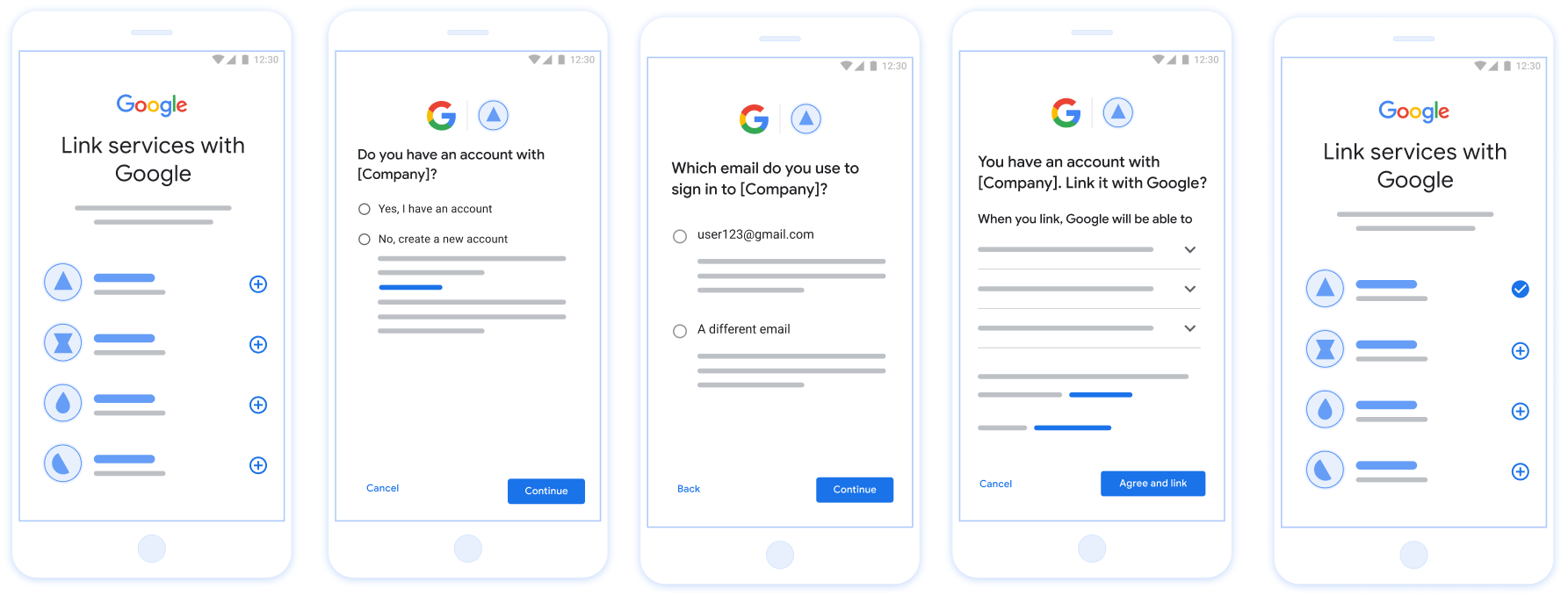
この図は、ユーザーが簡素化されたリンクフローを使用して Google アカウントをリンクする手順を示しています。最初のスクリーンショットは、ユーザーがリンクするアプリをどのように選択できるかを示します。2 つ目のスクリーンショットでは、ユーザーがサービスに既存のアカウントがあるかどうかを確認できます。3 番目のスクリーンショットでは、リンクする Google アカウントを選択できます。4 番目のスクリーンショットは、ユーザーの Google アカウントをアプリにリンクするための確認画面を示します。5 番目のスクリーンショットは、Google アプリでユーザー アカウントが正常にリンクされたことを示します。

図 1. ユーザーのスマートフォンでの簡素化されたリンクによるアカウント リンク

簡素化されたリンクの要件

OAuth サーバーを実装する

トークン交換エンドポイントは、checkcreateget インテントをサポートする必要があります。アカウントのリンクのフローを完了し、さまざまなインテントがいつ使用されるかを確認する手順は次のとおりです。

  1. ユーザーが認証システムにアカウントを持っているかどうか。(ユーザーが [はい] または [いいえ] を選択して決定します)
    1. はい : ユーザーは Google アカウントに関連付けられているメールアドレスを使用してプラットフォームにログインしますか?(ユーザーが [はい] または [いいえ] を選択して決定します)
      1. YES : 認証システムに一致するアカウントがユーザーにありますか?(check intent が呼び出されて確認される)
        1. YES : get intent が呼び出され、インテントの取得が成功した場合、アカウントがリンクされます。
        2. いいえ : 新しいアカウントを作成しますか?(ユーザーが [はい] または [いいえ] を選択して決定します)
          1. YES : create intent が呼び出され、作成インテントが正常に返された場合、アカウントがリンクされます。
          2. いいえ : ウェブ OAuth フローがトリガーされ、ユーザーはブラウザにリダイレクトされ、別のメールアドレスでリンクするオプションが表示されます。
      2. いいえ : ウェブ OAuth フローがトリガーされ、ユーザーはブラウザにリダイレクトされ、別のメールアドレスでリンクするオプションが表示されます。
    2. NO : 認証システムに一致するアカウントがユーザーにありますか?(check intent が呼び出されて確認される)
      1. YES : get intent が呼び出され、インテントの取得が成功した場合、アカウントがリンクされます。
      2. NO : create intent が呼び出され、作成インテントが正常に返された場合、アカウントがリンクされます。

既存のユーザー アカウントを確認する(インテントを確認する)

ユーザーが Google プロフィールへのアクセスに同意すると、 Google ユーザーの ID に関する署名付きアサーションを含むリクエスト。「 アサーションには、ユーザーの Google アカウント ID、 表示されます。アプリケーション用に構成されたトークン交換エンドポイント プロジェクトがリクエストを処理できます

対応する Google アカウントが認証にすでに存在する場合 トークン交換エンドポイントは account_found=true を返します。もし Google アカウントが既存のユーザーと一致しません。トークン交換エンドポイントがあります account_found=false で HTTP 404 Not Found エラーを返す。

リクエストは次のようになります。

POST /token HTTP/1.1
Host: oauth2.example.com
Content-Type: application/x-www-form-urlencoded

grant_type=urn:ietf:params:oauth:grant-type:jwt-bearer&intent=check&assertion=JWT&scope=SCOPES&client_id=GOOGLE_CLIENT_ID&client_secret=GOOGLE_CLIENT_SECRET

トークン交換エンドポイントでは、以下のパラメータを処理する必要があります。

トークン交換エンドポイントのパラメータ
intent これらのリクエストでは、このパラメータの値は check
grant_type 交換されるトークンの種類。これらのリクエストでは、 パラメータの値は urn:ietf:params:oauth:grant-type:jwt-bearer です。
assertion Google ユーザー ID の署名付きアサーションを提供する JSON Web Token(JWT)。この JWT には、ユーザーの認証情報、 Google アカウント ID、名前、メールアドレス。
client_id Google に割り当てたクライアント ID。
client_secret Google に割り当てたクライアント シークレット。

check インテント リクエストに応答するには、トークン交換エンドポイントで次の手順を行う必要があります。

  • JWT アサーションを検証してデコードします。
  • Google アカウントが認証システムにすでに存在するかどうかを確認します。
JWT アサーションを検証してデコードする

JWT アサーションの検証とデコードは、 ご使用の言語に対応した JWT デコード ライブラリ。使用 Google の公開鍵は、Google Cloud で提供されている JWK または PEM 形式を使用しており、 トークンの署名。

デコードされた場合、JWT アサーションは次の例のようになります。

{
  "sub": "1234567890",      // The unique ID of the user's Google Account
  "iss": "https://accounts.google.com",        // The assertion's issuer
  "aud": "123-abc.apps.googleusercontent.com", // Your server's client ID
  "iat": 233366400,         // Unix timestamp of the assertion's creation time
  "exp": 233370000,         // Unix timestamp of the assertion's expiration time
  "name": "Jan Jansen",
  "given_name": "Jan",
  "family_name": "Jansen",
  "email": "jan@gmail.com", // If present, the user's email address
  "email_verified": true,   // true, if Google has verified the email address
  "hd": "example.com",      // If present, the host domain of the user's GSuite email address
                            // If present, a URL to user's profile picture
  "picture": "https://lh3.googleusercontent.com/a-/AOh14GjlTnZKHAeb94A-FmEbwZv7uJD986VOF1mJGb2YYQ",
  "locale": "en_US"         // User's locale, from browser or phone settings
}

トークンの署名を検証するだけでなく、アサーションの 発行者(iss フィールド)が https://accounts.google.com の場合、 (aud フィールド)は、割り当てられたクライアント ID で、トークンの有効期限が切れていないことを確認します。 (exp フィールド)。

emailemail_verifiedhd フィールドを使用すると、 Google はメールアドレスをホストし、その権威があります。Google が そのユーザーが現在正当なアカウント所有者であることが判明している場合 パスワードやその他の本人確認の方法をスキップすることもできます。それ以外の場合、これらのメソッドは を使用して、リンクする前にアカウントを確認できます。

Google が信頼できるケース:

  • email には @gmail.com という接尾辞が付いています。これは Gmail アカウントです。
  • email_verified は true で、hd が設定されています。これは G Suite アカウントです。

ユーザーは Gmail や G Suite を使用せずに Google アカウントを登録できます。日時 email@gmail.com という接尾辞がなく、hd が存在しない場合、Google には含まれません。 認証には、信頼できる認証方法、パスワード、その他の本人確認方法を使用することが推奨されます。 できます。email_verified も、Google が最初に検証した ユーザーに付与できますが、サードパーティの所有権が付与されます。 アカウントが変更された可能性があります。

Google アカウントが認証システムに存在するかどうかの確認

次のいずれかの条件を満たしていることを確認します。

  • アサーションの sub フィールドにある Google アカウント ID がユーザーのものである データベースです
  • アサーションに含まれているメールアドレスが、ユーザーのデータベースに登録されているユーザーと一致している。

いずれかの条件が true の場合、ユーザーは登録済みです。その場合、 次のようなレスポンスが返されます。

HTTP/1.1 200 Success
Content-Type: application/json;charset=UTF-8

{
  "account_found":"true",
}

Google アカウント ID もメールアドレスも アサーションがデータベース内のユーザーと一致した場合、ユーザーはまだ登録されていません。イン この場合、トークン交換エンドポイントは HTTP 404 エラーを返す必要があります。 "account_found": "false" を指定します。次に例を示します。

HTTP/1.1 404 Not found
Content-Type: application/json;charset=UTF-8

{
  "account_found":"false",
}

自動リンクを処理する(インテントの取得)

ユーザーが Google プロフィールへのアクセスに同意すると、 Google ユーザーの ID に関する署名付きアサーションを含むリクエスト。「 アサーションには、ユーザーの Google アカウント ID、 表示されます。アプリケーション用に構成されたトークン交換エンドポイント プロジェクトがリクエストを処理できます

対応する Google アカウントが認証にすでに存在する場合 トークン交換エンドポイントはユーザーにトークンを返します。もし Google アカウントが既存のユーザーと一致しない(トークン交換エンドポイント) linking_error エラーとオプションの login_hint を返します。

リクエストは次のようになります。

POST /token HTTP/1.1
Host: oauth2.example.com
Content-Type: application/x-www-form-urlencoded

grant_type=urn:ietf:params:oauth:grant-type:jwt-bearer&intent=get&assertion=JWT&scope=SCOPES&client_id=GOOGLE_CLIENT_ID&client_secret=GOOGLE_CLIENT_SECRET

トークン交換エンドポイントでは、以下のパラメータを処理する必要があります。

トークン交換エンドポイントのパラメータ
intent これらのリクエストでは、このパラメータの値は get になります。
grant_type 交換されるトークンの種類。これらのリクエストでは、 パラメータの値は urn:ietf:params:oauth:grant-type:jwt-bearer です。
assertion Google ユーザー ID の署名付きアサーションを提供する JSON Web Token(JWT)。この JWT には、ユーザーの認証情報、 Google アカウント ID、名前、メールアドレス。
scope 省略可: Google がリクエストするように構成したスコープ できます。
client_id Google に割り当てたクライアント ID。
client_secret Google に割り当てたクライアント シークレット。

get インテント リクエストに応答するには、トークン交換エンドポイントで次の手順を行う必要があります。

  • JWT アサーションを検証してデコードします。
  • Google アカウントが認証システムにすでに存在するかどうかを確認します。
JWT アサーションを検証してデコードする

JWT アサーションの検証とデコードは、 ご使用の言語に対応した JWT デコード ライブラリ。使用 Google の公開鍵は、Google Cloud で提供されている JWK または PEM 形式を使用しており、 トークンの署名。

デコードされた場合、JWT アサーションは次の例のようになります。

{
  "sub": "1234567890",      // The unique ID of the user's Google Account
  "iss": "https://accounts.google.com",        // The assertion's issuer
  "aud": "123-abc.apps.googleusercontent.com", // Your server's client ID
  "iat": 233366400,         // Unix timestamp of the assertion's creation time
  "exp": 233370000,         // Unix timestamp of the assertion's expiration time
  "name": "Jan Jansen",
  "given_name": "Jan",
  "family_name": "Jansen",
  "email": "jan@gmail.com", // If present, the user's email address
  "email_verified": true,   // true, if Google has verified the email address
  "hd": "example.com",      // If present, the host domain of the user's GSuite email address
                            // If present, a URL to user's profile picture
  "picture": "https://lh3.googleusercontent.com/a-/AOh14GjlTnZKHAeb94A-FmEbwZv7uJD986VOF1mJGb2YYQ",
  "locale": "en_US"         // User's locale, from browser or phone settings
}

トークンの署名を検証するだけでなく、アサーションの 発行者(iss フィールド)が https://accounts.google.com の場合、 (aud フィールド)は、割り当てられたクライアント ID で、トークンの有効期限が切れていないことを確認します。 (exp フィールド)。

emailemail_verifiedhd フィールドを使用すると、 Google はメールアドレスをホストし、その権威があります。Google が そのユーザーが現在正当なアカウント所有者であることが判明している場合 パスワードやその他の本人確認の方法をスキップすることもできます。それ以外の場合、これらのメソッドは を使用して、リンクする前にアカウントを確認できます。

Google が信頼できるケース:

  • email には @gmail.com という接尾辞が付いています。これは Gmail アカウントです。
  • email_verified は true で、hd が設定されています。これは G Suite アカウントです。

ユーザーは Gmail や G Suite を使用せずに Google アカウントを登録できます。日時 email@gmail.com という接尾辞がなく、hd が存在しない場合、Google には含まれません。 認証には、信頼できる認証方法、パスワード、その他の本人確認方法を使用することが推奨されます。 できます。email_verified も、Google が最初に検証した ユーザーに付与できますが、サードパーティの所有権が付与されます。 アカウントが変更された可能性があります。

Google アカウントが認証システムに存在するかどうかの確認

次のいずれかの条件を満たしていることを確認します。

  • アサーションの sub フィールドにある Google アカウント ID がユーザーのものである データベースです
  • アサーションに含まれているメールアドレスが、ユーザーのデータベースに登録されているユーザーと一致している。

ユーザーのアカウントが見つかった場合、アクセス トークンを発行し、次の例のように HTTPS レスポンスの本文で JSON オブジェクトの値を返します。

{
  "token_type": "Bearer",
  "access_token": "ACCESS_TOKEN",
  "refresh_token": "REFRESH_TOKEN",
  "expires_in": SECONDS_TO_EXPIRATION
}

場合によっては、ユーザーが ID トークンに基づくアカウントのリンクが失敗することがあります。もし トークン交換エンドポイントは、HTTP HTTPS レスポンスで応答する必要があります。 error=linking_error を指定する 401 エラーが返されます。

HTTP/1.1 401 Unauthorized
Content-Type: application/json;charset=UTF-8

{
  "error":"linking_error",
  "login_hint":"foo@bar.com"
}

Google は、linking_error を含む 401 エラー レスポンスを受信すると、 login_hint をパラメータとして使用して、ユーザーを認可エンドポイントに送信します。「 ユーザーがブラウザで OAuth リンクフローを使用してアカウントのリンクを完了します。

Handle account creation using Sign in with Google (create intent)

When a user needs to create an account on your service, Google makes a request to your token exchange endpoint that specifies intent=create.

The request has the following form:

POST /token HTTP/1.1
Host: oauth2.example.com
Content-Type: application/x-www-form-urlencoded

response_type=token&grant_type=urn:ietf:params:oauth:grant-type:jwt-bearer&scope=SCOPES&intent=create&assertion=JWT&client_id=GOOGLE_CLIENT_ID&client_secret=GOOGLE_CLIENT_SECRET

Your token exchange endpoint must able to handle the following parameters:

Token endpoint parameters
intent For these requests, the value of this parameter is create.
grant_type The type of token being exchanged. For these requests, this parameter has the value urn:ietf:params:oauth:grant-type:jwt-bearer.
assertion A JSON Web Token (JWT) that provides a signed assertion of the Google user's identity. The JWT contains information that includes the user's Google Account ID, name, and email address.
client_id The client ID you assigned to Google.
client_secret The client secret you assigned to Google.

The JWT within the assertion parameter contains the user's Google Account ID, name, and email address, which you can use to create a new account on your service.

To respond to the create intent requests, your token exchange endpoint must perform the following steps:

  • Validate and decode the JWT assertion.
  • Validate user information and create new account.
JWT アサーションを検証してデコードする

JWT アサーションの検証とデコードは、 ご使用の言語に対応した JWT デコード ライブラリ。使用 Google の公開鍵は、Google Cloud で提供されている JWK または PEM 形式を使用しており、 トークンの署名。

デコードされた場合、JWT アサーションは次の例のようになります。

{
  "sub": "1234567890",      // The unique ID of the user's Google Account
  "iss": "https://accounts.google.com",        // The assertion's issuer
  "aud": "123-abc.apps.googleusercontent.com", // Your server's client ID
  "iat": 233366400,         // Unix timestamp of the assertion's creation time
  "exp": 233370000,         // Unix timestamp of the assertion's expiration time
  "name": "Jan Jansen",
  "given_name": "Jan",
  "family_name": "Jansen",
  "email": "jan@gmail.com", // If present, the user's email address
  "email_verified": true,   // true, if Google has verified the email address
  "hd": "example.com",      // If present, the host domain of the user's GSuite email address
                            // If present, a URL to user's profile picture
  "picture": "https://lh3.googleusercontent.com/a-/AOh14GjlTnZKHAeb94A-FmEbwZv7uJD986VOF1mJGb2YYQ",
  "locale": "en_US"         // User's locale, from browser or phone settings
}

トークンの署名を検証するだけでなく、アサーションの 発行者(iss フィールド)が https://accounts.google.com の場合、 (aud フィールド)は、割り当てられたクライアント ID で、トークンの有効期限が切れていないことを確認します。 (exp フィールド)。

emailemail_verifiedhd フィールドを使用すると、 Google はメールアドレスをホストし、その権威があります。Google が そのユーザーが現在正当なアカウント所有者であることが判明している場合 パスワードやその他の本人確認の方法をスキップすることもできます。それ以外の場合、これらのメソッドは を使用して、リンクする前にアカウントを確認できます。

Google が信頼できるケース:

  • email には @gmail.com という接尾辞が付いています。これは Gmail アカウントです。
  • email_verified は true で、hd が設定されています。これは G Suite アカウントです。

ユーザーは Gmail や G Suite を使用せずに Google アカウントを登録できます。日時 email@gmail.com という接尾辞がなく、hd が存在しない場合、Google には含まれません。 認証には、信頼できる認証方法、パスワード、その他の本人確認方法を使用することが推奨されます。 できます。email_verified も、Google が最初に検証した ユーザーに付与できますが、サードパーティの所有権が付与されます。 アカウントが変更された可能性があります。

Validate user information and create new account

Check whether either of the following conditions are true:

  • The Google Account ID, found in the assertion's sub field, is in your user database.
  • The email address in the assertion matches a user in your user database.

If either condition is true, prompt the user to link their existing account with their Google Account. To do so, respond to the request with an HTTP 401 error that specifies error=linking_error and gives the user's email address as the login_hint. The following is a sample response:

HTTP/1.1 401 Unauthorized
Content-Type: application/json;charset=UTF-8

{
  "error":"linking_error",
  "login_hint":"foo@bar.com"
}

When Google receives a 401 error response with linking_error, Google sends the user to your authorization endpoint with login_hint as a parameter. The user completes account linking using the OAuth linking flow in their browser.

If neither condition is true, create a new user account with the information provided in the JWT. New accounts don't typically have a password set. It's recommended that you add Sign in with Google to other platforms to enable users to sign in with Google across the surfaces of your application. Alternatively, you can email the user a link that starts your password recovery flow to allow the user to set a password to sign in on other platforms.

When the creation is completed, issue an access token and return the values in a JSON object in the body of your HTTPS response, like in the following example:

{
  "token_type": "Bearer",
  "access_token": "ACCESS_TOKEN",
  "refresh_token": "REFRESH_TOKEN",
  "expires_in": SECONDS_TO_EXPIRATION
}

Google API クライアント ID を取得する

アカウント リンクの登録プロセスで、Google API クライアント ID を指定する必要があります。

OAuth リンクの手順を完了したときに作成したプロジェクトを使用して、API クライアント ID を取得します。そのための手順は次のとおりです。

  1. [クライアント] ページに移動します。
  2. Google APIs プロジェクトを作成または選択します。

    プロジェクトにウェブ アプリケーション タイプのクライアント ID がない場合は、[クライアントを作成] をクリックして作成します。[承認済みの JavaScript 生成元] ボックスにサイトのドメインが含まれていることを確認してください。ローカルテストや開発を行う場合は、承認済みの JavaScript 生成元フィールドに http://localhosthttp://localhost:<port_number> の両方を追加する必要があります。

実装を検証する

OAuth 2.0 Playground ツールを使用して、実装を検証できます。

このツールで、次の手順を行います。

  1. [構成] 設定をクリックして、[OAuth 2.0 構成] ウィンドウを開きます。
  2. [OAuth flow] フィールドで、[クライアントサイド] を選択します。
  3. [OAuth Endpoints] フィールドで、[Custom] を選択します。
  4. 対応するフィールドに、OAuth 2.0 エンドポイントと Google に割り当てたクライアント ID を指定します。
  5. [Step 1] セクションで、Google スコープを選択しないでください。代わりに、このフィールドを空白のままにするか、サーバーで有効なスコープを入力します(OAuth スコープを使用しない場合は任意の文字列を入力します)。完了したら、[Authorize APIs] をクリックします。
  6. [Step 2] セクションと [Step 3] セクションで、OAuth 2.0 フローを確認し、各ステップが意図したとおりに動作することを確認します。

Google アカウント リンク デモツールを使用して、実装を検証できます。

このツールで、次の手順を行います。

  1. [Google でログイン] ボタンをクリックします。
  2. リンクするアカウントを選択します。
  3. サービス ID を入力します。
  4. 必要に応じて、アクセスをリクエストするスコープを 1 つ以上入力します。
  5. [Start Demo] をクリックします。
  6. 確認のメッセージが表示されたら、リンク リクエストに同意または拒否できることを確認します。
  7. プラットフォームにリダイレクトされることを確認します。