帳戶是透過業界標準的 OAuth 2.0 隱含和授權碼流程連結。
您的服務必須支援符合 OAuth 2.0 規範的授權和權杖交換端點。在隱含流程中,Google 會在使用者瀏覽器中開啟授權端點。成功登入後,請將長期有效的存取權杖傳回給 Google。現在,Google 傳送的每項要求都會包含這個存取權杖。
在授權碼流程中,您需要兩個端點:
授權端點,會向尚未登入的使用者顯示登入 UI。授權端點也會建立短期授權碼,記錄使用者對所要求存取權的同意聲明。
權杖交換端點,負責處理兩種類型的交換作業:
- 將授權碼換成長期更新權杖和短期存取權杖。使用者完成帳戶連結流程時,就會進行這項交換作業。
- 使用長期更新權杖交換短期存取權杖。 如果 Google 的存取權杖已過期,就需要新的權杖,此時就會進行這項交換作業。
選擇 OAuth 2.0 流程
雖然隱含流程較容易導入,但 Google 建議隱含流程核發的存取權杖永不過期。這是因為權杖到期後,系統會強制使用者透過隱含流程重新連結帳戶。基於安全考量,如果您需要設定權杖到期時間,強烈建議改用授權碼流程。
設計指南
本節說明您為 OAuth 連結流程代管的使用者畫面設計規定和建議。Google 應用程式呼叫後,平台會向使用者顯示 Google 登入頁面和帳戶連結同意畫面。使用者同意連結帳戶後,系統會將他們導向回 Google 應用程式。
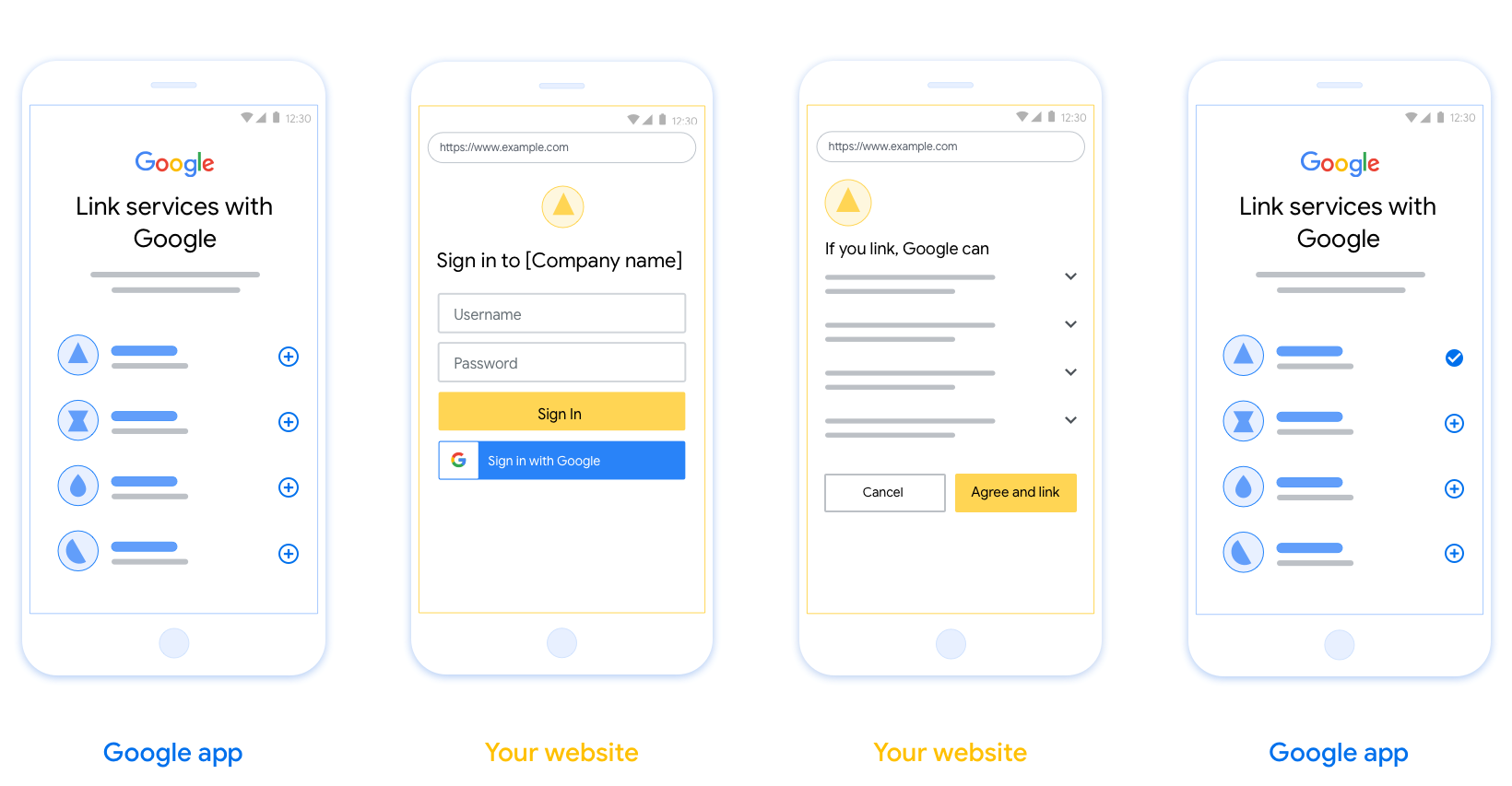
需求條件
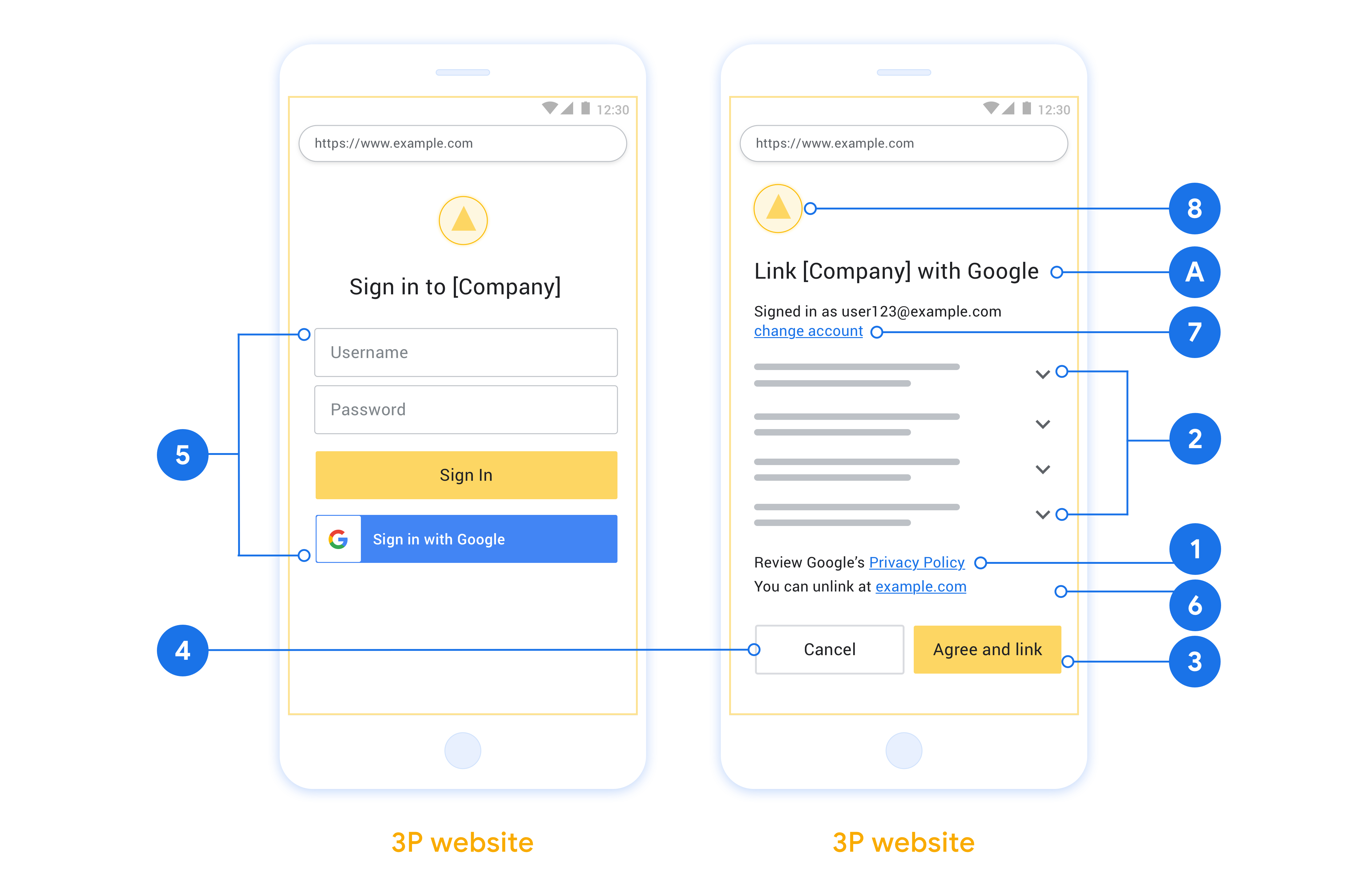
- 您必須告知使用者,他們的帳戶將連結至 Google,而非 Google Home 或 Google 助理等特定 Google 產品。
建議
建議您採取下列做法:
顯示 Google 隱私權政策。 在同意畫面上加入《Google 隱私權政策》連結。
要分享的資料。使用簡潔明瞭的用語,向使用者說明 Google 需要哪些資料,以及原因。
明確的行動號召。在同意聲明畫面中提供明確的行動號召,例如「同意並連結」。這是因為使用者必須瞭解連結帳戶時,需要與 Google 分享哪些資料。
可取消訂閱。如果使用者選擇不連結,請提供返回或取消的方式。
清楚的登入程序。確保使用者有清楚的 Google 帳戶登入方式,例如使用者名稱和密碼欄位,或「使用 Google 帳戶登入」。
可取消連結。提供解除連結的機制,例如平台帳戶設定的網址。或者,您也可以加入Google 帳戶的連結,讓使用者管理已連結的帳戶。
可變更使用者帳戶。建議使用者切換帳戶的方法。如果使用者通常有多個帳戶,這項功能就特別實用。
- 如果使用者必須關閉同意畫面才能切換帳戶,請將可復原的錯誤傳送給 Google,讓使用者透過 OAuth 連結和隱含流程登入所需帳戶。
加入您的標誌。在同意畫面上顯示公司標誌。 請按照樣式指南放置標誌。如要顯示 Google 標誌,請參閱「標誌和商標」一文。
建立專案
如要建立專案以使用帳戶連結,請按照下列步驟操作:
- 前往 Google API 控制台。
- 按一下 [Create Project]。
- 輸入名稱或接受系統產生的建議。
- 確認或編輯其餘欄位。
- 點選「建立」。
如要查看專案 ID,請按照下列步驟操作:
- 前往 Google API 控制台。
- 在到達網頁的表格中找出專案。專案 ID 會顯示在「ID」欄中。
設定 OAuth 同意畫面
Google 帳戶連結程序會顯示同意畫面,告知使用者要求存取資料的應用程式、要求存取的資料類型,以及適用條款。您必須先設定 OAuth 同意畫面,才能產生 Google API 用戶端 ID。
- 開啟 Google API 控制台的「OAuth consent screen」(OAuth 同意畫面) 頁面。
- 如果出現提示,請選取您剛建立的專案。
在「OAuth 同意畫面」頁面中填寫表單,然後按一下「儲存」按鈕。
應用程式名稱:要求同意的應用程式名稱。名稱應如實反映應用程式,且與使用者在其他地方看到的應用程式名稱一致。應用程式名稱會顯示在帳戶連結同意畫面上。
應用程式標誌:同意畫面上的圖片,可協助使用者識別您的應用程式。標誌會顯示在帳戶連結同意畫面和帳戶設定中。
支援電子郵件:方便使用者與您聯絡,洽詢同意聲明相關事宜。
Google API 的範圍:範圍可讓應用程式存取使用者的私人 Google 資料。如果是 Google 帳戶連結用途,預設範圍 (電子郵件地址、個人資料、openid) 就已足夠,不需要新增任何敏感範圍。一般而言,最佳做法是在需要存取權時,逐步要求範圍,而不是預先要求。瞭解詳情。
授權網域:為保障您與使用者的安全,Google 只允許應用程式透過 OAuth 驗證,使用授權網域。應用程式的連結必須託管於授權網域。瞭解詳情。
應用程式首頁連結:應用程式的首頁。必須託管在已授權網域。
應用程式隱私權政策連結:顯示在 Google 帳戶連結同意畫面上。必須託管在已授權網域。
應用程式服務條款連結 (選填):必須託管於已授權網域。

圖 1. 虛構應用程式 Tunery 的 Google 帳戶連結同意畫面
查看「驗證狀態」,如果應用程式需要驗證,請點按「送交驗證」按鈕,將應用程式送交驗證。詳情請參閱「OAuth 驗證規定」。
導入 OAuth 伺服器
n
To support the OAuth 2.0 implicit flow, your service makes an authorization endpoint available by HTTPS. This endpoint is responsible for authentication and obtaining consent from users for data access. The authorization endpoint presents a sign-in UI to your users that aren't already signed in and records consent to the requested access.
When a Google application needs to call one of your service's authorized APIs, Google uses this endpoint to get permission from your users to call these APIs on their behalf.
Google Account Linking: OAuth Implicit Flow
The following sequence diagram details interactions between the User, Google, and your service's endpoints.
Roles and responsibilities
The following table defines the roles and responsibilities of actors in the Google Account Linking (GAL) OAuth Implicit flow. Note that in GAL, Google acts as the OAuth Client, while your service acts as the Identity/Service Provider.
| Actor / Component | GAL Role | Responsibilities |
|---|---|---|
| Google App / Server | OAuth Client | Initiates the flow, receives the access token using a browser redirect, and securely stores it to access your service's APIs. |
| Your Authorization Endpoint | Authorization Server | Authenticates your users, obtains their consent, and issues long-lived access tokens directly to Google. |
| Google Redirect URI | Callback Endpoint | Receives the user redirect from your authorization service with the
access_token and state values in the URL
fragment. |
A typical OAuth 2.0 implicit flow session initiated by Google has the following flow:
- Google opens your authorization endpoint in the user's browser. The user signs in, if not signed in already, and grants Google permission to access their data with your API, if they haven't already granted permission.
- Your service creates an access token and returns it to Google. To do so, redirect the user's browser back to Google with the access token attached to the request.
- Google calls your service's APIs and attaches the access token with each request. Your service verifies that the access token grants Google authorization to access the API and then completes the API call.
Handle authorization requests
When a Google application needs to perform account linking using an OAuth 2.0 implicit flow, Google sends the user to your authorization endpoint with a request that includes the following parameters:
| Authorization endpoint parameters | |
|---|---|
client_id |
The client ID you assigned to Google. |
redirect_uri |
The URL to which you send the response to this request. |
state |
A bookkeeping value that is passed back to Google unchanged in the redirect URI. |
response_type |
The type of value to return in the response. For the OAuth 2.0 implicit
flow, the response type is always token. |
user_locale |
The Google Account language setting in RFC5646 format used to localize your content in the user's preferred language. |
For example, if your authorization endpoint is available at
https://myservice.example.com/auth, a request might look like the following:
GET https://myservice.example.com/auth?client_id=GOOGLE_CLIENT_ID&redirect_uri=REDIRECT_URI&state=STATE_STRING&response_type=token&user_locale=LOCALE
For your authorization endpoint to handle sign-in requests, do the following steps:
Verify the
client_idandredirect_urivalues to prevent granting access to unintended or misconfigured client apps:- Confirm that the
client_idmatches the client ID you assigned to Google. - Confirm that the URL specified by the
redirect_uriparameter has the following form:https://oauth-redirect.googleusercontent.com/r/YOUR_PROJECT_ID https://oauth-redirect-sandbox.googleusercontent.com/r/YOUR_PROJECT_ID
- Confirm that the
Check if the user is signed in to your service. If the user isn't signed in, complete your service's sign-in or sign-up flow.
Generate an access token for Google to use to access your API. The access token can be any string value, but it must uniquely represent the user and the client the token is for and must not be guessable.
Send an HTTP response that redirects the user's browser to the URL specified by the
redirect_uriparameter. Include all of the following parameters in the URL fragment:access_token: The access token you just generatedtoken_type: The stringbearerstate: The unmodified state value from the original request
The following is an example of the resulting URL:
https://oauth-redirect.googleusercontent.com/r/YOUR_PROJECT_ID#access_token=ACCESS_TOKEN&token_type=bearer&state=STATE_STRING
Google's OAuth 2.0 redirect handler receives the access token and confirms
that the state value hasn't changed. After Google has obtained an
access token for your service, Google attaches the token to subsequent calls
to your service APIs.
處理使用者資訊要求
userinfo 端點是 OAuth 2.0 受保護的資源,可傳回已連結使用者的聲明。除了下列用途外,不一定要實作並代管 userinfo 端點:
成功從權杖端點擷取存取權杖後,Google 會向您的使用者資訊端點傳送要求,以擷取已連結使用者的基本個人資料。
| userinfo 端點要求標頭 | |
|---|---|
Authorization header |
Bearer 類型的存取權杖。 |
舉例來說,如果您的 userinfo 端點位於
https://myservice.example.com/userinfo,要求可能如下所示:
GET /userinfo HTTP/1.1
Host: myservice.example.com
Authorization: Bearer ACCESS_TOKEN
為了讓 userinfo 端點處理要求,請按照下列步驟操作:
- 從授權標頭擷取存取權杖,然後為與存取權杖相關聯的使用者傳回資訊。
- 如果存取權杖無效,請使用
WWW-Authenticate回應標頭傳回 HTTP 401 Unauthorized 錯誤。以下是 userinfo 錯誤回應的範例:HTTP/1.1 401 Unauthorized WWW-Authenticate: error="invalid_token", error_description="The Access Token expired"
如果存取權杖有效,則傳回並傳回 HTTP 200 回應,且 HTTPS 內文含有下列 JSON 物件 回應:
{ "sub": "USER_UUID", "email": "EMAIL_ADDRESS", "given_name": "FIRST_NAME", "family_name": "LAST_NAME", "name": "FULL_NAME", "picture": "PROFILE_PICTURE", }userinfo 端點回應 sub用來在系統中識別使用者的專屬 ID。 email使用者的電子郵件地址。 given_name選填:使用者的名字。 family_name選填:使用者的姓氏。 name選填:使用者全名。 picture選用:使用者的個人資料相片。
驗證實作
您可以使用 OAuth 2.0 Playground 工具驗證實作成果。
在工具中執行下列步驟:
- 點選「設定」 開啟「OAuth 2.0 設定」視窗。
- 在「OAuth flow」欄位中,選取「用戶端」。
- 在「OAuth Endpoints」(OAuth 端點) 欄位中,選取「Custom」(自訂)。
- 在對應欄位中,指定 OAuth 2.0 端點和您指派給 Google 的用戶端 ID。
- 在「步驟 1」部分,請勿選取任何 Google 範圍。請將這個欄位留空,或輸入適用於伺服器的範圍 (如果您未使用 OAuth 範圍,則輸入任意字串)。完成後,請按一下「授權 API」。
- 在「步驟 2」和「步驟 3」部分,請完成 OAuth 2.0 流程,並確認每個步驟都能正常運作。
您可以使用 Google 帳戶連結示範工具驗證實作項目。
在工具中執行下列步驟:
- 按一下「使用 Google 帳戶登入」按鈕。
- 選擇要連結的帳戶。
- 輸入服務 ID。
- 選擇性輸入您要要求存取的一或多個範圍。
- 按一下「開始試用」。
- 系統顯示提示時,確認您要同意或拒絕連結要求。
- 確認系統會將你重新導向至平台。