
Nếu ứng dụng của bạn sử dụng
để hiển thị nội dung trên web, bạn nên định cấu hình để nội dung có thể được kiếm tiền một cách tối ưu bằng quảng cáo.WebView
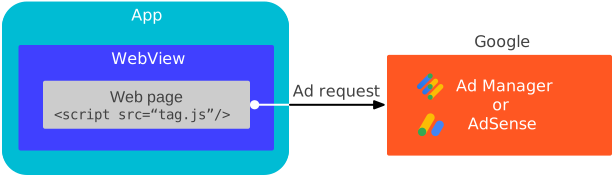
Hướng dẫn này trình bày cách cung cấp thông tin về cách định cấu hình đối tượng WebView.
Bật cookie của bên thứ ba
Để cải thiện trải nghiệm quảng cáo của người dùng và để nhất quán với
chính sách cookie của Chrome, hãy bật cookie của bên thứ ba
trên thực thể WebView của bạn.
Java
CookieManager.getInstance().setAcceptThirdPartyCookies(webView, true);
Kotlin
CookieManager.getInstance().setAcceptThirdPartyCookies(webView, true)
Cài đặt web
Chế độ cài đặt WebView mặc định chưa được tối ưu hoá cho quảng cáo. Sử dụng API WebSettings để định cấu hình WebView cho:
- JavaScript
- Quyền truy cập vào bộ nhớ trên thiết bị
Tự động phát video
Java
import android.webkit.CookieManager;
import android.webkit.WebView;

public class MainActivity extends AppCompatActivity {
  private WebView webView;

  @Override
  protected void onCreate(Bundle savedInstanceState) {
    super.onCreate(savedInstanceState);
    setContentView(R.layout.activity_main);
    webView = findViewById(R.id.webview);

    // Let the web view accept third-party cookies.
    CookieManager.getInstance().setAcceptThirdPartyCookies(webView, true);
    // Let the web view use JavaScript.
    webView.getSettings().setJavaScriptEnabled(true);
    // Let the web view access local storage.
    webView.getSettings().setDomStorageEnabled(true);
    // Let HTML videos play automatically.
    webView.getSettings().setMediaPlaybackRequiresUserGesture(false);
  }
}
Kotlin
import android.webkit.CookieManager
import android.webkit.WebView

class MainActivity : AppCompatActivity() {
  lateinit var webView: WebView

  override fun onCreate(savedInstanceState: Bundle?) {
    super.onCreate(savedInstanceState)
    setContentView(R.layout.activity_main)
    webView = findViewById(R.id.webview)

    // Let the web view accept third-party cookies.
    CookieManager.getInstance().setAcceptThirdPartyCookies(webView, true)
    // Let the web view use JavaScript.
    webView.settings.javaScriptEnabled = true
    // Let the web view access local storage.
    webView.settings.domStorageEnabled = true
    // Let HTML videos play automatically.
    webView.settings.mediaPlaybackRequiresUserGesture = false
  }
}
Tải nội dung chế độ xem web
Cookie và URL trang rất quan trọng đối với việc kiếm tiền từ chế độ xem web và chỉ hoạt động như mong đợi khi
loadUrl() được dùng với URL dựa trên mạng. Để tối ưu hoá
WebView hiệu suất, hãy tải nội dung trên web
trực tiếp từ URL dựa trên mạng. Tránh sử dụng WebViewAssetLoader, tải
tài sản từ thiết bị hoặc tạo nội dung trên web một cách linh động.
Java
import android.webkit.CookieManager;
import android.webkit.WebView;

public class MainActivity extends AppCompatActivity {
  private WebView webView;

  @Override
  protected void onCreate(Bundle savedInstanceState) {
    super.onCreate(savedInstanceState);
    setContentView(R.layout.activity_main);
    webView = findViewById(R.id.webview);

    // Let the web view accept third-party cookies.
    CookieManager.getInstance().setAcceptThirdPartyCookies(webView, true);
    // Let the web view use JavaScript.
    webView.getSettings().setJavaScriptEnabled(true);
    // Let the web view access local storage.
    webView.getSettings().setDomStorageEnabled(true);
    // Let HTML videos play automatically.
    webView.getSettings().setMediaPlaybackRequiresUserGesture(false);

    // Load the URL for optimized web view performance.
    webView.loadUrl("https://google.github.io/webview-ads/test/");
  }
}
Kotlin
import android.webkit.CookieManager
import android.webkit.WebView

class MainActivity : AppCompatActivity() {
  lateinit var webView: WebView

  override fun onCreate(savedInstanceState: Bundle?) {
    super.onCreate(savedInstanceState)
    setContentView(R.layout.activity_main)
    webView = findViewById(R.id.webview)

    // Let the web view accept third-party cookies.
    CookieManager.getInstance().setAcceptThirdPartyCookies(webView, true)
    // Let the web view use JavaScript.
    webView.settings.javaScriptEnabled = true
    // Let the web view access local storage.
    webView.settings.domStorageEnabled = true
    // Let HTML videos play automatically.
    webView.settings.mediaPlaybackRequiresUserGesture = false

    // Load the URL for optimized web view performance.
    webView.loadUrl("https://google.github.io/webview-ads/test/")
  }
}
Kiểm thử chế độ xem web
Trong quá trình phát triển ứng dụng, bạn nên tải URL thử nghiệm này:
https://google.github.io/webview-ads/test/
để xác minh rằng các chế độ cài đặt này có hiệu quả như mong muốn đối với quảng cáo. URL thử nghiệm có tiêu chí thành công cho một quá trình tích hợp hoàn chỉnh nếu bạn thấy những điều sau:
Cài đặt chế độ xem web
- Cách hoạt động của cookie của bên thứ ba
- Cách hoạt động của cookie của bên thứ nhất
- Đã bật JavaScript
- Đã bật bộ nhớ DOM
Quảng cáo dạng video
- Quảng cáo dạng video phát cùng dòng và không mở trong trình phát tích hợp toàn màn hình
- Quảng cáo dạng video tự động phát mà không cần nhấp vào nút phát
- Quảng cáo dạng video có thể phát lại
Sau khi hoàn tất quá trình kiểm thử, hãy thay thế URL kiểm thử bằng URL mà chế độ xem web dự định tải.