
แบนเนอร์แบบปรับขนาดได้ช่วยให้คุณระบุความกว้างของโฆษณาเพื่อกำหนดขนาดโฆษณาที่เหมาะสมที่สุดสำหรับอุปกรณ์แต่ละเครื่องได้ แบนเนอร์แบบปรับขนาดได้ที่แทรกระหว่างเนื้อหามีขนาดใหญ่และสูงกว่าแบนเนอร์แบบปรับขนาดได้ที่ยึดตำแหน่ง และไม่ได้ใช้ความสูงคงที่ แบนเนอร์แบบปรับขนาดได้ที่แทรกระหว่างเนื้อหามีความสูงที่เปลี่ยนแปลงได้ แบนเนอร์เหล่านี้อาจเติมเต็มทั้งหน้าจอหรือมีความสูงสูงสุดที่คุณระบุ
คู่มือนี้ครอบคลุมการสร้างแบนเนอร์แบบปรับขนาดได้ที่แทรกระหว่างเนื้อหาและการตั้งค่าขนาดแบนเนอร์
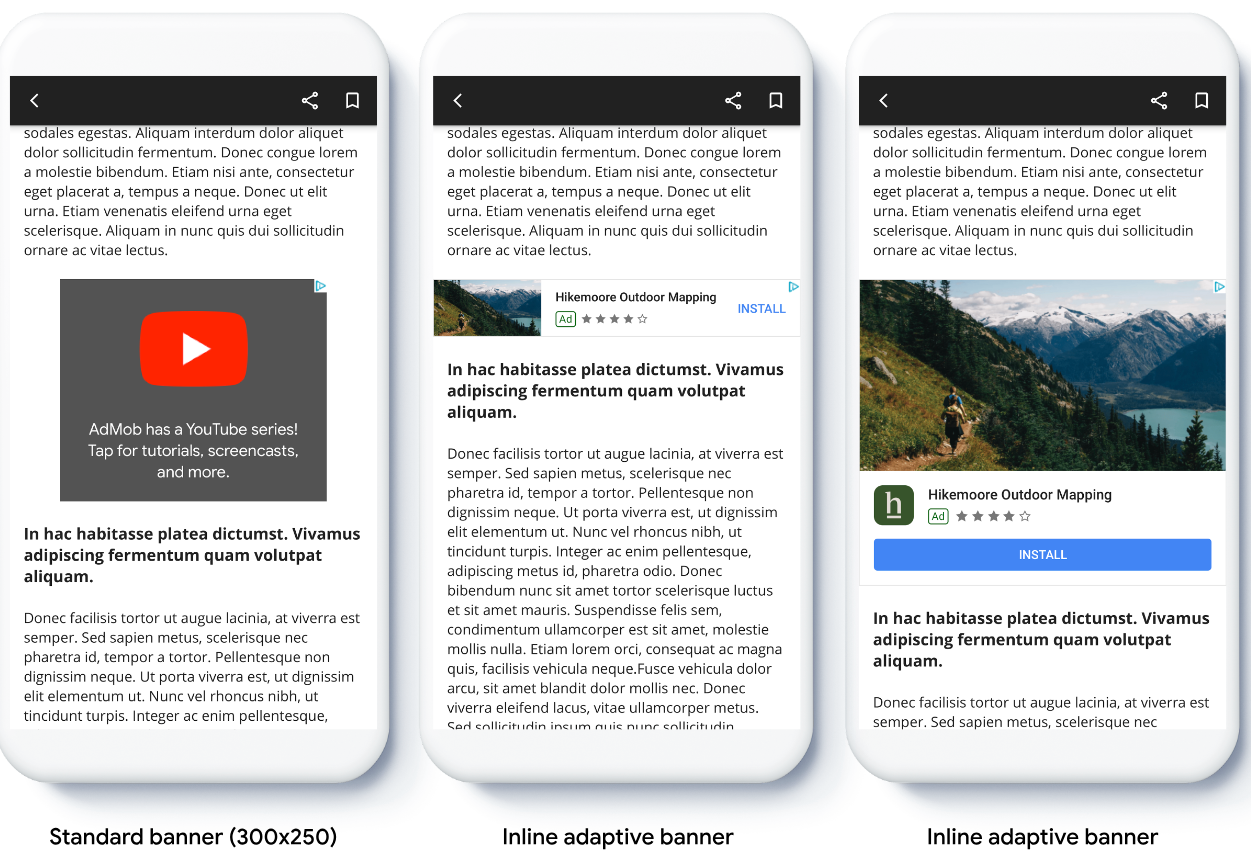
รูปภาพต่อไปนี้แสดงแบนเนอร์แบบปรับขนาดได้ที่แทรกระหว่างเนื้อหาในเนื้อหาที่เลื่อนได้
ก่อนเริ่มต้น
โปรดตรวจสอบว่าได้ตั้งค่าโฆษณาแบนเนอร์แล้วก่อนดำเนินการต่อ
หากต้องการดูตัวอย่างแบนเนอร์แบบปรับขนาดได้ที่แทรกระหว่างเนื้อหาแบบเต็ม ให้ดาวน์โหลดแอปตัวอย่างต่อไปนี้
ใช้แบนเนอร์แบบปรับขนาดได้ที่แทรกระหว่างเนื้อหา
หากต้องการใช้แบนเนอร์แบบปรับขนาดได้ที่แทรกระหว่างเนื้อหา ให้ตั้งค่าขนาดโฆษณา สร้างคำขอโฆษณา และโหลดโฆษณา
หากต้องการกำหนดขนาดแบนเนอร์แบบปรับขนาดได้ที่แทรกระหว่างเนื้อหา ให้กำหนดความกว้างของโฆษณา วิธีที่ใช้กันโดยทั่วไปมีดังนี้
- ใช้ความกว้างแบบเต็มหน้าจอ
- ใช้ความกว้างของเลย์เอาต์หลักที่มีโฆษณา
- ปรับความกว้างให้ครอบคลุมพื้นที่ปลอดภัยของอุปกรณ์
เมื่อสร้างออบเจ็กต์ขนาดโฆษณา ให้ใช้ความกว้างที่คำนวณนี้
ตัวอย่างต่อไปนี้แสดงการตั้งค่าขนาดโฆษณา การสร้างคำขอโฆษณา และการโหลดโฆษณา
Kotlin
private fun loadAd() {
  // Create an inline adaptive ad size. 320 is a placeholder value.
  // Replace 320 with your banner container width.
  val adSize = AdSize.getCurrentOrientationInlineAdaptiveBannerAdSize(this, 320)

  // Step 1 - Create a BannerAdRequest object with ad unit ID and size.
  val adRequest = BannerAdRequest.Builder("AD_UNIT_ID", adSize).build()

  // Step 2 - Load the ad.
  BannerAd.load(
    adRequest,
    object : AdLoadCallback<BannerAd> {
      override fun onAdLoaded(ad: BannerAd) {
        // Assign the loaded ad to the BannerAd object.
        bannerAd = ad
        // Step 3 - Call BannerAd.getView() to get the View and add it
        // to view hierarchy on the UI thread.
        activity?.runOnUiThread {
          binding.bannerViewContainer.addView(ad.getView(requireActivity()))
        }
      }

      override fun onAdFailedToLoad(loadAdError: LoadAdError) {
        bannerAd = null
      }
    }
  )
}
Java
private void loadAd() {
  // Create an inline adaptive ad size. 320 is a placeholder value.
  // Replace 320 with your banner container width.
  AdSize adSize = AdSize.getCurrentOrientationInlineAdaptiveBannerAdSize(this, 320);

  // Step 1 - Create a BannerAdRequest object with ad unit ID and size.
  BannerAdRequest adRequest = new BannerAdRequest.Builder("AD_UNIT_ID",
      adSize).build();

  // Step 2 - Load the ad.
  BannerAd.load(
      adRequest,
      new AdLoadCallback<BannerAd>() {
        @Override
        public void onAdLoaded(@NonNull BannerAd ad) {
          // Assign the loaded ad to the BannerAd object.
          bannerAd = ad;
          // Step 3 - Call BannerAd.getView() to get the View and add it
          // to view hierarchy on the UI thread.
          if (getActivity() != null) {
            getActivity()
                .runOnUiThread(() ->
                    binding.bannerViewContainer.addView(ad.getView(getActivity())));
          }
        }

        @Override
        public void onAdFailedToLoad(@NonNull LoadAdError adError) {
          bannerAd = null;
        }
      });
}
ตั้งค่าเลย์เอาต์แบนเนอร์แบบปรับขนาดได้ที่แทรกระหว่างเนื้อหา
หากต้องการโหลดโฆษณาแบนเนอร์แบบปรับขนาดได้ที่แทรกระหว่างเนื้อหาล่วงหน้าสำหรับเลย์เอาต์ที่เฉพาะเจาะจง ให้ใช้วิธีการต่อไปนี้
AdSize.getPortraitInlineAdaptiveBannerAdSize(Context context, int width)AdSize.getLandscapeInlineAdaptiveBannerAdSize(Context context, int width)
หากแอปของคุณรองรับมุมมองแนวตั้งและแนวนอน และคุณต้องการโหลด
โฆษณาแบนเนอร์แบบปรับขนาดได้ล่วงหน้าในเลย์เอาต์ปัจจุบัน ให้ใช้วิธี
AdSize.getCurrentOrientationInlineAdaptiveBannerAdSize(Context context, int width)
ซึ่งจะโหลดโฆษณาในเลย์เอาต์ปัจจุบัน
จำกัดความสูงของแบนเนอร์แบบปรับขนาดได้ที่แทรกระหว่างเนื้อหา
โดยค่าเริ่มต้น แบนเนอร์แบบปรับขนาดได้ที่แทรกระหว่างเนื้อหาซึ่งสร้างขึ้นโดยไม่มีค่า maxHeight จะมีความสูงสูงสุดเท่ากับความสูงของอุปกรณ์ หากต้องการจำกัดความสูงของแบนเนอร์แบบปรับขนาดได้ที่แทรกระหว่างเนื้อหา ให้ใช้วิธี
AdSize.getInlineAdaptiveBannerAdSize(int width, int maxHeight)