

מבוא
במדריך הזה מוסבר איך להשתמש בתכונות של Google Ad Manager לפרסום מותאם באמצעות ה-API. לפני שמתחילים, חשוב להבין את היסודות של פרסום מותאם ב-Ad Manager.
אחזור פורמט של מודעה מותאמת
פורמטים של מודעות מותאמות מיוצגים על ידי
CreativeTemplate
ב-Ad Manager API. כדי לאחזר פורמטים מותאמים מהרשת, משתמשים בתג CreativeTemplateService.
כדי להבדיל בין תבניות קריאייטיב לבין פורמטים של מודעות מותאמות, משתמשים בשדה isNativeEligible. אם השדה הזה מוגדר כ-True, תבנית הקריאייטיב מייצגת פורמט של מודעה מותאמת.
Java
StatementBuilder statementBuilder = new StatementBuilder()
    .where("isNativeEligible = :isNativeEligible")
    .orderBy("id DESC")
    .limit(StatementBuilder.SUGGESTED_PAGE_LIMIT)
    .withBindVariableValue("isNativeEligible", true);;

CreativeTemplatePage page = creativeTemplateService.getCreativeTemplatesByStatement(
    statementBuilder.toStatement());
Python
query = 'WHERE isNativeEligible = :isNativeEligible'
values = [
    {'key': 'isNativeEligible',
     'value': {
         'xsi_type': 'BooleanValue',
         'value': 'true'
     }},
]
statement = ad_manager.FilterStatement(query, values)

response = creative_template_service.getCreativeTemplatesByStatement(
    statement.ToStatement())
PHP
$pageSize = StatementBuilder::SUGGESTED_PAGE_LIMIT;
$statementBuilder = (new StatementBuilder())
    ->where('isNativeEligible = :isNativeEligible')
    ->orderBy('id ASC')
    ->limit($pageSize)
    ->withBindVariableValue('isNativeEligible', true);

$page = $creativeTemplateService->getCreativeTemplatesByStatement(
    $statementBuilder->ToStatement());
.NET
StatementBuilder statementBuilder = new StatementBuilder()
    .Where("isNativeEligible = :isNativeEligible")
    .OrderBy("id ASC")
    .Limit(StatementBuilder.SUGGESTED_PAGE_LIMIT)
    .AddValue("isNativeEligible", true);

CreativeTemplatePage page = creativeTemplateService.getCreativeTemplatesByStatement(
      statementBuilder.ToStatement());
Ruby
query = 'WHERE isNativeEligible = :isNativeEligible'
values = [
  {
    :key => 'isNativeEligible',
    :value => {
      :xsi_type => 'BooleanValue',
      :value => 'true'
    }
  },
]
statement = AdManagerApi::FilterStatement.new(query, values)

page = creative_template_service.get_creative_templates_by_statement(
  statement.toStatement())
יצירת קריאייטיב מותאם
קריאייטיבים מותאמים נתמכים על ידי
TemplateCreatives
ב-Ad Manager API. הם לא ישות נפרדת. כדי ליצור נכסי קריאייטיב מותאמים, צריך ליצור TemplateCreative עבור CreativeTemplate שעומד בדרישות של מודעות מותאמות. הרכיבים של הקריאייטיב המקורי מאוחסנים באובייקטים של CreativeTemplateVariable.
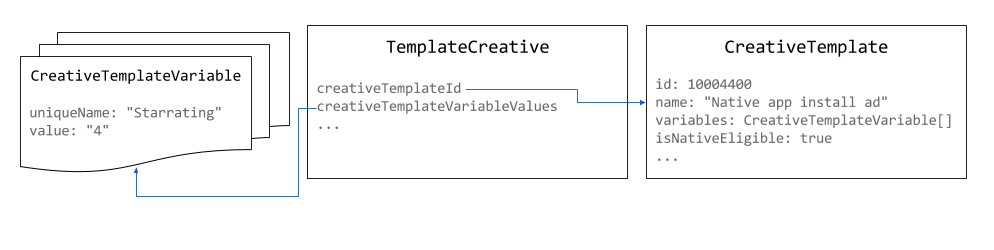
משתמשים בפיקסלים בגודל 1x1 כגודל של נכסי קריאייטיב מותאמים. אפשר להגדיר את הגודל של המודעה שעוברת עיבוד ב-NativeStyle או להגדיר אותו באמצעות עיבוד בהתאמה אישית.
Java
// Use the system defined native app install creative template.
long nativeAppInstallTemplateId = 10004400L;

// Use 1x1 as the size for native creatives.
Size size = new Size();
size.setWidth(1);
size.setHeight(1);
size.setIsAspectRatio(false);

TemplateCreative nativeAppInstallCreative = new TemplateCreative();
nativeAppInstallCreative.setName("Native creative #" + new Random().nextInt(Integer.MAX_VALUE));
nativeAppInstallCreative.setCreativeTemplateId(nativeAppInstallTemplateId);
nativeAppInstallCreative.setSize(size);

List<BaseCreativeTemplateVariableValue> templateVariables = Lists.newArrayList();

// Set the star rating.
StringCreativeTemplateVariableValue starRatingVariableValue =
    new StringCreativeTemplateVariableValue();
starRatingVariableValue.setUniqueName("Starrating");
starRatingVariableValue.setValue("4");
templateVariables.add(starRatingVariableValue);
Python
# Use the system defined native app install creative template.
native_app_install_template_id = '10004400'

creative = {
    'xsi_type': 'TemplateCreative',
    'name': 'Native creative',
    'creativeTemplateId': native_app_install_template_id,
    'size': {'width': 1, 'height': 1, 'isAspectRatio': false},
    'creativeTemplateVariableValues': [
        {
            'xsi_type': 'StringCreativeTemplateVariableValue',
            'uniqueName': 'Starrating',
            'value': '4'
        }
    ]
}
PHP
// Use the system defined native app install creative template.
$nativeAppInstallTemplateId = 10004400;

// Use 1x1 as the size for native creatives.
$size = new Size();
$size->width = 1;
$size->height = 1;
$size->isAspectRatio = false;

$nativeAppInstallCreative = new TemplateCreative();
$nativeAppInstallCreative->name = 'Native creative #' . uniqid();
$nativeAppInstallCreative->creativeTemplateId = $nativeAppInstallTemplateId;
$nativeAppInstallCreative->size = $size;

$starRatingVariableValue = new StringCreativeTemplateVariableValue();
$starRatingVariableValue->uniqueName = 'Starrating';
$starRatingVariableValue->value = '4';
$nativeAppInstallCreative->creativeTemplateVariableValues[] =
    $starRatingVariableValue;
C#
// Use the system defined native app install creative template.
long nativeAppInstallTemplateId = 10004400L;

TemplateCreative nativeAppInstallCreative = new TemplateCreative();
nativeAppInstallCreative.name =
    String.Format("Native creative #{0}", new Random().Next(int.MaxValue));
nativeAppInstallCreative.creativeTemplateId = nativeAppInstallTemplateId;

// Use 1x1 as the size for native creatives.
Size size = new Size();
size.width = 1;
size.height = 1;
size.isAspectRatio = false;
nativeAppInstallCreative.size = size;

List<BaseCreativeTemplateVariableValue> templateVariables =
    new List<BaseCreativeTemplateVariableValue>();

templateVariables.Add(new StringCreativeTemplateVariableValue() {
  uniqueName = "Starrating",
  value = "4"
});
Ruby
# Use the system defined native app install creative template.
creative_template_id = 10004400

creative = {
    :xsi_type => 'TemplateCreative',
    :name => "Native creative %d" % Time.new.to_i,
    :creative_template_id => creative_template_id,
    :size => {:width => 1, :height => 1, :is_aspect_ratio => false}
}

starrating_variable_value = {
    :xsi_type => 'StringCreativeTemplateVariableValue',
    :unique_name => 'Starrating',
    :value => '4'
}

creative[:creative_template_variable_values] = [
    starrating_variable_value
]
יצירת סגנון מותאם
אפשר ליצור סגנונות של מודעות מותאמות באמצעות NativeStyleService.
נכון לעכשיו, ה-API לא מבצע אימות של קטעי ה-CSS וה-HTML שאתם מספקים. כשמגדירים את פרטי הטירגוט, השדות הנתמכים היחידים הם
inventoryTargeting
ו-
customTargeting.
Java
long nativeAppInstallTemplateId = 10004400L;

// Create a native style for native app install ads.
NativeStyle nativeStyle = new NativeStyle();
nativeStyle.setName("Native style #" + new Random().nextInt(Integer.MAX_VALUE));
nativeStyle.setCreativeTemplateId(nativeAppInstallTemplateId);
nativeStyle.setSize(size);
nativeStyle.setHtmlSnippet(htmlSnippet);
nativeStyle.setCssSnippet(cssSnippet);
Python
native_app_install_template_id = '10004400'

# Create a style for native app install ads.
native_style = {
    'name': 'Native style #%d' % uuid.uuid4(),
    'htmlSnippet': html_snippet,
    'cssSnippet': css_snippet,
    'creativeTemplateId': native_app_install_template_id,
    'size': {
        'width': width,
        'height': height,
        'isAspectRatio': False
    }
}
PHP
$nativeAppInstallTemplateId = 10004400;

// Create a style for native app install ads.
$nativeStyle = new NativeStyle();
$nativeStyle->setName('Native style #'. uniqid());
$nativeStyle->setCreativeTemplateId($nativeAppInstallTemplateId);
$nativeStyle->setSize($size);
$nativeStyle->setHtmlSnippet($htmlSnippet);
$nativeStyle->setCssSnippet($cssSnippet);
C#
long nativeAppInstallTemplateId = 10004400L;

// Create a style for native app install ads.
NativeStyle nativeStyle = new NativeStyle();
nativeStyle.name = string.Format("Native style #{0}", new Random().Next());
nativeStyle.creativeTemplateId = nativeAppInstallTemplateId;
nativeStyle.size = size;
nativeStyle.htmlSnippet = htmlSnippet;
nativeStyle.cssSnippet = cssSnippet;
Ruby
native_app_install_template_id = 10004400

# Create a style for native app install ads.
native_style = {
  :name => 'Native style #%d' % (Time.new.to_f * 1000),
  :html_snippet => html_snippet,
  :css_snippet => css_snippet,
  :creative_template_id => native_app_install_template_id,
  :size => size
}
אם הסגנון הוא לגודל דינמי, מגדירים את השדה isFluid לערך true ואת השדה size לערך 1x1 פיקסלים.
הצגת מודעה מותאמת
כשיוצרים LineItem למודעה מותאמת, צריך להגדיר את סוג CreativeSizeType של CreativePlaceholder כ-NATIVE, ואת creativeTemplateId של פורמט המודעה המותאמת הרצוי.
Java
// Create creative placeholder size.
Size size = new Size();
size.setWidth(1);
size.setHeight(1);
size.setIsAspectRatio(false);

long nativeAppInstallTemplateId = 10004400L;

// Create the creative placeholder.
CreativePlaceholder creativePlaceholder = new CreativePlaceholder();
creativePlaceholder.setSize(size);
creativePlaceholder.setCreativeTemplateId(nativeAppInstallTemplateId);
creativePlaceholder.setCreativeSizeType(CreativeSizeType.NATIVE);
Python
native_app_install_template_id = '10004400'

# Create the creative placeholder.
creative_placeholder = {
    'size': {
        'width': '1',
        'height': '1'
    },
    'creativeTemplateId': native_app_install_template_id,
    'creativeSizeType': 'NATIVE'
}
PHP
$nativeAppInstallTemplateId = 10004400;

// Create the creative placeholder.
$creativePlaceholder = new CreativePlaceholder();
$creativePlaceholder->setSize(new Size(1, 1, false));
$creativePlaceholder->setCreativeTemplateId($nativeAppInstallTemplateId);
$creativePlaceholder->setCreativeSizeType(CreativeSizeType::NATIVE);
C#
// Create the creative placeholder size.
Size size = new Size();
size.width = 1;
size.height = 1;
size.isAspectRatio = false;

long nativeAppInstallTemplateId = 10004400L;

// Create the creative placeholder.
CreativePlaceholder creativePlaceholder = new CreativePlaceholder();
creativePlaceholder.size = size;
creativePlaceholder.creativeTemplateId = nativeAppInstallTemplateId;
creativePlaceholder.creativeSizeType = CreativeSizeType.NATIVE;
Ruby
# Create the creative placeholder.
creative_placeholder = {
    :size => {:width => 1, :height => 1, :is_aspect_ratio => false},
    :creative_template_id => 10004400,
    :creative_size_type => 'NATIVE'
}