
Tworzenie i przesyłanie plików danych o encjach
Podczas tworzenia i przesyłania plików danych o podmiotach postępuj zgodnie z tymi instrukcjami:
- W przypadku plików danych o elementach postępuj zgodnie ze specyfikacją opisaną w artykule Plik danych o elementach. Zalecamy używanie unikalnych nazw plików danych o podmiotach w przypadku każdego przesłania.
W nazwie pliku umieść sygnaturę czasową, np.
Entity_1633621547.json. - W deskryptorze zestawu plików ustaw pole
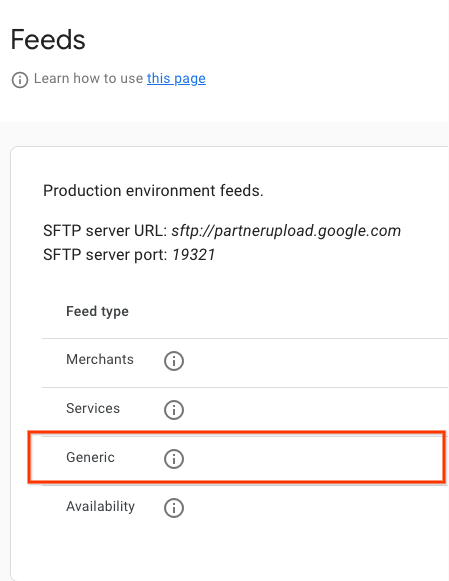
namenareservewithgoogle.entity. Przykład pliku deskryptora znajdziesz w przykładowym pliku JSON. Zalecamy używanie unikalnych nazw plików deskryptora dla każdego przesłanego pliku. W nazwie pliku umieść sygnaturę czasową, np.Entity_1633621547.filesetdesc.json. Plik deskryptora musi zostać przesłany na ogólny serwer SFTP. - Przesyłaj pliki danych na ogólny serwer SFTP codziennie w ramach pełnych odświeżeń.
- Szczegóły serwera SFTP znajdziesz w sekcji Konfiguracja > Pliki danych na portalu dla partnerów.
- Stan przetwarzania pliku danych możesz sprawdzić w sekcji Pliki danych > Historia w portalu dla partnerów.
Definicje
Definicja EntityFeed
message EntityFeed {
  repeated Entity data = 1;
}
Definicja jednostki
//
// Information about an Entity that is on the partner's platform. For example,
// an Entity could be a retail store, a hospital, an online business etc.
message Entity {
  // An opaque string generated by the partner that identifies an Entity.
  // Must be unique across all entities.
  // Strongly recommended to only include URL-safe characters.
  // This ID should be immutable. Changing or recycling them to represent the
  // same entity may cause issues and outages.
  // (required)
  string entity_id = 1;

  // If present, the name, telephone, url and location are used to support
  // matching partner inventory with entities already present on Google. This
  // information will not be displayed.

  // The name of the Entity. (required)
  string name = 2;

  // The contact telephone number of the Entity including its country and area
  // codes, e.g. +14567891234. Highly recommended. (optional)
  string telephone = 3;

  // The url of the Entity's public website. Highly recommended. (optional)
  string url = 4;

  // The location of the Entity (required)
  madden.ingestion.GeoCoordinates location = 5;

}
Definicja GeoCoordinates
// The Geo data of a location, including latitude, longitude, and address.
// At least one of [lat/lng or address] should be provided (or both).
message GeoCoordinates {
  // [-90, +90] degrees (inclusive). (optional)
  double latitude = 1;

  // [-180, +180] degrees (inclusive). (optional)
  double longitude = 2;

  // Address for a location, could either be structured or unstructured.
  oneof addresses {
    // Postal address of the location, preferred.
    PostalAddress address = 3;

    // An unstructured address could also be provided as a fallback.
    // E.g. "1600 amphitheatre parkway mountain view, ca 94043"
    string unstructured_address = 4;
  }
}
Definicja PostalAddress
// The postal address for a merchant.
message PostalAddress {
  // The country, using ISO 3166-1 alpha-2 country code, e.g. "US" (required)
  string country = 1;

  // The locality/city, e.g. "Mountain View". (required)
  string locality = 2;

  // The region/state/province, e.g. "CA". This field is only required in
  // countries where region is commonly a part of the address. (optional)
  string region = 3;

  // The postal code, e.g. "94043". (required)
  string postal_code = 4;

  // The street address, e.g. "1600 Amphitheatre Pkwy". (required)
  string street_address = 5;
}
Przykłady plików danych o encjach
Restauracje
Nazwa pliku : entity_1697754089_0001.json
{
  "data": [
    {
      "entity_id": "dining-1",
      "name": "Sample Eatery 1",
      "telephone": "+1-415-876-5432",
      "url": "www.sampleeatery1.com",
      "location": {
        "latitude": 37.404570,
        "longitude": -122.033160,
        "address": {
          "country": "US",
          "locality": "Sunnyvale",
          "region": "CA",
          "postal_code": "94089",
          "street_address": "815 11th Ave"
        }
      }
    },
    {
      "entity_id": "dining-2",
      "name": "Sample Eatery 2",
      "telephone": "+1-415-123-4567",
      "url": "www.sampleeatery2.com",
      "location": {
        "latitude": 37.422113,
        "longitude": -122.084041,
        "address": {
          "country": "US",
          "locality": "Sunnyvale",
          "region": "CA",
          "postal_code": "94089",
          "street_address": "805 11th Ave"
        }
      }
    }
  ]
}
Plik opisu lokalu gastronomicznego
Nazwa pliku : entity_1697754089.filesetdesc.json
{
  "generation_timestamp": 1697754089,
  "name": "reservewithgoogle.entity",
  "data_file": [
    "entity_1697754089_0001.json",
    "entity_1697754089_0002.json"
  ]
}
Zakupy
Nazwa pliku : entity_1697754089_0001.json
{
  "data": [
    {
      "entity_id": "apparel-brand-store-1",
      "name": "Apparel Brand Store - Downtown",
      "telephone": "+1-415-876-0001",
      "url": "www.apparel-brand-example.com/store/1",
      "location": {
        "latitude": 37.404570,
        "longitude": -122.033160,
        "address": {
          "country": "US",
          "locality": "Sunnyvale",
          "region": "CA",
          "postal_code": "94089",
          "street_address": "700 11th Ave"
        }
      }
    },
    {
      "entity_id": "footwear-brand-store-1",
      "name": "Footwear Brand Store - City Center",
      "telephone": "+1-415-123-0002",
      "url": "www.footwear-brand-example.com/store/1",
      "location": {
        "latitude": 37.422113,
        "longitude": -122.084041,
        "address": {
          "country": "US",
          "locality": "Sunnyvale",
          "region": "CA",
          "postal_code": "94089",
          "street_address": "800 11th Ave"
        }
      }
    }
  ]
}
Plik opisu zakupów
Nazwa pliku : entity_1697754089.filesetdesc.json
{
  "generation_timestamp": 1692998244,
  "name": "reservewithgoogle.entity",
  "data_file": [
    "entity_1697754089_0001.json"
  ]
}