
Créer et importer des flux d'entités
Lorsque vous créez et importez des flux d'entités, suivez ces instructions :
- Suivez les spécifications décrites dans le flux d'entités pour les fichiers de données d'entités. Nous vous recommandons d'utiliser des noms de fichiers de données d'entité uniques pour chaque importation.
Incluez un code temporel dans le nom du fichier, par exemple
Entity_1633621547.json. - Dans le fichier de description de l'ensemble de fichiers, définissez le champ
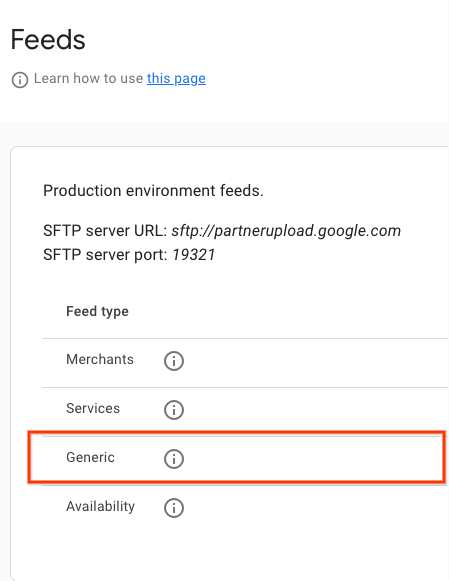
namesurreservewithgoogle.entity. Pour obtenir un exemple de fichier de description, consultez l'exemple JSON. Nous vous recommandons d'utiliser des noms de fichiers de description uniques pour chaque importation. Incluez un code temporel dans le nom de fichier, par exempleEntity_1633621547.filesetdesc.json. Le fichier de description doit être importé sur le serveur SFTP générique. - Importez les flux sur le serveur SFTP générique tous les jours en tant qu'actualisations complètes.
- Vous trouverez les informations sur le serveur SFTP dans la section Configuration > Flux du portail des partenaires.
- Consultez l'état de l'ingestion des flux dans la section Flux > Historique du portail des partenaires.
Définitions
Définition d'EntityFeed
message EntityFeed {
  repeated Entity data = 1;
}
Définition d'entité
//
// Information about an Entity that is on the partner's platform. For example,
// an Entity could be a retail store, a hospital, an online business etc.
message Entity {
  // An opaque string generated by the partner that identifies an Entity.
  // Must be unique across all entities.
  // Strongly recommended to only include URL-safe characters.
  // This ID should be immutable. Changing or recycling them to represent the
  // same entity may cause issues and outages.
  // (required)
  string entity_id = 1;

  // If present, the name, telephone, url and location are used to support
  // matching partner inventory with entities already present on Google. This
  // information will not be displayed.

  // The name of the Entity. (required)
  string name = 2;

  // The contact telephone number of the Entity including its country and area
  // codes, e.g. +14567891234. Highly recommended. (optional)
  string telephone = 3;

  // The url of the Entity's public website. Highly recommended. (optional)
  string url = 4;

  // The location of the Entity (required)
  madden.ingestion.GeoCoordinates location = 5;

}
Définition de GeoCoordinates
// The Geo data of a location, including latitude, longitude, and address.
// At least one of [lat/lng or address] should be provided (or both).
message GeoCoordinates {
  // [-90, +90] degrees (inclusive). (optional)
  double latitude = 1;

  // [-180, +180] degrees (inclusive). (optional)
  double longitude = 2;

  // Address for a location, could either be structured or unstructured.
  oneof addresses {
    // Postal address of the location, preferred.
    PostalAddress address = 3;

    // An unstructured address could also be provided as a fallback.
    // E.g. "1600 amphitheatre parkway mountain view, ca 94043"
    string unstructured_address = 4;
  }
}
Définition de PostalAddress
// The postal address for a merchant.
message PostalAddress {
  // The country, using ISO 3166-1 alpha-2 country code, e.g. "US" (required)
  string country = 1;

  // The locality/city, e.g. "Mountain View". (required)
  string locality = 2;

  // The region/state/province, e.g. "CA". This field is only required in
  // countries where region is commonly a part of the address. (optional)
  string region = 3;

  // The postal code, e.g. "94043". (required)
  string postal_code = 4;

  // The street address, e.g. "1600 Amphitheatre Pkwy". (required)
  string street_address = 5;
}
Exemples de flux d'entités
Restauration
Nom du fichier : entity_1697754089_0001.json
{
  "data": [
    {
      "entity_id": "dining-1",
      "name": "Sample Eatery 1",
      "telephone": "+1-415-876-5432",
      "url": "www.sampleeatery1.com",
      "location": {
        "latitude": 37.404570,
        "longitude": -122.033160,
        "address": {
          "country": "US",
          "locality": "Sunnyvale",
          "region": "CA",
          "postal_code": "94089",
          "street_address": "815 11th Ave"
        }
      }
    },
    {
      "entity_id": "dining-2",
      "name": "Sample Eatery 2",
      "telephone": "+1-415-123-4567",
      "url": "www.sampleeatery2.com",
      "location": {
        "latitude": 37.422113,
        "longitude": -122.084041,
        "address": {
          "country": "US",
          "locality": "Sunnyvale",
          "region": "CA",
          "postal_code": "94089",
          "street_address": "805 11th Ave"
        }
      }
    }
  ]
}
Fichier de description des restaurants
Nom du fichier : entity_1697754089.filesetdesc.json
{
  "generation_timestamp": 1697754089,
  "name": "reservewithgoogle.entity",
  "data_file": [
    "entity_1697754089_0001.json",
    "entity_1697754089_0002.json"
  ]
}
Shopping
Nom du fichier : entity_1697754089_0001.json
{
  "data": [
    {
      "entity_id": "apparel-brand-store-1",
      "name": "Apparel Brand Store - Downtown",
      "telephone": "+1-415-876-0001",
      "url": "www.apparel-brand-example.com/store/1",
      "location": {
        "latitude": 37.404570,
        "longitude": -122.033160,
        "address": {
          "country": "US",
          "locality": "Sunnyvale",
          "region": "CA",
          "postal_code": "94089",
          "street_address": "700 11th Ave"
        }
      }
    },
    {
      "entity_id": "footwear-brand-store-1",
      "name": "Footwear Brand Store - City Center",
      "telephone": "+1-415-123-0002",
      "url": "www.footwear-brand-example.com/store/1",
      "location": {
        "latitude": 37.422113,
        "longitude": -122.084041,
        "address": {
          "country": "US",
          "locality": "Sunnyvale",
          "region": "CA",
          "postal_code": "94089",
          "street_address": "800 11th Ave"
        }
      }
    }
  ]
}
Fichier de descripteur Shopping
Nom du fichier : entity_1697754089.filesetdesc.json
{
  "generation_timestamp": 1692998244,
  "name": "reservewithgoogle.entity",
  "data_file": [
    "entity_1697754089_0001.json"
  ]
}