Tworzenie i przesyłanie plików danych o dostępności spotkań
Podczas tworzenia i przesyłania plików danych o dostępności terminów spotkań postępuj zgodnie z tymi instrukcjami:
- Postępuj zgodnie ze specyfikacją opisaną w pliku danych o dostępności wizyt w przypadku plików danych o dostępności wizyt. Zalecamy używanie unikalnych nazw plików danych o dostępności terminów wizyt w przypadku każdego przesłania.
W nazwie pliku umieść sygnaturę czasową, np.
appointment availability_1633621547.json. - W deskryptorze zestawu plików ustaw pole
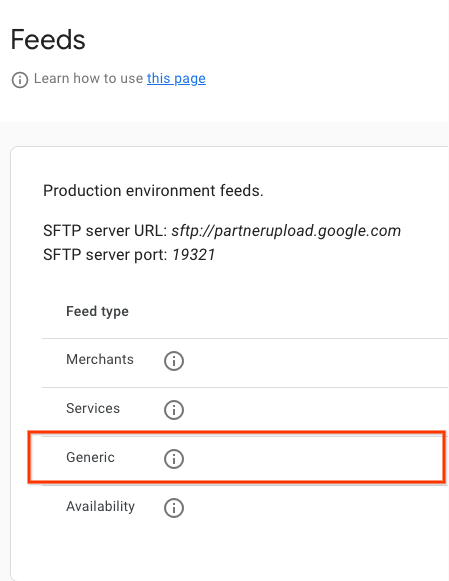
namena wartośćappointment.availability. Przykładowy plik deskryptora znajdziesz w sekcji Przykładowy plik JSON. Zalecamy używanie unikalnych nazw plików deskryptorów dla każdego przesłania. W nazwie pliku umieść sygnaturę czasową, np.appointment availability_1633621547.filesetdesc.json. Plik deskryptora musi zostać przesłany na ogólny serwer SFTP. - Przesyłaj pliki danych na ogólny serwer SFTP co 30 minut w ramach pełnych odświeżeń.
- Szczegóły serwera SFTP znajdziesz w sekcji Konfiguracja > Pliki danych na portalu dla partnerów.
- Stan przetwarzania kanału możesz sprawdzić w sekcji Pliki danych > Historia w portalu dla partnerów.
Przesyłanie dodatkowych plików danych
Dostępność terminów obsługuje też dodatkowe pliki danych, dzięki czemu partnerzy mogą przesyłać tylko zmiany wprowadzone w dostępności za pomocą przesyłania plików danych.
Aby przesłać plik danych z przyrostowymi aktualizacjami, ustaw wartość is_incremental: true w co najmniej jednym przedziale dostępności w pliku danych. Jeśli niektóre pliki danych mają wartość is_incremental ustawioną na true, a inne na false, system traktuje wszystkie jako przyrostowe.
Aktualizacje przyrostowe umożliwiają wykonywanie tych operacji:
- Bez zmian
- Nie podawaj identyfikatora dostępności w przypadku jednostek, w których nie ma zmian.
- Aktualizowanie dostępności
- Aby zaktualizować pojedynczą dostępność, prześlij konkretny wpis dotyczący dostępności (ten sam
availability_id), który wymaga modyfikacji, zmieniając dowolne wybrane pola. - Usuwanie dostępności
- Jeśli wpis dotyczący dostępności nie jest już dostępny lub powinien zostać usunięty, prześlij ten wpis (ten sam
availability_id) z wartościąspots_availableustawioną na 0, a system automatycznie go usunie. Aby usunąć wszystkie dane sprzedawcy lub podmiotu, ustaw wartośćspots_availablewszystkich przedziałów czasowych dostępności na 0 – spowoduje to usunięcie sprzedawcy lub podmiotu z sekcji Dostępność. - Dodaj dostępność
- W przypadku nowych przedziałów czasowych dostępności w przesłanym pliku danych uwzględnij nowy wpis dotyczący dostępności z nowym, unikalnym identyfikatorem
availability_id. System traktuje go tak samo, jakby był uwzględniony w zwykłym pliku danych.
Definicje
Definicja pliku danych AppointmentAvailabilityFeed
message AppointmentAvailabilityFeed {
  repeated AppointmentAvailability data = 1;
}
Definicja AppointmentAvailability
// This represents the availability data for a bookable service provided by a
// merchant.
// For example, it can be a haircut/nail manicure service for a beauty salon or
// a massage service for a spa.
// The availability feed should be a list of this message.
message AppointmentAvailability {
  // An opaque string generated by the partner that identifies a service time
  // slot. Must be unique across all entities and service time slots.
  // Strongly recommended to only include URL-safe characters.
  // Required.
  string availability_id = 1;

  // An opaque string generated by the partner that identifies an Entity.
  // Must be unique across all entities.
  // Strongly recommended to only include URL-safe characters.
  // Required.
  string entity_id = 2;

  // An opaque string of ASCII characters from an aggregator partner which
  // uniquely identifies the Service (haircut, nail manicure, massage).
  // Strongly recommended to only include URL-safe characters.
  // Required.
  string service_id = 3;

  // The name of the service provider. For example, the name of the
  // hairdresser or the spa staff member.
  // Optional.
  string provider = 12;

  // Timestamp of when this availability slot starts in UTC.
  // Given in seconds since the unix epoch.
  // For example, 1735714800 seconds for 1 Jan 2025, 07:00:00 (UTC).
  // Required.
  int64 start_time_sec = 4;

  // The minimum number of minutes in advance before the start time that this
  // availability slot can be booked.
  // For example, if the start time is 10:00 AM and the min_advance_minutes is
  // 60, then the latest time this slot can be booked is 9:00 AM on the day of
  // the appointment.
  // If not set, it is assumed to be 0, meaning the slot can be booked at any
  // time before the start time.
  // Optional.
  int32 min_advance_minutes = 13;

  // Number of total spots and available spots of this booking availability.
  // Required.
  int32 spots_total = 5;
  // Required.
  int32 spots_available = 6;

  // The minimum number of spots that should be booked for this availability.
  // For example, a user has to book at least 2 spots for a time slot sometimes.
  // If set, spots_minimum_book should be less or equal to spots_available.
  // Optional.
  int32 spots_minimum_book = 7;

  // Link of this booking availability. Users will be redirected to partner
  // website to continue booking after clicking this link.
  // Required.
  string booking_link = 8;

  // Base price per person.
  // Required.
  google.type.Money base_price = 9;
  // Fee per person.
  // Required.
  google.type.Money fee_price = 10;

  // Whether the feed is incremental or not.
  // By default it is false, meaning the Availability feed will override the
  // previous data for the same entity_id.
  // If this is set to be true, the Availability feed will be proceeded as
  // incremental updates for the same entity_id.
  //    1) If it is a new availability_id, the entry is added.
  //    2) If it is an existing availability_id and the spots_available is 0,
  //       the entry is removed.
  //    3) If it is an existing availability_id and the spots_available is not
  //    0, the entry is updated.
  bool is_incremental = 11;
}
Zewnętrzne odwołania do plików proto:
Przykłady plików danych o dostępności pól golfowych
Plik danych o dostępności wizyt
{
  "data": [
    {
      "availability_id": "availability_id_1",
      "entity_id": "entity_id_1",
      "service_id": "service_id_1",
      "start_time_sec": 1728257400,
      "spots_total": 4,
      "spots_available": 4,
      "spots_minimum_book": 2,
      "booking_link": "https://www.googleappointments.com/a_link_direct_to_booking_page",
      "base_price": {
        "currency_code": "USD",
        "units": 80,
        "nanos": 0
      },
      "fee_price": {
        "currency_code": "USD",
        "units": 1,
        "nanos": 750000000
      }
    },
    {
      "availability_id": "availability_id_2",
      "entity_id": "entity_id_2",
      "service_id": "service_id_2",
      "start_time_sec": 1728259200,
      "spots_total": 4,
      "spots_available": 4,
      "spots_minimum_book": 2,
      "booking_link": "https://googlegolfappointments.com/a_link_direct_to_booking_page",
      "base_price": {
        "currency_code": "USD",
        "units": 80,
        "nanos": 0
      },
      "fee_price" : {
        "currency_code": "USD",
        "units": 2,
        "nanos": 850000000
      }
    }
  ]
}
Plik deskryptora
{
  "generation_timestamp": 1663347730,
  "name": "appointment.availability",
  "data_file": [
    "appointment_availability_1663347730.json"
  ]
}