Creare e caricare feed sulla disponibilità degli appuntamenti
Quando crei e carichi i feed di disponibilità degli appuntamenti, segui queste istruzioni:
- Segui le specifiche descritte nel
feed sulla disponibilità degli appuntamenti
per i file di dati sulla disponibilità degli appuntamenti. Ti consigliamo di utilizzare nomi di file di dati sulla disponibilità degli appuntamenti univoci per ogni caricamento.
Includi un timestamp nel nome file, ad esempio
appointment availability_1633621547.json. - Nel descrittore del set di file, imposta il campo
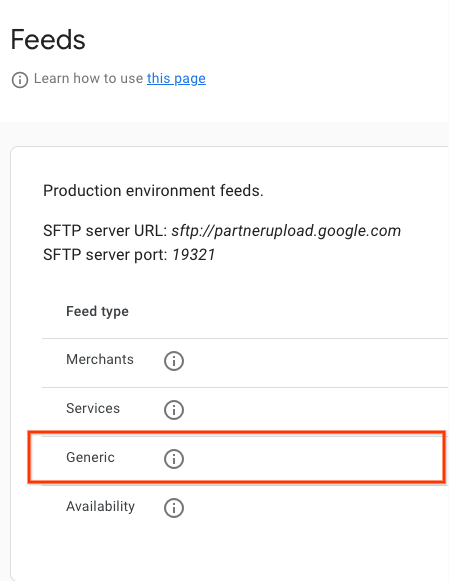
namesuappointment.availability. Per un esempio del file descrittore, consulta l'esempio JSON. Ti consigliamo di utilizzare nomi di file descrittori univoci per ogni caricamento. Includi un timestamp nel nome file, ad esempioappointment availability_1633621547.filesetdesc.json. Il file descrittore deve essere caricato sul server SFTP generico. - Carica i feed sul server SFTP generico ogni 30 minuti come aggiornamenti completi.
- Puoi trovare i dettagli del server SFTP nella sezione Configurazione > Feed del Partner Portal.
- Visualizza lo stato di importazione dei feed nella sezione Feed > Cronologia del Partner Portal.
Caricamento dei feed incrementali
La disponibilità degli appuntamenti supporta anche i feed incrementali, consentendo ai partner di caricare solo le modifiche apportate alla disponibilità utilizzando il caricamento dei feed.
Per caricare un feed incrementale, imposta is_incremental: true in almeno uno degli slot di disponibilità del feed. Se alcuni feed hanno is_incremental impostato su true e altri su false, il sistema li considera tutti incrementali.
Gli aggiornamenti incrementali offrono le seguenti operazioni:
- Stabile
- Non includere l'ID disponibilità per le entità per le quali non sono state apportate modifiche.
- Aggiorna disponibilità
- Per aggiornare una singola disponibilità, carica la voce di disponibilità specifica (lo stesso
availability_id) che richiede la modifica, alterando uno qualsiasi dei campi selezionati. - Elimina disponibilità
- Se una voce di disponibilità non è più disponibile o deve essere eliminata, carica la disponibilità (lo stesso
availability_id) conspots_availableimpostato su 0 e il sistema la eliminerà automaticamente. Inoltre, per rimuovere tutti i dati di un commerciante / entità, impostaspots_availablesu 0 per tutti i relativi slot di disponibilità. In questo modo, il commerciante / l'entità verrà rimosso dalla disponibilità. - Aggiungi disponibilità
- Per i nuovi slot di disponibilità, includi la nuova voce di disponibilità con il nuovo
availability_idunivoco nel caricamento del feed. Il sistema lo tratta come se fosse incluso in un feed normale.
Definizioni
Definizione di AppointmentAvailabilityFeed
message AppointmentAvailabilityFeed {
  repeated AppointmentAvailability data = 1;
}
Definizione di AppointmentAvailability
// This represents the availability data for a bookable service provided by a
// merchant.
// For example, it can be a haircut/nail manicure service for a beauty salon or
// a massage service for a spa.
// The availability feed should be a list of this message.
message AppointmentAvailability {
  // An opaque string generated by the partner that identifies a service time
  // slot. Must be unique across all entities and service time slots.
  // Strongly recommended to only include URL-safe characters.
  // Required.
  string availability_id = 1;

  // An opaque string generated by the partner that identifies an Entity.
  // Must be unique across all entities.
  // Strongly recommended to only include URL-safe characters.
  // Required.
  string entity_id = 2;

  // An opaque string of ASCII characters from an aggregator partner which
  // uniquely identifies the Service (haircut, nail manicure, massage).
  // Strongly recommended to only include URL-safe characters.
  // Required.
  string service_id = 3;

  // The name of the service provider. For example, the name of the
  // hairdresser or the spa staff member.
  // Optional.
  string provider = 12;

  // Timestamp of when this availability slot starts in UTC.
  // Given in seconds since the unix epoch.
  // For example, 1735714800 seconds for 1 Jan 2025, 07:00:00 (UTC).
  // Required.
  int64 start_time_sec = 4;

  // The minimum number of minutes in advance before the start time that this
  // availability slot can be booked.
  // For example, if the start time is 10:00 AM and the min_advance_minutes is
  // 60, then the latest time this slot can be booked is 9:00 AM on the day of
  // the appointment.
  // If not set, it is assumed to be 0, meaning the slot can be booked at any
  // time before the start time.
  // Optional.
  int32 min_advance_minutes = 13;

  // Number of total spots and available spots of this booking availability.
  // Required.
  int32 spots_total = 5;
  // Required.
  int32 spots_available = 6;

  // The minimum number of spots that should be booked for this availability.
  // For example, a user has to book at least 2 spots for a time slot sometimes.
  // If set, spots_minimum_book should be less or equal to spots_available.
  // Optional.
  int32 spots_minimum_book = 7;

  // Link of this booking availability. Users will be redirected to partner
  // website to continue booking after clicking this link.
  // Required.
  string booking_link = 8;

  // Base price per person.
  // Required.
  google.type.Money base_price = 9;
  // Fee per person.
  // Required.
  google.type.Money fee_price = 10;

  // Whether the feed is incremental or not.
  // By default it is false, meaning the Availability feed will override the
  // previous data for the same entity_id.
  // If this is set to be true, the Availability feed will be proceeded as
  // incremental updates for the same entity_id.
  //    1) If it is a new availability_id, the entry is added.
  //    2) If it is an existing availability_id and the spots_available is 0,
  //       the entry is removed.
  //    3) If it is an existing availability_id and the spots_available is not
  //    0, the entry is updated.
  bool is_incremental = 11;
}
Riferimenti proto esterni:
Esempi di feed sulla disponibilità di campi da golf
Feed sulla disponibilità per un appuntamento
{
  "data": [
    {
      "availability_id": "availability_id_1",
      "entity_id": "entity_id_1",
      "service_id": "service_id_1",
      "start_time_sec": 1728257400,
      "spots_total": 4,
      "spots_available": 4,
      "spots_minimum_book": 2,
      "booking_link": "https://www.googleappointments.com/a_link_direct_to_booking_page",
      "base_price": {
        "currency_code": "USD",
        "units": 80,
        "nanos": 0
      },
      "fee_price": {
        "currency_code": "USD",
        "units": 1,
        "nanos": 750000000
      }
    },
    {
      "availability_id": "availability_id_2",
      "entity_id": "entity_id_2",
      "service_id": "service_id_2",
      "start_time_sec": 1728259200,
      "spots_total": 4,
      "spots_available": 4,
      "spots_minimum_book": 2,
      "booking_link": "https://googlegolfappointments.com/a_link_direct_to_booking_page",
      "base_price": {
        "currency_code": "USD",
        "units": 80,
        "nanos": 0
      },
      "fee_price" : {
        "currency_code": "USD",
        "units": 2,
        "nanos": 850000000
      }
    }
  ]
}
File descrittore
{
  "generation_timestamp": 1663347730,
  "name": "appointment.availability",
  "data_file": [
    "appointment_availability_1663347730.json"
  ]
}