Feeds für die Verfügbarkeit von Terminen erstellen und hochladen
Beachten Sie beim Erstellen und Hochladen von Feeds zur Terminverfügbarkeit die folgenden Hinweise:
- Halten Sie sich an die Spezifikation, die im Feed für die Verfügbarkeit von Terminen für Datendateien zur Verfügbarkeit von Terminen beschrieben ist. Wir empfehlen, für jeden Upload eindeutige Dateinamen für die Daten zur Terminverfügbarkeit zu verwenden.
Fügen Sie dem Dateinamen einen Zeitstempel hinzu, z. B.
appointment availability_1633621547.json. - Legen Sie im Fileset-Deskriptor das Feld
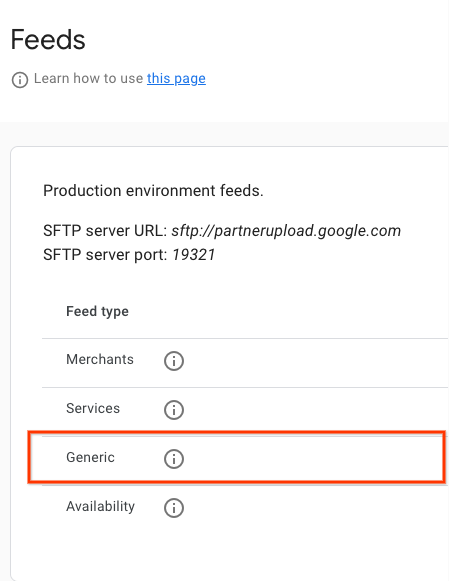
nameaufappointment.availabilityfest. Ein Beispiel für die Deskriptordatei finden Sie im JSON-Beispiel. Wir empfehlen, für jeden Upload eindeutige Namen für die Deskriptordateien zu verwenden. Fügen Sie dem Dateinamen einen Zeitstempel hinzu, z. B.appointment availability_1633621547.filesetdesc.json. Die Deskriptordatei muss auf den allgemeinen SFTP-Server hochgeladen werden. - Laden Sie Feeds alle 30 Minuten als vollständige Aktualisierungen auf den allgemeinen SFTP-Server hoch.
- Details zum SFTP-Server findest du im Partner-Portal unter Konfiguration > Feeds.
- Den Status der Feedaufnahme finden Sie im Partner-Portal unter Feeds > Verlauf.
Inkrementelle Feeds hochladen
Die Terminverfügbarkeit unterstützt auch inkrementelle Feeds. Partner können also nur die Änderungen an ihrer Verfügbarkeit über den Feed-Upload hochladen.
Wenn Sie einen inkrementellen Feed hochladen möchten, legen Sie is_incremental: true für mindestens einen der Verfügbarkeitszeiträume in Ihrem Feed fest. Wenn für einige Feeds is_incremental auf true und für andere auf false festgelegt ist, werden alle als inkrementell behandelt.
Inkrementelle Updates bieten die folgenden Vorgänge:
- Keine Änderung
- Geben Sie die Verfügbarkeits-ID nicht für Entitäten an, bei denen es keine Änderung gibt.
- Verfügbarkeit von Updates
- Wenn Sie eine einzelne Verfügbarkeit aktualisieren möchten, laden Sie den entsprechenden Verfügbarkeitseintrag (dieselbe
availability_id) hoch, der geändert werden muss, und ändern Sie die ausgewählten Felder. - Verfügbarkeit löschen
- Wenn ein Verfügbarkeitseintrag nicht mehr verfügbar ist oder gelöscht werden soll, laden Sie diese Verfügbarkeit (dieselbe
availability_id) mitspots_availableauf 0 hoch. Das System löscht sie dann automatisch. Wenn Sie alle Daten für einen Händler / eine Rechtspersönlichkeit entfernen möchten, setzen Siespots_availablefür alle Verfügbarkeitszeiträume auf 0. Dadurch wird der Händler / die Rechtspersönlichkeit selbst aus der Verfügbarkeit entfernt. - Verfügbarkeit hinzufügen
- Fügen Sie für neue Verfügbarkeitszeiträume den neuen Verfügbarkeitseintrag mit der eindeutigen neuen
availability_idin den Feed-Upload ein. Das System behandelt sie so, als wären sie in einem regulären Feed enthalten.
Definitionen
AppointmentAvailabilityFeed – Definition
message AppointmentAvailabilityFeed {
  repeated AppointmentAvailability data = 1;
}
AppointmentAvailability – Definition
// This represents the availability data for a bookable service provided by a
// merchant.
// For example, it can be a haircut/nail manicure service for a beauty salon or
// a massage service for a spa.
// The availability feed should be a list of this message.
message AppointmentAvailability {
  // An opaque string generated by the partner that identifies a service time
  // slot. Must be unique across all entities and service time slots.
  // Strongly recommended to only include URL-safe characters.
  // Required.
  string availability_id = 1;

  // An opaque string generated by the partner that identifies an Entity.
  // Must be unique across all entities.
  // Strongly recommended to only include URL-safe characters.
  // Required.
  string entity_id = 2;

  // An opaque string of ASCII characters from an aggregator partner which
  // uniquely identifies the Service (haircut, nail manicure, massage).
  // Strongly recommended to only include URL-safe characters.
  // Required.
  string service_id = 3;

  // The name of the service provider. For example, the name of the
  // hairdresser or the spa staff member.
  // Optional.
  string provider = 12;

  // Timestamp of when this availability slot starts in UTC.
  // Given in seconds since the unix epoch.
  // For example, 1735714800 seconds for 1 Jan 2025, 07:00:00 (UTC).
  // Required.
  int64 start_time_sec = 4;

  // The minimum number of minutes in advance before the start time that this
  // availability slot can be booked.
  // For example, if the start time is 10:00 AM and the min_advance_minutes is
  // 60, then the latest time this slot can be booked is 9:00 AM on the day of
  // the appointment.
  // If not set, it is assumed to be 0, meaning the slot can be booked at any
  // time before the start time.
  // Optional.
  int32 min_advance_minutes = 13;

  // Number of total spots and available spots of this booking availability.
  // Required.
  int32 spots_total = 5;
  // Required.
  int32 spots_available = 6;

  // The minimum number of spots that should be booked for this availability.
  // For example, a user has to book at least 2 spots for a time slot sometimes.
  // If set, spots_minimum_book should be less or equal to spots_available.
  // Optional.
  int32 spots_minimum_book = 7;

  // Link of this booking availability. Users will be redirected to partner
  // website to continue booking after clicking this link.
  // Required.
  string booking_link = 8;

  // Base price per person.
  // Required.
  google.type.Money base_price = 9;
  // Fee per person.
  // Required.
  google.type.Money fee_price = 10;

  // Whether the feed is incremental or not.
  // By default it is false, meaning the Availability feed will override the
  // previous data for the same entity_id.
  // If this is set to be true, the Availability feed will be proceeded as
  // incremental updates for the same entity_id.
  //    1) If it is a new availability_id, the entry is added.
  //    2) If it is an existing availability_id and the spots_available is 0,
  //       the entry is removed.
  //    3) If it is an existing availability_id and the spots_available is not
  //    0, the entry is updated.
  bool is_incremental = 11;
}
Externe Proto-Referenzen:
Beispiele für Verfügbarkeitsfeeds für Golfplätze
Feed für verfügbare Termine
{
  "data": [
    {
      "availability_id": "availability_id_1",
      "entity_id": "entity_id_1",
      "service_id": "service_id_1",
      "start_time_sec": 1728257400,
      "spots_total": 4,
      "spots_available": 4,
      "spots_minimum_book": 2,
      "booking_link": "https://www.googleappointments.com/a_link_direct_to_booking_page",
      "base_price": {
        "currency_code": "USD",
        "units": 80,
        "nanos": 0
      },
      "fee_price": {
        "currency_code": "USD",
        "units": 1,
        "nanos": 750000000
      }
    },
    {
      "availability_id": "availability_id_2",
      "entity_id": "entity_id_2",
      "service_id": "service_id_2",
      "start_time_sec": 1728259200,
      "spots_total": 4,
      "spots_available": 4,
      "spots_minimum_book": 2,
      "booking_link": "https://googlegolfappointments.com/a_link_direct_to_booking_page",
      "base_price": {
        "currency_code": "USD",
        "units": 80,
        "nanos": 0
      },
      "fee_price" : {
        "currency_code": "USD",
        "units": 2,
        "nanos": 850000000
      }
    }
  ]
}
Deskriptordatei
{
  "generation_timestamp": 1663347730,
  "name": "appointment.availability",
  "data_file": [
    "appointment_availability_1663347730.json"
  ]
}