This document explains how to receive and respond to Google Meet events from
Google Cloud Pub/Sub.
A *Meet event* represents an activity or change to a
Meet resource, such as creating a new meeting. You can use events
to understand what happened and then take action, or to respond in a meaningful
way for your users.
Here are some examples of how you can use events:
- Observe and respond to changes in a meeting, such as when a meeting starts
or ends.
- Track who attended the meeting for regulatory or training purposes.
- Listen for the meeting transcript so the file contents can be parsed and
logged into a CRM or database.
## How events work
Whenever something happens in Google Meet, a Google Meet REST API resource is created
or updated. Meet uses events to deliver information to your app
about the type of activity that occurred, and the Meet REST API
resource that was affected.
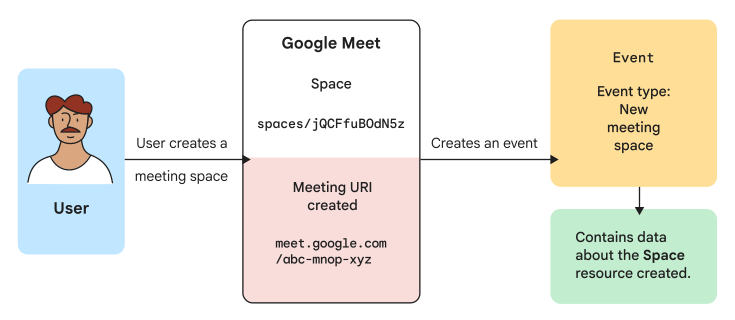 **Figure 1.** A user creates a meeting space, which creates a `Space` resource. Meet then creates an event that contains data about the new meeting space.
Meet categorizes events by type. Event types help you filter and
receive only the type of information you need, and let you handle similar
activities in the same way.
The following example shows how an activity in Meet affects a
related Meet REST API resource, and the type of event that your
Meet app receives:
| Activity | Meet REST API resource | Event type |
|---|---|---|
| A user joins a meeting space. | A [`ConferenceRecord`](https://developers.google.com/workspace/meet/api/reference/rest/v2/conferenceRecords) resource is created. | New conference record |
## Receive event data from Google Meet
To receive event data, your app can do either of the following:
- Subscribe to events using the [Google Workspace Events API](https://developers.google.com/workspace/events)
to receive events as they occur. For more information, see [Subscribe to
Google Meet events](https://developers.google.com/workspace/events/guides/events-meet).
- Query for recent data by calling the
[Meet REST API](https://developers.google.com/workspace/meet/api/guides/overview).
The following table explains the difference and reasons for subscribing to
events versus querying for them:
| | Subscribe to events | Query for data |
|---|---|---|
| Use cases | - Process or respond to events in real time. - Monitor changes in resources to improve the performance of your app. | - Retrieve data manually. - Fetch all data from Meet (due to an outage or inactive subscription). |
| API | Google Workspace Events API | Meet REST API |
| Source of events | Conference record and users | Space and conference record |
| Supported events | Conference record
For a list of supported event types, see [Event types for creating subscriptions](https://developers.google.com/workspace/events/guides/events-meet#event-types) in the Google Workspace Events API documentation. | Space and conference record
For a list of supported endpoints, see the [`Space`](https://developers.google.com/workspace/meet/api/reference/rest/v2/spaces) resource and the [`ConferenceRecord`](https://developers.google.com/workspace/meet/api/reference/rest/v2/conferenceRecords) resource in the Meet REST API documentation. |
| Event format | A Google Cloud Pub/Sub message, formatted according to the CloudEvent specification. For details, see [Structure of Google Workspace events](https://developers.google.com/workspace/events#structure). | A Meet REST API resource (`Space` and `ConferenceRecord`) |
| Event data | Base64-encoded string with or without resource data. For example payloads, see [Event data](https://developers.google.com/workspace/events/guides/events-meet#event-data). | JSON payload that contains resource data. For an example payload, see the [`ConferenceRecord`](https://developers.google.com/workspace/meet/api/reference/rest/v2/conferenceRecords) resource in the reference documentation. |
### Example: Retrieve events about participants in a meeting space
In this example, a Meet app wants to receive information about
participant changes in a meeting space. In the meeting space, a participant
joins an active conference, which populates a
[`ParticipantSession`](https://developers.google.com/workspace/meet/api/reference/rest/v2/conferenceRecords.participants.participantSessions)
resource and triggers a new event. You can then get info about these events
using either the [subscribe](https://developers.google.com/workspace/meet/api/guides/events-overview#subscribe-example) or [query](https://developers.google.com/workspace/meet/api/guides/events-overview#query-example)
method.
#### Subscribe to events
To receive events in real time, the Meet app calls the
Google Workspace Events API
[`subscriptions.create`](https://developers.google.com/workspace/events/reference/rest/v1/subscriptions/create)
method to subscribe to the meeting space for all types of events. After creating
the subscription, the Meet app can start to receive events.
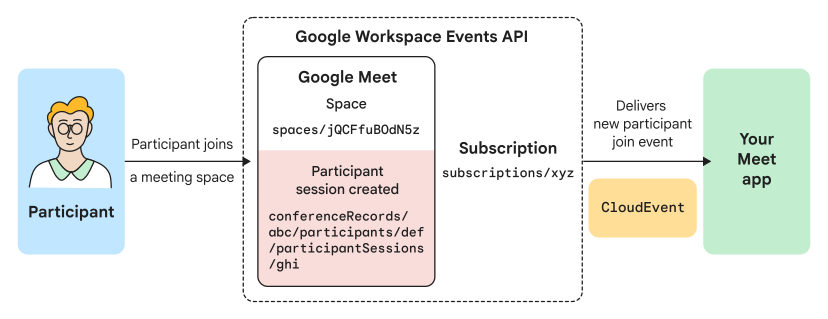 **Figure 2.** A Meet app receives participant events through a subscription using the Google Workspace Events API.
In figure 2, the Meet app has an active subscription to the
meeting space, so the app receives an event whenever a participant session
changes in the meeting space. The Meet app can then respond in
real time to any of the activities, such as knowing when a participant joins or
leaves an active conference.
To learn about creating subscriptions using the Google Workspace Events API,
see the [Google Workspace Events API documentation](https://developers.google.com/workspace/events).
#### Query for recent events
Instead of receiving events as they occur, a Meet app can also
call the Meet REST API to list recent meeting space events that are related
to participant activity.
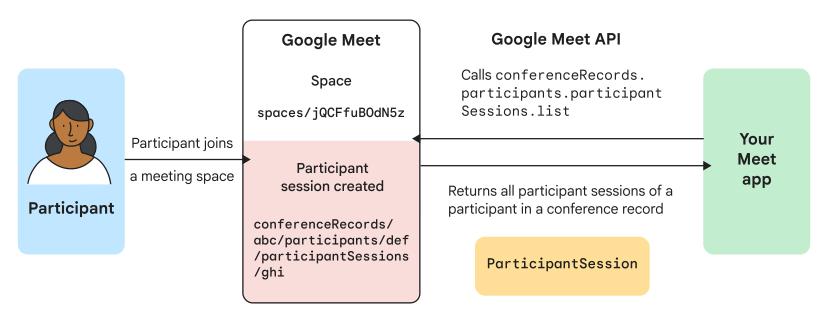 **Figure 3.** A Meet app receives recent participant events by querying for meeting space events using the Meet REST API.
In figure 3, a Meet app calls the Meet REST API
[`conferenceRecords.participants.participantSessions.list`](https://developers.google.com/workspace/meet/api/reference/rest/v2/conferenceRecords.participants.participantSessions/list)
method after all the participant session activities have occurred. The
Meet REST API returns a list of `ParticipantSession` resources that
represent each of the changes. The Meet app can then process or
respond based on the recent activity, such as creating a list of participants
that joined and left the conference.
To query for events using the Meet REST API, see [List all participant
sessions](https://developers.google.com/workspace/meet/api/guides/participants#list-participant-sessions).
## Limitations
- Calendar invitees and other participants invited to a conference can only receive the following events: `google.workspace.meet.conference.v2.started` and `google.workspace.meet.transcript.v2.fileGenerated`.
## Related topics
- [Google Workspace Events API overview](https://developers.google.com/workspace/events)
- [Create a Google Workspace subscription](https://developers.google.com/workspace/events/guides/create-subscription)
- [Subscribe to Google Meet events](https://developers.google.com/workspace/events/guides/events-meet)