This page explains how to build a homepage for direct messages with your
Google Chat app. A homepage, referred to as *App Home* in the
Google Chat API, is a customizable card interface that appears in the **Home** tab
of
[1:1 direct message spaces](https://developers.google.com/workspace/chat/api/reference/rest/v1/spaces#spacetype)
between a user and a Chat app.
 **Figure 1**: An example of a homepage that appears in direct messages with a Chat app.
Unlike other Google Workspace host applications, add-ons that
extend Chat don't display a homepage in the right-side quick
access panel and don't use `addOns.common.homepageTrigger` in the manifest.
Instead, Chat displays your homepage as a card in the **Home**
tab of a 1:1 direct message with the Chat app and is
configured in the Google Cloud console.
You can use App Home to share tips for interacting with the
Chat app, display a personalized user dashboard, or
let users access and configure an
[external service or tool](https://developers.google.com/workspace/chat/connect-web-services-tools) from
Chat.
*** ** * ** ***
Use the Card Builder to design and preview messaging and user interfaces for Chat apps:
[Open the Card Builder](https://addons.gsuite.google.com/uikit/builder)
*** ** * ** ***
## Prerequisites
### HTTP
A Google Chat app that receives and responds to
[user interactions](https://developers.google.com/workspace/chat/receive-respond-interactions).
To build one, complete the
[HTTP quickstart](https://developers.google.com/workspace/chat/quickstart/gcf-app).
> [!NOTE]
> **Note:** The code samples in this guide are written to run as a [Google Cloud
> Run function](https://cloud.google.com/functions/docs/quickstarts) for Node.js.
### Apps Script
A Google Chat app that receives and responds to
[user interactions](https://developers.google.com/workspace/chat/receive-respond-interactions).
To build one, complete the
[Apps Script quickstart](https://developers.google.com/workspace/chat/quickstart/apps-script-app).
## Configure App Home for your Chat app
To support App Home, enable **Support App Home** and configure the **App home**
[trigger](https://developers.google.com/workspace/chat/receive-respond-interactions#triggers) in the
Google Cloud console. Your Chat app receives an **App Home**
trigger event whenever a user opens the **Home** tab in a 1:1 direct message
with the Chat app.
To configure App Home in the Google Cloud console:
1. In the Google Cloud console, go to **Menu**
\> **APIs \& Services**
\> **Enabled APIs \& Services**
\> **Google Chat API**
\> **Configuration**.
[Go to Chat API configuration](https://console.cloud.google.com/apis/api/chat.googleapis.com/hangouts-chat)
2. Under **Interactive features** , make sure **Enable interactive features** is
turned on, and then under **Functionality** , select the **Support App Home**
checkbox.
3. Under **Connection settings** \>
**Triggers** , specify your App Home handler in the **App home** field based
on your Chat app architecture:
- **HTTP** : Enter the HTTPS endpoint URL that handles App Home requests (or select **Use common HTTP endpoint URL for all triggers** so your common HTTP endpoint URL receives all events).
- **Google Apps Script** : Enter the name of the Google Apps Script callback function that builds and returns your homepage card (defaults to `onAppHome`).
4. Click **Save**.
## Handle the App Home event object
When a user opens the **Home** tab of a 1:1 direct message with your
Chat app, Chat sends an
[event object](https://developers.google.com/workspace/chat/receive-respond-interactions#event-objects) to
your App Home endpoint or callback function.
Unlike space or message interaction events, the initial App Home event object
doesn't include a union interaction payload (such as `messagePayload`). It
contains the following fields:
- [`commonEventObject`](https://developers.google.com/workspace/add-ons/concepts/event-objects#common-event-object): Includes `clientPlatform`, `hostApp` (`"CHAT"`), `userLocale`, and `userTimezone`.
- `chat.user`: The [Chat user](https://developers.google.com/workspace/chat/api/reference/rest/v1/User) who opened the **Home** tab.
- `chat.eventTime`: The timestamp when the user opened the **Home** tab.
## Build an App Home card
When a user opens the **Home** tab, handle the **App Home** trigger event by
returning a
[`RenderActions`](https://developers.google.com/workspace/add-ons/reference/rpc/google.apps.card.v1#renderactions) object with a `pushCard`
navigation action and a
[`Card`](https://developers.google.com/workspace/add-ons/reference/rpc/google.apps.card.v1#card). To create
an interactive experience, the card can contain interactive widgets such as
buttons or text inputs.
### HTTP
{
"action": {
"navigations": [
{
"pushCard": {
"header": {
"title": "Welcome to App Home"
},
"sections": [
{
"widgets": [
{
"textParagraph": {
"text": "Manage your settings and view your dashboard here."
}
},
{
"buttonList": {
"buttons": [
{
"text": "Refresh",
"onClick": {
"action": {
"function": "https://example.com/updateAppHome"
}
}
}
]
}
}
]
}
]
}
}
]
}
}
### Apps Script
/**
* Builds and returns the App Home card when a user opens the Home tab.
*
* @param {Object} event The event object from Google Chat.
* @return {ActionResponse} The RenderActions response pushing the homepage card.
*/
function onAppHome(event) {
const card = CardService.newCardBuilder()
.setHeader(
CardService.newCardHeader().setTitle('Welcome to App Home'))
.addSection(
CardService.newCardSection()
.addWidget(
CardService.newTextParagraph().setText(
'Manage your settings and view your dashboard here.'))
.addWidget(
CardService.newButtonSet().addButton(
CardService.newTextButton()
.setText('Refresh')
.setOnClickAction(
CardService.newAction().setFunctionName(
'updateAppHome')))))
.build();
return CardService.newActionResponseBuilder()
.setNavigation(CardService.newNavigation().pushCard(card))
.build();
}
## Respond to App Home interactions
If your App Home card contains interactive widgets, such as buttons or form
inputs, clicking a button sends an event object containing
`chat.buttonClickedPayload` (along with `commonEventObject.parameters` and
`commonEventObject.formInputs`) to the button's configured action function or
endpoint.
To update the App Home card in response to a user interaction, return a
[`RenderActions`](https://developers.google.com/workspace/add-ons/reference/rpc/google.apps.card.v1#renderactions) object with an `updateCard`
navigation action. To learn more about reading form inputs from interactive
widgets, see
[Read form data input by users on cards](https://developers.google.com/workspace/chat/read-form-data).
### HTTP
{
"action": {
"navigations": [
{
"updateCard": {
"header": {
"title": "Welcome to App Home"
},
"sections": [
{
"widgets": [
{
"textParagraph": {
"text": "Last updated: 2026-10-02T23:00:00Z"
}
}
]
}
]
}
}
]
}
}
### Apps Script
/**
* Updates the App Home card when a user clicks the Refresh button.
*
* @param {Object} event The event object from Google Chat.
* @return {ActionResponse} The RenderActions response updating the homepage card.
*/
function updateAppHome(event) {
const updatedCard = CardService.newCardBuilder()
.setHeader(
CardService.newCardHeader().setTitle('Welcome to App Home'))
.addSection(
CardService.newCardSection().addWidget(
CardService.newTextParagraph().setText(
'Last updated: ' + new Date().toTimeString())))
.build();
return CardService.newActionResponseBuilder()
.setNavigation(CardService.newNavigation().updateCard(updatedCard))
.build();
}
### Open dialogs from App Home
Your Chat app can also respond to interactions in App
Home by opening [dialogs](https://developers.google.com/workspace/chat/dialogs).
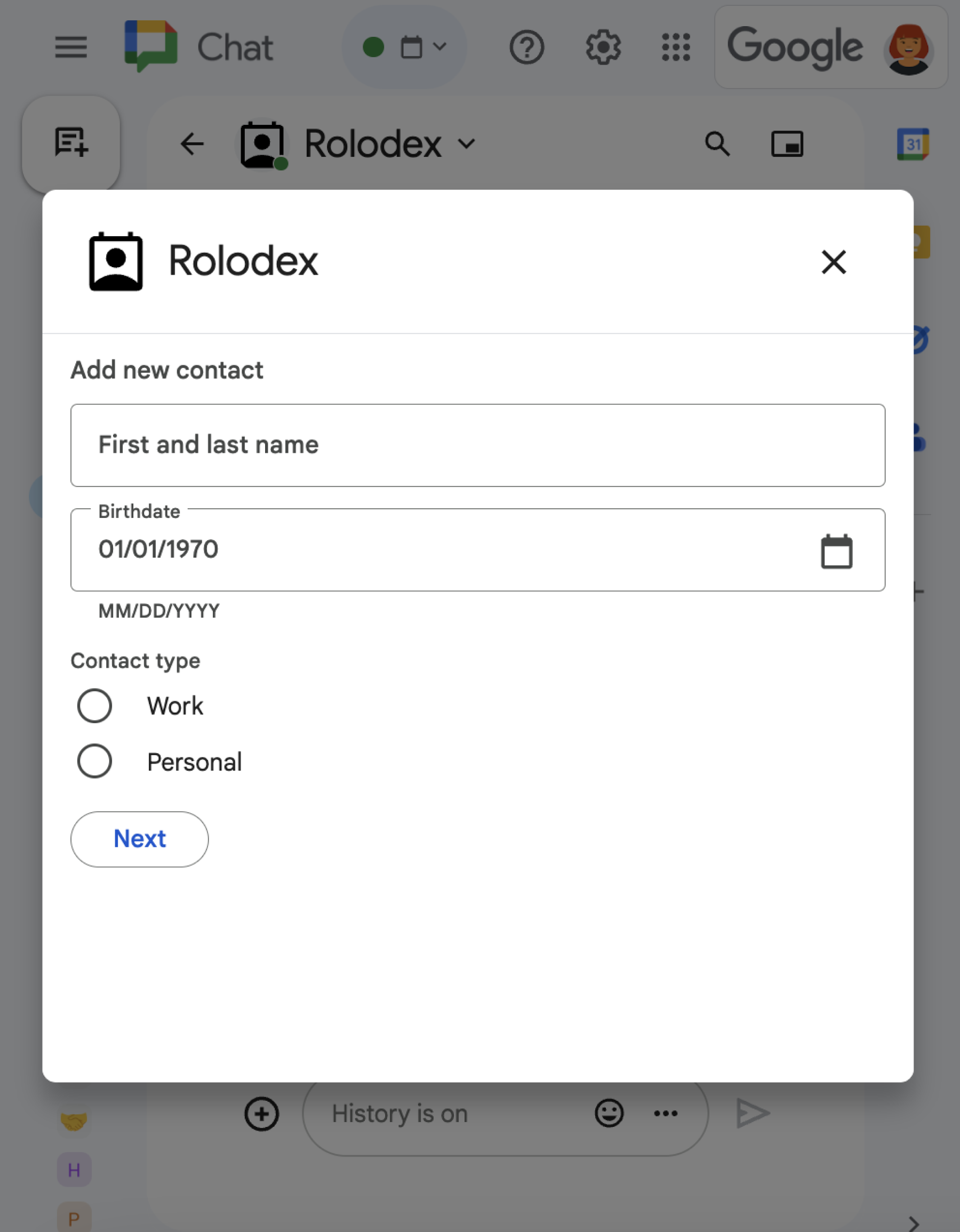 **Figure 2**: A dialog that prompts a user to add a contact.
To learn how to open, update, and close dialogs using `RenderActions`
(`pushCard`, `updateCard`, and `endNavigation: "CLOSE_DIALOG"`), see
[Open interactive dialogs](https://developers.google.com/workspace/chat/dialogs).
## Related topics
- [Receive and respond to user interactions](https://developers.google.com/workspace/chat/receive-respond-interactions)
- [Open interactive dialogs](https://developers.google.com/workspace/chat/dialogs)
- [Read form data input by users on cards](https://developers.google.com/workspace/chat/read-form-data)
- [View Chat app samples](https://developers.google.com/workspace/chat/samples)
## Chat apps that aren't add-ons: Build a homepage for a Chat app
If you maintain a Chat app that isn't a
Google Workspace add-on, Chat sends an
[`APP_HOME` interaction event](https://developers.google.com/workspace/chat/api/reference/rest/v1/Event)
when a user opens the **Home** tab, and sends `CARD_CLICKED` or `SUBMIT_FORM`
interaction events when a user interacts with widgets on the App Home card.
To upgrade a Chat app that isn't an
add-on to the Google Workspace add-ons framework, see
[Convert a Google Chat app to a Google Workspace add-on](https://developers.google.com/workspace/chat/convert).
### Build an App Home card in a Chat app that isn't an add-on
In a Chat app that isn't an
add-on, handle the `APP_HOME` interaction event by
returning a response containing a top-level `renderActions` field with
`pushCard` navigation:
### Node.js
node/app-home/index.js [View on GitHub](https://github.com/googleworkspace/google-chat-samples/blob/main/node/app-home/index.js)
```javascript
app.post('/', async (req, res) => {
let event = req.body.chat;
let body = {};
if (event.type === 'APP_HOME') {
// App home is requested
body = { action: { navigations: [{
pushCard: getHomeCard()
}]}}
} else if (event.type === 'SUBMIT_FORM') {
// The update button from app home is clicked
commonEvent = req.body.commonEventObject;
if (commonEvent && commonEvent.invokedFunction === 'updateAppHome') {
body = updateAppHome()
}
}
return res.json(body);
});
// Create the app home card
function getHomeCard() {
return { sections: [{ widgets: [
{ textParagraph: {
text: "Here is the app home 🏠 It's " + new Date().toTimeString()
}},
{ buttonList: { buttons: [{
text: "Update app home",
onClick: { action: {
function: "updateAppHome"
}}
}]}}
]}]};
}
```
### Python
python/app-home/main.py [View on GitHub](https://github.com/googleworkspace/google-chat-samples/blob/main/python/app-home/main.py)
```python
@app.route('/', methods=['POST'])
def post() -> Mapping[str, Any]:
"""Handle requests from Google Chat
Returns:
Mapping[str, Any]: the response
"""
event = request.get_json()
match event['chat'].get('type'):
case 'APP_HOME':
# App home is requested
body = { "action": { "navigations": [{
"pushCard": get_home_card()
}]}}
case 'SUBMIT_FORM':
# The update button from app home is clicked
event_object = event.get('commonEventObject')
if event_object is not None:
if 'update_app_home' == event_object.get('invokedFunction'):
body = update_app_home()
case _:
# Other response types are not supported
body = {}
return json.jsonify(body)
def get_home_card() -> Mapping[str, Any]:
"""Create the app home card
Returns:
Mapping[str, Any]: the card
"""
return { "sections": [{ "widgets": [
{ "textParagraph": {
"text": "Here is the app home 🏠 It's " +
datetime.datetime.now().isoformat()
}},
{ "buttonList": { "buttons": [{
"text": "Update app home",
"onClick": { "action": {
"function": "update_app_home"
}}
}]}}
]}]}
```
### Java
java/app-home/src/main/java/com/google/chat/app/home/App.java [View on GitHub](https://github.com/googleworkspace/google-chat-samples/blob/main/java/app-home/src/main/java/com/google/chat/app/home/App.java)
```java
// Process Google Chat events
@PostMapping("/")
@ResponseBody
public GenericJson onEvent(@RequestBody JsonNode event) throws Exception {
switch (event.at("/chat/type").asText()) {
case "APP_HOME":
// App home is requested
GenericJson navigation = new GenericJson();
navigation.set("pushCard", getHomeCard());
GenericJson action = new GenericJson();
action.set("navigations", List.of(navigation));
GenericJson response = new GenericJson();
response.set("action", action);
return response;
case "SUBMIT_FORM":
// The update button from app home is clicked
if (event.at("/commonEventObject/invokedFunction").asText().equals("updateAppHome")) {
return updateAppHome();
}
}
return new GenericJson();
}
// Create the app home card
GoogleAppsCardV1Card getHomeCard() {
return new GoogleAppsCardV1Card()
.setSections(List.of(new GoogleAppsCardV1Section()
.setWidgets(List.of(
new GoogleAppsCardV1Widget()
.setTextParagraph(new GoogleAppsCardV1TextParagraph()
.setText("Here is the app home 🏠 It's " + new Date())),
new GoogleAppsCardV1Widget()
.setButtonList(new GoogleAppsCardV1ButtonList().setButtons(List.of(new GoogleAppsCardV1Button()
.setText("Update app home")
.setOnClick(new GoogleAppsCardV1OnClick()
.setAction(new GoogleAppsCardV1Action()
.setFunction("updateAppHome"))))))))));
}
```
### Apps Script
This example sends a card message by returning
[card JSON](https://developers.google.com/workspace/chat/api/reference/rest/v1/cards).
You can also use the
[Apps Script card service](https://developers.google.com/apps-script/reference/card-service).
apps-script/app-home/app-home.gs [View on GitHub](https://github.com/googleworkspace/google-chat-samples/blob/main/apps-script/app-home/app-home.gs)
```javascript
/**
* Responds to a APP_HOME event in Google Chat.
*/
function onAppHome() {
return { action: { navigations: [{
pushCard: getHomeCard()
}]}};
}
/**
* Returns the app home card.
*/
function getHomeCard() {
return { sections: [{ widgets: [
{ textParagraph: {
text: "Here is the app home 🏠 It's " + new Date().toTimeString()
}},
{ buttonList: { buttons: [{
text: "Update app home",
onClick: { action: {
function: "updateAppHome"
}}
}]}}
]}]};
}
```
### Respond to App Home interactions in a Chat app that isn't an add-on
In a Chat app that isn't an
add-on, handle `CARD_CLICKED` or `SUBMIT_FORM`
interaction events from an App Home card by returning a response containing a
top-level `renderActions` field with `updateCard` navigation:
### Node.js
node/app-home/index.js [View on GitHub](https://github.com/googleworkspace/google-chat-samples/blob/main/node/app-home/index.js)
```javascript
// Update the app home
function updateAppHome() {
return { renderActions: { action: { navigations: [{
updateCard: getHomeCard()
}]}}}
};
```
### Python
python/app-home/main.py [View on GitHub](https://github.com/googleworkspace/google-chat-samples/blob/main/python/app-home/main.py)
```python
def update_app_home() -> Mapping[str, Any]:
"""Update the app home
Returns:
Mapping[str, Any]: the update card render action
"""
return { "renderActions": { "action": { "navigations": [{
"updateCard": get_home_card()
}]}}}
```
### Java
java/app-home/src/main/java/com/google/chat/app/home/App.java [View on GitHub](https://github.com/googleworkspace/google-chat-samples/blob/main/java/app-home/src/main/java/com/google/chat/app/home/App.java)
```java
// Update the app home
GenericJson updateAppHome() {
GenericJson navigation = new GenericJson();
navigation.set("updateCard", getHomeCard());
GenericJson action = new GenericJson();
action.set("navigations", List.of(navigation));
GenericJson renderActions = new GenericJson();
renderActions.set("action", action);
GenericJson response = new GenericJson();
response.set("renderActions", renderActions);
return response;
}
```
### Apps Script
This example sends a card message by returning
[card JSON](https://developers.google.com/workspace/chat/api/reference/rest/v1/cards).
You can also use the
[Apps Script card service](https://developers.google.com/apps-script/reference/card-service).
apps-script/app-home/app-home.gs [View on GitHub](https://github.com/googleworkspace/google-chat-samples/blob/main/apps-script/app-home/app-home.gs)
```javascript
/**
* Updates the home app.
*/
function updateAppHome() {
return { renderActions: { action: { navigations: [{
updateCard: getHomeCard()
}]}}};
}
```