[Video](https://www.youtube.com/watch?v=5UTW1ThyYz8)
This page describes how a Google Chat app can open dialogs
to display user interfaces (UIs) and respond to users.
*Dialogs* are windowed, card-based interfaces
that open from a Chat space or message. The dialog and its
contents are only visible to the user who opened it.
Chat apps can use dialogs to request and collect information from
Chat users, including multi-step forms. For more details
on building form inputs, see
[Collect and process information from users](https://developers.google.com/workspace/chat/read-form-data#build-cards).
> [!NOTE]
> For more examples, see [Google Chat app samples](https://developers.google.com/workspace/chat/samples).
## Prerequisites
### HTTP
A Google Chat app that receives and responds to
[user interactions](https://developers.google.com/workspace/chat/receive-respond-interactions).
To build one, complete the
[HTTP quickstart](https://developers.google.com/workspace/chat/quickstart/gcf-app).
> [!NOTE]
> **Note:** The code samples in this guide are written to run as a [Google Cloud
> Run function](https://cloud.google.com/functions/docs/quickstarts) for Node.js.
### Apps Script
A Google Chat app that receives and responds to
[user interactions](https://developers.google.com/workspace/chat/receive-respond-interactions).
To build one, complete the
[Apps Script quickstart](https://developers.google.com/workspace/chat/quickstart/apps-script-app).
## Open a dialog
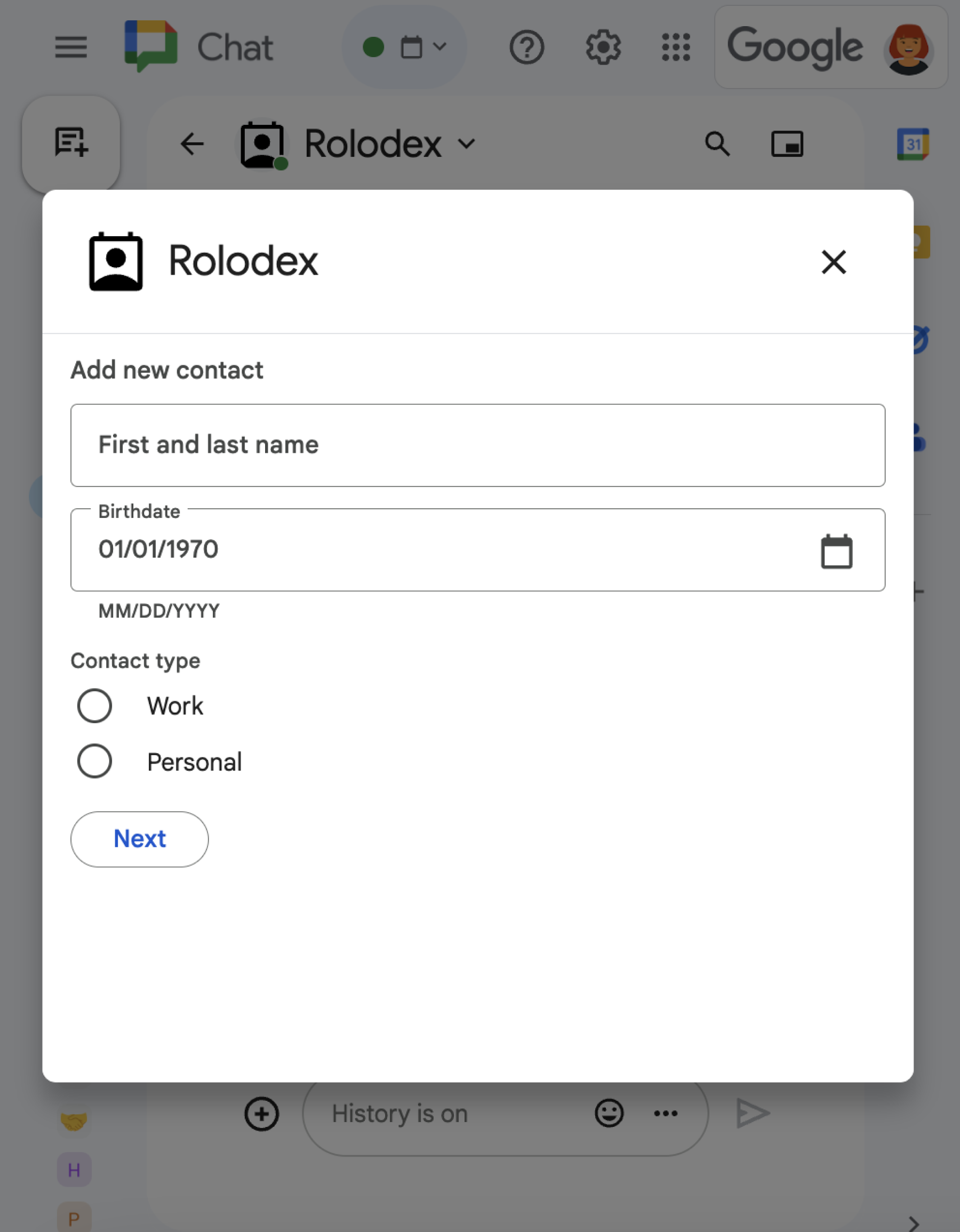 **Figure 1** : A [sample
Chat app](https://developers.google.com/workspace/chat/tutorial-contact-app) that opens a dialog to collect contact information. 
This section explains how to respond and set up a dialog by doing the following:
1. Trigger the dialog request from a user interaction.
2. Handle the request by returning and opening a dialog.
3. After users submit information, process the submission by either closing the dialog or returning another dialog.
### Trigger a dialog request
A Chat app can only open dialogs to respond to a user
interaction, such as a command or a button click from a message in a card.
To respond to users with a dialog, a Chat app must
build an interaction that triggers the dialog request, such as the following:
- **Respond to a command.** To trigger the request from a command, you must check the **Opens a dialog** checkbox when [configuring the command](https://developers.google.com/workspace/chat/commands#configure).
- **Respond to a button click** in a [message](https://developers.google.com/workspace/chat/messages-overview), either as part of a card or at the bottom of the message. To trigger the request from a button in a message, you configure the button's [`onClick`](https://developers.google.com/workspace/add-ons/reference/rpc/google.apps.card.v1#onclick) action by setting its `interaction` to `OPEN_DIALOG`.
- **Respond to a button click in a Chat app homepage** . To learn about opening dialogs from homepages, see [Build a homepage for your Google Chat app](https://developers.google.com/workspace/chat/send-app-home-card-message).
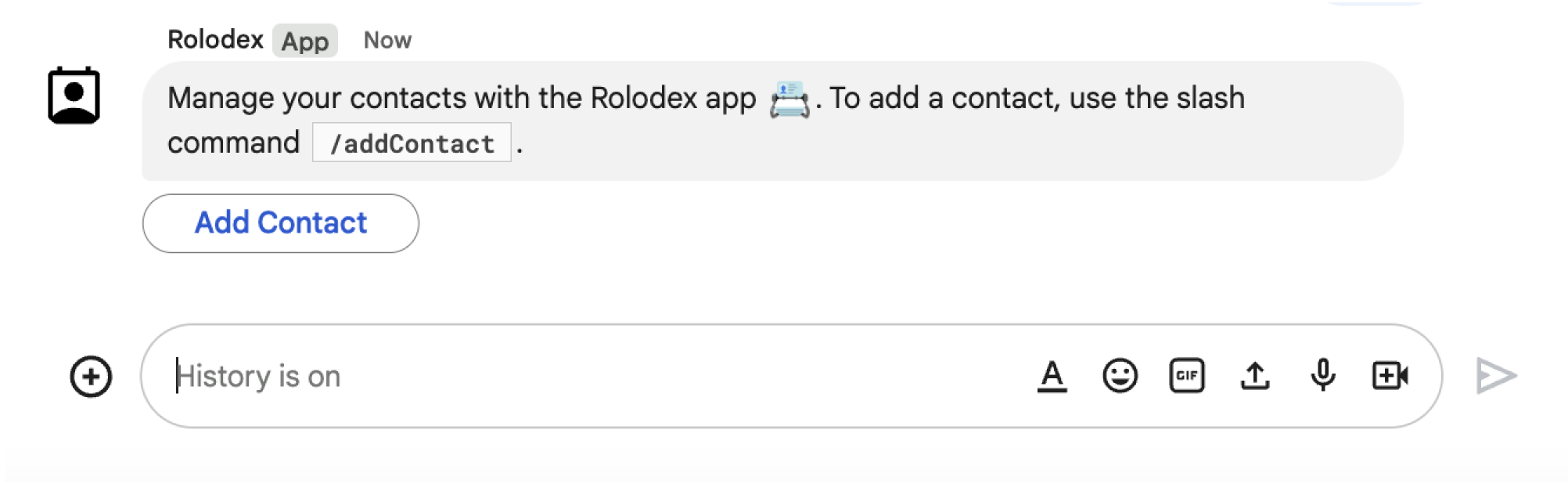 **Figure 2** : A Chat app sends a message that prompts users to use the `/addContact` slash command.
The message also includes a button that users can click to trigger the command.
The following code sample shows how to trigger a dialog request from a button in
a card message. To open the dialog, set the field
[`onClick.action.interaction`](https://developers.google.com/workspace/add-ons/reference/rpc/google.apps.card.v1#google.apps.card.v1.Action.Interaction)
of the button to `OPEN_DIALOG`:
### Node.js
node/chat/contact-form-app/index.js [View on GitHub](https://github.com/googleworkspace/add-ons-samples/blob/main/node/chat/contact-form-app/index.js)
```javascript
{ buttonList: { buttons: [{
text: "ADD CONTACT",
onClick: { action: {
function: FUNCTION_URL,
interaction: "OPEN_DIALOG",
parameters: [
{ key: "actionName", value: "openInitialDialog" }
]
}}
}]}}
```
Replace `FUNCTION_URL` with the HTTP endpoint that handles
the button clicks.
### Python
python/chat/contact-form-app/main.py [View on GitHub](https://github.com/googleworkspace/add-ons-samples/blob/main/python/chat/contact-form-app/main.py)
```python
{ 'buttonList': { 'buttons': [{
'text': "ADD CONTACT",
'onClick': { 'action': {
'function': FUNCTION_URL,
'interaction': "OPEN_DIALOG",
'parameters': [
{ 'key': "actionName", 'value': "openInitialDialog" }
]
}}
}]}}
```
Replace `FUNCTION_URL` with the HTTP endpoint that handles
the button clicks.
### Java
java/chat/contact-form-app/src/main/java/com/google/chat/contact/App.java [View on GitHub](https://github.com/googleworkspace/add-ons-samples/blob/main/java/chat/contact-form-app/src/main/java/com/google/chat/contact/App.java)
```java
.setButtonList(new GoogleAppsCardV1ButtonList().setButtons(List.of(new GoogleAppsCardV1Button()
.setText("ADD CONTACT")
.setOnClick(new GoogleAppsCardV1OnClick().setAction(new GoogleAppsCardV1Action()
.setFunction(FUNCTION_URL)
.setInteraction("OPEN_DIALOG")
.setParameters(List.of(
new GoogleAppsCardV1ActionParameter().setKey("actionName").setValue("openInitialDialog"))))))))));
```
Replace `FUNCTION_URL` with the HTTP endpoint that handles
the button clicks.
### Apps Script
This example sends a card message by returning
[card JSON](https://developers.google.com/workspace/chat/api/reference/rest/v1/cards).
You can also use the
[Apps Script card service](https://developers.google.com/apps-script/reference/card-service).
apps-script/chat/contact-form-app/Code.gs [View on GitHub](https://github.com/googleworkspace/add-ons-samples/blob/main/apps-script/chat/contact-form-app/Code.gs)
```javascript
{ buttonList: { buttons: [{
text: "ADD CONTACT",
onClick: { action: {
function: "openInitialDialog",
interaction: "OPEN_DIALOG"
}}
}]}}
```
### Open the initial dialog
When a user triggers a dialog request, your Chat app
receives an
[event object](https://developers.google.com/workspace/chat/receive-respond-interactions#event-objects) with
a payload that specifies a `dialogEventType` object as `REQUEST_DIALOG`.
To open a dialog, your Chat app can respond to the
request by returning a
[`RenderActions`](https://developers.google.com/workspace/add-ons/reference/rpc/google.apps.card.v1#renderactions)
object with the navigation `pushCard` to display a card. The card should contain
any user interface (UI) elements, including one or more
[`sections[]`](https://developers.google.com/workspace/add-ons/reference/rpc/google.apps.card.v1#google.apps.card.v1.Card.FIELDS.repeated.google.apps.card.v1.Card.Section.google.apps.card.v1.Card.sections)
of widgets. To collect information from users, you can specify form input
widgets and a button widget. To learn more about designing form inputs, see
[Collect and process information from users](https://developers.google.com/workspace/chat/read-form-data#build-cards).
The following code sample shows how a Chat app returns
a response that opens a dialog:
### Node.js
node/chat/contact-form-app/index.js [View on GitHub](https://github.com/googleworkspace/add-ons-samples/blob/main/node/chat/contact-form-app/index.js)
```javascript
/**
* Opens the initial step of the dialog that lets users add contact details.
*
* @return {Object} open the dialog.
*/
function openInitialDialog() {
return { action: { navigations: [{ pushCard: { sections: [{ widgets: [
{ textInput: {
name: "contactName",
label: "First and last name",
type: "SINGLE_LINE"
}},
{ dateTimePicker: {
name: "contactBirthdate",
label: "Birthdate",
type: "DATE_ONLY"
}},
{ selectionInput: {
name: "contactType",
label: "Contact type",
type: "RADIO_BUTTON",
items: [
{ text: "Work", value: "Work", selected: false },
{ text: "Personal", value: "Personal", selected: false }
]
}},
{ buttonList: { buttons: [{
text: "NEXT",
onClick: { action: {
function: FUNCTION_URL,
parameters: [
{ key: "actionName", value: "openConfirmationDialog" }
]
}}
}]}}
]}]}}]}};
}
```
Replace `FUNCTION_URL` with the HTTP endpoint that handles
the button clicks.
### Python
python/chat/contact-form-app/main.py [View on GitHub](https://github.com/googleworkspace/add-ons-samples/blob/main/python/chat/contact-form-app/main.py)
```python
def open_initial_dialog() -> Mapping[str, Any]:
"""Opens the initial step of the dialog that lets users add contact details.
Returns:
Mapping[str, Any]: open the dialog.
"""
return { 'action': { 'navigations': [{ 'pushCard': { 'sections': [{ 'widgets': [
{ 'textInput': {
'name': "contactName",
'label': "First and last name",
'type': "SINGLE_LINE"
}},
{ 'dateTimePicker': {
'name': "contactBirthdate",
'label': "Birthdate",
'type': "DATE_ONLY"
}},
{ 'selectionInput': {
'name': "contactType",
'label': "Contact type",
'type': "RADIO_BUTTON",
'items': [
{ 'text': "Work", 'value': "Work", 'selected': False },
{ 'text': "Personal", 'value': "Personal", 'selected': False }
]
}},
{ 'buttonList': { 'buttons': [{
'text': "NEXT",
'onClick': { 'action': {
'function': FUNCTION_URL,
'parameters': [
{ 'key': "actionName", 'value': "openConfirmationDialog" }
]
}}
}]}}
]}]}}]}}
```
Replace `FUNCTION_URL` with the HTTP endpoint that handles
the button clicks.
### Java
java/chat/contact-form-app/src/main/java/com/google/chat/contact/App.java [View on GitHub](https://github.com/googleworkspace/add-ons-samples/blob/main/java/chat/contact-form-app/src/main/java/com/google/chat/contact/App.java)
```java
/**
* Opens the initial step of the dialog that lets users add contact details.
*
* @return {Object} open the dialog.
*/
GenericJson openInitialDialog() {
GoogleAppsCardV1Card cardV2 = new GoogleAppsCardV1Card()
.setSections(List.of(new GoogleAppsCardV1Section().setWidgets(List.of(
new GoogleAppsCardV1Widget().setTextInput(new GoogleAppsCardV1TextInput()
.setName("contactName")
.setLabel("First and last name")
.setType("SINGLE_LINE")),
new GoogleAppsCardV1Widget().setDateTimePicker(new GoogleAppsCardV1DateTimePicker()
.setName("contactBirthdate")
.setLabel("Birthdate")
.setType("DATE_ONLY")),
new GoogleAppsCardV1Widget().setSelectionInput(new GoogleAppsCardV1SelectionInput()
.setName("contactType")
.setLabel("Contact type")
.setType("RADIO_BUTTON")
.setItems(List.of(
new GoogleAppsCardV1SelectionItem()
.setText("Work")
.setValue("Work")
.setSelected(false),
new GoogleAppsCardV1SelectionItem()
.setText("Personal")
.setValue("Personal")
.setSelected(false)))),
new GoogleAppsCardV1Widget().setButtonList(new GoogleAppsCardV1ButtonList().setButtons(List.of(
new GoogleAppsCardV1Button()
.setText("NEXT")
.setOnClick(new GoogleAppsCardV1OnClick().setAction(new GoogleAppsCardV1Action()
.setFunction(FUNCTION_URL)
.setParameters(List.of(
new GoogleAppsCardV1ActionParameter().setKey("actionName").setValue("openConfirmationDialog"))))))))))));
return new GenericJson() {{
put("action", new GenericJson() {{
put("navigations", List.of(new GenericJson() {{
put("pushCard", cardV2);
}}));
}});
}};
}
```
Replace `FUNCTION_URL` with the HTTP endpoint that handles
the button clicks.
### Apps Script
This example sends a card message by returning
[card JSON](https://developers.google.com/workspace/chat/api/reference/rest/v1/cards).
You can also use the
[Apps Script card service](https://developers.google.com/apps-script/reference/card-service).
apps-script/chat/contact-form-app/Code.gs [View on GitHub](https://github.com/googleworkspace/add-ons-samples/blob/main/apps-script/chat/contact-form-app/Code.gs)
```javascript
/**
* Opens the initial step of the dialog that lets users add contact details.
*
* @param {Object} event The event object from the Google Workspace add-on.
* @return {Object} open the dialog.
*/
function openInitialDialog(event) {
return { action: { navigations: [{ pushCard: { sections: [{ widgets: [
{ textInput: {
name: "contactName",
label: "First and last name",
type: "SINGLE_LINE"
}},
{ dateTimePicker: {
name: "contactBirthdate",
label: "Birthdate",
type: "DATE_ONLY"
}},
{ selectionInput: {
name: "contactType",
label: "Contact type",
type: "RADIO_BUTTON",
items: [
{ text: "Work", value: "Work", selected: false },
{ text: "Personal", value: "Personal", selected: false }
]
}},
{ buttonList: { buttons: [{
text: "NEXT",
onClick: { action: { function : "openConfirmationDialog" }}
}]}}
]}]}}]}};
}
```
## Handle the dialog submission
When users click a button that submits a dialog, your
Chat app receives an event object with a
[`buttonClickedPayload`](https://developers.google.com/workspace/add-ons/concepts/event-objects#buttonclickedpayload)
object. In the payload, the `dialogEventType` is set to `SUBMIT_DIALOG`. To
understand how to collect and process the information in the dialog, see
[Collect and process information from Google Chat users](https://developers.google.com/workspace/chat/read-form-data).
Your Chat app must respond to the event object by
doing one of the following:
- [Return another dialog](https://developers.google.com/workspace/chat/dialogs#return-another-dialog) to populate another card or form.
- [Close the dialog](https://developers.google.com/workspace/chat/dialogs#close) after validating the data the user submitted, and optionally, send a confirmation message.
### Optional: Return another dialog
After users submit the initial dialog, Chat apps can
return one or more additional dialogs to help users review information before
submitting, complete multi-step forms, or populate form content dynamically.
To process the data that users input, the Chat app
handles the data in the event's
[`commonEventObject.formInputs`](https://developers.google.com/workspace/add-ons/concepts/event-objects#common_event_object)
object. To learn more about retrieving values from input widgets, see
[Collect and process information from users](https://developers.google.com/workspace/chat/read-form-data).
To keep track of any data that users input from the initial dialog, you must add
parameters to the button that opens the next dialog. For details, see
[Transfer data to another card](https://developers.google.com/workspace/chat/read-form-data#transfer).
In this example, a Chat app opens an initial dialog
that leads to a second dialog for confirmation before submitting:
### Node.js
node/chat/contact-form-app/index.js [View on GitHub](https://github.com/googleworkspace/add-ons-samples/blob/main/node/chat/contact-form-app/index.js)
```javascript
/**
* Responds to a message in Google Chat.
*
* @return {Object} response that handles dialogs.
*/
function handleMessage() {
return { hostAppDataAction: { chatDataAction: { createMessageAction: { message: {
text: "To add a contact, use the `ADD CONTACT` button below.",
accessoryWidgets: [
{ buttonList: { buttons: [{
text: "ADD CONTACT",
onClick: { action: {
function: FUNCTION_URL,
interaction: "OPEN_DIALOG",
parameters: [
{ key: "actionName", value: "openInitialDialog" }
]
}}
}]}}
]
}}}}};
}
/**
* Responds to a button clicked in Google Chat.
*
* @param {Object} event The event object from the Google Workspace add-on.
* @return {Object} response depending on the button clicked.
*/
function handleButtonClicked(event) {
// Initial dialog form page
if (event.commonEventObject.parameters.actionName === "openInitialDialog") {
return openInitialDialog();
// Confirmation dialog form page
} else if (event.commonEventObject.parameters.actionName === "openConfirmationDialog") {
return openConfirmationDialog(event);
// Submission dialog form page
} else if (event.commonEventObject.parameters.actionName === "submitDialog") {
return submitDialog(event);
}
}
/**
* Opens the initial step of the dialog that lets users add contact details.
*
* @return {Object} open the dialog.
*/
function openInitialDialog() {
return { action: { navigations: [{ pushCard: { sections: [{ widgets: [
{ textInput: {
name: "contactName",
label: "First and last name",
type: "SINGLE_LINE"
}},
{ dateTimePicker: {
name: "contactBirthdate",
label: "Birthdate",
type: "DATE_ONLY"
}},
{ selectionInput: {
name: "contactType",
label: "Contact type",
type: "RADIO_BUTTON",
items: [
{ text: "Work", value: "Work", selected: false },
{ text: "Personal", value: "Personal", selected: false }
]
}},
{ buttonList: { buttons: [{
text: "NEXT",
onClick: { action: {
function: FUNCTION_URL,
parameters: [
{ key: "actionName", value: "openConfirmationDialog" }
]
}}
}]}}
]}]}}]}};
}
/**
* Opens the second step of the dialog that lets users confirm details.
*
* @param {Object} event The event object from the Google Workspace add-on.
* @return {Object} update the dialog.
*/
function openConfirmationDialog(event) {
// Retrieve the form input values
const name = event.commonEventObject.formInputs["contactName"].stringInputs.value[0];
const birthdate = event.commonEventObject.formInputs["contactBirthdate"].dateInput.msSinceEpoch;
const type = event.commonEventObject.formInputs["contactType"].stringInputs.value[0];
// Display the input values for confirmation
return { action: { navigations: [{ pushCard: { sections: [{ widgets: [
{ textParagraph: { text: "Confirm contact information and submit:" }},
{ textParagraph: { text: "Name: " + name }},
{ textParagraph: { text: "Birthday: " + new Date(birthdate) }},
{ textParagraph: { text: "Type: " + type }},
{ buttonList: { buttons: [{
text: "SUBMIT",
onClick: { action: {
function: FUNCTION_URL,
parameters: [
{ key: "actionName", value: "submitDialog" },
// Pass input values as parameters for last dialog step (submission)
{ key: "contactName", value: name },
{ key: "contactBirthdate", value: birthdate },
{ key: "contactType", value: type }
]
}}
}]}}
]}]}}]}};
}
```
Replace `FUNCTION_URL` with the HTTP endpoint that handles
the button clicks.
### Python
python/chat/contact-form-app/main.py [View on GitHub](https://github.com/googleworkspace/add-ons-samples/blob/main/python/chat/contact-form-app/main.py)
```python
def handle_message() -> Mapping[str, Any]:
"""Responds to a message in Google Chat.
Returns:
Mapping[str, Any]: the response that handles dialogs.
"""
return { 'hostAppDataAction': { 'chatDataAction': { 'createMessageAction': { 'message': {
'text': "To add a contact, use the `ADD CONTACT` button below.",
'accessoryWidgets': [
{ 'buttonList': { 'buttons': [{
'text': "ADD CONTACT",
'onClick': { 'action': {
'function': FUNCTION_URL,
'interaction': "OPEN_DIALOG",
'parameters': [
{ 'key': "actionName", 'value': "openInitialDialog" }
]
}}
}]}}
]
}}}}}
def handle_button_clicked(event: Mapping[str, Any]) -> Mapping[str, Any]:
"""Responds to a button clicked in Google Chat.
Args:
Mapping[str, Any] event: the event object from the Google Workspace add-on
Returns:
Mapping[str, Any]: the response depending on the button clicked.
"""
# Initial dialog form page
if "openInitialDialog" == event['commonEventObject']['parameters']['actionName']:
return open_initial_dialog()
# Confirmation dialog form page
elif "openConfirmationDialog" == event['commonEventObject']['parameters']['actionName'] :
return open_confirmation_dialog(event)
# Submission dialog form page
elif "submitDialog" == event['commonEventObject']['parameters']['actionName']:
return submit_dialog(event)
def open_initial_dialog() -> Mapping[str, Any]:
"""Opens the initial step of the dialog that lets users add contact details.
Returns:
Mapping[str, Any]: open the dialog.
"""
return { 'action': { 'navigations': [{ 'pushCard': { 'sections': [{ 'widgets': [
{ 'textInput': {
'name': "contactName",
'label': "First and last name",
'type': "SINGLE_LINE"
}},
{ 'dateTimePicker': {
'name': "contactBirthdate",
'label': "Birthdate",
'type': "DATE_ONLY"
}},
{ 'selectionInput': {
'name': "contactType",
'label': "Contact type",
'type': "RADIO_BUTTON",
'items': [
{ 'text': "Work", 'value': "Work", 'selected': False },
{ 'text': "Personal", 'value': "Personal", 'selected': False }
]
}},
{ 'buttonList': { 'buttons': [{
'text': "NEXT",
'onClick': { 'action': {
'function': FUNCTION_URL,
'parameters': [
{ 'key': "actionName", 'value': "openConfirmationDialog" }
]
}}
}]}}
]}]}}]}}
def open_confirmation_dialog(event: Mapping[str, Any]) -> Mapping[str, Any]:
"""Opens the second step of the dialog that lets users confirm details.
Args:
Mapping[str, Any] event: the event object from the Google Workspace add-on
Returns:
Mapping[str, Any]: update the dialog.
"""
name = event.get('commonEventObject').get('formInputs')["contactName"].get('stringInputs').get('value')[0]
birthdateEpoch = event.get('commonEventObject').get('formInputs')["contactBirthdate"].get('dateInput').get('msSinceEpoch')
birthdate = datetime.fromtimestamp(int(birthdateEpoch) / 1000.0).strftime("%Y-%m-%d")
type = event.get('commonEventObject').get('formInputs')["contactType"].get('stringInputs').get('value')[0]
# Display the input values for confirmation
return { 'action': { 'navigations': [{ 'pushCard': { 'sections': [{ 'widgets': [
{ 'textParagraph': { 'text': "Confirm contact information and submit:" }},
{ 'textParagraph': { 'text': "Name: " + name }},
{ 'textParagraph': { 'text': "Birthday: " + birthdate }},
{ 'textParagraph': { 'text': "Type: " + type }},
{ 'buttonList': { 'buttons': [{
'text': "SUBMIT",
'onClick': { 'action': {
'function': FUNCTION_URL,
'parameters': [
{ 'key': "actionName", 'value': "submitDialog" },
# Pass input values as parameters for last dialog step (submission)
{ 'key': "contactName", 'value': name },
{ 'key': "contactBirthdate", 'value': birthdate },
{ 'key': "contactType", 'value': type }
]
}}
}]}}
]}]}}]}}
```
Replace `FUNCTION_URL` with the HTTP endpoint that handles
the button clicks.
### Java
java/chat/contact-form-app/src/main/java/com/google/chat/contact/App.java [View on GitHub](https://github.com/googleworkspace/add-ons-samples/blob/main/java/chat/contact-form-app/src/main/java/com/google/chat/contact/App.java)
```java
/**
* Responds to a message in Google Chat.
*
* @return response that handles dialogs.
*/
GenericJson handleMessage() {
Message message = new Message()
.setText("To add a contact, use the `ADD CONTACT` button below.")
.setAccessoryWidgets(List.of(new AccessoryWidget()
.setButtonList(new GoogleAppsCardV1ButtonList().setButtons(List.of(new GoogleAppsCardV1Button()
.setText("ADD CONTACT")
.setOnClick(new GoogleAppsCardV1OnClick().setAction(new GoogleAppsCardV1Action()
.setFunction(FUNCTION_URL)
.setInteraction("OPEN_DIALOG")
.setParameters(List.of(
new GoogleAppsCardV1ActionParameter().setKey("actionName").setValue("openInitialDialog"))))))))));
return new GenericJson() {{
put("hostAppDataAction", new GenericJson() {{
put("chatDataAction", new GenericJson() {{
put("createMessageAction", new GenericJson() {{
put("message", message);
}});
}});
}});
}};
}
/**
* Responds to a button clicked in Google Chat.
*
* @param event The event object from the Google Workspace add-on.
* @return response depending on the button clicked.
*/
GenericJson handleButtonClicked(JsonNode event) {
String actionName = event.at("/commonEventObject/parameters/actionName").asText();
// Initial dialog form page
if ("openInitialDialog".equals(actionName)) {
return openInitialDialog();
// Confirmation dialog form page
} else if ("openConfirmationDialog".equals(actionName)) {
return openConfirmationDialog(event);
// Submission dialog form page
} else if ("submitDialog".equals(actionName)) {
return submitDialog(event);
}
return null;
}
/**
* Opens the initial step of the dialog that lets users add contact details.
*
* @return {Object} open the dialog.
*/
GenericJson openInitialDialog() {
GoogleAppsCardV1Card cardV2 = new GoogleAppsCardV1Card()
.setSections(List.of(new GoogleAppsCardV1Section().setWidgets(List.of(
new GoogleAppsCardV1Widget().setTextInput(new GoogleAppsCardV1TextInput()
.setName("contactName")
.setLabel("First and last name")
.setType("SINGLE_LINE")),
new GoogleAppsCardV1Widget().setDateTimePicker(new GoogleAppsCardV1DateTimePicker()
.setName("contactBirthdate")
.setLabel("Birthdate")
.setType("DATE_ONLY")),
new GoogleAppsCardV1Widget().setSelectionInput(new GoogleAppsCardV1SelectionInput()
.setName("contactType")
.setLabel("Contact type")
.setType("RADIO_BUTTON")
.setItems(List.of(
new GoogleAppsCardV1SelectionItem()
.setText("Work")
.setValue("Work")
.setSelected(false),
new GoogleAppsCardV1SelectionItem()
.setText("Personal")
.setValue("Personal")
.setSelected(false)))),
new GoogleAppsCardV1Widget().setButtonList(new GoogleAppsCardV1ButtonList().setButtons(List.of(
new GoogleAppsCardV1Button()
.setText("NEXT")
.setOnClick(new GoogleAppsCardV1OnClick().setAction(new GoogleAppsCardV1Action()
.setFunction(FUNCTION_URL)
.setParameters(List.of(
new GoogleAppsCardV1ActionParameter().setKey("actionName").setValue("openConfirmationDialog"))))))))))));
return new GenericJson() {{
put("action", new GenericJson() {{
put("navigations", List.of(new GenericJson() {{
put("pushCard", cardV2);
}}));
}});
}};
}
/**
* Opens the second step of the dialog that lets users confirm details.
*
* @param event The event object from the Google Workspace add-on.
* @return update the dialog.
*/
GenericJson openConfirmationDialog(JsonNode event) {
// Retrieve the form input values
String name = event.at("/commonEventObject/formInputs/contactName/stringInputs/value").get(0).asText();
String birthdateEpoch = event.at("/commonEventObject/formInputs/contactBirthdate/dateInput/msSinceEpoch").asText();
String birthdate = new SimpleDateFormat("MM/dd/yyyy").format(new Date((long)Double.parseDouble(birthdateEpoch)));
String type = event.at("/commonEventObject/formInputs/contactType/stringInputs/value").get(0).asText();
// Display the input values for confirmation
GoogleAppsCardV1Card cardV2 = new GoogleAppsCardV1Card()
.setSections(List.of(new GoogleAppsCardV1Section().setWidgets(List.of(
new GoogleAppsCardV1Widget().setTextParagraph(new GoogleAppsCardV1TextParagraph()
.setText("Confirm contact information and submit:")),
new GoogleAppsCardV1Widget().setTextParagraph(new GoogleAppsCardV1TextParagraph()
.setText("Name: " + name)),
new GoogleAppsCardV1Widget().setTextParagraph(new GoogleAppsCardV1TextParagraph()
.setText("Birthday: " + birthdate)),
new GoogleAppsCardV1Widget().setTextParagraph(new GoogleAppsCardV1TextParagraph()
.setText("Type: " + type)),
new GoogleAppsCardV1Widget().setButtonList(new GoogleAppsCardV1ButtonList().setButtons(List.of(
new GoogleAppsCardV1Button()
.setText("SUBMIT")
.setOnClick(new GoogleAppsCardV1OnClick().setAction(new GoogleAppsCardV1Action()
.setFunction(FUNCTION_URL)
.setParameters(List.of(
new GoogleAppsCardV1ActionParameter().setKey("actionName").setValue("submitDialog"),
// Pass input values as parameters for last dialog step (submission)
new GoogleAppsCardV1ActionParameter().setKey("contactName").setValue(name),
new GoogleAppsCardV1ActionParameter().setKey("contactBirthdate").setValue(birthdate),
new GoogleAppsCardV1ActionParameter().setKey("contactType").setValue(type))))))))))));
return new GenericJson() {{
put("action", new GenericJson() {{
put("navigations", List.of(new GenericJson() {{
put("pushCard", cardV2);
}}));
}});
}};
}
```
Replace `FUNCTION_URL` with the HTTP endpoint that handles
the button clicks.
### Apps Script
This example sends a card message by returning
[card JSON](https://developers.google.com/workspace/chat/api/reference/rest/v1/cards).
You can also use the
[Apps Script card service](https://developers.google.com/apps-script/reference/card-service).
apps-script/chat/contact-form-app/Code.gs [View on GitHub](https://github.com/googleworkspace/add-ons-samples/blob/main/apps-script/chat/contact-form-app/Code.gs)
```javascript
/**
* Responds to a message in Google Chat.
*
* @param {Object} event The event object from the Google Workspace add-on.
* @return {Object} response that handles dialogs.
*/
function onMessage(event) {
// Reply with a message that contains a button to open the initial dialog
return { hostAppDataAction: { chatDataAction: { createMessageAction: { message: {
text: "To add a contact, use the `ADD CONTACT` button below.",
accessoryWidgets: [
{ buttonList: { buttons: [{
text: "ADD CONTACT",
onClick: { action: {
function: "openInitialDialog",
interaction: "OPEN_DIALOG"
}}
}]}}
]
}}}}};
}
/**
* Opens the initial step of the dialog that lets users add contact details.
*
* @param {Object} event The event object from the Google Workspace add-on.
* @return {Object} open the dialog.
*/
function openInitialDialog(event) {
return { action: { navigations: [{ pushCard: { sections: [{ widgets: [
{ textInput: {
name: "contactName",
label: "First and last name",
type: "SINGLE_LINE"
}},
{ dateTimePicker: {
name: "contactBirthdate",
label: "Birthdate",
type: "DATE_ONLY"
}},
{ selectionInput: {
name: "contactType",
label: "Contact type",
type: "RADIO_BUTTON",
items: [
{ text: "Work", value: "Work", selected: false },
{ text: "Personal", value: "Personal", selected: false }
]
}},
{ buttonList: { buttons: [{
text: "NEXT",
onClick: { action: { function : "openConfirmationDialog" }}
}]}}
]}]}}]}};
}
/**
* Opens the second step of the dialog that lets users confirm details.
*
* @param {Object} event The event object from the Google Workspace add-on.
* @return {Object} update the dialog.
*/
function openConfirmationDialog(event) {
// Retrieve the form input values
const name = event.commonEventObject.formInputs["contactName"].stringInputs.value[0];
const birthdate = event.commonEventObject.formInputs["contactBirthdate"].dateInput.msSinceEpoch;
const type = event.commonEventObject.formInputs["contactType"].stringInputs.value[0];
// Display the input values for confirmation
return { action: { navigations: [{ pushCard: { sections: [{ widgets: [
{ textParagraph: { text: "Confirm contact information and submit:" }},
{ textParagraph: { text: "Name: " + name }},
{ textParagraph: { text: "Birthday: " + new Date(birthdate) }},
{ textParagraph: { text: "Type: " + type }},
{ buttonList: { buttons: [{
text: "SUBMIT",
onClick: { action: {
function: "submitDialog",
// Pass input values as parameters for last dialog step (submission)
parameters: [
{ key: "contactName", value: name },
{ key: "contactBirthdate", value: birthdate },
{ key: "contactType", value: type }
]
}}
}]}}
]}]}}]}};
}
```
### Close the dialog
When users click a submit button on a dialog, your
Chat app executes its associated action and provides
the event object with `buttonClickedPayload` set to the following:
- `isDialogEvent` is `true`.
- `dialogEventType` is `SUBMIT_DIALOG`.
The Chat app should return a
[`RenderActions`](https://developers.google.com/workspace/add-ons/reference/rpc/google.apps.card.v1#renderactions)
object with
[`endNavigation`](https://developers.google.com/workspace/add-ons/reference/rpc/google.apps.card.v1#endnavigation)
set to `CLOSE_DIALOG` (`endNavigation: "CLOSE_DIALOG"`).
#### Optional: Display a temporary notification
When you close the dialog, you can also display a temporary text notification
to the user who is interacting with the app.
To display a notification, return the
[`RenderActions`](https://developers.google.com/workspace/add-ons/reference/rpc/google.apps.card.v1#renderactions)
object with the field `notification` set.
The following example closes the dialog with a text notification:
### Node.js
node/chat/contact-form-app/index.js [View on GitHub](https://github.com/googleworkspace/add-ons-samples/blob/main/node/chat/contact-form-app/index.js)
```javascript
// Validate the parameters.
if (!event.commonEventObject.parameters["contactName"]) {
return { action: {
navigations: [{ endNavigation: { action: "CLOSE_DIALOG"}}],
notification: { text: "Failure, the contact name was missing!" }
}};
}
```
### Python
python/chat/contact-form-app/main.py [View on GitHub](https://github.com/googleworkspace/add-ons-samples/blob/main/python/chat/contact-form-app/main.py)
```python
# Validate the parameters.
if event.get('commonEventObject').get('parameters')["contactName"] == "":
return { 'action': {
'navigations': [{ 'endNavigation': { 'action': "CLOSE_DIALOG"}}],
'notification': { 'text': "Failure, the contact name was missing!" }
}}
```
### Java
java/chat/contact-form-app/src/main/java/com/google/chat/contact/App.java [View on GitHub](https://github.com/googleworkspace/add-ons-samples/blob/main/java/chat/contact-form-app/src/main/java/com/google/chat/contact/App.java)
```java
// Validate the parameters.
if (event.at("/commonEventObject/parameters/contactName").asText().isEmpty()) {
return new GenericJson() {{
put("action", new GenericJson() {{
put("navigations", List.of(new GenericJson() {{
put("endNavigation", new GenericJson() {{
put("action", "CLOSE_DIALOG");
}});
}}));
put("notification", new GenericJson() {{
put("text", "Failure, the contact name was missing!");
}});
}});
}};
}
return new GenericJson() {{
put("hostAppDataAction", new GenericJson() {{
put("chatDataAction", new GenericJson() {{
put("createMessageAction", new GenericJson() {{
put("message", new Message()
.setText( "✅ " + event.at("/commonEventObject/parameters/contactName").asText() +
" has been added to your contacts."));
}});
}});
}});
}};
}
}
```
### Apps Script
This example sends a card message by returning
[card JSON](https://developers.google.com/workspace/chat/api/reference/rest/v1/cards).
You can also use the
[Apps Script card service](https://developers.google.com/apps-script/reference/card-service).
apps-script/chat/contact-form-app/Code.gs [View on GitHub](https://github.com/googleworkspace/add-ons-samples/blob/main/apps-script/chat/contact-form-app/Code.gs)
```javascript
// Validate the parameters.
if (!event.commonEventObject.parameters["contactName"]) {
return { action: {
navigations: [{ endNavigation: { action: "CLOSE_DIALOG"}}],
notification: { text: "Failure, the contact name was missing!" }
}};
}
```
For details about passing parameters between dialogs, see
[Transfer data to another card](https://developers.google.com/workspace/chat/read-form-data#transfer).
#### Optional: Send a confirmation Chat message
When you close the dialog, you can also send a new Chat message,
or update an existing one.
To send a new message, return a
[`DataActions`](https://developers.google.com/workspace/add-ons/reference/rpc/google.apps.card.v1#google.apps.card.v1.DataActions)
object with the field
`CreateMessageAction` set with the new message.
The following example closes the dialog by sending a new message:
### Node.js
node/chat/contact-form-app/index.js [View on GitHub](https://github.com/googleworkspace/add-ons-samples/blob/main/node/chat/contact-form-app/index.js)
```javascript
return { hostAppDataAction: { chatDataAction: { createMessageAction: { message: {
text: "✅ " + event.commonEventObject.parameters["contactName"] + " has been added to your contacts."
}}}}};
```
### Python
python/chat/contact-form-app/main.py [View on GitHub](https://github.com/googleworkspace/add-ons-samples/blob/main/python/chat/contact-form-app/main.py)
```python
return { 'hostAppDataAction': { 'chatDataAction': { 'createMessageAction': { 'message': {
'text': "✅ " + event.get('commonEventObject').get('parameters')["contactName"] + " has been added to your contacts."
}}}}}
```
### Java
java/chat/contact-form-app/src/main/java/com/google/chat/contact/App.java [View on GitHub](https://github.com/googleworkspace/add-ons-samples/blob/main/java/chat/contact-form-app/src/main/java/com/google/chat/contact/App.java)
```java
return new GenericJson() {{
put("hostAppDataAction", new GenericJson() {{
put("chatDataAction", new GenericJson() {{
put("createMessageAction", new GenericJson() {{
put("message", new Message()
.setText( "✅ " + event.at("/commonEventObject/parameters/contactName").asText() +
" has been added to your contacts."));
}});
}});
}});
}};
```
### Apps Script
This example sends a card message by returning
[card JSON](https://developers.google.com/workspace/chat/api/reference/rest/v1/cards).
You can also use the
[Apps Script card service](https://developers.google.com/apps-script/reference/card-service).
apps-script/chat/contact-form-app/Code.gs [View on GitHub](https://github.com/googleworkspace/add-ons-samples/blob/main/apps-script/chat/contact-form-app/Code.gs)
```javascript
return { hostAppDataAction: { chatDataAction: { createMessageAction: { message: {
text: "✅ " + event.commonEventObject.parameters["contactName"] + " has been added to your contacts."
}}}}};
```
To update a message after the user submits a dialog, return a `DataActions`
object that contains one of the following actions:
- [`UpdateMessageAction`](https://developers.google.com/workspace/add-ons/reference/rpc/apps.extensions.markup#updatemessageaction): [Updates a message](https://developers.google.com/workspace/chat/receive-respond-interactions#deliver-response) sent by the Chat app, such as the message from which the user requested the dialog.
- [`UpdateInlinePreviewAction`](https://developers.google.com/workspace/add-ons/reference/rpc/apps.extensions.markup#updateinlinepreviewaction): Updates the card from a [link preview](https://developers.google.com/workspace/chat/preview-links).
## Troubleshoot
When a Google Chat app or
[card](https://developers.google.com/workspace/chat/create-messages#create) returns an error, the
Chat interface surfaces a message saying "Something went wrong."
or "Unable to process your request." Sometimes the Chat UI
doesn't display any error message, but the Chat app or
card produces an unexpected result; for example, a card message might not
appear.
Although an error message might not display in the Chat UI,
descriptive error messages and log data are available to help you fix errors
when error logging for Chat apps is turned on. For help viewing,
debugging, and fixing errors, see
[Troubleshoot and fix Google Chat errors](https://developers.google.com/workspace/chat/troubleshoot).
## Related topics
- [View the Contact Manager sample](https://developers.google.com/workspace/chat/tutorial-contact-app), which is a Chat app that uses dialogs to collect contact information.
- [Open dialogs from a Google Chat app homepage](https://developers.google.com/workspace/chat/send-app-home-card-message#dialogs).
- [Respond to Google Chat app commands](https://developers.google.com/workspace/chat/commands)
- [Process information inputted by users](https://developers.google.com/workspace/chat/read-form-data)
## Chat apps that aren't add-ons: Open interactive dialogs
The following documentation applies to Chat apps that aren't Google Workspace add-ons. To migrate a Chat app that isn't an add-on, see [Convert a Google Chat app to a Google Workspace add-on](https://developers.google.com/workspace/chat/convert).
### Trigger a dialog request
The following code sample shows how a Chat app that
isn't an add-on
triggers a dialog request from a button in a card message. To open the dialog,
the
[`button.interaction`](https://developers.google.com/workspace/chat/api/reference/rest/v1/cards#Message.Button_1)
field is set to `OPEN_DIALOG`:
### Node.js
node/contact-form-app/index.js [View on GitHub](https://github.com/googleworkspace/google-chat-samples/blob/main/node/contact-form-app/index.js)
```javascript
buttonList: { buttons: [{
text: "Add Contact",
onClick: { action: {
function: "openInitialDialog",
interaction: "OPEN_DIALOG"
}}
}]}
```
### Python
python/contact-form-app/main.py [View on GitHub](https://github.com/googleworkspace/google-chat-samples/blob/main/python/contact-form-app/main.py)
```python
'buttonList': { 'buttons': [{
'text': "Add Contact",
'onClick': { 'action': {
'function': "openInitialDialog",
'interaction': "OPEN_DIALOG"
}}
}]}
```
### Java
java/contact-form-app/src/main/java/com/google/chat/contact/App.java [View on GitHub](https://github.com/googleworkspace/google-chat-samples/blob/main/java/contact-form-app/src/main/java/com/google/chat/contact/App.java)
```java
.setButtonList(new GoogleAppsCardV1ButtonList().setButtons(List.of(new GoogleAppsCardV1Button()
.setText("Add Contact")
.setOnClick(new GoogleAppsCardV1OnClick().setAction(new GoogleAppsCardV1Action()
.setFunction("openInitialDialog")
.setInteraction("OPEN_DIALOG"))))))));
```
### Apps Script
This example sends a card message by returning
[card JSON](https://developers.google.com/workspace/chat/api/reference/rest/v1/cards).
You can also use the
[Apps Script card service](https://developers.google.com/apps-script/reference/card-service).
apps-script/contact-form-app/main.gs [View on GitHub](https://github.com/googleworkspace/google-chat-samples/blob/main/apps-script/contact-form-app/main.gs)
```javascript
buttonList: { buttons: [{
text: "Add Contact",
onClick: { action: {
function: "openInitialDialog",
interaction: "OPEN_DIALOG"
}}
}]}
```
### Open the initial dialog
When a user triggers a dialog request, a Chat app that
isn't an add-on
receives an interaction event, represented as an
[`event`](https://developers.google.com/workspace/chat/api/reference/rest/v1/Event) type in the
Chat API. If the interaction triggers a dialog request, the event's
`dialogEventType` field is set to `REQUEST_DIALOG`.
To open a dialog, a Chat app that isn't an
add-on can respond to the
request by returning an
[`actionResponse`](https://developers.google.com/workspace/chat/api/reference/rest/v1/spaces.messages#actionresponse)
object with `type: "DIALOG"` and a
[`Message`](https://developers.google.com/workspace/chat/api/reference/rest/v1/spaces.messages#Message)
object. To specify the contents of the dialog, you include the following
objects:
- An [`actionResponse`](https://developers.google.com/workspace/chat/api/reference/rest/v1/spaces.messages#ActionResponse) object, with its `type` set to `DIALOG`.
- A [`dialogAction`](https://developers.google.com/workspace/chat/api/reference/rest/v1/spaces.messages#DialogAction) object. The `body` field contains the user interface (UI) elements to display in the card, including one or more [`sections`](https://developers.google.com/workspace/chat/api/reference/rest/v1/cards#section) of widgets. To collect information from users, you can specify form input widgets and a button widget.
The following code sample shows how a Chat app that
isn't an add-on
returns a response that opens a dialog:
### Node.js
node/contact-form-app/index.js [View on GitHub](https://github.com/googleworkspace/google-chat-samples/blob/main/node/contact-form-app/index.js)
```javascript
/**
* Opens the initial step of the dialog that lets users add contact details.
*
* @return {Object} a message with an action response to open a dialog.
*/
function openInitialDialog() {
return { actionResponse: {
type: "DIALOG",
dialogAction: { dialog: { body: { sections: [{
header: "Add new contact",
widgets: CONTACT_FORM_WIDGETS.concat([{
buttonList: { buttons: [{
text: "Review and submit",
onClick: { action: { function: "openConfirmation" }}
}]}
}])
}]}}}
}};
}
```
### Python
python/contact-form-app/main.py [View on GitHub](https://github.com/googleworkspace/google-chat-samples/blob/main/python/contact-form-app/main.py)
```python
def open_initial_dialog() -> dict:
"""Opens the initial step of the dialog that lets users add contact details."""
return { 'actionResponse': {
'type': "DIALOG",
'dialogAction': { 'dialog': { 'body': { 'sections': [{
'header': "Add new contact",
'widgets': CONTACT_FORM_WIDGETS + [{
'buttonList': { 'buttons': [{
'text': "Review and submit",
'onClick': { 'action': { 'function': "openConfirmation" }}
}]}
}]
}]}}}
}}
```
### Java
java/contact-form-app/src/main/java/com/google/chat/contact/App.java [View on GitHub](https://github.com/googleworkspace/google-chat-samples/blob/main/java/contact-form-app/src/main/java/com/google/chat/contact/App.java)
```java
// Opens the initial step of the dialog that lets users add contact details.
Message openInitialDialog() {
return new Message().setActionResponse(new ActionResponse()
.setType("DIALOG")
.setDialogAction(new DialogAction().setDialog(new Dialog().setBody(new GoogleAppsCardV1Card()
.setSections(List.of(new GoogleAppsCardV1Section()
.setHeader("Add new contact")
.setWidgets(Stream.concat(
CONTACT_FORM_WIDGETS.stream(),
List.of(new GoogleAppsCardV1Widget()
.setButtonList(new GoogleAppsCardV1ButtonList().setButtons(List.of(new GoogleAppsCardV1Button()
.setText("Review and submit")
.setOnClick(new GoogleAppsCardV1OnClick().setAction(new GoogleAppsCardV1Action()
.setFunction("openConfirmation"))))))).stream()).collect(Collectors.toList()))))))));
}
```
### Apps Script
This example sends a card message by returning
[card JSON](https://developers.google.com/workspace/chat/api/reference/rest/v1/cards).
You can also use the
[Apps Script card service](https://developers.google.com/apps-script/reference/card-service).
apps-script/contact-form-app/main.gs [View on GitHub](https://github.com/googleworkspace/google-chat-samples/blob/main/apps-script/contact-form-app/main.gs)
```javascript
/**
* Opens the initial step of the dialog that lets users add contact details.
*
* @return {Object} a message with an action response to open a dialog.
*/
function openInitialDialog() {
return { actionResponse: {
type: "DIALOG",
dialogAction: { dialog: { body: { sections: [{
header: "Add new contact",
widgets: CONTACT_FORM_WIDGETS.concat([{
buttonList: { buttons: [{
text: "Review and submit",
onClick: { action: { function: "openConfirmation" }}
}]}
}])
}]}}}
}};
}
```
### Handle the dialog submission
When users click a button that submits a dialog, a
Chat app that isn't an add-on
receives
a [`CARD_CLICKED`](https://developers.google.com/workspace/chat/api/reference/rest/v1/EventType) interaction
event where the
[`dialogEventType`](https://developers.google.com/workspace/chat/api/reference/rest/v1/DialogEventType)
is `SUBMIT_DIALOG`.
#### Optional: Return another dialog
To process the data that users input in a Chat app that
isn't an add-on, the Chat app
uses the
[`event.common.formInputs`](https://developers.google.com/workspace/chat/api/reference/rest/v1/Event#CommonEventObject)
object.
In this example, a Chat app that isn't an
add-on opens an initial
dialog that leads to a second dialog for confirmation before submitting:
### Node.js
node/contact-form-app/index.js [View on GitHub](https://github.com/googleworkspace/google-chat-samples/blob/main/node/contact-form-app/index.js)
```javascript
/**
* Responds to CARD_CLICKED interaction events in Google Chat.
*
* @param {Object} event the CARD_CLICKED interaction event from Google Chat.
* @return {Object} message responses specific to the dialog handling.
*/
function onCardClick(event) {
// Initial dialog form page
if (event.common.invokedFunction === "openInitialDialog") {
return openInitialDialog();
// Confirmation dialog form page
} else if (event.common.invokedFunction === "openConfirmation") {
return openConfirmation(event);
// Submission dialog form page
} else if (event.common.invokedFunction === "submitForm") {
return submitForm(event);
}
}
/**
* Opens the initial step of the dialog that lets users add contact details.
*
* @return {Object} a message with an action response to open a dialog.
*/
function openInitialDialog() {
return { actionResponse: {
type: "DIALOG",
dialogAction: { dialog: { body: { sections: [{
header: "Add new contact",
widgets: CONTACT_FORM_WIDGETS.concat([{
buttonList: { buttons: [{
text: "Review and submit",
onClick: { action: { function: "openConfirmation" }}
}]}
}])
}]}}}
}};
}
/**
* Returns the second step as a dialog or card message that lets users confirm details.
*
* @param {Object} event the interactive event with form inputs.
* @return {Object} returns a dialog or private card message.
*/
function openConfirmation(event) {
const name = fetchFormValue(event, "contactName") ?? "";
const birthdate = fetchFormValue(event, "contactBirthdate") ?? "";
const type = fetchFormValue(event, "contactType") ?? "";
const cardConfirmation = {
header: "Your contact",
widgets: [{
textParagraph: { text: "Confirm contact information and submit:" }}, {
textParagraph: { text: "Name: " + name }}, {
textParagraph: {
text: "Birthday: " + convertMillisToDateString(birthdate)
}}, {
textParagraph: { text: "Type: " + type }}, {
buttonList: { buttons: [{
text: "Submit",
onClick: { action: {
function: "submitForm",
parameters: [{
key: "contactName", value: name }, {
key: "contactBirthdate", value: birthdate }, {
key: "contactType", value: type
}]
}}
}]}
}]
};
// Returns a dialog with contact information that the user input.
if (event.isDialogEvent) {
return { action_response: {
type: "DIALOG",
dialogAction: { dialog: { body: { sections: [ cardConfirmation ]}}}
}};
}
// Updates existing card message with contact information that the user input.
return {
actionResponse: { type: "UPDATE_MESSAGE" },
privateMessageViewer: event.user,
cardsV2: [{
card: { sections: [cardConfirmation]}
}]
}
}
```
### Python
python/contact-form-app/main.py [View on GitHub](https://github.com/googleworkspace/google-chat-samples/blob/main/python/contact-form-app/main.py)
```python
def on_card_click(event: dict) -> dict:
"""Responds to CARD_CLICKED interaction events in Google Chat."""
# Initial dialog form page
if "openInitialDialog" == event.get('common').get('invokedFunction'):
return open_initial_dialog()
# Confirmation dialog form page
elif "openConfirmation" == event.get('common').get('invokedFunction'):
return open_confirmation(event)
# Submission dialog form page
elif "submitForm" == event.get('common').get('invokedFunction'):
return submit_form(event)
def open_initial_dialog() -> dict:
"""Opens the initial step of the dialog that lets users add contact details."""
return { 'actionResponse': {
'type': "DIALOG",
'dialogAction': { 'dialog': { 'body': { 'sections': [{
'header': "Add new contact",
'widgets': CONTACT_FORM_WIDGETS + [{
'buttonList': { 'buttons': [{
'text': "Review and submit",
'onClick': { 'action': { 'function': "openConfirmation" }}
}]}
}]
}]}}}
}}
def open_confirmation(event: dict) -> dict:
"""Returns the second step as a dialog or card message that lets users confirm details."""
name = fetch_form_value(event, "contactName") or ""
birthdate = fetch_form_value(event, "contactBirthdate") or ""
type = fetch_form_value(event, "contactType") or ""
card_confirmation = {
'header': "Your contact",
'widgets': [{
'textParagraph': { 'text': "Confirm contact information and submit:" }}, {
'textParagraph': { 'text': "Name: " + name }}, {
'textParagraph': {
'text': "Birthday: " + convert_millis_to_date_string(birthdate)
}}, {
'textParagraph': { 'text': "Type: " + type }}, {
'buttonList': { 'buttons': [{
'text': "Submit",
'onClick': { 'action': {
'function': "submitForm",
'parameters': [{
'key': "contactName", 'value': name }, {
'key': "contactBirthdate", 'value': birthdate }, {
'key': "contactType", 'value': type
}]
}}
}]}
}]
}
# Returns a dialog with contact information that the user input.
if event.get('isDialogEvent'):
return { 'action_response': {
'type': "DIALOG",
'dialogAction': { 'dialog': { 'body': { 'sections': [card_confirmation] }}}
}}
# Updates existing card message with contact information that the user input.
return {
'actionResponse': { 'type': "UPDATE_MESSAGE" },
'privateMessageViewer': event.get('user'),
'cardsV2': [{
'card': { 'sections': [card_confirmation] }
}]
}
```
### Java
java/contact-form-app/src/main/java/com/google/chat/contact/App.java [View on GitHub](https://github.com/googleworkspace/google-chat-samples/blob/main/java/contact-form-app/src/main/java/com/google/chat/contact/App.java)
```java
// Responds to CARD_CLICKED interaction events in Google Chat.
Message onCardClick(JsonNode event) {
String invokedFunction = event.at("/common/invokedFunction").asText();
// Initial dialog form page
if ("openInitialDialog".equals(invokedFunction)) {
return openInitialDialog();
// Confirmation dialog form page
} else if ("openConfirmation".equals(invokedFunction)) {
return openConfirmation(event);
// Submission dialog form page
} else if ("submitForm".equals(invokedFunction)) {
return submitForm(event);
}
return null;
}
// Opens the initial step of the dialog that lets users add contact details.
Message openInitialDialog() {
return new Message().setActionResponse(new ActionResponse()
.setType("DIALOG")
.setDialogAction(new DialogAction().setDialog(new Dialog().setBody(new GoogleAppsCardV1Card()
.setSections(List.of(new GoogleAppsCardV1Section()
.setHeader("Add new contact")
.setWidgets(Stream.concat(
CONTACT_FORM_WIDGETS.stream(),
List.of(new GoogleAppsCardV1Widget()
.setButtonList(new GoogleAppsCardV1ButtonList().setButtons(List.of(new GoogleAppsCardV1Button()
.setText("Review and submit")
.setOnClick(new GoogleAppsCardV1OnClick().setAction(new GoogleAppsCardV1Action()
.setFunction("openConfirmation"))))))).stream()).collect(Collectors.toList()))))))));
}
// Returns the second step as a dialog or card message that lets users confirm details.
Message openConfirmation(JsonNode event) {
String name = fetchFormValue(event, "contactName") != null ?
fetchFormValue(event, "contactName") : "";
String birthdate = fetchFormValue(event, "contactBirthdate") != null ?
fetchFormValue(event, "contactBirthdate") : "";
String type = fetchFormValue(event, "contactType") != null ?
fetchFormValue(event, "contactType") : "";
GoogleAppsCardV1Section cardConfirmationSection = new GoogleAppsCardV1Section()
.setHeader("Your contact")
.setWidgets(List.of(
new GoogleAppsCardV1Widget().setTextParagraph(new GoogleAppsCardV1TextParagraph()
.setText("Confirm contact information and submit:")),
new GoogleAppsCardV1Widget().setTextParagraph(new GoogleAppsCardV1TextParagraph()
.setText("Name: " + name)),
new GoogleAppsCardV1Widget().setTextParagraph(new GoogleAppsCardV1TextParagraph()
.setText("Birthday: " + convertMillisToDateString(birthdate))),
new GoogleAppsCardV1Widget().setTextParagraph(new GoogleAppsCardV1TextParagraph()
.setText("Type: " + type)),
new GoogleAppsCardV1Widget().setButtonList(new GoogleAppsCardV1ButtonList().setButtons(List.of(new GoogleAppsCardV1Button()
.setText("Submit")
.setOnClick(new GoogleAppsCardV1OnClick().setAction(new GoogleAppsCardV1Action()
.setFunction("submitForm")
.setParameters(List.of(
new GoogleAppsCardV1ActionParameter().setKey("contactName").setValue(name),
new GoogleAppsCardV1ActionParameter().setKey("contactBirthdate").setValue(birthdate),
new GoogleAppsCardV1ActionParameter().setKey("contactType").setValue(type))))))))));
// Returns a dialog with contact information that the user input.
if (event.at("/isDialogEvent") != null && event.at("/isDialogEvent").asBoolean()) {
return new Message().setActionResponse(new ActionResponse()
.setType("DIALOG")
.setDialogAction(new DialogAction().setDialog(new Dialog().setBody(new GoogleAppsCardV1Card()
.setSections(List.of(cardConfirmationSection))))));
}
// Updates existing card message with contact information that the user input.
return new Message()
.setActionResponse(new ActionResponse()
.setType("UPDATE_MESSAGE"))
.setPrivateMessageViewer(new User().setName(event.at("/user/name").asText()))
.setCardsV2(List.of(new CardWithId().setCard(new GoogleAppsCardV1Card()
.setSections(List.of(cardConfirmationSection)))));
}
```
### Apps Script
This example sends a card message by returning
[card JSON](https://developers.google.com/workspace/chat/api/reference/rest/v1/cards).
You can also use the
[Apps Script card service](https://developers.google.com/apps-script/reference/card-service).
apps-script/contact-form-app/main.gs [View on GitHub](https://github.com/googleworkspace/google-chat-samples/blob/main/apps-script/contact-form-app/main.gs)
```javascript
/**
* Responds to CARD_CLICKED interaction events in Google Chat.
*
* @param {Object} event the CARD_CLICKED interaction event from Google Chat.
* @return {Object} message responses specific to the dialog handling.
*/
function onCardClick(event) {
// Initial dialog form page
if (event.common.invokedFunction === "openInitialDialog") {
return openInitialDialog();
// Confirmation dialog form page
} else if (event.common.invokedFunction === "openConfirmation") {
return openConfirmation(event);
// Submission dialog form page
} else if (event.common.invokedFunction === "submitForm") {
return submitForm(event);
}
}
/**
* Opens the initial step of the dialog that lets users add contact details.
*
* @return {Object} a message with an action response to open a dialog.
*/
function openInitialDialog() {
return { actionResponse: {
type: "DIALOG",
dialogAction: { dialog: { body: { sections: [{
header: "Add new contact",
widgets: CONTACT_FORM_WIDGETS.concat([{
buttonList: { buttons: [{
text: "Review and submit",
onClick: { action: { function: "openConfirmation" }}
}]}
}])
}]}}}
}};
}
/**
* Returns the second step as a dialog or card message that lets users confirm details.
*
* @param {Object} event the interactive event with form inputs.
* @return {Object} returns a dialog or private card message.
*/
function openConfirmation(event) {
const name = fetchFormValue(event, "contactName") ?? "";
const birthdate = fetchFormValue(event, "contactBirthdate") ?? "";
const type = fetchFormValue(event, "contactType") ?? "";
const cardConfirmation = {
header: "Your contact",
widgets: [{
textParagraph: { text: "Confirm contact information and submit:" }}, {
textParagraph: { text: "Name: " + name }}, {
textParagraph: {
text: "Birthday: " + convertMillisToDateString(birthdate)
}}, {
textParagraph: { text: "Type: " + type }}, {
buttonList: { buttons: [{
text: "Submit",
onClick: { action: {
function: "submitForm",
parameters: [{
key: "contactName", value: name }, {
key: "contactBirthdate", value: birthdate }, {
key: "contactType", value: type
}]
}}
}]}
}]
};
// Returns a dialog with contact information that the user input.
if (event.isDialogEvent) {
return { action_response: {
type: "DIALOG",
dialogAction: { dialog: { body: { sections: [ cardConfirmation ]}}}
}};
}
// Updates existing card message with contact information that the user input.
return {
actionResponse: { type: "UPDATE_MESSAGE" },
privateMessageViewer: event.user,
cardsV2: [{
card: { sections: [cardConfirmation]}
}]
}
}
```
#### Close the dialog
When users click a button on a dialog, a Chat app that
isn't an add-on executes its associated action and
provides the event object with the following information:
- [`eventType`](https://developers.google.com/workspace/chat/api/reference/rest/v1/EventType) is `CARD_CLICKED`.
- [`dialogEventType`](https://developers.google.com/workspace/chat/api/reference/rest/v1/DialogEventType) is `SUBMIT_DIALOG`.
The Chat app that isn't an
add-on should return an
[`ActionResponse`](https://developers.google.com/workspace/chat/api/reference/rest/v1/spaces.messages#ActionResponse)
object with its `type` set to `DIALOG`, and `dialogAction` populated. If the
action did not fail, then the `dialogAction.actionStatus` should be `OK` as in
the following example:
### Node.js
node/contact-form-app/index.js [View on GitHub](https://github.com/googleworkspace/google-chat-samples/blob/main/node/contact-form-app/index.js)
```javascript
// The Chat app indicates that it received form data from the dialog or card.
// Sends private text message that confirms submission.
const confirmationMessage = "✅ " + contactName + " has been added to your contacts.";
if (event.dialogEventType === "SUBMIT_DIALOG") {
return {
actionResponse: {
type: "DIALOG",
dialogAction: { actionStatus: {
statusCode: "OK",
userFacingMessage: "Success " + contactName
}}
}
};
}
```
### Python
python/contact-form-app/main.py [View on GitHub](https://github.com/googleworkspace/google-chat-samples/blob/main/python/contact-form-app/main.py)
```python
# The Chat app indicates that it received form data from the dialog or card.
# Sends private text message that confirms submission.
confirmation_message = "✅ " + contact_name + " has been added to your contacts.";
if "SUBMIT_DIALOG" == event.get('dialogEventType'):
return {
'actionResponse': {
'type': "DIALOG",
'dialogAction': { 'actionStatus': {
'statusCode': "OK",
'userFacingMessage': "Success " + contact_name
}}
}
}
```
### Java
java/contact-form-app/src/main/java/com/google/chat/contact/App.java [View on GitHub](https://github.com/googleworkspace/google-chat-samples/blob/main/java/contact-form-app/src/main/java/com/google/chat/contact/App.java)
```java
// The Chat app indicates that it received form data from the dialog or card.
// Sends private text message that confirms submission.
String confirmationMessage = "✅ " + contactName + " has been added to your contacts.";
if (event.at("/dialogEventType") != null && "SUBMIT_DIALOG".equals(event.at("/dialogEventType").asText())) {
return new Message().setActionResponse(new ActionResponse()
.setType("DIALOG")
.setDialogAction(new DialogAction().setActionStatus(new ActionStatus()
.setStatusCode("OK")
.setUserFacingMessage("Success " + contactName))));
}
```
### Apps Script
This example sends a card message by returning
[card JSON](https://developers.google.com/workspace/chat/api/reference/rest/v1/cards).
You can also use the
[Apps Script card service](https://developers.google.com/apps-script/reference/card-service).
apps-script/contact-form-app/main.gs [View on GitHub](https://github.com/googleworkspace/google-chat-samples/blob/main/apps-script/contact-form-app/main.gs)
```javascript
// The Chat app indicates that it received form data from the dialog or card.
// Sends private text message that confirms submission.
const confirmationMessage = "✅ " + contactName + " has been added to your contacts.";
if (event.dialogEventType === "SUBMIT_DIALOG") {
return {
actionResponse: {
type: "DIALOG",
dialogAction: { actionStatus: {
statusCode: "OK",
userFacingMessage: "Success " + contactName
}}
}
};
}
```
##### Optional: Display a temporary notification
A Chat app that isn't an
add-on can respond with a success or error
notification by returning an
[`ActionResponse`](https://developers.google.com/workspace/chat/api/reference/rest/v1/spaces.messages#ActionResponse)
with `actionStatus` set.
The following example checks that parameters are valid and closes the dialog
with a text notification when invalid:
### Node.js
node/contact-form-app/index.js [View on GitHub](https://github.com/googleworkspace/google-chat-samples/blob/main/node/contact-form-app/index.js)
```javascript
const contactName = event.common.parameters["contactName"];
// Checks to make sure the user entered a contact name.
// If no name value detected, returns an error message.
const errorMessage = "Don't forget to name your new contact!";
if (!contactName && event.dialogEventType === "SUBMIT_DIALOG") {
return { actionResponse: {
type: "DIALOG",
dialogAction: { actionStatus: {
statusCode: "INVALID_ARGUMENT",
userFacingMessage: errorMessage
}}
}};
}
```
### Python
python/contact-form-app/main.py [View on GitHub](https://github.com/googleworkspace/google-chat-samples/blob/main/python/contact-form-app/main.py)
```python
contact_name = event.get('common').get('parameters')["contactName"]
# Checks to make sure the user entered a contact name.
# If no name value detected, returns an error message.
error_message = "Don't forget to name your new contact!"
if contact_name == "" and "SUBMIT_DIALOG" == event.get('dialogEventType'):
return { 'actionResponse': {
'type': "DIALOG",
'dialogAction': { 'actionStatus': {
'statusCode': "INVALID_ARGUMENT",
'userFacingMessage': error_message
}}
}}
```
### Java
java/contact-form-app/src/main/java/com/google/chat/contact/App.java [View on GitHub](https://github.com/googleworkspace/google-chat-samples/blob/main/java/contact-form-app/src/main/java/com/google/chat/contact/App.java)
```java
String contactName = event.at("/common/parameters/contactName").asText();
// Checks to make sure the user entered a contact name.
// If no name value detected, returns an error message.
String errorMessage = "Don't forget to name your new contact!";
if (contactName.isEmpty() && event.at("/dialogEventType") != null && "SUBMIT_DIALOG".equals(event.at("/dialogEventType").asText())) {
return new Message().setActionResponse(new ActionResponse()
.setType("DIALOG")
.setDialogAction(new DialogAction().setActionStatus(new ActionStatus()
.setStatusCode("INVALID_ARGUMENT")
.setUserFacingMessage(errorMessage))));
}
```
### Apps Script
This example sends a card message by returning
[card JSON](https://developers.google.com/workspace/chat/api/reference/rest/v1/cards).
You can also use the
[Apps Script card service](https://developers.google.com/apps-script/reference/card-service).
apps-script/contact-form-app/main.gs [View on GitHub](https://github.com/googleworkspace/google-chat-samples/blob/main/apps-script/contact-form-app/main.gs)
```javascript
const contactName = event.common.parameters["contactName"];
// Checks to make sure the user entered a contact name.
// If no name value detected, returns an error message.
const errorMessage = "Don't forget to name your new contact!";
if (!contactName && event.dialogEventType === "SUBMIT_DIALOG") {
return { actionResponse: {
type: "DIALOG",
dialogAction: { actionStatus: {
statusCode: "INVALID_ARGUMENT",
userFacingMessage: errorMessage
}}
}};
}
```
##### Optional: Send a confirmation Chat message
To send a new message when closing a dialog in a
Chat app that isn't an add-on,
return an
[`ActionResponse`](https://developers.google.com/workspace/chat/api/reference/rest/v1/spaces.messages#actionresponse)
object with `type: "NEW_MESSAGE"`. The following example closes the
dialog with a confirmation text message:
### Node.js
node/contact-form-app/index.js [View on GitHub](https://github.com/googleworkspace/google-chat-samples/blob/main/node/contact-form-app/index.js)
```javascript
return {
actionResponse: { type: "NEW_MESSAGE" },
privateMessageViewer: event.user,
text: confirmationMessage
};
```
### Python
python/contact-form-app/main.py [View on GitHub](https://github.com/googleworkspace/google-chat-samples/blob/main/python/contact-form-app/main.py)
```python
return {
'actionResponse': { 'type': "NEW_MESSAGE" },
'privateMessageViewer': event.get('user'),
'text': confirmation_message
}
```
### Java
java/contact-form-app/src/main/java/com/google/chat/contact/App.java [View on GitHub](https://github.com/googleworkspace/google-chat-samples/blob/main/java/contact-form-app/src/main/java/com/google/chat/contact/App.java)
```java
return new Message()
.setActionResponse(new ActionResponse().setType("NEW_MESSAGE"))
.setPrivateMessageViewer(new User().setName(event.at("/user/name").asText()))
.setText(confirmationMessage);
```
### Apps Script
This example sends a card message by returning
[card JSON](https://developers.google.com/workspace/chat/api/reference/rest/v1/cards).
You can also use the
[Apps Script card service](https://developers.google.com/apps-script/reference/card-service).
apps-script/contact-form-app/main.gs [View on GitHub](https://github.com/googleworkspace/google-chat-samples/blob/main/apps-script/contact-form-app/main.gs)
```javascript
return {
actionResponse: { type: "NEW_MESSAGE" },
privateMessageViewer: event.user,
text: confirmationMessage
};
```
To update a message, return an `actionResponse` object that contains the
updated message and sets the `type` to one of the following:
- `UPDATE_MESSAGE`: Updates the message that [triggered the dialog request](https://developers.google.com/workspace/chat/dialogs#not-add-on-request).
- `UPDATE_USER_MESSAGE_CARDS`: Updates the card from a [link preview](https://developers.google.com/workspace/chat/preview-links).