Once your integration is tested end to end in the sandbox, register your
application with Google to receive your signed production certificate and unique
relying party metadata (`gw_rp_metadata_bytes`). This guide applies to **Direct
Relying Parties**---apps and websites verifying users for themselves.
> [!NOTE]
> **Verifying users on behalf of downstream businesses?** Use [Step 5: Go Live as a Verifier Registrar](https://developers.google.com/wallet/identity/verify/verifier-registrar-onboarding) instead.
[Start
Choose your path
RP, Verifier Registrar, or In-Person](https://developers.google.com/wallet/identity/verify/choose-your-path) [1 Set up the sandbox Allowlist account \& switch device](https://developers.google.com/wallet/identity/verify/sandbox) [2 Create a test ID Add a test ID pass to Wallet](https://developers.google.com/wallet/identity/verify/create-test-id) 3 Integrate Build by your path: [Relying Party→](https://developers.google.com/wallet/identity/verify/accepting-ids-from-wallet-online) [Verifier Registrar→](https://developers.google.com/wallet/identity/verify/verifier-registrar) [4 Test integration Run E2E checklist \& record video](https://developers.google.com/wallet/identity/verify/test-your-integration) 5Here Go live Launch by your path: [Relying Party✓](https://developers.google.com/wallet/identity/verify/relying-party-onboarding) [Verifier Registrar→](https://developers.google.com/wallet/identity/verify/verifier-registrar-onboarding)
## Steps on this page
[A
Prepare your submissionCSR, display assets \& E2E video](https://developers.google.com/wallet/identity/verify/relying-party-onboarding#prepare) [B
Submit intake formSubmit form \& accept RP ToS](https://developers.google.com/wallet/identity/verify/relying-party-onboarding#submit) [C
Receive signed certReview takes 3--5 business days](https://developers.google.com/wallet/identity/verify/relying-party-onboarding#approval) [D
Switch to productionDeploy prod cert, metadata \& IACA roots](https://developers.google.com/wallet/identity/verify/relying-party-onboarding#switch-to-production)
## Step A: Prepare your submission
Before going live in production, Google uses a certificate signing process where
Google signs your certificate to establish trust. Gather the following three
items:
1. **Your production Certificate Signing Request (CSR):** Generated from your production P-256 / ECDSA private key.
2. **Your display assets:**
- **Display Name**
- **Logo URL** (must comply with the [Brand Guidelines](https://developers.google.com/wallet/identity/verify/brand-guidelines))
- **Privacy Policy URL**
- **Terms of Service URL**
3. **Your end-to-end sandbox demonstration video:** Recorded after completing [Step 4.D: Record your end-to-end demonstration video](https://developers.google.com/wallet/identity/verify/test-your-integration#video).
## Step B: Submit the intake form \& accept the Terms of Service
Fill out and submit the
[Relying Party Onboarding Form](https://support.google.com/pay/merchants/contact/wallet_identity_relying_partners).
> [!NOTE]
> **Note:** By submitting this onboarding intake form, you are formally accepting the [Relying Party Terms of Service](https://developers.google.com/wallet/identity/verify/relying-party-tos).
[Open Relying Party Onboarding Form](https://support.google.com/pay/merchants/contact/wallet_identity_relying_partners)
## Step C: Review \& receive your production credentials
Onboarding review typically takes **3--5 business days**. Once approved, Google
provides you with:
- Your **signed production X.509 certificate**.
- Your unique Base64URL-encoded metadata string (`gw_rp_metadata_bytes`).
If you have not heard back after 5 business days, reach out to
`wallet-identity-rp-support@google.com`.
## Step D: Switch your server \& device to production
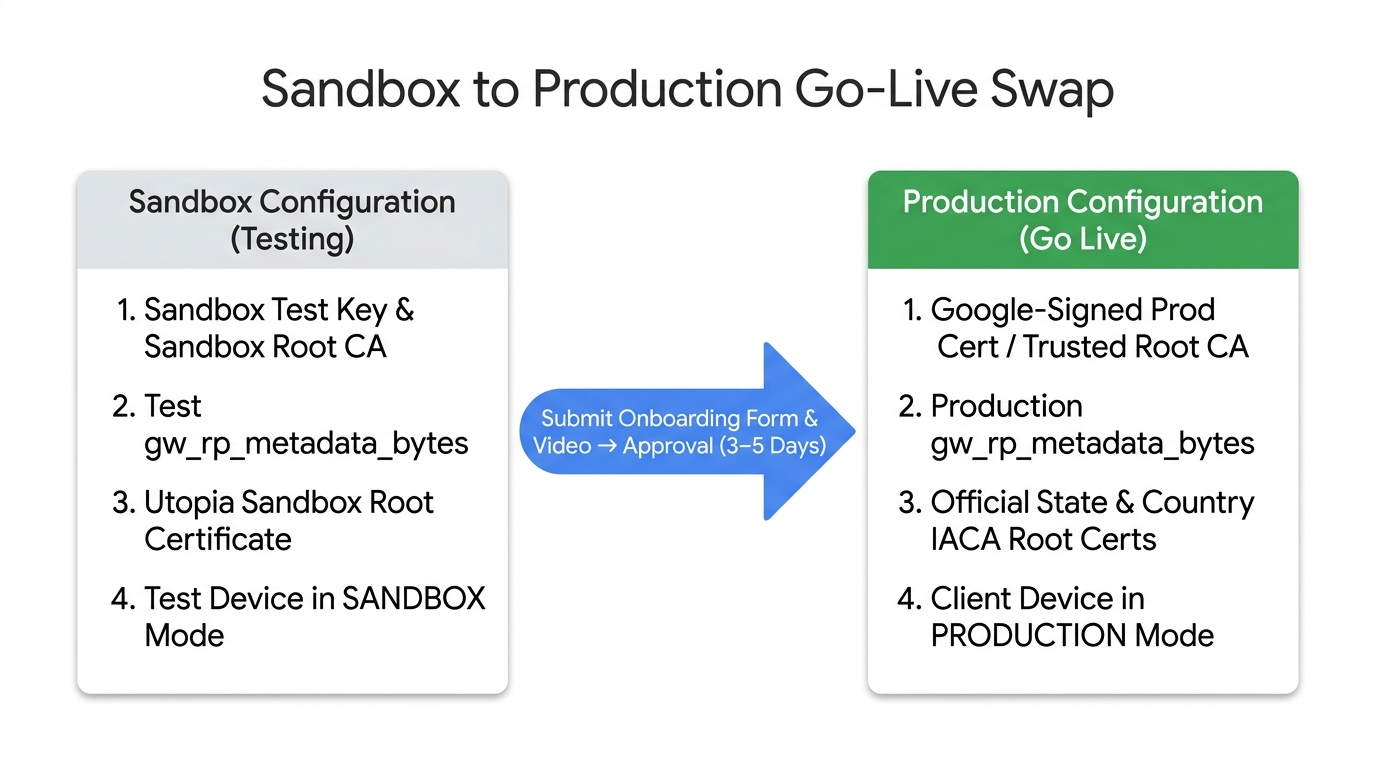
Update your verifier server and test device from sandbox to production:
1. **Replace your signing key and certificate:** Sign OpenID4VP requests with your production private key and include your Google-signed production certificate in the JWS `x5c` header ([Step 3.A](https://developers.google.com/wallet/identity/verify/accepting-ids-from-wallet-online#signed_requests)).
2. **Update `client_id`:** Recompute `x509_hash:` from your production DER certificate.
3. **Update `gw_rp_metadata_bytes`:** Replace the sandbox test metadata string in `client_metadata` with your production `gw_rp_metadata_bytes`.
4. **Configure production IACA root certificates:** Ensure your server's trust store validates `issuerAuth` against the official production root certificates in [Supported Issuers \& IACA Certificates](https://developers.google.com/wallet/identity/verify/supported-issuers-iaca-certs) (and remove the Utopia Sandbox cert from production).
5. **Switch your test device back to PRODUCTION:** Follow [Step 1.C: Switch back to production](https://developers.google.com/wallet/identity/verify/sandbox#switch-back) and verify the production flow.
## Related resources
- [Step 3: Integrate as a Relying Party](https://developers.google.com/wallet/identity/verify/accepting-ids-from-wallet-online)
- [Supported Issuers \& IACA Certificates](https://developers.google.com/wallet/identity/verify/supported-issuers-iaca-certs)
- [Relying Party Terms of Service](https://developers.google.com/wallet/identity/verify/relying-party-tos)
- [Onboarding FAQ](https://developers.google.com/wallet/identity/verify/faq#onboard_get_started)