# Ecommerce URL Structure Best Practices | Google Search Central
# Designing a URL structure for ecommerce websites
Well-designed URLs can help Google more efficiently locate and retrieve web pages on your
ecommerce site. If you control the structure of your URLs (for example, you are building your
own site from scratch), then this guide can help you decide on your URL structure to avoid
indexing problems seen by Google on ecommerce sites.
> [!NOTE]
> If you're using an ecommerce platform, you can most likely skip this section, as the platform has most likely already considered these issues for you.
## Why URL structure matters
A good URL design structure helps Google crawl and index your site, while a poor URL structure can lead to the following issues:
-
**Content can be missed** if Googlebot incorrectly thinks two URLs will return the same
content as only one URL may be retrieved by the crawler (the other is discarded as a
duplicate). This can happen if fragment identifiers (like `#fragment`) are
used to show different content. Google does not use fragment identifiers in indexing.
**Example:** `/product/t-shirt#black` and `/product/t-shirt#white`
are considered to be the same page by Google.
-
**The same content may be retrieved multiple times** by the crawler if Google thinks two URLs
are different but result in the same page being returned. This can slow down
the crawling of your site and put additional load on your web server for no benefit.
**Example:** `/product/black-t-shirt` and `/product?sku=1234` may return
the same product page, but Google cannot determine this by looking at the URL alone.
-
**The crawler may think your site contains an infinite number of pages** if your URLs
include a continually changing value such as a timestamp. As a result, Google may take
longer to find all the useful content on your site.
**Example:** `/about?now=12:34am` and `/about?now=12:35am` may be
treated as different URLs by Google even though both URLs display the same page.
See [How Google Search Works](https://developers.google.com/search/docs/fundamentals/how-search-works)
and [How Google's Site Crawlers Index Your Site](https://www.google.com/search/howsearchworks/crawling-indexing/)
for more information on how Google crawls and indexes your site.
## Good URL structure design best practices
To optimize how Google crawls and indexes your website, follow these best practices on how to
structure your URLs.
### General URL recommendations
- Minimize the number of alternative URLs that return the same content to avoid Google making more requests to your site than needed. Google may not realize that two URLs return the same page until after both are retrieved.
- If upper and lower case text in a URL is treated the same by the web server, convert all text to the same case so it is easier for Google to determine that URLs reference the same page.
- Make sure each page in paginated results has a unique URL. We see the most URL mistakes in pagination URL structures.
-
Add descriptive words in URL paths. The words in URLs may help Google better understand the page.
**Recommended** :
`/product/black-t-shirt-with-a-white-collar`
**Not recommended** :
`/product/3243`
### URL query parameter recommendations
Follow these recommendations when using query parameters to help Google successfully crawl and
index your site.
-
Use `?key=value` URL parameters rather than `?value`, where possible.
URL parameters allow Google Search to understand your site's structure and crawl and index more efficiently.
**Recommended** :
`/photo-frames?page=2`, `/t-shirt?color=green`
**Not recommended** :
`/photo-frames?2`, `/t-shirt?green`
-
Avoid using the same parameters twice. Googlebot may ignore one of the values otherwise.
**Recommended** :
`?type=candy,sweet`
**Not recommended** :
`?type=candy&type=sweet`
-
Avoid internally linking to temporary parameters, such as session-IDs, tracking codes,
user-relative values (`location=nearby`, `time=last-week`), and
the current time. This can result in URLs that have a short life or duplicate URLs
for the same page. To get the best results from Google Search, use long-term, persistent
URLs.
**Recommended** :
`/t-shirt?location=UK`
**Not recommended** :
`/t-shirt?location=nearby`, `/t-shirt?current-time=12:02`, `/t-shirt?session=123123123`
### How Google understands URLs for product variants
A common consideration on ecommerce sites is how to structure URLs when a product is available
in multiple sizes or colors. Each combination of product attributes is referred to as a
*product variant*. To help Google understand your product variants, make sure that each
variant can be identified by a separate URL. We recommend the following URL structures for variant URLs:
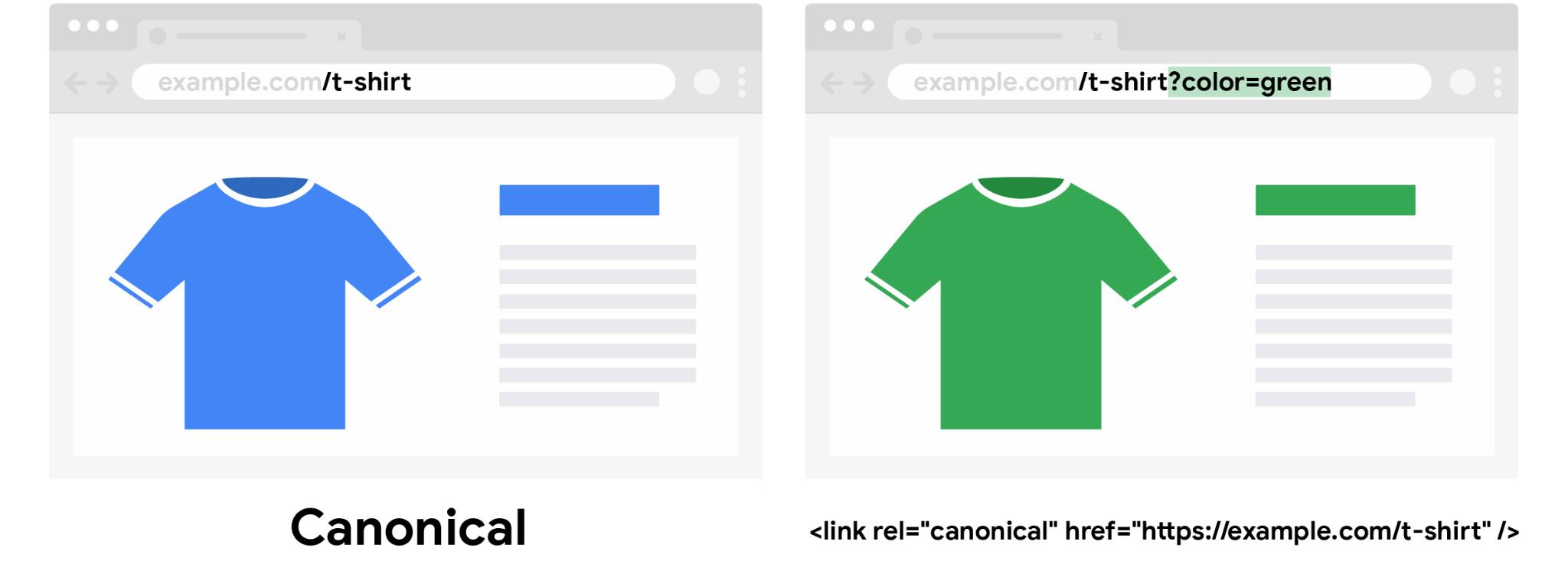
- A path segment, such as `/t-shirt/green`
- A query parameter, such as `/t-shirt?color=green`
For more information, see the [product variant structured data documentation](https://developers.google.com/search/docs/appearance/structured-data/product-variants).
If you use optional query parameters to identify variants, use the URL with the query
parameter omitted as the [canonical URL](https://developers.google.com/search/docs/crawling-indexing/consolidate-duplicate-urls). This can help Google better understand the
relationship between product variants.
## Using URLs in your content
To help Google Search and Google Shopping correctly identify your products and the
relationship between product variants, follow these best practices when using URLs in your
content.
- Use the same URL in internal links, sitemap files, and [`` tags](https://developers.google.com/search/docs/crawling-indexing/consolidate-duplicate-urls). For example, if linking to the first page in a paginated sequence using a query parameter where the default page is page one, either include or exclude `?page=1` on the URL throughout your site consistently.
- Use a self-referencing [`` tag](https://developers.google.com/search/docs/crawling-indexing/consolidate-duplicate-urls) (one where the URL in the tag points to the current page) on all indexable pages and include those URLs in a [sitemap](https://developers.google.com/search/docs/crawling-indexing/sitemaps/build-sitemap) file.
- For products with unique URLs per variant, include the canonical product URL on all variant pages using a `` tag. For more information, see [the `canonical_link` property of Google Merchant Center](https://support.google.com/merchants/answer/9340054).
- Include links directly on the pages using `` tags; don't use JavaScript to navigate between pages. Googlebot might not detect navigation from JavaScript code. For more information about how Google processes JavaScript, see [Understand the JavaScript SEO basics](https://developers.google.com/search/docs/guides/javascript-seo-basics).
- Include meaningful text between `` and `` tags where possible, such as the title of the product being linked to. Don't use generic phrases such as "click here".
- Avoid linking to, or at least indexing, pages without useful content. If a category has no items, use a [`noindex` robots `meta` tag](https://developers.google.com/search/docs/crawling-indexing/robots-meta-tag#noindex). If your site detects that a category has become empty and automatically removes the category from on-site search and browse, consider returning a `404 (not found)` HTTP status code for the page.
## Additional resources
Want to learn more? Check out the following resources:
- [Help Google understand your site structure](https://developers.google.com/search/docs/specialty/ecommerce/help-google-understand-your-ecommerce-site-structure)
- [Avoid creating duplicate content](https://developers.google.com/search/docs/crawling-indexing/consolidate-duplicate-urls)
- [Pagination, incremental page loading, and their impact on Search](https://developers.google.com/search/docs/specialty/ecommerce/pagination-and-incremental-page-loading)
- [Managing crawling of faceted navigation URLs](https://developers.google.com/search/docs/crawling-indexing/crawling-managing-faceted-navigation)