# 5 common mistakes with rel=canonical
Monday, April 08, 2013
> [!IMPORTANT]
> It's been a while since we published this blog post. Some of the information may be outdated (for example, some images may be missing, and some links may not work anymore). `rel="prev"` and `rel="next"` are no longer supported.
Including a
[`rel=canonical` link](https://developers.google.com/search/docs/crawling-indexing/consolidate-duplicate-urls)
in your webpage is a strong hint to search engines your about preferred version to index among
[duplicate pages on the web](https://developers.google.com/search/docs/crawling-indexing/consolidate-duplicate-urls).
It's supported by several search engines, including
[Yahoo!](https://www.ysearchblog.com/2009/02/12/fighting-duplication-adding-more-arrows-to-your-quiver/),
[Bing](https://www.bing.com/community/site_blogs/b/webmaster/archive/2009/02/12/partnering-to-help-solve-duplicate-content-issues.aspx),
and Google. The `rel=canonical` link consolidates indexing properties from the
duplicates, like their inbound links, as well as specifies which URL you'd like displayed in
search results. However, `rel=canonical` can be a bit tricky because it's not very
obvious when there's a misconfiguration.
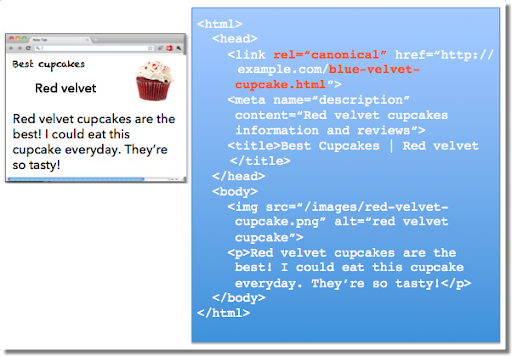
While the webmaster sees the "red velvet" page on the left in their browser, search engines notice
on the webmaster's unintended "blue velvet" `rel=canonical` on the right. We recommend
the following best practices for using `rel=canonical`:
- A large portion of the duplicate page's content should be present on the canonical version.
> [!NOTE]
> One test is to imagine you don't understand the language of the content---if you placed the duplicate side-by-side with the canonical, does a very large percentage of the words of the duplicate page appear on the canonical page? If you need to speak the language to understand that the pages are similar; for example, if they're only topically similar but not extremely close in exact words, the canonical designation might be disregarded by search engines.
- Double-check that your `rel=canonical` target exists (it's not an error or "[`soft 404`](https://developers.google.com/search/docs/crawling-indexing/troubleshoot-crawling-errors#soft-404-errors)").
- Verify the `rel=canonical` target doesn't contain a noindex robots `meta` tag.
- Make sure you'd prefer the `rel=canonical` URL to be displayed in search results (rather than the duplicate URL).
- Include the `rel=canonical` link in either the `` of the page or the HTTP header.
- Specify no more than one `rel=canonical` for a page. When more than one is specified, all `rel=canonical` links will be ignored.
## Mistake 1: `rel=canonical` to the first page of a paginated series
Imagine that you have an article that spans several pages:
- example.com/article?story=cupcake-news\&page=1
- example.com/article?story=cupcake-news\&page=2
- and so on
Specifying a `rel=canonical` from page 2 (or any later page) to page 1 is not correct
use of `rel=canonical`, as these are not duplicate pages. Using
`rel=canonical` in this instance would result in the content on pages 2 and beyond not
being indexed at all.
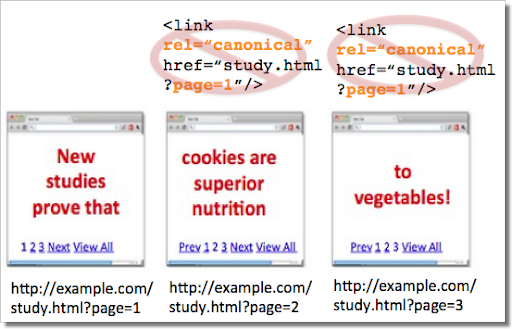 Good content (for example, "cookies are superior nutrition" and "to vegetables") is lost when specifying `rel=canonical` from component pages to the first page of a series. 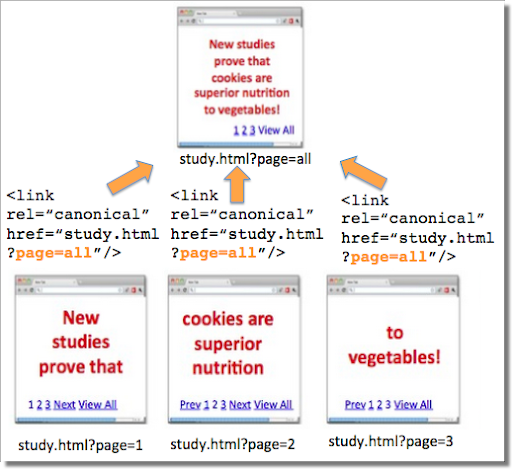 `rel=canonical` from component pages to the view-all page 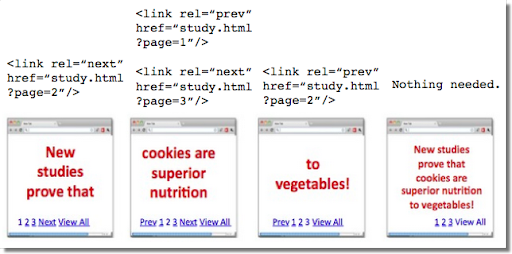 If `rel=canonical` to a view-all page isn't designated, paginated content can use `rel="prev"` and `rel="next"` markup.
## Mistake 2: Absolute URLs mistakenly written as relative URLs
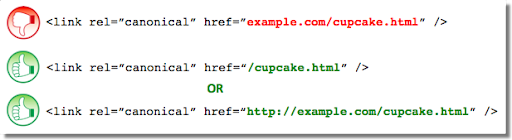
The `` tag, like many HTML tags, accepts both relative and absolute URLs.
Relative URLs include a path "relative" to the current page. For example,
`images/cupcake.png` means "from the current directory go to the `images`
subdirectory, then to `cupcake.png`." Absolute URLs specify the full path---including the
scheme like `https://`.
Specifying `` (a relative
URL since there's no `https://`) implies that the desired canonical URL is
`https://example.com/example.com/cupcake.html` even though that is
almost certainly not what was intended. In these cases, our algorithms may ignore the specified
`rel=canonical`. Ultimately this means that whatever you had hoped to accomplish with
this `rel=canonical` will not come to fruition.
## Mistake 3: Unintended or multiple declarations of `rel=canonical`
Occasionally, we see `rel=canonical` designations that we believe are unintentional. In
very rare circumstances we see simple typos, but more commonly a busy site owner copies a page
template without thinking to change the target of the `rel=canonical`. Now the site
owner's pages specify a `rel=canonical` to the template author's site.
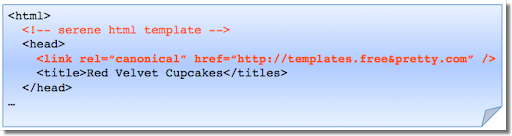
If you use a template, check that you didn't also copy the `rel=canonical`
specification.
Another issue is when pages include multiple `rel=canonical` links to different URLs.
This happens frequently in conjunction with SEO plugins that often insert a default
`rel=canonical` link, possibly unbeknownst to the webmaster who installed the plugin.
In cases of multiple declarations of `rel=canonical`, Google will likely ignore all the
`rel=canonical` hints. Any benefit that a legitimate `rel=canonical` might
have offered will be lost.
In both these types of cases, double-checking the page's source code will help correct the issue.
Be sure to check the entire `` section as the `rel=canonical`
links may be spread apart.
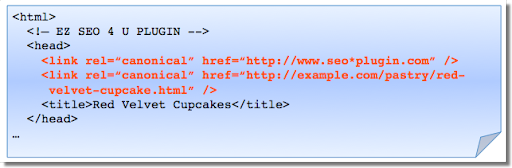
Check the behavior of plugins by looking at the page's source code.
## Mistake 4: Category or landing page specifies `rel=canonical` to a featured article
Let's say you run a site about desserts. Your dessert site has useful category pages like
"pastry" and "gelato." Each day the category pages feature a unique article. For instance,
your pastry landing page might feature "red velvet cupcakes." Because the "pastry" category
page has nearly all the same content as the "red velvet cupcake" page, you add a
`rel=canonical` from the category page to the featured individual article.
If we were to accept this `rel=canonical`, then your pastry category page would not
appear in search results. That's because the `rel=canonical` signals that you would
prefer search engines display the canonical URL in place of the duplicate. However, if you want
users to be able to find both the category page and featured article, it's best to only have a
self-referential `rel=canonical` on the category page, or none at all.
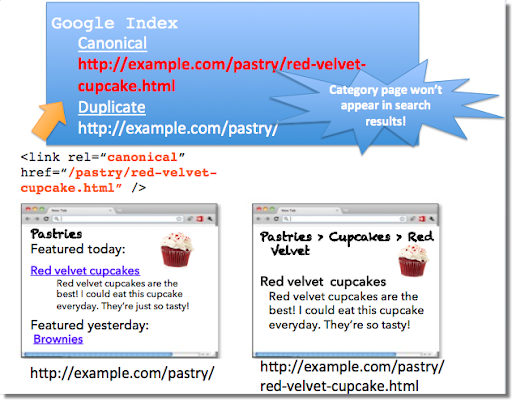
Remember that the canonical designation also implies the preferred display URL. Avoid adding a
`rel=canonical` from a category or landing page to a featured article.
## Mistake 5: `rel=canonical` in the ``
The `rel=canonical` link tag should only appear in the `` of an
HTML document. Additionally, to avoid HTML parsing issues, it's good to include the
`rel=canonical` as early as possible in the ``. When we
encounter a `rel=canonical` designation in the ``, it's
disregarded.
This is an easy mistake to correct. Simply double-check that your `rel=canonical` links
are always in the `` of your page, and as early as possible if you can.
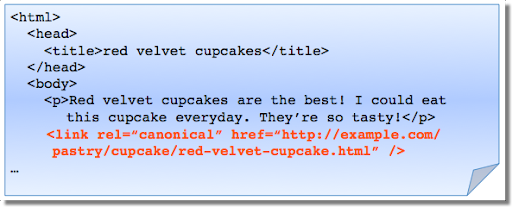
`rel=canonical` designations in the `` are processed, not the
``.
## Conclusion
To create valuable `rel=canonical` designations:
- Verify that most of the main text content of a duplicate page also appears in the canonical page.
- Check that `rel=canonical` is only specified once (if at all) and in the `` of the page.
- Check that `rel=canonical` points to an existent URL with good content (that is, not a `404`, or worse, a `soft 404`).
- Avoid specifying `rel=canonical` from landing or category pages to featured articles as that will make the featured article the preferred URL in search results.
And, as always, please ask any questions in our
[Webmaster Help forum](https://support.google.com/webmasters/community/).
Written by Allan Scott, Software Engineer, Indexing Team