Thursday, September 15, 2011
> [!IMPORTANT]
> It's been a while since we published this blog post. Some of the information may be outdated (for example, some images may be missing, and some links may not work anymore). `rel=prev/next` is not an indexing signal anymore. Check out our up-to-date [guide to pagination](https://developers.google.com/search/docs/specialty/ecommerce/pagination-and-incremental-page-loading).
Much like [`rel="canonical"`](https://developers.google.com/search/blog/2009/02/specify-your-canonical)
acts a strong hint for duplicate content, you can now use the HTML link elements
[`rel="next"` and `rel="prev"`](https://www.whatwg.org/specs/web-apps/current-work/multipage/links.html#sequential-link-types)
to indicate the relationship between component URLs in a paginated series. Throughout the web, a
paginated series of content may take many shapes---it can be an article divided into several
component pages, or a product category with items spread across several pages, or a forum thread
divided into a sequence of URLs. Now, if you choose to include `rel="next"` and
`rel="prev"` markup on the component pages within a series, you're giving Google a
strong hint that you'd like us to:
- Consolidate indexing properties, such as links, from the component pages/URLs to the series as a whole (that is, links should not remain dispersed between `page-1.html`, `page-2.html`, etc., but be grouped with the sequence).
- Send users to the most relevant page/URL---typically the first page of the series.
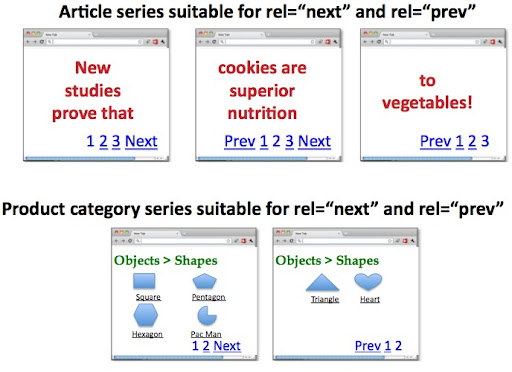 The relationship between component URLs in a series can now be indicated to Google through `rel="next"` and `rel="prev"`.
There's an exception to the `rel="prev"` and `rel="next"` implementation:
If, alongside your series of content, you also offer users a view-all page, or if you're
considering a view-all page, please see our post on
[View-all in search results](https://developers.google.com/search/blog/2011/09/view-all-in-search-results) for more
information. Because view-all pages are most commonly preferred by searchers, we do our best to
surface this version when appropriate in results rather than a component page (component pages are
more likely to surface with `rel="next"` and `rel="prev"`).
If you don't have a view-all page or you'd like to override Google returning a view-all page, you
can use `rel="next"` and `rel="prev"` as described in this post.
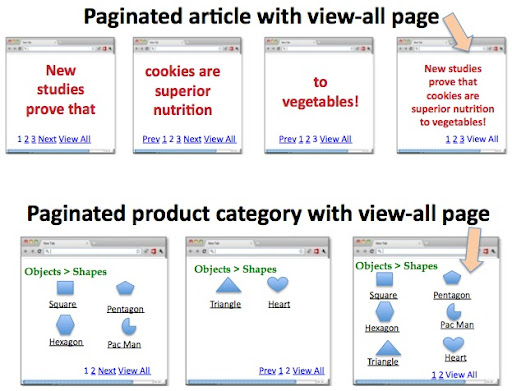 For information on paginated configurations that include a view-all page, please see our post on [View-all in search results](https://developers.google.com/search/blog/2011/09/view-all-in-search-results).
## Outlining your options
Here are three options for a series:
1. Leave whatever you have exactly as-is. Paginated content exists throughout the web and we'll continue to strive to give searchers the best result, regardless of the page's `rel="next"`/`rel="prev"` HTML markup---or lack thereof.
2. If you have a view-all page, or are considering a view-all page, see our post on [View-all in search results](https://developers.google.com/search/blog/2011/09/view-all-in-search-results).
3. Hint to Google the relationship between the component URLs of your series with `rel="next"` and `rel="prev"`. This helps us more accurately index your content and serve to users the most relevant page (commonly the first page). Implementation details below.
## Implementing `rel="next"` and `rel="prev"`
If you prefer option 3 (above) for your site, let's get started! Let's say you have content
paginated into the URLs:
```
https://www.example.com/article?story=abc&page=1
https://www.example.com/article?story=abc&page=2
https://www.example.com/article?story=abc&page=3
https://www.example.com/article?story=abc&page=4
```
On the first page, `https://www.example.com/article?story=abc&page=1`, you'd include
in the `` section:
```
```
On the second page, `https://www.example.com/article?story=abc&page=2`:
```
```
On the third page, `https://www.example.com/article?story=abc&page=3`:
```
```
And on the last page, `https://www.example.com/article?story=abc&page=4`:
```
```
A few points to mention:
- The first page only contains `rel="next"` and no `rel="prev"` markup.
- Pages two to the second-to-last page should be doubly-linked with both `rel="next"` and `rel="prev"` markup.
- The last page only contains markup for `rel="prev"`, not `rel="next"`.
- `rel="next"` and `rel="prev"` values can be either relative or absolute URLs (as allowed by the `` tag). And, if you include a `` link in your document, relative paths will resolve according to the base URL.
- `rel="next"` and `rel="prev"` only need to be declared within the `` section, not within the document ``.
- We allow `rel="previous"` as a syntactic variant of `rel="prev"` links.
- `rel="next"` and `rel="previous"` on the one hand and `rel="canonical"` on the other constitute independent concepts. Both declarations can be included in the same page. For example, `https://www.example.com/article?story=abc&page=2&sessionid=123` may contain:
```
```
- `rel="prev"` and `rel="next"` act as hints to Google, not absolute commands.
- When implemented incorrectly, such as omitting an expected `rel="prev"` or `rel="next"` designation in the series, we'll continue to index the page(s), and rely on our own heuristics to understand your content.
More information can be found in our
[Help Center](https://support.google.com/webmasters), or join the
conversation in our
[Webmaster Help Forum](https://support.google.com/webmasters/community)!
Written by Benjia Li and Joachim Kupke, Software Engineers, Indexing Team