# Discover your links
> [!IMPORTANT]
> It's been a while since we published this blog post. Some of the information may be outdated (for example, some images may be missing, and some links may not work anymore).
Monday, February 05, 2007
> [!NOTE]
> **Update on October 15, 2008** : For more recent news on links, visit [Links Week](https://developers.google.com/search/blog/2008/10/links-information-straight-from-source) on our Webmaster Central Blog. We're discussing [internal links](https://developers.google.com/search/blog/2008/10/importance-of-link-architecture), [outbound links](https://developers.google.com/search/blog/2008/10/linking-out-often-its-just-applying), and [inbound links](https://developers.google.com/search/blog/2008/10/good-times-with-inbound-links).
You asked, and we listened: We've extended our support for querying links to your site to much
beyond the
[`link:` operator](https://www.google.com/intl/en/help/operators.html#link)
you might have used in the past. Now you can use
[Webmaster Tools](https://search.google.com/search-console)
to view a much larger sample of links to pages on your site that we found on the web. Unlike the
`link:` operator, this data is much more comprehensive and can be classified, filtered,
and downloaded. All you need to do is verify site ownership to see this information.
To make this data even more useful, we have divided the world of links into two types: external
and internal. Let's understand what kind of links fall into which bucket.
## What are external links?
External links to your site are the links that reside on pages that do not belong to your domain.
For example, if you are viewing links for
, all the
links that do not originate from pages on any subdomain of google.com would appear as external
links to your site.
## What are internal links?
Internal links to your site are the links that reside on pages that belong to your domain. For
example, if you are viewing links for
, all the links
that originate from pages on any subdomain of google.com, such as
or
[mobile.google.com](https://mobile.google.com), would appear as
internal links to your site.
## Viewing links to a page on your site
You can view the links to your site by selecting a verified site in your Webmaster Tools account
and clicking on the new **Links** tab at the top. Once there, you will see the two options on
the left: external links and internal links, with the external links view selected. You will also
see a table that lists pages on your site, as shown below. The first column of the table lists
pages of your site with links to them, and the second column shows the number of the external
links to that page that we have available to show you. (Note that this may not be 100% of the
external links to this page.)

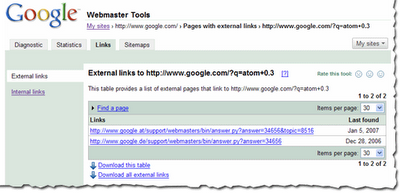
This table also provides the total number of external links to your site that we have available
to show you. When in this summary view, click the linked number and go to the detailed list of
links to that page. When in the detailed view, you'll see the list of all the pages that link to
specific page on your site, and the time we last crawled that link. Since you are on the
External Links tab on the left, this list is the external pages that point to the page.
## Finding links to a specific page on your site
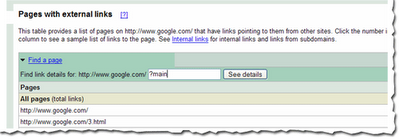
To find links to a specific page on your site, you first need to find that specific page in the
summary view. You can do this by navigating through the table, or if you want to find that page
quickly, you can use the handy **Find a page** link at the top of the table. Just fill in the
URL and click See details. For example, if the page you are looking for has the URL
, you
can enter `?main` in the **Find a page** form. This will take you directly to the
detailed view of the links to
.
## Viewing internal links
To view internal links to pages on your site, click on the **Internal Links** tab on the left
side bar in the view. This takes you to a summary table that, just like external links view,
displays information about pages on your site with internal links to them.

However, this view also provides you with a way to filter the data further: to see links from
any of the subdomain on the domain, or links from just the specific subdomain you are currently
viewing. For example, if you are currently viewing the internal links to https://www.google.com/,
you can either see links from all the subdomains, such as links from
and
https://www.google.com, or you can see links only from other pages on
[https://www.google.com](https://www.google.com/).
## Downloading links data
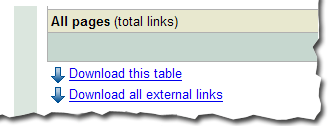
There are three different ways to download links data about your site. The first: download the
current view of the table you see, which lets you navigate to any summary or details table, and
download the data in the current view. Second, and probably the most useful data, is the list
all external links to your site. This allows you to download a list of all the links that point
to your site, along with the information about the page they point to and the last time we
crawled that link. Thirdly, we provide a similar download for all internal links to your site.
We do limit the amount of data you can download for each type of link (for instance, you can
currently download up to one million external links). Google knows about more links than the
total we show, but the overall fraction of links we show is much, much larger than the
`link:` command currently offers. Why not visit us at
[Webmaster Central](https://search.google.com/search-console)
and explore the links for your site?