# Modify Existing Conversions
Call the [`Conversion.update()`](https://developers.google.com/search-ads/v2/reference/conversion/update)
method to make the following types of changes to one or more existing conversions:
- Modify the revenue, currency code, or quantity.
- Modify the [advertiser-provided
order ID](https://developers.google.com/search-ads/v2/reference/conversion#conversion.floodlightOrderId) and any [custom
Floodlight variables](https://developers.google.com/search-ads/v2/how-tos/conversions/custom-data).
- Remove the conversion by changing the [`conversion.state`](https://developers.google.com/search-ads/v2/reference/conversion#conversion.state) from `ACTIVE` to `REMOVED`.
Search Ads 360 does not support changing the following:
- The conversion date.
- The conversion type.
- The keyword or visit that is attributed for the conversion.
- The Floodlight activity or activity name.
However, you can always mark an existing conversion as REMOVED and upload a new conversion
with the updated date, type, attribution IDs, or Floodlight activity (be sure to specify a
new `conversionId` as well).
As with `Conversion.insert()`, if your update request specifies multiple
conversions, Search Ads 360 attempts to update each conversion on a best-effort basis
instead of updating the entire batch as an all-or-nothing transaction. If some updates in a
batch fail, others might still succeed. We recommend you [read
the response](https://developers.google.com/search-ads/v2/how-tos/conversions/update#update-response) for every updated conversion to make sure that the update is successful.
## (Updated 2025) Deprecation of `dsConversionId`
Currently, you can use either `dsConversionId` or `conversionId` to
identify and edit conversions. The `dsConversionId` field is being deprecated
in Q3 2025. Going forward, you must use `conversionId` to edit conversions in
the Search Ads 360 Conversion API.
Key Changes:
- **[`dsConversionId`](https://developers.google.com/search-ads/v2/reference/conversion#conversion.dsConversionId) Deprecation** : `dsConversionID` will no longer be supported in the Search Ads 360 Reporting API (referred to as `conversion.id`) or the reporting UI (referred to as "Conversion ID").
- **[`conversionId`](https://developers.google.com/search-ads/v2/reference/conversion#conversion.conversionId) Requirement** : `conversionId` will become a mandatory field for editing conversions through the Search Ads 360 Conversion API.
How to obtain `conversionId`:
- **Search Ads 360 Reporting API** : You can retrieve [`advertiser_conversion_id`](https://developers.google.com/search-ads/reporting/api/reference/fields/v0/conversion#conversion.advertiser_conversion_id) using the Search Ads 360 Reporting API. This value corresponds to the `conversionId` required for editing.
- **Search Ads 360 UI** : You can find "Advertiser conversion ID" in the conversion reporting page within the Search Ads 360 user interface. 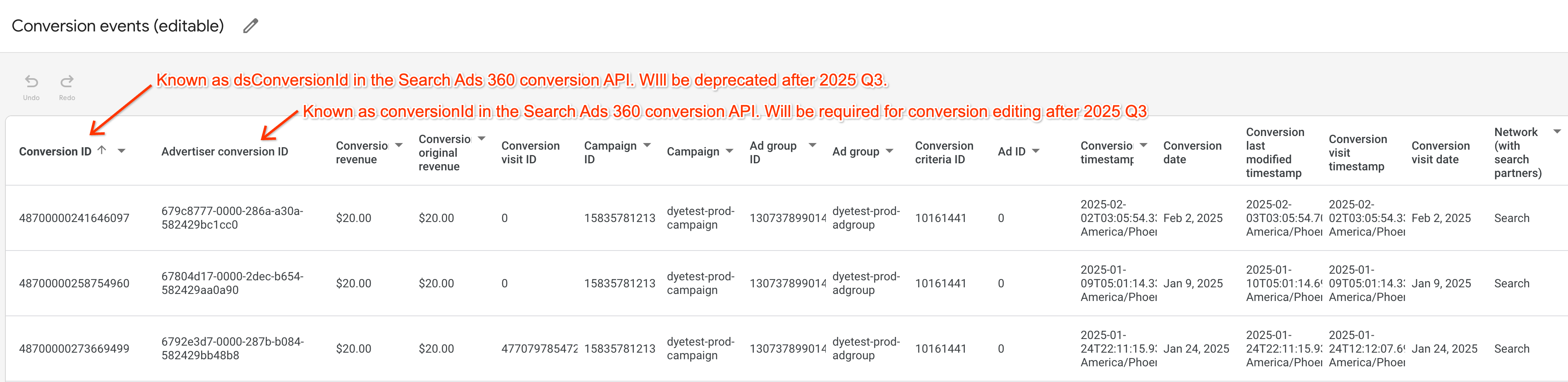
## Send an update request
Most of the fields that you specify in a `Conversion.update()` are used to
identify the conversions you want to update. You can use either of the following
techniques to identify an existing conversion:
- Specify the conversion's `clickId`
- All the conversions edited must be within 60 days of the time when the click ID is generated.
- Specify the conversion's `criterionId` (keyword ID)
Both techniques require you to specify the conversion's `conversionId`, `conversionTimestamp`,
and transaction `type`.
In addition, if the original conversion specified `revenueMicros` and `currencyCode`
or `quantityMillis`, the update request needs to specify this data even if you
aren't changing it.
### Identify conversion by click ID
If a conversion originally specified a click ID, you can send a `Conversion.update()`
request that specifies the following fields:
- `clickId`
- `conversionId`
- `conversionTimestamp`
- `type`
- `state` (only required if you want to change the state to REMOVED or ACTIVE)
- `quantityMillis` (only if specified in the original conversion)
- `revenueMicros` (only if specified in the original conversion)
- `currencyCode` (only if specified in the original conversion)
#### Example
Here's an example of two existing conversions:
```
{
"kind": "doubleclicksearch#conversionList",
"conversion" : [{
"clickId" : "COiYmPDTv7kCFcP0KgodOzQAAA",
"conversionId" : "test_20130906_10",
"conversionTimestamp" : "1378710000000",
"segmentationType" : "FLOODLIGHT",
"segmentationName" : "Test",
"type": "TRANSACTION",
"revenueMicros": "100000000", // 100 million revenueMicros is equivalent to $100 of revenue
"currencyCode": "USD"
},
{
"clickId": "COiYmPDTv7kCFcP0KgodOzQAAA",
"conversionId": "test_1383337059137",
"conversionTimestamp": "1378710000000",
"segmentationType" : "FLOODLIGHT",
"segmentationName" : "Test",
"type": "ACTION",
"quantityMillis": "1000"
}]
}
```
The following request updates one of the conversions from the previous example and removes
the other:
### JSON
Note that a `Conversion.update()` request uses the **PUT**
HTTP method.
```
PUT https://www.googleapis.com/doubleclicksearch/v2/conversion
Authorization: Bearer your OAuth 2.0 access token
Content-type: application/json
{
"kind": "doubleclicksearch#conversionList",
"conversion": [
{
"clickId": "COiYmPDTv7kCFcP0KgodOzQAAA", // Replace with data from your site
"conversionId": "test_20130906_10",
"conversionTimestamp": "1378710000000",
"type": "TRANSACTION",
"revenueMicros": "90000000", // 90 million revenueMicros is equivalent to $90 of revenue
"currencyCode": "USD"
},
{
"clickId": "COiYmPDTv7kCFcP0KgodOzQAAA", // Replace with data from your site
"conversionId": "test_1383337059137",
"conversionTimestamp": "1378710000000",
"type": "ACTION",
"quantityMillis": "1000",
"state": "REMOVED"
}
]
}
```
##### Use the Search Ads 360 utility script to send this request
To send a raw JSON POST request, you can use the [sa360Api.py
script](https://developers.google.com/search-ads/v2/prereqs#ds3py) as follows:
1. Copy the example JSON object (everything between and including the two curly brackets) into a new text file named `request.txt`.
2. Change the agency ID that's in the JSON code to your own agency ID.
3. Remove any comments, such as `// The date column segments the report by individual days.`
4. Assemble your OAuth 2.0 credentials into a single, comma-delimited string as follows:
`client-ID,client-secret,refresh-token`
(This is the same string that `sa360Api.py` outputs when you run `sa360Api.py
--login` as described in [Set Up
Authorization](https://developers.google.com/search-ads/v2/authorizing).)
5. Invoke `sa360Api.py` as follows:
`sa360Api.py --cred
CREDENTIALS --server API-method --put < request.txt
`
In the command above, substitute the string you assembled in the previous step for `CREDENTIALS`.
Substitute the name of the PUT method in the box below for `API-method`.
For example:
`sa360Api.py --cred
123456789123.apps.googleusercontent.com,ABCDEFGHIJKLMNOPQR_abcdef,1/HIJklM01OPQR23NOP456rst890uvw
--server https://www.googleapis.com/doubleclicksearch/v2/conversion --put < request.txt`
### Java
```
/**
* Instantiate the Doubleclicksearch service, create a conversion that updates an existing conversion,
* and upload the conversions.
*/
public static void main(String[] args) throws Exception {
Doubleclicksearch service = getService(); // See Set Up Your Application.
// Set up a List to keep track of each conversion you create.
List conversions = new Vector();
// Create a conversion and add it to the conversion list.
// Just to get a little fancy, the updateConversionFromVisit() method can be used for all
// visit conversions, including conversions that don't specify quantity, revenue, or currency.
// If quantityMillis wasn't specified in the original conversion, specify -1L for the
// quantityMillis parameter. Likewise, if revenueMicros wasn't specified originally,
// specify -1L for the revenueMicros parameter and an empty string for currency.
conversionList = updateConversionFromVisit(
conversionList,
"COiYmPDTv7kCFcP0KgodOzQAAA", // clickId. Replace with data from your site
"test_20130906_10", // conversionId
1378710000000L, // timeStamp
"TRANSACTION", // type
"", // state
-1L, // quantityMillis
90000000L, // revenueMicros. Equivalent to $90 of revenue
"USD"); // currencyCode
// Here's a conversion that needs to be removed. Just set the state parameter to "REMOVED".
conversionList = updateConversionFromVisit(
conversionList,
"COiYmPDTv7kCFcP0KgodOzQAAA", // clickId. Replace with data from your site
"test_1383337059137", // conversionId
1378710000000L, // timeStamp
"ACTION", // type
"REMOVED", // state
1000L, // quantityMillis
-1L, // revenueMicros
""); // currencyCode
// Upload the List and handle the response.
uploadConversions(conversions, service); // See an example in Add New Conversions.
}
/**
* Create a conversion and add it to a List.
*/
private static List updateConversionFromVisit(List conversions,
String clickId,
String conversionId,
Long timeStamp,
String type,
String state,
Long quantity,
Long revenue,
String currency) {
// Identifies the existing conversion.
Conversion conversion = new Conversion()
.setClickId(clickId)
.setConversionId(conversionId)
.setConversionTimestamp(BigInteger.valueOf(timeStamp))
.setType(type);
// Only add these fields if the value is not empty greater than -1.
if(!state.isEmpty()) conversion.setState(state);
if (quantity > -1L) {
conversion.setQuantityMillis(quantity);
}
if (revenue > -1L) {
conversion.setRevenueMicros(revenue);
if (!currency.isEmpty()) {
conversion.setCurrencyCode(currency);
} else {
System.err.println(String.format(
"Can't add conversion %s. It specifies revenue but no currency.",
conversion.getConversionId()));
return conversions;
}
}
conversions.add(conversion);
return conversions;
}
```
### Python
```
def update_conversion(service):
"""Change the revenue for one existing conversion and remove another.
Args:
service: An authorized Doubleclicksearch service. See https://developers.google.com/search-ads/v2/configure.
"""
request = service.conversion().update(
body=
{
'conversion' : [{
'clickId' : 'COiYmPDTv7kCFcP0KgodOzQAAA', // Replace with data from your site
'conversionId' : 'test_20130906_13',
'conversionTimestamp' : '1378710000000',
'segmentationType' : 'FLOODLIGHT',
'segmentationName' : 'Test',
'type': 'TRANSACTION',
'revenueMicros': '90000000', // 90 million revenueMicros is equivalent to $90 of revenue
'currencyCode': 'USD'
},
{
'clickId': 'COiYmPDTv7kCFcP0KgodOzQAAA', // Replace with data from your site
'conversionId': 'test_1383337059137_01',
'conversionTimestamp': '1378710000000',
'segmentationType' : 'FLOODLIGHT',
'segmentationName' : 'Test',
'type': 'ACTION',
'quantityMillis': '1000',
'state': 'REMOVED'
}]
}
)
pprint.pprint(request.execute())
```
### Identify conversion by keyword ID
If you don't have access to a click ID, or if a conversion was originally attributed to a
keyword or keyword/ad, you can send a `Conversion.update()` request that
specifies the following fields:
- `criterionId` (keyword Id)
- `conversionId`
- `conversionTimestamp`
- `type`
- `state` (only required if you want to change the state to REMOVED or ACTIVE)
- `quantityMillis` (only if specified in the original conversion)
- `revenueMicros` (only if specified in the original conversion)
- `currencyCode` (only if specified in the original conversion)
You can optionally specify other IDs, such as the conversion's ad ID, campaign ID,
and so on, but you don't need to. Search Ads 360 only needs the IDs in the list above to
identify an existing conversion.
#### Example
Here's an example of an existing conversion:
```
{
"kind": "doubleclicksearch#conversionList",
"conversion" : [{
"agencyId": "12300000000000456",
"advertiserId": "45600000000010291",
"engineAccountId": "700000000042441",
"campaignId": "71700000002044839",
"adGroupId": "58700000032026064",
"criterionId": "43700004289911004",
"adId": "44700000155906860",
"conversionId": "test_1383157519886",
"conversionTimestamp": "1378710000000",
"type": "ACTION",
"quantityMillis": "1000",
"segmentationType": "FLOODLIGHT",
"segmentationName": "Test"
}]
}
```
The following request updates the timestamp of the conversion:
### JSON
Note that a `Conversion.update()` request uses the **PUT**
HTTP method.
##### Use the Search Ads 360 utility script to send this request
To send a raw JSON POST request, you can use the [sa360Api.py
script](https://developers.google.com/search-ads/v2/prereqs#ds3py) as follows:
1. Copy the example JSON object (everything between and including the two curly brackets) into a new text file named `request.txt`.
2. Change the agency ID that's in the JSON code to your own agency ID.
3. Remove any comments, such as `// The date column segments the report by individual days.`
4. Assemble your OAuth 2.0 credentials into a single, comma-delimited string as follows:
`client-ID,client-secret,refresh-token`
(This is the same string that `sa360Api.py` outputs when you run `sa360Api.py
--login` as described in [Set Up
Authorization](https://developers.google.com/search-ads/v2/authorizing).)
5. Invoke `sa360Api.py` as follows:
`sa360Api.py --cred
CREDENTIALS --server API-method --put < request.txt
`
In the command above, substitute the string you assembled in the previous step for `CREDENTIALS`.
Substitute the name of the PUT method in the box below for `API-method`.
For example:
`sa360Api.py --cred
123456789123.apps.googleusercontent.com,ABCDEFGHIJKLMNOPQR_abcdef,1/HIJklM01OPQR23NOP456rst890uvw
--server https://www.googleapis.com/doubleclicksearch/v2/conversion --put < request.txt`
```
PUT https://www.googleapis.com/doubleclicksearch/v2/conversion
Authorization: Bearer your OAuth 2.0 access token
Content-type: application/json
{
"kind": "doubleclicksearch#conversionList",
"conversion": [
{
"criterionId": "43700004289911004", // Replace with your ID
"conversionId": "test_1383157519886",
"conversionTimestamp": "1378710000000",
"type": "ACTION",
"quantityMillis": "3000"
}
]
}
```
### Java
```
// Send conversion data to updateConversion, which creates a conversion and adds it
// to the conversion list.
conversionList = updateConversionFromKeyword(conversionList,
43700004289911004L, // criterionId. Replace with your ID
"test_1383157519886", // conversionId
1378710000000L, // timeStamp
"ACTION", // type
"", // state
3000L, // quantityMillis
-1L, // revenueMicros
""); // currencyCode
private static List updateConversionFromKeyword(List conversions,
Long criterionId,
String conversionId,
Long timeStamp,
String type,
String state,
Long quantity,
Long revenue,
String currency
) {
Conversion conversion = new Conversion()
.setCriterionId(criterionId)
.setConversionId(conversionId)
.setConversionTimestamp(BigInteger.valueOf(timeStamp))
.setType(type);
// Only add these fields if the value is not empty greater than -1.
if(!state.isEmpty()) conversion.setState(state);
if (quantity > -1L) {
conversion.setQuantityMillis(quantity);
}
if (revenue > -1L) {
conversion.setRevenueMicros(revenue);
if (!currency.isEmpty()) {
conversion.setCurrencyCode(currency);
} else {
System.err.println(String.format(
"Can't add conversion %s. It specifies revenue but no currency.",
conversion.getConversionId()));
return conversions;
}
}
conversions.add(conversion);
return conversions;
}
```
### Python
```
def update_conversion(service):
"""Change the timestamp of a conversion. Use only the keyword id (criterionId)
to identify the conversion.
Args:
service: An authorized Doubleclicksearch service. See https://developers.google.com/search-ads/v2/configure.
"""
request = service.conversion().update(
body=
{
'conversion': [{
'criterionId': '43700004289911004', // Replace with your ID
'conversionId': 'test_1383157519886',
'conversionTimestamp': '1378760000000',
'type': 'ACTION',
'quantityMillis': '1000'
}]
}
)
pprint.pprint(request.execute())
```
## Handle Search Ads 360 responses
The response for an update request is the same as the response for an insert
request: Search Ads 360 indicates success only if all conversions in the request were
successfully updated.
If the request succeeds, the response includes the full Search Ads 360 internal
representation for each updated conversion, such as campaign ID, ad group ID and keyword
(criterion) ID.
If one or more update fails to validate or upload, the response includes failure
messages for each failed update. The response does not contain messages about conversions
that successfully updated.
For more information about these failure messages, see [Handle
Search Ads 360 responses](https://developers.google.com/search-ads/v2/how-tos/conversions/insert#responses) for insert requests.