
Wydawcy używają integracji po stronie serwera głównie do zarządzania czytelnikami i ich uprawnieniami. Wydawcy używają UpdateReaderEntitlements, aby aktualizować w Google informacje o uprawnieniach do identyfikatora produktu dla PPID.
Konfiguracja Google Cloud
Konfigurowanie połączeń subskrypcji w Google Cloud obejmuje 2 główne komponenty:
- włączanie interfejsu API w danym projekcie,
- tworzenie konta usługi na potrzeby dostępu do interfejsu API.
Włączanie interfejsu Subscription Linking API
Aby używać konta usługi i zarządzać uprawnieniami czytelnika, w projekcie Google Cloud musi być włączony interfejs Subscription Linking API oraz prawidłowo skonfigurowane konto usługi OAuth. Aby włączyć interfejs Subscription Linking API w projekcie, w menu wybierz Interfejsy API i usługi > Biblioteka i wyszukaj Subscription Linking lub otwórz stronę bezpośrednio:
https://console.cloud.google.com/apis/library?project=gcp_project_id
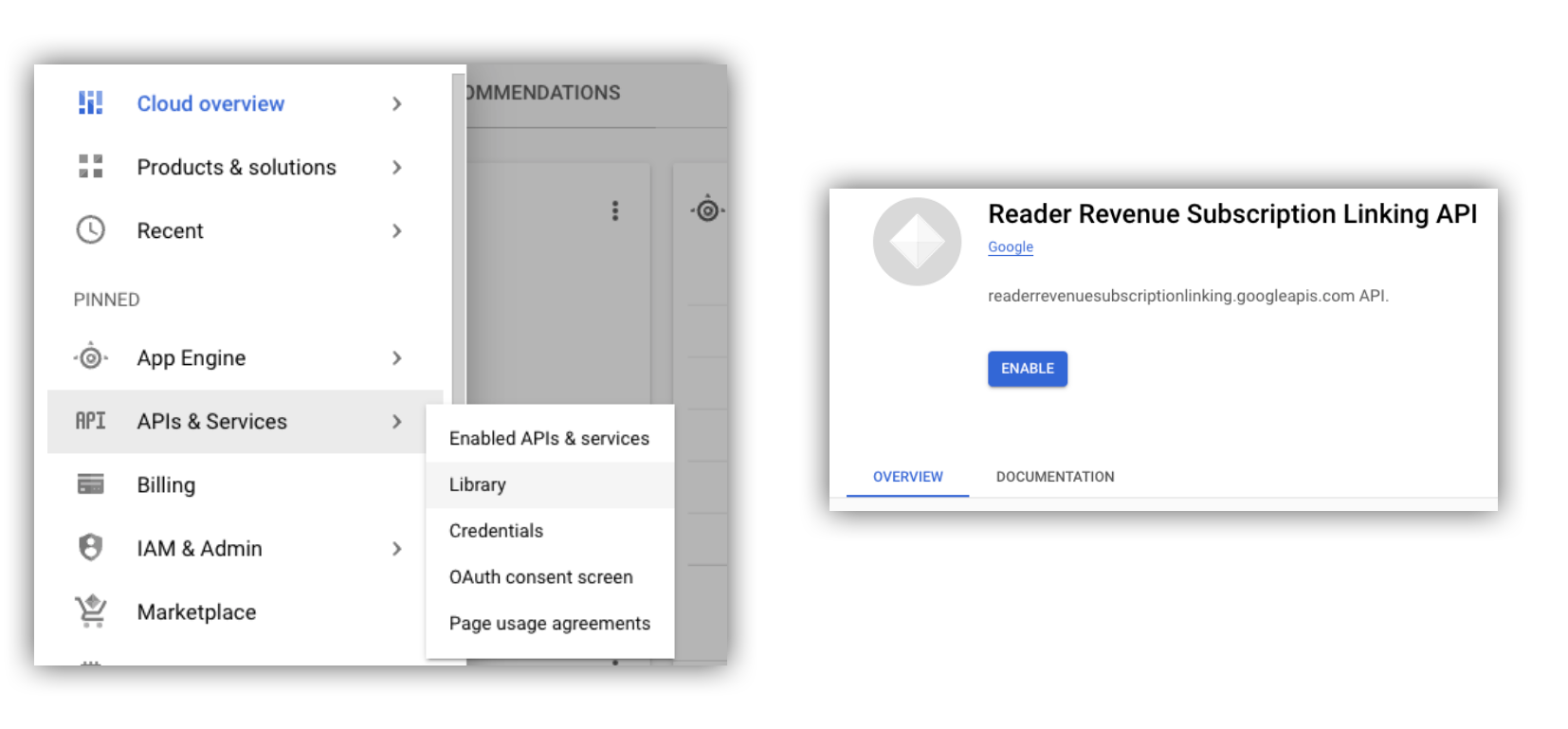
Rysunek 1. Otwieranie biblioteki interfejsów API i włączanie interfejsu API w projekcie Google Cloud.
Tworzenie konta usługi
Konta usługi umożliwiają dostęp z aplikacji do interfejsu Subscription Linking API.
- Utwórz konto usługi w konsoli projektu.
- Utwórz dane logowania do konta usługi i zapisz
plik
credentials.jsonw bezpiecznym miejscu, do którego ma dostęp Twoja aplikacja. - Przyznaj utworzonemu kontu usługi "Administrator połączeń subskrypcji" rolę uprawnień. Aby mieć szczegółową kontrolę nad możliwościami konta usługi, możesz przypisać odpowiednią rolę z tabeli poniżej.
| Możliwość / Rola | Administrator połączeń subskrypcji | Wyświetlający połączenia subskrypcji | Wyświetlający uprawnienia połączeń subskrypcji |
|---|---|---|---|
| Pobieranie uprawnień czytelnika | |||
| Pobieranie czytelników | |||
| Aktualizowanie uprawnień czytelnika | |||
| Usuwanie czytelników |
Używanie konta usługi z interfejsem Subscription Linking API
Aby uwierzytelniać wywołania interfejsu Subscription Linking API za pomocą kont usługi,
użyj biblioteki klienta googleapis
(która automatycznie obsługuje access_token żądania)
lub podpisuj żądania bezpośrednio za pomocą interfejsu REST API. Jeśli używasz interfejsu REST API,
musisz najpierw uzyskać access_token (za pomocą biblioteki Google Auth
lub przy użyciu JWT konta usługi)
a następnie dołączyć go do nagłówka Authorization.
Przykłady biblioteki klienta i interfejsu REST API
zawierają przykładowy kod wywoływania funkcji getReader(),
getReaderEntitlements(), updateReaderEntitlements() i
deleteReader().
Klucz konta usługi i domyślne uwierzytelnianie aplikacji (ADC)
Aby wywoływać interfejs Subscription Linking API, musisz mieć klucz konta usługi. Jeśli nie możesz wyeksportować klucza konta usługi ze względu na zasady organizacji, możesz użyć metody domyślnych uwierzytelniania aplikacji (ADC).
Oto przykładowe polecenie, które umożliwia skonfigurowanie ADC za pomocą gcloud auth application-default login polecenia:
gcloud config set project [YOUR_PROJECT_ID]
gcloud auth application-default login --impersonate-service-account [YOUR_SERVICE_ACCOUNT_NAME@xxx.iam.gserviceaccount.com]
To polecenie tworzy plik JSON zawierający dane logowania do konta usługi i umieszcza go w dobrze znanej lokalizacji w systemie plików. Lokalizacja zależy od systemu operacyjnego:
- Linux, macOS:
$HOME/.config/gcloud/application_default_credentials.json - Windows:
%APPDATA%\gcloud\application_default_credentials.json
Nie musisz podawać ścieżki do pliku klucza w kodzie, ponieważ ADC automatycznie wyszukuje dane logowania.
this.auth = new Auth.GoogleAuth({
   // keyFile: process.env.KEY_FILE, - You don't need to provide this field
    'https://www.googleapis.com/auth/readerrevenue.subscriptionlinking.manage'
  ],
  ...
});
Biblioteka klienta
W tej sekcji wyjaśniamy, jak używać biblioteki klienta googleapis w Node.js.
Przykładowe żądanie
import {readerrevenuesubscriptionlinking_v1, Auth} from 'googleapis';
const subscriptionLinking = readerrevenuesubscriptionlinking_v1.Readerrevenuesubscriptionlinking;

class SubscriptionLinking {
  constructor() {
    this.auth = new Auth.GoogleAuth({
      keyFile: process.env.KEY_FILE,
      scopes: [
        'https://www.googleapis.com/auth/readerrevenue.subscriptionlinking.manage'
      ],
    })
  }

  init() {
    return new subscriptionLinking(
        {version: 'v1', auth: this.auth})
  }
}

const subscriptionLinkingApi = new SubscriptionLinking();
const client = subscriptionLinkingApi.init();

/**
 * Retrieves details for a specific reader associated with the publication.
 * @async
 * @param {string} ppid - The Publisher Provided ID (ppid) for the reader.
 * @return {Promise<object>} A promise that resolves with the reader's details
 *  from the API.
 */
async function getReader(ppid) {
  const publicationId = process.env.PUBLICATION_ID;
  return await client.publications.readers.get({
    name: `publications/${publicationId}/readers/${ppid}`,
  });
}

/**
 * Updates the entitlements for a specific reader.
 * @async
 * @param {string} ppid - The Publisher Provided ID (ppid) for the reader whose
 *  entitlements are being updated.
 * @return {Promise<object>} A promise that resolves with the result of the
 *  updated entitlements object.
 */
async function updateReaderEntitlements(ppid) {
  const publicationId = process.env.PUBLICATION_ID;
  const requestBody = {
    /*
    Refer to
    https://developers.google.com/news/subscription-linking/appendix/glossary#entitlements_object
    */
    entitlements : [{
      product_id: `${publicationId}:basic`,
      subscription_token: 'abc1234',
      detail: 'This is our basic plan',
      expire_time: '2025-10-21T03:05:08.200564Z'
    }]
  };
  return await client.publications.readers.updateEntitlements({
    name: `publications/${publicationId}/readers/${ppid}/entitlements`,
    requestBody
  });
}

/**
 * Retrieves the current entitlements for a specific reader.
 * @async
 * @param {string} ppid - The Publisher Provided ID (ppid) for the reader.
 * @return {Promise<object>} A promise that resolves with the reader's entitlements object.
 */
async function getReaderEntitlements(ppid) {
  const publicationId = process.env.PUBLICATION_ID;
  return await client.publications.readers.getEntitlements({
    name: `publications/${publicationId}/readers/${ppid}/entitlements`
  });
}

/**
 * Deletes a specific Subscription Linking reader record associated with the publication.
 * @async
 * @param {string} ppid - The Publisher Provided ID (ppid) for the reader to be deleted.
 * @param {boolean=} forceDelete - If true, delete the user even if their
 *  entitlements are not empty
 * @return {Promise<object>} A promise that resolves upon successful deletion
 *  with an empty object ({})
 */
async function deleteReader(ppid, forceDelete = false) {
  const publicationId = process.env.PUBLICATION_ID;
  return await client.publications.readers.delete({
    name: `publications/${publicationId}/readers/${ppid}`
    force: forceDelete
  });
}
Interfejs API typu REST
Jeśli chcesz wywoływać punkty końcowe interfejsu REST API, możesz użyć dowolnej z tych metod, aby uzyskać accessToken do ustawienia w nagłówku Authorization.
1. Użyj GoogleAuth biblioteki
import { GoogleAuth } from 'google-auth-library';
import credentialJson from 'path_to_your_json_file' with { type: 'json' };

const auth = new GoogleAuth({
    credentials: credential_json,
    scopes: [
      'https://www.googleapis.com/auth/readerrevenue.subscriptionlinking.manage'
    ]
});

async function getAccessToken() {
    const accessToken = await auth.getAccessToken();
    return accessToken;
}
2. Wygeneruj access_token za pomocą JWT konta usługi
import fetch from 'node-fetch';
import jwt from 'jsonwebtoken';

function getSignedJwt() {
  /*
    Either store the service account credentials string in an environment variable
    Or implement logic to fetch it.
  */
  const key_file = process.env.CREDENTIALS_STRING

  const issueDate = new Date();
  const expireMinutes = 60;
  const offsetInSeconds = issueDate.getTimezoneOffset() * 60000;
  const expireDate = new Date(issueDate.getTime() + (expireMinutes * 60000));
  const iat = Math.floor((issueDate.getTime() + offsetInSeconds) / 1000);
  const exp = Math.floor((expireDate.getTime() + offsetInSeconds) / 1000);

  const token = {
    iss: key_file.client_email,
    iat,
    exp,
    aud: 'https://oauth2.googleapis.com/token',
    scope:'https://www.googleapis.com/auth/readerrevenue.subscriptionlinking.manage',
  }
  return jwt.sign(token, key_file.private_key, {
    algorithm: 'RS256',
    keyid: key_file.private_key_id,
  })
}

async function getAccessToken(signedJwt) {
  let body = new URLSearchParams();
  body.set('grant_type', 'urn:ietf:params:oauth:grant-type:jwt-bearer');
  body.set('assertion', signedJwt);
  const response = await fetch('https://oauth2.googleapis.com/token', {
    method: 'POST',
    headers: {'Content-Type': 'application/x-www-form-urlencoded'},
    body
  })
  const accessResponse = await response.json();
  return accessResponse.access_token;
}
Przykładowy kod wywołań interfejsu REST API za pomocą biblioteki Google Auth
import { GoogleAuth } from 'google-auth-library';
import fetch from 'node-fetch'
import credentialJson from 'path_to_your_json_file' with { type: 'json' };

const BASE_SUBSCRIPTION_LINKING_API_URL='https://readerrevenuesubscriptionlinking.googleapis.com/v1';
const publicationId = process.env.PUBLICATION_ID

const auth = new GoogleAuth({
    credentials: credentialJson,
    scopes: [
      'https://www.googleapis.com/auth/readerrevenue.subscriptionlinking.manage'
    ]
});

async function getAccessToken() {
    const accessToken = await auth.getAccessToken();
    return accessToken;
}

/**
 * Retrieves details for a specific reader associated with the publication.
 * @async
 * @param {string} ppid - The Publisher Provided ID (ppid) for the reader.
 * @return {object} reader json for the given ppid
 */
async function getReader(ppid) {
  const endpoint = `${BASE_SUBSCRIPTION_LINKING_API_URL}/publications/${publicationId}/readers/${ppid}`;
  const accessToken = await getAccessToken();
  const response = await fetch(endpoint, {
     method: 'GET',
     headers: {
       Authorization: `Bearer ${accessToken}`,
     },
   });
  const reader = await response.json();
  return reader;
}

/**
 * Updates the entitlements for a specific reader.
 * @async
 * @param {string} ppid - The Publisher Provided ID (ppid) for the reader.
 * @return {object} the updated entitlements object in json.
 */
async function updateReaderEntitlements(ppid) {
  const endpoint = `${BASE_SUBSCRIPTION_LINKING_API_URL}/publications/${publicationId}/readers/${ppid}/entitlements`;
  const requestBody = {
    /*
    Refer to
    https://developers.google.com/news/subscription-linking/appendix/glossary#entitlements_object
    */
    entitlements : [{
      product_id: `${publicationId}:basic`,
      subscription_token: 'abc1234',
      detail: 'This is our basic plan',
      expire_time: '2025-10-21T03:05:08.200564Z'
    }]
  };
  const response = await fetch(endpoint, {
     method: 'PATCH',
     headers: {
       Authorization: `Bearer ${accessToken}`,
       'Content-Type': 'application/json',
     },
     body: JSON.stringify(requestBody)
   })
  const updatedEntitlements = await response.json();
  return updatedEntitlements;
}

/**
 * Retrieves the current entitlements for a specific reader.
 * @async
 * @param {string} ppid - The Publisher Provided ID (ppid) for the reader.
 * @return {object} the reader's entitlements object in json.
 */
async function getReaderEntitlements(ppid) {
  const endpoint = `${BASE_SUBSCRIPTION_LINKING_API_URL}/publications/${publicationId}/readers/${ppid}/entitlements`;
  const accessToken = await getAccessToken();
  const response = await fetch(endpoint, {
     method: 'GET',
     headers: {
       Authorization: `Bearer ${accessToken}`,
     },
   });
  const entitlements = await response.json();
  return entitlements;
}

/**
 * Deletes a specific Subscription Linkikng reader record associated with the publication.
 * @async
 * @param {string} ppid - The Publisher Provided ID (ppid) for the reader.
 * @param {boolean=} forceDelete - If true, delete the user even if their
 *  entitlements are not empty
 * @return {object} returns an empty object ({}) if the delete operation is successful
 */
async function deleteReader(ppid, forceDelete = false) {
  const endpoint = `${BASE_SUBSCRIPTION_LINKING_API_URL}/publications/${publicationId}/readers/${ppid}?force=${forceDelete}`;
  const response = await fetch(endpoint, {
     method: 'DELETE',
     headers: {
       Authorization: `Bearer ${accessToken}`,
     }
   });
  const result = await response.json();
  return result;
}