
पब्लिशर, सर्वर-साइड इंटिग्रेशन का इस्तेमाल मुख्य रूप से उनका कॉन्टेंट पढ़ने वाले लोगों और उनके एनटाइटलमेंट को मैनेज करने के लिए करेंगे. पब्लिशर किसी पीपीआईडी के लिए, प्रॉडक्ट आईडी के एनटाइटलमेंट से जुड़े Google के रिकॉर्ड को अपडेट करने के लिए, UpdateReaderEntitlements का इस्तेमाल करते हैं.
Google Cloud का सेटअप
Google Cloud में Subscription Linking API कॉन्फ़िगर करने की प्रोसेस में दो अहम चरण शामिल हैं:
- दिए गए किसी प्रोजेक्ट के लिए, इस एपीआई को चालू करना
- एपीआई ऐक्सेस करने के लिए, सेवा खाता बनाना
Subscription Linking API चालू करना
सेवा खाते का इस्तेमाल करने और लोगों के एनटाइटलमेंट को मैनेज करने के लिए, Google Cloud प्रोजेक्ट में Subscription Linking API चालू होना चाहिए. साथ ही, सही तरीके से कॉन्फ़िगर किया गया OAuth सेवा खाता मौजूद होना चाहिए. किसी प्रोजेक्ट के लिए Subscription Linking API चालू करने के लिए, मेन्यू -> एपीआई और सेवाएं -> लाइब्रेरी पर जाएं और Subscription Linking खोजें या सीधे इस पेज पर जाएं:
https://console.cloud.google.com/apis/library?project=gcp_project_id
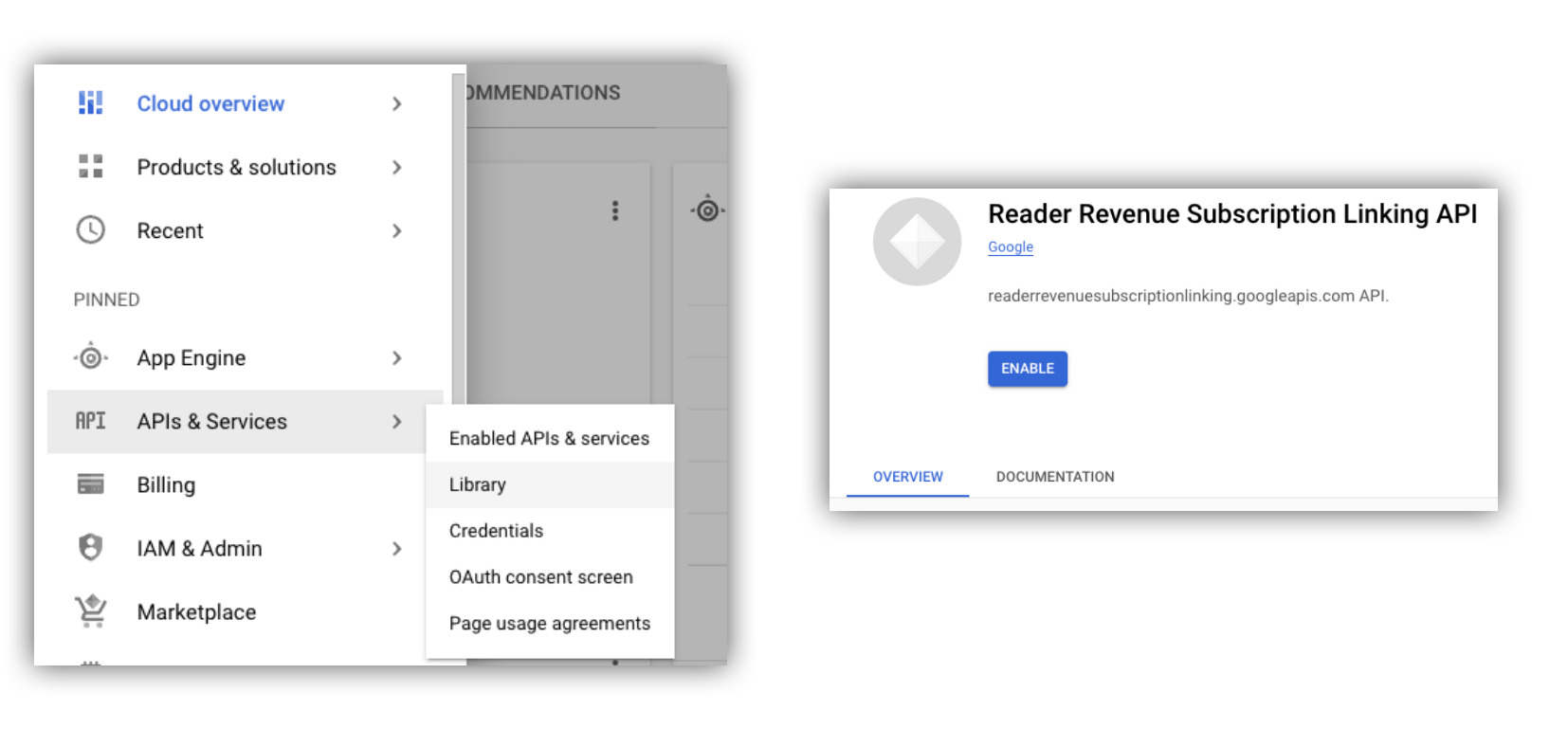
पहली इमेज. एपीआई लाइब्रेरी पर जाना और Google Cloud प्रोजेक्ट के लिए एपीआई चालू करना.
सेवा खाता बनाना
सेवा खातों का इस्तेमाल, आपके ऐप्लिकेशन से Subscription Linking API को ऐक्सेस करने की अनुमति देने के लिए किया जाता है.
- अपने प्रोजेक्ट के कंसोल में, सेवा खाता बनाएं.
- सेवा खाते के लिए क्रेडेंशियल बनाएं और
credentials.jsonफ़ाइल को किसी ऐसी सुरक्षित जगह पर सेव करें जहां से आपका ऐप्लिकेशन इसे ऐक्सेस कर सके. - आपने जो सेवा खाता बनाया है उसके लिए, आईएएम की यह भूमिका तय करें: "सदस्यता लिंक करने वाला एडमिन". सेवा खाते की क्षमताओं पर विस्तृत कंट्रोल के लिए, यहां दी गई टेबल से उचित भूमिका असाइन करें.
| क्षमता / भूमिका | सदस्यता लिंक करने वाला एडमिन | सदस्यता लिंक करने की सुविधा से जुड़ी ऑडियंस | सदस्यता लिंक करने की सुविधा के एनटाइटलमेंट से जुड़ी ऑडियंस |
|---|---|---|---|
| ऑडियंस के एनटाइटलमेंट देखना | |||
| ऑडियंस का डेटा देखना | |||
| ऑडियंस के एनटाइटलमेंट अपडेट करना | |||
| ऑडियंस का डेटा मिटाना |
Subscription Linking API के साथ सेवा खाते का इस्तेमाल करना
सेवा खातों की मदद से, Subscription Linking API की पुष्टि के अनुरोधों को ऑथराइज़ करने के लिए, इनमें से कोई एक तरीका इस्तेमाल करें: googleapis क्लाइंट लाइब्रेरी का इस्तेमाल करें. यह लाइब्रेरी, access_token के अनुरोधों को अपने-आप मैनेज करती है. इसके अलावा, REST API की मदद से सीधे तौर पर अनुरोधों पर हस्ताक्षर करें. अगर REST API का इस्तेमाल किया जा रहा है, तो आपको सबसे पहले access_token हासिल करना होगा. इसके लिए, Google Auth library का इस्तेमाल करें या सेवा खाते के JWT का इस्तेमाल करें. इसके बाद, इसे Authorization हेडर में शामिल करें
नीचे दिए गए क्लाइंट लाइब्रेरी और REST API के दोनों उदाहरणों में, getReader(), getReaderEntitlements(), updateReaderEntitlements(), और deleteReader() को कॉल करने का सैंपल कोड दिया गया है.
सेवा खाते की कुंजी और ऐप्लिकेशन के डिफ़ॉल्ट क्रेडेंशियल (एडीसी)
Subscription Linking API को कॉल करने के लिए, आपके पास सेवा खाते की कुंजी होनी चाहिए. अगर संगठन की नीति की वजह से, सेवा खाते की कुंजी एक्सपोर्ट नहीं की जा सकती, तो ऐप्लिकेशन के डिफ़ॉल्ट क्रेडेंशियल (एडीसी) तरीके का इस्तेमाल किया जा सकता है.
gcloud auth application-default login कमांड का इस्तेमाल करके, एडीसी सेट अप करने के लिए यहां एक सैंपल कमांड दी गई है:
gcloud config set project [YOUR_PROJECT_ID]
gcloud auth application-default login --impersonate-service-account [YOUR_SERVICE_ACCOUNT_NAME@xxx.iam.gserviceaccount.com]
इस कमांड से, सेवा खाते के क्रेडेंशियल वाली एक JSON फ़ाइल बनती है. साथ ही, यह फ़ाइल आपके फ़ाइल सिस्टम में किसी जानी-पहचानी जगह पर सेव हो जाती है. जगह की जानकारी, आपके ऑपरेटिंग सिस्टम के हिसाब से तय होती है:
- Linux, macOS:
$HOME/.config/gcloud/application_default_credentials.json - Windows:
%APPDATA%\gcloud\application_default_credentials.json
आपको अपने कोड में, कुंजी फ़ाइल का पाथ देने की ज़रूरत नहीं है. ऐसा इसलिए, क्योंकि ADC अपने-आप क्रेडेंशियल खोजता है.
this.auth = new Auth.GoogleAuth({
   // keyFile: process.env.KEY_FILE, - You don't need to provide this field
    'https://www.googleapis.com/auth/readerrevenue.subscriptionlinking.manage'
  ],
  ...
});
क्लाइंट लाइब्रेरी
इस सेक्शन में, Node.js में googleapis क्लाइंट लाइब्रेरी का इस्तेमाल करने का तरीका बताया गया है.
अनुरोध का उदाहरण
import {readerrevenuesubscriptionlinking_v1, Auth} from 'googleapis';
const subscriptionLinking = readerrevenuesubscriptionlinking_v1.Readerrevenuesubscriptionlinking;

class SubscriptionLinking {
  constructor() {
    this.auth = new Auth.GoogleAuth({
      keyFile: process.env.KEY_FILE,
      scopes: [
        'https://www.googleapis.com/auth/readerrevenue.subscriptionlinking.manage'
      ],
    })
  }

  init() {
    return new subscriptionLinking(
        {version: 'v1', auth: this.auth})
  }
}

const subscriptionLinkingApi = new SubscriptionLinking();
const client = subscriptionLinkingApi.init();

/**
 * Retrieves details for a specific reader associated with the publication.
 * @async
 * @param {string} ppid - The Publisher Provided ID (ppid) for the reader.
 * @return {Promise<object>} A promise that resolves with the reader's details
 *  from the API.
 */
async function getReader(ppid) {
  const publicationId = process.env.PUBLICATION_ID;
  return await client.publications.readers.get({
    name: `publications/${publicationId}/readers/${ppid}`,
  });
}

/**
 * Updates the entitlements for a specific reader.
 * @async
 * @param {string} ppid - The Publisher Provided ID (ppid) for the reader whose
 *  entitlements are being updated.
 * @return {Promise<object>} A promise that resolves with the result of the
 *  updated entitlements object.
 */
async function updateReaderEntitlements(ppid) {
  const publicationId = process.env.PUBLICATION_ID;
  const requestBody = {
    /*
    Refer to
    https://developers.google.com/news/subscription-linking/appendix/glossary#entitlements_object
    */
    entitlements : [{
      product_id: `${publicationId}:basic`,
      subscription_token: 'abc1234',
      detail: 'This is our basic plan',
      expire_time: '2025-10-21T03:05:08.200564Z'
    }]
  };
  return await client.publications.readers.updateEntitlements({
    name: `publications/${publicationId}/readers/${ppid}/entitlements`,
    requestBody
  });
}

/**
 * Retrieves the current entitlements for a specific reader.
 * @async
 * @param {string} ppid - The Publisher Provided ID (ppid) for the reader.
 * @return {Promise<object>} A promise that resolves with the reader's entitlements object.
 */
async function getReaderEntitlements(ppid) {
  const publicationId = process.env.PUBLICATION_ID;
  return await client.publications.readers.getEntitlements({
    name: `publications/${publicationId}/readers/${ppid}/entitlements`
  });
}

/**
 * Deletes a specific Subscription Linking reader record associated with the publication.
 * @async
 * @param {string} ppid - The Publisher Provided ID (ppid) for the reader to be deleted.
 * @param {boolean=} forceDelete - If true, delete the user even if their
 *  entitlements are not empty
 * @return {Promise<object>} A promise that resolves upon successful deletion
 *  with an empty object ({})
 */
async function deleteReader(ppid, forceDelete = false) {
  const publicationId = process.env.PUBLICATION_ID;
  return await client.publications.readers.delete({
    name: `publications/${publicationId}/readers/${ppid}`
    force: forceDelete
  });
}
REST API
अगर आपको REST API एंडपॉइंट को कॉल करना है, तो accessToken हेडर में सेट करने के लिए, accessToken पाने के लिए इनमें से किसी भी तरीके का इस्तेमाल किया जा सकता है.Authorization
1. GoogleAuth लाइब्रेरी का इस्तेमाल करना
import { GoogleAuth } from 'google-auth-library';
import credentialJson from 'path_to_your_json_file' with { type: 'json' };

const auth = new GoogleAuth({
    credentials: credential_json,
    scopes: [
      'https://www.googleapis.com/auth/readerrevenue.subscriptionlinking.manage'
    ]
});

async function getAccessToken() {
    const accessToken = await auth.getAccessToken();
    return accessToken;
}
2. सेवा खाते के JWT का इस्तेमाल करके access_token जनरेट करना
import fetch from 'node-fetch';
import jwt from 'jsonwebtoken';

function getSignedJwt() {
  /*
    Either store the service account credentials string in an environment variable
    Or implement logic to fetch it.
  */
  const key_file = process.env.CREDENTIALS_STRING

  const issueDate = new Date();
  const expireMinutes = 60;
  const offsetInSeconds = issueDate.getTimezoneOffset() * 60000;
  const expireDate = new Date(issueDate.getTime() + (expireMinutes * 60000));
  const iat = Math.floor((issueDate.getTime() + offsetInSeconds) / 1000);
  const exp = Math.floor((expireDate.getTime() + offsetInSeconds) / 1000);

  const token = {
    iss: key_file.client_email,
    iat,
    exp,
    aud: 'https://oauth2.googleapis.com/token',
    scope:'https://www.googleapis.com/auth/readerrevenue.subscriptionlinking.manage',
  }
  return jwt.sign(token, key_file.private_key, {
    algorithm: 'RS256',
    keyid: key_file.private_key_id,
  })
}

async function getAccessToken(signedJwt) {
  let body = new URLSearchParams();
  body.set('grant_type', 'urn:ietf:params:oauth:grant-type:jwt-bearer');
  body.set('assertion', signedJwt);
  const response = await fetch('https://oauth2.googleapis.com/token', {
    method: 'POST',
    headers: {'Content-Type': 'application/x-www-form-urlencoded'},
    body
  })
  const accessResponse = await response.json();
  return accessResponse.access_token;
}
Google Auth लाइब्रेरी के साथ REST API कॉल के लिए सैंपल कोड
import { GoogleAuth } from 'google-auth-library';
import fetch from 'node-fetch'
import credentialJson from 'path_to_your_json_file' with { type: 'json' };

const BASE_SUBSCRIPTION_LINKING_API_URL='https://readerrevenuesubscriptionlinking.googleapis.com/v1';
const publicationId = process.env.PUBLICATION_ID

const auth = new GoogleAuth({
    credentials: credentialJson,
    scopes: [
      'https://www.googleapis.com/auth/readerrevenue.subscriptionlinking.manage'
    ]
});

async function getAccessToken() {
    const accessToken = await auth.getAccessToken();
    return accessToken;
}

/**
 * Retrieves details for a specific reader associated with the publication.
 * @async
 * @param {string} ppid - The Publisher Provided ID (ppid) for the reader.
 * @return {object} reader json for the given ppid
 */
async function getReader(ppid) {
  const endpoint = `${BASE_SUBSCRIPTION_LINKING_API_URL}/publications/${publicationId}/readers/${ppid}`;
  const accessToken = await getAccessToken();
  const response = await fetch(endpoint, {
     method: 'GET',
     headers: {
       Authorization: `Bearer ${accessToken}`,
     },
   });
  const reader = await response.json();
  return reader;
}

/**
 * Updates the entitlements for a specific reader.
 * @async
 * @param {string} ppid - The Publisher Provided ID (ppid) for the reader.
 * @return {object} the updated entitlements object in json.
 */
async function updateReaderEntitlements(ppid) {
  const endpoint = `${BASE_SUBSCRIPTION_LINKING_API_URL}/publications/${publicationId}/readers/${ppid}/entitlements`;
  const requestBody = {
    /*
    Refer to
    https://developers.google.com/news/subscription-linking/appendix/glossary#entitlements_object
    */
    entitlements : [{
      product_id: `${publicationId}:basic`,
      subscription_token: 'abc1234',
      detail: 'This is our basic plan',
      expire_time: '2025-10-21T03:05:08.200564Z'
    }]
  };
  const response = await fetch(endpoint, {
     method: 'PATCH',
     headers: {
       Authorization: `Bearer ${accessToken}`,
       'Content-Type': 'application/json',
     },
     body: JSON.stringify(requestBody)
   })
  const updatedEntitlements = await response.json();
  return updatedEntitlements;
}

/**
 * Retrieves the current entitlements for a specific reader.
 * @async
 * @param {string} ppid - The Publisher Provided ID (ppid) for the reader.
 * @return {object} the reader's entitlements object in json.
 */
async function getReaderEntitlements(ppid) {
  const endpoint = `${BASE_SUBSCRIPTION_LINKING_API_URL}/publications/${publicationId}/readers/${ppid}/entitlements`;
  const accessToken = await getAccessToken();
  const response = await fetch(endpoint, {
     method: 'GET',
     headers: {
       Authorization: `Bearer ${accessToken}`,
     },
   });
  const entitlements = await response.json();
  return entitlements;
}

/**
 * Deletes a specific Subscription Linkikng reader record associated with the publication.
 * @async
 * @param {string} ppid - The Publisher Provided ID (ppid) for the reader.
 * @param {boolean=} forceDelete - If true, delete the user even if their
 *  entitlements are not empty
 * @return {object} returns an empty object ({}) if the delete operation is successful
 */
async function deleteReader(ppid, forceDelete = false) {
  const endpoint = `${BASE_SUBSCRIPTION_LINKING_API_URL}/publications/${publicationId}/readers/${ppid}?force=${forceDelete}`;
  const response = await fetch(endpoint, {
     method: 'DELETE',
     headers: {
       Authorization: `Bearer ${accessToken}`,
     }
   });
  const result = await response.json();
  return result;
}