
Die serverseitige Integration verwenden Verlage und Webpublisher hauptsächlich, um Leser und ihre Berechtigungen zu verwalten. Mit UpdateReaderEntitlements aktualisieren Verlage und Webpublisher den Google-Eintrag einer Produkt-ID-Berechtigung für eine PPID.
Google Cloud-Einrichtung
Die Konfiguration der Aboverknüpfung in Google Cloud beinhaltet zwei wichtige Schritte:
- Aktivieren der API für ein bestimmtes Projekt
- Erstellen eines Dienstkontos für den Zugriff auf die API
Subscription Linking API aktivieren
Damit ein Dienstkonto verwendet und die Berechtigungen eines Lesers verwaltet werden können, müssen in einem Google Cloud-Projekt sowohl die Subscription Linking API als auch ein ordnungsgemäß konfiguriertes OAuth-Dienstkonto aktiviert sein. Wenn du die Subscription Linking API für ein Projekt aktivieren möchtest, öffne das Menü -> „APIs und Dienste“ -> „Bibliothek“ und suche nach Subscription Linking. Du kannst die Seite aber auch direkt aufrufen:
https://console.cloud.google.com/apis/library?project=gcp_project_id
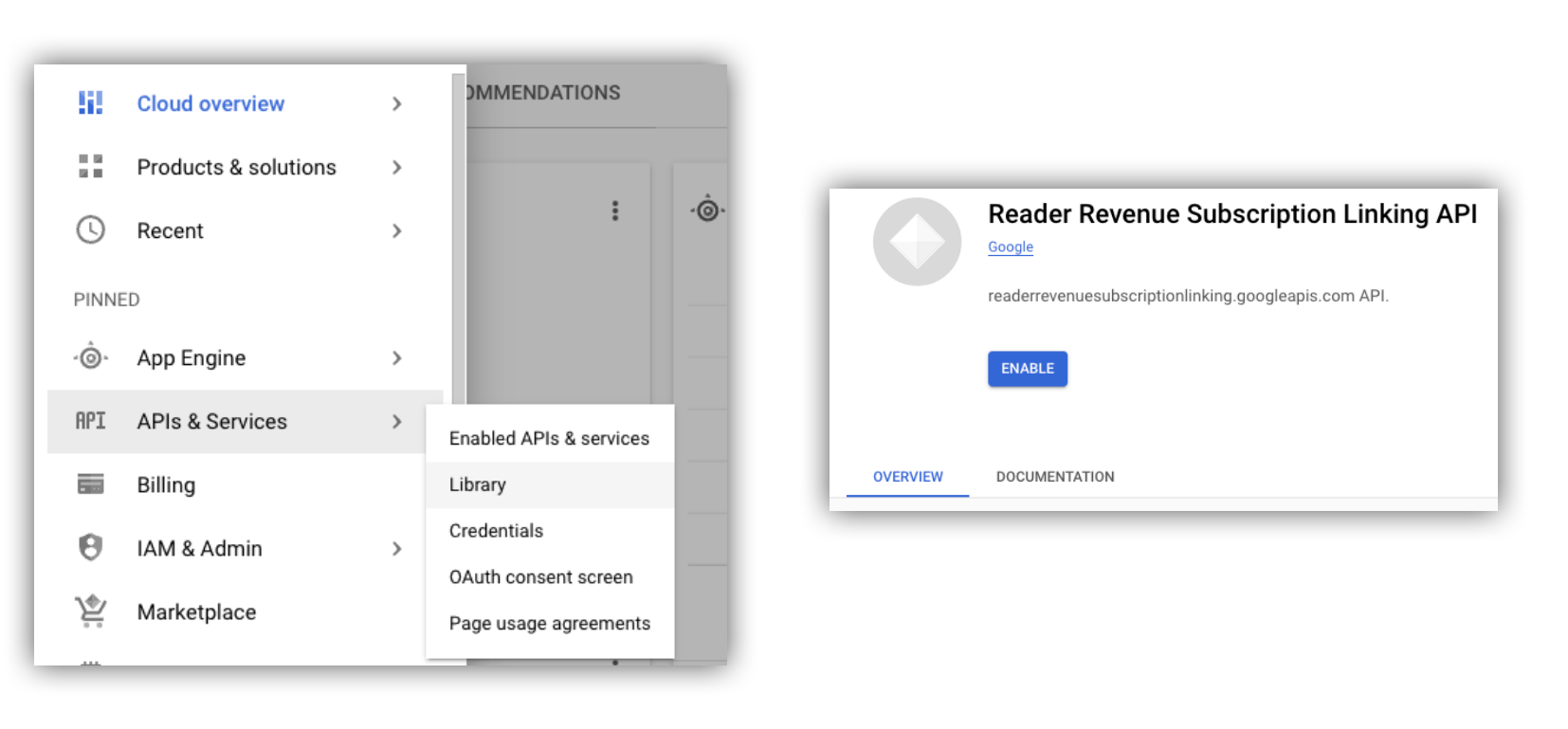
Abbildung 1 : API-Bibliothek aufrufen und die API für ein Google Cloud-Projekt aktivieren
Dienstkonto erstellen
Dienstkonten werden verwendet, um den Zugriff deiner Anwendung auf die Subscription Linking API zu ermöglichen.
- Erstelle ein Dienstkonto in der Konsole deines Projekts.
- Erstelle Anmeldedaten für das Dienstkonto, und speichere
die Datei
credentials.jsonan einem sicheren Ort, auf den deine Anwendung zugreifen kann. - Weise dem erstellten Dienstkonto die IAM-Rolle „Administrator von Aboverknüpfungen“ zu. Um detaillierte Kontrolle über die Funktionen des Dienstkontos zu haben, kannst du die entsprechende Rolle aus der folgenden Tabelle zuweisen.
| Funktion / Rolle | Administrator von Aboverknüpfungen | Betrachter von Aboverknüpfungen | Betrachter von Berechtigungen für Aboverknüpfungen |
|---|---|---|---|
| Berechtigungen der Leser abrufen | |||
| Leser abrufen | |||
| Berechtigungen der Leser aktualisieren | |||
| Leser löschen |
Dienstkonto mit der Subscription Linking API verwenden
Um Aufrufe der Subscription Linking API mit Dienstkonten zu authentifizieren,
verwende entweder die googleapis-Clientbibliothek
(die access_token Anfragen automatisch verarbeitet)
oder signiere Anfragen direkt mit der REST API. Wenn du die REST API verwendest,
musst du zuerst ein access_token abrufen (über die Google Auth-Bibliothek
oder mit einem Dienstkonto-JWT)
und es dann in den Authorization Header einfügen.
In den folgenden Beispielen für Clientbibliotheken und REST APIs
findest du Beispielcode für den Aufruf von getReader(),
getReaderEntitlements(), updateReaderEntitlements() und
deleteReader().
Dienstkontoschlüssel und Standardanmeldedaten für Anwendungen (Application Default Credentials, ADC)
Um die Subscription Linking API aufzurufen, benötigst du einen Dienstkontoschlüssel. Wenn du aufgrund deiner Organisationsrichtlinie keinen Dienstkontoschlüssel exportieren kannst, kannst du die Methode „Standardanmeldedaten für Anwendungen“ (Application Default Credentials, ADC) verwenden.
Hier ist ein Beispielbefehl zum Einrichten von ADC mit dem gcloud auth application-default login Befehl:
gcloud config set project [YOUR_PROJECT_ID]
gcloud auth application-default login --impersonate-service-account [YOUR_SERVICE_ACCOUNT_NAME@xxx.iam.gserviceaccount.com]
Mit diesem Befehl wird eine JSON-Datei mit den Anmeldedaten des Dienstkontos erstellt und an einem bekannten Speicherort in deinem Dateisystem abgelegt. Der Speicherort hängt von deinem Betriebssystem ab:
- Linux, macOS:
$HOME/.config/gcloud/application_default_credentials.json - Windows:
%APPDATA%\gcloud\application_default_credentials.json
Du musst den Pfad zur Schlüsseldatei nicht in deinem Code angeben, da ADC automatisch nach Anmeldedaten sucht.
this.auth = new Auth.GoogleAuth({
   // keyFile: process.env.KEY_FILE, - You don't need to provide this field
    'https://www.googleapis.com/auth/readerrevenue.subscriptionlinking.manage'
  ],
  ...
});
Clientbibliothek
In diesem Abschnitt wird erläutert, wie du die googleapis-Clientbibliothek in Node.js verwendest.
Beispielanfrage
import {readerrevenuesubscriptionlinking_v1, Auth} from 'googleapis';
const subscriptionLinking = readerrevenuesubscriptionlinking_v1.Readerrevenuesubscriptionlinking;

class SubscriptionLinking {
  constructor() {
    this.auth = new Auth.GoogleAuth({
      keyFile: process.env.KEY_FILE,
      scopes: [
        'https://www.googleapis.com/auth/readerrevenue.subscriptionlinking.manage'
      ],
    })
  }

  init() {
    return new subscriptionLinking(
        {version: 'v1', auth: this.auth})
  }
}

const subscriptionLinkingApi = new SubscriptionLinking();
const client = subscriptionLinkingApi.init();

/**
 * Retrieves details for a specific reader associated with the publication.
 * @async
 * @param {string} ppid - The Publisher Provided ID (ppid) for the reader.
 * @return {Promise<object>} A promise that resolves with the reader's details
 *  from the API.
 */
async function getReader(ppid) {
  const publicationId = process.env.PUBLICATION_ID;
  return await client.publications.readers.get({
    name: `publications/${publicationId}/readers/${ppid}`,
  });
}

/**
 * Updates the entitlements for a specific reader.
 * @async
 * @param {string} ppid - The Publisher Provided ID (ppid) for the reader whose
 *  entitlements are being updated.
 * @return {Promise<object>} A promise that resolves with the result of the
 *  updated entitlements object.
 */
async function updateReaderEntitlements(ppid) {
  const publicationId = process.env.PUBLICATION_ID;
  const requestBody = {
    /*
    Refer to
    https://developers.google.com/news/subscription-linking/appendix/glossary#entitlements_object
    */
    entitlements : [{
      product_id: `${publicationId}:basic`,
      subscription_token: 'abc1234',
      detail: 'This is our basic plan',
      expire_time: '2025-10-21T03:05:08.200564Z'
    }]
  };
  return await client.publications.readers.updateEntitlements({
    name: `publications/${publicationId}/readers/${ppid}/entitlements`,
    requestBody
  });
}

/**
 * Retrieves the current entitlements for a specific reader.
 * @async
 * @param {string} ppid - The Publisher Provided ID (ppid) for the reader.
 * @return {Promise<object>} A promise that resolves with the reader's entitlements object.
 */
async function getReaderEntitlements(ppid) {
  const publicationId = process.env.PUBLICATION_ID;
  return await client.publications.readers.getEntitlements({
    name: `publications/${publicationId}/readers/${ppid}/entitlements`
  });
}

/**
 * Deletes a specific Subscription Linking reader record associated with the publication.
 * @async
 * @param {string} ppid - The Publisher Provided ID (ppid) for the reader to be deleted.
 * @param {boolean=} forceDelete - If true, delete the user even if their
 *  entitlements are not empty
 * @return {Promise<object>} A promise that resolves upon successful deletion
 *  with an empty object ({})
 */
async function deleteReader(ppid, forceDelete = false) {
  const publicationId = process.env.PUBLICATION_ID;
  return await client.publications.readers.delete({
    name: `publications/${publicationId}/readers/${ppid}`
    force: forceDelete
  });
}
REST API
Wenn du REST API-Endpunkte aufrufen möchtest, kannst du eine der beiden Methoden verwenden, um ein accessToken abzurufen und es im Authorization-Header festzulegen.
1. GoogleAuth-Bibliothek verwenden
import { GoogleAuth } from 'google-auth-library';
import credentialJson from 'path_to_your_json_file' with { type: 'json' };

const auth = new GoogleAuth({
    credentials: credential_json,
    scopes: [
      'https://www.googleapis.com/auth/readerrevenue.subscriptionlinking.manage'
    ]
});

async function getAccessToken() {
    const accessToken = await auth.getAccessToken();
    return accessToken;
}
2. access_token mit einem Dienstkonto-JWT generieren
import fetch from 'node-fetch';
import jwt from 'jsonwebtoken';

function getSignedJwt() {
  /*
    Either store the service account credentials string in an environment variable
    Or implement logic to fetch it.
  */
  const key_file = process.env.CREDENTIALS_STRING

  const issueDate = new Date();
  const expireMinutes = 60;
  const offsetInSeconds = issueDate.getTimezoneOffset() * 60000;
  const expireDate = new Date(issueDate.getTime() + (expireMinutes * 60000));
  const iat = Math.floor((issueDate.getTime() + offsetInSeconds) / 1000);
  const exp = Math.floor((expireDate.getTime() + offsetInSeconds) / 1000);

  const token = {
    iss: key_file.client_email,
    iat,
    exp,
    aud: 'https://oauth2.googleapis.com/token',
    scope:'https://www.googleapis.com/auth/readerrevenue.subscriptionlinking.manage',
  }
  return jwt.sign(token, key_file.private_key, {
    algorithm: 'RS256',
    keyid: key_file.private_key_id,
  })
}

async function getAccessToken(signedJwt) {
  let body = new URLSearchParams();
  body.set('grant_type', 'urn:ietf:params:oauth:grant-type:jwt-bearer');
  body.set('assertion', signedJwt);
  const response = await fetch('https://oauth2.googleapis.com/token', {
    method: 'POST',
    headers: {'Content-Type': 'application/x-www-form-urlencoded'},
    body
  })
  const accessResponse = await response.json();
  return accessResponse.access_token;
}
Beispielcode für REST API-Aufrufe mit der Google Auth-Bibliothek
import { GoogleAuth } from 'google-auth-library';
import fetch from 'node-fetch'
import credentialJson from 'path_to_your_json_file' with { type: 'json' };

const BASE_SUBSCRIPTION_LINKING_API_URL='https://readerrevenuesubscriptionlinking.googleapis.com/v1';
const publicationId = process.env.PUBLICATION_ID

const auth = new GoogleAuth({
    credentials: credentialJson,
    scopes: [
      'https://www.googleapis.com/auth/readerrevenue.subscriptionlinking.manage'
    ]
});

async function getAccessToken() {
    const accessToken = await auth.getAccessToken();
    return accessToken;
}

/**
 * Retrieves details for a specific reader associated with the publication.
 * @async
 * @param {string} ppid - The Publisher Provided ID (ppid) for the reader.
 * @return {object} reader json for the given ppid
 */
async function getReader(ppid) {
  const endpoint = `${BASE_SUBSCRIPTION_LINKING_API_URL}/publications/${publicationId}/readers/${ppid}`;
  const accessToken = await getAccessToken();
  const response = await fetch(endpoint, {
     method: 'GET',
     headers: {
       Authorization: `Bearer ${accessToken}`,
     },
   });
  const reader = await response.json();
  return reader;
}

/**
 * Updates the entitlements for a specific reader.
 * @async
 * @param {string} ppid - The Publisher Provided ID (ppid) for the reader.
 * @return {object} the updated entitlements object in json.
 */
async function updateReaderEntitlements(ppid) {
  const endpoint = `${BASE_SUBSCRIPTION_LINKING_API_URL}/publications/${publicationId}/readers/${ppid}/entitlements`;
  const requestBody = {
    /*
    Refer to
    https://developers.google.com/news/subscription-linking/appendix/glossary#entitlements_object
    */
    entitlements : [{
      product_id: `${publicationId}:basic`,
      subscription_token: 'abc1234',
      detail: 'This is our basic plan',
      expire_time: '2025-10-21T03:05:08.200564Z'
    }]
  };
  const response = await fetch(endpoint, {
     method: 'PATCH',
     headers: {
       Authorization: `Bearer ${accessToken}`,
       'Content-Type': 'application/json',
     },
     body: JSON.stringify(requestBody)
   })
  const updatedEntitlements = await response.json();
  return updatedEntitlements;
}

/**
 * Retrieves the current entitlements for a specific reader.
 * @async
 * @param {string} ppid - The Publisher Provided ID (ppid) for the reader.
 * @return {object} the reader's entitlements object in json.
 */
async function getReaderEntitlements(ppid) {
  const endpoint = `${BASE_SUBSCRIPTION_LINKING_API_URL}/publications/${publicationId}/readers/${ppid}/entitlements`;
  const accessToken = await getAccessToken();
  const response = await fetch(endpoint, {
     method: 'GET',
     headers: {
       Authorization: `Bearer ${accessToken}`,
     },
   });
  const entitlements = await response.json();
  return entitlements;
}

/**
 * Deletes a specific Subscription Linkikng reader record associated with the publication.
 * @async
 * @param {string} ppid - The Publisher Provided ID (ppid) for the reader.
 * @param {boolean=} forceDelete - If true, delete the user even if their
 *  entitlements are not empty
 * @return {object} returns an empty object ({}) if the delete operation is successful
 */
async function deleteReader(ppid, forceDelete = false) {
  const endpoint = `${BASE_SUBSCRIPTION_LINKING_API_URL}/publications/${publicationId}/readers/${ppid}?force=${forceDelete}`;
  const response = await fetch(endpoint, {
     method: 'DELETE',
     headers: {
       Authorization: `Bearer ${accessToken}`,
     }
   });
  const result = await response.json();
  return result;
}