After Google converts your service provider accounts to advanced accounts
and enables UCP checkout service management for your test accounts, proceed
to configuring and testing the merchant account linking flow in sandbox mode.
> [!IMPORTANT]
> **Important:** Perform all sandbox testing steps using the test service provider account and test merchant account that you created in [Test accounts setup](https://developers.google.com/merchant/3p/quickstart/test-accounts).
## Validate the UCP integration in the sandbox test environment
Verify your capability endpoints before onboarding merchants:
1. **Exchange Test Credentials:**
- Generate a **Test** [**Checkout API Secret Key**](https://developers.google.com/merchant/ucp/guides/integration-ui/integration#set_up_checkout_api_keys) and reply to the support case you opened during your [enablement request](https://developers.google.com/merchant/3p/guides/ucp/checkout/request-testing) to request to share it securely with Google.
- Receive your **Order Webhook API Key** from Google to authenticate incoming test events.
2. **Execute End-to-End Test Transactions:**
- Complete sample checkout transactions in sandbox mode to verify payload validation, error responses, and webhook acknowledgments.
## Implement the merchant account linking dialog flow
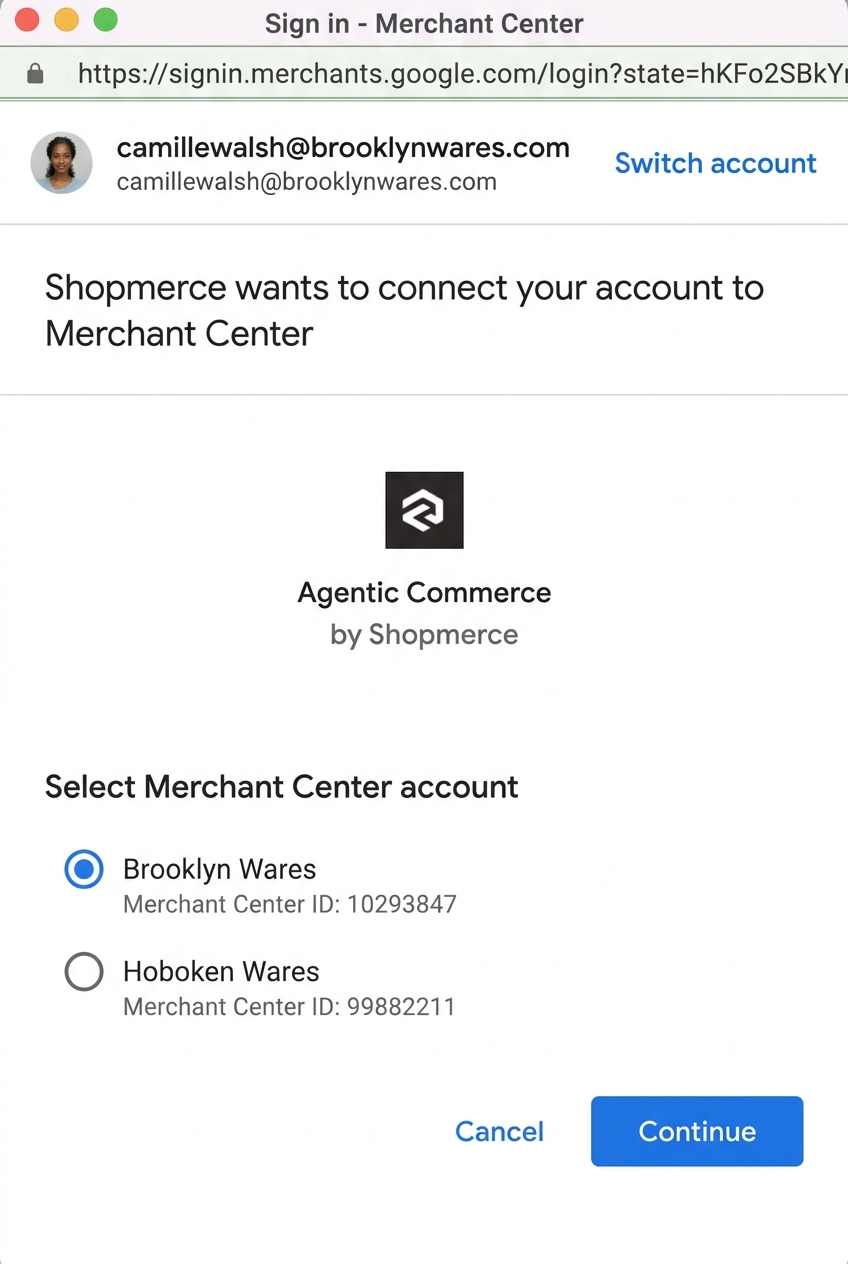
Merchants link their existing Google Merchant Center accounts to your
platform through a secure, Google-hosted dialog window opened from your merchant
portal.
> [!IMPORTANT]
> **Important:** Because your platform can't check a merchant's UCP program eligibility before the account link is established, clarify in your onboarding UI that linking a Merchant Center account doesn't guarantee UCP checkout eligibility. For example, label your onboarding action **Connect to check eligibility** rather than **Enable Checkout**.
### Dialog launch
Your portal opens a secure dialog window targeting the Google
Merchant Center linking URL with your advanced Merchant Center account
ID (`{PROVIDER_ID}`), internal merchant identifier
(`{PROVIDER_MERCHANT_ID}`), and callback URL
(`{PROVIDER_CALLBACK_URL}`).
We recommend configuring the dialog window with the following display
properties:
- **Height:** `850px`
- **Width:** `440px`
- **Location:** Centered on screen
Alternatively, use the maximum dimensions allowed by the user's device if it is
smaller.
#### Dialog URL specification
GET https://merchants.google.com/mc/linkedaccounts/linking/serviceprovider/link?provider={PROVIDER_ID}&provider_merchant_id={PROVIDER_MERCHANT_ID}&redirect_uri={PROVIDER_CALLBACK_URL}
#### URL query parameters
| Parameter | Type | Required | Description |
|---|---|---|---|
| `provider` | Integer | Yes | Your unique numeric advanced Merchant Center account ID ({PROVIDER_ID}) assigned to your service provider account in Merchant Center. |
| `provider_merchant_id` | String | Yes | Your platform's internal unique identifier for the merchant account. |
| `redirect_uri` | String | Optional | The callback URL ({PROVIDER_CALLBACK_URL}) where Google returns the proposal ID upon merchant approval. |
If you don't provide a `redirect_uri` callback URL, a success dialog displays
the confirmation message **Connection initiated** . To retrieve service
relationships with a pending approval, and approve the
open proposal without a callback URL, monitor your
[`ACCOUNT_SERVICE_CHANGE` notifications](https://developers.google.com/merchant/api/guides/notifications/account-service-changes)
from the Merchant API or call
[`accounts.services.list`](https://developers.google.com/merchant/api/reference/rest/accounts_v1/accounts.services/list).
### Merchant consent
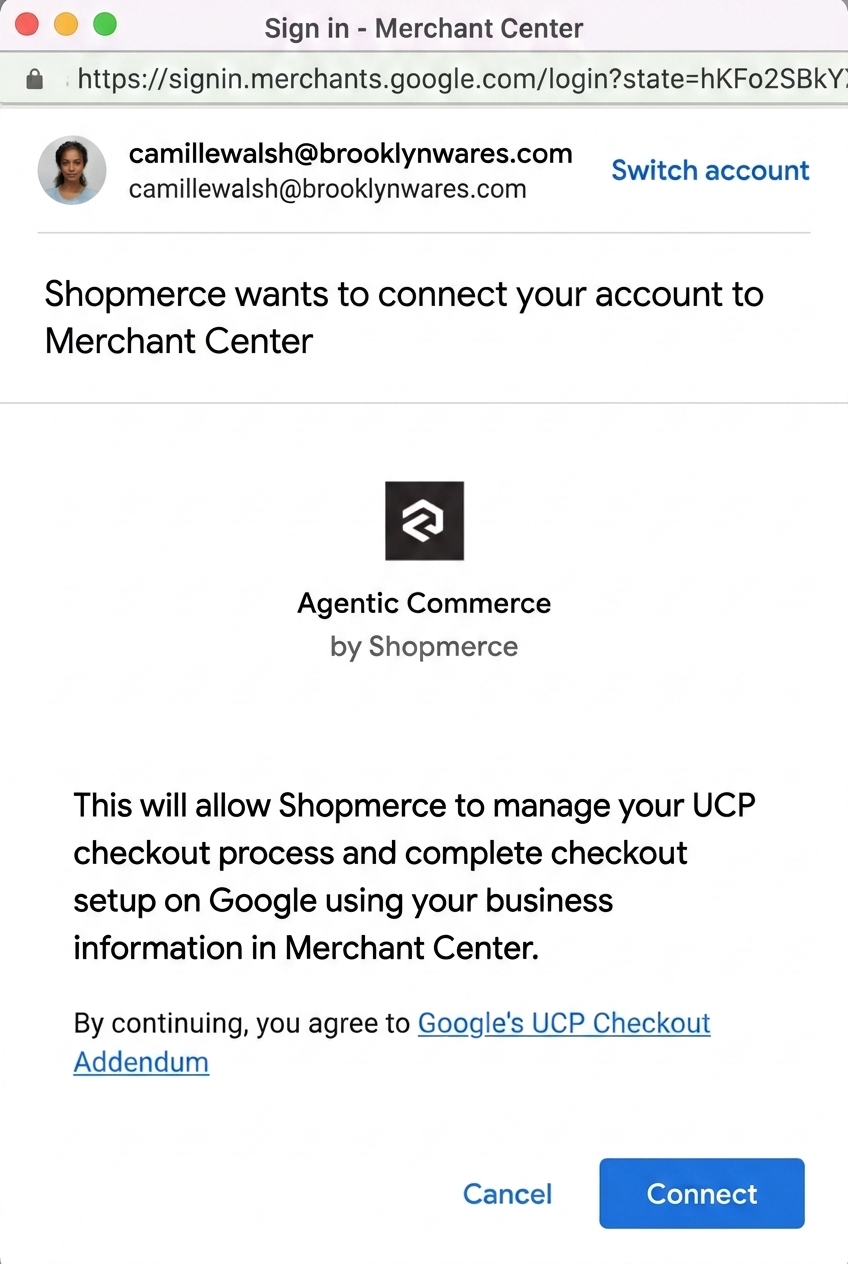
Within the dialog in your website, the merchant signs in, selects their
Merchant Center account, reviews permissions, and accepts the
Terms of Service .
### Redirect callback
We highly recommend that you provide a callback URI (`redirect_uri`) to
automatically receive the proposal information needed to send the proposal
approval call to the Merchant API, and display a confirmation page after
approval completes. This creates an instantaneous, seamless connection
experience for the merchant. Trigger subsequent merchant account configuration
calls asynchronously in the background after returning the confirmation page.
When you provide a `redirect_uri`, Google passes parameters back to the
service provider through query parameters:
| Parameter | Type | Description |
|---|---|---|
| `status` | Integer | Status of the linking request. See [Possible status values](https://developers.google.com/merchant/3p/guides/ucp/checkout/sandbox-testing#status-values). |
| `proposal_names` | Array of strings | Identifier of the account linking proposal to be used in MAPI approve method to accept the linking request. |
| `google_merchant_id` | Integer (64-bit) | Identifier of the merchant's Merchant Center account. |
| `provider_merchant_id` | String | Identifier of the merchant's account in the service provider's system. |
| `timestamp` | Timestamp in ISO 8601 / RFC 3339 format | Timestamp when the linking proposal was sent. |
#### Possible status values
The `status` query parameter returns one of the following values:
| Status code | Description |
|---|---|
| `200` | Success. |
| `500` | General error caused by a failure to issue the linking proposal between the merchant's account and the service provider account. |
### Handshake (proposal delivery and approval)
- **Proposal Delivery:** Google generates a service proposal ([`accounts.services.propose`](https://developers.google.com/merchant/api/reference/rest/accounts_v1/accounts.services/propose)) and delivers the proposal details to one of the following:
- Your callback redirect URI
- Through an `ACCOUNT_SERVICE_CHANGE` notification callback. To learn how to decode the notification payload and interpret its contents, see [Decode account service change payloads](https://developers.google.com/merchant/api/guides/notifications/account-service-changes#decode_account_service_change_payloads).
- **Backend Approval:** Your backend server receives the proposal ID and sends an approval request (`accounts.services.approve`) to Google Merchant API on behalf of the merchant. Approving the proposal establishes the service link.
- To learn more about the handshake process, see the [Account Relationships Handshake Guide](https://developers.google.com/merchant/api/guides/accounts/relationships#handshake).
#### Service proposal approval API call
POST https://merchantapi.googleapis.com/accounts/v1/accounts/{MERCHANT_ID}/services/{SERVICE_ID}:approve
Content-Type: application/json
Authorization: Bearer {SERVICE_TOKEN}
{}
- `{MERCHANT_ID}`: The numeric Google Merchant Center ID of the merchant.
- `{SERVICE_ID}`: The composite service identifier delivered during proposal creation, in the format `{PROVIDER_ID}~{PROPOSAL_ID}`.
#### Successful response (`200 OK`)
{
"name": "accounts/{MERCHANT_ID}/services/{PROVIDER_ID}~{PROPOSAL_ID}",
"provider": "providers/{PROVIDER_ID}",
"providerDisplayName": "Acme Commerce Platform",
"handshake": {
"approvalState": "ESTABLISHED",
"actor": "ACCOUNT"
},
"ucpCheckoutManagement": {}
}
### State established
Once the `accounts.services.approve` call has been made, Google marks the
service relationship as `ESTABLISHED`. You can view the status of requested
service links by calling
[`accounts.services.list`](https://developers.google.com/merchant/api/reference/rest/accounts_v1/accounts.services/list).
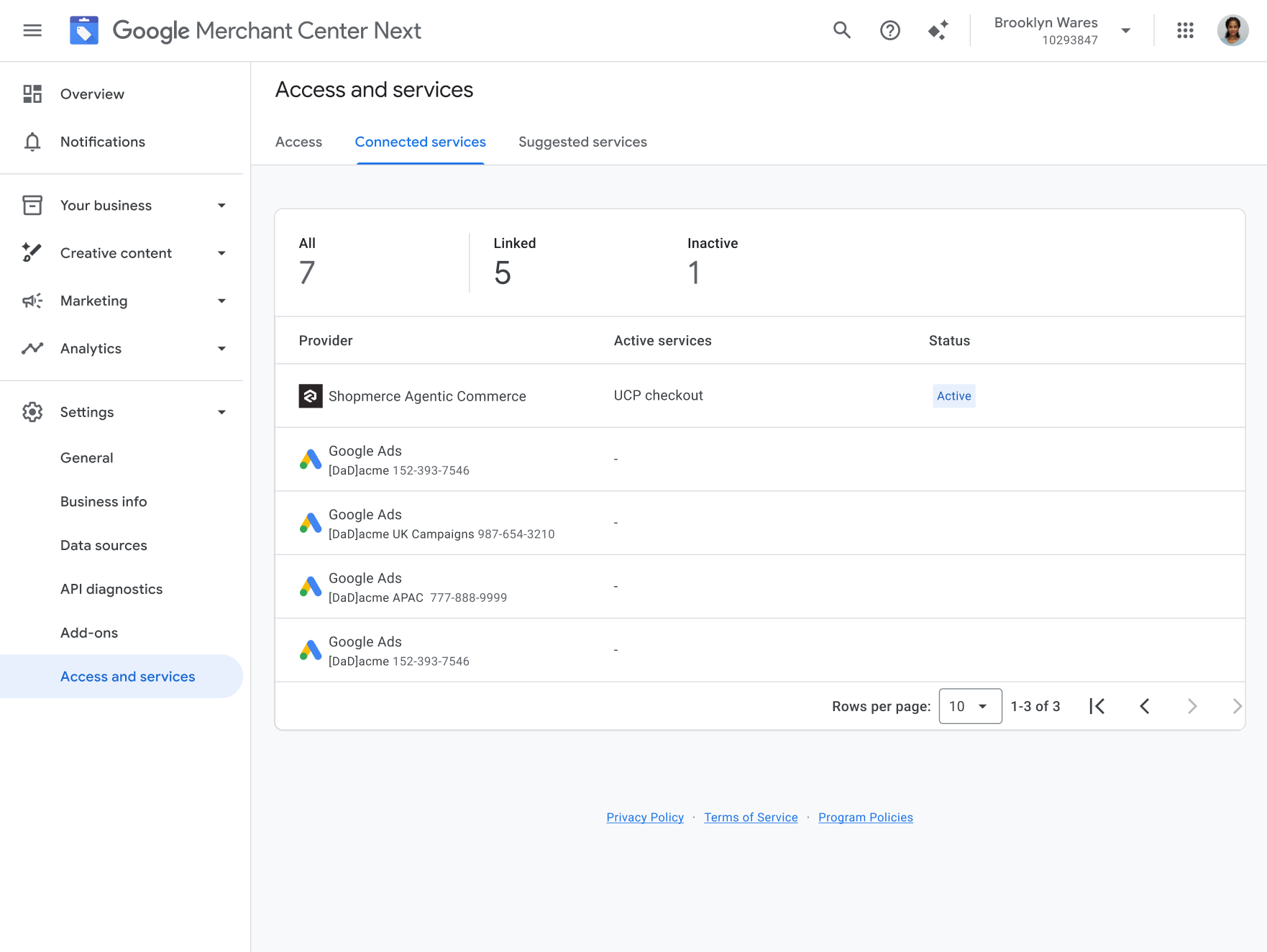
The merchant can view the established service by logging in to
Merchant Center and navigating to
**Settings \> Access and services \> Connected services.**
## Complete post-linking activation and technical profile setup
Once the service link reaches the `ESTABLISHED` state, verify the merchant's
program eligibility and activate UCP capabilities for the merchant.
> [!IMPORTANT]
> **Important:** After `accounts.services.approve` returns `ESTABLISHED`, cross-account permissions can take up to 60 seconds to propagate across Google's systems. If subsequent Merchant API requests targeting the linked merchant account return `401 UNAUTHENTICATED`, retry the request with exponential backoff.
To verify program eligibility and activate UCP capabilities for the
merchant, complete these steps:
1. **Check UCP Program Eligibility:**
- Call [`accounts.programs.get`](https://developers.google.com/merchant/api/reference/rest/accounts_v1/accounts.programs/get) to check the merchant's `ucp-integration` program status before enabling the program:
GET https://merchantapi.googleapis.com/accounts/v1alpha/accounts/{MERCHANT_ID}/programs/ucp-integration
Authorization: Bearer {SERVICE_TOKEN}
- Check the `state` field in the returned [`Program`](https://developers.google.com/merchant/api/reference/rest/accounts_v1/accounts.programs#Program) resource:
- `ELIGIBLE` or `ENABLED`: The merchant is eligible to participate in the program. Proceed to enabling the program (if `ELIGIBLE`) and configuring UCP settings.
- `NOT_ELIGIBLE`: The merchant isn't eligible to participate in the program and can't be onboarded to UCP. Don't call `accounts.programs.enable` or configure `ucpSettings`.
2. **Enable UCP Integration Program:**
- For eligible merchants, call [`accounts.programs.enable`](https://developers.google.com/merchant/api/reference/rest/accounts_v1/accounts.programs/enable) to activate the `ucp-integration` program for the merchant account. This can only be done using the Merchant API:
POST https://merchantapi.googleapis.com/accounts/v1alpha/accounts/{MERCHANT_ID}/programs/ucp-integration:enable
Authorization: Bearer {SERVICE_TOKEN}
3. **Configure Merchant UCP Settings:**
- Call `accounts.programs.ucpSettings.updateUcpSettings` to register the merchant's hosted well-known UCP profile URI that you created in the previous step [Create a well-known UCP profile URI](https://developers.google.com/merchant/3p/guides/ucp/checkout/setup#step-2). For example: `https://{MERCHANT_DOMAIN}/.well-known/ucp`
PATCH https://merchantapi.googleapis.com/accounts/v1alpha/accounts/{MERCHANT_ID}/programs/ucp-integration/ucpSettings?updateMask=well_known_uri
Content-Type: application/json
Authorization: Bearer {SERVICE_TOKEN}
{
"wellKnownUri": "https://{MERCHANT_DOMAIN}/.well-known/ucp"
}
4. **Configure Order Webhook Ingestion:**
- Stream real-time [order lifecycle events](https://developers.google.com/merchant/ucp/guides/orders) to Google's central webhook endpoint:
POST https://shoppingdataintegration.googleapis.com/v1/webhooks/partners/{PARTNER_ID}/events/order?key={API_KEY}
- `{PARTNER_ID}`: Your assigned UCP order event partner ID.
- `{API_KEY}`: Your production Order Webhook API key.
> [!NOTE]
> **Note:** Your UCP order event partner ID (`{PARTNER_ID}`) is distinct from the `{PROVIDER_ID}` assigned to your service provider account.
For more information about how to create UCP checkout endpoints and
order webhooks, see
[Implement UCP checkout endpoints and order webhooks](https://developers.google.com/merchant/3p/guides/ucp/checkout/setup#step-1).
## Handle merchant-initiated un-linking and disconnects
Service providers must support merchant-initiated disconnect
workflows across both their portal and Merchant Center:
- **Disconnect from Merchant Center UI:** When a merchant disconnects your platform from the Merchant Center UI, Google sends an `ACCOUNT_SERVICE_CHANGE` push notification to your backend. Decode the notification payload using the [Account service change notifications guide](https://developers.google.com/merchant/api/guides/notifications/account-service-changes#decode_account_service_change_payloads) to identify the disconnected merchant account.
- **Disconnect from your portal:** If a merchant disconnects their account directly within your platform's portal, call [`accounts.services.reject`](https://developers.google.com/merchant/api/reference/rest/accounts_v1/accounts.services/reject) to terminate the established service link in Merchant Center.
- **Graceful decommissioning and in-flight orders:** Upon disconnect, update your internal merchant status to stop accepting new UCP checkout sessions, but continue streaming [order lifecycle events](https://developers.google.com/merchant/ucp/guides/orders) for any in-flight orders until they reach a terminal state (such as delivered, canceled, or refunded).
> [!NOTE]
> **Note:** Automated API workflows for clearing `.well-known/ucp` profile settings and transitioning merchants between service providers are under active development. Additional API decommissioning guidance will be provided in an upcoming release. During the pilot program, contact your Google partner engineering representative if you need assistance decommissioning a merchant.
## Next steps
After completing sandbox validation, proceed to
[Perform final validation](https://developers.google.com/merchant/3p/guides/ucp/checkout/final-validation).