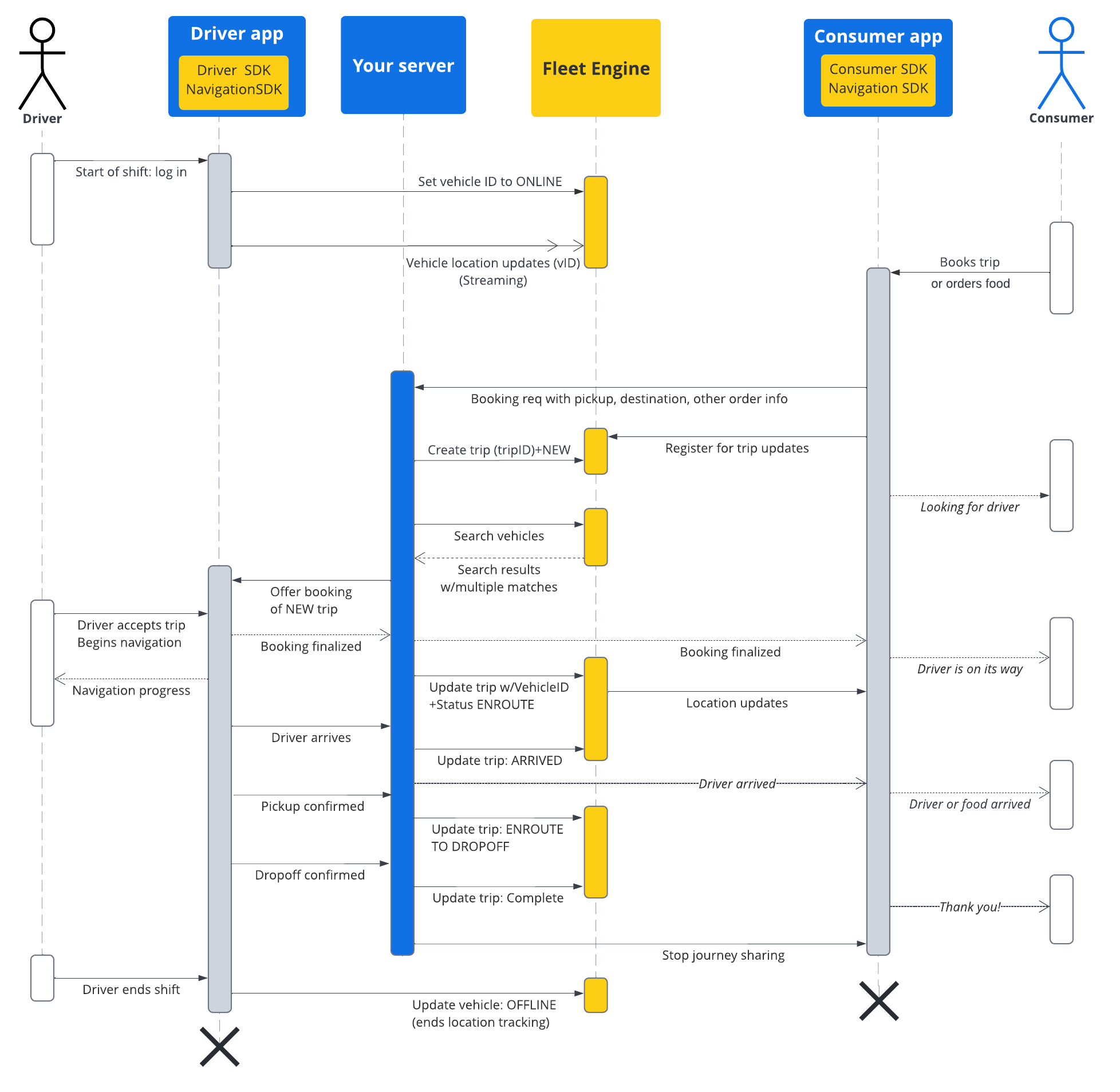
مستندات این بخش نحوه ایجاد و کار با سفرها را با استفاده از سرویس سفرهای درخواستی Google Maps Mobility نشان میدهد. آشنایی با موارد زیر را در نظر میگیرد:
- موتور ناوگان : شما باید با جزئیات پیادهسازی، مکانیسمهای درخواست و امنیت موتور ناوگان آشنا باشید. برای این منظور، به بخش «سرویس موتور ناوگان چیست؟» و مباحث امنیتی در «راهاندازی موتور ناوگان» مراجعه کنید.
- اصول اولیه وسایل نقلیه برای خدمات درخواستی. به مقدمهای بر وسایل نقلیه مراجعه کنید.
- اصول اولیه سفر برای خدمات درخواستی. به سفرهای درخواستی مراجعه کنید.
TripService که استفاده خواهید کرد برای gRPC و REST در دسترس است. برای سادگی، ارجاعات فیلد از قرارداد gRPC پیروی میکنند.
In Fleet Engine for on-demand services, a trip is a type of journey that models the fulfillment of a food delivery or ride request from your consumers. A trip has a status that you report to Fleet Engine as the journey evolves, such as NEW , ENROUTE_TO_PICKUP , and more. The trip status corresponds to geo-located waypoints assigned to the vehicle, and Fleet Engine modifies these vehicle waypoints with each trip update you make. See On demand trips in Fleet Engine essentials for more about trips and their relationship to vehicles.
زندگی یک سفر
برای ردیابی هر سفر در Fleet Engine، ابتدا باید یک موجودیت Trip ایجاد کنید. برای مرجع به gRPC یا REST مراجعه کنید.
جدول زیر نمونهای از جریان پیوسته یک سفر ایجاد شده در سیستم شما و مراحل چرخه عمر آن در Fleet Engine را شرح میدهد. فرض بر این است که شما Fleet Engine را راهاندازی کردهاید و وسیله نقلیهای برای اختصاص به سفر دارید و بهروزرسانیهای موقعیت مکانی در برنامه راننده فعال است. به Driver SDK: On-demand trips مراجعه کنید.
| ۱ | دریافت درخواست رزرو. | Before a Fleet Engine trip begins, your booking system first receives a request for a ride or delivery from a consumer through your app or other booking system. Your system then creates the trip entity using CreateTrip with required fields, such as the pickup location. It can also set other fields at this point, such passengers and dropoff location, or wait until it assigns a vehicle. See Create a single-destination trip . |
| ۲ | وسیله نقلیه اختصاص دهید. | You can either assign vehicles to trips directly within your system and report the assignment to Fleet Engine, or you can use the Search Vehicle service to search for vehicles, filtering by both trip and vehicle attributes to find the best vehicle to complete the journey. Any online vehicle within your search radius makes their proximity known through location updates provided by the Driver SDK. به محض اینکه |
| ۳ | سفر را بهروزرسانی کنید. | Once the driver accepts the trip and begins navigating to the pickup location, your system updates the trip status from NEW to ENROUTE_TO_PICKUP . You continue to poll the vehicle location throughout the journey, either through a direct connection from the app to your backend, or by polling Fleet Engine, which receives an ongoing stream of vehicle location updates from the Driver SDK. Your system then reports each journey milestone to Fleet Engine, which updates the vehicle's waypoint list accordingly. |
| ۴ | سفر را با مصرفکننده به اشتراک بگذارید. | Fleet Engine جزئیات سفر و موقعیت مکانی خودرو را در اختیار Consumer SDK قرار میدهد که از یک شنونده برای دریافت بهروزرسانیهای سفر و نمایش آنها در برنامه مصرفکننده استفاده میکند. Fleet Engine به طور خودکار ETA، مسافت باقیمانده، مسیرها و نقاط مسیر باقیمانده خودرو را بهروزرسانی میکند. برای اطلاعات بیشتر به Share journeys برای سفرهای درخواستی مراجعه کنید. |
| ۵ | سفر کامل. | به محض اینکه وسیله نقلیه به نقطه مقصد سفر برسد و راننده شما سفر موفقیتآمیز را اعلام کند، سیستم شما TripStatus در Fleet Engine روی COMPLETE تنظیم میکند. به خاطر داشته باشید که مانند وسایل نقلیه، موجودیتهای سفر صرف نظر از وضعیت، به مدت ۷ روز در Fleet Engine فعال میمانند و در آن زمان حذف میشوند. |
جریان توالی سفر
نمودار زیر نمای دقیقتری از این جریان را نشان میدهد.