> [!WARNING]
> This product or feature is in Preview (pre-GA). Pre-GA products and features might have limited support, and changes to pre-GA products and features might not be compatible with other pre-GA versions. Pre-GA Offerings are covered by the [Google
> Maps Platform Service Specific Terms](https://cloud.google.com/maps-platform/terms/maps-service-terms). For more information, see the [launch stage
> descriptions](https://developers.google.com/maps/launch-stages).
> [!IMPORTANT]
> Converting an address into English is the process of mapping each address component expressed in the local language (non-English) into a component that can be parsed by an English-based system.
When using the Address Validation API, you can request that a validation
response also return the address converted into English. Use this feature when
your system needs to provide address information in English-based Latin
characters when receiving an address originating in a non-English language.
For example:
- Your company might fulfill shipping requests from all over the world and use English and English-based Latin characters to standardize all addresses.
- Your business might handle shipments to and from a country that uses a different language than the language of the provided address.
## How to return an address in English
To request an address validation with included English-equivalent components,
add the following to the validation request body:
```json
"languageOptions": { "returnEnglishLatinAddress": "true" }
```
The following example requests English-based components while verifying the
address to the Prado Museum:
```bash
curl -X POST -d '{
"address": {
"region_code" : "ES",
"address_lines": ["C. de Ruiz de Alarcón, 23, 28014 Madrid, Spain"],
},
"languageOptions": {returnEnglishLatinAddress: true}
}' \
-H 'Content-Type: application/json' \
-H 'X-Goog-Api-Key: API_KEY' \
'https://addressvalidation.googleapis.com/v1:validateAddress'
```
The response returns the English address in the `englishLatinAddress` field. See
[Address conversion example](https://developers.google.com/maps/documentation/address-validation/convert-addresses-english.md.txt#address-conversion) below for details. Each
component of the returned local language address is converted into English as
best as possible. The converted address is not reusable as an input to the API.
The `englishLatinAddress` field uses the same
[Address](https://developers.google.com/maps/documentation/address-validation/reference/rest/v1/TopLevel/validateAddress.md.txt#address)
proto as the `address` field uses, with the following exceptions:
- No [`ConfirmationLevel`](https://developers.google.com/maps/documentation/address-validation/reference/rest/v1/TopLevel/validateAddress.md.txt#confirmationlevel) field
- No [`unconfirmedComponentTypes`](https://developers.google.com/maps/documentation/address-validation/reference/rest/v1/TopLevel/validateAddress.md.txt#address) field
> [!NOTE]
> The validation verdict is based on the **local language address**, not the English language equivalent.
### Improve the quality of Japanese address conversions
When submitting a Japanese address to convert to English, include a space
or separator (For example, '-') between the following parts of the address:
- **The building number (premise) and building name**.
- **The building number (premise) and subpremise / unit number**.
- **The building name and subpremise**.
For example:
- 東京都渋谷区渋谷 3−21−3 渋谷ストリーム 5階 (Recommended)
- 東京都渋谷区渋谷3−21−3渋谷ストリーム5階 (Not recommended)
Examples when there is no building name:
- 東京都渋谷区渋谷3丁目21−3 5階 (Recommended)
- 東京都渋谷区渋谷3丁目21−3−5階 (Recommended)
- 東京都渋谷区渋谷3丁目21−35階 (Not recommended)
## How address conversion works
The Address Validation API applies English conversion to each component of
the address. This means that the `administrative_area`, the `locality` and other
components of the address are treated individually. See
[AddressComponent](https://developers.google.com/maps/documentation/address-validation/reference/rest/v1/TopLevel/validateAddress.md.txt#addresscomponent)
in the reference documentation for a list of the address components.
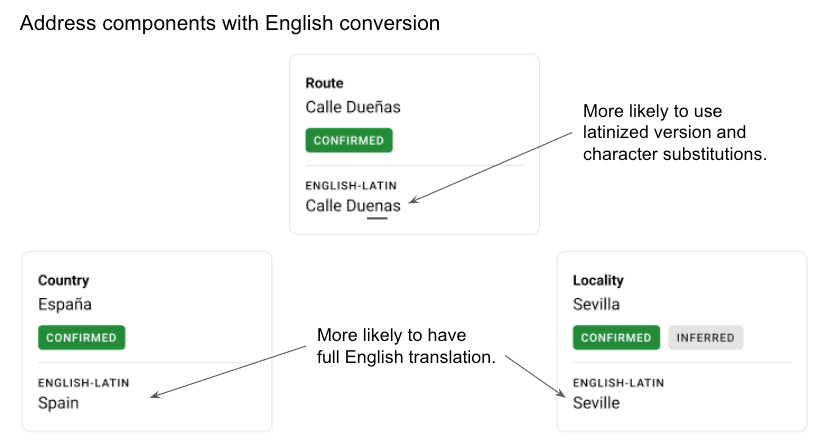
The following diagram illustrates what English conversion would look like for
the address *Calle Dueñas, 5, 41003 Sevilla, España*.
> [!NOTE]
> **Note:** Address conversion is not available in the demo until this feature is released for general availability.
For each component evaluated for English conversion, the service uses the
process described in the following sections.
### Uses fully-translated English where possible
Some address components might have a fully-translated version available for use.
For example, the Spanish country of `España` would be translated to `Spain`. In
that case, the service uses the English version. This is typically the case for
larger address components such as `country` and `administrative_area_level_1`.
### Uses latinization of the local language if English is not available
Latinization means that the local language is converted to the Latin script
using transcription.
- If the local language of the address uses a Latin character set, and no English equivalent exists for the address component, the service replaces characters from the local language that are *not* English-based. For example, `Calle Dueñas` becomes `Calle Duenas`, where ñ is substituted with n.
- If the local language of the address does not use a Latin-based character set, and no English equivalent exists for the address component, the service uses a latinized version of the local language, if available. For example, a Japanese conversion returns the romanization of Japanese. Any non-English, non-Latin characters are replaced with English-based Latin characters. For example: 3丁目 becomes 3-chome.
- *Note that Japanese is not yet enabled for the preview*
- If a latinized version of the language is not available, the components are returned in the local language.
### Substitutes Latin characters not in English
Any Latin characters not in English are replaced with their English-character
equivalent. For example, each of the following characters would be replaced by
the character "o": ð, ò, ó, ô, õ, ö, ø, ō, ŏ, ő, ơ, ṍ, ṏ, ṑ, ṓ, ọ, ỏ, ố, ồ, ổ,
ỗ, ộ, ớ, ờ, ở, ỡ, and ợ. For example:
*Calle de Ruiz de Alarcón* becomes *Calle de Ruiz de Alarcon*
## Address conversion example
The following example shows a validation response from a request for the Palacio
de las Dueñas in Spain, with the `englishLatinAddress` in bold. This request
used the field `returnEnglishLatinAddress` in the `languageOptions` parameter in
the input.
```json
"result": {
"verdict": {
"inputGranularity": "PREMISE",
"validationGranularity": "PREMISE",
"geocodeGranularity": "PREMISE",
"addressComplete": true,
"hasInferredComponents": true
},
"address": {
"formattedAddress": "Calle Dueñas, 5, 41003 Sevilla, España",
"postalAddress": {
"regionCode": "ES",
"languageCode": "es",
"postalCode": "41003",
"administrativeArea": "Sevilla",
"locality": "Sevilla",
"addressLines": [
"C. Dueñas, 5"
]
},
"addressComponents": [
{
"componentName": {
"text": "Calle Dueñas",
"languageCode": "es"
},
"componentType": "route",
"confirmationLevel": "CONFIRMED"
},
{
"componentName": {
"text": "5",
"languageCode": "es"
},
"componentType": "street_number",
"confirmationLevel": "CONFIRMED"
},
{
"componentName": {
"text": "41003"
},
"componentType": "postal_code",
"confirmationLevel": "CONFIRMED"
},
{
"componentName": {
"text": "Sevilla",
"languageCode": "es"
},
"componentType": "locality",
"confirmationLevel": "CONFIRMED"
},
{
"componentName": {
"text": "España",
"languageCode": "es"
},
"componentType": "country",
"confirmationLevel": "CONFIRMED"
},
{
"componentName": {
"text": "Sevilla",
"languageCode": "es"
},
"componentType": "administrative_area_level_2",
"confirmationLevel": "CONFIRMED",
"inferred": true
}
]
},
"geocode": {
"location": {
"latitude": 37.394849,
"longitude": -5.9893604
},
"plusCode": {
"globalCode": "8C9P92V6+W7"
},
"bounds": {
"low": {
"latitude": 37.3948098,
"longitude": -5.9894249
},
"high": {
"latitude": 37.3948882,
"longitude": -5.9893025
}
},
"featureSizeMeters": 7.174035,
"placeId": "ChIJzRDYbgRsEg0RDDgHlF80UoI",
"placeTypes": [
"premise"
]
},
"metadata": {
"business": true,
"residential": false
},
"englishLatinAddress": {
"formattedAddress": "Calle Duenas, 5, 41003 Seville, Spain",
"postalAddress": {
"regionCode": "ES",
"languageCode": "en",
"postalCode": "41003",
"administrativeArea": "Seville",
"locality": "Seville",
"addressLines": [
"C. Duenas, 5"
]
},
"addressComponents": [
{
"componentName": {
"text": "Calle Duenas",
"languageCode": "es"
},
"componentType": "route",
},
{
"componentName": {
"text": "5",
"languageCode": "es"
},
"componentType": "street_number",
},
{
"componentName": {
"text": "41003"
},
"componentType": "postal_code",
},
{
"componentName": {
"text": "Seville",
"languageCode": "en"
},
"componentType": "locality",
},
{
"componentName": {
"text": "Spain",
"languageCode": "en"
},
"componentType": "country",
},
{
"componentName": {
"text": "Seville",
"languageCode": "en"
},
"componentType": "administrative_area_level_2",
"inferred": true
}
]
}
},
"responseId": "e874d263-7d0d-413f-9213-119a784765ed"
```
## Support options for Preview releases
Although Google does not provide support for
[Preview](https://developers.google.com/maps/launch-stages.md.txt#preview) versions,
features, or functionality of the Services, we consider requests at these
developmental stages on a case-by-case basis.
Use these recommendations for pre-GA versions:
- Pre-GA features are not covered by the
[Google Maps Platform SLA](https://cloud.google.com/maps-platform/terms/sla/).
- Use fallback mechanisms, especially if you are using a
pre-GA feature in a production environment. Some examples of fallback
situations are: quota exceeded, unexpected response codes and latency,
or unexpected responses when compared to the existing behavior.
You can use the issue tracker to request new features or suggest modifications
to existing features. Be sure to include the following in your request:
- Describe the specific feature or behavior you would like to see added, as well
as the reasons you think it's important.
- If possible, include specific details about your use case and the new
opportunities the feature would allow for.
For this feedback or any other questions on features, file a bug in the
[issue tracker](https://developers.google.com/maps/documentation/address-validation/support.md.txt#issue-tracker).