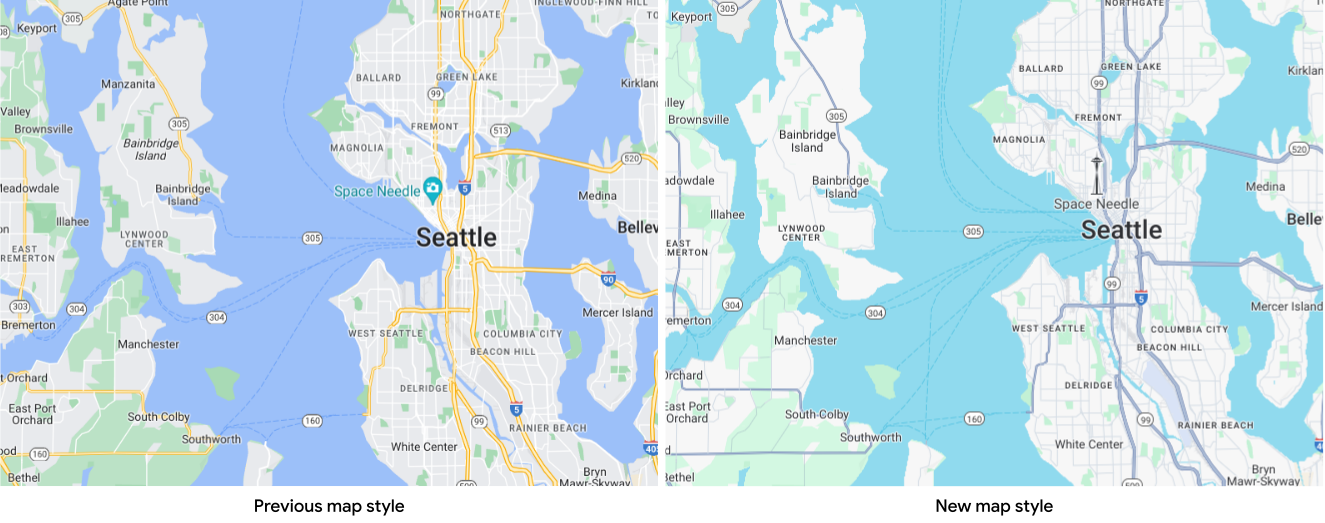
Between May 2024 and March 25, 2025, Google Maps Platform updated the
default map style for the following APIs and SDKs.
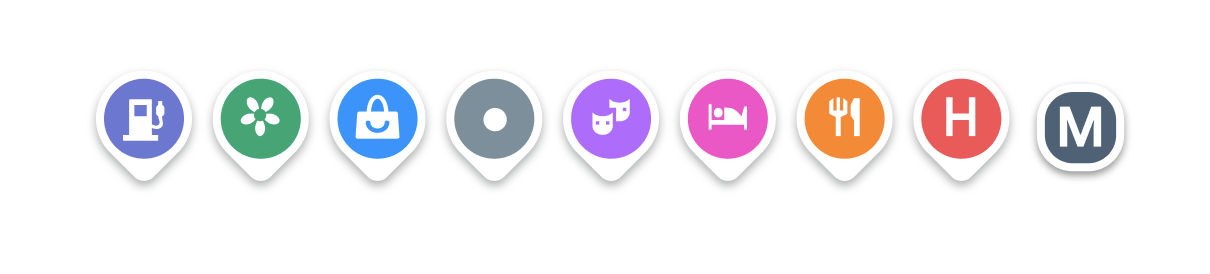
Starting August 2024, Google Maps Platform also updated all pins to a
modernized style to improve scannability, consistency, and accessibility.
## For apps that use map IDs
To use cloud-based maps styling on Android, you must use the latest renderer for Maps SDK for Android. [Follow these instructions](https://developers.google.com/maps/documentation/android-sdk/renderer.md.txt).
Starting March 21, 2024, if your app used map IDs, you could use
cloud-based maps styling to preview and customize the latest map styles to
align with your specific requirements. For more information, see
[Cloud-based maps styling](https://developers.google.com/maps/documentation/javascript/cloud-customization.md.txt).
On March 25, 2025, the default map style updated to the latest version, with
a new color palette, modernized pins, improved map experiences, and better
usability. Your custom styles now sit on top of the default map style.
The new map style and modernized pins are only visible on `roadmap` map types.
To display the modernized pins for other map types, use
Maps JavaScript API without a map ID.
## For apps that don't use map IDs
Google Maps Platform released new versions for each of the APIs and SDKs with
the updated default map style and modernized pins\* according to the schedule in
the following table. If your app doesn't use map IDs, you can use these new
versions (or subsequent) in order to use the new default map style.
> [!NOTE]
> **Note:** Products that updated to the new default map style before August 2024 now include modernized pins in their API and SDK versions.
| **Product** | **Update details** | **Date available\*** |
|---|---|---|
| Maps JavaScript API | v3.58
Note: If you don't specify the version number or channel directly, this may impact your application at a later date.
For more information, see [Versioning in the Maps JavaScript API](https://developers.google.com/maps/documentation/javascript/versions.md.txt). | [beta channel](https://developers.google.com/maps/documentation/javascript/versions.md.txt#beta-channel): March 2024 
[weekly channel](https://developers.google.com/maps/documentation/javascript/versions.md.txt#weekly-channel): August 2024 
[quarterly channel](https://developers.google.com/maps/documentation/javascript/versions.md.txt#quarterly-channel): November 2024  |
| Maps SDK for Android | v19.0.0 with the new map renderer.
For details, see [New Map Renderer](https://developers.google.com/maps/documentation/android-sdk/renderer.md.txt). For more information on updating versions, see [Maps SDK for Android versions](https://developers.google.com/maps/documentation/android-sdk/versions.md.txt). | June 2024  |
| Maps SDK for iOS | v9.0.0
For more information on updating versions, see [Maps SDK for iOS versions](https://developers.google.com/maps/documentation/ios-sdk/versions.md.txt). | May 2024  |
| Navigation SDK for Android | v6.0.0
For more information on updating [versions](https://developers.google.com/maps/documentation/navigation/android-sdk/release-notes.md.txt), see [Navigation SDK setup](https://developers.google.com/maps/documentation/navigation/android-sdk/setup-overview.md.txt). | September 2024  |
| Navigation SDK for iOS | v9.0.0
For more information on updating [versions](https://developers.google.com/maps/documentation/navigation/ios-sdk/release-notes.md.txt), see [Install the Navigation SDK](https://developers.google.com/maps/documentation/navigation/ios-sdk/config#install-the-sdk) | May 2024  |
| Maps Static API | The updated map style will be applied when available. | August 2024  |
| Maps Embed API | The updated map style will be applied when available. | August 2024  |
| Map Tiles API - 2D Roadmap | The updated map style will be applied when available. | March 2025  |
A green check () denotes that the new map style and modernized pins\* are available for that
product.
\*The modernized pins style was introduced in August 2024.
## Opt out
You can't opt out of the latest map style after March 25, 2025. However,
developers are welcome to create custom map styles reminiscent of the current
default map styles.