In today's location-aware world, users expect seamless access to place information,
directions, and navigation. Whether it's through a messenger app, a local context
discovery app, a logistics and transportation platform, a travel planner, or a
real estate listing platform, users often need to quickly view location details
or find the best route from A to B. While developers can build their own in-app
experience, leveraging the comprehensive and familiar interface of Google Maps
provides a superior experience.
A well-structured Google Maps URL is essential for a seamless user experience.
Incorrect URLs compromise this experience, directing users to the wrong location,
displaying a generic map view instead of specific details, or even resulting in
a broken link. This frustrates users and prevents them from achieving their goal.
For example, even with a valid Maps URL, a user expecting details about a specific
business might instead land on a general map view with no relevant information.
See example below:
```
https://www.google.com/maps/search/?api=1&query=-33.8567%2C151.2152
```
This Maps URL is valid for opening Google Maps and displaying a location based
on latitude and longitude. However it does not provide users with details about
a specific place.
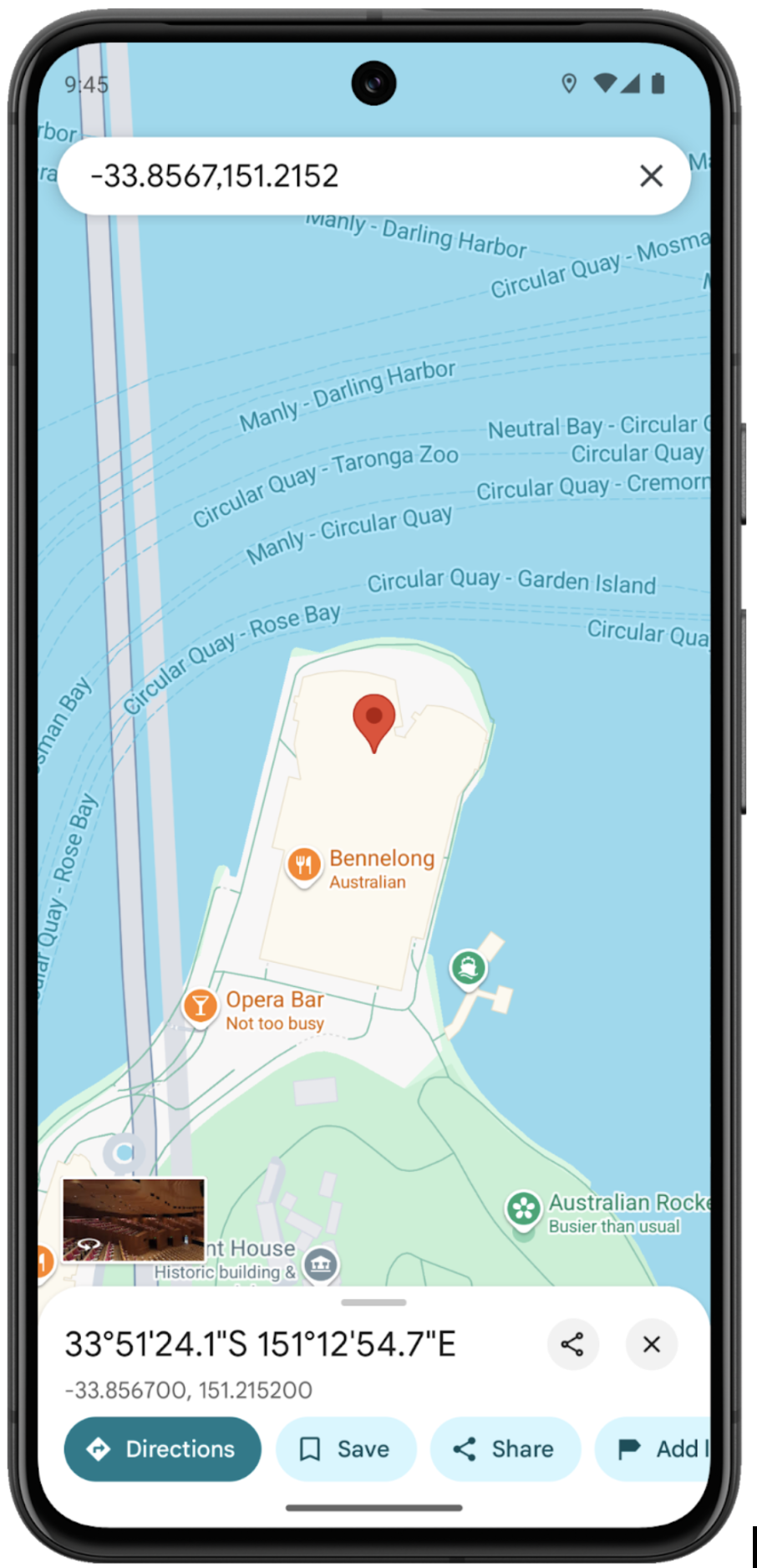 Search only using latitude and longitude
## Seamlessly bridging your application with Google Maps through accurate URLs
 A Maps URL with a unique place name directs users to that place's details page on Google Maps
Google Maps Platform (GMP) offers two primary methods for constructing accurate
URLs: Places API(New), which requires an API key, and Maps URLs, which are free
and don't require a key. The following solutions address different scenarios
and use cases:
### Using the GMP Places API(New)'s googleMapsUri or googleMapsLinks field
The [GMP Places API(New)](https://developers.google.com/maps/documentation/places/web-service/maps-links.md.txt) returns a comprehensive set of information about a
specific place. When requesting the `googleMapsUri` or `googleMapsLinks` field
(by specifying it in [field mask](https://developers.google.com/maps/documentation/places/web-service/choose-fields.md.txt)), the API response includes a place object.
This object contains pre-formatted URLs, which can be used to directly open
the corresponding view, such as place details view, in Google Maps.
Example:
Place Details Request
```
curl -X GET -H 'Content-Type: application/json' \
-H "X-Goog-Api-Key: YOUR_API_KEY" \
-H "X-Goog-FieldMask: googleMapsUri,googleMapsLinks" \
https://places.googleapis.com/v1/places/ChIJ3S-JXmauEmsRUcIaWtf4MzE
```
Place Details Response:
```
{
"googleMapsUri": "https://maps.google.com/?cid=3545450935484072529",
"googleMapsLinks": {
"directionsUri": "https://www.google.com/maps/dir//''/data=!4m7!4m6!1m1!4e2!1m2!1m1!1s0x6b12ae665e892fdd:0x3133f8d75a1ac251!3e0",
"placeUri": "https://maps.google.com/?cid=3545450935484072529",
"writeAReviewUri": "https://www.google.com/maps/place//data=!4m3!3m2!1s0x6b12ae665e892fdd:0x3133f8d75a1ac251!12e1",
"reviewsUri": "https://www.google.com/maps/place//data=!4m4!3m3!1s0x6b12ae665e892fdd:0x3133f8d75a1ac251!9m1!1b1",
"photosUri": "https://www.google.com/maps/place//data=!4m3!3m2!1s0x6b12ae665e892fdd:0x3133f8d75a1ac251!10e5"
}
}
```
`ChIJ3S-JXmauEmsRUcIaWtf4MzE` in the above example is the Place ID of Sydney
Opera House in the above example. A Place ID is a textual identifier that
uniquely identifies a place in the Google Places database and on Google Maps.
#### Retrieving Place IDs at zero cost
To programmatically retrieve Place IDs, you can use the [Places API: Text Search(ID Only)](https://developers.google.com/maps/documentation/places/web-service/usage-and-billing.md.txt#id-textsearch) functionality. This is a zero cost method for obtaining Place IDs. Learn more about [Place ID](https://developers.google.com/maps/documentation/places/web-service/place-id.md.txt), and [Place API(New)](https://developers.google.com/maps/documentation/places/web-service/op-overview.md.txt) request.
Places API Text Search(ID Only) Request:
```
curl -X POST -d '{"textQuery" : "Sydney Opera House"}' \
-H 'Content-Type: application/json' -H 'X-Goog-Api-Key: YOUR_API_KEY' \
-H 'X-Goog-FieldMask: places.id' \
'https://places.googleapis.com/v1/places:searchText'
```
Places API Text Search(ID Only) Response:
```
{
"places": [
{
"id": "ChIJ3S-JXmauEmsRUcIaWtf4MzE"
}
]
}
```
Place IDs can also be retrieved when a user clicks or taps a POI on maps.
Find out more details about clickable POI icons([JavaScript](https://developers.google.com/maps/documentation/javascript/reference/map.md.txt#MapOptions.clickableIcons), [Android](https://developers.google.com/android/reference/com/google/android/gms/maps/GoogleMap.OnPoiClickListener.md.txt), [iOS](https://developers.google.com/maps/documentation/ios-sdk/reference/objc/Protocols/GMSMapViewDelegate.md.txt#-mapview:didtappoiwithplaceid:name:location:))
#### Implementation
When using the Places API, developers can simply extract the `googleMapsUri` or `googleMapsLinks` field from the response and use it to launch the corresponding view in Google Maps app or in a browser if the app is not installed.
| Feature | Description |
|---|---|
| directionsUri | Link to open Google Maps to display directions from the user's current location to this place |
| placeUri | Link to open Google Maps to the place details page for this place |
| writeAReviewUri | Link to open Google Maps to the review writing page for this place |
| reviewsUri | Link to open Google Maps to the reviews page for this place |
| photosUri | Link to open Google Maps to the photos page for this place |
Check out the [developer guidance](https://developers.google.com/maps/documentation/places/web-service/maps-links.md.txt) and try the feature today.
### Utilizing the Maps URLs
Using Maps URLs, you can build a universal, cross-platform URL to launch Google
Maps and perform searches, get directions and navigation, and display map views
and panoramic images. The URL syntax is the same regardless of the platform in
use. You don't need a Google API key to use Maps URLs.
The map actions available are:
- The [Search function](https://developers.google.com/maps/documentation/urls/get-started.md.txt#search-action) launches a Google Maps app or in a browser if the app is
not installed that displays a pin for a specific place, or performs a general
search and launches a map to display the results.
- The [Directions function](https://developers.google.com/maps/documentation/urls/get-started.md.txt#directions-action) launches a Google Maps app or in a browser if the app
is not installed that displays directions between points or enables turn-by-turn
navigation on Google Maps for mobile devices.
- The [Street View panorama function](https://developers.google.com/maps/documentation/urls/get-started.md.txt#street-view-action) lets you launch a viewer to display Street
View images as interactive panoramas.
Visit [GMP Maps URLs developer documentation](https://developers.google.com/maps/documentation/urls/get-started.md.txt) to explore more functions and examples.
Here we dive into two key functionalities of Maps URLs:
- **Displaying place details on Google Maps:** This section explains how to
construct URLs that will display details for a specific location on Google Maps.
It also details how to work with places that have non-unique names by using
Place IDs and precise queries.
- **Providing Directions using Maps URLs:** This section explains how to create URLs that provide directions between locations, including directions with multiple waypoints and turn-by-turn navigation.
#### Displaying place details on Google Maps
The Search function takes two parameters to complete the places search, which
are `query`(required) and `query_place_id`(optional).
The `query` parameter is required for all search requests. It accepts a place
name, or comma-separated latitude/longitude coordinates, or a general search term.
The Search URL structure:
```
https://www.google.com/maps/search/?api=1¶meters
```
**Scenario 1: Displaying place details for a unique place name**
```
https://www.google.com/maps/search/?api=1&query=Sydney%20Opera%20House
```
In this example, only the place name is specified. This URL opens the details page for the Sydney Opera House.
 Search place name and display place details
Now, consider a place with a non-unique name. What happens when you search only
by this non-unique name? See next scenario.
**Scenario 2: Search places for a non-unique place name**
```
https://www.google.com/maps/search/?api=1&query=7-Eleven
```
Since the place name is not unique, this URL opens a list of nearby 7-Eleven
locations within the viewport. Users can then choose a specific store to see its
details.
 Place list page for searching non-unique name
To avoid the list of locations and directly access a specific details page, you
can use a more precise method. See next example.
**Scenario 3: Displaying place details for a non-unique place name**
When dealing with common place names, a simple name search often returns a list of locations. To directly link to a specific details page, you can use one of the following methods:
**Method 1: Using a precise query with Place Name and Address**
```
https://www.google.com/maps/search/?api=1&query=7-Eleven%2C37%20Swanston%20St%2C%20Melbourne%20Australia
```
In this URL, the `query` parameter is formatted as place name, address. This
helps narrow down the search and directly link to the intended location.
**Method 2: Using the Place ID**
Place IDs uniquely identify a place in the Google Places database and on Google
Maps.
```
https://www.google.com/maps/search/?api=1&query=7-Elevan&query_place_id=ChIJGcmcg7ZC1moRAOacd3HoEwM
```
Here, `ChIJGcmcg7ZC1moRAOacd3HoEwM` is the unique Place ID for the specific
place. The `query` parameter is still required but will be only used if Google
Maps cannot find the place ID.
**Scenario 4: Displaying place details using latitude and longitude coordinates
as well as the place ID**
Using the Place ID ensures Google Maps shows detailed place information.
```
https://www.google.com/maps/search/?api=1&query=-33.8567%2C151.2152&query_place_id=ChIJ3S-JXmauEmsRUcIaWtf4MzE
```
 Place Detail page using latitude and longitude as well as Place ID
**Retrieving Place IDs at zero cost**
To programmatically retrieve Place IDs, you can use the
[Places API: Text Search(ID Only)](https://developers.google.com/maps/documentation/places/web-service/usage-and-billing.md.txt#id-textsearch) functionality.
This is a zero cost method for obtaining [Place IDs](https://developers.google.com/maps/documentation/places/web-service/place-id.md.txt).
Learn more about Place ID, and [Place API(New)](https://developers.google.com/maps/documentation/places/web-service/op-overview.md.txt) request.
Places API Text Search(ID Only) Request:
```
curl -X POST -d '{"textQuery" : "Sydney Opera House"}'
-H 'Content-Type: application/json' -H 'X-Goog-Api-Key: YOUR_API_KEY'
-H 'X-Goog-FieldMask: places.id'
'https://places.googleapis.com/v1/places:searchText'
```
Places API Text Search(ID Only) Response:
```
{
"places": [
{
"id": "ChIJ3S-JXmauEmsRUcIaWtf4MzE"
}
]
}
```
Place IDs can also be retrieved when a user clicks or taps a POI on maps.
Find out more details about clickable POI icons([JavaScript](https://developers.google.com/maps/documentation/javascript/reference/map.md.txt#MapOptions.clickableIcons), [Android](https://developers.google.com/android/reference/com/google/android/gms/maps/GoogleMap.OnPoiClickListener.md.txt), [iOS](https://developers.google.com/maps/documentation/ios-sdk/reference/objc/Protocols/GMSMapViewDelegate.md.txt#-mapview:didtappoiwithplaceid:name:location:))
**Conclusion**
Providing accurate place details is critical for a positive experience. To ensure
users land on the correct place details page, construct the Search URLs using
one of the following recommended formats:
- `query=PLACE_NAME, ADDRESS`
- `query=PLACE_NAME&query_place_id=PLACE_ID`
Avoid using only latitude/longitude coordinates in the `query` parameter when
your goal is to display a specific place's details. Formats like
`query=latitude,longitude`, `query=PLACE_NAME,latitude,longitude`,
or `query=ADDRESS,latitude,longitude` will not consistently lead to the
desired place details page. Instead, it will show the latitude and longitude of
the location.
#### Categorical search using Maps URLs
In a categorical search, you pass a general search term, and Google Maps
attempts to find listings that match your criteria near the location you specify.
If no location is specified, Google Maps attempts to find listings nearby your current location.
**Scenario 1: Nearby places search**
```
https://www.google.com/maps/search/?api=1&query=Cafe%20near%20Sydney%20Opera%20House%20that%20are%20open%20now
```
 Categorical search - nearby places
#### Providing Directions using Maps URLs
The Directions function displays the path between two or more specified points
on the map, as well as the distance and travel time. It offers developers more
control over the directions provided. [GMP's Maps URLs Directions](https://developers.google.com/maps/documentation/urls/get-started.md.txt#directions-action) documentation provides detailed instructions
on constructing URLs for customized directions.
The Directions URL structure:
```
https://www.google.com/maps/dir/?api=1¶meters
```
**Scenario 1: Finding the best route from the user's current location to a destination**
```
https://www.google.com/maps/dir/?api=1&destination=Flinders%20Station%20Melbourne&travelmode=driving
```
This URL opens Google Maps and displays driving directions from the user's current location.
In this URL, the `origin` is omitted. When `origin` is omitted, the path defaults
to the most relevant starting location, such as device location, if available.
If none, the resulting map provides a form to allow a user to enter the origin.
The value of origin and destination can be either a place name, address, or
comma-separated latitude/longitude coordinates.
The `travelmode` is an optional parameter. It defines the method of travel.
This parameter can be set as:
- driving
- walking
- bicycling
- two-wheeler
- transit
If no travelmode is specified, the Google Map shows one or more of the most
relevant modes for the specified route and/or user preferences.
Developers can also specify Place IDs by using `origin_place_id` parameter and
`destination_place_id`. Using a Place ID is the best guarantee that you will
link to the right place.
**Retrieving Place IDs at zero cost**
To programmatically retrieve Place IDs, you can use the
[Places API: Text Search(ID Only)](https://developers.google.com/maps/documentation/places/web-service/usage-and-billing.md.txt#id-textsearch) functionality.
This is a zero cost method for obtaining [Place IDs](https://developers.google.com/maps/documentation/places/web-service/place-id.md.txt).
Learn more about Place ID, and [Place API(New)](https://developers.google.com/maps/documentation/places/web-service/op-overview.md.txt) request.
Places API Text Search(ID Only) Request:
```
curl -X POST -d '{"textQuery" : "Sydney Opera House"}'
-H 'Content-Type: application/json' -H 'X-Goog-Api-Key: YOUR_API_KEY'
-H 'X-Goog-FieldMask: places.id'
'https://places.googleapis.com/v1/places:searchText'
```
Places API Text Search(ID Only) Response:
```
{
"places": [
{
"id": "ChIJ3S-JXmauEmsRUcIaWtf4MzE"
}
]
}
```
Place IDs can also be retrieved when a user clicks or taps a POI on maps.
Find out more details about clickable POI icons([JavaScript](https://developers.google.com/maps/documentation/javascript/reference/map.md.txt#MapOptions.clickableIcons), [Android](https://developers.google.com/android/reference/com/google/android/gms/maps/GoogleMap.OnPoiClickListener.md.txt), [iOS](https://developers.google.com/maps/documentation/ios-sdk/reference/objc/Protocols/GMSMapViewDelegate.md.txt#-mapview:didtappoiwithplaceid:name:location:))
 Directions from user's current location
**Scenario 3: Providing Turn-by-Turn Navigation**
```
https://www.google.com/maps/dir/?api=1&destination=Flinders%20Station%20Melbourne&travelmode=driving&dir_action=navigate
```
Setting `dir_action=navigate` in the URL will launch Google Maps in turn-by-turn
navigation mode if the user's current location(device location) is available and
used as the origin (either explicitly provided or implicitly used when the origin
parameter is omitted). Otherwise, a route preview will be displayed.
Turn-by-turn navigation is launched when dir_action=navigate is set and:
- The origin is specified and it is close to the user's current location
- The origin is omitted and the user's current location is available
Route preview is launched when:
- `dir_action=navigate` is not set
- `dir_action=navigate` is set and the origin is specified, and the origin is not close to the user's current location
- `dir_action=navigate` is set and the origin is omitted, and the user's current location is unavailable
Note that navigation is not available on all Google Maps products such as Google
Maps Web, and/or between all destinations. In those cases this parameter will be
ignored.
|---|---|
|  |  |
| Turn-by-Turn Navigation | Route Preview |
**Conclusion**
By correctly constructing the Maps URLs, you can ensure users get the right
information they need quickly and efficiently.
- Always specify the destination, and use Place ID whenever possible for
guaranteed accuracy
- When the goal is to provide immediate navigation, include dir_action=navigate
parameter to trigger turn-by-turn navigation. Navigation will start from the
user's current location if the device location is available and used as the
origin (either explicitly set or omitted)
## Choosing the right approach for your application
You have two primary options: leveraging the pre-formatted URLs provided by the
Places API or manually constructing Maps URLs in your application. Each approach
has its own set of advantages and disadvantages.
Places API:
- The `googleMapsUri` and `googleMapsLinks` fields in the Place Details response
provide ready-to-use URLs. This reduces development time and minimizes the
risk of errors in URL formatting.
- Provides less control over the configuration of directions. While `googleMapsLinks` offers basic directions, it doesn't support waypoints or advanced customization. Also, it is relatively less straightforward to trigger turn-by-turn navigation directly.
Maps URLs:
- Offers greater flexibility and control. Developers can construct URLs to display place details and configure various aspects of directions, including adding waypoints, specifying travel modes, and initiating turn-by-turn navigation.
- Requires a deeper understanding of the URL parameters and structure. Manual construction increases the potential for errors if not done carefully.
## Improving Maps URLs with UTM parameters
To help Google better understand how developers are integrating Maps URLs and to
ensure optimal performance, we encourage you to include UTM tracking parameters
in your URL construction. By adding `utm_source` and `utm_campaign` parameters, you
provide valuable data that allows us to analyze usage patterns and improve the
Maps URLs product.
For the `utm_source` parameter, use the name of your application. The
`utm_campaign` parameter should reflect the user's intended action, such as
"location_sharing," "place_details_search," or "directions_request".
For example, a URL with UTM parameters might look like this:
```
https://www.google.com/maps/search/?api=1&query=Sydney+Opera+House&query_place_id=ChIJ3S-JXmauEmsRUcIaWtf4MzE&utm_source=YourAppName&utm_campaign=place_details_search
```
Consistently using these parameters helps us identify areas for improvement,
troubleshoot issues more effectively, and ultimately deliver a better experience
for all users.
## Next Steps
Suggested further reading:
- [Maps URL](https://developers.google.com/maps/documentation/urls/get-started.md.txt)
- [Place IDs](https://developers.google.com/maps/documentation/places/web-service/place-id.md.txt)
- [Places API - Link to Google Maps](https://developers.google.com/maps/documentation/places/web-service/maps-links.md.txt)
- [Routes API](https://developers.google.com/maps/documentation/routes)
## Contributors
Principal authors:
[Teresa Qin](https://www.linkedin.com/in/teresa-qin-8a773415/) \| Google Maps
Platform Solutions Engineer