Select platform: [HTML5](https://developers.google.com/interactive-media-ads/docs/sdks/html5/client-side/companions.md.txt "View this page for the HTML5 platform docs.") [Android](https://developers.google.com/interactive-media-ads/docs/sdks/android/client-side/companions.md.txt "View this page for the Android platform docs.") [iOS](https://developers.google.com/interactive-media-ads/docs/sdks/ios/client-side/companions.md.txt "View this page for the iOS platform docs.")
This guide is intended for publishers interested in adding companion ads to
their Android IMA implementation.
## Prerequisites
- Android application with the IMA SDK integrated. See the [BasicExample](https://github.com/googleads/googleads-ima-android/blob/main/basicexample/) if you don't already have an app with the SDK integrated. If you need help implementing the IMA SDK in your app, check out [Set up the IMA SDK](https://developers.google.com/interactive-media-ads/docs/sdks/android/client-side/get-started.md.txt).
- An ad tag configured to return a companion ad. If you need a sample, check out our [FAQ](https://developers.google.com/interactive-media-ads/faq#4).
## Add companion ads to your app
Follow along to add a companion ad slot and display companion ads in your app.
### Create a ViewGroup to display your companion
Before requesting a companion, you need to create a space for it in your
layout. In your layout XML, add a `ViewGroup` element; this example uses a
`LinearLayout`. In a later step you'll pass a reference to this element to
your `AdDisplayContainer`.
If you're
integrating into the BasicExample app, add this to the
[`activity_my.xml`](https://github.com/googleads/googleads-ima-android/blob/main/basicexample/app/src/main/res/layout/activity_my.xml)
file, below the `videoPlayerContainer`.
```xml
```
### Create a `CompanionAdSlot`
The next step is to build a `CompanionAdSlot` object, which is
then added to an `ArrayList` instance.
The `AdDisplayContainer` interface takes a list of companion ad slots so you
can display multiple companion ads at once. You need to create an instance of
`ImaSdkFactory` class to create the `CompanionAdSlot` object.
```java
public void createCompanionAdSlot(ViewGroup companionViewGroup) {
ImaSdkFactory sdkFactory = ImaSdkFactory.getInstance();
CompanionAdSlot companionAdSlot = sdkFactory.createCompanionAdSlot(companionViewGroup);
companionAdSlot.setSize(300, 250);
ArrayList companionAdSlots = new ArrayList();
companionAdSlots.add(companionAdSlot);
}
```
Create a companion ad slot for each size of companion you intend to show in
your app. The IMA SDK populates the companion ad slot with any companions from
the VAST response that have dimensions matching the view's height and width.
The IMA SDK also supports using
[fluid sized companions](https://developers.google.com/interactive-media-ads/docs/sdks/android/client-side/companions.md.txt#display-fluid-companion-ads).
Once you create the `companionAdSlots`, add them to the `AdsLoader`. The
following examples show how to do this depending on whether you
are using the
[Exoplayer-IMA extension](https://developers.google.com/interactive-media-ads/docs/sdks/android/client-side/get-started/exoplayer-extension.md.txt),
or other IMA implementations that don't use the extension.
### Exoplayer-IMA extension
```java
public void setCompanionAdSlotExoPlayer(
Context context, ArrayList companionAdSlots) {
ImaAdsLoader adsLoader =
new ImaAdsLoader.Builder(context).setCompanionAdSlots(companionAdSlots).build();
}
```
### Other implementations
```java
public void setCompanionAdSlot(
AdDisplayContainer adDisplayContainer, ArrayList companionAdSlots) {
adDisplayContainer.setCompanionSlots(companionAdSlots);
}
```
That's all there is to it! Your application is now displaying companion ads.
## Display fluid companion ads
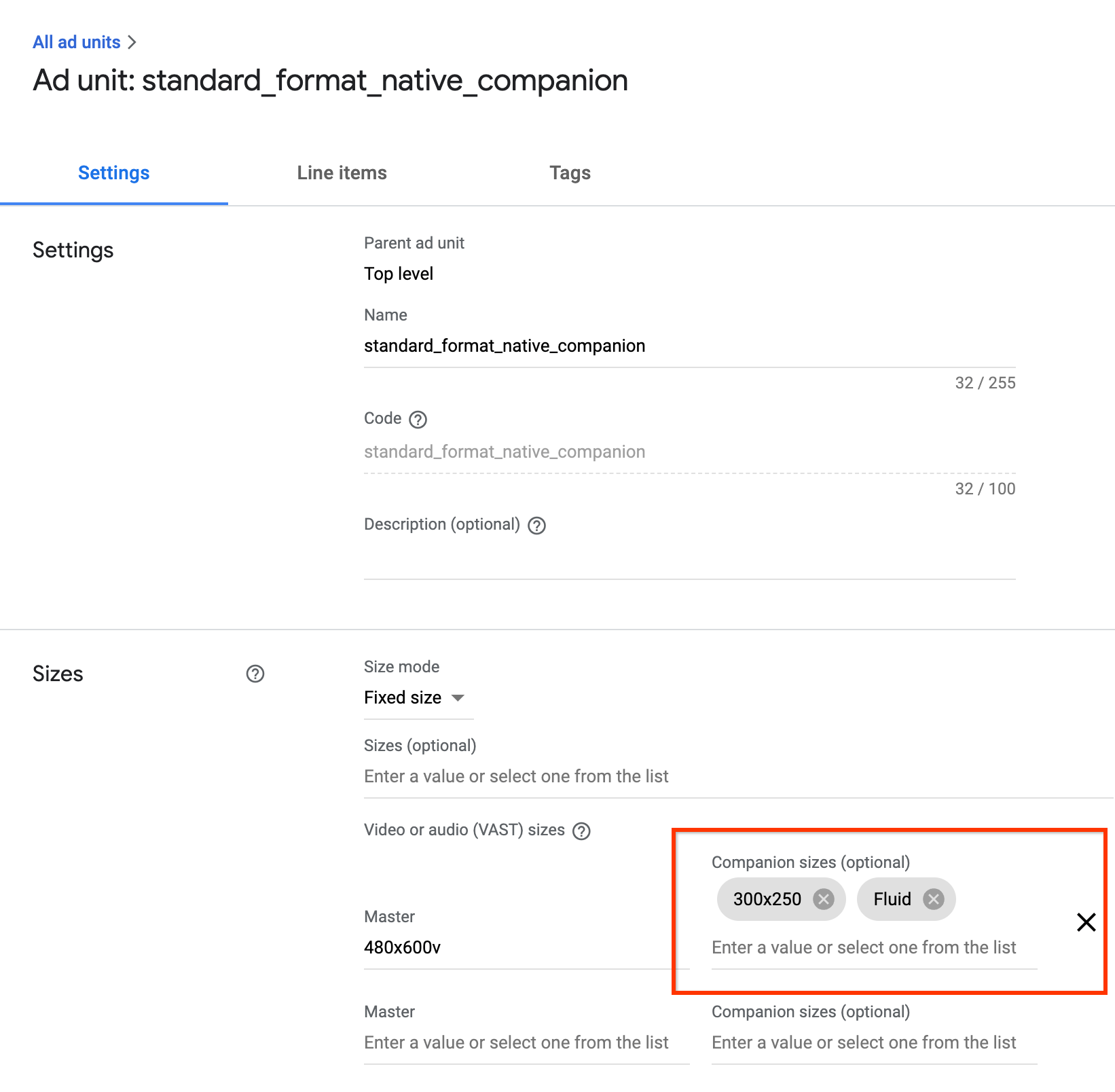
IMA supports fluid companion ads. These companions ads can resize to match the
size of the ad slot. They fill 100% of the width of parent view, then resize
their height to fit the companion's content. They're set by using the `Fluid`
companion size in Ad Manager. See the following image for where to set
this value.
### Update Android apps for fluid companions
You can declare a fluid companion slot by updating the
[`CompanionAdSlot.setSize()`](https://developers.google.com/interactive-media-ads/docs/sdks/android/client-side/api/reference/com/google/ads/interactivemedia/v3/api/CompanionAdSlot.md.txt#public-abstract-void-setsize-int-width,-int-height)
method to take
[`CompanionAdSlot.FLUID_SIZE`](https://developers.google.com/interactive-media-ads/docs/sdks/android/client-side/api/reference/com/google/ads/interactivemedia/v3/api/CompanionAdSlot.md.txt#public-static-final-int-fluid_size)
as both parameters.
```java
companionAdSlot.setSize(CompanionAdSlot.FLUID_SIZE, CompanionAdSlot.FLUID_SIZE);
```
## FAQ
I followed the guide, but I'm not seeing companion ads. What should I do?
: First, check to make sure your tag really is returning companions. To do
this, open the tag in a web browser and look for a `` tag. If
you see that, check to make sure the size of the companion being returned is
the same size as the dimensions you're passing into the `CompanionAdSlot`
object.
What will my companion ad slot look like when following this guide?
: The following image was created from the
[BasicExample](https://github.com/googleads/googleads-ima-android/blob/main/basicexample/)
and has the content video playing on top with the companion ad underneath.
