This guide helps you understand the changes to your web application
introduced by the
[Federated Credentials Management API](https://developer.chrome.com/en/docs/privacy-sandbox/fedcm/) (FedCM).
When FedCM is enabled the browser displays user prompts and no third-party
cookies are used.
## Overview
FedCM enables more private sign-in flows without requiring the use of
third-party cookies. The browser controls user settings, displays user prompts,
and only contacts an Identity Provider such as Google after explicit user
consent is given.
For most websites, migration occurs seamlessly through backward compatible
updates to the Google Identity Services JavaScript library.
## Updates on Auto Sign-in feature
[Federated Credential Management (FedCM) Beta](https://developers.googleblog.com/2023/08/announcing-federated-credential-management-beta-for-gis.html) for Google Identity Services
was launched in August 2023. Many developers tested the API and have provided
valuable feedback.
One response Google heard from developers is about the FedCM automatic sign-in
flow user gesture requirement. For improved privacy, Chrome requires users to
reconfirm that they want to sign in to the website with Google Account in each
Chrome instance even if the user approved the website prior to the FedCM
rollout. This one-time reconfirmation is achieved through a single click of the
One Tap prompt or [Button flow](https://developers.google.com/identity/gsi/web/guides/personalized-button#federated_credential_manager_fedcm) with FedCM to demonstrate user intent to
sign-in. This change may cause an initial disruption in automatic sign-in
conversion rates for some websites.
Recently in M121, Chrome made a [change](https://developers.google.com/privacy-sandbox/3pcd/fedcm-updates#chrome_121_december_2023) to the FedCM automatic sign-in
flow UX. The reconfirmation is only required when third-party cookies are
restricted. This means:
1. FedCM automatic sign-in does not require reconfirmation for returning users.
If users reconfirm with FedCM UI, this reconfirmation will count toward the
user gesture requirement for the post-3PCD era.
2. FedCM automatic sign-in will check the reconfirmation status when the
third-party cookies are manually restricted by users today, or by default in
future Chrome.
With this change, we recommend all automatic sign-in developers migrate to FedCM
as soon as possible, to reduce disruption to automatic sign-in conversion rates.
For the automatic sign-in flow, GIS JavaScript won't trigger FedCM on an older
Chrome (before M121), even if your website chooses to opt-in FedCM.
## User journey differences
The One Tap experiences using FedCM and without FedCM are similar only with
minor differences.
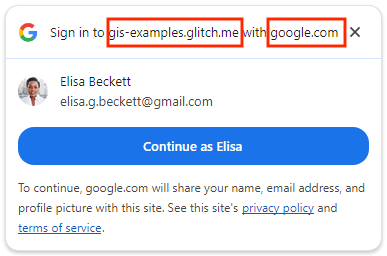
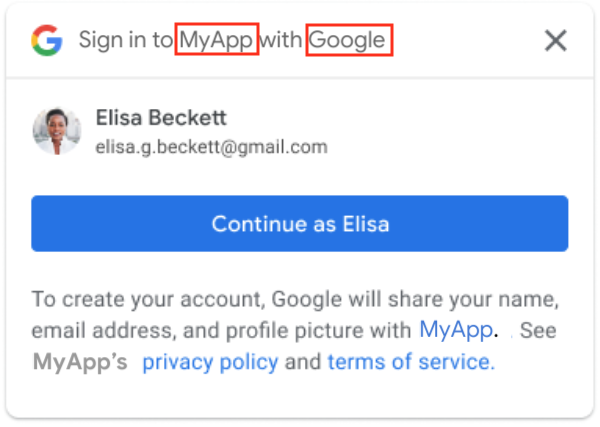
### Single-session new user
Using FedCM, One Tap shows the top-level domain name instead of application
name.
| Using FedCM | Without FedCM |
|---|---|
|   |   |
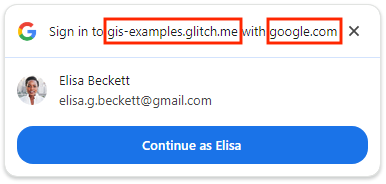
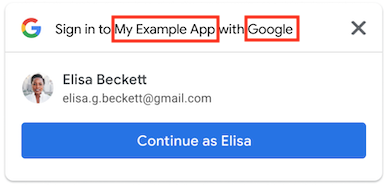
### Single-session returning user (with automatic sign-in disabled)
Using FedCM, One Tap shows the top-level domain name instead of application
name.
| Using FedCM | Without FedCM |
|---|---|
|   |   |
### Single-session returning user (with automatic sign-in enabled)
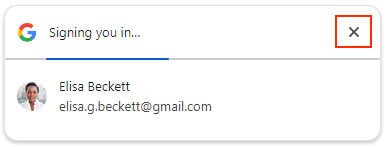
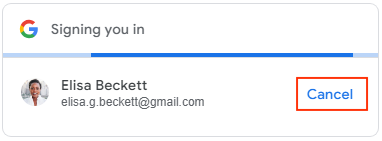
Using FedCM, users can click **X** to cancel the automatic sign-in within 5
seconds instead of clicking the **Cancel** button.
| Using FedCM | Without FedCM |
|---|---|
|   |   |
### Multiple-session
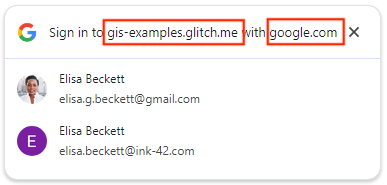
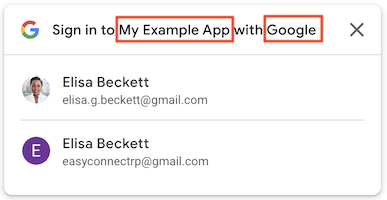
Using FedCM, One Tap shows the top-level domain name instead of application
name.
| Using FedCM | Without FedCM |
|---|---|
|   |   |
See Sign in with Google button [page](https://developers.google.com/identity/gsi/web/guides/personalized-button#key_user_journeys) for the key user journeys for FedCM
Button flow.
## Before you begin
Check that your browser settings and version [supports](https://developers.google.com/identity/gsi/web/guides/supported-browsers) the FedCM API,
updating to the latest version is recommended.
- FedCM API is available in Chrome 117 or later.
- The [Third-party sign-in](https://support.google.com/chrome/answer/14264742) setting is enabled in Chrome. The setting
only affects One Tap and has no impact on the FedCM button flow.
- If your Chrome browser version is 119 or earlier, open `chrome://flags` and
enable the experimental `FedCmWithoutThirdPartyCookies` feature. This step
isn't needed with Chrome browser version 120 or later.
## Migrate your web app
Follow these steps to enable FedCM, evaluate potential migration impact, and
if needed to make changes to your existing web application:
#### 1. **Add** a boolean flag to enable FedCM for [Button](https://developers.google.com/identity/gsi/web/guides/personalized-button) when initializing using: (Optional)
- HTML, set the [`data-use_fedcm_for_button`](https://developers.google.com/identity/gsi/web/reference/html-reference#data-use_fedcm_for_button) attribute to `true` to
enable FedCM Button flow. With FedCM Button flow enabled only, you can also
set [`data-use_fedcm_for_button`](https://developers.google.com/identity/gsi/web/reference/html-reference#data-button_auto_select) attribute to `true` to enable the new
[auto select](https://developers.google.com/identity/gsi/web/guides/personalized-button#auto-select) feature.
- JavaScript, set [`use_fedcm_for_button`](https://developers.google.com/identity/gsi/web/reference/js-reference#use_fedcm_for_button) to `true` in the
[`IdConfiguration`](https://developers.google.com/identity/gsi/web/reference/js-reference#IdConfiguration) object to enable FedCM Button flow. With FedCM Button
flow enabled only, you can also set
[`button_auto_select`](https://developers.google.com/identity/gsi/web/reference/js-reference#button_auto_select) attribute to `true` to enable the new
[auto select](https://developers.google.com/identity/gsi/web/guides/personalized-button#auto-select) feature.
> [!NOTE]
> **Note:** This step is optional. If you choose not to enable FedCM for the Button flow, it will continue to use the existing non-FedCM flow.
#### 2. **Remove** use of `isDisplayMoment()`, `isDisplayed()`, `isNotDisplayed()`, and `getNotDisplayedReason()` methods for One Tap in your code.
To improve user privacy, the [`google.accounts.id.prompt`](https://developers.google.com/identity/gsi/web/reference/js-reference#google.accounts.id.prompt) callback no
longer returns any display moment notification in the
[`PromptMomentNotication`](https://developers.google.com/identity/gsi/web/reference/js-reference#PromptMomentNotification) object. Remove any code that depends on the
display moment related methods. They are `isDisplayMoment()`, `isDisplayed()`,
`isNotDisplayed()`, and `getNotDisplayedReason()` methods.
#### 3. **Remove** use of `getSkippedReason()` method for One Tap in your code.
While the skip moment, `isSkippedMoment()`, would still be called from the
[`google.accounts.id.prompt`](https://developers.google.com/identity/gsi/web/reference/js-reference#google.accounts.id.prompt) callback in the [`PromptMomentNotication`](https://developers.google.com/identity/gsi/web/reference/js-reference#PromptMomentNotification)
object, detailed reason wouldn't be provided. Remove any code that depends on
the `getSkippedReason()` method from your code.
Note that the dismissed moment notification, `isDismissedMoment()`, and
the related detailed reason method, `getDismissedReason()`, are unchanged
when FedCM is enabled.
#### 4. **Remove** `position` style attributes from [`data-prompt_parent_id`](https://developers.google.com/identity/gsi/web/reference/js-reference#prompt_parent_id) and [`intermediate_iframes`](https://developers.google.com/identity/gsi/web/amp/intermediate-support-reference) for One Tap.
The browser controls the size and position of user prompts, custom positions
for One Tap on Desktop are not supported.
#### 5. **Update** page layout if needed for One Tap.
The browser controls the size and position of user prompts. Depending upon
the layout of individual pages, some content might be overlaid as custom
positions for One Tap on Desktop are not supported in any way such as
[style attribute](https://developers.google.com/identity/gsi/web/guides/change-position), [`data-prompt_parent_id`](https://developers.google.com/identity/gsi/web/reference/js-reference#prompt_parent_id),
[`intermediate_iframes`](https://developers.google.com/identity/gsi/web/amp/intermediate-support-reference), customized iframe, and other creative ways.
Change page layout to improve the user experience when important information
is obscured. Don't build your UX around the One Tap prompt even if you assume
it is in the default position. Because the FedCM API is browser-mediated,
different browser vendors may place the position of the prompt slightly
differently.
#### 6. **Add** `allow="identity-credentials-get"` attribute to parent frame if your web app calls One Tap or Button API from cross-origin iframes.
An iframe is considered as cross-origin if its
[origin](https://web.dev/articles/same-site-same-origin) is not exactly the same as the
parent origin. For Example:
- Different domains: `https://example1.com` and `https://example2.com`
- Different top-level domains: `https://example.uk` and `https://example.jp`
- Subdomains: `https://example.com` and `https://login.example.com`
When using One Tap in a cross-origin iframe, users may encounter a
confusing experience. The One Tap prompt displays the **top-level** domain's
name, not the iframe's, as a security measure to prevent credential
harvesting. However, the ID tokens are issued to the iframe's origin.
Review this [GitHub issue](https://github.com/w3c-fedid/FedCM/issues/449) for more details.
Because this discrepancy can be misleading, only using One Tap in cross-origin
but [same-site](https://web.dev/articles/same-site-same-origin) iframes is a **supported** method. For example, a page on
the top-level domain `https://www.example.com` using iframe to embeds a page
with One Tap on `https://login.example.com`. The One Tap prompt will display
"Sign in to example.com with google.com".
All other cases like different domains are **unsupported**. Instead, consider
alternative integration methods like:
- Implementing the [Sign in with Google button](https://developers.google.com/identity/gsi/web/guides/personalized-button) without FedCM enabled.
- Implementing One Tap on the top-level domain
- Utilizing the [Google OAuth 2.0 endpoints](https://developers.google.com/identity/protocols/oauth2) for more customized integration.
- If you're embedding a third-party site within an iframe and can't modify its One Tap implementation, you can prevent the One Tap prompt from appearing within the iframe. To do this, remove the [`allow="identity-credentials-get"`](https://developers.google.com/privacy-sandbox/cookies/fedcm/implement#call_fedcm_from_within_a_cross-origin_iframe) attribute from the iframe tag in the parent frame. This will suppress the prompt, and you can then guide your users to the embedded site's sign-in page directly.
When One Tap or Button API is called from cross-origin iframes, you must add
[`allow="identity-credentials-get"`](https://developers.google.com/privacy-sandbox/cookies/fedcm/implement#call_fedcm_from_within_a_cross-origin_iframe) attribute in every
parent frame `iframe` tag:
If your app utilizes an iframe that contains another iframe, you must
ensure that the attribute is added to every iframe, including all sub-iframes.
For example, consider the following scenario:
- The top document (`https://www.example.uk`) contains an iframe named "Iframe
A", which embeds a page (`https://logins.example.com`).
- This embedded page (`https://logins.example.com`) also contains an iframe
named "Iframe B," which further embeds a page (`https://onetap.example2.com`)
that hosts One Tap or Button.
To ensure that One Tap or Button can be displayed properly, the attribute must
be added to both Iframe A and Iframe B tags.
> [!NOTE]
> **Note:** The [Intermediate Iframe API](https://developers.google.com/identity/gsi/web/amp/nonamp-reference) supports FedCM cross-origin iframes. No additional attribute is needed. However, if you embed a page using the [Intermediate Iframe API](https://developers.google.com/identity/gsi/web/amp/nonamp-reference) within another iframe, you must add the `allow="identity-credentials-get"` attribute to all parent iframes. [Enable FedCM](https://developers.google.com/identity/gsi/web/guides/fedcm-migration#fedcm_flag) to test and ensure proper permission policy setup on all layers.
**Prepare** for inquiries on the One Tap prompt or Button not displayed.
Other sites with different origins may embed your pages that host One Tap
within their iframes. You may receive increased amount of support tickets
related to One Tap or Button not showing up from end-users or other site
owners. While the updates can only be made by the site owners on their pages,
you can do the following to mitigate the impact:
- Update your developer documentation to include how to set up the iframe
properly to call your site. You can link to this page in your documentation.
- Update your developer FAQs page if applicable.
- Let your support team know this upcoming change and prepare for the response
to the inquiry ahead of time.
- Proactively contact impacted partners, customers, or site owners for a
smooth FedCM transition.
> [!NOTE]
> **Note:** On the affected page, you should see the error message in the Chrome browser Developer Tools console: **`[GSI_LOGGER]: FedCM get() rejects with NotAllowedError: The 'identity-credentials-get' feature is not enabled in this document.`**
#### 7. **Add** these [directives](https://developers.google.com/identity/gsi/web/guides/get-google-api-clientid#content_security_policy) to your Content Security Policy (CSP).
This step is optional as not all websites choose to define a CSP.
- If CSP is not used in your website, no changes are needed.
- If your CSP works for the current One Tap or Button and you don't use
`connect-src`, `frame-src`, `script-src`, `style-src`, or `default-src` no
changes are needed.
- Otherwise, follow this [guide](https://developers.google.com/identity/gsi/web/guides/get-google-api-clientid#content_security_policy) to set up your CSP. Without proper CSP
setup, the FedCM One Tap or Button wouldn't be displayed on the site.
> [!NOTE]
> **Note:** On the affected page, you should see the error message in the Chrome browser Developer Tools console: **`[GSI_LOGGER]: FedCM get() rejects with NetworkError: Failed to execute 'get' on 'CredentialsContainer': Refused to connect to 'https://accounts.google.com/gsi/fedcm.json' because it violates the document's Content Security Policy.`**
#### 8. **Remove** Accelerated Mobile Pages (AMP) support for sign-in.
User sign-in support for AMP is an optional feature of GIS your web app
may have implemented. If this is the case,
**Delete** any references to the:
- [`amp-onetap-google`](https://developers.google.com/identity/gsi/web/amp/amp-reference) custom element, and
-
Consider redirecting sign-in requests from AMP to your website's HTML sign-in
flow. Note that the related [`Intermediate Iframe Support API`](https://developers.google.com/identity/gsi/web/amp/intermediate-support-reference) is
unaffected.
## Test and verify your migration
After making necessary changes based on the preceding steps, you can verify the
migration is successful.
1. Confirm your browser [supports](https://developers.google.com/identity/gsi/web/guides/supported-browsers) FedCM and you have an existing Google
Account session.
2. Navigate to the One Tap or Button page(s) in your application.
3. Confirm that the One Tap prompt or Button is displayed and safely overlays
underlying content.
4. Confirm a correct credential returns to your endpoint or callback method
when signing in your application using One Tap or Button.
5. If automatic sign in is enabled, verify that cancelling works and a correct
credential returns to your endpoint or callback method.
#### One Tap cooldown period
Clicking One Tap
on the top-right corner closes the prompt and enters the cooldown period which
suppresses the One Tap prompt from displaying temporarily. In Chrome, if you
want to have One Tap prompt shown again before the cooldown period ends, you
can reset the cooldown status by clicking the lock icon in the address bar and
clicking the *Reset Permission* button.
#### Automatic sign in quiet period
When testing [automatic sign in](https://developers.google.com/identity/gsi/web/guides/automatic-sign-in-sign-out) One Tap using FedCM, it has a 10 minute
quiet period between every automatic sign-in attempt. The quiet period can't be
reset. You would have to wait for 10 minutes or use different Google Account
for testing in order to trigger automatic sign in again.
### Helpful resources
The [Privacy Sandbox Analysis Tool](https://developers.google.com/privacy-sandbox/blog/psat-announcement) (PSAT) is a Chrome DevTools extension
to assist with the adoption of alternative APIs such as FedCM. It works by
scanning your site for affected features and provides a list of recommended
changes.