Room Bundles let you define multiple room types for a single property, or
combine an itinerary of a room with rate features---additional services that
come with a rate and conditions of sale---to your users beyond a standard
price.
> [!IMPORTANT]
> **Key Point:** Room Bundles and rate features are different from amenities, which are things a hotel has that aren't tied to a rate, such as a fitness center or restaurant, and which are defined by [`attributes` in a Hotel
> List](https://developers.google.com/hotels/hotel-prices/xml-reference/hotel-list-feed#attributes).
## Key concepts and workflow
With Room Bundles, you can offer additional combinations of physical room types
with different service packages.
### Examples
The following images shows examples of Room bundles in desktop and mobile
devices:
### Room Bundles with images
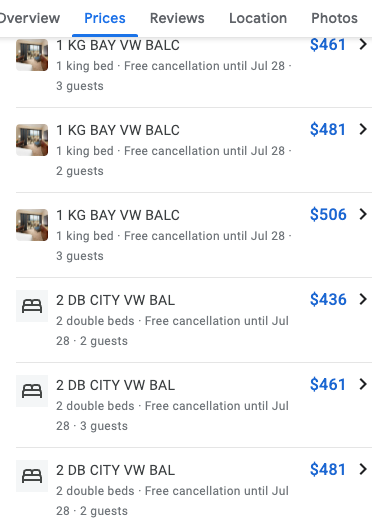
This example is mobile version of Room bundles which consists of all the
different room types for the required number of occupants and their respective
room images.
**Note:** Room bundles without images are replaced
with a bed placeholder image.
### Rate features
The following images show examples of rate features:



> [!IMPORTANT]
> **Key Point:** Your TAM (Technical Account Manager) needs to enable your account to use rate features.
Displaying Room Bundles and rate features in search results is governed by the
same selection process as standard room rates.
### Room Bundles
You define Room Bundles and rate features in Transaction messages. The root
element of a Transaction message is [``](https://developers.google.com/hotels/hotel-prices/xml-reference/transaction-messages#Transaction).
The structure of the Transaction message depends on what you are doing:
defining the metadata about the Room Bundle or rate feature, or updating the
Room Bundle's pricing or availability.
Metadata
: Define Room Bundle and rate feature metadata with [``](https://developers.google.com/hotels/hotel-prices/xml-reference/transaction-messages#PackageData) in a
[``](https://developers.google.com/hotels/hotel-prices/xml-reference/transaction-messages#PropertyDataSet) element. For more information, see [Define room and
package metadata](https://developers.google.com/hotels/hotel-prices/dev-guide/room-bundles#metadata). Room Bundles use existing `` elements
for their physical room descriptions.
Pricing and availability
: Define Room Bundle pricing and availability with the [``](https://developers.google.com/hotels/hotel-prices/xml-reference/transaction-messages#RoomBundle) element
in a `` for each package/itinerary combination. For more
information, see [Define pricing and availability](https://developers.google.com/hotels/hotel-prices/dev-guide/room-bundles#pricing).
The base room's rate, taxes, and other fees are mandatory under
`` when they're not used with Room Bundles, and can be removed when
used with Room Bundles. If you're implementing Room Bundles using a live
account, follow these steps:
1. Include the base room's rate, taxes, and other fees under `` and
add one Room Bundle that matches the base Room Bundle.
2. If needed, define additional Room Bundles within the same `` block
for other room types at that property or different packages of services.
3. After the Room Bundle is launched, remove the base room's rate, taxes, and
other fees.
### Room Bundle metadata
When defining Room Bundles and rate features, you typically define the
description, additional services that are part of the rate, and other
information about the Room Bundle ahead of time. This information is known as
the Room Bundle metadata. You then reference this metadata in your pricing
updates, but don't include it in the pricing update messages.
When you define Room Bundles, use existing [``](https://developers.google.com/hotels/hotel-prices/xml-reference/transaction-messages#RoomData) elements for the
physical room descriptions and [``](https://developers.google.com/hotels/hotel-prices/xml-reference/transaction-messages#PackageData) elements for the rate features
and terms that aren't part of the physical room description.
Using the `` and `` elements can significantly
reduce the size of your Hotel List and [Hotel Price
Feed](https://developers.google.com/hotels/hotel-prices/dev-guide/updating-prices) because it reduces the
amount of repetitive data sent in Transaction messages.
For example, data such as a room name and description is typically repeated
for every itinerary. You can use the `` and ``
elements to define this type of data once. Itinerary-specific Room Bundle data
is then merged with the stored room and package definitions for display to the
end user.
Google matches your metadata with your itinerary-specific data to render the
contents of your ads. There is special processing to combine the names and
descriptions from the `` and `` elements, allowing
the physical room to be described in `` and rate features and
package details to be in ``.
If you define both the room data and package data for a single room or Room
Bundle, Google includes both in the ad output, separated by a hyphen.
### Photo guidelines
When sending room photos, here are some guidelines you should follow to make
sure your photos are shown to users:
- Send photos for each room type, including photos of accessible
rooms---for example, designated accessible rooms with various bathroom
fixtures, such as roll-in shower.
- Include at least four photos of the room and at least one photo of the
bathroom.
- Photos should be of the room itself rather than of the property. The most
important photos are of the bed, the whole room, the bathroom, living space,
and the view from the room (with the rest of the room in the same photo), and,
if applicable, the balcony, patio, or terrace.
It is also helpful to capture photos of the desk, kitchen, coffee/tea makers,
and distinct room features.
- Avoid photos of people and property---for example, exterior or property
amenities---sightseeing/tourism, and food.
- Avoid close-up shots of objects, such as closeups of stemware.
- Avoid branding and brands, though labeled or branded toiletries are fine to
include within a photo that captures the entire bathroom area. Photos
shouldn't feature large blocks of text, logos, or watermarks.
- Provide standard, landscape (horizontal) photos with a wide field of view;
avoid fisheye and distorted photos. Capture photos at the highest resolution
for improved ranking. You don't need to submit the same photo in various
resolutions.
### Data precedence
Room Bundle data is gathered from all sources and combined, using precedence
rules, to produce the final data for a given hotel, itinerary, and Room Bundle.
The ordering is as follows, from lowest to highest precedence:
1. (Lowest) Partner data
2. Property data
3. [``](https://developers.google.com/hotels/hotel-prices/xml-reference/transaction-messages#RoomData), where the `` matches the `` in the `` block
4. [``](https://developers.google.com/hotels/hotel-prices/xml-reference/transaction-messages#PackageData), where the `` matches the `` in the `` block
5. (Highest) [``](https://developers.google.com/hotels/hotel-prices/xml-reference/transaction-messages#RoomBundle)
## Define pricing and availability
To define Room Bundle pricing and availability, use a [``](https://developers.google.com/hotels/hotel-prices/xml-reference/transaction-messages#RoomBundle) element in
a Transaction message for each package or itinerary combination. The
`` element should be inside the [``](https://developers.google.com/hotels/hotel-prices/xml-reference/transaction-messages#Result) element. Sample code
for two [``](https://developers.google.com/hotels/hotel-prices/xml-reference/transaction-messages#RoomBundle) elements is shown. Note that, in this example, the
two [``](https://developers.google.com/hotels/hotel-prices/xml-reference/transaction-messages#RoomBundle) elements reference room and package metadata using
`` and ``.
For each ``, the contained set of Room Bundles overwrites the
existing set for that property or itinerary combination. If you don't define any
Room Bundles or rate features in the `` element, then all Room
Bundles are removed and only the basic room for that hotel or itinerary shows up
in search results.
Be sure to use elements such as `` to make your Room Bundles more
attractive to potential customers and be sure they match the hotel's landing
page. In this example, you would define names and other descriptive information
in the metadata.
`` is optional and represents the unique identifier for a room and
package combination. We strongly recommend using `RatePlanID` as a variable to
build your dynamic landing page (formerly Point of Sale) URL. It should be
within 50 characters in length for optimal performance. For details, see
[Using Variables and Conditions](https://developers.google.com/hotels/hotel-prices/dev-guide/pos-urls).
The following elements are optional in Room Bundles:
``
``
``
``
``
``
``
When you implement Room Bundle in a live account, remove `` after the
Room Bundle is enabled.
1800542017-10-072060773P54321199.9925.122.00060773-P54321436233P12345298.8842.1210.00436233-P12345
## Define room and package metadata
To define Room Bundle metadata, use [``](https://developers.google.com/hotels/hotel-prices/xml-reference/transaction-messages#PackageData) and [``](https://developers.google.com/hotels/hotel-prices/xml-reference/transaction-messages#RoomData) elements
inside the [``](https://developers.google.com/hotels/hotel-prices/xml-reference/transaction-messages#PropertyDataSet) element of a Transaction message.
You define room and package metadata in a Transaction message that is
separate from the [pricing and availability data](https://developers.google.com/hotels/hotel-prices/dev-guide/room-bundles#pricing). By defining this
data ahead of time, your pricing updates don't need to include repetitive
information such as descriptions, photo URLs, amenities, and other data about
each and every room or package for each and every itinerary.
Google stores the metadata for you and inserts it into your ads when they are
displayed. You can update room and package metadata at any time with a new
Transaction message.
In the Transaction message, you set a package ID and a room ID on each block
that you then reference in your [``](https://developers.google.com/hotels/hotel-prices/xml-reference/transaction-messages#Result) blocks of pricing updates.
If the room and package data changes---for example, if you add a new room
type in a property, send a new Transaction message that contains the
updated room and package data---Google replaces the existing metadata about
a room or package with the new data.
Google recommends that you define metadata during your initial setup. After
predefining the metadata, you only need to reference the `` and
`` values in your [pricing
updates](https://developers.google.com/hotels/hotel-prices/dev-guide/updating-prices) rather than include all
that information again. Google uses those IDs to match rooms and Room Bundles
with the stored metadata. This can greatly reduce the overall size of your
Transaction messages.
Because prices for room or itinerary combinations change much more frequently
than the room or package descriptions, defining metadata once and then referring
to it is a much more efficient use of Transaction messages. In addition, errors
such as mismatching room descriptions can be eliminated by using metadata rather
than defining data inline.
The recommended and most efficient method of defining metadata and pricing
separately is shown below:
1800540607734http://www.foo.com/static/bar/imageQueen.jpg
P543212web11P123454web111800542017-10-072060773P54321199.9925.122.00060773-P54321436233P12345298.8842.1210.00060773-P12345
## Occupancy and capacity
When defining Room Bundles, you must understand the difference between
*occupancy* and *capacity*:
Occupancy
: The number of guests that a Room Bundle is intended to apply to. For example,
the "Honeymoon Package" has an *occupancy* of two. You set the value of a
package's occupancy by using the [``](https://developers.google.com/hotels/hotel-prices/xml-reference/transaction-messages#PackageData) or [``](https://developers.google.com/hotels/hotel-prices/xml-reference/transaction-messages#RoomBundle) elements'
`` child element.
Capacity
: The maximum number of people that a room can physically accommodate. The
capacity of a room is always equal to or higher than the occupancy. For
example, the "Honeymoon Suite" in your hotel has a maximum capacity of six
people, but you price a bundle for two guests. You set the value of a
package's capacity by using the [``](https://developers.google.com/hotels/hotel-prices/xml-reference/transaction-messages#RoomData) element's `` child
element.
When pricing a Room Bundle, you must give the price for the number of guests
that the bundle is intended to be for (the value specified in the bundle's
`` element). If `` is set to two, then the price in that
package must be for two people. You cannot set `` to four guests, and
set the bundle's price for two guests.
### Shared rooms
You also use Occupancy and Capacity in Room Bundles to set prices for shared
room accomodations---for example, hostel. As an example, to set a per person
price for a dorm room that has 8 beds, you would set Occupancy to `1` and
Capacity to `8`, and identify it as such in the `` name. [See
example](https://developers.google.com/hotels/hotel-prices/xml-reference/transaction-messages#hostel-example).
## Update Room Bundles
This section describes how to remove a Room Bundle that is no longer available
and how to update the price of an existing Room Bundle.
> [!IMPORTANT]
> **Key Point:** Every time you update a room/itinerary's `` block in your Transaction messages, you must include a complete set of available Room Bundles for each ``.
### Room Bundle removal
Room Bundles are different from hotel prices in the way that you remove
them.
To remove a room or itinerary combination from inventory, you set the
`` element's `` to `-1`. To remove a Room Bundle for a
given room or itinerary, remove the [``](https://developers.google.com/hotels/hotel-prices/xml-reference/transaction-messages#RoomBundle) element from the
`` block in the Transaction message.
Room Bundles in your data feeds are considered a set, which number anywhere
from 0 to tens of them. When you send Room Bundles to Google, you send the
current, complete set. You don't change values of an individual Room Bundle to
mark a previously available one as unavailable. Whatever set of bundles is in
the most recent Transaction message replaces the current set.
For example, there are bundles A, B, C, and D. You first send a message that
defines the set of room bundles A, B, C and D. Later, if bundle B sells out,
you resend the entire set with bundles A, C, and D only. If all Room Bundles
have sold out, send an empty set of Room Bundles.
### Price adjustments
To change the price of a Room Bundle, set the new `` in the [``](https://developers.google.com/hotels/hotel-prices/xml-reference/transaction-messages#Result)
element.
Every time you update a room/itinerary's `` block in your Transaction
messages, you must include a complete set of available Room Bundles for each
``. Google replaces the existing set of Room Bundles with the new
set. If you don't include any Room Bundles in ``, then Google removes
all Room Bundles for that room or itinerary.
### Metadata updates
You update Room Bundle metadata with a response to a [``](https://developers.google.com/hotels/hotel-prices/xml-reference/queries#Query) from Google.
You respond to a Query message with a Transaction message that defines the room
and package metadata for the specified hotels. For more information, see [Query
Messages](https://developers.google.com/hotels/hotel-prices/dev-guide/query-messages).