The MediaPipe Object Detector task lets you detect the presence and location of
multiple classes of objects within images or videos. For example, an object
detector can locate dogs in an image. This task operates on image data with a
machine learning (ML) model, accepting static data or a continuous video stream
as input and outputting a list of detection results. Each detection result
represents an object that appears within the image or video.
[Open in Web Demos](https://google-ai-edge.github.io/mediapipe-samples-web/#/vision/object_detector)[Edit in StackBlitz](https://stackblitz.com/github/google-ai-edge/mediapipe-samples-web?file=src/tasks/object-detector.ts)
## Quickstart
Install the SDK for your platform,
[prepare input data](https://developers.google.com/edge/mediapipe/solutions/prepare_data.md.txt#vision), choose a
running mode, and run inference.
### Web
npm`npm install @mediapipe/tasks-vision`[Web demo](https://google-ai-edge.github.io/mediapipe-samples-web/#/vision/object_detector)·[Edit in StackBlitz](https://stackblitz.com/github/google-ai-edge/mediapipe-samples-web?file=src/tasks/object-detector.ts)·[Setup guide](https://developers.google.com/edge/mediapipe/solutions/setup_web.md.txt)
#### Image
`IMAGE`Stateless · single frameSynchronous call on independent still images. Resets temporal tracking state on every call.
```typescript
import { FilesetResolver, ObjectDetector } from "@mediapipe/tasks-vision";
const vision = await FilesetResolver.forVisionTasks(
"https://cdn.jsdelivr.net/npm/@mediapipe/tasks-vision@latest/wasm"
);
const objectDetector = await ObjectDetector.createFromOptions(vision, {
baseOptions: { modelAssetPath: "efficientdet_lite0.tflite", delegate: "GPU" },
runningMode: "IMAGE",
scoreThreshold: 0.5,
maxResults: 5,
});
// Synchronous single-frame call (stateless across images)
const image = document.getElementById("image") as HTMLImageElement;
const result = objectDetector.detect(image);
```
#### Video
`VIDEO`Every frame · no dropsSynchronous tracking across decoded video frames with monotonic timestamps. Processes every frame in order and never drops frames.
```typescript
import { FilesetResolver, ObjectDetector } from "@mediapipe/tasks-vision";
const vision = await FilesetResolver.forVisionTasks(
"https://cdn.jsdelivr.net/npm/@mediapipe/tasks-vision@latest/wasm"
);
const objectDetector = await ObjectDetector.createFromOptions(vision, {
baseOptions: { modelAssetPath: "efficientdet_lite0.tflite", delegate: "GPU" },
runningMode: "VIDEO",
scoreThreshold: 0.5,
maxResults: 5,
});
// Synchronous across decoded frames with monotonic timestamps (never drops frames)
for (const { frame, timestampMs } of decodedVideoFrames) {
const result = objectDetector.detectForVideo(frame, timestampMs);
}
```
#### Livestream
`VIDEO + rAF`Live camera · latest frameWeb tasks run synchronously---pair `runningMode: "VIDEO"` with `requestAnimationFrame` so each paint inspects only the latest camera frame (skipping intermediate frames when busy).
```typescript
import { FilesetResolver, ObjectDetector } from "@mediapipe/tasks-vision";
const vision = await FilesetResolver.forVisionTasks(
"https://cdn.jsdelivr.net/npm/@mediapipe/tasks-vision@latest/wasm"
);
// On Web, live camera loops pair runningMode: "VIDEO" with requestAnimationFrame
const objectDetector = await ObjectDetector.createFromOptions(vision, {
baseOptions: { modelAssetPath: "efficientdet_lite0.tflite", delegate: "GPU" },
runningMode: "VIDEO",
scoreThreshold: 0.5,
maxResults: 5,
});
const video = document.getElementById("webcam") as HTMLVideoElement;
video.srcObject = await navigator.mediaDevices.getUserMedia({ video: true });
await video.play();
let lastVideoTime = -1;
function renderLoop() {
if (video.readyState >= 2 && video.currentTime !== lastVideoTime) {
lastVideoTime = video.currentTime;
const result = objectDetector.detectForVideo(video, performance.now());
console.log(result.detections);
}
requestAnimationFrame(renderLoop);
}
renderLoop();
```
### Android (Kotlin)
Gradle`implementation("com.google.mediapipe:tasks-vision:latest.release")`[Sample code](https://github.com/google-ai-edge/mediapipe-samples/tree/main/examples/object_detection/android)·[Setup guide](https://developers.google.com/edge/mediapipe/solutions/setup_android.md.txt)
#### Image
`IMAGE`Stateless · single frameSynchronous call on independent still images. Resets temporal tracking state on every call.
```kotlin
import com.google.mediapipe.framework.image.BitmapImageBuilder
import com.google.mediapipe.framework.image.MPImage
import com.google.mediapipe.tasks.core.BaseOptions
import com.google.mediapipe.tasks.vision.core.RunningMode
import com.google.mediapipe.tasks.vision.objectdetector.ObjectDetector
val baseOptions = BaseOptions.builder()
.setModelAssetPath("efficientdet_lite0.tflite")
.build()
val options = ObjectDetector.ObjectDetectorOptions.builder()
.setBaseOptions(baseOptions)
.setRunningMode(RunningMode.IMAGE)
.setScoreThreshold(0.5f)
.setMaxResults(5)
.build()
val objectDetector = ObjectDetector.createFromOptions(context, options)
// Synchronous single-image call (no temporal tracking across calls)
val mpImage = BitmapImageBuilder(bitmap).build()
val result = objectDetector.detect(mpImage)
```
#### Video
`VIDEO`Every frame · no dropsSynchronous tracking across decoded video frames with monotonic timestamps. Processes every frame in order and never drops frames.
```kotlin
import com.google.mediapipe.framework.image.BitmapImageBuilder
import com.google.mediapipe.framework.image.MPImage
import com.google.mediapipe.tasks.core.BaseOptions
import com.google.mediapipe.tasks.vision.core.RunningMode
import com.google.mediapipe.tasks.vision.objectdetector.ObjectDetector
val baseOptions = BaseOptions.builder()
.setModelAssetPath("efficientdet_lite0.tflite")
.build()
val options = ObjectDetector.ObjectDetectorOptions.builder()
.setBaseOptions(baseOptions)
.setRunningMode(RunningMode.VIDEO)
.setScoreThreshold(0.5f)
.setMaxResults(5)
.build()
val objectDetector = ObjectDetector.createFromOptions(context, options)
// Synchronous: processes every frame in order with monotonic timestamps (no frame drops)
val mpImage = BitmapImageBuilder(frameBitmap).build()
val result = objectDetector.detectForVideo(mpImage, frameTimestampMs)
```
#### Livestream
`LIVE_STREAM`Async · drops frames when busyAsynchronous camera pipeline with a result callback. Automatically drops incoming frames when busy so results stay current with low latency.
```kotlin
import android.os.SystemClock
import android.util.Log
import com.google.mediapipe.framework.image.BitmapImageBuilder
import com.google.mediapipe.framework.image.MPImage
import com.google.mediapipe.tasks.core.BaseOptions
import com.google.mediapipe.tasks.vision.core.RunningMode
import com.google.mediapipe.tasks.vision.objectdetector.ObjectDetector
val baseOptions = BaseOptions.builder()
.setModelAssetPath("efficientdet_lite0.tflite")
.build()
val options = ObjectDetector.ObjectDetectorOptions.builder()
.setBaseOptions(baseOptions)
.setRunningMode(RunningMode.LIVE_STREAM)
.setScoreThreshold(0.5f)
.setMaxResults(5)
.setResultListener { result, _ -> val detections = result.detections() }
.setErrorListener { error -> Log.e("MediaPipe", error.message.orEmpty()) }
.build()
val objectDetector = ObjectDetector.createFromOptions(context, options)
// Async: automatically drops incoming camera frames when busy so results stay current
objectDetector.detectAsync(mpImage, SystemClock.uptimeMillis())
```
### Android (Java)
Gradle`implementation 'com.google.mediapipe:tasks-vision:latest.release'`[Sample code](https://github.com/google-ai-edge/mediapipe-samples/tree/main/examples/object_detection/android)·[Setup guide](https://developers.google.com/edge/mediapipe/solutions/setup_android.md.txt)
#### Image
`IMAGE`Stateless · single frameSynchronous call on independent still images. Resets temporal tracking state on every call.
```java
import com.google.mediapipe.framework.image.BitmapImageBuilder;
import com.google.mediapipe.framework.image.MPImage;
import com.google.mediapipe.tasks.core.BaseOptions;
import com.google.mediapipe.tasks.vision.core.RunningMode;
import com.google.mediapipe.tasks.vision.objectdetector.ObjectDetector;
import com.google.mediapipe.tasks.vision.objectdetector.ObjectDetectorResult;
BaseOptions baseOptions = BaseOptions.builder()
.setModelAssetPath("efficientdet_lite0.tflite")
.build();
ObjectDetector.ObjectDetectorOptions options = ObjectDetector.ObjectDetectorOptions.builder()
.setBaseOptions(baseOptions)
.setRunningMode(RunningMode.IMAGE)
.setScoreThreshold(0.5f)
.setMaxResults(5)
.build();
ObjectDetector objectDetector = ObjectDetector.createFromOptions(context, options);
// Synchronous single-image call (no temporal tracking across calls)
MPImage mpImage = new BitmapImageBuilder(bitmap).build();
ObjectDetectorResult result = objectDetector.detect(mpImage);
```
#### Video
`VIDEO`Every frame · no dropsSynchronous tracking across decoded video frames with monotonic timestamps. Processes every frame in order and never drops frames.
```java
import com.google.mediapipe.framework.image.BitmapImageBuilder;
import com.google.mediapipe.framework.image.MPImage;
import com.google.mediapipe.tasks.core.BaseOptions;
import com.google.mediapipe.tasks.vision.core.RunningMode;
import com.google.mediapipe.tasks.vision.objectdetector.ObjectDetector;
import com.google.mediapipe.tasks.vision.objectdetector.ObjectDetectorResult;
BaseOptions baseOptions = BaseOptions.builder()
.setModelAssetPath("efficientdet_lite0.tflite")
.build();
ObjectDetector.ObjectDetectorOptions options = ObjectDetector.ObjectDetectorOptions.builder()
.setBaseOptions(baseOptions)
.setRunningMode(RunningMode.VIDEO)
.setScoreThreshold(0.5f)
.setMaxResults(5)
.build();
ObjectDetector objectDetector = ObjectDetector.createFromOptions(context, options);
// Synchronous: processes every frame in order with monotonic timestamps (no frame drops)
MPImage mpImage = new BitmapImageBuilder(frameBitmap).build();
ObjectDetectorResult result = objectDetector.detectForVideo(mpImage, frameTimestampMs);
```
#### Livestream
`LIVE_STREAM`Async · drops frames when busyAsynchronous camera pipeline with a result callback. Automatically drops incoming frames when busy so results stay current with low latency.
```java
import android.os.SystemClock;
import android.util.Log;
import com.google.mediapipe.framework.image.BitmapImageBuilder;
import com.google.mediapipe.framework.image.MPImage;
import com.google.mediapipe.tasks.core.BaseOptions;
import com.google.mediapipe.tasks.vision.core.RunningMode;
import com.google.mediapipe.tasks.vision.objectdetector.ObjectDetector;
BaseOptions baseOptions = BaseOptions.builder()
.setModelAssetPath("efficientdet_lite0.tflite")
.build();
ObjectDetector.ObjectDetectorOptions options = ObjectDetector.ObjectDetectorOptions.builder()
.setBaseOptions(baseOptions)
.setRunningMode(RunningMode.LIVE_STREAM)
.setScoreThreshold(0.5f)
.setMaxResults(5)
.setResultListener((result, inputImage) -> { var detections = result.detections(); })
.setErrorListener(error -> Log.e("MediaPipe", String.valueOf(error.getMessage())))
.build();
ObjectDetector objectDetector = ObjectDetector.createFromOptions(context, options);
// Async: automatically drops incoming camera frames when busy so results stay current
objectDetector.detectAsync(mpImage, SystemClock.uptimeMillis());
```
### iOS
SwiftPM`https://github.com/google-ai-edge/mediapipe → MediaPipeTasksVision`[Package.swift](https://developers.google.com/edge/mediapipe/solutions/setup_ios.md.txt#package_swift)·[Sample code](https://github.com/google-ai-edge/mediapipe-samples/tree/main/examples/object_detection/ios)·[Setup guide](https://developers.google.com/edge/mediapipe/solutions/setup_ios.md.txt)
#### Image
`IMAGE`Stateless · single frameSynchronous call on independent still images. Resets temporal tracking state on every call.
```swift
import Foundation
import MediaPipeTasksVision
guard let modelPath = Bundle.main.path(forResource: "efficientdet_lite0", ofType: "tflite") else { return }
let options = ObjectDetectorOptions()
options.baseOptions.modelAssetPath = modelPath
options.runningMode = .image
options.scoreThreshold = 0.5
options.maxResults = 5
let objectDetector = try ObjectDetector(options: options)
// Synchronous single-image call (stateless across images)
let mpImage = try MPImage(uiImage: image)
let result = try objectDetector.detect(image: mpImage)
```
#### Video
`VIDEO`Every frame · no dropsSynchronous tracking across decoded video frames with monotonic timestamps. Processes every frame in order and never drops frames.
```swift
import Foundation
import MediaPipeTasksVision
guard let modelPath = Bundle.main.path(forResource: "efficientdet_lite0", ofType: "tflite") else { return }
let options = ObjectDetectorOptions()
options.baseOptions.modelAssetPath = modelPath
options.runningMode = .video
options.scoreThreshold = 0.5
options.maxResults = 5
let objectDetector = try ObjectDetector(options: options)
// Synchronous: processes every frame in order with monotonic timestamps (no frame drops)
let mpImage = try MPImage(pixelBuffer: pixelBuffer)
let result = try objectDetector.detect(videoFrame: mpImage, timestampInMilliseconds: timestampMs)
```
#### Livestream
`LIVE_STREAM`Async · drops frames when busyAsynchronous camera pipeline with a result callback. Automatically drops incoming frames when busy so results stay current with low latency.
```swift
import Foundation
import MediaPipeTasksVision
final class ObjectDetectorStreamService: NSObject {
private var objectDetector: ObjectDetector?
func setUp() throws {
guard let modelPath = Bundle.main.path(
forResource: "efficientdet_lite0",
ofType: "tflite"
) else { return }
let options = ObjectDetectorOptions()
options.baseOptions.modelAssetPath = modelPath
options.runningMode = .liveStream
options.scoreThreshold = 0.5
options.maxResults = 5
options.objectDetectorLiveStreamDelegate = self
objectDetector = try ObjectDetector(options: options)
}
func detectAsync(mpImage: MPImage, timestampMs: Int) throws {
// Async: automatically drops incoming camera frames when busy so results stay current
try objectDetector?.detectAsync(image: mpImage, timestampInMilliseconds: timestampMs)
}
}
extension ObjectDetectorStreamService: ObjectDetectorLiveStreamDelegate {
func objectDetector(
_ objectDetector: ObjectDetector,
didFinishDetection result: ObjectDetectorResult?,
timestampInMilliseconds: Int,
error: (any Error)?
) {
guard let result else { return }
DispatchQueue.main.async {
let detections = result.detections
}
}
}
```
### Python
pip`pip install mediapipe`[Sample code](https://colab.research.google.com/github/google-ai-edge/mediapipe-samples/blob/main/examples/object_detection/python/object_detector.ipynb)·[Setup guide](https://developers.google.com/edge/mediapipe/solutions/setup_python.md.txt)
#### Image
`IMAGE`Stateless · single frameSynchronous call on independent still images. Resets temporal tracking state on every call.
```python
import mediapipe as mp
BaseOptions = mp.tasks.BaseOptions
ObjectDetector = mp.tasks.vision.ObjectDetector
ObjectDetectorOptions = mp.tasks.vision.ObjectDetectorOptions
VisionRunningMode = mp.tasks.vision.RunningMode
options = ObjectDetectorOptions(
base_options=BaseOptions(model_asset_path="efficientdet_lite0.tflite"),
running_mode=VisionRunningMode.IMAGE,
score_threshold=0.5,
max_results=5,
)
with ObjectDetector.create_from_options(options) as detector:
# Synchronous single-image call (stateless across images)
mp_image = mp.Image.create_from_file("input.jpg")
result = detector.detect(mp_image)
```
#### Video
`VIDEO`Every frame · no dropsSynchronous tracking across decoded video frames with monotonic timestamps. Processes every frame in order and never drops frames.
```python
import mediapipe as mp
BaseOptions = mp.tasks.BaseOptions
ObjectDetector = mp.tasks.vision.ObjectDetector
ObjectDetectorOptions = mp.tasks.vision.ObjectDetectorOptions
VisionRunningMode = mp.tasks.vision.RunningMode
options = ObjectDetectorOptions(
base_options=BaseOptions(model_asset_path="efficientdet_lite0.tflite"),
running_mode=VisionRunningMode.VIDEO,
score_threshold=0.5,
max_results=5,
)
with ObjectDetector.create_from_options(options) as detector:
# Synchronous: processes every frame in order with monotonic timestamps (no frame drops)
for mp_image, timestamp_ms in decoded_video_frames:
result = detector.detect_for_video(mp_image, timestamp_ms)
```
#### Livestream
`LIVE_STREAM`Async · drops frames when busyAsynchronous camera pipeline with a result callback. Automatically drops incoming frames when busy so results stay current with low latency.
```python
import mediapipe as mp
BaseOptions = mp.tasks.BaseOptions
ObjectDetector = mp.tasks.vision.ObjectDetector
ObjectDetectorOptions = mp.tasks.vision.ObjectDetectorOptions
VisionRunningMode = mp.tasks.vision.RunningMode
def on_result(result, output_image: mp.Image, timestamp_ms: int):
print(f"Detected {len(result.detections)} object(s) at {timestamp_ms} ms")
options = ObjectDetectorOptions(
base_options=BaseOptions(model_asset_path="efficientdet_lite0.tflite"),
running_mode=VisionRunningMode.LIVE_STREAM,
score_threshold=0.5,
max_results=5,
result_callback=on_result,
)
with ObjectDetector.create_from_options(options) as detector:
# Async: automatically drops incoming camera frames when busy so results stay current
mp_image = mp.Image(image_format=mp.ImageFormat.SRGB, data=rgb_frame)
detector.detect_async(mp_image, timestamp_ms)
```
### Flutter
pub`flutter pub add mediapipe_vision`[Live gallery](https://google.github.io/flutter-mediapipe/)·[Sample code](https://github.com/google/flutter-mediapipe/tree/main/samples/vision/object_detector)·[Setup guide](https://developers.google.com/edge/mediapipe/solutions/setup_flutter.md.txt)
#### Image
`RunningMode.image`Stateless · single frameOne call per independent still image. No tracking state carries over between calls.
```dart
import 'package:mediapipe_vision/mediapipe_vision.dart';
Future detectObjects(VisionImage image) async {
final detector = await ObjectDetector.create(
ObjectDetectorOptions(
model: VisionModels.objectDetector,
maxResults: 5,
scoreThreshold: 0.4,
),
);
try {
final result = await detector.detect(image);
for (final detection in result.detections) {
final label = detection.categories.first;
final box = detection.boundingBox;
print('${label.categoryName} at ${box.left},${box.top}');
}
} finally {
await detector.dispose();
}
}
```
#### Video
`RunningMode.video`Every frame · no dropsTracking across decoded video frames with strictly increasing timestamps. Processes every frame in order and never drops frames.
```dart
import 'dart:typed_data';
import 'package:mediapipe_vision/mediapipe_vision.dart';
typedef Frame = ({Uint8List rgba, int width, int height, int milliseconds});
Future detectObjectsInVideo(Stream frames) async {
final detector = await ObjectDetector.create(
ObjectDetectorOptions(
model: VisionModels.objectDetector,
runningMode: RunningMode.video,
maxResults: 5,
scoreThreshold: 0.4,
),
);
try {
await for (final frame in frames) {
final result = await detector.detectForVideo(
VisionImage.fromPixels(
pixels: frame.rgba,
width: frame.width,
height: frame.height,
format: VisionPixelFormat.rgba,
),
timestampMilliseconds: frame.milliseconds,
);
final ms = result.timestampMilliseconds;
for (final detection in result.detections) {
final label = detection.categories.first;
final box = detection.boundingBox;
print('$ms ms: ${label.categoryName} at ${box.left},${box.top}');
}
}
} finally {
await detector.dispose();
}
}
```
#### Livestream
`RunningMode.liveStream`Async · drops frames when busyEach call returns at once and results arrive on the task's `results` stream. One frame runs at a time; a newer frame replaces one that's waiting, so results stay current.
```dart
import 'dart:typed_data';
import 'package:mediapipe_vision/mediapipe_vision.dart';
typedef Frame = ({Uint8List rgba, int width, int height, int milliseconds});
Future detectObjectsLive(Stream frames) async {
final detector = await ObjectDetector.create(
ObjectDetectorOptions(
model: VisionModels.objectDetector,
runningMode: RunningMode.liveStream,
maxResults: 5,
scoreThreshold: 0.4,
),
);
// Listen before the first frame, as Google requires a result listener.
final results = detector.results.listen((result) {
final ms = result.timestampMilliseconds;
for (final detection in result.detections) {
final label = detection.categories.first;
final box = detection.boundingBox;
print('$ms ms: ${label.categoryName} at ${box.left},${box.top}');
}
});
try {
await for (final frame in frames) {
detector.detectAsync(
VisionImage.fromPixels(
pixels: frame.rgba,
width: frame.width,
height: frame.height,
format: VisionPixelFormat.rgba,
),
timestampMilliseconds: frame.milliseconds,
);
}
} finally {
// Runs the frame in flight and the waiting one, then closes results.
await detector.dispose();
await results.cancel();
print('${detector.droppedFrames} frames dropped');
}
}
```
## Task details
This section describes the capabilities, inputs, outputs, and configuration
options of this task.
### Features
- **Input image processing** - Processing includes image rotation, resizing, normalization, and color space conversion.
- **Label map locale** - Set the language used for display names.
- **Score threshold** - Filter results based on prediction scores.
- **Top-k detection** - Limit the number of detection results.
- **Label allowlist and denylist** - Specify the categories detected.
Inputs The Object Detector accepts an input of one of the following data types:
- Still images
- Decoded video frames
- Live video feed
See [Prepare vision input data](https://developers.google.com/edge/mediapipe/solutions/prepare_data.md.txt#vision) for `MPImage`, `mp.Image`, `VisionImage`, and browser media examples.
Outputs The Object Detector outputs the following results for detected objects:
- Category of object
- Probability score
- Bounding box coordinates
### Configuration options
This task has the following configuration options:
### Web
| Option Name | Description | Value Range | Default Value |
|---|---|---|---|
| `runningMode` | Sets the running mode for the task: `IMAGE`: Single image inputs. `VIDEO`: Decoded video frames and live camera streams. | {`IMAGE`, `VIDEO`} | `IMAGE` |
| `displayNamesLocale` | Locale code for display names provided in the model metadata, if available. You can add localized labels to custom models with the [LiteRT Metadata Writer API](https://developers.google.com/edge/litert/conversion/tensorflow/metadata_writer_tutorial.md.txt). | Locale code | `"en"` |
| `maxResults` | Maximum number of top-scored detection results to return (`-1` returns all results). | Integer | `-1` |
| `scoreThreshold` | Prediction score threshold overriding the model metadata default. Detections lower than this score are rejected. | Float `[0.0, 1.0]` | Not set |
| `categoryAllowlist` | Optional list of allowed category names. Mutually exclusive with `categoryDenylist`. | List of strings | Not set |
| `categoryDenylist` | Optional list of excluded category names. Mutually exclusive with `categoryAllowlist`. | List of strings | Not set |
### Android
| Option Name | Description | Value Range | Default Value |
|---|---|---|---|
| `runningMode` | Sets the running mode for the task: `IMAGE`: Single image inputs. `VIDEO`: Decoded frames of a video. `LIVE_STREAM`: Livestream of camera input data (requires asynchronous listener/delegate). | {`IMAGE`, `VIDEO`, `LIVE_STREAM`} | `IMAGE` |
| `displayNamesLocale` | Locale code for display names provided in the model metadata, if available. You can add localized labels to custom models with the [LiteRT Metadata Writer API](https://developers.google.com/edge/litert/conversion/tensorflow/metadata_writer_tutorial.md.txt). | Locale code | `"en"` |
| `maxResults` | Maximum number of top-scored detection results to return (`-1` returns all results). | Integer | `-1` |
| `scoreThreshold` | Prediction score threshold overriding the model metadata default. Detections lower than this score are rejected. | Float `[0.0, 1.0]` | Not set |
| `categoryAllowlist` | Optional list of allowed category names. Mutually exclusive with `categoryDenylist`. | List of strings | Not set |
| `categoryDenylist` | Optional list of excluded category names. Mutually exclusive with `categoryAllowlist`. | List of strings | Not set |
| `resultListener` | Asynchronous callback for `LIVE_STREAM` mode results. | `OutputHandler.ResultListener` | Not set |
| `errorListener` | Optional error listener for `LIVE_STREAM` mode. | `ErrorListener` | Not set |
### iOS
| Option Name | Description | Value Range | Default Value |
|---|---|---|---|
| `runningMode` | Sets the running mode for the task: `IMAGE`: Single image inputs. `VIDEO`: Decoded frames of a video. `LIVE_STREAM`: Livestream of camera input data (requires asynchronous listener/delegate). | {`IMAGE`, `VIDEO`, `LIVE_STREAM`} | `IMAGE` |
| `displayNamesLocale` | Locale code for display names provided in the model metadata, if available. You can add localized labels to custom models with the [LiteRT Metadata Writer API](https://developers.google.com/edge/litert/conversion/tensorflow/metadata_writer_tutorial.md.txt). | Locale code | `"en"` |
| `maxResults` | Maximum number of top-scored detection results to return (`-1` returns all results). | Integer | `-1` |
| `scoreThreshold` | Prediction score threshold overriding the model metadata default. Detections lower than this score are rejected. | Float `[0.0, 1.0]` | Not set |
| `categoryAllowlist` | Optional list of allowed category names. Mutually exclusive with `categoryDenylist`. | List of strings | Not set |
| `categoryDenylist` | Optional list of excluded category names. Mutually exclusive with `categoryAllowlist`. | List of strings | Not set |
| `objectDetectorLiveStreamDelegate` | Asynchronous delegate for `LIVE_STREAM` mode results (invoked on a serial background queue). | `ObjectDetectorLiveStreamDelegate` | Not set |
### Python
| Option Name | Description | Value Range | Default Value |
|---|---|---|---|
| `running_mode` | Sets the running mode for the task: `IMAGE`: Single image inputs. `VIDEO`: Decoded frames of a video. `LIVE_STREAM`: Livestream of camera input data (requires `result_callback`). | {`IMAGE`, `VIDEO`, `LIVE_STREAM`} | `IMAGE` |
| `display_names_locale` | Locale code for display names provided in the model metadata, if available. You can add localized labels to custom models with the [LiteRT Metadata Writer API](https://developers.google.com/edge/litert/conversion/tensorflow/metadata_writer_tutorial.md.txt). | Locale code | `"en"` |
| `max_results` | Maximum number of top-scored detection results to return (`-1` returns all results). | Integer | `-1` |
| `score_threshold` | Prediction score threshold overriding the model metadata default. Detections lower than this score are rejected. | Float `[0.0, 1.0]` | Not set |
| `category_allowlist` | Optional list of allowed category names. Mutually exclusive with `category_denylist`. | List of strings | Not set |
| `category_denylist` | Optional list of excluded category names. Mutually exclusive with `category_allowlist`. | List of strings | Not set |
| `result_callback` | Asynchronous callback function for `LIVE_STREAM` mode results. | `Callable` | Not set |
### Flutter
| Option Name | Description | Value Range | Default Value |
|---|---|---|---|
| `runningMode` | Sets the running mode for the task: `RunningMode.image`: Single image inputs. `RunningMode.video`: Decoded frames of a video. `RunningMode.liveStream`: Livestream of camera input data (results arrive on the task's `results` stream). | {`RunningMode.image`, `RunningMode.video`, `RunningMode.liveStream`} | `RunningMode.image` |
| `displayNamesLocale` | Locale code for display names provided in the model metadata, if available. You can add localized labels to custom models with the [LiteRT Metadata Writer API](https://developers.google.com/edge/litert/conversion/tensorflow/metadata_writer_tutorial.md.txt). | Locale code | `null` (the model's own locale) |
| `maxResults` | Maximum number of top-scored detection results to return (a negative value returns all results). | Any positive integer, or a negative one for all results | `-1` |
| `scoreThreshold` | Prediction score threshold. Detections lower than this score are rejected. | Any finite `double` | `0` |
| `categoryAllowlist` | Optional list of allowed category names. Mutually exclusive with `categoryDenylist`; setting both throws an `ArgumentError`. | `List` | Empty |
| `categoryDenylist` | Optional list of excluded category names. Mutually exclusive with `categoryAllowlist`; setting both throws an `ArgumentError`. | `List` | Empty |
### Task output
Each `ObjectDetectorResult` contains a `detections` list of bounding boxes and ranked class labels:
| Field | Type / Coordinate Space | Description |
|---|---|---|
| `boundingBox` | `BoundingBox` (pixels) | Unnormalized pixel rectangle (`originX`, `originY`, `width`, `height`) in input image coordinates (`bounding_box` in Python; in Dart, integer `left`, `top`, `right`, and `bottom` edges with `width` and `height` getters, not clipped to the image). |
| `categories` | `Category[]` (`score` in `[0.0, 1.0]`) | Ranked object class labels (`categoryName`, `displayName`, `index`, `score`; `List` in Dart). |
#### Example `ObjectDetectorResult` payload
The following example shows two detected objects (`dog`) with their pixel bounding boxes and confidence scores:
```javascript
{
detections: [
{
boundingBox: { originX: 355, originY: 133, width: 190, height: 206 }, // pixel coordinates
categories: [{ index: 17, score: 0.7383, categoryName: "dog" }]
},
{
boundingBox: { originX: 103, originY: 15, width: 138, height: 369 },
categories: [{ index: 17, score: 0.7305, categoryName: "dog" }]
}
]
}
```
## Models
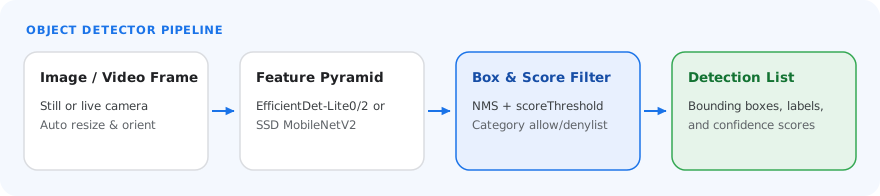
The Object Detector requires an object detection model to be downloaded and
stored in your project directory. If you don't already have a model, start with
the default, recommended model. The other models presented in this section make
trade-offs between latency and accuracy.
### EfficientDet-Lite0 model (recommended)
The EfficientDet-Lite0 model uses an EfficientNet-Lite0 backbone with a 320x320
input size and BiFPN feature network. The model was trained with the [COCO
dataset](https://cocodataset.org/), a large-scale object detection dataset that
contains 1.5 million object instances and 80 object labels. See the [full
list](https://storage.googleapis.com/mediapipe-tasks/object_detector/labelmap.txt)
of supported labels. EfficientDet-Lite0 is available as an int8, float16, or
float32 model. This model is recommended because it strikes a balance between latency
and accuracy. It is both accurate and lightweight enough for many use cases.
| Model name | Input shape | Quantization type | Versions |
|---|---|---|---|
| [EfficientDet-Lite0 (int8)](https://storage.googleapis.com/mediapipe-models/object_detector/efficientdet_lite0/int8/latest/efficientdet_lite0.tflite) | 320 x 320 | int8 | [Latest](https://storage.googleapis.com/mediapipe-models/object_detector/efficientdet_lite0/int8/latest/efficientdet_lite0.tflite) |
| [EfficientDet-Lite0 (float 16)](https://storage.googleapis.com/mediapipe-models/object_detector/efficientdet_lite0/float16/latest/efficientdet_lite0.tflite) | 320 x 320 | float 16 | [Latest](https://storage.googleapis.com/mediapipe-models/object_detector/efficientdet_lite0/float16/latest/efficientdet_lite0.tflite) |
| [EfficientDet-Lite0 (float 32)](https://storage.googleapis.com/mediapipe-models/object_detector/efficientdet_lite0/float32/latest/efficientdet_lite0.tflite) | 320 x 320 | None (float32) | [Latest](https://storage.googleapis.com/mediapipe-models/object_detector/efficientdet_lite0/float32/latest/efficientdet_lite0.tflite) |
### EfficientDet-Lite2 model
The EfficientDet-Lite2 model uses an EfficientNet-Lite2 backbone with a 448x448
input size and BiFPN feature network. The model was trained with the [COCO
dataset](https://cocodataset.org/), a large-scale object detection dataset that
contains 1.5 million object instances and 80 object labels. See the [full
list](https://storage.googleapis.com/mediapipe-tasks/object_detector/labelmap.txt)
of supported labels. EfficientDet-Lite2 is available as an int8, float16, or
float32 model. This model is generally more accurate than EfficientDet-Lite0,
but is also slower and more memory intensive. This model is appropriate for use
cases where accuracy is a higher priority than speed and size.
| Model name | Input shape | Quantization type | Versions |
|---|---|---|---|
| [EfficientDet-Lite2 (int8)](https://storage.googleapis.com/mediapipe-models/object_detector/efficientdet_lite2/int8/latest/efficientdet_lite2.tflite) | 448 x 448 | int8 | [Latest](https://storage.googleapis.com/mediapipe-models/object_detector/efficientdet_lite2/int8/latest/efficientdet_lite2.tflite) |
| [EfficientDet-Lite2 (float 16)](https://storage.googleapis.com/mediapipe-models/object_detector/efficientdet_lite2/float16/latest/efficientdet_lite2.tflite) | 448 x 448 | float 16 | [Latest](https://storage.googleapis.com/mediapipe-models/object_detector/efficientdet_lite2/float16/latest/efficientdet_lite2.tflite) |
| [EfficientDet-Lite2 (float 32)](https://storage.googleapis.com/mediapipe-models/object_detector/efficientdet_lite2/float32/latest/efficientdet_lite2.tflite) | 448 x 448 | None (float32) | [Latest](https://storage.googleapis.com/mediapipe-models/object_detector/efficientdet_lite2/float32/latest/efficientdet_lite2.tflite) |
### SSD MobileNetV2 model
The SSD MobileNetV2 model uses a MobileNetV2 backbone with a 256x256 input size
and SSD feature network. The model was trained with the [COCO
dataset](https://cocodataset.org/), a large-scale object detection dataset that
contains 1.5 million object instances and 80 object labels. See the [full
list](https://storage.googleapis.com/mediapipe-tasks/object_detector/labelmap.txt)
of supported labels. SSD MobileNetV2 is available as a float 16 and float 32
model. This model is faster and lighter than EfficientDet-Lite0, but is also
generally less accurate. This model is appropriate for use cases that require a
fast, lightweight model that sacrifices some accuracy.
| Model name | Input shape | Quantization type | Versions |
|---|---|---|---|
| [SSDMobileNet-V2 (float 16)](https://storage.googleapis.com/mediapipe-models/object_detector/ssd_mobilenet_v2/float16/latest/ssd_mobilenet_v2.tflite) | 256 x 256 | float 16 | [Latest](https://storage.googleapis.com/mediapipe-models/object_detector/ssd_mobilenet_v2/float16/latest/ssd_mobilenet_v2.tflite) |
| [SSDMobileNet-V2 (float 32)](https://storage.googleapis.com/mediapipe-models/object_detector/ssd_mobilenet_v2/float32/latest/ssd_mobilenet_v2.tflite) | 256 x 256 | None (float32) | [Latest](https://storage.googleapis.com/mediapipe-models/object_detector/ssd_mobilenet_v2/float32/latest/ssd_mobilenet_v2.tflite) |
### Model requirements and metadata
This section describes the requirements for custom models if you decide to build
a model to use with this task. Custom models must be in [LiteRT](https://developers.google.com/edge/litert)
format and must include
[metadata](https://developers.google.com/edge/litert/conversion/tensorflow/metadata_writer_tutorial.md.txt#object_detectors)
describing the operating parameters of the model.
#### Design requirements
| Input | Shape | Description |
|---|---|---|
| Input image | Float32 tensor of shape\[1, height, width, 3\] | The normalized input image. |
| Output | Shape | Description |
|---|---|---|
| `detection_boxes` | Float32 tensor of shape \[1, num_boxes, 4\] | Box location of each detected object. |
| `detection_classes` | Float32 tensor of shape \[1, num_boxes\] | Indexes of the class names for each detected object. |
| `detection_scores` | float32 tensor of shape \[1, num_boxes\] | Prediction scores for each detected object. |
| `num_boxes` | Float32 tensor of size 1 | The number of detected boxes. |
#### Metadata requirements
| Parameter | Description |
|---|---|
| `input_norm_mean` | The mean value used in the input tensor normalization. |
| `input_norm_std` | The standard deviation used in the input tensor normalization. |
| `label_file_paths` | The paths to the category tensor label files. If the model does not have any label files, pass an empty list. |
| `score_calibration_md` | Information on the score calibration operation in the classification tensor. This parameter is not required if the model does not use score calibration. |
## Task benchmarks
Here are the task benchmarks for the preceding pre-trained models. The latency
result is the average latency on Pixel 6 using CPU / GPU.
| Model name | Device | CPU latency | GPU latency |
|---|---|---|---|
| EfficientDet-Lite0 float32 model | Pixel 6 | 61.30ms | 27.83ms |
| EfficientDet-Lite0 float16 model | Pixel 6 | 53.97ms | 27.97ms |
| EfficientDet-Lite0 int8 model | Pixel 6 | 29.31ms | - |
| EfficientDet-Lite2 float32 model | Pixel 6 | 197.98ms | 41.15ms |
| EfficientDet-Lite2 float16 model | Pixel 6 | 198.77ms | 47.31ms |
| EfficientDet-Lite2 int8 model | Pixel 6 | 70.91ms | - |
| SSD MobileNetV2 float32 model | Pixel 6 | 36.30ms | 24.01ms |
| SSD MobileNetV2 float16 model | Pixel 6 | 37.35ms | 28.16ms |