The MediaPipe Interactive Segmenter task lets you divide an image into two regions: a selected
object and everything else. The task is stateful: You first set an image, and
then you can efficiently perform segmentation multiple times by providing
different strokes (points and brush mode) indicating a location in an image. The
task estimates the boundaries of an object at that location, and returns image
data defining the area of the object. You can use this task to interactively
select an object in an image and use the output to apply effects to the image,
such as color overlays highlighting the object or blurring the background around
it. This task operates on image data with a machine learning (ML) model.
[Open in Web Demos](https://google-ai-edge.github.io/mediapipe-samples-web/#/vision/interactive_segmenter)[Edit in StackBlitz](https://stackblitz.com/github/google-ai-edge/mediapipe-samples-web?file=src/tasks/interactive-segmenter.ts)
## Quickstart
Install the SDK for your platform, [prepare input data](https://developers.google.com/edge/mediapipe/solutions/prepare_data.md.txt#vision),
initialize the task with a model, and run inference.
> [!NOTE]
> **No `RunningMode` (`VIDEO` or `LIVE_STREAM`):** Interactive Segmenter operates on a single pinned still image---call `setImage()` once, then call `segment(strokes)` interactively as the user adds positive or negative brush strokes. It does not expose a `RunningMode` option. For continuous frame-by-frame video or live camera segmentation, use [Image Segmenter](https://developers.google.com/edge/mediapipe/solutions/vision/image_segmenter.md.txt).
### Web
npm`npm install @mediapipe/tasks-vision`[Web demo](https://google-ai-edge.github.io/mediapipe-samples-web/#/vision/interactive_segmenter)·[Edit in StackBlitz](https://stackblitz.com/github/google-ai-edge/mediapipe-samples-web?file=src/tasks/interactive-segmenter.ts)·[Setup guide](https://developers.google.com/edge/mediapipe/solutions/setup_web.md.txt)
```typescript
import { FilesetResolver, InteractiveSegmenter } from "@mediapipe/tasks-vision";
const MODEL_URL = "https://storage.googleapis.com/mediapipe-models/interactive_segmenter_v2/magic_touch/int8/latest/interactive_segmentation.task";
const vision = await FilesetResolver.forVisionTasks(
"https://cdn.jsdelivr.net/npm/@mediapipe/tasks-vision@latest/wasm"
);
const interactiveSegmenter = await InteractiveSegmenter.createFromOptions(vision, {
baseOptions: { modelAssetPath: MODEL_URL, delegate: "GPU" },
});
const image = document.getElementById("image") as HTMLImageElement;
interactiveSegmenter.setImage(image);
image.addEventListener("click", (event) => {
const mask = interactiveSegmenter.segment([
{
brushMode: 1, // 1 = POSITIVE, 2 = NEGATIVE
point: [{ x: event.offsetX / image.width, y: event.offsetY / image.height }],
isCompleted: true,
},
]);
const maskData = mask.getAsFloat32Array();
mask.close();
});
```
### Android (Kotlin)
Gradle`implementation("com.google.mediapipe:tasks-vision:latest.release")`[Sample code](https://github.com/google-ai-edge/mediapipe-samples/tree/main/examples/interactive_segmentation/android)·[Setup guide](https://developers.google.com/edge/mediapipe/solutions/setup_android.md.txt)
```kotlin
import com.google.mediapipe.framework.image.BitmapImageBuilder
import com.google.mediapipe.framework.image.ByteBufferExtractor
import com.google.mediapipe.framework.image.MPImage
import com.google.mediapipe.tasks.components.containers.NormalizedKeypoint
import com.google.mediapipe.tasks.core.BaseOptions
import com.google.mediapipe.tasks.vision.interactivesegmenter.InteractiveSegmenter
import com.google.mediapipe.tasks.vision.interactivesegmenter.InteractiveSegmenterOptions
import com.google.mediapipe.tasks.vision.interactivesegmenter.Stroke
val baseOptions = BaseOptions.builder()
.setModelAssetPath("interactive_segmentation.task")
.build()
val options = InteractiveSegmenterOptions.builder()
.setBaseOptions(baseOptions)
.build()
val interactiveSegmenter = InteractiveSegmenter.createFromOptions(context, options)
val mpImage = BitmapImageBuilder(bitmap).build()
interactiveSegmenter.setImage(mpImage)
val strokes = listOf(
Stroke.builder()
.setBrushMode(Stroke.BrushMode.POSITIVE)
.setPoints(listOf(NormalizedKeypoint.create(0.2f, 0.5f), NormalizedKeypoint.create(0.5f, 0.5f)))
.setCompleted(true)
.build()
)
val mask: MPImage = interactiveSegmenter.segment(strokes)
val maskBuffer = ByteBufferExtractor.extract(mask).asFloatBuffer()
mask.close()
```
### Android (Java)
Gradle`implementation 'com.google.mediapipe:tasks-vision:latest.release'`[Sample code](https://github.com/google-ai-edge/mediapipe-samples/tree/main/examples/interactive_segmentation/android)·[Setup guide](https://developers.google.com/edge/mediapipe/solutions/setup_android.md.txt)
```java
import com.google.mediapipe.framework.image.BitmapImageBuilder;
import com.google.mediapipe.framework.image.ByteBufferExtractor;
import com.google.mediapipe.framework.image.MPImage;
import java.nio.FloatBuffer;
import com.google.mediapipe.tasks.components.containers.NormalizedKeypoint;
import com.google.mediapipe.tasks.core.BaseOptions;
import com.google.mediapipe.tasks.vision.interactivesegmenter.InteractiveSegmenter;
import com.google.mediapipe.tasks.vision.interactivesegmenter.InteractiveSegmenterOptions;
import com.google.mediapipe.tasks.vision.interactivesegmenter.Stroke;
import java.util.Arrays;
import java.util.List;
BaseOptions baseOptions = BaseOptions.builder()
.setModelAssetPath("interactive_segmentation.task")
.build();
InteractiveSegmenterOptions options = InteractiveSegmenterOptions.builder()
.setBaseOptions(baseOptions)
.build();
InteractiveSegmenter interactiveSegmenter = InteractiveSegmenter.createFromOptions(context, options);
MPImage mpImage = new BitmapImageBuilder(bitmap).build();
interactiveSegmenter.setImage(mpImage);
List strokes = Arrays.asList(
Stroke.builder()
.setBrushMode(Stroke.BrushMode.POSITIVE)
.setPoints(Arrays.asList(NormalizedKeypoint.create(0.2f, 0.5f), NormalizedKeypoint.create(0.5f, 0.5f)))
.setCompleted(true)
.build()
);
MPImage mask = interactiveSegmenter.segment(strokes);
FloatBuffer maskBuffer = ByteBufferExtractor.extract(mask).asFloatBuffer();
mask.close();
```
### iOS
SwiftPM`https://github.com/google-ai-edge/mediapipe → MediaPipeTasksVision`[Package.swift](https://developers.google.com/edge/mediapipe/solutions/setup_ios.md.txt#package_swift)·[Sample code](https://github.com/google-ai-edge/mediapipe-samples/tree/main/examples/interactive_segmentation/ios)·[Setup guide](https://developers.google.com/edge/mediapipe/solutions/setup_ios.md.txt)
```swift
import CoreGraphics
import Foundation
import MediaPipeTasksVision
guard let modelPath = Bundle.main.path(forResource: "interactive_segmentation", ofType: "task") else { return }
let options = InteractiveSegmenterOptions()
options.baseOptions.modelAssetPath = modelPath
let interactiveSegmenter = try InteractiveSegmenter(options: options)
let mpImage = try MPImage(uiImage: image)
try interactiveSegmenter.set(image: mpImage)
let strokes = [
Stroke(
points: [NormalizedKeypoint(location: CGPoint(x: 0.5, y: 0.5), label: nil, score: 0.0)],
brushMode: .positive,
isCompleted: true
)
]
let mask = try interactiveSegmenter.segment(strokes: strokes)
```
### Python
pip`pip install mediapipe`[Sample code](https://colab.research.google.com/github/google-ai-edge/mediapipe-samples/blob/main/examples/interactive_segmentation/python/interactive_segmenter.ipynb)·[Setup guide](https://developers.google.com/edge/mediapipe/solutions/setup_python.md.txt)
```python
import mediapipe as mp
BaseOptions = mp.tasks.BaseOptions
InteractiveSegmenter = mp.tasks.vision.InteractiveSegmenter
InteractiveSegmenterOptions = mp.tasks.vision.InteractiveSegmenterOptions
BrushMode = mp.tasks.vision.InteractiveSegmenterBrushMode
Stroke = mp.tasks.vision.InteractiveSegmenterStroke
StrokePoint = mp.tasks.vision.InteractiveSegmenterStrokePoint
options = InteractiveSegmenterOptions(
base_options=BaseOptions(model_asset_path="interactive_segmentation.task")
)
with InteractiveSegmenter.create_from_options(options) as segmenter:
mp_image = mp.Image.create_from_file("input.jpg")
segmenter.set_image(mp_image)
strokes = [
Stroke(brush_mode=BrushMode.POSITIVE, points=[StrokePoint(x=0.5, y=0.5)], is_completed=True)
]
segmented_mask = segmenter.segment(strokes)
```
### Flutter
pub`flutter pub add mediapipe_vision`[Live gallery](https://google.github.io/flutter-mediapipe/)·[Sample code](https://github.com/google/flutter-mediapipe/tree/main/samples/vision/interactive_segmenter)·[Setup guide](https://developers.google.com/edge/mediapipe/solutions/setup_flutter.md.txt)
```dart
import 'package:mediapipe_vision/mediapipe_vision.dart';
Future selectObject(VisionImage image) async {
final segmenter = await InteractiveSegmenter.create(
InteractiveSegmenterOptions(model: VisionModels.interactiveSegmenter),
);
try {
await segmenter.setImage(image);
return await segmenter.segment([
Stroke(
brushMode: BrushMode.positive,
points: [
const NormalizedKeypoint(x: 0.45, y: 0.5),
const NormalizedKeypoint(x: 0.55, y: 0.5),
],
),
]);
} finally {
await segmenter.dispose();
}
}
```
## Task details
This section describes the capabilities, inputs, outputs, and configuration
options of this task.
### Features
- **Input image processing** - Processing includes image rotation, resizing, normalization, and color space conversion.
Inputs
- Strokes (points and brush mode) indicating an area of interest in an image
- Image file to be processed
See [Prepare vision input data](https://developers.google.com/edge/mediapipe/solutions/prepare_data.md.txt#vision) for `MPImage`, `mp.Image`, `VisionImage`, and browser media examples.
Outputs The Interactive Segmenter outputs a segmented mask with pixel values in float32 format. Each pixel value indicates the level of confidence that it is part of the object located at the area of interest.
### Configuration options
### Web
| Option Name | Description | Value Range | Default Value |
|---|---|---|---|
| `baseOptions.modelAssetPath` | Path or URL to the interactive segmentation model bundle (`.task`). | `String` | Required |
| `baseOptions.delegate` | Hardware acceleration delegate used to execute the model. | {`CPU`, `GPU`} | `CPU` |
### Android
| Option Name | Description | Value Range | Default Value |
|---|---|---|---|
| `baseOptions.modelAssetPath` | Path or URL to the interactive segmentation model bundle (`.task`). | `String` | Required |
| `baseOptions.delegate` | Hardware acceleration delegate used to execute the model. | {`CPU`, `GPU`} | `CPU` |
### iOS
| Option Name | Description | Value Range | Default Value |
|---|---|---|---|
| `baseOptions.modelAssetPath` | Path or URL to the interactive segmentation model bundle (`.task`). | `String` | Required |
| `baseOptions.delegate` | Hardware acceleration delegate used to execute the model. | {`CPU`, `GPU`} | `CPU` |
### Python
| Option Name | Description | Value Range | Default Value |
|---|---|---|---|
| `base_options.model_asset_path` | Path or URL to the interactive segmentation model bundle (`.task`). | `String` | Required |
| `base_options.delegate` | Hardware acceleration delegate used to execute the model. | {`CPU`, `GPU`} | `CPU` |
### Flutter
| Option Name | Description | Value Range | Default Value |
|---|---|---|---|
| `model` | Google's pinned interactive segmentation model bundle (`VisionModels.interactiveSegmenter`), bundled with the app at build time. Supply exactly one of `model`, `modelPath`, and `modelBytes`. | `DownloadAsset` | Not set |
| `modelPath` | Path to an interactive segmentation model bundle (`.task`) on native platforms, or its URL in browsers. | `String` | Not set |
| `modelBytes` | The interactive segmentation model bundle (`.task`) in memory, for example from a Flutter asset. | `Uint8List` | Not set |
| `delegate` | Hardware acceleration delegate used to execute the model. | {`Delegate.cpu`, `Delegate.gpu`} | `Delegate.cpu` |
### Task output
Each `segment(strokes)` call returns a pixel-aligned float32 foreground confidence mask (`MPMask` on Web, `MPImage` on Android/iOS, or `mp.Image` in Python) for the object selected by the cumulative positive and negative `Stroke` inputs:
| Field | Type / Range | Description |
|---|---|---|
| `width` | `int` (pixels) | Width of the output mask in pixels, matching the input image passed to `setImage`. |
| `height` | `int` (pixels) | Height of the output mask in pixels, matching the input image passed to `setImage`. |
| `data` | `Float32Array` (`[0.0, 1.0]`) | Row-major single-channel buffer of `width × height` float32 foreground probabilities (`mask.getAsFloat32Array()` on Web, `ByteBufferExtractor.extract(mask).asFloatBuffer()` on Android, or `mask.numpy_view()` in Python; in Dart, `segment` returns a `ConfidenceMask` whose `confidence` `Float32List` is indexed `y * width + x`). |
#### Example `InteractiveSegmenter` mask payload
The following example shows the foreground confidence mask returned by `segment(strokes)`:
```javascript
{
width: 640,
height: 480,
data: Float32Array(307200) [0.003, 0.004, 0.964, 0.981 /* ... foreground probability in [0.0, 1.0] per pixel */]
}
```
## Models
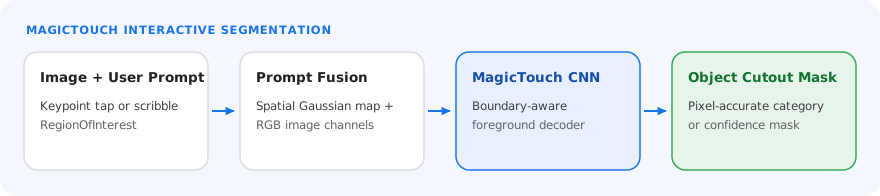
The Interactive Segmenter can be used with more than one ML model. Start with the
default, recommended model for your target platform when you start developing
with this task. The other available models typically make trade-offs between
performance, accuracy, resolution, and resource requirements, and in some cases,
include additional features.
### MagicTouch model (recommended)
This model identifies segments given image coordinates for an area of interest.
The model uses a Convolutional Neural Network, similar to a
[MobileNetV3](https://www.kaggle.com/models?query=mobilenet-v3) architecture,
with a customized decoder.
| Model name | Input shape | Quantization type | Model Card | Versions |
|---|---|---|---|---|
| [MagicTouch](https://storage.googleapis.com/mediapipe-models/interactive_segmenter_v2/magic_touch/int8/latest/interactive_segmentation.task) | 768 x 768 x 3 | int8 | [info](https://storage.googleapis.com/mediapipe-assets/Model%20Card%20MagicTouch.pdf) | [Latest](https://storage.googleapis.com/mediapipe-models/interactive_segmenter_v2/magic_touch/int8/latest/interactive_segmentation.task) |
## Task benchmarks
Here are the task benchmarks for the whole pipeline based on the preceding
pre-trained models. The latency result is the average latency on Pixel 10 using
CPU / GPU.
| Model name | Device | CPU latency | GPU latency |
|---|---|---|---|
| MagicTouch | Pixel 10 | 208.2ms | 580.6ms |